
Skip to content
  • Categories
  • Recent
  • Tags
  • Popular
  • Unsolved
Collapse
Discussion Forum to share and further the development of home control and automation, independent of platforms.
  1. Home
  2. Software
  3. Multi-System Reactor
  4. [Reactor] Variables not updating correctly in latest-25201-2aa18550
How to upgrade from an old version of MSR?
cw-kidC
Hello I haven't updated my installation of MSR in a very long time. Its a bare metal Linux install currently on version 24366-3de60836 I see the latest version is now latest-26011-c621bbc7 I assume I cannot just jump from a very old version to the latest version? Or can I? Thanks
Multi-System Reactor
Access control - allowing anonymous user to dashboard
tunnusT
Using build 25328 and having the following users.yaml configuration: users: # This section defines your valid users. admin: ******* groups: # This section defines your user groups. Optionally, it defines application # and API access restrictions (ACLs) for the group. Users may belong to # more than one group. Again, no required or special groups here. admin_group: users: - admin applications: true # special form allows access to ALL applications guests: users: "*" applications: - dashboard api_acls: # This ACL allows users in the "admin" group to access the API - url: "/api" group: admin_group allow: true log: true # This ACL allows anyone/thing to access the /api/v1/alive API endpoint - url: "/api/v1/alive" allow: true session: timeout: 7200 # (seconds) rolling: true # activity extends timeout when true # If log_acls is true, the selected ACL for every API access is logged. log_acls: true # If debug_acls is true, even more information about ACL selection is logged. debug_acls: true My goal is to allow anonymous user to dashboard, but MSR is still asking for a password when trying to access that. Nothing in the logs related to dashboard access. Probably an error in the configuration, but help needed to find that. Tried to put url: "/dashboard" under api_acls, but that was a long shot and didn't work.
Multi-System Reactor
VEC Virtual Switch Auto Off
S
I use Virtual Entity Controller virtual switches which I turn on via webhooks from other applications. Once a switch triggers and turns on, I can then activate associated rules. I would like each virtual switch to automatically turn off after a configurable time (e.g., 5 seconds, 10 seconds). Is there a better way to achieve this auto-off behavior instead of creating a separate rule for each switch that uses the 'Condition must be sustained for' option to turn it off? With a large number of these switches (and the associated turn-off rules), I'm checking to see if there is a simpler approach.If not, could this be a feature request to add an auto-off timer directly to the virtual switches. Thanks Reactor (Multi-hub) latest-26011-c621bbc7 VirtualEntityController v25356 Synology Docker
Multi-System Reactor
Upcoming Storage Change -- Got Back-ups?
toggledbitsT
TL;DR: Format of data in storage directory will soon change. Make sure you are backing up the contents of that directory in its entirety, and you preserve your backups for an extended period, particularly the backup you take right before upgrading to the build containing this change (date of that is still to be determined, but soon). The old data format will remain readable (so you'll be able to read your pre-change backups) for the foreseeable future. In support of a number of other changes in the works, I have found it necessary to change the storage format for Reactor objects in storage at the physical level. Until now, plain, standard JSON has been used to store the data (everything under the storage directory). This has served well, but has a few limitations, including no real support for native JavaScript objects like Date, Map, Set, and others. It also is unable to store data that contains "loops" — objects that reference themselves in some way. I'm not sure exactly when, but in the not-too-distant future I will publish a build using the new data format. It will automatically convert existing JSON data to the new format. For the moment, it will save data in both the new format and the old JSON format, preferring the former when loading data from storage. I have been running my own home with this new format for several months, and have no issues with data loss or corruption. A few other things to know: If you are not already backing up your storage directory, you should be. At a minimum, back this directory up every time you make big changes to your Rules, Reactions, etc. Your existing JSON-format backups will continue to be readable for the long-term (years). The code that loads data from these files looks for the new file format first (which will have a .dval suffix), and if not found, will happily read (and convert) a same-basenamed .json file (i.e. it looks for ruleid.dval first, and if it doesn't find it, it tries to load ruleid.json). I'll publish detailed instructions for restoring from old backups when the build is posted (it's easy). The new .dval files are not directly human-readable or editable as easily as the old .json files. A new utility will be provided in the tools directory to convert .dval data to .json format, which you can then read or edit if you find that necessary. However, that may not work for all future data, as my intent is to make more native JavaScript objects directly storable, and many of those objects cannot be stored in JSON. You may need to modify your backup tools/scripts to pick up the new files: if you explicitly name .json files (rather than just specifying the entire storage directory) in your backup configuration, you will need to add .dval files to get a complete, accurate backup. I don't think this will be an issue for any of you; I imagine that you're all just backing up the entire contents of storage regardless of format/name, that is the safest (and IMO most correct) way to go (if that's not what you're doing, consider changing your approach). The current code stores the data in both the .dval form and the .json form to hedge against any real-world problems I don't encounter in my own use. Some future build will drop this redundancy (i.e. save only to .dval form). However, the read code for the .json form will remain in any case. This applies only to persistent storage that Reactor creates and controls under the storage tree. All other JSON data files (e.g. device data for Controllers) are unaffected by this change and will remain in that form. YAML files are also unaffected by this change. This thread is open for any questions or concerns.
Multi-System Reactor
Oddness in Copy/Move of Reactions
G
Topic thumbnail image
Multi-System Reactor
[Solved] function isRuleEnabled() issue
CrilleC
Topic thumbnail image
Multi-System Reactor
[Reactor] Problem with Global Reactions and groups
therealdbT
Topic thumbnail image
Multi-System Reactor
Possible feature request 2?
CatmanV2C
Just another thought. Adding devices from my Home Assistant / Zigbee2MQTT integration. Works perfectly but they always add as their IEEE address. Some of these devices have up to 10 entities associated, and the moment they are renamed to something sensible, each of those entities 'ceases to exist' in MSR. I like things tidy, and deleting each defunct entity needs 3 clicks. Any chance of a 'bulk delete' option? No biggy as I've pretty much finished my Z-wave migration and I don't expect to be adding more than 2 new Zigbee devices Cheers C
Multi-System Reactor
Reactor (Multi-System/Multi-Hub) Announcements
toggledbitsT
Build 21228 has been released. Docker images available from DockerHub as usual, and bare-metal packages here. Home Assistant up to version 2021.8.6 supported; the online version of the manual will now state the current supported versions; Fix an error in OWMWeatherController that could cause it to stop updating; Unify the approach to entity filtering on all hub interface classes (controllers); this works for device entities only; it may be extended to other entities later; Improve error detail in messages for EzloController during auth phase; Add isRuleSet() and isRuleEnabled() functions to expressions extensions; Implement set action for lock and passage capabilities (makes them more easily scriptable in some cases); Fix a place in the UI where 24-hour time was not being displayed.
Multi-System Reactor
Copying a global reaction
tunnusT
With build 25328, if you copy a global reaction, a new reaction does not appear in the UI unless you do a refresh. I recall this used to work without needing this page refresh? Anyway, only a minor nuisance.
Multi-System Reactor
[Reactor] Bug when sending MQTT boolean payloads
therealdbT
Topic thumbnail image
Multi-System Reactor
Difficulty defining repeating annual period
R
I have tried numerous ways to define a recurring annual period, for example from December 15 to January 15. No matter which method I try - after and before, between, after and/not after, Reactor reports "waiting for invalid date, invalid date. Some constructs also seem to cause Reactor to hang, timeout and restart. For example "before January 15 is evaluated as true, but reports "waiting for invalid date, invalid date". Does anyone have a tried and true method to define a recurring annual period? I think the "between" that I used successfully in the past may have broken with one of the updates.
Multi-System Reactor
Need help with sequence
T
Good evening all, For about the past week or so, I've been having problems with a specific rule in my home automation that controls when my home goes from an Away mode to Home mode. One of the conditions it checked for was my alarm panel, when it changed from Armed Away to Disarmed. There seems to have been a firmware update on the panel that added an intermittent step of "pending", and I can't say for certain it happens 100% of the time. Is there a way to write a condition that so it changes from one condition, to the next, and then another condition? As in, Home alarm changes from armed_away to pending to disarmed. Thanks.
Multi-System Reactor
Possible feature request?
CatmanV2C
No idea how easy this would be. During my migration away from Z-wave I've been replacing the Z-wave devices with Sonoff which has broken some of my automations. Any chance of a 'Test Reaction' function to call out which ones are broken because an entity no longer exists? Without actually running the reaction? Or does this exist already and I'm just not aware of how to do it? Obviously I can see entities that are no longer available, but not quite what I'm looking for. I guess it's something of an edge case so no huge issue. TIA! C
Multi-System Reactor
Logic Assistance: Exterior Lights on when Illuminance Below Threshold
PablaP
Topic thumbnail image
Multi-System Reactor
Time series documentation
tunnusT
Is the current manual (incl. examples) up to date with how retention value is handled in time series configuration? Referring to this post
Multi-System Reactor
MQTT templates for ZIgbee scene controller, or a better way?
CatmanV2C
Topic thumbnail image
Multi-System Reactor
Reset a delay
CatmanV2C
I'm sure this has been asked, and answered, but damned if I can figure it out Use case: I have a rear garden with lights. A door from the kitchen into the garden and a door from the garage. Currently if I open the kitchen door the lights come on (yay) and a 3 minute delay starts. After 3 minutes, no matter what else happens, the lights go off (Boo! But also yay!) What I would like is for the 3 minute delay until the lights go off to start from the latest door open event. That is, if I'm going from kitchen to garage, and back again, the lights stay on until there's three minutes of no activity. I've tried 'hacking' with a virtual switch, but can't seem to stop the delay. Any pointers? TIA C
Multi-System Reactor
Reactor Loading Screen Safari
S
Topic thumbnail image
Multi-System Reactor
Constraints states visually do not match actual
S
Topic thumbnail image
Multi-System Reactor

[Reactor] Variables not updating correctly in latest-25201-2aa18550
Scheduled Pinned Locked Moved Multi-System Reactor
95 Posts 7 Posters 15.7k Views 7 Watching
  • Oldest to Newest
  • Newest to Oldest
  • Most Votes
Reply
  • Reply as topic
Log in to reply
This topic has been deleted. Only users with topic management privileges can see it.
  • toggledbitsT Offline
    toggledbitsT Offline
    toggledbits
    wrote on last edited by toggledbits
    #24

    It's probably moot at this point... I've just spent the last two weeks completely revamping the evaluation of Rule-based variables, to make them perform more like global variables, respect dependencies between them better, etc. The last week has just been a deep dive through the logs watching the performance of my own house on the updated approach.

    I'll shortly be releasing a blind build with these changes, just for you (@tunnus) and @therealdb to try. I expect this to be disruptive, because any approaches in the logic that rely on specific behaviors and side-effects of the old approach will now work differently, maybe fail, and adapting to the new approach will be necessary. But, I think the new approach will produce a result that is much more in keeping with how you would expect it to work. So, sit tight... I'll be ready to build later today or early tomorrow.

    Author of Multi-system Reactor and Reactor, DelayLight, Switchboard, and about a dozen other plugins that run on Vera and openLuup.

    toggledbitsT 1 Reply Last reply
    0
    • toggledbitsT toggledbits

      It's probably moot at this point... I've just spent the last two weeks completely revamping the evaluation of Rule-based variables, to make them perform more like global variables, respect dependencies between them better, etc. The last week has just been a deep dive through the logs watching the performance of my own house on the updated approach.

      I'll shortly be releasing a blind build with these changes, just for you (@tunnus) and @therealdb to try. I expect this to be disruptive, because any approaches in the logic that rely on specific behaviors and side-effects of the old approach will now work differently, maybe fail, and adapting to the new approach will be necessary. But, I think the new approach will produce a result that is much more in keeping with how you would expect it to work. So, sit tight... I'll be ready to build later today or early tomorrow.

      toggledbitsT Offline
      toggledbitsT Offline
      toggledbits
      wrote on last edited by toggledbits
      #25

      OK. Interim build latest-25248 for 64-bit docker systems only is up for testing/trials.

      NOTE TO ALL USERS NOT CONTRIBUTING TO THIS THREAD — this is not an official build and you are advised not to upgrade to it just yet. This build is specifically for participants in this thread as we work to improve the behavior of Rule-based variables. Wait for a build advertised in the official announcement thread before upgrading your system.

      Behavior of Rule-based variables now:

      • Will still be re-evaluated when the Rule is started, and any time the Rule is subject to trigger condition check (i.e. behavior not changed);
      • When the trigger condition check occurs, Rule-based variables are always evaluated/updated before trigger conditions (i.e. also same as before);
      • Rule-based variables may be modified by Set Variable action and assignment statements in Script Actions in Rule Reactions (unreliable before);
      • If a Rule-based variable references another Rule-based variable, and the latter changes, the former will be re-evaluated (now same as Global Variables).
      • The order of Rule-based variables doesn't matter, it's just for your convenience. Dependencies between variables are established at startup, and evaluation takes place in dependency tree order, not the order shown in the UI (now same as Global Variables).

      If you run into an issue you can't resolve, here's what I ask:

      1. Make sure your expectations are aligned with the changes above; make sure you are not relying on any prior behavior or side-effect of the prior behavior.

      2. Enable logging for the rule in question. Put a snippet like below in your logging.yaml file (replace the part after # with your rule ID):

         "Rule#rule-l3hj06aa":
           level: 5
           streams:
           - type: file  # filename is derived from rule ID
             keep: 2
             level: 999
             recycle: true
        
      3. Restart Reactor and get the rule in question to demonstrate whatever the issue is. Make sure to then capture the log file called Logger#Rule#XXX.log... I will be asking for it.

      4. Report the issue here on this thread, with all of the usual attention to posting requirements: good, detailed description; expectations of behavior; clear description of what's not meeting expectations; etc.

      5. I will PM you a URL where you can upload the log file and your rule JSON file (from storage/rules) if necessary.

      The locally-installed version of the documentation is also updated.

      Author of Multi-system Reactor and Reactor, DelayLight, Switchboard, and about a dozen other plugins that run on Vera and openLuup.

      G 1 Reply Last reply
      0
      • toggledbitsT toggledbits

        OK. Interim build latest-25248 for 64-bit docker systems only is up for testing/trials.

        NOTE TO ALL USERS NOT CONTRIBUTING TO THIS THREAD — this is not an official build and you are advised not to upgrade to it just yet. This build is specifically for participants in this thread as we work to improve the behavior of Rule-based variables. Wait for a build advertised in the official announcement thread before upgrading your system.

        Behavior of Rule-based variables now:

        • Will still be re-evaluated when the Rule is started, and any time the Rule is subject to trigger condition check (i.e. behavior not changed);
        • When the trigger condition check occurs, Rule-based variables are always evaluated/updated before trigger conditions (i.e. also same as before);
        • Rule-based variables may be modified by Set Variable action and assignment statements in Script Actions in Rule Reactions (unreliable before);
        • If a Rule-based variable references another Rule-based variable, and the latter changes, the former will be re-evaluated (now same as Global Variables).
        • The order of Rule-based variables doesn't matter, it's just for your convenience. Dependencies between variables are established at startup, and evaluation takes place in dependency tree order, not the order shown in the UI (now same as Global Variables).

        If you run into an issue you can't resolve, here's what I ask:

        1. Make sure your expectations are aligned with the changes above; make sure you are not relying on any prior behavior or side-effect of the prior behavior.

        2. Enable logging for the rule in question. Put a snippet like below in your logging.yaml file (replace the part after # with your rule ID):

           "Rule#rule-l3hj06aa":
             level: 5
             streams:
             - type: file  # filename is derived from rule ID
               keep: 2
               level: 999
               recycle: true
          
        3. Restart Reactor and get the rule in question to demonstrate whatever the issue is. Make sure to then capture the log file called Logger#Rule#XXX.log... I will be asking for it.

        4. Report the issue here on this thread, with all of the usual attention to posting requirements: good, detailed description; expectations of behavior; clear description of what's not meeting expectations; etc.

        5. I will PM you a URL where you can upload the log file and your rule JSON file (from storage/rules) if necessary.

        The locally-installed version of the documentation is also updated.

        G Offline
        G Offline
        gwp1
        wrote on last edited by gwp1
        #26

        @toggledbits whoops... guess this is one time having the system auto-update containers with new images is bad....

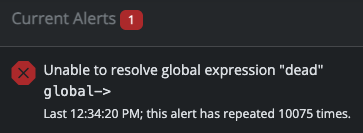
        So I'm on the test version. Found this:
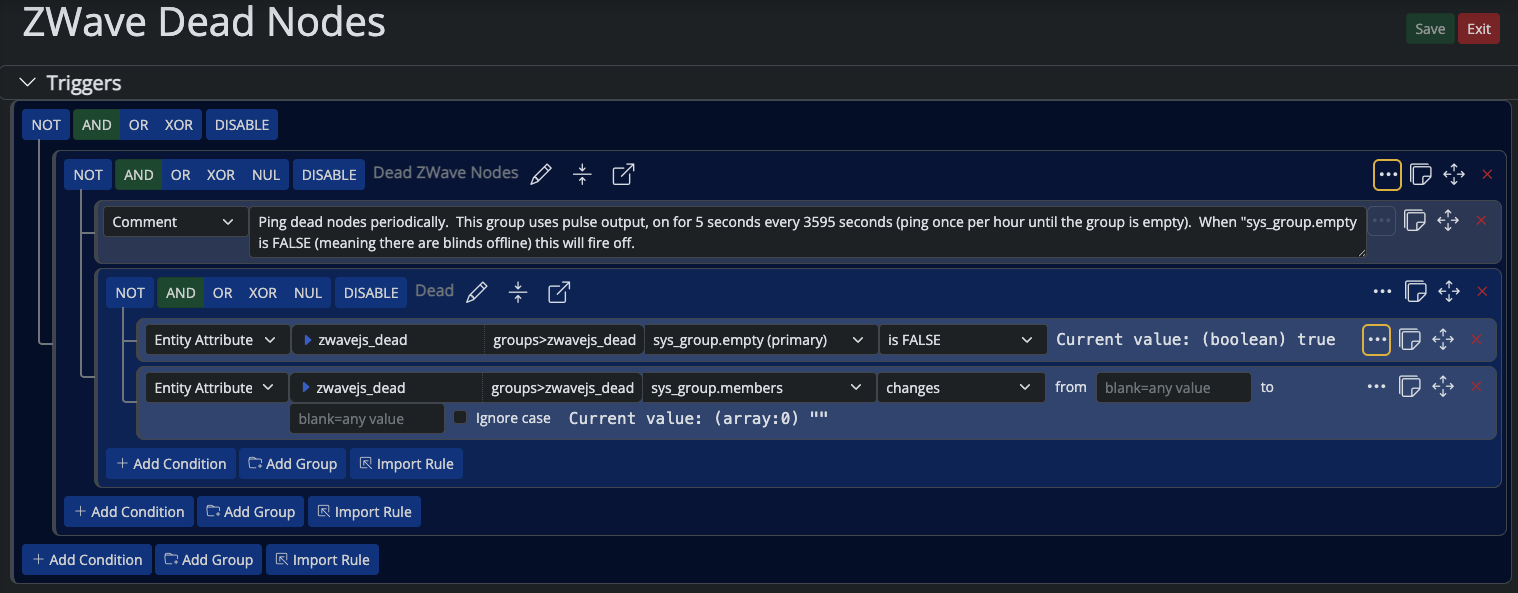
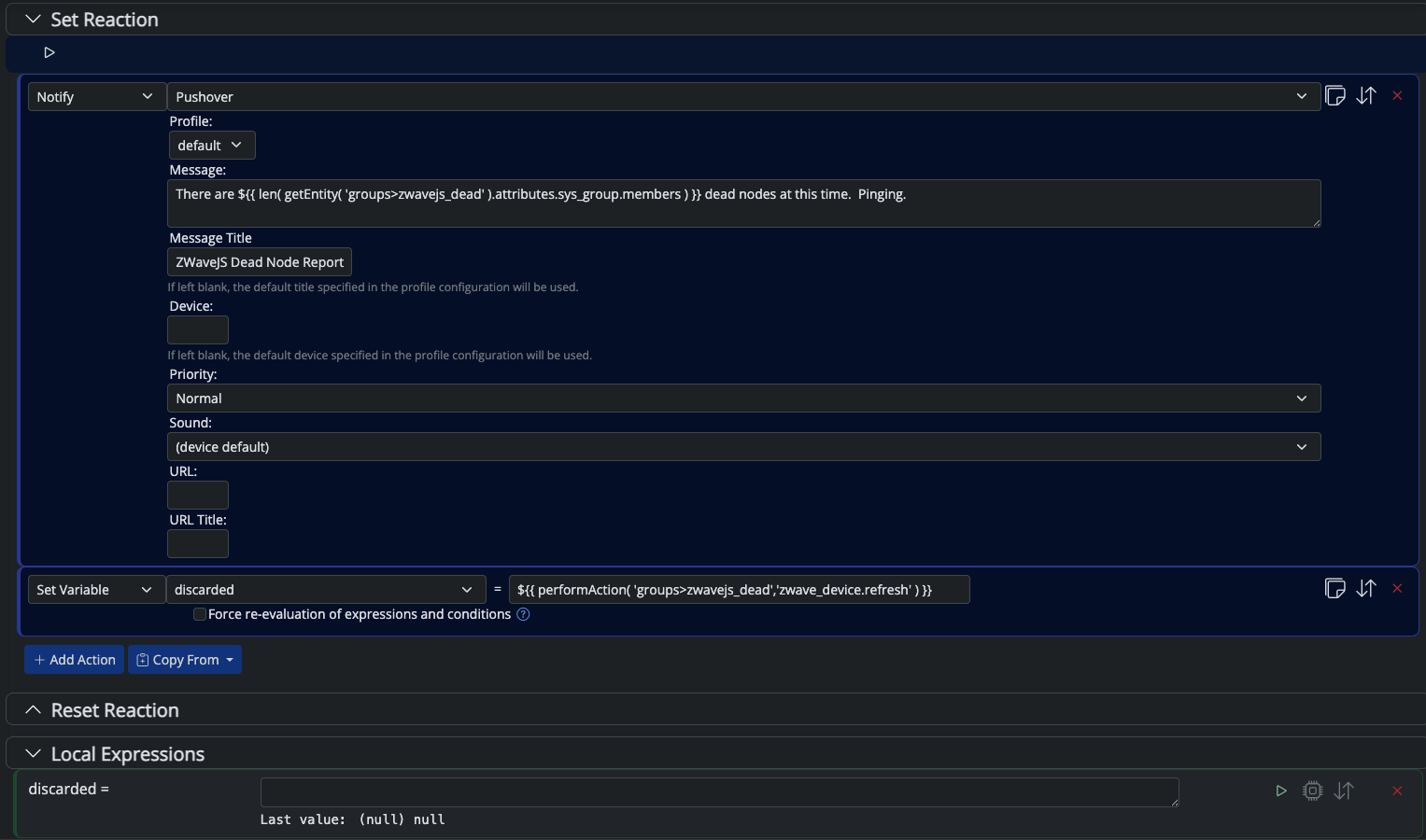
        cc690a62-1fe5-49f5-8586-636b6c8316ce-image.png

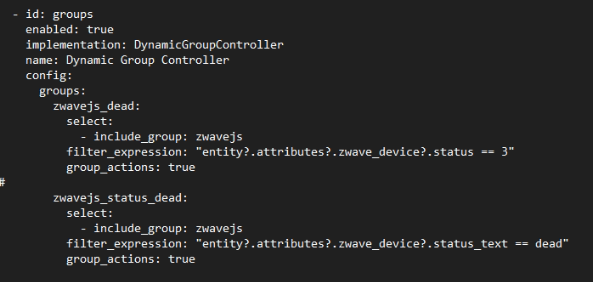
        This is a Dynamic Group I'd created forever ago:
        df0d4e38-393d-4864-adf4-dbef6e53897e-image.png

        My ruleset:
        23a5760e-ff12-45c2-b30e-11a08a13138b-image.png bc3bb93c-572b-4d5c-a718-fcbde56d7abb-image.png

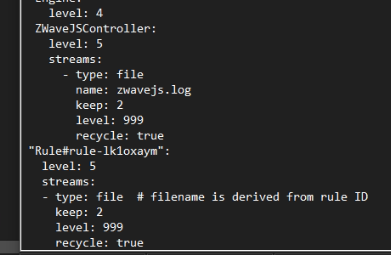
        I added the snippet as noted into my logging.yaml file:

        bb33c4d6-94b5-45a7-bd0e-cf91caaf9b4d-image.png

        When it didn't work I checked my yaml and found a spacing issue. That's been corrected, I now have a proper logger* log. Will upload to our pre-x Dropbox in folder 25248 logs along with the rule JSON file.

        *Hubitat C-7 2.4.3.177
        *Proxmox VE v8, Beelink MiniPC 12GBs, SSD

        *HAOS
        Core 2026.1.1
        w/ HA Connect ZWA-2
        FW: v1.1
        SDK: v7.23.1

        *Prod MSR in docker/portainer
        MSR: latest-26011-c621bbc7
        MQTTController: 25139
        ZWave Controller: 25139

        1 Reply Last reply
        0
        • toggledbitsT Offline
          toggledbitsT Offline
          toggledbits
          wrote on last edited by toggledbits
          #27

          Is there a global variable called dead (it's not shown above)?

          Or are you looking for the word dead in status_text? Because if it's that, your expression is incorrectly formed.

          Author of Multi-system Reactor and Reactor, DelayLight, Switchboard, and about a dozen other plugins that run on Vera and openLuup.

          G 1 Reply Last reply
          0
          • toggledbitsT toggledbits

            Is there a global variable called dead (it's not shown above)?

            Or are you looking for the word dead in status_text? Because if it's that, your expression is incorrectly formed.

            G Offline
            G Offline
            gwp1
            wrote on last edited by
            #28

            @toggledbits kicker is: this has been working for a long while. Dead iblind nodes (far too common, btw) get caught and pinged and I get the alerts on my phone.

            I don't see a Global Expression called dead and, yes, I believe when I wrote this I was looking for either a status of 3 or status_text of dead.

            *Hubitat C-7 2.4.3.177
            *Proxmox VE v8, Beelink MiniPC 12GBs, SSD

            *HAOS
            Core 2026.1.1
            w/ HA Connect ZWA-2
            FW: v1.1
            SDK: v7.23.1

            *Prod MSR in docker/portainer
            MSR: latest-26011-c621bbc7
            MQTTController: 25139
            ZWave Controller: 25139

            1 Reply Last reply
            0
            • toggledbitsT Offline
              toggledbitsT Offline
              toggledbits
              wrote on last edited by toggledbits
              #29

              OK. Yes, the new build also has some new error reporting. That message was probably being logged, but since you weren't looking at the logs, you didn't see it.

              You can also combine those into one status test, which will be a good bit more efficient:

              - id: groups
                enabled: true
                implementation: DynamicGroupController
                name: Dynamic Group Controller
                config:
                  groups:
                    zwavejs_dead:
                      select:
                        - include_group: zwavejs
                      filter_expression: <
                        entity?.attributes?.zwave_device?.status === 3 ||
                        entity?.attributes?.zwave_device?.status_text === "dead"
              

              Also, please... Please... PLEASE do not screen shot pure text. Use the fenced code block formatting here for text like expressions, configs, logs, etc. It may be expeditious for you to just paste the screen shot, but when I try to give you suggestions or corrections like the above, I have to retype the entire block (I can't copy-paste the text and update it). That not only takes a bunch of time, but also introduces the possibility that I will make a typo in the part we don't care about and leave you with a non-working example we then need to fix in yet another series of post replies.

              Don't forget to remove the Rule logging when it isn't needed.

              Author of Multi-system Reactor and Reactor, DelayLight, Switchboard, and about a dozen other plugins that run on Vera and openLuup.

              G 1 Reply Last reply
              0
              • toggledbitsT toggledbits

                OK. Yes, the new build also has some new error reporting. That message was probably being logged, but since you weren't looking at the logs, you didn't see it.

                You can also combine those into one status test, which will be a good bit more efficient:

                - id: groups
                  enabled: true
                  implementation: DynamicGroupController
                  name: Dynamic Group Controller
                  config:
                    groups:
                      zwavejs_dead:
                        select:
                          - include_group: zwavejs
                        filter_expression: <
                          entity?.attributes?.zwave_device?.status === 3 ||
                          entity?.attributes?.zwave_device?.status_text === "dead"
                

                Also, please... Please... PLEASE do not screen shot pure text. Use the fenced code block formatting here for text like expressions, configs, logs, etc. It may be expeditious for you to just paste the screen shot, but when I try to give you suggestions or corrections like the above, I have to retype the entire block (I can't copy-paste the text and update it). That not only takes a bunch of time, but also introduces the possibility that I will make a typo in the part we don't care about and leave you with a non-working example we then need to fix in yet another series of post replies.

                Don't forget to remove the Rule logging when it isn't needed.

                G Offline
                G Offline
                gwp1
                wrote on last edited by
                #30

                @toggledbits now I'm feeling hypocritical as I'm the guy at work chastising the Support folks for giving me screenshots for the exact reasons you noted.

                😶

                Change deployed.

                Got this upon restart of MSR:

                    at _ClientAPI._commandTimeout (http://192.168.1.100:8111/client/ClientAPI.js:594:125)
                

                Cleared it and refreshed the tab and all seems fine. Removing logging snippet.

                Thank you, sir!

                *Hubitat C-7 2.4.3.177
                *Proxmox VE v8, Beelink MiniPC 12GBs, SSD

                *HAOS
                Core 2026.1.1
                w/ HA Connect ZWA-2
                FW: v1.1
                SDK: v7.23.1

                *Prod MSR in docker/portainer
                MSR: latest-26011-c621bbc7
                MQTTController: 25139
                ZWave Controller: 25139

                1 Reply Last reply
                1
                • therealdbT Offline
                  therealdbT Offline
                  therealdb
                  wrote on last edited by
                  #31

                  @toggledbits I've updated my main system. I'll observe and report back. Thanks

                  --
                  On a mission to automate everything.

                  My MS Reactor contrib
                  My Luup Plug-ins

                  1 Reply Last reply
                  0
                  • therealdbT Offline
                    therealdbT Offline
                    therealdb
                    wrote on last edited by
                    #32

                    Ok, I got a bunch of errors at restart because of failed references in almost all variables - now it seems to be OK and variables are updated. I'm observing a couple of rules I haven't migrate yet - and, at this point, I'll not migrate - where I used to old trick that @gwp1 surfaced (and that I used without making it a rule). always seems to be OK.

                    --
                    On a mission to automate everything.

                    My MS Reactor contrib
                    My Luup Plug-ins

                    1 Reply Last reply
                    0
                    • therealdbT Offline
                      therealdbT Offline
                      therealdb
                      wrote on last edited by therealdb
                      #33

                      yep, it seems to be related (in general) to variables not being evaluated at startup. Here's a screenshot from a daily rule that it's setting a couple of things, including a virtual binary sensor for Christmas from a local variable:
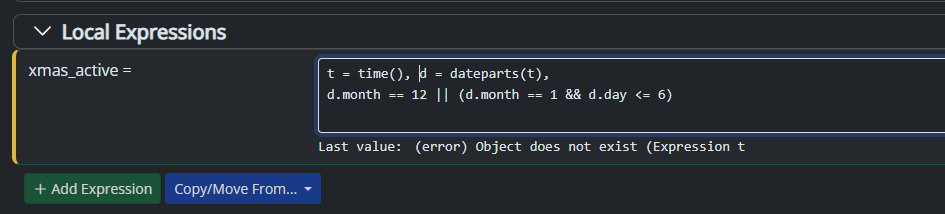
                      image.png After re-setting the rule, the expression got re-evaluated and the error went away. @toggledbits

                      EDIT. a similar one + logs

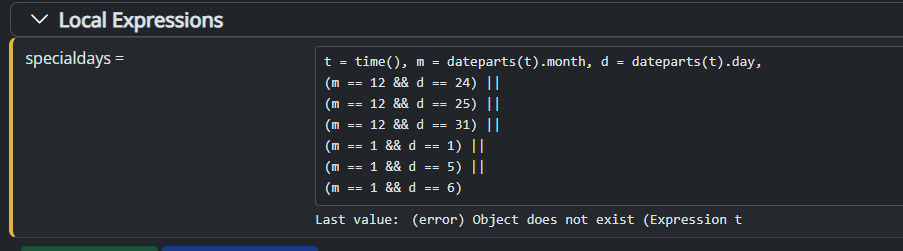
                      This one, instead, every time is evaluated gives the error.
                      e1f0057d-0f11-48c6-89a4-0760325798af-image.png

                      [latest-25248]2025-09-11T07:19:37.602Z <Rule:ERR> Lights-Christmas-Off (rule-kwv6wdpw in Lights-Outdoor): error evaluating expression specialdays: [Error] Object does not exist [-]
                      [latest-25248]2025-09-11T07:19:37.603Z <Rule:ERR> Full expression: t = time(), m = dateparts(t).month, d = dateparts(t).day,
                      (m == 12 && d == 24) ||
                      (m == 12 && d == 25) ||
                      (m == 12 && d == 31) ||
                      (m == 1 && d == 1) ||
                      (m == 1 && d == 5) ||
                      (m == 1 && d == 6)
                      [latest-25248]2025-09-11T07:19:37.604Z <Rule:CRIT> Error: Object does not exist [-]
                      Error: Object does not exist
                          at GlobalExpression.getInstance (/opt/reactor/server/lib/GlobalExpression.js:160:27)
                          at _0x1ec9e7._func.<computed> [as _ref] (/opt/reactor/server/lib/Rule.js:848:69)
                          at _resolve (/opt/reactor/common/lexp.js:1385:27)
                          at _run (/opt/reactor/common/lexp.js:1429:31)
                          at /opt/reactor/common/lexp.js:1697:33
                          at Array.forEach (<anonymous>)
                          at _run (/opt/reactor/common/lexp.js:1696:28)
                          at _run (/opt/reactor/common/lexp.js:1604:33)
                          at _run (/opt/reactor/common/lexp.js:1438:34)
                          at /opt/reactor/common/lexp.js:1425:29
                      [latest-25248]2025-09-11T07:19:37.627Z <Rule:INFO> Lights-Christmas-Off (rule-kwv6wdpw in Lights-Outdoor) evaluated; rule state transition from NULL to RESET!
                      [latest-25248]2025-09-11T07:19:37.638Z <Rule:INFO> Lights-Christmas-Off (rule-kwv6wdpw in Lights-Outdoor) started
                      

                      --
                      On a mission to automate everything.

                      My MS Reactor contrib
                      My Luup Plug-ins

                      toggledbitsT 1 Reply Last reply
                      0
                      • toggledbitsT Offline
                        toggledbitsT Offline
                        toggledbits
                        wrote on last edited by toggledbits
                        #34

                        New build latest-25254 posted. This should address the local variable in rule-based expressions at startup issue. Docker 64-bit platforms only.

                        Author of Multi-system Reactor and Reactor, DelayLight, Switchboard, and about a dozen other plugins that run on Vera and openLuup.

                        1 Reply Last reply
                        0
                        • therealdbT therealdb

                          yep, it seems to be related (in general) to variables not being evaluated at startup. Here's a screenshot from a daily rule that it's setting a couple of things, including a virtual binary sensor for Christmas from a local variable:

                          image.png After re-setting the rule, the expression got re-evaluated and the error went away. @toggledbits

                          EDIT. a similar one + logs

                          This one, instead, every time is evaluated gives the error.

                          e1f0057d-0f11-48c6-89a4-0760325798af-image.png

                          [latest-25248]2025-09-11T07:19:37.602Z <Rule:ERR> Lights-Christmas-Off (rule-kwv6wdpw in Lights-Outdoor): error evaluating expression specialdays: [Error] Object does not exist [-]
                          [latest-25248]2025-09-11T07:19:37.603Z <Rule:ERR> Full expression: t = time(), m = dateparts(t).month, d = dateparts(t).day,
                          (m == 12 && d == 24) ||
                          (m == 12 && d == 25) ||
                          (m == 12 && d == 31) ||
                          (m == 1 && d == 1) ||
                          (m == 1 && d == 5) ||
                          (m == 1 && d == 6)
                          [latest-25248]2025-09-11T07:19:37.604Z <Rule:CRIT> Error: Object does not exist [-]
                          Error: Object does not exist
                              at GlobalExpression.getInstance (/opt/reactor/server/lib/GlobalExpression.js:160:27)
                              at _0x1ec9e7._func.<computed> [as _ref] (/opt/reactor/server/lib/Rule.js:848:69)
                              at _resolve (/opt/reactor/common/lexp.js:1385:27)
                              at _run (/opt/reactor/common/lexp.js:1429:31)
                              at /opt/reactor/common/lexp.js:1697:33
                              at Array.forEach (<anonymous>)
                              at _run (/opt/reactor/common/lexp.js:1696:28)
                              at _run (/opt/reactor/common/lexp.js:1604:33)
                              at _run (/opt/reactor/common/lexp.js:1438:34)
                              at /opt/reactor/common/lexp.js:1425:29
                          [latest-25248]2025-09-11T07:19:37.627Z <Rule:INFO> Lights-Christmas-Off (rule-kwv6wdpw in Lights-Outdoor) evaluated; rule state transition from NULL to RESET!
                          [latest-25248]2025-09-11T07:19:37.638Z <Rule:INFO> Lights-Christmas-Off (rule-kwv6wdpw in Lights-Outdoor) started
                          
                          toggledbitsT Offline
                          toggledbitsT Offline
                          toggledbits
                          wrote on last edited by
                          #35

                          @therealdb said in [Reactor] Variables not updating correctly in latest-25201-2aa18550:

                          [latest-25248]2025-09-11T07:19:37.603Z Rule:ERR Full expression: t = time(), m = dateparts(t).month, d = dateparts(t).day,
                          (m == 12 && d == 24) ||
                          (m == 12 && d == 25) ||
                          (m == 12 && d == 31) ||
                          (m == 1 && d == 1) ||
                          (m == 1 && d == 5) ||
                          (m == 1 && d == 6)

                          Just a tip, a more efficient way to write this:

                          parts = dateparts(), m=parts.month, d=parts.day,
                              (m == 12 && d == 24) ||
                              (m == 12 && d == 25) ||
                              (m == 12 && d == 31) ||
                              (m == 1 && d == 1) ||
                              (m == 1 && d == 5) ||
                              (m == 1 && d == 6)
                          

                          The default time for dateparts() is the current time, so you don't need d, and by saving dateparts() to parts, the function is only invoked once. We old-timers love to save every cycle we squeeze out of the processor! 🙂

                          Author of Multi-system Reactor and Reactor, DelayLight, Switchboard, and about a dozen other plugins that run on Vera and openLuup.

                          therealdbT 1 Reply Last reply
                          1
                          • toggledbitsT toggledbits

                            @therealdb said in [Reactor] Variables not updating correctly in latest-25201-2aa18550:

                            [latest-25248]2025-09-11T07:19:37.603Z Rule:ERR Full expression: t = time(), m = dateparts(t).month, d = dateparts(t).day,
                            (m == 12 && d == 24) ||
                            (m == 12 && d == 25) ||
                            (m == 12 && d == 31) ||
                            (m == 1 && d == 1) ||
                            (m == 1 && d == 5) ||
                            (m == 1 && d == 6)

                            Just a tip, a more efficient way to write this:

                            parts = dateparts(), m=parts.month, d=parts.day,
                                (m == 12 && d == 24) ||
                                (m == 12 && d == 25) ||
                                (m == 12 && d == 31) ||
                                (m == 1 && d == 1) ||
                                (m == 1 && d == 5) ||
                                (m == 1 && d == 6)
                            

                            The default time for dateparts() is the current time, so you don't need d, and by saving dateparts() to parts, the function is only invoked once. We old-timers love to save every cycle we squeeze out of the processor! 🙂

                            therealdbT Offline
                            therealdbT Offline
                            therealdb
                            wrote on last edited by
                            #36

                            @toggledbits said in [Reactor] Variables not updating correctly in latest-25201-2aa18550:

                            Just a tip, a more efficient way to write this:

                            OMG, very old rules, isn't it? Thanks, I fixed it.

                            --
                            On a mission to automate everything.

                            My MS Reactor contrib
                            My Luup Plug-ins

                            toggledbitsT 1 Reply Last reply
                            0
                            • therealdbT therealdb

                              @toggledbits said in [Reactor] Variables not updating correctly in latest-25201-2aa18550:

                              Just a tip, a more efficient way to write this:

                              OMG, very old rules, isn't it? Thanks, I fixed it.

                              toggledbitsT Offline
                              toggledbitsT Offline
                              toggledbits
                              wrote on last edited by
                              #37

                              @therealdb said in [Reactor] Variables not updating correctly in latest-25201-2aa18550:

                              OMG, very old rules, isn't it? Thanks, I fixed it.

                              This particular effort has made me look at rules that I haven't touched since the earliest days as well, many of them almost untouched copies from the Vera importer. It's a trip down memory lane, for sure, and a follow-on "wow, there's such a better way to do that now".

                              How's the latest working out so far? @tunnus have you had a chance to play with it as well?

                              Author of Multi-system Reactor and Reactor, DelayLight, Switchboard, and about a dozen other plugins that run on Vera and openLuup.

                              tunnusT 1 Reply Last reply
                              0
                              • therealdbT Offline
                                therealdbT Offline
                                therealdb
                                wrote on last edited by
                                #38

                                So far, so good. Everything seems to be OK atm. I'll report in case of problems.

                                --
                                On a mission to automate everything.

                                My MS Reactor contrib
                                My Luup Plug-ins

                                1 Reply Last reply
                                0
                                • toggledbitsT Offline
                                  toggledbitsT Offline
                                  toggledbits
                                  wrote on last edited by
                                  #39

                                  OK. More testing done. I've hit a condition where the dependency scan in the last build still isn't hitting absolutely everything. Another build coming soon...

                                  Author of Multi-system Reactor and Reactor, DelayLight, Switchboard, and about a dozen other plugins that run on Vera and openLuup.

                                  1 Reply Last reply
                                  0
                                  • toggledbitsT Offline
                                    toggledbitsT Offline
                                    toggledbits
                                    wrote on last edited by
                                    #40

                                    New build 25260. Also included fixes and enhancements for the expression editor.

                                    Again, this build is intended only for the limited audience of this thread to test this specific issue. While the build at this point has had considerable testing, it's still not quite ready for consumption by all (but will be soon, if this goes well).

                                    Author of Multi-system Reactor and Reactor, DelayLight, Switchboard, and about a dozen other plugins that run on Vera and openLuup.

                                    1 Reply Last reply
                                    0
                                    • 3 Offline
                                      3 Offline
                                      3rdStng
                                      wrote on last edited by 3rdStng
                                      #41

                                      I don't know if my issue is related or not here. It seems like it should, but I also understand that local expression handling has changed within the last couple of builds. I don't know exactly when my issue started, nor what build I was on. My guess would be Sept 7th as my rule was last "SET" on that date.

                                      I am running latest-25254-f6a45e41 in a docker on unRAID. The following rule has been in place for years and has been working pretty reliably, until recently.
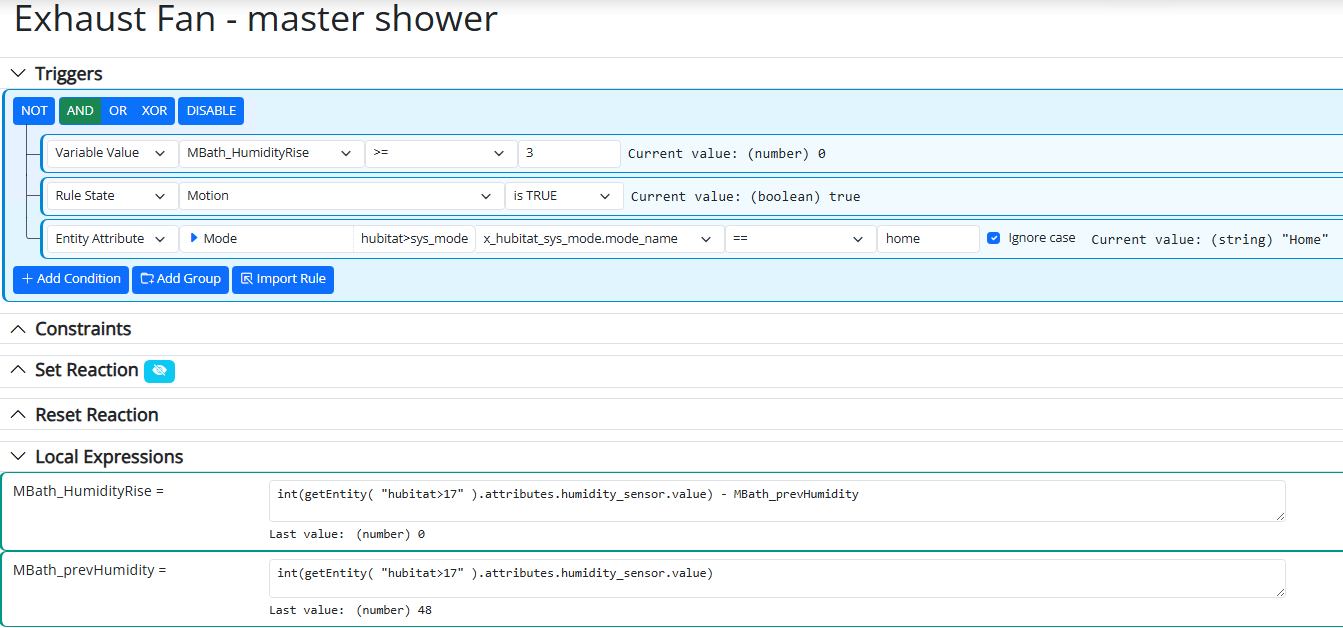
                                      image.png

                                      The Set Reaction is just to turn on the shower exhaust fan. I collapsed it for screenshot space.
                                      If I change the Local Expressions to: (and in this order)

                                      MBath_HumityRise = "CurrentHumidity - MBath_prevHumidity"
                                      MBath_prevHumidity = "CurrentHumidity"
                                      CurrentHumidity = (some # value like 48)
                                      

                                      And then manually change the CurrentHumidity value to 54 (something >=3), the rule triggers. The MBath_HumidityRise value changes to 6 too. Setting the CurrentHumidity to 50, changes the HumidityRise value to -4.

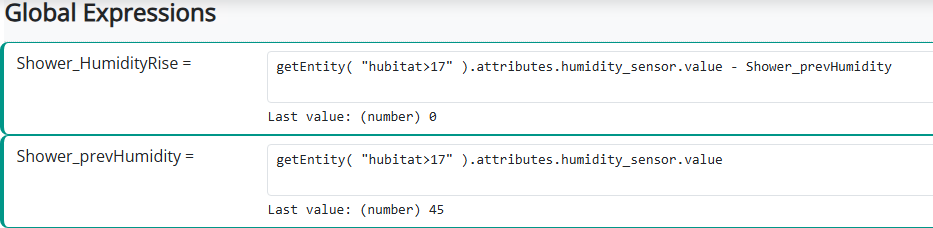
                                      When I set these expressions back to pull from the device, I see the prevHumidity value change, but the HumidityRise value always stays 0. I set up global expression under different names and watched the values too. In the same order with the Rise expression above the Prev expression, I never see the Rise value change.

                                      I will see if I have 25260 available for my docker update and test that, but for the life of me I cannot figure out why this rule stopped working.

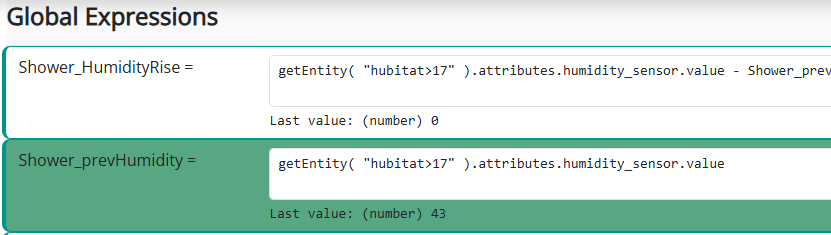
                                      EDIT: Updated to 25260 and I'm still not seeing the HumidityRise expression change. I kept my global expressions since they update and refresh on the page, where the local expressons don't appear to do so within the rule. Watching these two expressions, as soon as the prevHumidity sensor updates, the expression turns green. But the Rise expression didn't and still showed 0. In this screen grab, the humidity went from 46 to 45. I would have expected the top expression to show a -1.
                                      d9db6c59-4592-4acb-8baf-87dc8ae1a5dd-image.png daaa5ce6-8bd1-440c-af88-b3870297a781-image.png

                                      toggledbitsT 1 Reply Last reply
                                      0
                                      • toggledbitsT Offline
                                        toggledbitsT Offline
                                        toggledbits
                                        wrote on last edited by
                                        #42

                                        Build 25261 now available for 64-bit docker installs only. Fixes an issue with Rule expressions being evaluated too frequently (but the pendulum seems to be settling toward the middle).

                                        Author of Multi-system Reactor and Reactor, DelayLight, Switchboard, and about a dozen other plugins that run on Vera and openLuup.

                                        1 Reply Last reply
                                        0
                                        • 3 3rdStng

                                          I don't know if my issue is related or not here. It seems like it should, but I also understand that local expression handling has changed within the last couple of builds. I don't know exactly when my issue started, nor what build I was on. My guess would be Sept 7th as my rule was last "SET" on that date.

                                          I am running latest-25254-f6a45e41 in a docker on unRAID. The following rule has been in place for years and has been working pretty reliably, until recently.

                                          image.png

                                          The Set Reaction is just to turn on the shower exhaust fan. I collapsed it for screenshot space.
                                          If I change the Local Expressions to: (and in this order)

                                          MBath_HumityRise = "CurrentHumidity - MBath_prevHumidity"
                                          MBath_prevHumidity = "CurrentHumidity"
                                          CurrentHumidity = (some # value like 48)
                                          

                                          And then manually change the CurrentHumidity value to 54 (something >=3), the rule triggers. The MBath_HumidityRise value changes to 6 too. Setting the CurrentHumidity to 50, changes the HumidityRise value to -4.

                                          When I set these expressions back to pull from the device, I see the prevHumidity value change, but the HumidityRise value always stays 0. I set up global expression under different names and watched the values too. In the same order with the Rise expression above the Prev expression, I never see the Rise value change.

                                          I will see if I have 25260 available for my docker update and test that, but for the life of me I cannot figure out why this rule stopped working.

                                          EDIT: Updated to 25260 and I'm still not seeing the HumidityRise expression change. I kept my global expressions since they update and refresh on the page, where the local expressons don't appear to do so within the rule. Watching these two expressions, as soon as the prevHumidity sensor updates, the expression turns green. But the Rise expression didn't and still showed 0. In this screen grab, the humidity went from 46 to 45. I would have expected the top expression to show a -1.

                                          d9db6c59-4592-4acb-8baf-87dc8ae1a5dd-image.png daaa5ce6-8bd1-440c-af88-b3870297a781-image.png

                                          toggledbitsT Offline
                                          toggledbitsT Offline
                                          toggledbits
                                          wrote on last edited by toggledbits
                                          #43

                                          @3rdStng said in [Reactor] Variables not updating correctly in latest-25201-2aa18550:

                                          EDIT: Updated to 25260 and I'm still not seeing the HumidityRise expression change. I kept my global expressions since they update and refresh on the page, where the local expressons don't appear to do so within the rule. Watching these two expressions, as soon as the prevHumidity sensor updates, the expression turns green. But the Rise expression didn't and still showed 0. In this screen grab, the humidity went from 46 to 45. I would have expected the top expression to show a -1.

                                          OK. So let's start with the Global Expressions. The rise is always going to be zero, because it will evaluate prevHumidity to the current value of the sensor whenever it changes, and then cause HumidityRise to be re-evaluated subtracting the current value of the sensor taken from the sensor via getEntity() with the current value of the sensor stored in prevHumidity, and that will always be zero. This is as it ever was.

                                          Rule-based expressions have changed and now operate the same way on the recent builds, so the result is going to be the same. The difference will always be zero. And when I look at your "old" way, I'm kind of surprised that worked on the older builds, too. The fact that it may have is, to me, an indicator of the kind of problems reported on this thread, a problem which you just happened to use to your advantage previously.

                                          In working on a new approach for you, I also found another use case not handled correctly, so you'll need to update to 25261 to continue with the instructions below.

                                          Here's a new approach going forward (requires build 25261) :

                                          First, tie the Rule's trigger condition to any change in the device entity's humidity_sensor.value attribute. Like this:

                                          bfa7a03f-f9ac-4512-9ad8-2c9c37c56ab0-image.png

                                          Tip: because we're using the changes operator, when the entity's humidity value changes, the trigger condition (and therefore the Rule) will issue a very quick pulse that activates the SET reaction. That pulse is often too quick to see in the UI (its milliseconds), so setting the condition (in condition options) for pulse output with a delay of a few seconds (e.g. 5) will delay the reset so you can more clearly see the distinct phases of handling in the UI. In this case, that delay makes no impact operationally, it's just for your convenience visually.

                                          Then, the new set of local expressions:
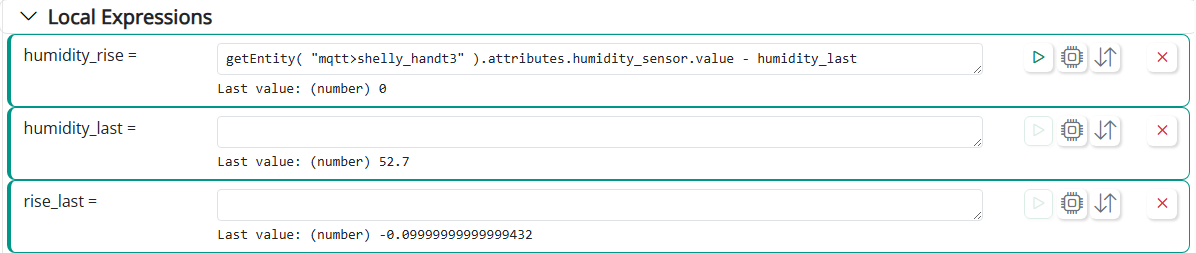
                                          45720c19-889d-42c1-9799-049fd33bb6bf-image.png

                                          Only humidity_rise has an expression. In text (for copy-paste), it is:

                                              getEntity( "mqtt>shelly_handt3" ).attributes.humidity_sensor.value - humidity_last
                                          

                                          The humidity_last and rise_last variables are expressionless, used as storage for the Rule's logic.

                                          First operating principle: when an entity referred to by a Rule-based expression or trigger condition is modified, the rule is re-evaluated, and that process begins with three steps: (1) re-evaluate its Rule-based expressions (recompute them); (2) evaluate and update the state of all trigger conditions; (3) set the Rule state from trigger conditions result. This is how Rules have always worked, and they still work this way.

                                          Finally, the SET reaction for this rule would look like this:
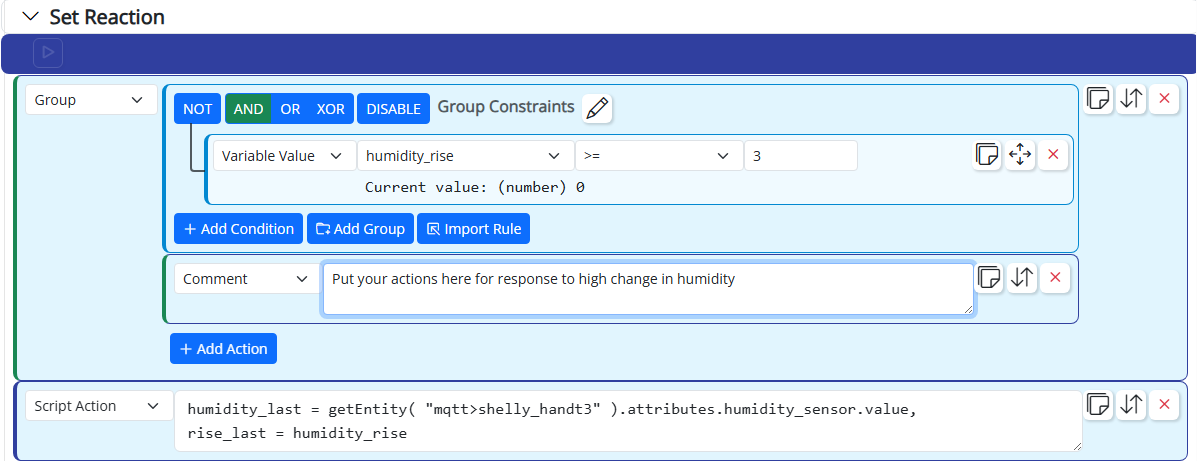
                                          b7e5f40d-6f53-434d-b507-683e86e697ab-image.png

                                          That script in text for copy-paste is (note the image shows this incorrectly — use the text below):

                                          rise_last = humidity_rise,
                                          humidity_last = getEntity( "mqtt>shelly_handt3" ).attributes.humidity_sensor.value
                                          

                                          The conditional group in that Reaction is where you turn on your dehumidifer/exhaust fan, etc. The Script Action updates the local humidity_last and rise_last variables. The rise_last variable is new, and I'll explain why I chose to have two rise variables below.

                                          Theory of operation: whenever the device reports a new humidity value, the difference variable humidity_rise is calculated and then the trigger condition is evaluated and will be true (because the change in humidity caused the Rule to self-evaluate), so the SET reaction runs. In the SET reaction, if the rise is >= 3%, the actions inside the conditional group will be run. To finish, the Script action stores the last humidity and rise in their respective variables. Because it does this unconditionally (outside the conditional group), the last humidity is always recorded and the rule will therefore handle rising and falling humidity values correctly.

                                          Why add rise_last? When the trigger condition's pulse time expires (either from your condition options or the native timing of the changes pulse), the Rule is re-evaluated, and again, the first step of that is to evaluate its rule-based variables (i.e. first operating principle in effect). This is going to cause humidity_rise to go to 0, because the SET reaction made humidity_last match the entity's current humidity value (therefore the difference is now zero). I added the rise_last variable, the value of which is set only during the SET reaction, to store the humidity rise from that phase of evaluation, so you can see what it was. It is normal and you should expect humidity_rise to be 0 except when the SET reaction is running; it's now a scratch variable. The rise_last variable is your go-to reference for the last difference that was or was not acted upon by the Rule.

                                          Also... your original expressions wrapped attribute values in int(), which truncates them (e.g. int(2.99) results in 2, but it's really almost 3). You might want to use round() instead (e.g. round(2.2) is 2, and round(2.99) is 3).

                                          And finally, you might consider looking at the time series capabilities of VirtualEntityController. That can directly produce a change rate value (using the rate aggregator) that makes it pretty easy to determine when there's a sudden upward change in humidity.

                                          Author of Multi-system Reactor and Reactor, DelayLight, Switchboard, and about a dozen other plugins that run on Vera and openLuup.

                                          1 Reply Last reply
                                          1
                                          Reply
                                          • Reply as topic
                                          Log in to reply
                                          • Oldest to Newest
                                          • Newest to Oldest
                                          • Most Votes


                                          Recent Topics

                                          • HA and AI
                                            CatmanV2C
                                            CatmanV2
                                            0
                                            1
                                            34

                                          • How to upgrade from an old version of MSR?
                                            CatmanV2C
                                            CatmanV2
                                            0
                                            6
                                            94

                                          • Access control - allowing anonymous user to dashboard
                                            toggledbitsT
                                            toggledbits
                                            0
                                            2
                                            90

                                          • VEC Virtual Switch Auto Off
                                            S
                                            SweetGenius
                                            1
                                            1
                                            62

                                          • Upcoming Storage Change -- Got Back-ups?
                                            toggledbitsT
                                            toggledbits
                                            3
                                            1
                                            59

                                          • Oddness in Copy/Move of Reactions
                                            G
                                            gwp1
                                            0
                                            1
                                            77

                                          • [Solved] function isRuleEnabled() issue
                                            CrilleC
                                            Crille
                                            0
                                            4
                                            144

                                          • [Reactor] Problem with Global Reactions and groups
                                            therealdbT
                                            therealdb
                                            0
                                            3
                                            146

                                          • Possible feature request 2?
                                            CatmanV2C
                                            CatmanV2
                                            0
                                            3
                                            120

                                          • Reactor (Multi-System/Multi-Hub) Announcements
                                            toggledbitsT
                                            toggledbits
                                            5
                                            133
                                            82.1k

                                          • Genuinely impressed with Zigbee and HA / Reactor
                                            CatmanV2C
                                            CatmanV2
                                            1
                                            9
                                            423

                                          • Copying a global reaction
                                            toggledbitsT
                                            toggledbits
                                            0
                                            3
                                            146
                                          Powered by NodeBB | Contributors
                                          Hosted freely by 10RUPTiV - Solutions Technologiques | Contact us
                                          • Login

                                          • Don't have an account? Register

                                          • Login or register to search.
                                          • First post
                                            Last post
                                          0
                                          • Categories
                                          • Recent
                                          • Tags
                                          • Popular
                                          • Unsolved