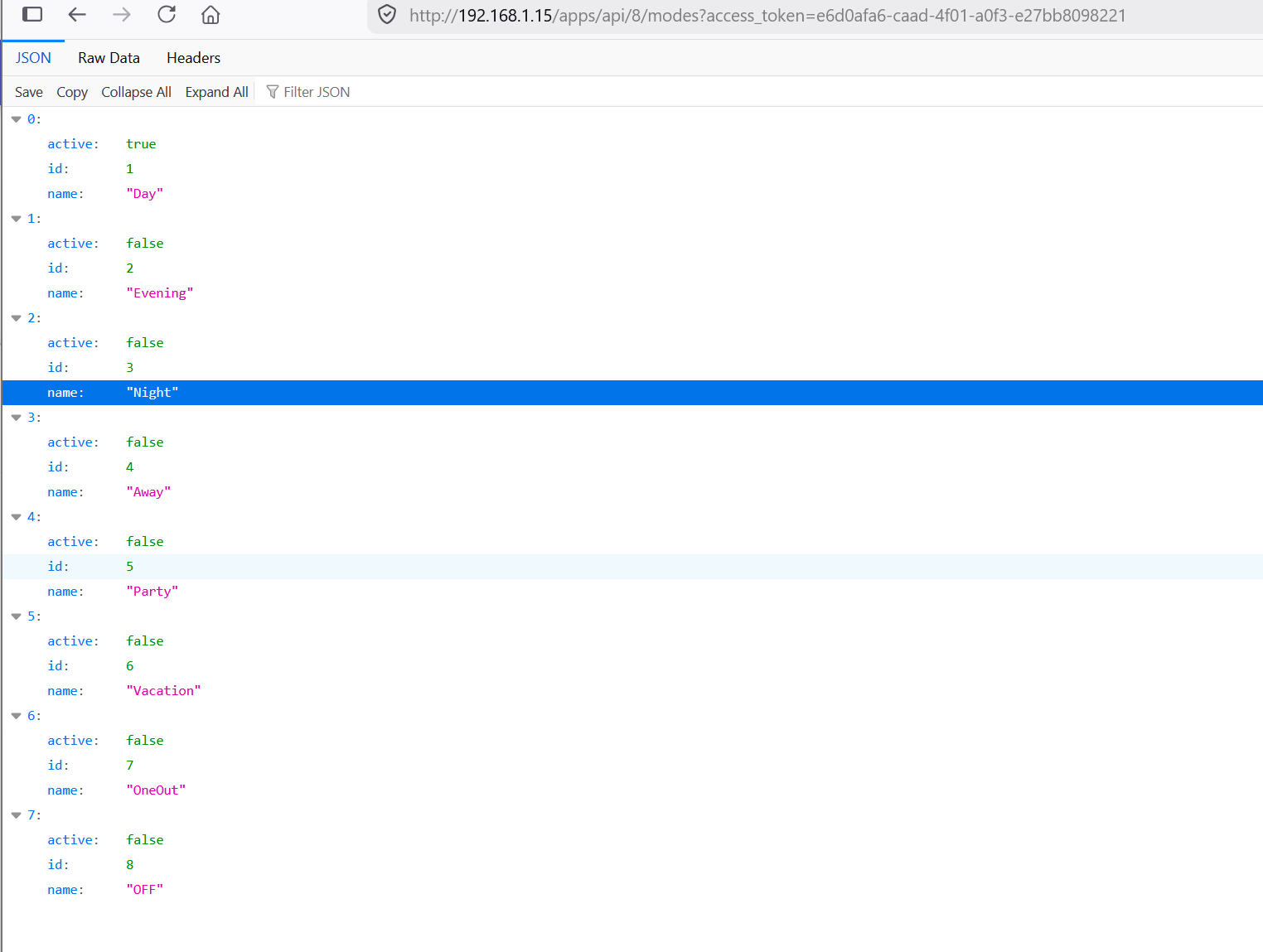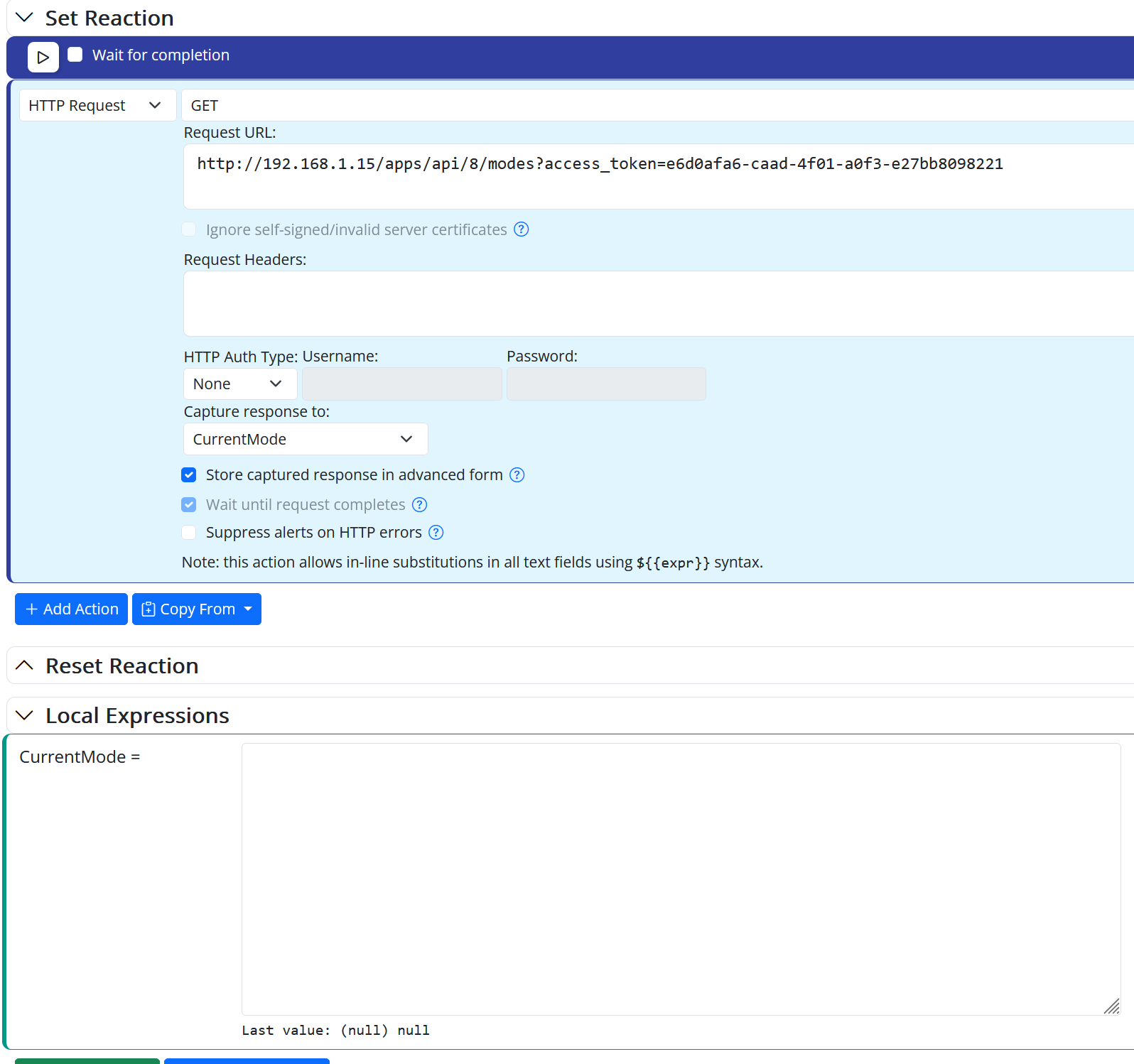








Mode Status NULL
-
Hi @toggledbits
Up to version 26130, this statement worked perfectly to update the global variable.
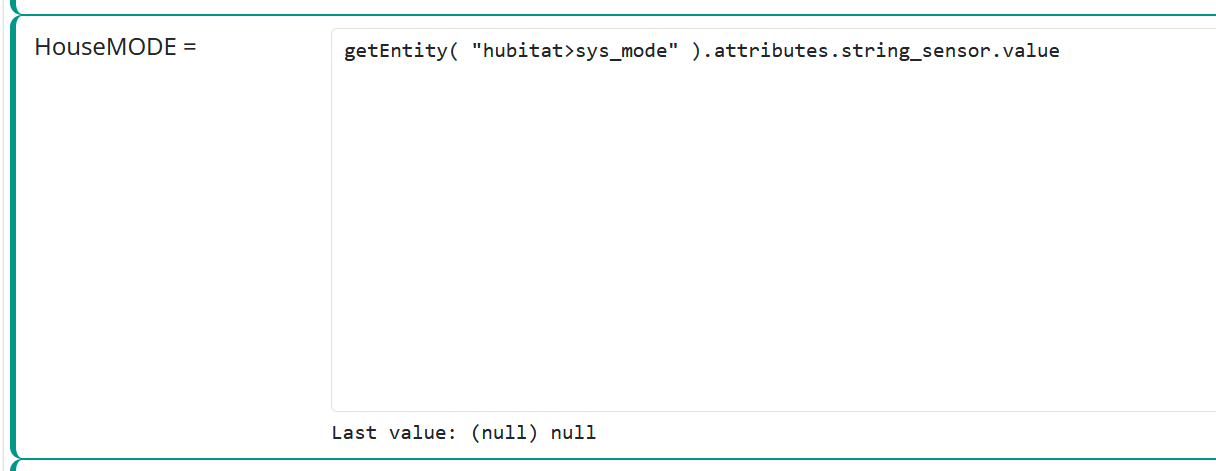
It used to assign the mode correctly to the variable.
However, now, when I restart the system—which is already on version 26174—I see that the value reverts to null, forcing me to change the mode so that the status is updated.
If it is NULL, this action also has no effect.

Thanks.
-
I think I know what this is... fix coming soon...
Edit: by the way... always look at the log files.
-
Hi @toggledbits
In version 26177, the query response now returns a value—great!
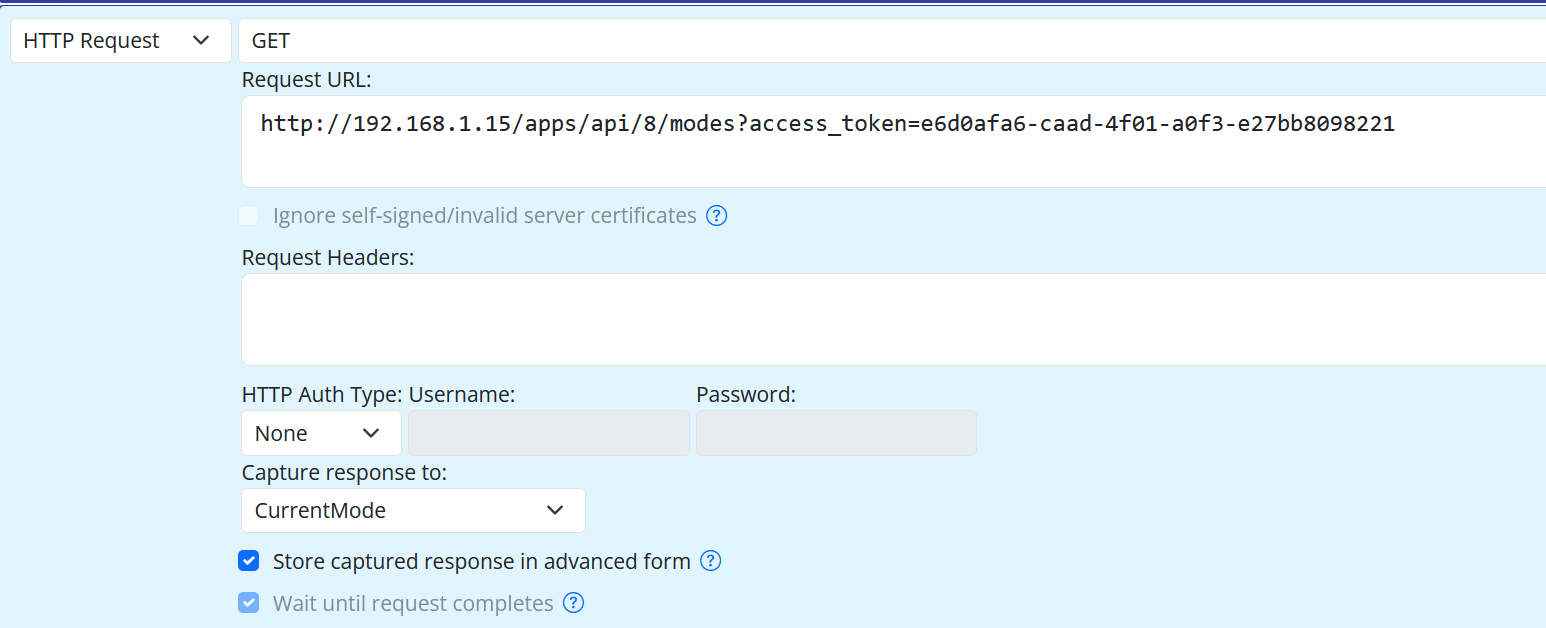
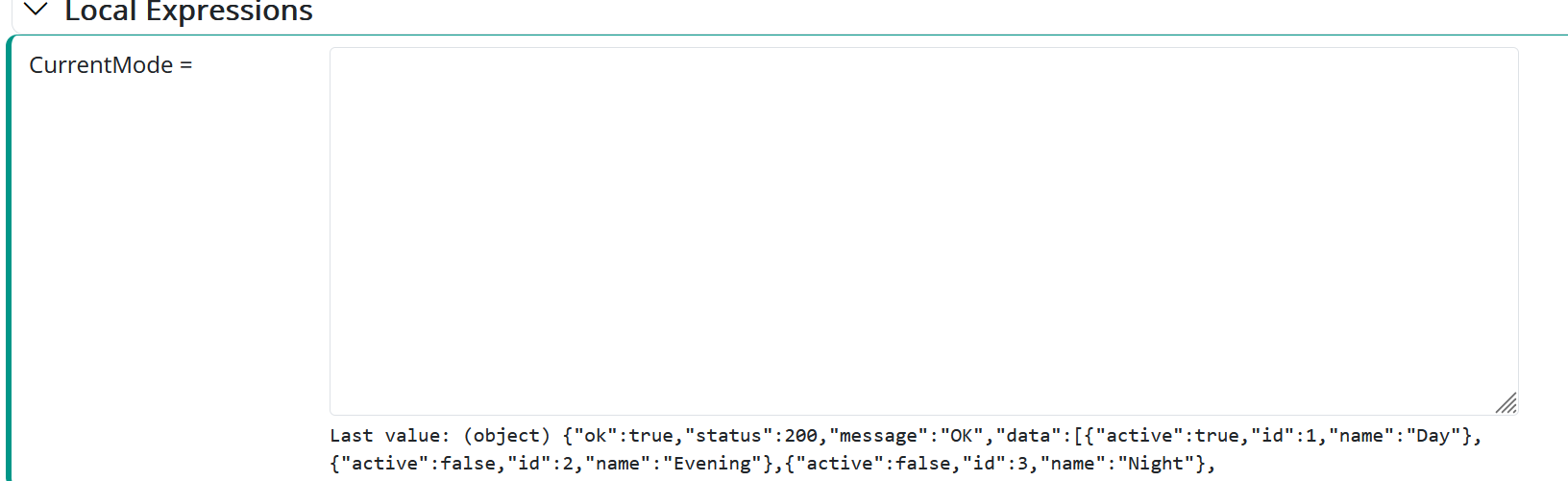
So we're still getting a null response to this query.
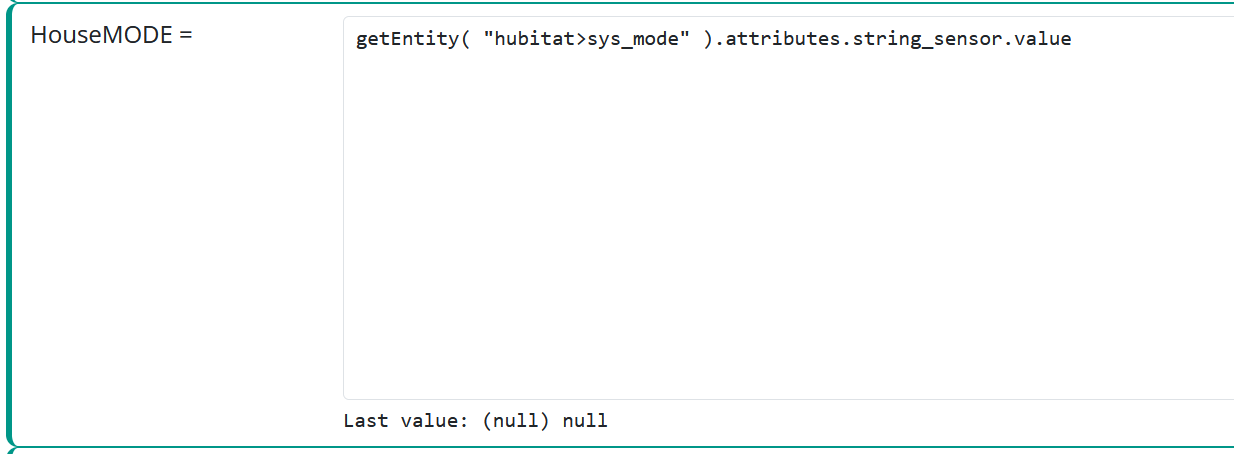
However, we now have an additional problem: previously, when we went to Hubutat and changed the Mode—for example, from Day to Evening—it would apply the change and start working; now this is no longer happening, and the response remains permanently “null.”
The part of the log where I'm getting an error is shown below; I'm not sure if this helps.
[latest-26177]2026-06-27T17:02:07.252Z <DynamicGroupController:INFO> DynamicGroupController#groups registering zwave_device.debug for Group#groups>dgc_PowerOutlet_OFF [latest-26177]2026-06-27T17:02:07.252Z <DynamicGroupController:INFO> DynamicGroupController#groups registering zwave_device.ping for Group#groups>dgc_PowerOutlet_OFF [latest-26177]2026-06-27T17:02:07.253Z <DynamicGroupController:INFO> DynamicGroupController#groups registering energy_sensor.reset for Group#groups>dgc_PowerOutlet_OFF [latest-26177]2026-06-27T17:02:07.297Z <HubitatController:INFO> HubitatController#hubitat Maker API responded with 101 devices [latest-26177]2026-06-27T17:02:07.329Z <HubitatController:WARN> HubitatController#hubitat native capability URL no definition data; skipped [latest-26177]2026-06-27T17:02:07.330Z <HubitatController:INFO> HubitatController#hubitat found configured probe/health check device 'Hub Information' ("7") [latest-26177]2026-06-27T17:02:07.485Z <Controller:INFO> HubitatController#hubitat 0 dead entities older than 86400000s purged [latest-26177]2026-06-27T17:02:07.503Z <HubitatController:INFO> HubitatController#hubitat connecting to hub's eventsocket WebSocket API at ws://192.168.1.15/eventsocket [latest-26177]2026-06-27T17:02:07.510Z <OWMWeatherController:ERR> OWMWeatherController#weather location home failed fetching https://api.openweathermap.org/data/2.5/weather?lat=8.975962&lon=-79.507854&appid=650d94f1d61f6e237b> [latest-26177]2026-06-27T17:02:07.511Z <OWMWeatherController:CRIT> FetchError: request to https://api.openweathermap.org/data/2.5/weather?lat=8.975962&lon=-79.507854&appid=650d94f1d61f6e237bebec455f062ec7&units=standard&_r=17> FetchError: request to https://api.openweathermap.org/data/2.5/weather?lat=8.975962&lon=-79.507854&appid=650d94f1d61f6e237bebec455f062ec7&units=standard&_r=1782579726389 failed, reason: at ClientRequest.<anonymous> (/home/wilson/reactor/node_modules/node-fetch/lib/index.js:1501:11) at ClientRequest.emit (node:events:509:28) at ClientRequest.emit (node:domain:489:12) at emitErrorEvent (node:_http_client:109:11) at TLSSocket.socketErrorListener (node:_http_client:593:5) at TLSSocket.emit (node:events:509:28) at TLSSocket.emit (node:domain:489:12) at emitErrorNT (node:internal/streams/destroy:170:8) at emitErrorCloseNT (node:internal/streams/destroy:129:3) at processTicksAndRejections (node:internal/process/task_queues:90:21) [latest-26177]2026-06-27T17:02:07.512Z <OWMWeatherController:NOTICE> OWMWeatherController#weather failures Array(1) [{ "status": "rejected", "reason": FetchError(FetchError: request to https://api.openweathermap.org/data/2.5/> [latest-26177]2026-06-27T17:02:07.512Z <OWMWeatherController:INFO> OWMWeatherController#weather done; 1 locations, 1 failed [latest-26177]2026-06-27T17:02:07.513Z <Controller:NOTICE> Controller OWMWeatherController#weather is now online. [latest-26177]2026-06-27T17:02:12.753Z <app:ERR> Trapped unhandled Promise rejection: [FetchError] Invalid response body while trying to fetch http://192.168.1.15/apps/api/8/postURL?access_token=e6d0afa6-caad-4f01-a0f3-e27bb8> [latest-26177]2026-06-27T17:02:12.753Z <app:CRIT> FetchError: Invalid response body while trying to fetch http://192.168.1.15/apps/api/8/postURL?access_token=e6d0afa6-caad-4f01-a0f3-e27bb8098221: Premature close [-] FetchError: Invalid response body while trying to fetch http://192.168.1.15/apps/api/8/postURL?access_token=e6d0afa6-caad-4f01-a0f3-e27bb8098221: Premature close at PassThrough.<anonymous> (/home/wilson/reactor/node_modules/node-fetch/lib/index.js:217:52) at PassThrough.emit (node:events:509:28) at PassThrough.emit (node:domain:489:12) at emitErrorNT (node:internal/streams/destroy:170:8) at emitErrorCloseNT (node:internal/streams/destroy:129:3) at process.processTicksAndRejections (node:internal/process/task_queues:90:21) [latest-26177]2026-06-27T17:02:12.754Z <app:ERR> Please refer to the console log for trace [latest-26177]2026-06-27T17:02:12.776Z <DynamicGroupController:INFO> DynamicGroupController#groups processing pending updates for Array(4) ["dgc_Device_ENTRANCE", "dgc_Device_TRIPPED", "dgc_ColorLed_ON", "dgc_Device_SMOKE"] [latest-26177]2026-06-27T17:02:12.784Z <DynamicGroupController:INFO> DynamicGroupController#groups registering power_switch.on for Group#groups>dgc_ColorLed_ON [latest-26177]2026-06-27T17:02:12.784Z <DynamicGroupController:INFO> DynamicGroupController#groups registering power_switch.off for Group#groups>dgc_ColorLed_ON [latest-26177]2026-06-27T17:02:12.784Z <DynamicGroupController:INFO> DynamicGroupController#groups registering power_switch.set for Group#groups>dgc_ColorLed_ON [latest-26177]2026-06-27T17:02:12.784Z <DynamicGroupController:INFO> DynamicGroupController#groups registering toggle.toggle for Group#groups>dgc_ColorLed_ON [latest-26177]2026-06-27T17:02:12.784Z <DynamicGroupController:INFO> DynamicGroupController#groups registering color_temperature.set for Group#groups>dgc_ColorLed_ON [latest-26177]2026-06-27T17:02:12.784Z <DynamicGroupController:INFO> DynamicGroupController#groups registering rgb_color.set for Group#groups>dgc_ColorLed_ON [latest-26177]2026-06-27T17:02:12.784Z <DynamicGroupController:INFO> DynamicGroupController#groups registering rgb_color.set_rgb for Group#groups>dgc_ColorLed_ON [latest-26177]2026-06-27T17:02:12.784Z <DynamicGroupController:INFO> DynamicGroupController#groups registering hs_color.set_hs for Group#groups>dgc_ColorLed_ON [latest-26177]2026-06-27T17:02:12.785Z <DynamicGroupController:INFO> DynamicGroupController#groups registering hs_color.set_hue for Group#groups>dgc_ColorLed_ON [latest-26177]2026-06-27T17:02:12.785Z <DynamicGroupController:INFO> DynamicGroupController#groups registering hs_color.set_saturation for Group#groups>dgc_ColorLed_ON [latest-26177]2026-06-27T17:02:12.785Z <DynamicGroupController:INFO> DynamicGroupController#groups registering dimming.set for Group#groups>dgc_ColorLed_ON [latest-26177]2026-06-27T17:02:12.785Z <DynamicGroupController:INFO> DynamicGroupController#groups registering dimming.up for Group#groups>dgc_ColorLed_ON [latest-26177]2026-06-27T17:02:12.785Z <DynamicGroupController:INFO> DynamicGroupController#groups registering dimming.down for Group#groups>dgc_ColorLed_ON [latest-26177]2026-06-27T17:02:12.791Z <Rule:INFO> Panel Tripped (rule-mfdbsyrp in SharpTools) starting rule state evaluation; because predicate-state-changed Predicate#rule-mfdbsyrp/trig [latest-26177]2026-06-27T17:02:12.791Z <Rule:INFO> Panel Tripped (rule-mfdbsyrp in SharpTools) evaluated; rule state transition from SET to 'RESET' -
My
sys_modeentity is updating fine. Be more intentional in your review of the logs. Change the house mode on the hub using its user interface, and then immediately look at the end of the Reactor log. You should see a message like:[###BUILDVERSION###]2026-06-27T20:24:27.557Z <HubitatController#he_3:NOTICE> HubitatController#he_3 received mode change to Evening [###BUILDVERSION###]2026-06-27T20:24:32.487Z <HubitatController#he_3:NOTICE> HubitatController#he_3 received mode change to Day(that's the output of two back-to-back changes on my hub)
If you don't see that and you see errors instead related to the hub, post those.
And remember, full browser refresh. If an entity value doesn't look right/expected, refresh first. Then start asking why the value isn't what's expected.
The request errors you posted are for OWM weather queries, and those are not unusual; their service isn't guaranteed and I get several request errors every day myself (which I ignore). Generally, your HTTP request action seems unrelated to the system mode issue. If it happens again, go directly to the end of the log and see what detail was logged for the request, but make sure you are looking at that actual request action, not something unrelated.