













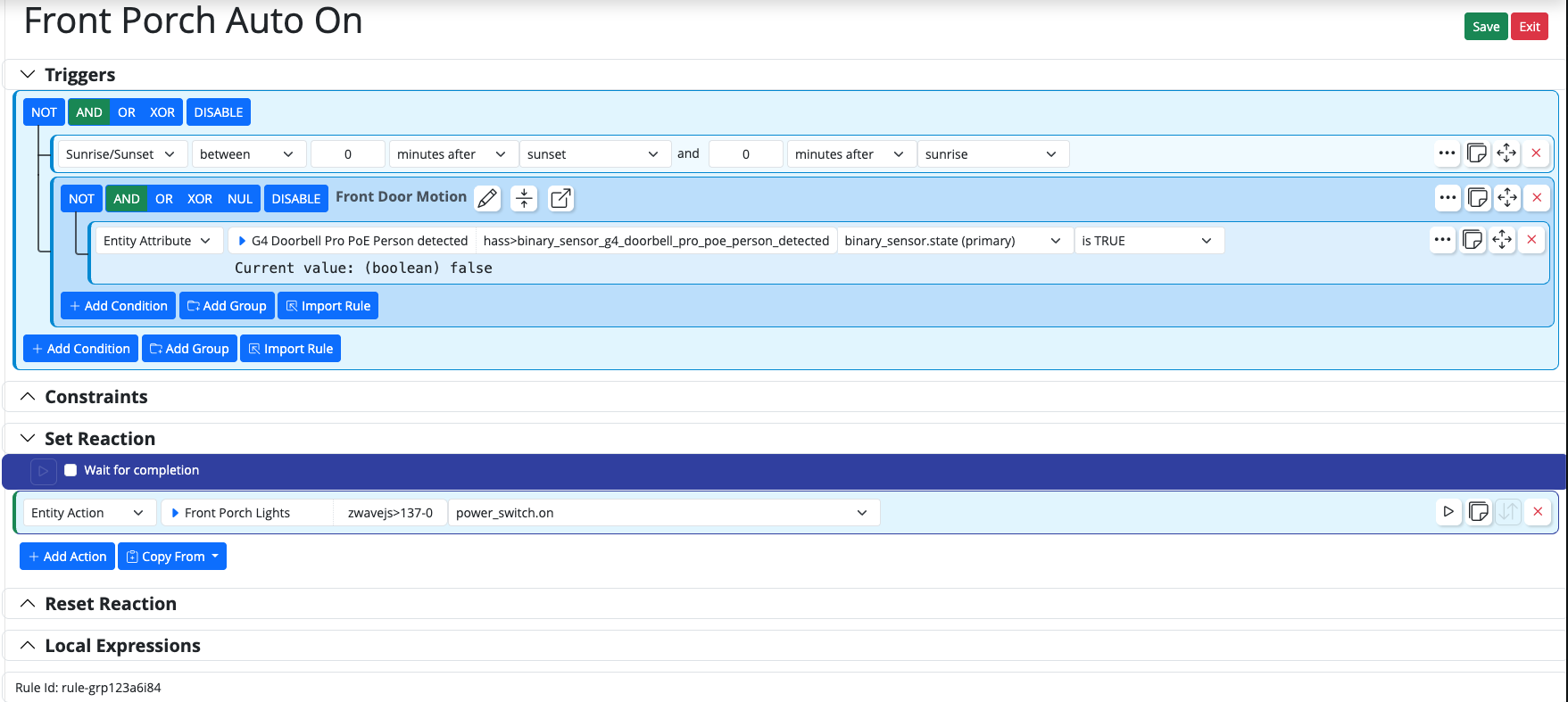
Set reaction triggering wrong z-wave device
-
OK. Everything checks out there. I would upgrade to the latest ZWaveJSController -- it looks like you are a release behind. That version added logging for what is actually sent to ZWaveJS, which may be instructive. But restarting for that update and rebuilding the state data may resolve the issue (you've probably done the former, I assume, but the latter is less obvious), so we're changing the conditions of the test. But let's see what happens when you upgrade, and then see what the log entries look like if the behavior is the same, because it sure looks like ZWaveJSController has it correct.
-
I wasn't sure if I was on the correct release or not. Does the Docker image include the Zwave release in the pull?
said in Set reaction triggering wrong z-wave device:
I wasn't sure if I was on the correct release or not. Does the Docker image include the Zwave release in the pull?
Never mind. It's says it does not in your documentation.

I updated to v25304 and restarted Reactor. I'll run some tests now.
-
said in Set reaction triggering wrong z-wave device:
I wasn't sure if I was on the correct release or not. Does the Docker image include the Zwave release in the pull?
Never mind. It's says it does not in your documentation.
I updated to v25304 and restarted Reactor. I'll run some tests now.
said in Set reaction triggering wrong z-wave device:
I updated to v25304 and restarted Reactor. I'll run some tests now.
Alright, it still seems to be doing the same thing. I'm tailing the zwavejs log, and pressing the button for the Set Reaction. I see it pushing the command for 137-0, however, the soffit lights (136-0) are coming on.
root@docker:/home/tmorgenthaler/reactor/logs# tail -f zwavejs.log | grep 137-0
[latest-26011]2026-01-31T20:25:01.008Z <ZWaveJSController:5:ZWaveJSController.js:1237> ZWaveJSController#zwavejs updating attribute power_switch.state with { "entity": "137-0", "impl": { "valueId": "37:currentValue:" } }
[latest-26011]2026-01-31T20:25:01.008Z <ZWaveJSController:5:ZWaveJSController.js:1148> ZWaveJSController#zwavejs _apply_value entity Switch#zwavejs>137-0 power_switch.state
[latest-26011]2026-01-31T20:25:01.008Z <ZWaveJSController:5:ZWaveJSController.js:1161> ZWaveJSController#zwavejs handling Switch#zwavejs>137-0 power_switch.state by { "valueId": "37:currentValue:" } with { "endpoint": 0, "commandClass": 37, "commandClassName": "Binary Switch", "property": "currentValue", "propertyName": "currentValue", "ccVersion": 2, "metadata": { "type": "boolean", "readable": true, "writeable": false, "label": "Current value", "stateful": true, "secret": false }, "value": true, "__endp": { "power_switch.state": { "entity": "137-0", "impl": { "valueId": "37:currentValue:" } } } }
[latest-26011]2026-01-31T20:25:01.009Z <ZWaveJSController:5:ZWaveJSController.js:1252> ZWaveJSController#zwavejs setting Switch#zwavejs>137-0.x_zwave_values.Binary_Switch_currentValue to true
[latest-26011]2026-01-31T20:25:01.104Z <ZWaveJSController:5:ZWaveJSController.js:948> ZWaveJSController#zwavejs handling node event statistics updated entity Switch#zwavejs>137-0
[latest-26011]2026-01-31T20:25:15.710Z <ZWaveJSController:INFO> ZWaveJSController#zwavejs performing power_switch.on on Front Porch Lights (Switch#zwavejs>137-0) with {  }
[latest-26011]2026-01-31T20:25:15.973Z <ZWaveJSController:5:ZWaveJSController.js:948> ZWaveJSController#zwavejs handling node event statistics updated entity Switch#zwavejs>137-0
[latest-26011]2026-01-31T20:25:16.125Z <ZWaveJSController:5:ZWaveJSController.js:948> ZWaveJSController#zwavejs handling node event value updated entity Switch#zwavejs>137-0
[latest-26011]2026-01-31T20:25:16.125Z <ZWaveJSController:5:ZWaveJSController.js:1252> ZWaveJSController#zwavejs setting Switch#zwavejs>137-0.x_zwave_values.Binary_Switch_targetValue to true
[latest-26011]2026-01-31T20:25:16.125Z <ZWaveJSController:5:ZWaveJSController.js:948> ZWaveJSController#zwavejs handling node event value updated entity Switch#zwavejs>137-0
[latest-26011]2026-01-31T20:25:16.126Z <ZWaveJSController:5:ZWaveJSController.js:1237> ZWaveJSController#zwavejs updating attribute power_switch.state with { "entity": "137-0", "impl": { "valueId": "37:currentValue:" } }
[latest-26011]2026-01-31T20:25:16.126Z <ZWaveJSController:5:ZWaveJSController.js:1148> ZWaveJSController#zwavejs _apply_value entity Switch#zwavejs>137-0 power_switch.state
[latest-26011]2026-01-31T20:25:16.126Z <ZWaveJSController:5:ZWaveJSController.js:1161> ZWaveJSController#zwavejs handling Switch#zwavejs>137-0 power_switch.state by { "valueId": "37:currentValue:" } with { "endpoint": 0, "commandClass": 37, "commandClassName": "Binary Switch", "property": "currentValue", "propertyName": "currentValue", "ccVersion": 2, "metadata": { "type": "boolean", "readable": true, "writeable": false, "label": "Current value", "stateful": true, "secret": false }, "value": true, "__endp": { "power_switch.state": { "entity": "137-0", "impl": { "valueId": "37:currentValue:" } } } }
[latest-26011]2026-01-31T20:25:16.126Z <ZWaveJSController:5:ZWaveJSController.js:1252> ZWaveJSController#zwavejs setting Switch#zwavejs>137-0.x_zwave_values.Binary_Switch_currentValue to true
[latest-26011]2026-01-31T20:25:16.224Z <ZWaveJSController:5:ZWaveJSController.js:948> ZWaveJSController#zwavejs handling node event statistics updated entity Switch#zwavejs>137-0
[latest-26011]2026-01-31T20:25:33.510Z <ZWaveJSController:5:ZWaveJSController.js:948> ZWaveJSController#zwavejs handling node event statistics updated entity Switch#zwavejs>137-0
[latest-26011]2026-01-31T20:25:33.661Z <ZWaveJSController:5:ZWaveJSController.js:948> ZWaveJSController#zwavejs handling node event value updated entity Switch#zwavejs>137-0
[latest-26011]2026-01-31T20:25:33.661Z <ZWaveJSController:5:ZWaveJSController.js:948> ZWaveJSController#zwavejs handling node event value updated entity Switch#zwavejs>137-0
[latest-26011]2026-01-31T20:25:33.662Z <ZWaveJSController:5:ZWaveJSController.js:1252> ZWaveJSController#zwavejs setting Switch#zwavejs>137-0.x_zwave_values.Binary_Switch_targetValue to false
[latest-26011]2026-01-31T20:25:33.666Z <ZWaveJSController:5:ZWaveJSController.js:1237> ZWaveJSController#zwavejs updating attribute power_switch.state with { "entity": "137-0", "impl": { "valueId": "37:currentValue:" } }
[latest-26011]2026-01-31T20:25:33.666Z <ZWaveJSController:5:ZWaveJSController.js:1148> ZWaveJSController#zwavejs _apply_value entity Switch#zwavejs>137-0 power_switch.state
[latest-26011]2026-01-31T20:25:33.666Z <ZWaveJSController:5:ZWaveJSController.js:1161> ZWaveJSController#zwavejs handling Switch#zwavejs>137-0 power_switch.state by { "valueId": "37:currentValue:" } with { "endpoint": 0, "commandClass": 37, "commandClassName": "Binary Switch", "property": "currentValue", "propertyName": "currentValue", "ccVersion": 2, "metadata": { "type": "boolean", "readable": true, "writeable": false, "label": "Current value", "stateful": true, "secret": false }, "value": false, "__endp": { "power_switch.state": { "entity": "137-0", "impl": { "valueId": "37:currentValue:" } } } }
[latest-26011]2026-01-31T20:25:33.666Z <ZWaveJSController:5:ZWaveJSController.js:1252> ZWaveJSController#zwavejs setting Switch#zwavejs>137-0.x_zwave_values.Binary_Switch_currentValue to false
[latest-26011]2026-01-31T20:25:33.760Z <ZWaveJSController:5:ZWaveJSController.js:948> ZWaveJSController#zwavejs handling node event statistics updated entity Switch#zwavejs>137-0
I also see the results of turning off the device from HAAS in the ZWaveJS logs.
Here are the entries for the devices in HAAS from ZwaveJS-UI
 Screenshot 2026-01-31 at 3.29.10 PM
I've also creating an attirbutes text file for 136-0. Maybe something is funky in that entry.
-
Here are some logs of me turning the entities on and off from HAAS.
root@docker:/home/tmorgenthaler/reactor/logs# tail -f zwavejs.log | grep 13'[6-7]'-0 [latest-26011]2026-01-31T20:37:00.403Z <ZWaveJSController:5:ZWaveJSController.js:1148> ZWaveJSController#zwavejs _apply_value entity Switch#zwavejs>136-0 power_switch.state [latest-26011]2026-01-31T20:37:00.403Z <ZWaveJSController:5:ZWaveJSController.js:1161> ZWaveJSController#zwavejs handling Switch#zwavejs>136-0 power_switch.state by { "valueId": "37:currentValue:" } with { "endpoint": 0, "commandClass": 37, "commandClassName": "Binary Switch", "property": "currentValue", "propertyName": "currentValue", "ccVersion": 2, "metadata": { "type": "boolean", "readable": true, "writeable": false, "label": "Current value", "stateful": true, "secret": false }, "value": true, "__endp": { "power_switch.state": { "entity": "136-0", "impl": { "valueId": "37:currentValue:" } } } } [latest-26011]2026-01-31T20:37:00.403Z <ZWaveJSController:5:ZWaveJSController.js:1252> ZWaveJSController#zwavejs setting Switch#zwavejs>136-0.x_zwave_values.Binary_Switch_currentValue to true [latest-26011]2026-01-31T20:37:00.648Z <ZWaveJSController:5:ZWaveJSController.js:948> ZWaveJSController#zwavejs handling node event statistics updated entity Switch#zwavejs>136-0 [latest-26011]2026-01-31T20:37:18.529Z <ZWaveJSController:5:ZWaveJSController.js:948> ZWaveJSController#zwavejs handling node event statistics updated entity Switch#zwavejs>136-0 [latest-26011]2026-01-31T20:37:18.553Z <ZWaveJSController:5:ZWaveJSController.js:948> ZWaveJSController#zwavejs handling node event value updated entity Switch#zwavejs>136-0 [latest-26011]2026-01-31T20:37:18.553Z <ZWaveJSController:5:ZWaveJSController.js:1252> ZWaveJSController#zwavejs setting Switch#zwavejs>136-0.x_zwave_values.Binary_Switch_targetValue to false [latest-26011]2026-01-31T20:37:18.559Z <ZWaveJSController:5:ZWaveJSController.js:948> ZWaveJSController#zwavejs handling node event value updated entity Switch#zwavejs>136-0 [latest-26011]2026-01-31T20:37:18.559Z <ZWaveJSController:5:ZWaveJSController.js:1237> ZWaveJSController#zwavejs updating attribute power_switch.state with { "entity": "136-0", "impl": { "valueId": "37:currentValue:" } } [latest-26011]2026-01-31T20:37:18.559Z <ZWaveJSController:5:ZWaveJSController.js:1148> ZWaveJSController#zwavejs _apply_value entity Switch#zwavejs>136-0 power_switch.state [latest-26011]2026-01-31T20:37:18.559Z <ZWaveJSController:5:ZWaveJSController.js:1161> ZWaveJSController#zwavejs handling Switch#zwavejs>136-0 power_switch.state by { "valueId": "37:currentValue:" } with { "endpoint": 0, "commandClass": 37, "commandClassName": "Binary Switch", "property": "currentValue", "propertyName": "currentValue", "ccVersion": 2, "metadata": { "type": "boolean", "readable": true, "writeable": false, "label": "Current value", "stateful": true, "secret": false }, "value": false, "__endp": { "power_switch.state": { "entity": "136-0", "impl": { "valueId": "37:currentValue:" } } } } [latest-26011]2026-01-31T20:37:18.560Z <ZWaveJSController:5:ZWaveJSController.js:1252> ZWaveJSController#zwavejs setting Switch#zwavejs>136-0.x_zwave_values.Binary_Switch_currentValue to false [latest-26011]2026-01-31T20:37:18.779Z <ZWaveJSController:5:ZWaveJSController.js:948> ZWaveJSController#zwavejs handling node event statistics updated entity Switch#zwavejs>136-0 [latest-26011]2026-01-31T20:37:25.647Z <ZWaveJSController:5:ZWaveJSController.js:948> ZWaveJSController#zwavejs handling node event statistics updated entity Switch#zwavejs>137-0 [latest-26011]2026-01-31T20:37:25.803Z <ZWaveJSController:5:ZWaveJSController.js:948> ZWaveJSController#zwavejs handling node event value updated entity Switch#zwavejs>137-0 [latest-26011]2026-01-31T20:37:25.803Z <ZWaveJSController:5:ZWaveJSController.js:948> ZWaveJSController#zwavejs handling node event value updated entity Switch#zwavejs>137-0 [latest-26011]2026-01-31T20:37:25.804Z <ZWaveJSController:5:ZWaveJSController.js:1252> ZWaveJSController#zwavejs setting Switch#zwavejs>137-0.x_zwave_values.Binary_Switch_targetValue to true [latest-26011]2026-01-31T20:37:25.808Z <ZWaveJSController:5:ZWaveJSController.js:1237> ZWaveJSController#zwavejs updating attribute power_switch.state with { "entity": "137-0", "impl": { "valueId": "37:currentValue:" } } [latest-26011]2026-01-31T20:37:25.808Z <ZWaveJSController:5:ZWaveJSController.js:1148> ZWaveJSController#zwavejs _apply_value entity Switch#zwavejs>137-0 power_switch.state [latest-26011]2026-01-31T20:37:25.808Z <ZWaveJSController:5:ZWaveJSController.js:1161> ZWaveJSController#zwavejs handling Switch#zwavejs>137-0 power_switch.state by { "valueId": "37:currentValue:" } with { "endpoint": 0, "commandClass": 37, "commandClassName": "Binary Switch", "property": "currentValue", "propertyName": "currentValue", "ccVersion": 2, "metadata": { "type": "boolean", "readable": true, "writeable": false, "label": "Current value", "stateful": true, "secret": false }, "value": true, "__endp": { "power_switch.state": { "entity": "137-0", "impl": { "valueId": "37:currentValue:" } } } } [latest-26011]2026-01-31T20:37:25.809Z <ZWaveJSController:5:ZWaveJSController.js:1252> ZWaveJSController#zwavejs setting Switch#zwavejs>137-0.x_zwave_values.Binary_Switch_currentValue to true [latest-26011]2026-01-31T20:37:25.898Z <ZWaveJSController:5:ZWaveJSController.js:948> ZWaveJSController#zwavejs handling node event statistics updated entity Switch#zwavejs>137-0 [latest-26011]2026-01-31T20:37:29.297Z <ZWaveJSController:5:ZWaveJSController.js:948> ZWaveJSController#zwavejs handling node event statistics updated entity Switch#zwavejs>137-0 [latest-26011]2026-01-31T20:37:29.447Z <ZWaveJSController:5:ZWaveJSController.js:948> ZWaveJSController#zwavejs handling node event value updated entity Switch#zwavejs>137-0 [latest-26011]2026-01-31T20:37:29.448Z <ZWaveJSController:5:ZWaveJSController.js:948> ZWaveJSController#zwavejs handling node event value updated entity Switch#zwavejs>137-0 [latest-26011]2026-01-31T20:37:29.448Z <ZWaveJSController:5:ZWaveJSController.js:1252> ZWaveJSController#zwavejs setting Switch#zwavejs>137-0.x_zwave_values.Binary_Switch_targetValue to false [latest-26011]2026-01-31T20:37:29.453Z <ZWaveJSController:5:ZWaveJSController.js:1237> ZWaveJSController#zwavejs updating attribute power_switch.state with { "entity": "137-0", "impl": { "valueId": "37:currentValue:" } } [latest-26011]2026-01-31T20:37:29.453Z <ZWaveJSController:5:ZWaveJSController.js:1148> ZWaveJSController#zwavejs _apply_value entity Switch#zwavejs>137-0 power_switch.state [latest-26011]2026-01-31T20:37:29.453Z <ZWaveJSController:5:ZWaveJSController.js:1161> ZWaveJSController#zwavejs handling Switch#zwavejs>137-0 power_switch.state by { "valueId": "37:currentValue:" } with { "endpoint": 0, "commandClass": 37, "commandClassName": "Binary Switch", "property": "currentValue", "propertyName": "currentValue", "ccVersion": 2, "metadata": { "type": "boolean", "readable": true, "writeable": false, "label": "Current value", "stateful": true, "secret": false }, "value": false, "__endp": { "power_switch.state": { "entity": "137-0", "impl": { "valueId": "37:currentValue:" } } } } [latest-26011]2026-01-31T20:37:29.453Z <ZWaveJSController:5:ZWaveJSController.js:1252> ZWaveJSController#zwavejs setting Switch#zwavejs>137-0.x_zwave_values.Binary_Switch_currentValue to false [latest-26011]2026-01-31T20:37:29.547Z <ZWaveJSController:5:ZWaveJSController.js:948> ZWaveJSController#zwavejs handling node event statistics updated entity Switch#zwavejs>137-0 -
I also just noticed that if I performed an action from the Entities page in MSR fr 137-0, it's turning on 136-0 in HAAS. If I turn on 136-0 through entities, it's turning on 137-0 in HAAS. It would appear these devices are somehow switching actions, despite everything showing what they are.
-
Here are some logs of me turning the entities on and off from HAAS.
root@docker:/home/tmorgenthaler/reactor/logs# tail -f zwavejs.log | grep 13'[6-7]'-0 [latest-26011]2026-01-31T20:37:00.403Z <ZWaveJSController:5:ZWaveJSController.js:1148> ZWaveJSController#zwavejs _apply_value entity Switch#zwavejs>136-0 power_switch.state [latest-26011]2026-01-31T20:37:00.403Z <ZWaveJSController:5:ZWaveJSController.js:1161> ZWaveJSController#zwavejs handling Switch#zwavejs>136-0 power_switch.state by { "valueId": "37:currentValue:" } with { "endpoint": 0, "commandClass": 37, "commandClassName": "Binary Switch", "property": "currentValue", "propertyName": "currentValue", "ccVersion": 2, "metadata": { "type": "boolean", "readable": true, "writeable": false, "label": "Current value", "stateful": true, "secret": false }, "value": true, "__endp": { "power_switch.state": { "entity": "136-0", "impl": { "valueId": "37:currentValue:" } } } } [latest-26011]2026-01-31T20:37:00.403Z <ZWaveJSController:5:ZWaveJSController.js:1252> ZWaveJSController#zwavejs setting Switch#zwavejs>136-0.x_zwave_values.Binary_Switch_currentValue to true [latest-26011]2026-01-31T20:37:00.648Z <ZWaveJSController:5:ZWaveJSController.js:948> ZWaveJSController#zwavejs handling node event statistics updated entity Switch#zwavejs>136-0 [latest-26011]2026-01-31T20:37:18.529Z <ZWaveJSController:5:ZWaveJSController.js:948> ZWaveJSController#zwavejs handling node event statistics updated entity Switch#zwavejs>136-0 [latest-26011]2026-01-31T20:37:18.553Z <ZWaveJSController:5:ZWaveJSController.js:948> ZWaveJSController#zwavejs handling node event value updated entity Switch#zwavejs>136-0 [latest-26011]2026-01-31T20:37:18.553Z <ZWaveJSController:5:ZWaveJSController.js:1252> ZWaveJSController#zwavejs setting Switch#zwavejs>136-0.x_zwave_values.Binary_Switch_targetValue to false [latest-26011]2026-01-31T20:37:18.559Z <ZWaveJSController:5:ZWaveJSController.js:948> ZWaveJSController#zwavejs handling node event value updated entity Switch#zwavejs>136-0 [latest-26011]2026-01-31T20:37:18.559Z <ZWaveJSController:5:ZWaveJSController.js:1237> ZWaveJSController#zwavejs updating attribute power_switch.state with { "entity": "136-0", "impl": { "valueId": "37:currentValue:" } } [latest-26011]2026-01-31T20:37:18.559Z <ZWaveJSController:5:ZWaveJSController.js:1148> ZWaveJSController#zwavejs _apply_value entity Switch#zwavejs>136-0 power_switch.state [latest-26011]2026-01-31T20:37:18.559Z <ZWaveJSController:5:ZWaveJSController.js:1161> ZWaveJSController#zwavejs handling Switch#zwavejs>136-0 power_switch.state by { "valueId": "37:currentValue:" } with { "endpoint": 0, "commandClass": 37, "commandClassName": "Binary Switch", "property": "currentValue", "propertyName": "currentValue", "ccVersion": 2, "metadata": { "type": "boolean", "readable": true, "writeable": false, "label": "Current value", "stateful": true, "secret": false }, "value": false, "__endp": { "power_switch.state": { "entity": "136-0", "impl": { "valueId": "37:currentValue:" } } } } [latest-26011]2026-01-31T20:37:18.560Z <ZWaveJSController:5:ZWaveJSController.js:1252> ZWaveJSController#zwavejs setting Switch#zwavejs>136-0.x_zwave_values.Binary_Switch_currentValue to false [latest-26011]2026-01-31T20:37:18.779Z <ZWaveJSController:5:ZWaveJSController.js:948> ZWaveJSController#zwavejs handling node event statistics updated entity Switch#zwavejs>136-0 [latest-26011]2026-01-31T20:37:25.647Z <ZWaveJSController:5:ZWaveJSController.js:948> ZWaveJSController#zwavejs handling node event statistics updated entity Switch#zwavejs>137-0 [latest-26011]2026-01-31T20:37:25.803Z <ZWaveJSController:5:ZWaveJSController.js:948> ZWaveJSController#zwavejs handling node event value updated entity Switch#zwavejs>137-0 [latest-26011]2026-01-31T20:37:25.803Z <ZWaveJSController:5:ZWaveJSController.js:948> ZWaveJSController#zwavejs handling node event value updated entity Switch#zwavejs>137-0 [latest-26011]2026-01-31T20:37:25.804Z <ZWaveJSController:5:ZWaveJSController.js:1252> ZWaveJSController#zwavejs setting Switch#zwavejs>137-0.x_zwave_values.Binary_Switch_targetValue to true [latest-26011]2026-01-31T20:37:25.808Z <ZWaveJSController:5:ZWaveJSController.js:1237> ZWaveJSController#zwavejs updating attribute power_switch.state with { "entity": "137-0", "impl": { "valueId": "37:currentValue:" } } [latest-26011]2026-01-31T20:37:25.808Z <ZWaveJSController:5:ZWaveJSController.js:1148> ZWaveJSController#zwavejs _apply_value entity Switch#zwavejs>137-0 power_switch.state [latest-26011]2026-01-31T20:37:25.808Z <ZWaveJSController:5:ZWaveJSController.js:1161> ZWaveJSController#zwavejs handling Switch#zwavejs>137-0 power_switch.state by { "valueId": "37:currentValue:" } with { "endpoint": 0, "commandClass": 37, "commandClassName": "Binary Switch", "property": "currentValue", "propertyName": "currentValue", "ccVersion": 2, "metadata": { "type": "boolean", "readable": true, "writeable": false, "label": "Current value", "stateful": true, "secret": false }, "value": true, "__endp": { "power_switch.state": { "entity": "137-0", "impl": { "valueId": "37:currentValue:" } } } } [latest-26011]2026-01-31T20:37:25.809Z <ZWaveJSController:5:ZWaveJSController.js:1252> ZWaveJSController#zwavejs setting Switch#zwavejs>137-0.x_zwave_values.Binary_Switch_currentValue to true [latest-26011]2026-01-31T20:37:25.898Z <ZWaveJSController:5:ZWaveJSController.js:948> ZWaveJSController#zwavejs handling node event statistics updated entity Switch#zwavejs>137-0 [latest-26011]2026-01-31T20:37:29.297Z <ZWaveJSController:5:ZWaveJSController.js:948> ZWaveJSController#zwavejs handling node event statistics updated entity Switch#zwavejs>137-0 [latest-26011]2026-01-31T20:37:29.447Z <ZWaveJSController:5:ZWaveJSController.js:948> ZWaveJSController#zwavejs handling node event value updated entity Switch#zwavejs>137-0 [latest-26011]2026-01-31T20:37:29.448Z <ZWaveJSController:5:ZWaveJSController.js:948> ZWaveJSController#zwavejs handling node event value updated entity Switch#zwavejs>137-0 [latest-26011]2026-01-31T20:37:29.448Z <ZWaveJSController:5:ZWaveJSController.js:1252> ZWaveJSController#zwavejs setting Switch#zwavejs>137-0.x_zwave_values.Binary_Switch_targetValue to false [latest-26011]2026-01-31T20:37:29.453Z <ZWaveJSController:5:ZWaveJSController.js:1237> ZWaveJSController#zwavejs updating attribute power_switch.state with { "entity": "137-0", "impl": { "valueId": "37:currentValue:" } } [latest-26011]2026-01-31T20:37:29.453Z <ZWaveJSController:5:ZWaveJSController.js:1148> ZWaveJSController#zwavejs _apply_value entity Switch#zwavejs>137-0 power_switch.state [latest-26011]2026-01-31T20:37:29.453Z <ZWaveJSController:5:ZWaveJSController.js:1161> ZWaveJSController#zwavejs handling Switch#zwavejs>137-0 power_switch.state by { "valueId": "37:currentValue:" } with { "endpoint": 0, "commandClass": 37, "commandClassName": "Binary Switch", "property": "currentValue", "propertyName": "currentValue", "ccVersion": 2, "metadata": { "type": "boolean", "readable": true, "writeable": false, "label": "Current value", "stateful": true, "secret": false }, "value": false, "__endp": { "power_switch.state": { "entity": "137-0", "impl": { "valueId": "37:currentValue:" } } } } [latest-26011]2026-01-31T20:37:29.453Z <ZWaveJSController:5:ZWaveJSController.js:1252> ZWaveJSController#zwavejs setting Switch#zwavejs>137-0.x_zwave_values.Binary_Switch_currentValue to false [latest-26011]2026-01-31T20:37:29.547Z <ZWaveJSController:5:ZWaveJSController.js:948> ZWaveJSController#zwavejs handling node event statistics updated entity Switch#zwavejs>137-0@tamorgen said in Set reaction triggering wrong z-wave device:
Here are some logs of me turning the entities on and off from HAAS.
You've shown here all stuff from ZWaveController, not HassController...? I don't think that would be helpful here anyway, because it would only show the HA entity IDs, and HA doesn't embed ZWave node numbers in their entity names. You would have to go look at the device in HA to confirm the node numbers. In HA's UI, go to Settings > Integrations > ZWave > Devices. Find the device you think is your Front Porch Lights switch, and click it. In the Device Info area, there's a Z-Wave Info heading with an arrow — click the arrow to expose the node number.
You said you updated ZWaveJSController, but it's still not showing me the expected log data. Can you confirm that in the startup messages for Reactor, ZWaveJSController reports it is version as 25304. If not, your update was not successful.
You can also go back to the ZWave-jS UI and command node 137 on from there, and see which device ZWave-JS switches. If it's the same device that Reactor switches, your Z-Wave nodes or HA devices are incorrectly identified.
What is clear in the Reactor logs so far is that ZWave node 137 is being told to do something, and ZWave node 137 responds back that it received the command its values changed. Nowhere along the way do the logs mention 136. If there was something wrong with what ZWaveJSController was commanding ZWaveJS to do, I would expect it log that it was performing an action on 137, but then gets update reports from 136, and that's not what is happening. I can also see in your Z-Wave data that node 137 is named "Front Porch Lights" at the node itself, which is consistent with the Reactor entity name, so Reactor/ZWaveJSController thinks it is doing the right thing.
I would start looking at the root, which is the ZWaveJS-UI, and make sure that node 137 is really your porch lights and you can command them on and off from there. If that's not the case, change the device name in Z-WaveJS UI, and then make sure the names in both HA and Reactor for nodes 136 and 137 match that data. Right now, it appears they do not.
-
@tamorgen said in Set reaction triggering wrong z-wave device:
Here are some logs of me turning the entities on and off from HAAS.
You've shown here all stuff from ZWaveController, not HassController...? I don't think that would be helpful here anyway, because it would only show the HA entity IDs, and HA doesn't embed ZWave node numbers in their entity names. You would have to go look at the device in HA to confirm the node numbers. In HA's UI, go to Settings > Integrations > ZWave > Devices. Find the device you think is your Front Porch Lights switch, and click it. In the Device Info area, there's a Z-Wave Info heading with an arrow — click the arrow to expose the node number.
You said you updated ZWaveJSController, but it's still not showing me the expected log data. Can you confirm that in the startup messages for Reactor, ZWaveJSController reports it is version as 25304. If not, your update was not successful.
You can also go back to the ZWave-jS UI and command node 137 on from there, and see which device ZWave-JS switches. If it's the same device that Reactor switches, your Z-Wave nodes or HA devices are incorrectly identified.
What is clear in the Reactor logs so far is that ZWave node 137 is being told to do something, and ZWave node 137 responds back that it received the command its values changed. Nowhere along the way do the logs mention 136. If there was something wrong with what ZWaveJSController was commanding ZWaveJS to do, I would expect it log that it was performing an action on 137, but then gets update reports from 136, and that's not what is happening. I can also see in your Z-Wave data that node 137 is named "Front Porch Lights" at the node itself, which is consistent with the Reactor entity name, so Reactor/ZWaveJSController thinks it is doing the right thing.
I would start looking at the root, which is the ZWaveJS-UI, and make sure that node 137 is really your porch lights and you can command them on and off from there. If that's not the case, change the device name in Z-WaveJS UI, and then make sure the names in both HA and Reactor for nodes 136 and 137 match that data. Right now, it appears they do not.
@toggledbits said in Set reaction triggering wrong z-wave device:
. Can you confirm that in the startup messages for Reactor, ZWaveJSController reports it is version as 25304
Yes, it shows up as 0.1.25304

So, you seemed to have hit it. There is a disagreement in the names in the Z-wave JS integration and the Z-Wave JS UI naming. I'm not sure how or when that happened, since I haven't touched the naming of these in at least 2 years.
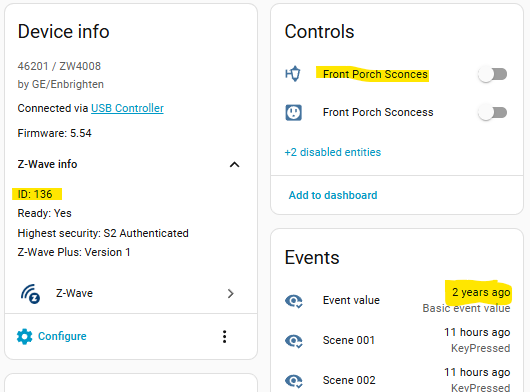

The device that is 136 is truly the Front Porch Sconces. Everywhere in the HA dashboards when I click on the binary switch, it does turn it on. Same with 137 being the Soffit Lights.
It would seem it's getting the names from the ZwaveJS UI values, since they seemed to be off. I've gone ahead and renamed them in ZwaveJS UI to reflect the values in ZwaveJS. How do I get ZWaveJSController to update the names? They still show up as the incorrect name. I went ahead and restarted MSR, and the old naming is till persistent.



-
Reactor only changes the entity name when the entity is first created. From there on, it sticks, no matter what the underlying hub does. To change the name, hit the "Rename" button on the entity in the detail pane (see your latest screen shots).
Also future note. When posting log snippets, please don't use
grepor other filtering. Find the lines of interest, and post 20-25 of context before and as much context after as is relevant. Not all relevant log messages may contain the string you are searching for. -
Reactor only changes the entity name when the entity is first created. From there on, it sticks, no matter what the underlying hub does. To change the name, hit the "Rename" button on the entity in the detail pane (see your latest screen shots).
Also future note. When posting log snippets, please don't use
grepor other filtering. Find the lines of interest, and post 20-25 of context before and as much context after as is relevant. Not all relevant log messages may contain the string you are searching for.Thank you. Perhaps the non-updating of the name was the root cause of my issue all along.
-
The name is incorrect at ZWave-JS (on the node itself) if that's the case, so to keep your sanity later, make sure you go all the way back to the source and work your way forward from there.
-
The name is incorrect at ZWave-JS (on the node itself) if that's the case, so to keep your sanity later, make sure you go all the way back to the source and work your way forward from there.
@toggledbits said in Set reaction triggering wrong z-wave device:
The name is incorrect at ZWave-JS (on the node itself) if that's the case, so to keep your sanity later, make sure you go all the way back to the source and work your way forward from there.
I renamed the devices on the ZWave-JS UI, so i won't have the problem going forward. I'm still not sure how this all happened, as I did not experience this problem in years past. The only thing I can think of is there was some sort of glitch in an upgrade. I know I had to restore the Z-Wave JS UI to an earlier version back in October because of a change they made that broke window coverings, so perhaps during that restore something went wonky.