






MSR with reverse proxy
-
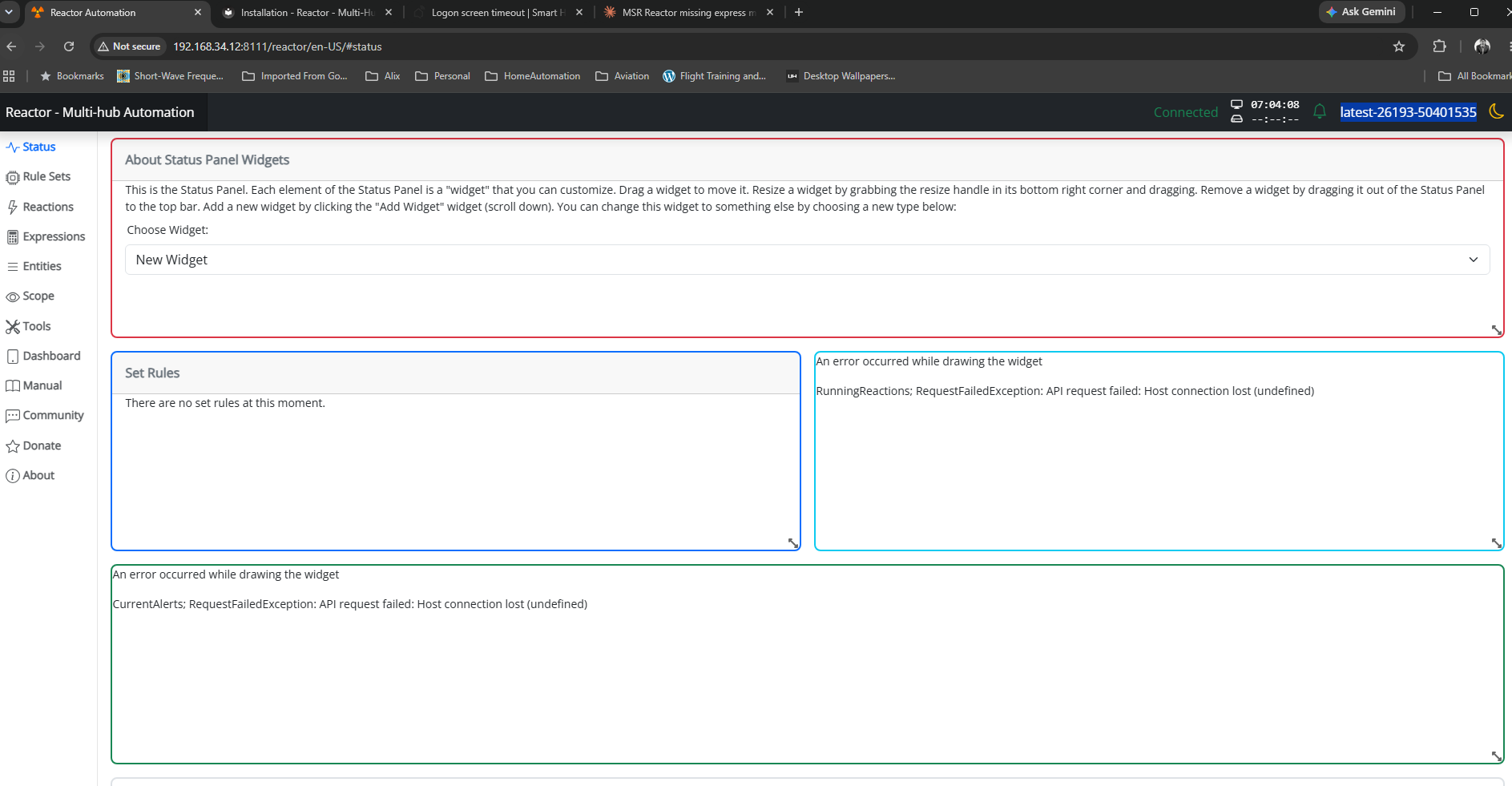
I'm trying to use MSR via reserve proxy in Synology DSM, but MSR page does not load
https://<public ip>:30000/reactor/en-US/At the same time logging page loads normally
https://<public ip>:30000/api/v1/logI thought maybe authentication was messing it up, but there was no deny entries in the log, and also disabling authentication did not make any difference. For this use case VPN is not an option (that works, but as said not an option for this particular use case).
Any ideas what could cause this? MSR build latest-26242-28d69aa8, Chrome browser
-
Do you have
baseurlset in your config?Author of Multi-system Reactor and Reactor, DelayLight, Switchboard, and about a dozen other plugins that run on Vera and openLuup.
-
Do you have
baseurlset in your config?@toggledbits yes I have
baseurl: "http://<private ip>:8111" -
Yeah, that will likely be a problem. It will try to redirect to that private IP and find itself unable. The API calls to the public IP don't need to do this, but the UI interfaces very much do. You might try putting the public IP there.
Author of Multi-system Reactor and Reactor, DelayLight, Switchboard, and about a dozen other plugins that run on Vera and openLuup.
-
Yeah, that will likely be a problem. It will try to redirect to that private IP and find itself unable. The API calls to the public IP don't need to do this, but the UI interfaces very much do. You might try putting the public IP there.
@toggledbits if I’d put public IP there, would it still work as expected when UI is used without a proxy? Also, does it accept dns name or just IPs?
Using MSR on Docker (Synology NAS), having InfluxDB, Grafana & Home Assistant, Zigbee2MQTT & ZWA-2
-
@toggledbits if I’d put public IP there, would it still work as expected when UI is used without a proxy? Also, does it accept dns name or just IPs?
@tunnus said in MSR with reverse proxy:
if I’d put public IP there, would it still work as expected when UI is used without a proxy?
That's a routing/firewall issue. Some will do it out of the box, some you have to enable it (it's often called NAT loopback, NAT hairpinning, or NAT reflection).
@tunnus said in MSR with reverse proxy:
Also, does it accept dns name or just IPs?
It should. That may be another path for you -- internal DNS resolution gives the local address, while external give the public address.
Caution all around, though. I don't build or test this for use in such proxies. I can foresee issues with access control in your scenario, because there's a high probability of extra steps needed to "see through" the proxy to the real original requesting address. If it works for you, fine, but at the moment, I'm not inclined to do more on this.
-
I use it with synology in this exact way. This is only resolved by my own dns running on my unifi. I have local entries in my laptop to resolve to my static ip. Even https/was are ok.
--
On a mission to automate everything. -
I use it with synology in this exact way. This is only resolved by my own dns running on my unifi. I have local entries in my laptop to resolve to my static ip. Even https/was are ok.
@therealdb although I used only IP addresses and not dns names, I wasn't able to get UI to load. In my setup I'm using MSR in a docker container network and not host networking, so that might cause some additional headaches.
So could you share your configuration (e.g Synology reverse proxy conf, baseurl ...)? Obviously no need to use real IPs. I'm also wondering if https configuration in MSR can be avoided (not using that at the moment), but using let's encrypt cert in DSM. Port forwardings & firewall settings shouldn't be an issue, as /api/v1/log page works fine.
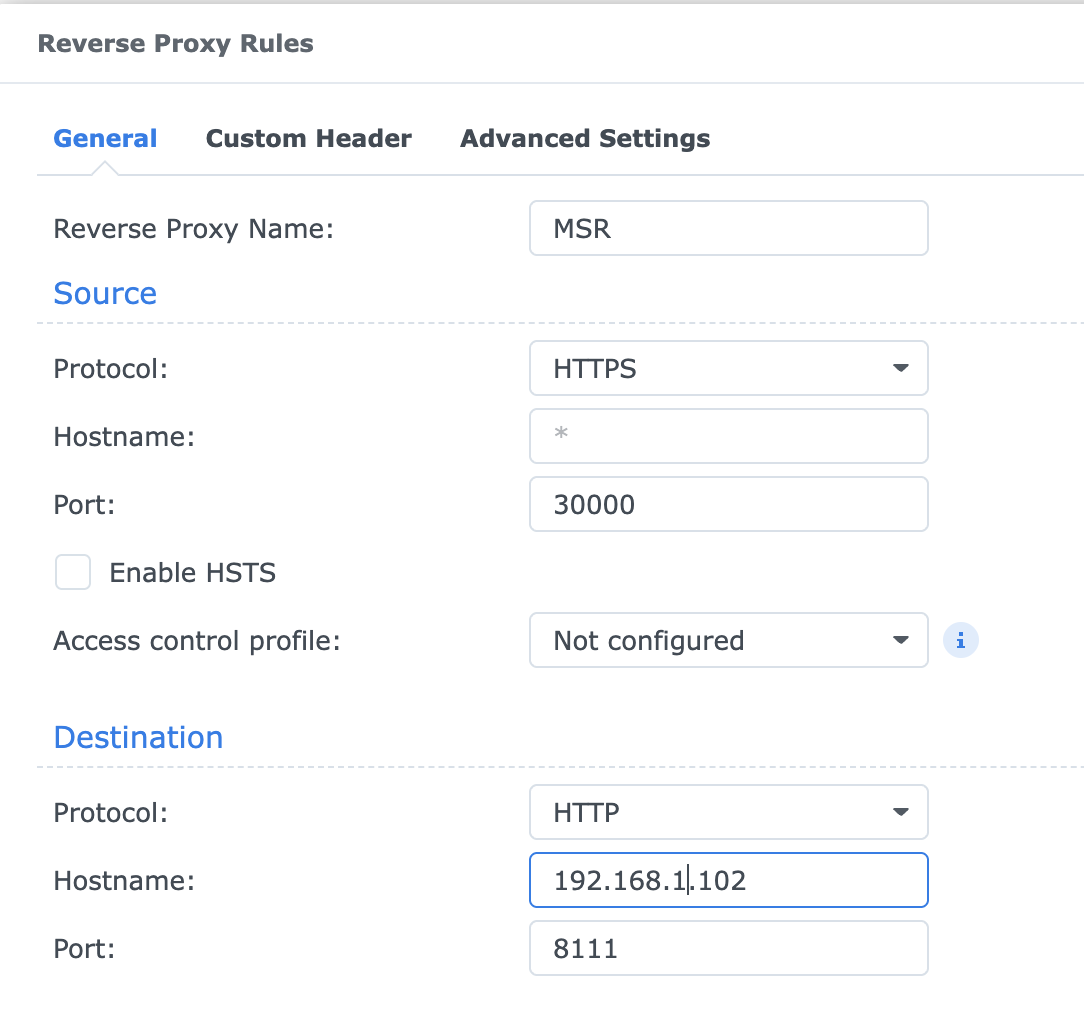
(MSR itself being in a container network having 172.18.0.11 address)
-
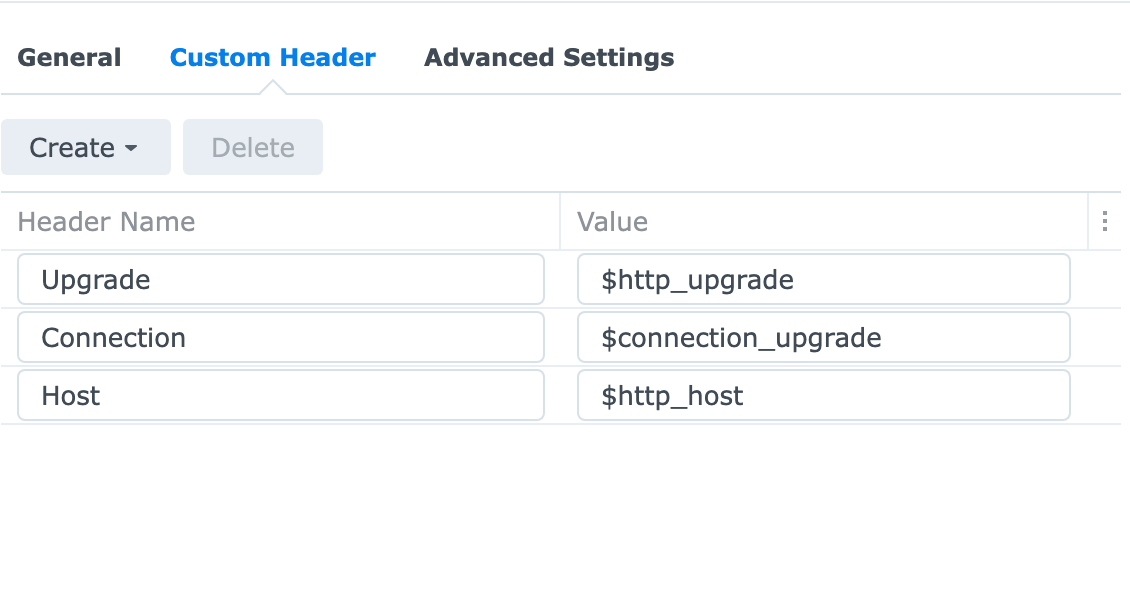
sorry, I'm on a tour right now. I have a similar config, but I configured a specific host name and I'm on the standard HTTPs port.
maybe this is useful
--
On a mission to automate everything. -
sorry, I'm on a tour right now. I have a similar config, but I configured a specific host name and I'm on the standard HTTPs port.
maybe this is useful
@therealdb what's your
baseurlsetting? Especially are you using different external port (and not 8111)? -
OK, I had some time in the past couple of weeks to look into this. Build 26284 now contains some changes that should smooth out configuration and use of reverse proxies. Let's see how it goes, and if I need to do more, we can work through that. There are a couple of new configuration keys to be used when a reverse proxy will provide access to Reactor, and a couple of existing keys have small (?) changes in behavior. The keys and behavior are summarized in the documentation for Access Control in the appropriate places, but to streamline the discussion and your efforts, I'll summarize them here. These configuration keys live in the
reactorsection ofreactor.yaml.First is
trusted_proxy— this tells Reactor the host address of the LAN side of the reverse proxy. This is the address Reactor first sees opening the UI or API connection. The value of this configuration key can be an IPv4 address (e.g. 192.168.0.10). It can also be an array of addresses. I recommend surrounding the address(es) with quotes just to avoid any problems. When Reactor sees a request come in from this address, it looks to see if the request follows the HTTP/1.1 protocol for reverse proxied requests. If so, Reactor knows to track both the request source address (the inside address of the proxy) and the client address (the IP address of the client using the proxy to access Reactor, which may be inside or outside of the LAN). If those two addresses are different, Reactor knows its a proxy request.Second is
proxy_baseurl. This sets the URL to be used asbaseurlwhen the request is proxied. If Reactor needs to redirect for the UI, it will usebaseurlas the base of the redirect if the request is not a proxy request, andproxy_baseurlif it is proxied. Typically, users of reverse proxies will keepbaseurlset to the internal (LAN) URL used to access Reactor (e.g.http://192.168.0.66:8111), but set theproxy_baseurlto the externally-resolvable URL for accessing Reactor from outside their network (e.g.https://example.duckdns.org:8554).Proxied requests are processed a little differently by
allowed_ipsand ACL IP matching. When a request is proxied, the IP address matched byallowed_ipsis that of the actual client, not the proxy's inside (LAN) address. Therefore, if you useallowed_ipswithtrusted_proxy, you must list every external/public host address (or network address in CIDR form) that is allowed to access Reactor through the proxy. By default, the proxy is not trusted byallowed_ips. That can be very inconvenient when you are a road warrior (frequent traveler to many places unknown) and want/need to access Reactor from wherever you may be. To help with this, at the expense of some security, you can tell Reactor that the proxy is trusted and all requests from the proxy should bypassallowed_ipsfiltering. Do this by settingpass_all_proxy: true, but if you do this, you must make sure that the proxy itself provides any and all filtering/authentication/security you might need before allowing access to Reactor. Thepass_all_proxykey works only to circumvent theallow_ipslist; it does not apply to ACLs.Access control ACLs now have
from_proxyto provide matching to requests coming from a specific proxy host (or network). Thesource_ipfilter always looks at the client address. An analog forpass_all_proxyin ACLs could therefore be an ACL withfrom_proxyandallow: true(actual implementation depends on the full set of ACLs and their sequence).Proxy configuration does not change any behavior of user access control in Reactor (i.e. Reactor user login). It is highly recommended that user login be configured and used when a reverse proxy is in use, even if the proxy provides access control in front of Reactor. If you choose not to use user login, you may be leaving your Reactor system vulnerable to external access by accidental discovery (e.g. port scans). Using user login with strong passwords provides an additional, necessary layer of deterrance to illicit access. Reactor will warn you if you are configured for proxy access without enabling and using user login.
The Reactor documentation recommends that you enable/use HTTPS when using user login/auth. You can get away without HTTPS if your access is exclusively on your home network (no external requests or reverse proxies), but it's a different matter when your login requests are going to be through public networks. Therefore, it is also highly recommended that you use HTTPS to access Reactor through your proxy. At the very least, your proxy should receive SSL/TLS-encrypted HTTP requests at its public/external interface. You can keep internal access to Reactor in plain, unencrypted HTTP (including requests from the proxy to Reactor) if you trust your internal network.
And for clarity, in all above where I say "highly recommended" I mean required unless you want to invite trouble.
To wrap up, a checklist:
- Set
trusted_proxyto the inside host/interface address of your reverse proxy; - Set
proxy_baseurlto the externally-accessible URL used to reach Reactor through your reverse proxy; - Enable and configure user authentication/login in Reactor if you haven't already;
- Make sure your proxy's public interface uses HTTPS (encrypted); HTTPS on the inside (between proxy and Reactor) is up to you.
Ref: Access Control in Reactor documentation
And a disclaimer: Opening up any system to the public Internet increases risk. Because the totality of your systems, tools, and needs are unique to you, only you can assess the risks of such access, and the correct and most secure way to provide it. Proceed at your own risk, and know that it is entirely at your own risk and that you accept that risk and its consequences in so doing. I am providing tools, not solutions. How you use these tools is up to you, and the consequences for not using any tool properly can be dire. If you don't know what you are doing in this area, don't do it. You've been warned.
Author of Multi-system Reactor and Reactor, DelayLight, Switchboard, and about a dozen other plugins that run on Vera and openLuup.
- Set
-
OK, I had some time in the past couple of weeks to look into this. Build 26284 now contains some changes that should smooth out configuration and use of reverse proxies. Let's see how it goes, and if I need to do more, we can work through that. There are a couple of new configuration keys to be used when a reverse proxy will provide access to Reactor, and a couple of existing keys have small (?) changes in behavior. The keys and behavior are summarized in the documentation for Access Control in the appropriate places, but to streamline the discussion and your efforts, I'll summarize them here. These configuration keys live in the
reactorsection ofreactor.yaml.First is
trusted_proxy— this tells Reactor the host address of the LAN side of the reverse proxy. This is the address Reactor first sees opening the UI or API connection. The value of this configuration key can be an IPv4 address (e.g. 192.168.0.10). It can also be an array of addresses. I recommend surrounding the address(es) with quotes just to avoid any problems. When Reactor sees a request come in from this address, it looks to see if the request follows the HTTP/1.1 protocol for reverse proxied requests. If so, Reactor knows to track both the request source address (the inside address of the proxy) and the client address (the IP address of the client using the proxy to access Reactor, which may be inside or outside of the LAN). If those two addresses are different, Reactor knows its a proxy request.Second is
proxy_baseurl. This sets the URL to be used asbaseurlwhen the request is proxied. If Reactor needs to redirect for the UI, it will usebaseurlas the base of the redirect if the request is not a proxy request, andproxy_baseurlif it is proxied. Typically, users of reverse proxies will keepbaseurlset to the internal (LAN) URL used to access Reactor (e.g.http://192.168.0.66:8111), but set theproxy_baseurlto the externally-resolvable URL for accessing Reactor from outside their network (e.g.https://example.duckdns.org:8554).Proxied requests are processed a little differently by
allowed_ipsand ACL IP matching. When a request is proxied, the IP address matched byallowed_ipsis that of the actual client, not the proxy's inside (LAN) address. Therefore, if you useallowed_ipswithtrusted_proxy, you must list every external/public host address (or network address in CIDR form) that is allowed to access Reactor through the proxy. By default, the proxy is not trusted byallowed_ips. That can be very inconvenient when you are a road warrior (frequent traveler to many places unknown) and want/need to access Reactor from wherever you may be. To help with this, at the expense of some security, you can tell Reactor that the proxy is trusted and all requests from the proxy should bypassallowed_ipsfiltering. Do this by settingpass_all_proxy: true, but if you do this, you must make sure that the proxy itself provides any and all filtering/authentication/security you might need before allowing access to Reactor. Thepass_all_proxykey works only to circumvent theallow_ipslist; it does not apply to ACLs.Access control ACLs now have
from_proxyto provide matching to requests coming from a specific proxy host (or network). Thesource_ipfilter always looks at the client address. An analog forpass_all_proxyin ACLs could therefore be an ACL withfrom_proxyandallow: true(actual implementation depends on the full set of ACLs and their sequence).Proxy configuration does not change any behavior of user access control in Reactor (i.e. Reactor user login). It is highly recommended that user login be configured and used when a reverse proxy is in use, even if the proxy provides access control in front of Reactor. If you choose not to use user login, you may be leaving your Reactor system vulnerable to external access by accidental discovery (e.g. port scans). Using user login with strong passwords provides an additional, necessary layer of deterrance to illicit access. Reactor will warn you if you are configured for proxy access without enabling and using user login.
The Reactor documentation recommends that you enable/use HTTPS when using user login/auth. You can get away without HTTPS if your access is exclusively on your home network (no external requests or reverse proxies), but it's a different matter when your login requests are going to be through public networks. Therefore, it is also highly recommended that you use HTTPS to access Reactor through your proxy. At the very least, your proxy should receive SSL/TLS-encrypted HTTP requests at its public/external interface. You can keep internal access to Reactor in plain, unencrypted HTTP (including requests from the proxy to Reactor) if you trust your internal network.
And for clarity, in all above where I say "highly recommended" I mean required unless you want to invite trouble.
To wrap up, a checklist:
- Set
trusted_proxyto the inside host/interface address of your reverse proxy; - Set
proxy_baseurlto the externally-accessible URL used to reach Reactor through your reverse proxy; - Enable and configure user authentication/login in Reactor if you haven't already;
- Make sure your proxy's public interface uses HTTPS (encrypted); HTTPS on the inside (between proxy and Reactor) is up to you.
Ref: Access Control in Reactor documentation
And a disclaimer: Opening up any system to the public Internet increases risk. Because the totality of your systems, tools, and needs are unique to you, only you can assess the risks of such access, and the correct and most secure way to provide it. Proceed at your own risk, and know that it is entirely at your own risk and that you accept that risk and its consequences in so doing. I am providing tools, not solutions. How you use these tools is up to you, and the consequences for not using any tool properly can be dire. If you don't know what you are doing in this area, don't do it. You've been warned.
@toggledbits, did follow your instructions and now reverse proxy works like a charm, thanks! I'm using https on Synology and firewalling functionality (allowing based on geo-ip), further restrictions done in
Access Control Profilethat DSM offers in reverse proxy configuration. Obviously also using authentication in MSR. - Set
