




Skip to content
  • Categories
  • Recent
  • Tags
  • Popular
  • Unsolved
Collapse
Discussion Forum to share and further the development of home control and automation, independent of platforms.
  1. Home
  2. Software
  3. Multi-System Reactor
  4. Post-DST and MSR not reflecting local time
[Solved] EzloController throws error in latest-26328
CrilleC
Edit: Fixed in re-spun 26328. (I just gave my old Ezlo Plus a new chance so it's running my z-wave devices in my garage, for evaluation, as my even older Vera Secure had issues reaching that far when some router nodes gave up). Bare metal latest-26328 Issue 1: Nodes don't update in Reactor after update from 26318. Issue 2: Also present in earlier builds, rooms don't add to DGC and throws error at start. Notice: No device mapping matches Intrusion Sensor. I don't know if you still support EzloController but seems like an easy fix? Let me know if you need more info! [latest-26328]2026-11-25T11:18:31.310Z <Controller:NOTICE> Controller HassController#hass is now online. [latest-26328]2026-11-25T11:18:31.313Z <EzloController:ERR> [TypeError] Cannot read properties of undefined (reading 'clear') [-] failed to process rooms: [undefined2] [latest-26328]2026-11-25T11:18:31.313Z <EzloController:CRIT> TypeError: Cannot read properties of undefined (reading 'clear') [-] TypeError: Cannot read properties of undefined (reading 'clear') at EzloController._process_hub_rooms (/home/homebridge/reactor/server/lib/EzloController.js:1558:153) at /home/homebridge/reactor/server/lib/EzloController.js:1388:48 at process.processTicksAndRejections (node:internal/process/task_queues:104:5) [latest-26328]2026-11-25T11:18:31.314Z <wsapi:INFO> wsapi: connection from "192.168.1.2" [latest-26328]2026-11-25T11:18:31.452Z <wsapi:INFO> wsapi: connection from "192.168.1.2" [latest-26328]2026-11-25T11:18:31.585Z <EzloController:ERR> EzloController#ezlo error creating entity Switch#ezlo>device_6b02d1d9129e0715b720f005: [TypeError] _0xf38820[_0x376e98(...)].update is not a function [-] [latest-26328]2026-11-25T11:18:31.585Z <EzloController:CRIT> TypeError: _0xf38820[_0x376e98(...)].update is not a function [-] TypeError: _0xf38820[_0x376e98(...)].update is not a function at /home/homebridge/reactor/server/lib/EzloController.js:1649:58 at Array.forEach (<anonymous>) at EzloController._process_hub_devices (/home/homebridge/reactor/server/lib/EzloController.js:1597:226) at /home/homebridge/reactor/server/lib/EzloController.js:1418:54 at process.processTicksAndRejections (node:internal/process/task_queues:104:5) [latest-26328]2026-11-25T11:18:31.588Z <EzloController:ERR> EzloController#ezlo error creating entity SecuritySensor#ezlo>device_6b02d41d129e0715b720f012: [TypeError] _0xf38820[_0x376e98(...)].update is not a function [-] [latest-26328]2026-11-25T11:18:31.588Z <EzloController:CRIT> TypeError: _0xf38820[_0x376e98(...)].update is not a function [-] TypeError: _0xf38820[_0x376e98(...)].update is not a function at /home/homebridge/reactor/server/lib/EzloController.js:1649:58 at Array.forEach (<anonymous>) at EzloController._process_hub_devices (/home/homebridge/reactor/server/lib/EzloController.js:1597:226) at /home/homebridge/reactor/server/lib/EzloController.js:1418:54 at process.processTicksAndRejections (node:internal/process/task_queues:104:5) [latest-26328]2026-11-25T11:18:31.590Z <EzloController:ERR> EzloController#ezlo no device mapping matches Intrusion Sensor ("6b02d41e129e0715b720f01c") -- skipped [latest-26328]2026-11-25T11:18:31.591Z <EzloController:ERR> EzloController#ezlo error creating entity SecuritySensor#ezlo>device_6b02d9d9129e0715b720f01f: [TypeError] _0xf38820[_0x376e98(...)].update is not a function [-] [latest-26328]2026-11-25T11:18:31.591Z <EzloController:CRIT> TypeError: _0xf38820[_0x376e98(...)].update is not a function [-] TypeError: _0xf38820[_0x376e98(...)].update is not a function at /home/homebridge/reactor/server/lib/EzloController.js:1649:58 at Array.forEach (<anonymous>) at EzloController._process_hub_devices (/home/homebridge/reactor/server/lib/EzloController.js:1597:226) at /home/homebridge/reactor/server/lib/EzloController.js:1418:54 at process.processTicksAndRejections (node:internal/process/task_queues:104:5) [latest-26328]2026-11-25T11:18:31.591Z <EzloController:ERR> EzloController#ezlo no device mapping matches Intrusion Sensor ("6b02d9da129e0715b720f029") -- skipped [latest-26328]2026-11-25T11:18:31.682Z <EzloController:INFO> EzloController#ezlo hub inventory complete/successful; 2159ms [latest-26328]2026-11-25T11:18:31.684Z <Controller:NOTICE> Controller EzloController#ezlo is now online.
Multi-System Reactor
[Solved] Unable to add new groups in DGC, Reactor latest-26318
CrilleC
Edit: Fixed in 26328. Bare metal latest-26318. I tried to add the group "ArmedSensors" but it would not show in UI. "ArmedSensors": name: Armed Sensors select: - include_capability: arming filter_expression: entity.attributes.arming.state The log: [latest-26318]2026-11-24T14:15:20.412Z <DynamicGroupController:ERR> DynamicGroupController#groups error updating dynamic group ArmedSensors: [TypeError] Cannot read properties of undefined (reading 'extendCapability') [-] [latest-26318]2026-11-24T14:15:20.412Z <DynamicGroupController:CRIT> TypeError: Cannot read properties of undefined (reading 'extendCapability') [-] TypeError: Cannot read properties of undefined (reading 'extendCapability') at DynamicGroupController._update_group (/home/homebridge/reactor/server/lib/DynamicGroupController.js:128:18) at DynamicGroupController._update (/home/homebridge/reactor/server/lib/DynamicGroupController.js:483:43) at process.processTicksAndRejections (node:internal/process/task_queues:104:5) at async DynamicGroupController.start (/home/homebridge/reactor/server/lib/DynamicGroupController.js:60:13) at async Promise.allSettled (index 3) Nothing related before or after that I could find. I then copied an existing group to exclude type errors in the new group. "OKforLarm": name: OK för Larm select: - include_capability: door_sensor filter_expression: entity.attributes.door_sensor.state "OKforLarm2": name: "OK för Larm 2" select: - include_capability: door_sensor filter_expression: entity.attributes.door_sensor.state Same error in log. [latest-26318]2026-11-24T14:18:29.793Z <DynamicGroupController:ERR> DynamicGroupController#groups error updating dynamic group OKforLarm2: [TypeError] Cannot read properties of undefined (reading 'extendCapability') [-] [latest-26318]2026-11-24T14:18:29.793Z <DynamicGroupController:CRIT> TypeError: Cannot read properties of undefined (reading 'extendCapability') [-] TypeError: Cannot read properties of undefined (reading 'extendCapability') at DynamicGroupController._update_group (/home/homebridge/reactor/server/lib/DynamicGroupController.js:128:18) at DynamicGroupController._update (/home/homebridge/reactor/server/lib/DynamicGroupController.js:483:43) at process.processTicksAndRejections (node:internal/process/task_queues:104:5) at async DynamicGroupController.start (/home/homebridge/reactor/server/lib/DynamicGroupController.js:60:13) at async Promise.allSettled (index 3) [latest-26318]2026-11-24T14:18:29.806Z <DynamicGroupController:ERR> DynamicGroupController#groups error updating dynamic group ArmedSensors: [TypeError] Cannot read properties of undefined (reading 'extendCapability') [-] [latest-26318]2026-11-24T14:18:29.806Z <DynamicGroupController:CRIT> TypeError: Cannot read properties of undefined (reading 'extendCapability') [-] TypeError: Cannot read properties of undefined (reading 'extendCapability') at DynamicGroupController._update_group (/home/homebridge/reactor/server/lib/DynamicGroupController.js:128:18) at DynamicGroupController._update (/home/homebridge/reactor/server/lib/DynamicGroupController.js:483:43) at process.processTicksAndRejections (node:internal/process/task_queues:104:5) at async DynamicGroupController.start (/home/homebridge/reactor/server/lib/DynamicGroupController.js:60:13) at async Promise.allSettled (index 3) Let me know if I missed something or you need more info.
Multi-System Reactor
Reactor (Multi-System/Multi-Hub) Announcements
toggledbitsT
Build 21228 has been released. Docker images available from DockerHub as usual, and bare-metal packages here. Home Assistant up to version 2021.8.6 supported; the online version of the manual will now state the current supported versions; Fix an error in OWMWeatherController that could cause it to stop updating; Unify the approach to entity filtering on all hub interface classes (controllers); this works for device entities only; it may be extended to other entities later; Improve error detail in messages for EzloController during auth phase; Add isRuleSet() and isRuleEnabled() functions to expressions extensions; Implement set action for lock and passage capabilities (makes them more easily scriptable in some cases); Fix a place in the UI where 24-hour time was not being displayed.
Multi-System Reactor
UI not loading after upgrading to 26318
tunnusT
Sorry for a hasty post, will update some details later, but the scenario is that I managed to type a wrong password for too many times and had the following users.yaml section: authtrack: max_attempts: 4 within_minutes: 180 # 180 minutes = 3 hrs block_expiration_minutes: 10080 # 7 days At this time I used build 26298. Then noticed there's a new build with a bypass blocking feature (and yes, it said it won't remove existing block). Anyway, went ahead and upgraded to 26318, but the problem now is that UI is not loading at all (page does not answer). This also means that I cannot use "http://reactor_host:port/diag/clear_authtrack?askauth" command to clear the block (or use any other source IP for login). Docker container stays up & running and does not exit. I'll try to dig up some logs, but anything that I could immediately try out (could I delete a particular file for example)? EDIT: some logs [latest-26318]2026-11-17T20:42:32.337Z <Rule:INFO> MSR startup (rule-lculfnhm in Miscellaneous) started [latest-26318]2026-11-17T20:42:32.343Z <httpapi:NOTICE> httpapi#1 HTTP server listening on :::8111 [latest-26318]2026-11-17T20:42:32.347Z <httpapi:INFO> httpapi#1 local docs found in /opt/reactor/docs/html; setting up static service [latest-26318]2026-11-17T20:42:32.354Z <app:NOTICE> Starting WSAPI... [latest-26318]2026-11-17T20:42:32.355Z <wsapi:NOTICE> wsapi: starting version 26298 protocol [latest-26318]2026-11-17T20:42:32.523Z <Engine:INFO> Engine#1 master timer tick, local time "17/11/2026 22:42:32" (TZ offset 120 mins from UTC) [latest-26318]2026-11-17T20:42:32.542Z <Engine:NOTICE> Starting reaction MSR startup<SET> (rule-lculfnhm:S) [latest-26318]2026-11-17T20:42:32.545Z <Notifier:null> Module Notifier v26186 [latest-26318]2026-11-17T20:42:32.545Z <Engine:INFO> MSR startup<SET> all actions completed. [latest-26318]2026-11-17T20:42:32.557Z <Rule:INFO> Rule#rule-lculfnhm reaction rule-lculfnhm:S completed [latest-26318]2026-11-17T20:42:32.558Z <default:null> Module NotifyTelegram v26177
Multi-System Reactor
[Resolved] Hubitat upgrade 2.5.3.123 may have broken login
3
Topic thumbnail image
Multi-System Reactor
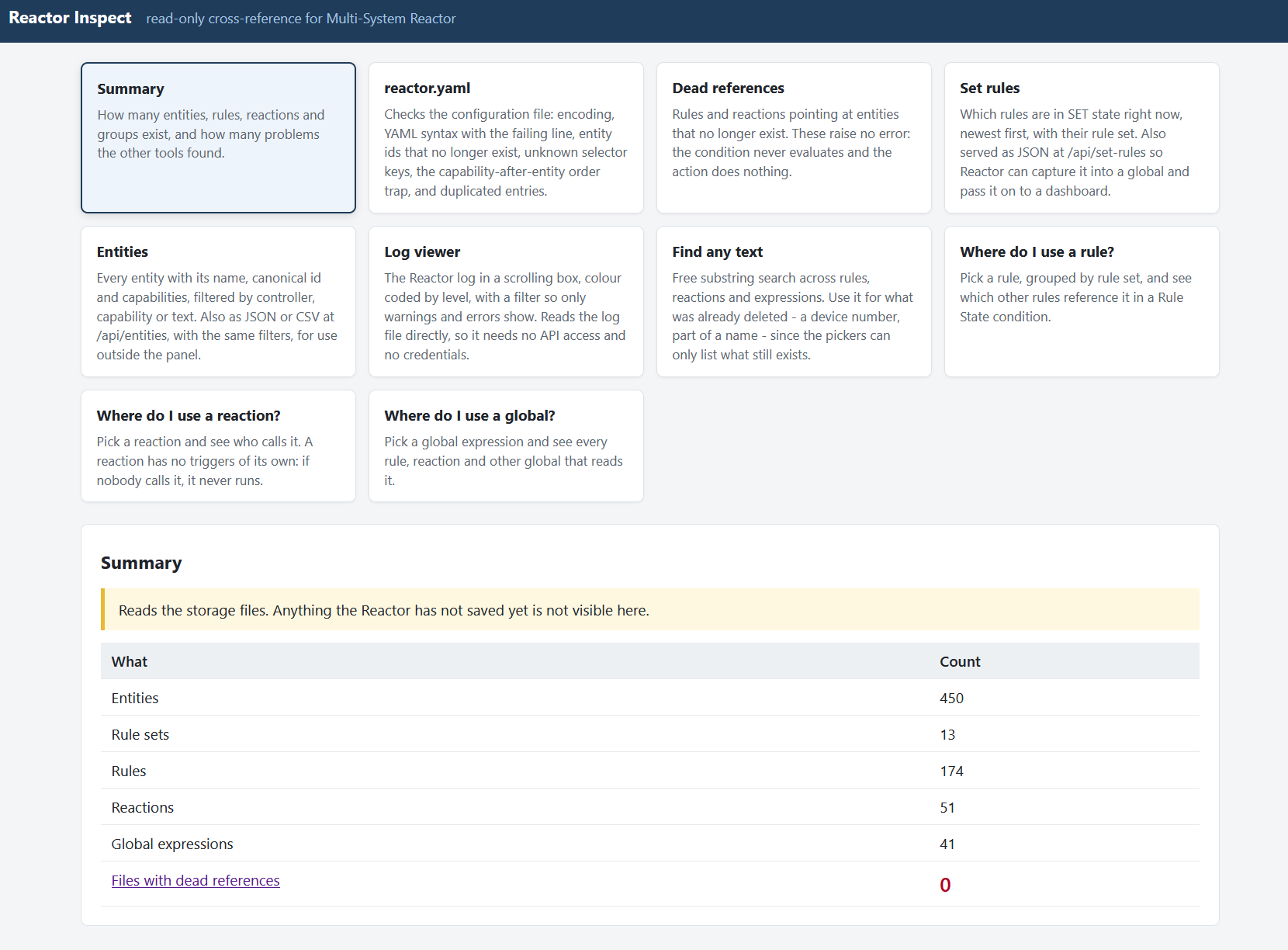
Reactor Inspect - a small read-only helper panel for MSR
wmarcolinW
Topic thumbnail image
Multi-System Reactor
Reverse proxy & API ACL
tunnusT
I'm trying to allow anonymous access from a local network to /api/v1/log, but the problem now with the reverse proxy configuration is that this access is open via proxy to the internet. At least I wasn't able to configure ACL so that only an access from a local network would be permitted. reactor.yaml: baseurl: "http://192.168.1.12:8111" proxy_baseurl: "https://external.com:30000" trusted_proxy: "192.168.1.12" Local traffic would originate from 192.168.1.0/24 network. Synology is acting as a reverse proxy and hosting MSR as a docker container (which has its own network and IP 172.18.0.5). MSR build is latest-26298-fbb75fb8 users.yaml: - url: "/api/v1/log" method: "GET" source_ip: 172.18.0.0/24 allow: true Using the above ACL works, but it enables access via proxy also. If I use source_ip: 192.168.1.0/24, then it doesn't work either locally or remotely. So I'm kinda lost what should I use as source_ip in this case?
Multi-System Reactor
MFA
T
Topic thumbnail image
Multi-System Reactor
Grouped devices
G
I've seen many of you using Dynamic Group Controller. I'm using it myself for monitoring device battery levels. I've read and re-read the Dynamic Group Controller docs and still cannot come to an answer for my question so let me paint my scenario: I've migrated from EchoSpeaks in Hubitat ('cause borked and seemingly unmaintained) to Alexa Devices in Home Assistant ('cause not borked in 2026.11.0) to be able to send TTS to my Echo devices. In EchoSpeaks I could create groups. Sweet. In Alexa Devices I don't seem to be able to do so. As such, my thought was "wait - isn't there a way in MSR?" Is this an effective scenario that Dynamic Group Controller can be used for?
Multi-System Reactor
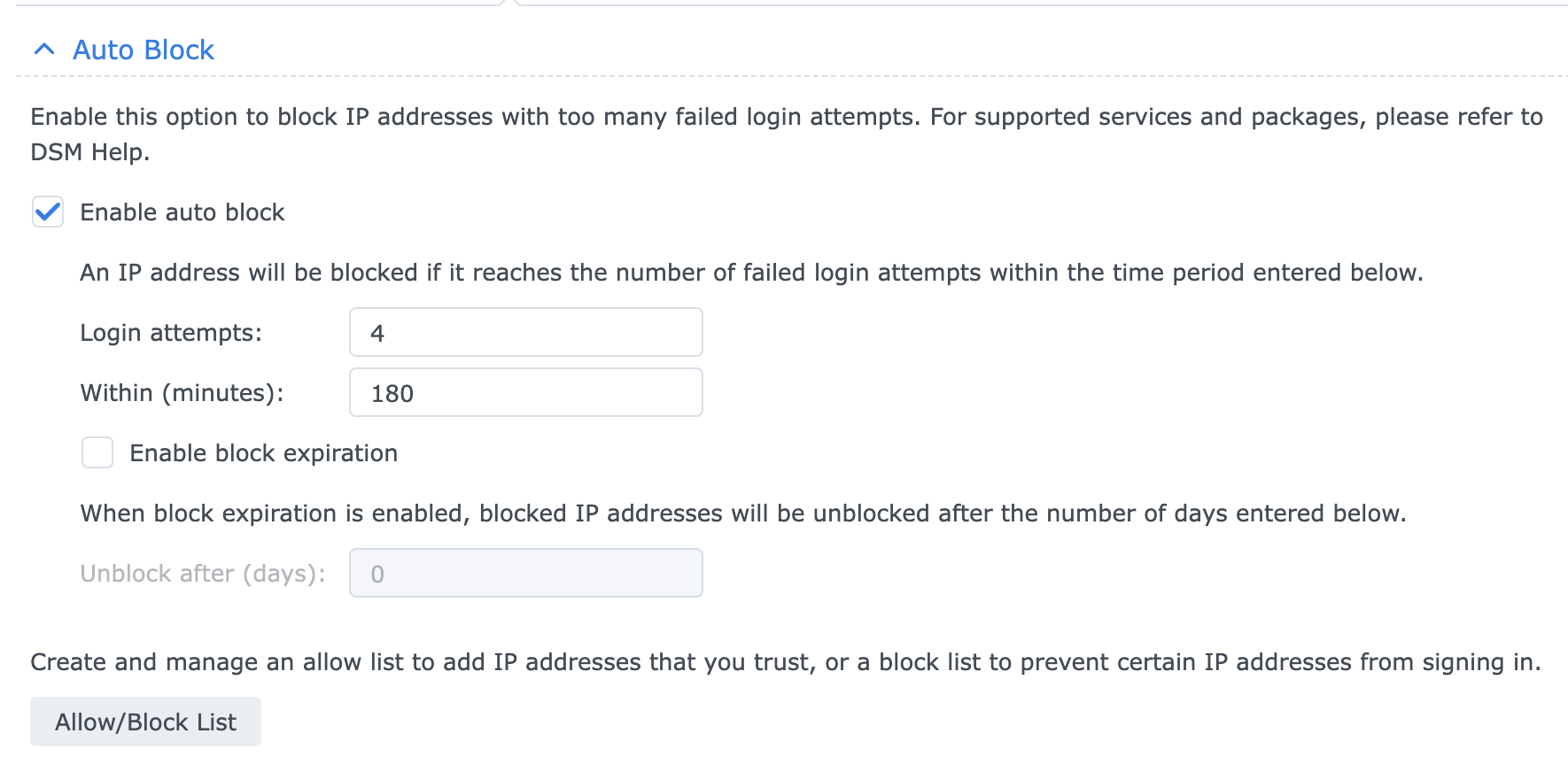
Login protections
tunnusT
Topic thumbnail image
Multi-System Reactor
Reactor Build 26284 stuck at Loading Reactor UI
T
Topic thumbnail image
Multi-System Reactor
MSR with reverse proxy
tunnusT
I'm trying to use MSR via reserve proxy in Synology DSM, but MSR page does not load https://<public ip>:30000/reactor/en-US/ At the same time logging page loads normally https://<public ip>:30000/api/v1/log I thought maybe authentication was messing it up, but there was no deny entries in the log, and also disabling authentication did not make any difference. For this use case VPN is not an option (that works, but as said not an option for this particular use case). Any ideas what could cause this? MSR build latest-26242-28d69aa8, Chrome browser
Multi-System Reactor
Missing attribute after upgrade
3
Topic thumbnail image
Multi-System Reactor
[MSR] Native fan capabilty
therealdbT
Nothing more to add. I see we have hvac_blower, but, anyway, maybe a native fan on the same assumptions of the fan from HASS could be reasonable. I have a couple of them. ie, this is from ESPHome via HASS. x_hass.domain="fan" x_hass.entity_id="fan.kitchen_seashell_hood_ventilation_fan" x_hass.floor_id=null x_hass.services=["fan","esphome"] x_hass.source="esphome" x_hass.state="off" x_hass_attr.friendly_name="Seashell Hood Ventilation Fan" x_hass_attr.percentage=50 x_hass_attr.percentage_step=25 x_hass_attr.preset_mode="" x_hass_attr.preset_modes=[] x_hass_attr.supported_features=49 Thanks.
Multi-System Reactor
[MSR] Rule do not fire
therealdbT
Topic thumbnail image
Multi-System Reactor
Rule condition shows TRUE in UI but Rule never transitions to SET — survives full restart
N
Build: latest-26221-b25bb3e3, Docker on Synology. Hi, I have a Rule whose Trigger/Constraints reference other Rules via Rule State ... is TRUE. At some point it stops firing. Expanding the rule's condition tree in the UI shows every Trigger and Constraint condition green/TRUE — confirmed live by walking into the room and watching Motion go true in real time. Rule History shows no new SET, just old reset entries. Tried, on the same rule, same evening: recreating the trigger conditions with fresh IDs, recreating the constraint conditions with fresh IDs (flat and wrapped in a new Group — wrapping in a Group produced one SET, but it didn't reproduce on repeat attempts with the same structure), and finally a full container restart with a verified-correct saved rule. Still no SET, even with a fresh live motion event right after the restart. Separately, I found that this rule (and its 10 per-room clones) share identical internal condition/group IDs with each other — leftover from a batch clone done months ago, never regenerated. Not sure if that's related, since fixing the IDs didn't reliably fix the symptom either. Has anyone seen a Rule State condition show TRUE in the UI without the Rule ever producing a SET, surviving a clean restart? Thanks in advance
Multi-System Reactor
DynamicGroupController and attributes
therealdbT
Hey @toggledbits I'm back to trying to optimize a couple of things based on dynamic group. First of all, I think I found a typo in the doc: primary_attribute: "binary_sensor.state" primary_attribute_value: | d = false; each id in members: d = getEntity(id)?.attributes?.power_switch?.state or d, d I think the correct code snippet is d = false, All that said, my use case for dynamic groups is to group 3 different climate devices, so I could easily command them at the same time. Commands are good, but sometimes I want to check if any of the devices are on, and that's easily done with a similar snippet as the one you have in the docs. But this is limited to the primary attribute, while I want to have any of the attributes in the group to be driven by a similar logic (while all are null in the group). ie, access hvac_control.mode and see if any of the unit is set to cool, or heat. Is that possible, without re-defining an expression in each of my rules? Thanks!
Multi-System Reactor
Unofficial thread for compatibility
tunnusT
As there are statements about compatibility for home assistant versions in MSR new version announcements (e.g. "HassController: Bless Hass to 2025.7.3"), I thought it would be good idea to track other controllers as well. As an example, I can confirm that build "latest-25208-c53e8513" works with Hubitat Elevation C-8 platform version 2.4.2.134 using Maker API. Updates: (the latest versions first in the list) OK: build "latest-25264-2fbe9217" with Hubitat C-8 platform v. 2.4.3.123
Multi-System Reactor
Ooops - Deleted Reactor Ex Machina II
R
I accidentally deleted Reactor Ex Machina II (REM II) from my Reactor rules. I tried to recover it by deleting the .json and .dval in the Rules subdirectory and then recreating it from Togglebits original posting, but that did not work. Does anyone know how to recover REM ll ?
Multi-System Reactor
Bail out of failed reaction?
T
Topic thumbnail image
Multi-System Reactor

Post-DST and MSR not reflecting local time

Scheduled Pinned Locked Moved Multi-System Reactor
18 Posts 4 Posters 6.1k Views 4 Watching
  • Oldest to Newest
  • Newest to Oldest
  • Most Votes
Reply
  • Reply as topic
Log in to reply
This topic has been deleted. Only users with topic management privileges can see it.
  • G Offline
    G Offline
    gwp1
    wrote on last edited by gwp1
    #1

    This system has been running flawlessly year after year for the time changes twice a year literally since MSR came out so I was caught off-guard when this happened this morning.

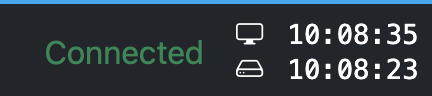
    Time in MSR browser is EST, time on RPi is local time (DST).

    76ed5313-b9b9-46d4-b0f9-462c40e99750-image.png

    195e61c5-58a7-4453-b96a-18cebae75550-image.png

    • I've rebooted the RPi
    • I've restarted MSR after double-checking the time on the RPi.
    • Used a completely different browser to eliminate any caching concerns.
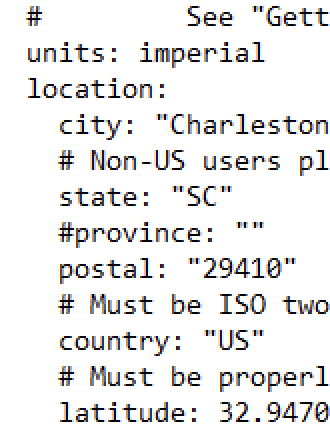
    • Double-checked MSR reactor.yaml

    a5f23151-d691-4343-8499-8e77a55528e5-image.png

    What am I missing here @toggledbits ?

    *Hubitat C-7 2.5.2.139
    *Proxmox VE v8, Beelink MiniPC 12GBs, SSD

    *HAOS
    Core 2026.10.4
    w/ HA Connect ZWA-2 & ZBT-2
    FW: v1.1
    SDK: v7.23.1

    *Prod MSR in docker/portainer
    MSR: latest-26298-fbb75fb8
    MQTTController: 25139
    ZWave Controller: 25139

    G 1 Reply Last reply
    0
    • G gwp1

      This system has been running flawlessly year after year for the time changes twice a year literally since MSR came out so I was caught off-guard when this happened this morning.

      Time in MSR browser is EST, time on RPi is local time (DST).

      76ed5313-b9b9-46d4-b0f9-462c40e99750-image.png

      195e61c5-58a7-4453-b96a-18cebae75550-image.png

      • I've rebooted the RPi
      • I've restarted MSR after double-checking the time on the RPi.
      • Used a completely different browser to eliminate any caching concerns.
      • Double-checked MSR reactor.yaml

      a5f23151-d691-4343-8499-8e77a55528e5-image.png

      What am I missing here @toggledbits ?

      G Offline
      G Offline
      gwp1
      wrote on last edited by gwp1
      #2

      Poking at things just because, doing a .../diag/sun and it shows me:

      The host time is 3/10/2024, 8:04:48 AM offset -300 minutes from UTC (TZ=undefined; location (lat,lon) 32.94707,-80.01374 elev 0m; sunrise 3/10/2024, 6:37:23 AM, sunset 3/10/2024, 6:25:28 PM.

      This is not what the RPi is showing as host time, it's an hour off - but if I go to CLI and do a simple date I get:

      00cc5775-2f66-4dff-ae84-b6262bd3c454-image.png

      ... which is correct.

      I also noticed suninfo.dst is still showing as false

      *Hubitat C-7 2.5.2.139
      *Proxmox VE v8, Beelink MiniPC 12GBs, SSD

      *HAOS
      Core 2026.10.4
      w/ HA Connect ZWA-2 & ZBT-2
      FW: v1.1
      SDK: v7.23.1

      *Prod MSR in docker/portainer
      MSR: latest-26298-fbb75fb8
      MQTTController: 25139
      ZWave Controller: 25139

      G toggledbitsT 2 Replies Last reply
      0
      • G gwp1

        Poking at things just because, doing a .../diag/sun and it shows me:

        The host time is 3/10/2024, 8:04:48 AM offset -300 minutes from UTC (TZ=undefined; location (lat,lon) 32.94707,-80.01374 elev 0m; sunrise 3/10/2024, 6:37:23 AM, sunset 3/10/2024, 6:25:28 PM.

        This is not what the RPi is showing as host time, it's an hour off - but if I go to CLI and do a simple date I get:

        00cc5775-2f66-4dff-ae84-b6262bd3c454-image.png

        ... which is correct.

        I also noticed suninfo.dst is still showing as false

        G Offline
        G Offline
        gwp1
        wrote on last edited by
        #3

        Reviewing troubleshooting:

        • Host time is verified correct
        • Browser time is verified correct (hard reset done anyway)
        • Local config is correct in reactor.yaml
        • Test time is not active (has been commented out since 2022's last use
        • MSR does not match RPi's host time, it is an hour behind as though it's literally not "seeing"/able to access the host time.

        *Hubitat C-7 2.5.2.139
        *Proxmox VE v8, Beelink MiniPC 12GBs, SSD

        *HAOS
        Core 2026.10.4
        w/ HA Connect ZWA-2 & ZBT-2
        FW: v1.1
        SDK: v7.23.1

        *Prod MSR in docker/portainer
        MSR: latest-26298-fbb75fb8
        MQTTController: 25139
        ZWave Controller: 25139

        G 1 Reply Last reply
        0
        • dzeD Offline
          dzeD Offline
          dze
          wrote on last edited by
          #4

          Seeing the same issue here.

          Verified host time against other systems.
          Checked Local time,
          MSR is 1 hour behind,
          Verified TZ settings .

          Hubitat C-7 2.3.8.125
          Home Assistant 2024.3.0 running ZST10-700 fw 7.18.3
          MSR on RPi4 bare metal Model B 2GBs, SSD
          MSR latest-24057-e9add9f5
          MQTTController-24050
          ZWave Controller-23326

          Hubitat C-7 2.3.4.127
          Home Assistant 2022.12.1.0
          MSR on RPi4 bare metal Model B 8GBs
          MSR latest-22349-ec1d482b
          MQTTController-22361
          ZWave Controller-22323

          1 Reply Last reply
          0
          • Tom_DT Offline
            Tom_DT Offline
            Tom_D
            wrote on last edited by
            #5

            MSR is running in a QNAP container. The server time is correct.

            screenshot-192.168.1.193_8080-2024.03.10-12_20_55.jpg

            screenshot-192.168.1.193_8111-2024.03.10-12_25_27.jpg

            latest-25082-3c348de6

            Tom_DT 1 Reply Last reply
            0
            • G gwp1

              Reviewing troubleshooting:

              • Host time is verified correct
              • Browser time is verified correct (hard reset done anyway)
              • Local config is correct in reactor.yaml
              • Test time is not active (has been commented out since 2022's last use
              • MSR does not match RPi's host time, it is an hour behind as though it's literally not "seeing"/able to access the host time.
              G Offline
              G Offline
              gwp1
              wrote on last edited by
              #6

              Interestingly, since the docs (yes, I read them) said to double-check to ensure test_time wasn't enabled - which it wasn't.

              Then I had the brainstorm of "what if I use the test_time functionality to at least get me on the right time until a solution is found"?

              So I set the test_time in reactor.yaml
              da23f19c-ef79-4153-b82c-ec6b7a01bea6-image.png

              Restarted Reactor
              fc426fbe-33ae-4b71-8299-c90544bdbb07-image.png

              And viola... it'll get me thru for now.

              6219dd70-377b-404e-9cb0-354a3c031bb3-image.png

              *Hubitat C-7 2.5.2.139
              *Proxmox VE v8, Beelink MiniPC 12GBs, SSD

              *HAOS
              Core 2026.10.4
              w/ HA Connect ZWA-2 & ZBT-2
              FW: v1.1
              SDK: v7.23.1

              *Prod MSR in docker/portainer
              MSR: latest-26298-fbb75fb8
              MQTTController: 25139
              ZWave Controller: 25139

              G 1 Reply Last reply
              0
              • G gwp1

                Interestingly, since the docs (yes, I read them) said to double-check to ensure test_time wasn't enabled - which it wasn't.

                Then I had the brainstorm of "what if I use the test_time functionality to at least get me on the right time until a solution is found"?

                So I set the test_time in reactor.yaml
                da23f19c-ef79-4153-b82c-ec6b7a01bea6-image.png

                Restarted Reactor
                fc426fbe-33ae-4b71-8299-c90544bdbb07-image.png

                And viola... it'll get me thru for now.
                6219dd70-377b-404e-9cb0-354a3c031bb3-image.png

                G Offline
                G Offline
                gwp1
                wrote on last edited by gwp1
                #7

                Ok, this just got weirder. I edited a rule at 15:50 EDT still under test_time as shown above.

                The rule shows the SET time as ea274e36-aaf1-4c08-a569-1327febaf149-image.png

                Then I turned OFF test_time and refreshed the same rule.
                2718ac68-7317-4499-a39f-d6cc78c11ac5-image.png

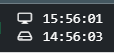
                That reflects the real time... but the clock display now shows me an hour off again, MSR being back on EST.
                46aab6b4-379b-4c04-a434-def84cf995db-image.png

                Yes, the browser is being refreshed after each change is implemented.

                UPDATE: looking back at some rules from the day, I see this rule was scheduled for 07:30 EDT but fired at 08:30 EDT. The display shows the REAL time but the action happened an hour late (ie, the time displayed for host time).

                be9c223c-421e-4b3a-9c7d-df1b141d5a79-image.png

                It would appear rules are firing from the displayed host time (the incorrect EST time) but being logged as the correct time, EDT.

                *Hubitat C-7 2.5.2.139
                *Proxmox VE v8, Beelink MiniPC 12GBs, SSD

                *HAOS
                Core 2026.10.4
                w/ HA Connect ZWA-2 & ZBT-2
                FW: v1.1
                SDK: v7.23.1

                *Prod MSR in docker/portainer
                MSR: latest-26298-fbb75fb8
                MQTTController: 25139
                ZWave Controller: 25139

                1 Reply Last reply
                0
                • G gwp1

                  Poking at things just because, doing a .../diag/sun and it shows me:

                  The host time is 3/10/2024, 8:04:48 AM offset -300 minutes from UTC (TZ=undefined; location (lat,lon) 32.94707,-80.01374 elev 0m; sunrise 3/10/2024, 6:37:23 AM, sunset 3/10/2024, 6:25:28 PM.

                  This is not what the RPi is showing as host time, it's an hour off - but if I go to CLI and do a simple date I get:

                  00cc5775-2f66-4dff-ae84-b6262bd3c454-image.png

                  ... which is correct.

                  I also noticed suninfo.dst is still showing as false

                  toggledbitsT Offline
                  toggledbitsT Offline
                  toggledbits
                  wrote on last edited by
                  #8

                  @gwp1 said in Post-DST and MSR not reflecting local time:

                  doing a .../diag/sun and it shows me:

                  The host time is 3/10/2024, 8:04:48 AM offset -300 minutes from UTC (TZ=undefined;

                  Try setting TZ. If using systemctl, do it in the systemctl configuration for Reactor.

                  No startup logs? No nodejs version info?

                  Traveling, have limited access.

                  Author of Multi-system Reactor and Reactor, DelayLight, Switchboard, and about a dozen other plugins that run on Vera and openLuup.

                  G 1 Reply Last reply
                  0
                  • toggledbitsT toggledbits

                    @gwp1 said in Post-DST and MSR not reflecting local time:

                    doing a .../diag/sun and it shows me:

                    The host time is 3/10/2024, 8:04:48 AM offset -300 minutes from UTC (TZ=undefined;

                    Try setting TZ. If using systemctl, do it in the systemctl configuration for Reactor.

                    No startup logs? No nodejs version info?

                    Traveling, have limited access.

                    G Offline
                    G Offline
                    gwp1
                    wrote on last edited by
                    #9

                    @toggledbits according to a screenshot in the first post, the RPi does have a default timezone. It's America/New York.

                    NodeJS v18.18.2

                    Pleading ignorance here for "If using systemctl do it in the systemctl configuration for Reactor. Not sure what you mean by that.

                    I've restarted Reactor and pulled two log files. I'll put them in the Dropbox.

                    *Hubitat C-7 2.5.2.139
                    *Proxmox VE v8, Beelink MiniPC 12GBs, SSD

                    *HAOS
                    Core 2026.10.4
                    w/ HA Connect ZWA-2 & ZBT-2
                    FW: v1.1
                    SDK: v7.23.1

                    *Prod MSR in docker/portainer
                    MSR: latest-26298-fbb75fb8
                    MQTTController: 25139
                    ZWave Controller: 25139

                    toggledbitsT 1 Reply Last reply
                    0
                    • G gwp1

                      @toggledbits according to a screenshot in the first post, the RPi does have a default timezone. It's America/New York.

                      NodeJS v18.18.2

                      Pleading ignorance here for "If using systemctl do it in the systemctl configuration for Reactor. Not sure what you mean by that.

                      I've restarted Reactor and pulled two log files. I'll put them in the Dropbox.

                      toggledbitsT Offline
                      toggledbitsT Offline
                      toggledbits
                      wrote on last edited by
                      #10

                      @gwp1 set tz in your environment for nodejs

                      Author of Multi-system Reactor and Reactor, DelayLight, Switchboard, and about a dozen other plugins that run on Vera and openLuup.

                      G 1 Reply Last reply
                      0
                      • Tom_DT Tom_D

                        MSR is running in a QNAP container. The server time is correct.

                        screenshot-192.168.1.193_8080-2024.03.10-12_20_55.jpg

                        screenshot-192.168.1.193_8111-2024.03.10-12_25_27.jpg

                        Tom_DT Offline
                        Tom_DT Offline
                        Tom_D
                        wrote on last edited by
                        #11

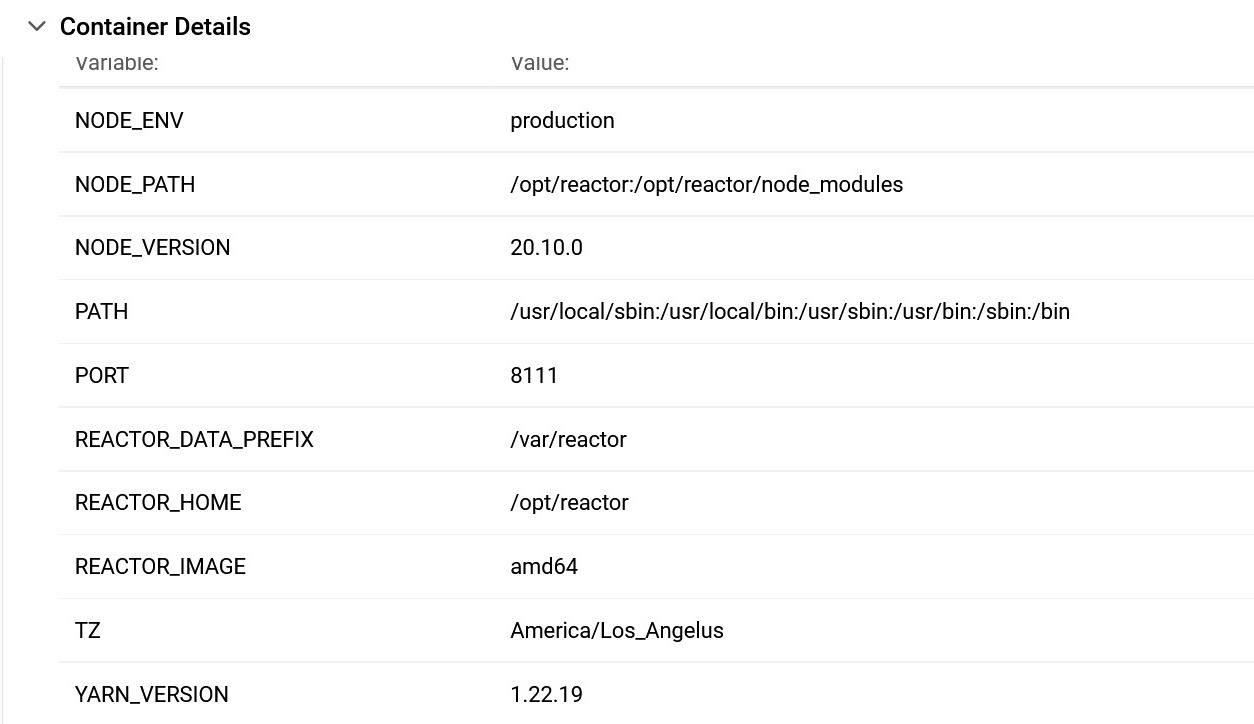
                        @Tom_D Spelling Los_Angeles properly solved my time issue. Thanks.

                        latest-25082-3c348de6

                        1 Reply Last reply
                        0
                        • toggledbitsT toggledbits

                          @gwp1 set tz in your environment for nodejs

                          G Offline
                          G Offline
                          gwp1
                          wrote on last edited by
                          #12

                          @toggledbits So this is new territory for me. What appears to have resolved this is the addition to app.js of this line at the top:

                          process.env.TZ = "America/New_York";
                          

                          I placed it here:

                          /** Copyright (C) 2020-2023 Kedron Holdings LLC, All Rights Reserved. This file is part of Reactor.
                           *  For info and license terms please see https://reactor.toggledbits.com/
                           *  ------------------------------------------------------------------------------
                          */
                          process.env.TZ = "America/New_York";
                          const a0_0x2a8642 = a0_0x2074;


                          *Hubitat C-7 2.5.2.139
                          *Proxmox VE v8, Beelink MiniPC 12GBs, SSD

                          *HAOS
                          Core 2026.10.4
                          w/ HA Connect ZWA-2 & ZBT-2
                          FW: v1.1
                          SDK: v7.23.1

                          *Prod MSR in docker/portainer
                          MSR: latest-26298-fbb75fb8
                          MQTTController: 25139
                          ZWave Controller: 25139

                          toggledbitsT 1 Reply Last reply
                          0
                          • G gwp1

                            @toggledbits So this is new territory for me. What appears to have resolved this is the addition to app.js of this line at the top:

                            process.env.TZ = "America/New_York";
                            

                            I placed it here:

                            /** Copyright (C) 2020-2023 Kedron Holdings LLC, All Rights Reserved. This file is part of Reactor.
                             *  For info and license terms please see https://reactor.toggledbits.com/
                             *  ------------------------------------------------------------------------------
                            */
                            process.env.TZ = "America/New_York";
                            const a0_0x2a8642 = a0_0x2074;
                            
                            
                            toggledbitsT Offline
                            toggledbitsT Offline
                            toggledbits
                            wrote on last edited by toggledbits
                            #13

                            @gwp1 said in Post-DST and MSR not reflecting local time:

                            So this is new territory for me.

                            OK. I'm back home now and can engage this a little more.

                            First, what you've done may have worked, but it's not the "right" way and nobody should ever do this in future. I say that only to avoid people going down this path if they happen upon this thread later. This may have worked, but you're going to have to redo it every time you upgrade Reactor, and it's just generally not the OS-approved way to handle it.

                            To start on the "right" path, we need to begin with a look at your system time setting, which you can see by doing the following (post the output here in reply):

                            ls -l /etc/localtime
                            

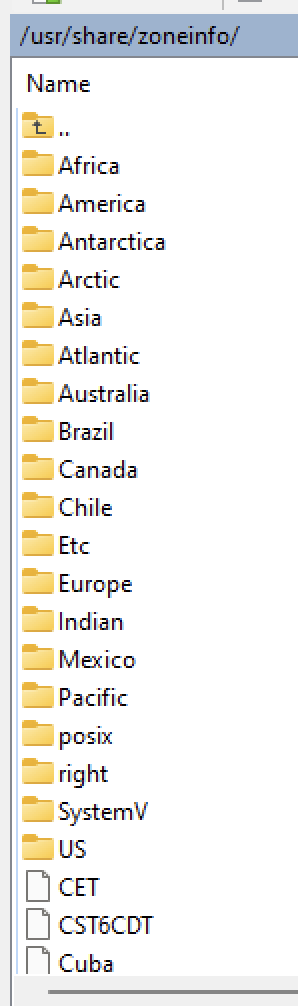
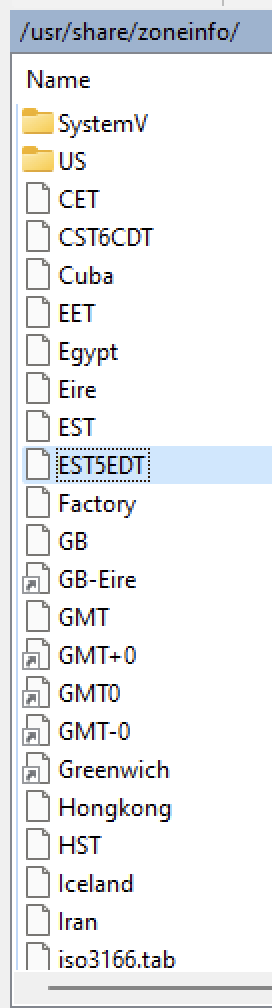
                            The named path is (or should be) a symbolic link to a timezone data file (typically in /usr/share/zoneinfo). The preferred timezone names these days are continental/regional forms, like America/New_York, not the old EST5EDT form. Using the timedatectl command with no options should show the correct current time, time zone, offset, and NTP status.

                            If Reactor is still misbehaving, make sure your OS is fully up to date, and all timezone data files have been updated to latest versions. If updates were applied, reboot and repeat the checks in the previous paragraph.

                            If all that doesn't fix or change it...

                            THIS APPLIES TO BARE-BONES INSTALLS ONLY. If you're a docker user having time zone or DST issues, see here.

                            The best way to change it on an RPi is to the raspi-config application. You can also manually symbolically relink the file yourself (i.e. in -sf /usr/share/zoneinfo/whatever/whatever /etc/localtime and then use the ls command again to confirm the result). Reboot the system after changing the time zone. Here's some helpful into for Ubuntu and Debian users on other hardware.

                            I have never run into a system bare-bones install that requires TZ to be set if the system time zone is set by linking /etc/localtime correctly. Common problems are misspelled time zone names (like apparently @Tom_D ran into). Docker users must set TZ in the container configuration, but should use the same continental/regional forms.

                            From there, if your nodejs is still not providing proper time to Reactor, you have some other misconfiguration or possibly nodejs bug (although I see no issues on 18 or 20) that I'm not going to spend time digging for -- you can set TZ for the Reactor process to work around it, but we need to know how you are starting up Reactor. If you used my RPi install script (from the reactor/tools directory), then you are using systemctl, because that's what the script sets up. To set TZ in the configuration for systemctl, do the following as root:

                            1. Open /etc/systemd/system/reactor.service in your favorite editor (nano, vi, etc.)

                            2. Find the line beginning Environment

                            3. Insert the following additional line after that (change the timezone specifier as needed for your locale):

                               Environment=TZ=America/New_York
                              

                              You should now have two lines that begin with Environment -- one for NODE_PATH and one for TZ.

                            4. Save the modified file.

                            5. Run systemctl daemon-reload to reload the modified config file.

                            6. Run systemctl restart reactor to restart the Reactor service.

                            That should address the timezone configuration when running Reactor with systemctl. If you start Reactor some other way (and again, this applies to bare-bones installs only, not docker), the easiest thing to do is to make the TZ environment variable setting part of the system startup process. Do this (as root) only if not using systemctl to start/run Reactor:

                            1. Open /etc/profile in your favorite editor;

                            2. At the bottom, add this line (change the timezone spec to whatever yours is):

                               TZ=America/New_York ; export TZ
                              
                            3. Save the file.

                            4. Reboot the system.

                            5. Log in and confirm the environment setting by doing echo $TZ

                            Author of Multi-system Reactor and Reactor, DelayLight, Switchboard, and about a dozen other plugins that run on Vera and openLuup.

                            G 1 Reply Last reply
                            0
                            • toggledbitsT toggledbits

                              @gwp1 said in Post-DST and MSR not reflecting local time:

                              So this is new territory for me.

                              OK. I'm back home now and can engage this a little more.

                              First, what you've done may have worked, but it's not the "right" way and nobody should ever do this in future. I say that only to avoid people going down this path if they happen upon this thread later. This may have worked, but you're going to have to redo it every time you upgrade Reactor, and it's just generally not the OS-approved way to handle it.

                              To start on the "right" path, we need to begin with a look at your system time setting, which you can see by doing the following (post the output here in reply):

                              ls -l /etc/localtime
                              

                              The named path is (or should be) a symbolic link to a timezone data file (typically in /usr/share/zoneinfo). The preferred timezone names these days are continental/regional forms, like America/New_York, not the old EST5EDT form. Using the timedatectl command with no options should show the correct current time, time zone, offset, and NTP status.

                              If Reactor is still misbehaving, make sure your OS is fully up to date, and all timezone data files have been updated to latest versions. If updates were applied, reboot and repeat the checks in the previous paragraph.

                              If all that doesn't fix or change it...

                              THIS APPLIES TO BARE-BONES INSTALLS ONLY. If you're a docker user having time zone or DST issues, see here.

                              The best way to change it on an RPi is to the raspi-config application. You can also manually symbolically relink the file yourself (i.e. in -sf /usr/share/zoneinfo/whatever/whatever /etc/localtime and then use the ls command again to confirm the result). Reboot the system after changing the time zone. Here's some helpful into for Ubuntu and Debian users on other hardware.

                              I have never run into a system bare-bones install that requires TZ to be set if the system time zone is set by linking /etc/localtime correctly. Common problems are misspelled time zone names (like apparently @Tom_D ran into). Docker users must set TZ in the container configuration, but should use the same continental/regional forms.

                              From there, if your nodejs is still not providing proper time to Reactor, you have some other misconfiguration or possibly nodejs bug (although I see no issues on 18 or 20) that I'm not going to spend time digging for -- you can set TZ for the Reactor process to work around it, but we need to know how you are starting up Reactor. If you used my RPi install script (from the reactor/tools directory), then you are using systemctl, because that's what the script sets up. To set TZ in the configuration for systemctl, do the following as root:

                              1. Open /etc/systemd/system/reactor.service in your favorite editor (nano, vi, etc.)

                              2. Find the line beginning Environment

                              3. Insert the following additional line after that (change the timezone specifier as needed for your locale):

                                 Environment=TZ=America/New_York
                                

                                You should now have two lines that begin with Environment -- one for NODE_PATH and one for TZ.

                              4. Save the modified file.

                              5. Run systemctl daemon-reload to reload the modified config file.

                              6. Run systemctl restart reactor to restart the Reactor service.

                              That should address the timezone configuration when running Reactor with systemctl. If you start Reactor some other way (and again, this applies to bare-bones installs only, not docker), the easiest thing to do is to make the TZ environment variable setting part of the system startup process. Do this (as root) only if not using systemctl to start/run Reactor:

                              1. Open /etc/profile in your favorite editor;

                              2. At the bottom, add this line (change the timezone spec to whatever yours is):

                                 TZ=America/New_York ; export TZ
                                
                              3. Save the file.

                              4. Reboot the system.

                              5. Log in and confirm the environment setting by doing echo $TZ

                              G Offline
                              G Offline
                              gwp1
                              wrote on last edited by gwp1
                              #14

                              @toggledbits I left this as unsolved because I was questioning my workaround for the exact reason you state: what about future updates overwriting what I'd done?

                              Results of

                              ls -l /etc/local/time

                              

                              763084ea-af8c-4812-9d72-e3acbef11109-image.png

                              So something is clearly amiss.

                              Moving on, timedatectl shows what I would expect. This information is correct:
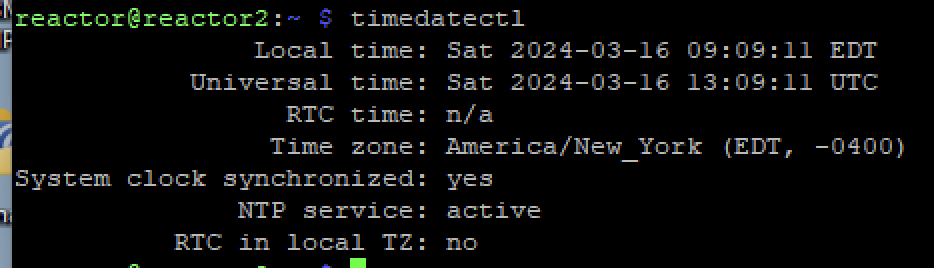
                              7176d3e6-fad5-44ca-a423-ef5a99d073d3-image.png

                              Moving on... I've done this before but stepped thru it again just to be sure.

                              sudo raspi-config
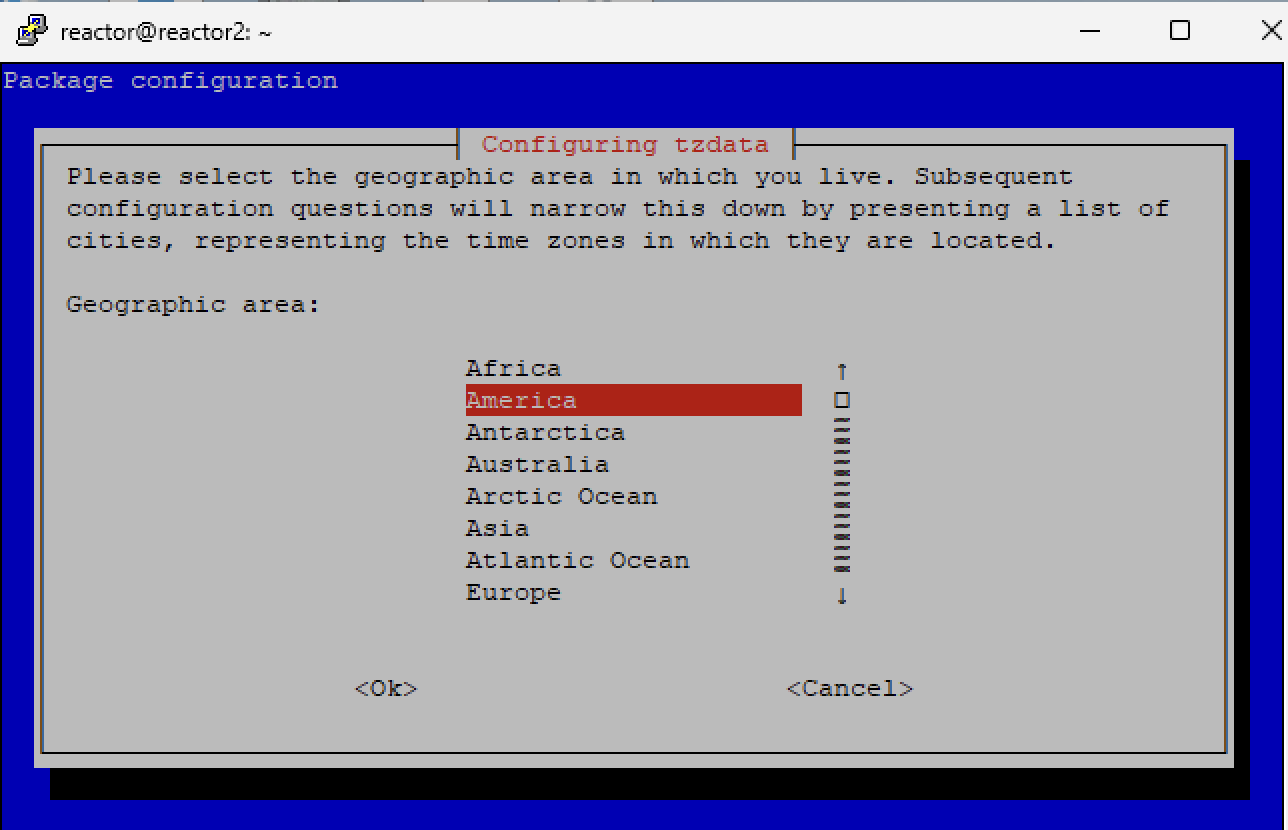
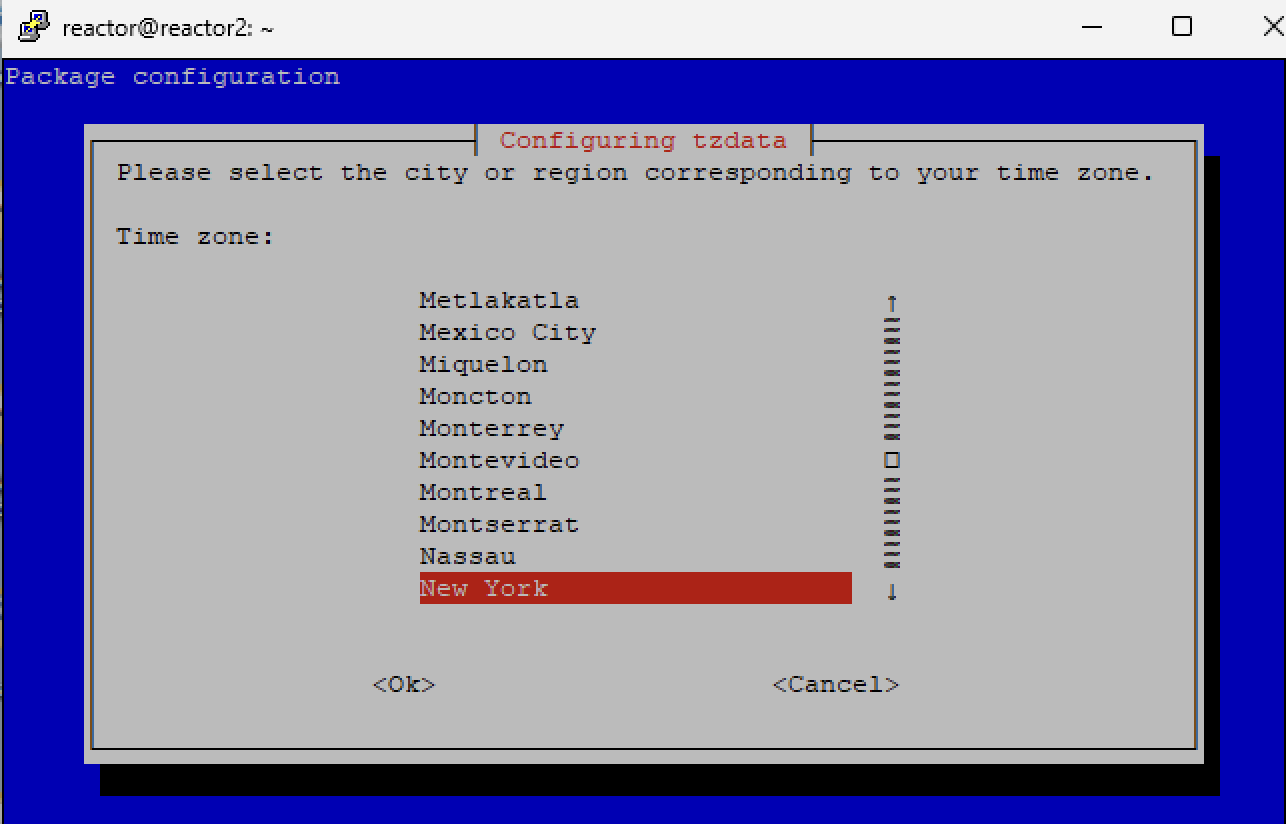
                              

                              55272d24-289b-44a4-84e3-6000bfc53677-image.png 51216d5c-0d05-47f0-951a-2094243d1a3b-image.png

                              Rebooted.

                              Alas, same result for

                              ls -l /etc/local/time

                              

                              293a4b03-fad6-4600-8bc9-3748de861d61-image.png

                              Moving on...

                              In usr/share/zoneinfo I see:
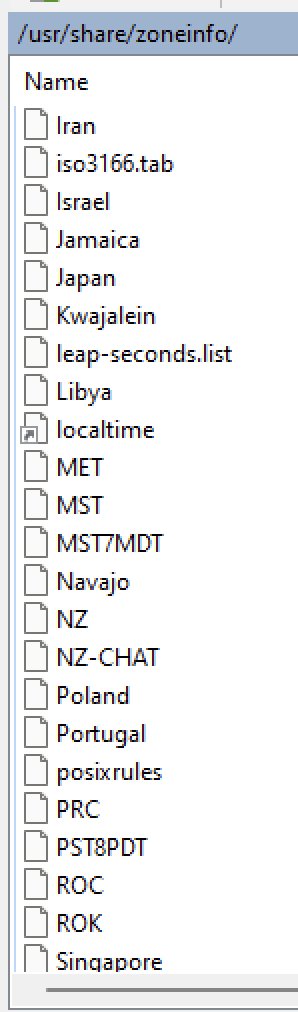
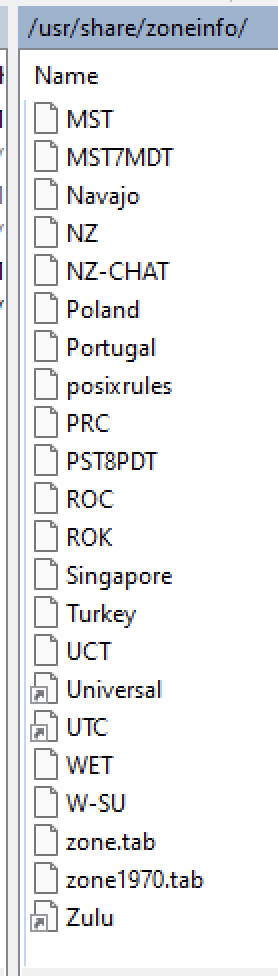
                              92089872-8855-43b4-bf47-40be2590a4ca-image.png 73beaa87-cf36-416b-930b-7f152b160d85-image.png 50e7ef4e-cdac-40e9-a434-82aafe9ceb8d-image.png 52143380-2467-483c-9226-303b745886a2-image.png

                              Moving on...

                              Did in -sf /usr/share/zoneinfo/whatever/whatever /etc/localtime which I think should be ln -sf /usr/share/zoneinfo/whatever/whatever /etc/localtime and rebooted.

                              Oddly, no change. Went digging into the RPi and realized

                              ls -l /etc/local/time
                              

                              should be

                              ls -l /etc/localtime
                              

                              The result of that is
                              f662743c-5520-441d-8c41-4804a58d6fa4-image.png ...which is what I'd expect and want.

                              Moving on...

                              Removed

                              process.env.TZ = "America/New_York";
                              

                              from app.js and restarted Reactor. Right back where we started.
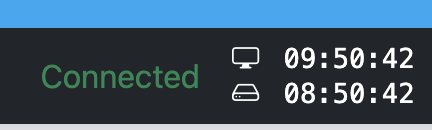
                              5354bebd-2080-404e-a8b9-f2e30494b040-image.png

                              Moving on to the reactor.service edit. This resulted in:
                              0fbe989a-86f2-41d3-aa61-58e45a3960d7-image.png

                              A few seconds off which netted me the MSR warning but I'll make sure both sides are properly synced NTP-wise.

                              Actually, they took care of each other themselves - btt I saved the edits here everything was back to normal.
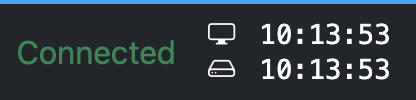
                              7f00f213-47be-4e6a-a571-514ddb352c70-image.png

                              *Hubitat C-7 2.5.2.139
                              *Proxmox VE v8, Beelink MiniPC 12GBs, SSD

                              *HAOS
                              Core 2026.10.4
                              w/ HA Connect ZWA-2 & ZBT-2
                              FW: v1.1
                              SDK: v7.23.1

                              *Prod MSR in docker/portainer
                              MSR: latest-26298-fbb75fb8
                              MQTTController: 25139
                              ZWave Controller: 25139

                              toggledbitsT 1 Reply Last reply
                              0
                              • G gwp1

                                @toggledbits I left this as unsolved because I was questioning my workaround for the exact reason you state: what about future updates overwriting what I'd done?

                                Results of

                                ls -l /etc/local/time
                                

                                763084ea-af8c-4812-9d72-e3acbef11109-image.png

                                So something is clearly amiss.

                                Moving on, timedatectl shows what I would expect. This information is correct:

                                7176d3e6-fad5-44ca-a423-ef5a99d073d3-image.png

                                Moving on... I've done this before but stepped thru it again just to be sure.

                                sudo raspi-config
                                

                                55272d24-289b-44a4-84e3-6000bfc53677-image.png 51216d5c-0d05-47f0-951a-2094243d1a3b-image.png

                                Rebooted.

                                Alas, same result for

                                ls -l /etc/local/time
                                

                                293a4b03-fad6-4600-8bc9-3748de861d61-image.png

                                Moving on...

                                In usr/share/zoneinfo I see:
                                92089872-8855-43b4-bf47-40be2590a4ca-image.png 73beaa87-cf36-416b-930b-7f152b160d85-image.png 50e7ef4e-cdac-40e9-a434-82aafe9ceb8d-image.png 52143380-2467-483c-9226-303b745886a2-image.png

                                Moving on...

                                Did in -sf /usr/share/zoneinfo/whatever/whatever /etc/localtime which I think should be ln -sf /usr/share/zoneinfo/whatever/whatever /etc/localtime and rebooted.

                                Oddly, no change. Went digging into the RPi and realized

                                ls -l /etc/local/time
                                

                                should be

                                ls -l /etc/localtime
                                

                                The result of that is
                                f662743c-5520-441d-8c41-4804a58d6fa4-image.png ...which is what I'd expect and want.

                                Moving on...

                                Removed

                                process.env.TZ = "America/New_York";
                                

                                from app.js and restarted Reactor. Right back where we started.
                                5354bebd-2080-404e-a8b9-f2e30494b040-image.png

                                Moving on to the reactor.service edit. This resulted in:
                                0fbe989a-86f2-41d3-aa61-58e45a3960d7-image.png

                                A few seconds off which netted me the MSR warning but I'll make sure both sides are properly synced NTP-wise.

                                Actually, they took care of each other themselves - btt I saved the edits here everything was back to normal.
                                7f00f213-47be-4e6a-a571-514ddb352c70-image.png

                                toggledbitsT Offline
                                toggledbitsT Offline
                                toggledbits
                                wrote on last edited by
                                #15

                                @gwp1 said in Post-DST and MSR not reflecting local time:

                                Results of

                                ls -l /etc/local/time

                                Ugh! That's a typo (one of two) on my part (localtime should be one word without a slash in it). I'll correct the original post, but as you discovered later, it should be:

                                    ls -l /etc/localtime
                                

                                Thanks for picking those errors up.

                                It's pretty unusual to have to set TZ for a systemd process. Again, I think there's some lurking broken config somewhere in the OS. But if setting TZ in the systemd config fixes it, that works.

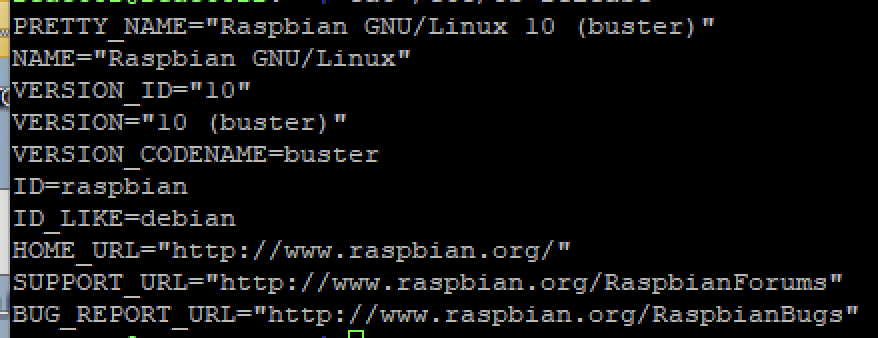
                                What OS are you using? Can you post the contents of /etc/issue?

                                Author of Multi-system Reactor and Reactor, DelayLight, Switchboard, and about a dozen other plugins that run on Vera and openLuup.

                                G 1 Reply Last reply
                                0
                                • toggledbitsT toggledbits

                                  @gwp1 said in Post-DST and MSR not reflecting local time:

                                  Results of

                                  ls -l /etc/local/time

                                  Ugh! That's a typo (one of two) on my part (localtime should be one word without a slash in it). I'll correct the original post, but as you discovered later, it should be:

                                      ls -l /etc/localtime
                                  

                                  Thanks for picking those errors up.

                                  It's pretty unusual to have to set TZ for a systemd process. Again, I think there's some lurking broken config somewhere in the OS. But if setting TZ in the systemd config fixes it, that works.

                                  What OS are you using? Can you post the contents of /etc/issue?

                                  G Offline
                                  G Offline
                                  gwp1
                                  wrote on last edited by gwp1
                                  #16

                                  @toggledbits sorry, let your request slip by me.

                                  etc/issue
                                  3eb94abc-d3f8-4479-bc4c-06dad65f07c1-image.png

                                  OS is
                                  d930ce00-0f43-4741-a8d9-7d21b5256c34-image.png

                                  *Hubitat C-7 2.5.2.139
                                  *Proxmox VE v8, Beelink MiniPC 12GBs, SSD

                                  *HAOS
                                  Core 2026.10.4
                                  w/ HA Connect ZWA-2 & ZBT-2
                                  FW: v1.1
                                  SDK: v7.23.1

                                  *Prod MSR in docker/portainer
                                  MSR: latest-26298-fbb75fb8
                                  MQTTController: 25139
                                  ZWave Controller: 25139

                                  1 Reply Last reply
                                  1
                                  • toggledbitsT Offline
                                    toggledbitsT Offline
                                    toggledbits
                                    wrote on last edited by
                                    #17

                                    OK. I don't have that running in my environment any more. It's EOL in June as well. You may want to plan for an upgrade. Not saying it's related; I've been through plenty of DSTs on Buster when I was using it, without issue. But like everything else, it's in your interest long-term to follow along with the LTS cycles, at least.

                                    Author of Multi-system Reactor and Reactor, DelayLight, Switchboard, and about a dozen other plugins that run on Vera and openLuup.

                                    G 1 Reply Last reply
                                    0
                                    • toggledbitsT toggledbits

                                      OK. I don't have that running in my environment any more. It's EOL in June as well. You may want to plan for an upgrade. Not saying it's related; I've been through plenty of DSTs on Buster when I was using it, without issue. But like everything else, it's in your interest long-term to follow along with the LTS cycles, at least.

                                      G Offline
                                      G Offline
                                      gwp1
                                      wrote on last edited by
                                      #18

                                      @toggledbits yeah, I just got new hardware and am considering moving to the containerized version. But that's going to take some time as it's tech I've not played with before and my day job + new puppy haven't left much dev hours these months. 🙂

                                      MSR is now very integral to the operation of this house so I need to tread carefully when poking the proverbial bear.

                                      *Hubitat C-7 2.5.2.139
                                      *Proxmox VE v8, Beelink MiniPC 12GBs, SSD

                                      *HAOS
                                      Core 2026.10.4
                                      w/ HA Connect ZWA-2 & ZBT-2
                                      FW: v1.1
                                      SDK: v7.23.1

                                      *Prod MSR in docker/portainer
                                      MSR: latest-26298-fbb75fb8
                                      MQTTController: 25139
                                      ZWave Controller: 25139

                                      1 Reply Last reply
                                      0
                                      • toggledbitsT toggledbits locked this topic on
                                      Reply
                                      • Reply as topic
                                      Log in to reply
                                      • Oldest to Newest
                                      • Newest to Oldest
                                      • Most Votes


                                      Recent Topics

                                      • [Solved] EzloController throws error in latest-26328
                                        therealdbT
                                        therealdb
                                        0
                                        12
                                        223

                                      • [Solved] Unable to add new groups in DGC, Reactor latest-26318
                                        CrilleC
                                        Crille
                                        0
                                        3
                                        123

                                      • Reactor (Multi-System/Multi-Hub) Announcements
                                        toggledbitsT
                                        toggledbits
                                        5
                                        154
                                        165.5k

                                      • UI not loading after upgrading to 26318
                                        toggledbitsT
                                        toggledbits
                                        0
                                        6
                                        279

                                      • [Resolved] Hubitat upgrade 2.5.3.123 may have broken login
                                        toggledbitsT
                                        toggledbits
                                        0
                                        8
                                        386

                                      • Reactor Inspect - a small read-only helper panel for MSR
                                        G
                                        gwp1
                                        2
                                        8
                                        699

                                      • Reverse proxy & API ACL
                                        tunnusT
                                        tunnus
                                        0
                                        9
                                        647

                                      • MFA
                                        T
                                        tamorgen
                                        0
                                        28
                                        1.8k

                                      • Grouped devices
                                        G
                                        gwp1
                                        0
                                        3
                                        248

                                      • Login protections
                                        toggledbitsT
                                        toggledbits
                                        0
                                        2
                                        271

                                      • Reactor Build 26284 stuck at Loading Reactor UI
                                        T
                                        tamorgen
                                        0
                                        16
                                        1.9k

                                      • MSR with reverse proxy
                                        tunnusT
                                        tunnus
                                        0
                                        12
                                        951
                                      Powered by NodeBB | Contributors
                                      Hosted freely by 10RUPTiV - Solutions Technologiques | Contact us
                                      • Login

                                      • Don't have an account? Register

                                      • Login or register to search.
                                      • First post
                                        Last post
                                      0
                                      • Categories
                                      • Recent
                                      • Tags
                                      • Popular
                                      • Unsolved