













Variables not updating properly

-
In my use case I'm trying to setup a rule which would detect certain fan oscillation event. When this event happens, fan frequency oscillates between 0 and 5.8 Hz.
So I have the following rule:

One local variable called
osc_timer_armedand two global variables (g_oscCount,g_oscFlag), these are all expressionless. Originally all of these were local, but that didn't work so now trying with globals as well.The logic is that if there are at least 6 "pulses" (0 or 5.8 Hz) within a 30 minute time window, rule would then execute desired action (e.g. a notification).
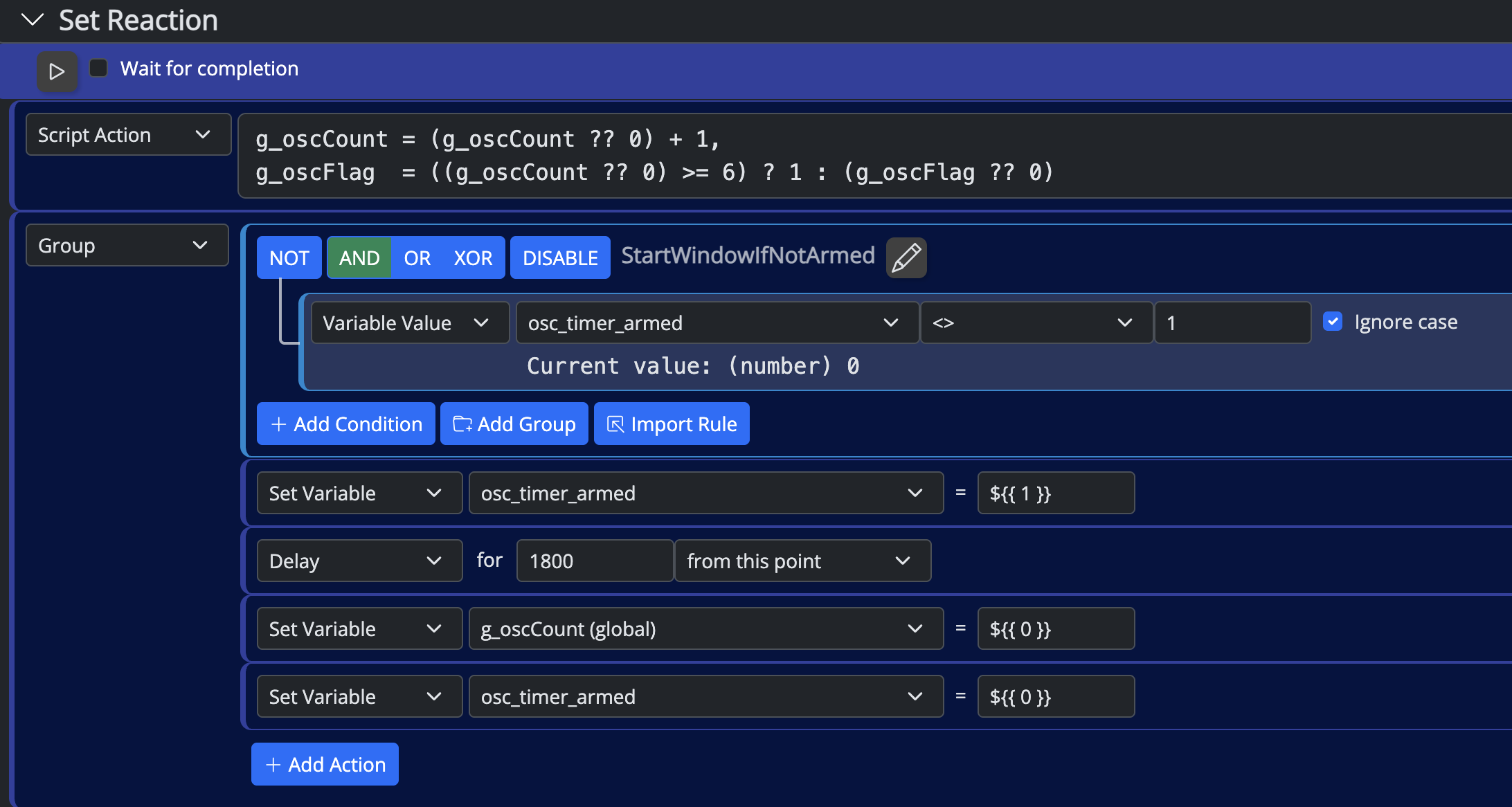
Set reaction is:
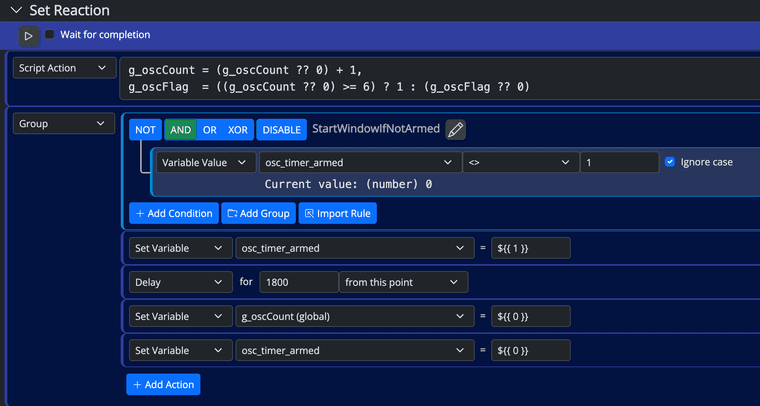
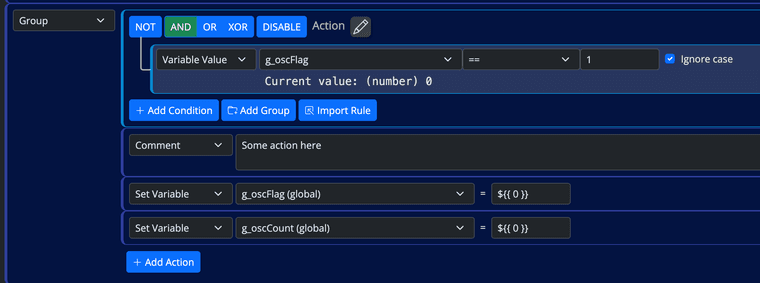
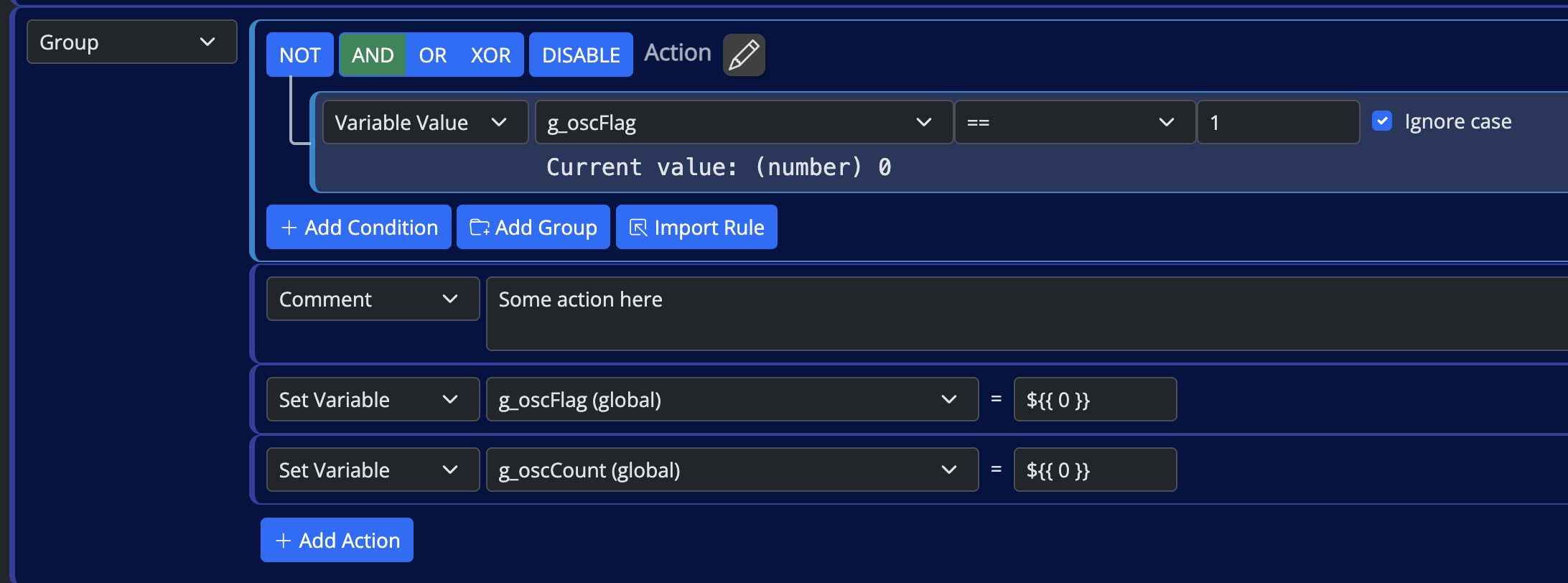
The problem is that I'm never getting to the action part (group called "Action"), as
g_oscCountis not updating past 1 (and thereforeg_oscFlagis not set either). First "instance" of this rule is running for 30 minutes, butg_oscCountdoes not increase in subsequent runs.
If I'm manually running the set reaction during this waiting (delay) time, I get the following runtime error on UI:
Error: Command timeout (1398 start_reaction)
    at _ClientAPI._commandTimeout (http://192.*.*.*:8111/client/ClientAPI.js:546:201)
My hypothesis is that the first instance of the rule (running reaction) is locking these variables and other instances cannot modify them? Although could this even happen with global variables?
Build is 26011 on Docker. Didn't find any meaningful in the logs (could increase the logging level if needed).
p.s. Script action below to speed up reproducing this issue (no need for triggers, manually running set reaction is enough - the latter part of the reaction, group "Action" is not needed either)
g_oscCount = (g_oscCount ?? 0) + 1,
g_oscFlag  = ((g_oscCount ?? 0) >= 6) ? 1 : (g_oscFlag ?? 0)
Using MSR on Docker (Synology NAS), having InfluxDB, Grafana & Home Assistant, Zigbee2MQTT & ZWA-2
-
In my use case I'm trying to setup a rule which would detect certain fan oscillation event. When this event happens, fan frequency oscillates between 0 and 5.8 Hz.
So I have the following rule:
One local variable called
osc_timer_armedand two global variables (g_oscCount,g_oscFlag), these are all expressionless. Originally all of these were local, but that didn't work so now trying with globals as well.The logic is that if there are at least 6 "pulses" (0 or 5.8 Hz) within a 30 minute time window, rule would then execute desired action (e.g. a notification).
Set reaction is:
The problem is that I'm never getting to the action part (group called "Action"), as
g_oscCountis not updating past 1 (and thereforeg_oscFlagis not set either). First "instance" of this rule is running for 30 minutes, butg_oscCountdoes not increase in subsequent runs.If I'm manually running the set reaction during this waiting (delay) time, I get the following runtime error on UI:
Error: Command timeout (1398 start_reaction)
    at _ClientAPI._commandTimeout (http://192.*.*.*:8111/client/ClientAPI.js:546:201)
My hypothesis is that the first instance of the rule (running reaction) is locking these variables and other instances cannot modify them? Although could this even happen with global variables?
Build is 26011 on Docker. Didn't find any meaningful in the logs (could increase the logging level if needed).
p.s. Script action below to speed up reproducing this issue (no need for triggers, manually running set reaction is enough - the latter part of the reaction, group "Action" is not needed either)
g_oscCount = (g_oscCount ?? 0) + 1, g_oscFlag = ((g_oscCount ?? 0) >= 6) ? 1 : (g_oscFlag ?? 0)@tunnus said in Variables not updating properly:
My hypothesis is that the first instance of the rule (running reaction) is locking these variables and other instances cannot modify them? Although could this even happen with global variables?
No, it doesn't work that way. When you try to re-run the reaction, it stops the running reaction and restarts a new thread. The timeout is simply because of the long delay. That's on the UI side. The UI is waiting for a "finished" response and the reaction is taking longer than the wait time. That's harmless. It has no effect on the variables.
Every test case I've tried doing this is working fine for both local and global. I assume you've restarted Reactor as part of the testing? The only issue I see is that some variable value display updates are not happening correctly while editing the rule (i.e. in the rule editor, so don't rely on those at the moment), but they are correct if you expand the rule detail in the Rules list, and the global variables are updating correctly in the Expressions list.
Your computation of
g_oscFlagis... puzzling. First of all, there's no need for usingg_oscCount ?? 0in that second expression, because the first expression assures that a value is set ong_oscCount(so the?? 0will never be used). But more to focus on is(g_oscFlag ?? 0)as the false side expression of the ternary operator (cond ? true : false). Here,g_oscFlagwill be zero untilg_oscCountis >= 6, when it will become 1, but then, it will be 1 forever more, because ifg_oscCountis reset to zero, for example, then the false condition will simply setg_oscFlagto itself, which is 1, not 0. Not really sure this is what you intended, and could explain why you're not getting your desired behavior. Also the variable name used in the first group isn't shown in any of the expressions, but I assume that's just a left-over of much editing/trials. Still, check that as well.Also, in this case, you may want to use the
?#operator instead of??. That ensures that the left side operands can be evaluated to a numeric value. If not, the expression result is the right side operator. That will handle any non-numeric values ing_oscCount(not just null).Author of Multi-system Reactor and Reactor, DelayLight, Switchboard, and about a dozen other plugins that run on Vera and openLuup.
-
@tunnus said in Variables not updating properly:
My hypothesis is that the first instance of the rule (running reaction) is locking these variables and other instances cannot modify them? Although could this even happen with global variables?
No, it doesn't work that way. When you try to re-run the reaction, it stops the running reaction and restarts a new thread. The timeout is simply because of the long delay. That's on the UI side. The UI is waiting for a "finished" response and the reaction is taking longer than the wait time. That's harmless. It has no effect on the variables.
Every test case I've tried doing this is working fine for both local and global. I assume you've restarted Reactor as part of the testing? The only issue I see is that some variable value display updates are not happening correctly while editing the rule (i.e. in the rule editor, so don't rely on those at the moment), but they are correct if you expand the rule detail in the Rules list, and the global variables are updating correctly in the Expressions list.
Your computation of
g_oscFlagis... puzzling. First of all, there's no need for usingg_oscCount ?? 0in that second expression, because the first expression assures that a value is set ong_oscCount(so the?? 0will never be used). But more to focus on is(g_oscFlag ?? 0)as the false side expression of the ternary operator (cond ? true : false). Here,g_oscFlagwill be zero untilg_oscCountis >= 6, when it will become 1, but then, it will be 1 forever more, because ifg_oscCountis reset to zero, for example, then the false condition will simply setg_oscFlagto itself, which is 1, not 0. Not really sure this is what you intended, and could explain why you're not getting your desired behavior. Also the variable name used in the first group isn't shown in any of the expressions, but I assume that's just a left-over of much editing/trials. Still, check that as well.Also, in this case, you may want to use the
?#operator instead of??. That ensures that the left side operands can be evaluated to a numeric value. If not, the expression result is the right side operator. That will handle any non-numeric values ing_oscCount(not just null).@toggledbits thanks for the analysis, but I'm having a different experience. If/when I manually re-run the reaction, it does not stop the already running reaction (the one that set the delay). Also, counter (
g_oscFlag) is not increasing past 1.I fixed that script action (but that didn't make any difference):
g_oscCount = (g_oscCount ?# 0) + 1, g_oscFlag = (g_oscCount >= 6) ? 1 : 0"Also the variable name used in the first group isn't shown in any of the expressions"
If you mean
osc_timer_armed, that is the only local expression I currently have in this rule, and that was also shown in the first screenshot in my previous post.Did you try to reproduce this by creating an identical reaction? As it is important to have that group with delay-action. Without that (delay) variables update/increase fine, but that's the essence: delay-action is needed to create this "window" during which pulses are counted.
-
Ahhh... I see what you're getting at...
Move the actions in StartWindowNotArmed to an independent Reaction (in the same Rule Set), and have StartWindowNotArmed start that Reaction without waiting for completion. That will allow the Set Reaction for the rule to keep executing and find the Action group on each pulse. That will also require
osc_timer_armedto be global, since an independent Reaction can't touch local variables inside a Rule.Make sure your Reset Reaction is completely empty, not even a comment. This is important, because if it contains anything at all, the reset caused by the pulse will interrupt/cancel the Set Reaction.
And you are correct! My error... in the case of Rule Reactions, the Engine already knows the Rule's Set Reaction is running, so it won't stop it, and it won't run it again until the Rule itself goes through the Reset state. The UI error message cause is still the same regardless (the running Reaction doesn't finish within the UI's waiting period for a response.
Of couse, you might be able to avoid all of this complexity by simply having a Rule to detect the low-frequency oscillation (pulse output -- the conditions as you have them will probably work) with no actions at all, and a second rule with a Ruie State condition looking at the former and using the "must repeat 6 times within 1800 seconds" condition option...
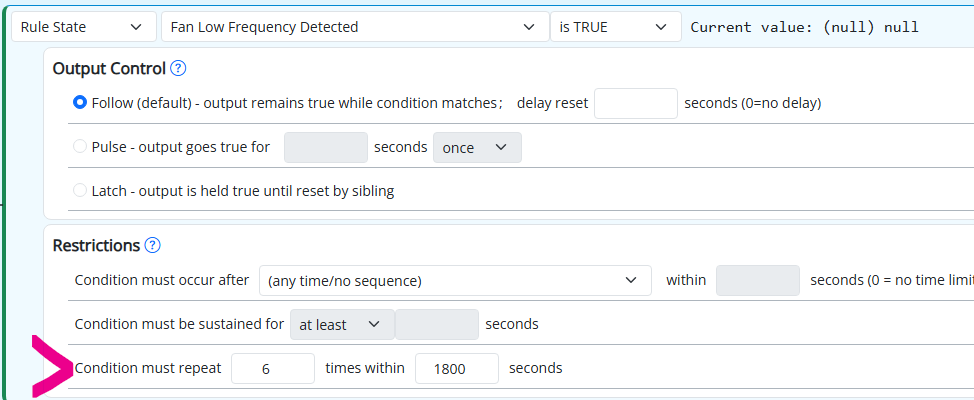
Edit: I think you can just do it in one rule, too, if you group the two conditions and apply the pulse on the group rather than the conditions individually.
Author of Multi-system Reactor and Reactor, DelayLight, Switchboard, and about a dozen other plugins that run on Vera and openLuup.
-
Ahhh... I see what you're getting at...
Move the actions in StartWindowNotArmed to an independent Reaction (in the same Rule Set), and have StartWindowNotArmed start that Reaction without waiting for completion. That will allow the Set Reaction for the rule to keep executing and find the Action group on each pulse. That will also require
osc_timer_armedto be global, since an independent Reaction can't touch local variables inside a Rule.Make sure your Reset Reaction is completely empty, not even a comment. This is important, because if it contains anything at all, the reset caused by the pulse will interrupt/cancel the Set Reaction.
And you are correct! My error... in the case of Rule Reactions, the Engine already knows the Rule's Set Reaction is running, so it won't stop it, and it won't run it again until the Rule itself goes through the Reset state. The UI error message cause is still the same regardless (the running Reaction doesn't finish within the UI's waiting period for a response.
Of couse, you might be able to avoid all of this complexity by simply having a Rule to detect the low-frequency oscillation (pulse output -- the conditions as you have them will probably work) with no actions at all, and a second rule with a Ruie State condition looking at the former and using the "must repeat 6 times within 1800 seconds" condition option...
Edit: I think you can just do it in one rule, too, if you group the two conditions and apply the pulse on the group rather than the conditions individually.
@toggledbits thanks, using an independent reaction works nicely!
