




Skip to content
  • Categories
  • Recent
  • Tags
  • Popular
  • Unsolved
Collapse
Discussion Forum to share and further the development of home control and automation, independent of platforms.
  1. Home
  2. Software
  3. Multi-System Reactor
  4. Dynamic MQTT topics and parameters
DynamicGroupController updating members issue
CrilleC
Bare-metal latest-26193 I have this group: "OKforLarm": name: OK för Larm select: - include_controller: vera - include_capability: door_sensor filter_expression: entity.attributes.door_sensor.state It contains the entities I expect but behaves a bit odd. When I open vera>device_10097 the entity attribute door_sensor.state changes to true but it won't show up as member in the group, when I also open vera>device_10095 they both shows as members and when I close vera>device_10095 it disappear from the group but when I close vera>device_10097 it lingers in the group until I restart Reactor.
Multi-System Reactor
DynamicGroupController and attributes
therealdbT
Hey @toggledbits I'm back to trying to optimize a couple of things based on dynamic group. First of all, I think I found a typo in the doc: primary_attribute: "binary_sensor.state" primary_attribute_value: | d = false; each id in members: d = getEntity(id)?.attributes?.power_switch?.state or d, d I think the correct code snippet is d = false, All that said, my use case for dynamic groups is to group 3 different climate devices, so I could easily command them at the same time. Commands are good, but sometimes I want to check if any of the devices are on, and that's easily done with a similar snippet as the one you have in the docs. But this is limited to the primary attribute, while I want to have any of the attributes in the group to be driven by a similar logic (while all are null in the group). ie, access hvac_control.mode and see if any of the unit is set to cool, or heat. Is that possible, without re-defining an expression in each of my rules? Thanks!
Multi-System Reactor
Arming Envisalink panel from MSR
T
Topic thumbnail image
Multi-System Reactor
Upgrade Issues
T
Topic thumbnail image
Multi-System Reactor
[SOLVED] Conflicting Set Reaction Groups Appear to Fire Simultaneously in Single Rule Evaluation
G
Topic thumbnail image
Multi-System Reactor
[SOLVED] Question regarding "in" vs "contains" vs contents of the string
G
Topic thumbnail image
Multi-System Reactor
Reactor (Multi-System/Multi-Hub) Announcements
toggledbitsT
Build 21228 has been released. Docker images available from DockerHub as usual, and bare-metal packages here. Home Assistant up to version 2021.8.6 supported; the online version of the manual will now state the current supported versions; Fix an error in OWMWeatherController that could cause it to stop updating; Unify the approach to entity filtering on all hub interface classes (controllers); this works for device entities only; it may be extended to other entities later; Improve error detail in messages for EzloController during auth phase; Add isRuleSet() and isRuleEnabled() functions to expressions extensions; Implement set action for lock and passage capabilities (makes them more easily scriptable in some cases); Fix a place in the UI where 24-hour time was not being displayed.
Multi-System Reactor
Logon screen timeout
G
Noticing since 170 that the lock screen doesn't switch to the logon prompt but, rather, stays on the active UI until such time as you go to click something within it. Then it jumps to the login screen. Brave browser Brave 1.92.139 (Official Build) (arm64) Chromium: 150.0.7871.114
Multi-System Reactor
[MSR] Copy&past of actions and/or drag&drop between set/reset
therealdbT
Hey @toggledbits One thing that bothers me while doing work on new systems/new features, is that I cannot copy&paste actions, and I cannot drag&drop between set and resets. #1 is for when I want to copy an action between different rules opened in two separate browser windows, while #2 is when I just need to flip a bunch of actions in the reset, or move some logic back and forth. Both will be appreciated, but I understand the technical challenges. Thanks!
Multi-System Reactor
Upgrade advice - upgrade from aarch64 to ARM64 image
T
I'm currently on version 26011. I understand that the aarch64 image is no longer supported. So, I therefore need to update to the ARM64 image. Can anyone possibly suggest how I update my docker compose.yaml file (see below). Ideally I'd like to keep my existing reactions etc. rather than start from scratch. # Multi-System Reactor template docker-compose.yml (version 22160) # # Change the lines indicated by "DO"... # services: reactor: container_name: reactor environment: # DO change the TZ: line to set your local time zone. # See valid TZ list: https://en.wikipedia.org/wiki/List_of_tz_database_time_zones TZ: GB # # DO NOT change this path. Your directory location is in "source" below. REACTOR_DATA_PREFIX: /var/reactor # DO change the image below to the one you are using (e.g. armv7l or aarch64 for RPi 4) image: toggledbits/reactor:latest-aarch64 restart: "always" expose: - 8111 ports: - 8111:8111 volumes: # DO change the /home/username/reactor below to the directory you created for # your local data; DO NOT change the /var/reactor part - /home/pi/docker/reactor:/var/reactor - /etc/localtime:/etc/localtime:ro tmpfs: /tmp
Multi-System Reactor
Alexa for MSR, any interest?
MikeReadingtonM
Topic thumbnail image
Multi-System Reactor
[RESOLVED] Telegram notification broke with latest update
3
Topic thumbnail image
Multi-System Reactor
[RESOLVED] Phantom device, “INFO” appears
wmarcolinW
Topic thumbnail image
Multi-System Reactor
[RESOLVED] Mode Status NULL
wmarcolinW
Topic thumbnail image
Multi-System Reactor
[RESOLVED] HTTP query failing after version 26177
wmarcolinW
Topic thumbnail image
Multi-System Reactor
Question about the find function
wmarcolinW
Topic thumbnail image
Multi-System Reactor
[Answered] OK to remove old json files?
3
Topic thumbnail image
Multi-System Reactor
Deprecation Announcement: 32-bit ARM *docker* images
toggledbitsT
If you are using the armv7l docker image, the OpenJS Foundation that publishes node is no longer producing 32-bit builds as of v24. That means the last supported LTS version of node for armv7l is v22, which will go End-of-Life in May 2027. Therefore, the Reactor armv7l image is now deprecated and will only be produced until node v22 goes EOL, and I will not publish armv7l images beyond that date. If you are running an RPi 3 or earlier with Reactor, you are on this image, and will need to upgrade hardware to a 64-bit model and use the arm64 image. If you need help getting it done, ask in this category.
Multi-System Reactor
[Solved] build 26150 - engine not starting
G
@toggledbits I pulled the image (well, Watchtower did) and within minutes the whole system went offline. The log looks like it ends with 26143. [latest-26143]2026-05-31T15:23:44.547Z <default:INFO> Closing container Container#Predicate#rule-mkahsmgf/26qq82mw-cons [latest-26143]2026-05-31T15:23:44.547Z <default:INFO> Closing container Container#Predicate#rule-lqyfljfi/22f8on0t-cons [latest-26143]2026-05-31T15:23:44.547Z <default:INFO> Closing container Container#Predicate#rule-lsb61rw8/24oenqi2-cons [latest-26143]2026-05-31T15:23:44.547Z <default:INFO> Closing container Container#Predicate#rule-lrh58he0/rule-lrh58he0:S-1c00gfib-cons [latest-26143]2026-05-31T15:23:44.547Z <default:INFO> Closing container Container#Predicate#rule-lrh58he0/1c00dylr-cons [latest-26143]2026-05-31T15:23:44.547Z <default:INFO> Closing container Container#Predicate#rule-lrh58he0/1nam9w5u-cons [latest-26143]2026-05-31T15:23:44.547Z <default:INFO> Closing container Container#Predicate#rule-miuh2qqi/22ls4lql-cons [latest-26143]2026-05-31T15:23:44.547Z <default:INFO> Closing container Container#Predicate#rule-kwc6rmci/rule-kwc6rmci:S-1vj8sdfc-cons [latest-26143]2026-05-31T15:23:44.547Z <default:INFO> Closing container Container#Predicate#rule-kwc6rmci/rule-kwc6rmci:S-1qanz01x-cons [latest-26143]2026-05-31T15:23:44.547Z <default:INFO> Closing container Container#Predicate#rule-ladyja6a/24lq19p6-cons [latest-26143]2026-05-31T15:23:44.547Z <default:INFO> Closing container Container#Predicate#rule-mk0o8iox/23oy468y-cons [latest-26143]2026-05-31T15:23:44.547Z <default:INFO> Closing container Container#Predicate#rule-miscg2h3/rule-miscg2h3:S-22gmbq1c-cons [latest-26143]2026-05-31T15:23:44.547Z <default:INFO> Closing container Container#Predicate#re-kxgrfjke/238p0old-cons [latest-26143]2026-05-31T15:23:44.547Z <default:INFO> Closing container Container#Predicate#re-m7ccsso5/re-m7ccsso5-1r0myjxa-cons [latest-26143]2026-05-31T15:23:44.547Z <default:INFO> Closing container Container#Predicate#rule-ladyja6a/19nl9wq2-cons [latest-26143]2026-05-31T15:23:44.547Z <default:INFO> Closing container Container#Predicate#rule-ladyja6a/rule-ladyja6a:S-yl3xk9t-cons [latest-26143]2026-05-31T15:23:44.547Z <default:INFO> Closing container Container#Predicate#rule-ladyja6a/rule-ladyja6a:S-yl3vv5m-cons [latest-26143]2026-05-31T15:23:44.547Z <default:INFO> Closing container Container#Predicate#re-ln7j2nqp/re-ln7j2nqp-22mx9lzd-cons [latest-26143]2026-05-31T15:23:44.547Z <default:INFO> Closing container Container#Predicate#re-ln7j2nqp/22mx87c8-cons [latest-26143]2026-05-31T15:23:44.547Z <default:INFO> Closing container Container#Predicate#rule-licneppy/1mzwe7ht-cons [latest-26143]2026-05-31T15:23:44.547Z <default:INFO> Closing container Container#Predicate#rule-ml3194ih/25jqt1j4-cons [latest-26143]2026-05-31T15:23:44.547Z <default:INFO> Closing container Container#Predicate#re-kxgrg7kf/227hshak-cons [latest-26143]2026-05-31T15:23:44.547Z <default:INFO> Closing container Container#Predicate#rule-reactorexmachina/13ua1p95-cons [latest-26143]2026-05-31T15:23:44.547Z <default:INFO> Closing container Container#Predicate#rule-reactorexmachina/13uagam7-cons [latest-26143]2026-05-31T15:23:44.547Z <default:INFO> Closing container Container#Predicate#rule-grpvl9oypg/rule-grpvl9oypg:R-134x4cbv-cons [latest-26143]2026-05-31T15:23:44.547Z <default:INFO> Closing container Container#Predicate#rule-grpvl9oypg/rule-grpvl9oypg:R-134x2fyl-cons [latest-26143]2026-05-31T15:23:44.547Z <default:INFO> Closing container Container#Predicate#re-lscjrws1/238p5c22-cons [latest-26143]2026-05-31T15:23:44.547Z <default:INFO> Closing container Container#Predicate#rule-lbwr0jvq/1xkczf03-cons [latest-26143]2026-05-31T15:23:44.547Z <Structure:NOTICE> Structure Structure#1 stopped [latest-26143]2026-05-31T15:23:44.547Z <app:NOTICE> Closing APIs... [latest-26143]2026-05-31T15:23:44.547Z <wsapi:NOTICE> wsapi: closing... [latest-26143]2026-05-31T15:23:44.547Z <wsapi:NOTICE> wsapi: disconnecting from "192.168.1.23#82" (1001 service closing) [latest-26143]2026-05-31T15:23:44.548Z <httpapi:NOTICE> HTTP API closing... [latest-26143]2026-05-31T15:23:44.549Z <wsapi:NOTICE> wsapi: server closed [latest-26143]2026-05-31T15:23:44.549Z <httpapi:INFO> HTTP server closed. [latest-26143]2026-05-31T15:23:44.549Z <app:NOTICE> Stopping timers... [latest-26143]2026-05-31T15:23:44.551Z <app:null> Shutdown complete, process ID 1 [latest-26143]2026-05-31T15:23:44.551Z <app:null> Closing logs... [latest-26143]2026-05-31T15:23:44.551Z <default:null> Closing log I can SSH to the VM. Alas, I do not have the previous image for 26143 as I'm a little too quick sometimes on housekeeping.
Multi-System Reactor
http request action & digest auth
tunnusT
I’m using the HTTP Request action in MSR and need to authenticate against an endpoint that uses HTTP Digest authentication. Now that endpoint was changed to use SHA-256 in digest auth, so I would like to know if MSR supports it, or is it limited to MD5-based digest auth?
Multi-System Reactor

Dynamic MQTT topics and parameters

Scheduled Pinned Locked Moved Multi-System Reactor
6 Posts 3 Posters 939 Views 3 Watching
  • Oldest to Newest
  • Newest to Oldest
  • Most Votes
Reply
  • Reply as topic
Log in to reply
This topic has been deleted. Only users with topic management privileges can see it.
  • M Offline
    M Offline
    mgvra
    wrote on last edited by
    #1

    Hi,
    I'm building a retro annunciator panel for my home automation’s "mission-critical" (and not so critical) statuses. Each 3D-printed panel consists of 45 RGB WS2812D 5mm LEDs. The plan is to introduce at least two panels, maybe even four if I totally lose it.

    Control is handled by a spare Raspberry Pi 3, which communicates with the MSR via MQTT. Each panel/LED follows this topic format:

    annunciator/panel/<panel-number>/led/<led-number>/set
    

    (e.g., annunciator/panel/1/led/1/set)

    The payload is a simple JSON object:

    {
      "color": "red", // or #FF0000
      "effect": "blink", // static, blink, breath
      "speed": 1000 // in ms
    }
    

    This setup is currently working fine in MSR. One might argue that the device name should be annunciator-panel-led instead, as that’s what it actually represents.

    local_mqtt_capabilities.yaml

    capabilities:
      x_mqtt_annunciator_panel:
        actions:
          on:
            arguments:
              color:
                type: string
              effect:
                type: string
                default: "static"
                values:
                 - static
                 - blink
                 - breath
              speed:
                type: int
                default: 500
          off: {}
          blink:
             arguments:
               color:
                 type: string
               speed:
                 type: int
                 default: 500
          breath:
            arguments:
              color:
                type: string
              speed:
                type: int
                default: 500
    

    local_mqtt_devices.yaml

    templates:
      annunciator-panel:
        capabilities:
         - x_mqtt_annunciator_panel
        actions:
          x_mqtt_annunciator_panel:
            on:
              topic: "annunciator/panel/%panel%/led/%led%/set"
              retain: true
              payload:
                expr: >
                  { "color": parameters.color, "effect": parameters.effect, "speed": parameters.speed }
                type: json
            off:
              topic: "annunciator/panel/%panel%/led/%led%/set"
              retain: true
              payload:
                expr: >
                  { "color": "off", "effect": "static" }
                type: json
            blink:
              topic: "annunciator/panel/%panel%/led/%led%/set"
              retain: true
              payload:
                expr: >
                  { "color": parameters.color, "effect": "blink", "speed": parameters.speed }
                type: json
            breath:
              topic: "annunciator/panel/%panel%/led/%led%/set"
              retain: true
              payload:
                expr: >
                  { "color": parameters.color, "effect": "breath", "speed": parameters.speed }
                type: json
    

    reactor.yaml

          # Annunciator panel 1
            annunciator-panel-p01-l01:
              name: 'Annunciator P1 L01'
              panel: 1
              led: 1
              include: annunciator-panel
            annunciator-panel-p01-l02:
              name: 'Annunciator P1 L02'
              panel: 1
              led: 2
              include: annunciator-panel
            annunciator-panel-p01-l03:
              name: 'Annunciator P1 L03'
              panel: 1
              led: 3
              include: annunciator-panel
           
           and so on, totaling 45 for now
    

    The Question:
    Is there a more efficient way to handle dynamic topics? I tried passing the panel and led IDs as parameters from the UI, but I soon realized that this syntax does not work:
    topic: "annunciator/panel/%parameters.panelId%/led/%parameters.ledId%/set"

    While my current setup works, introducing four panels would generate 180 entities in total. The reason I pass the IDs in the topic (rather than the payload) is to take advantage of MQTT's retain functionality. Since retention works on a per-topic basis, putting IDs inside the payload would only retain the latest update for the entire panel, not for each individual LED.

    Using: Reactor (Multi-hub) latest-25323-d340b7d9 / MQTTController [0.2.25304] (latest-arm64 Docker image running on RPI5)

    Off-topic:
    One might ask: "Who on earth needs dozens of indicator lights in a modern HA system?" Well, probably nobody, unless you get carried away with 1960s NASA ground control panels. I stumbled upon @toggledbits DSKY project and thought that since you’re clearly a fan of similar hardware, you might be interested in this "crazy" project of mine.

    This project was dormant for years but escalated quickly after I picked up a Creality K1C 3D printer. After the obligatory "calibration benchies," I remembered the annunciator panel, fired up Blender, and things got serious. Unlike the DSKY project, I’m not trying to replicate a specific device but rather capturing the era's aesthetic. The design is heavily inspired by the Master Specialties Company’s Roto-Tellite Series 1000 - those classic multicolor indicators found in the Titan II ICBM and NASA consoles.

    The Design:
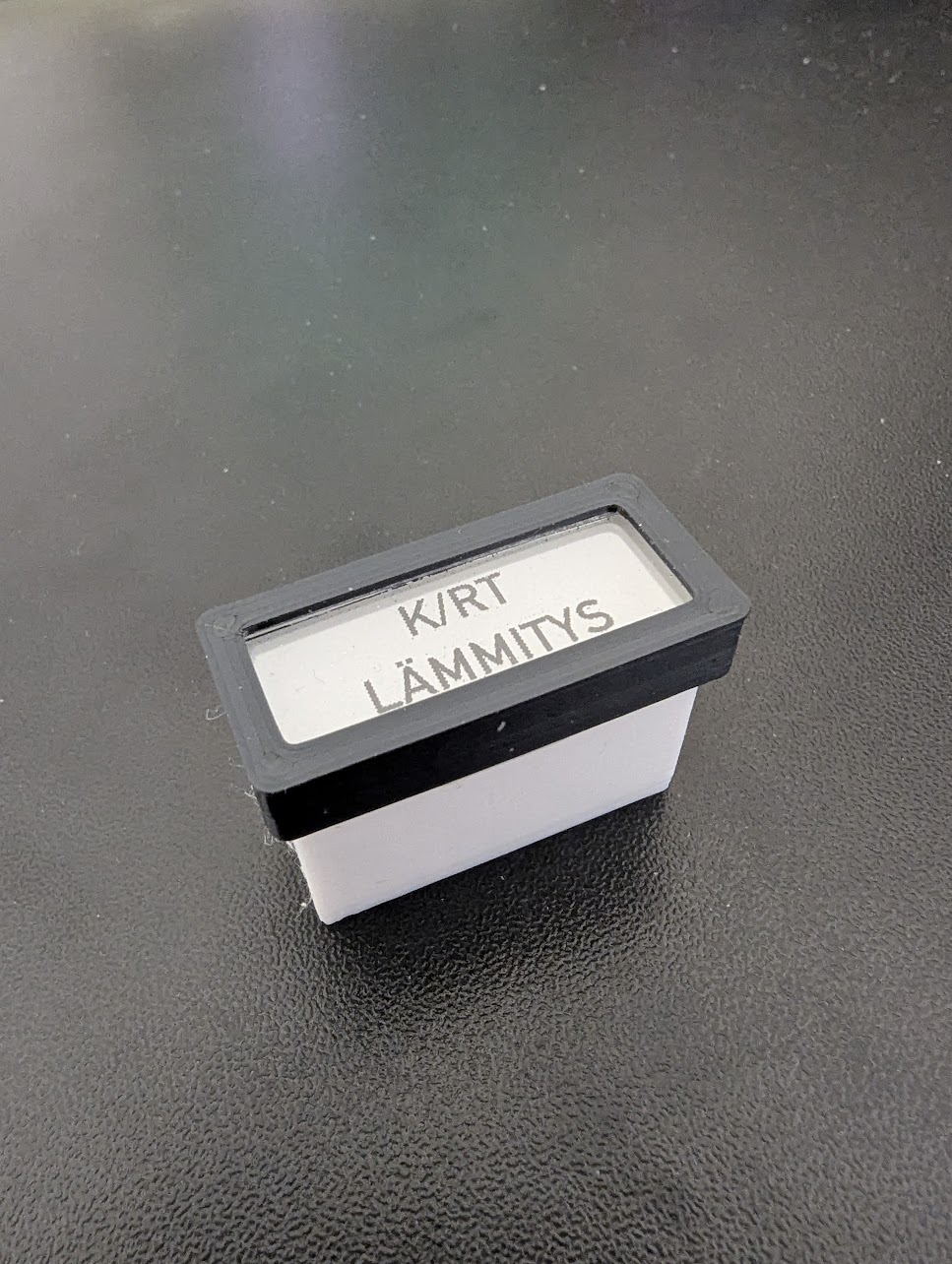
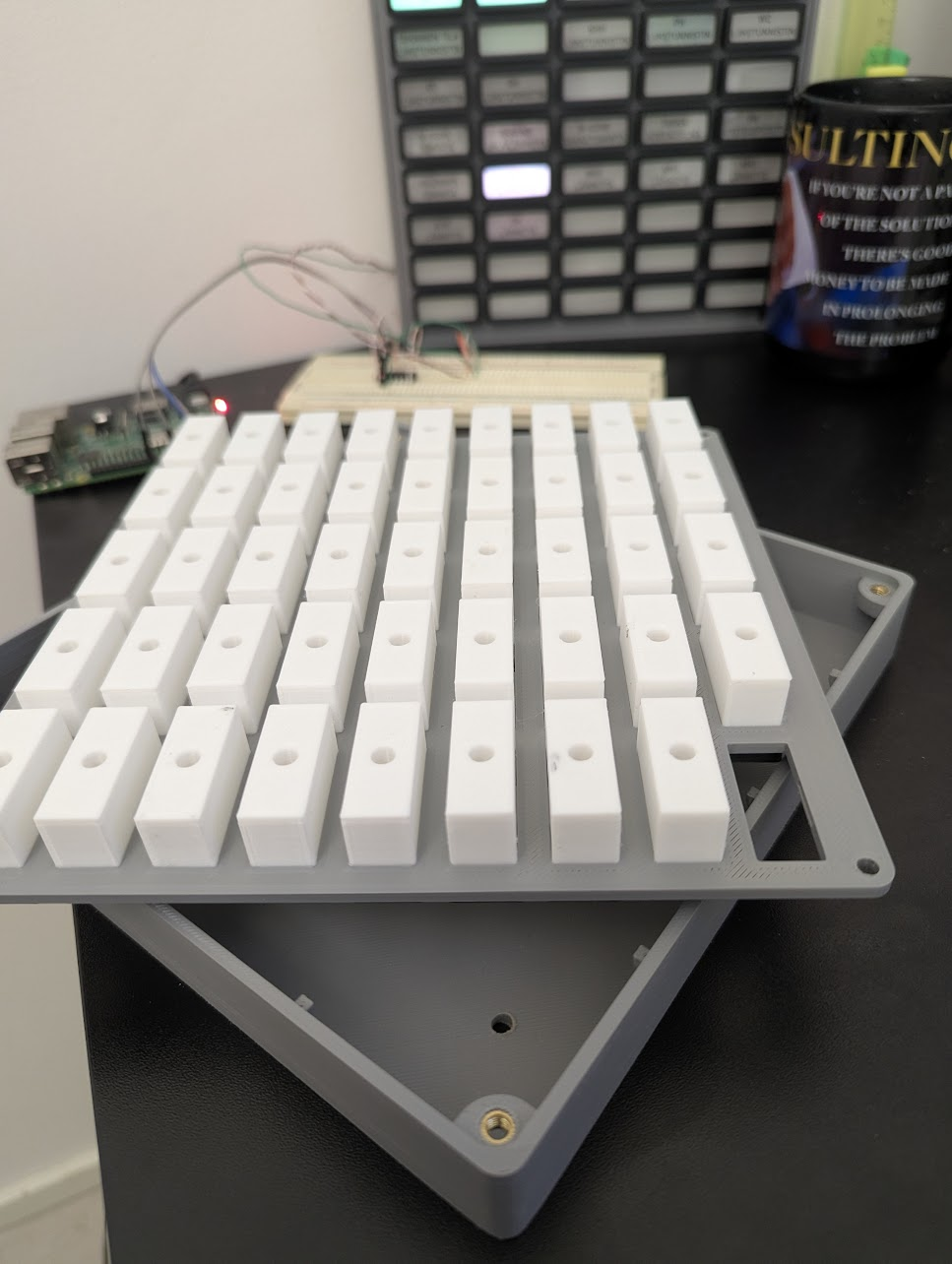
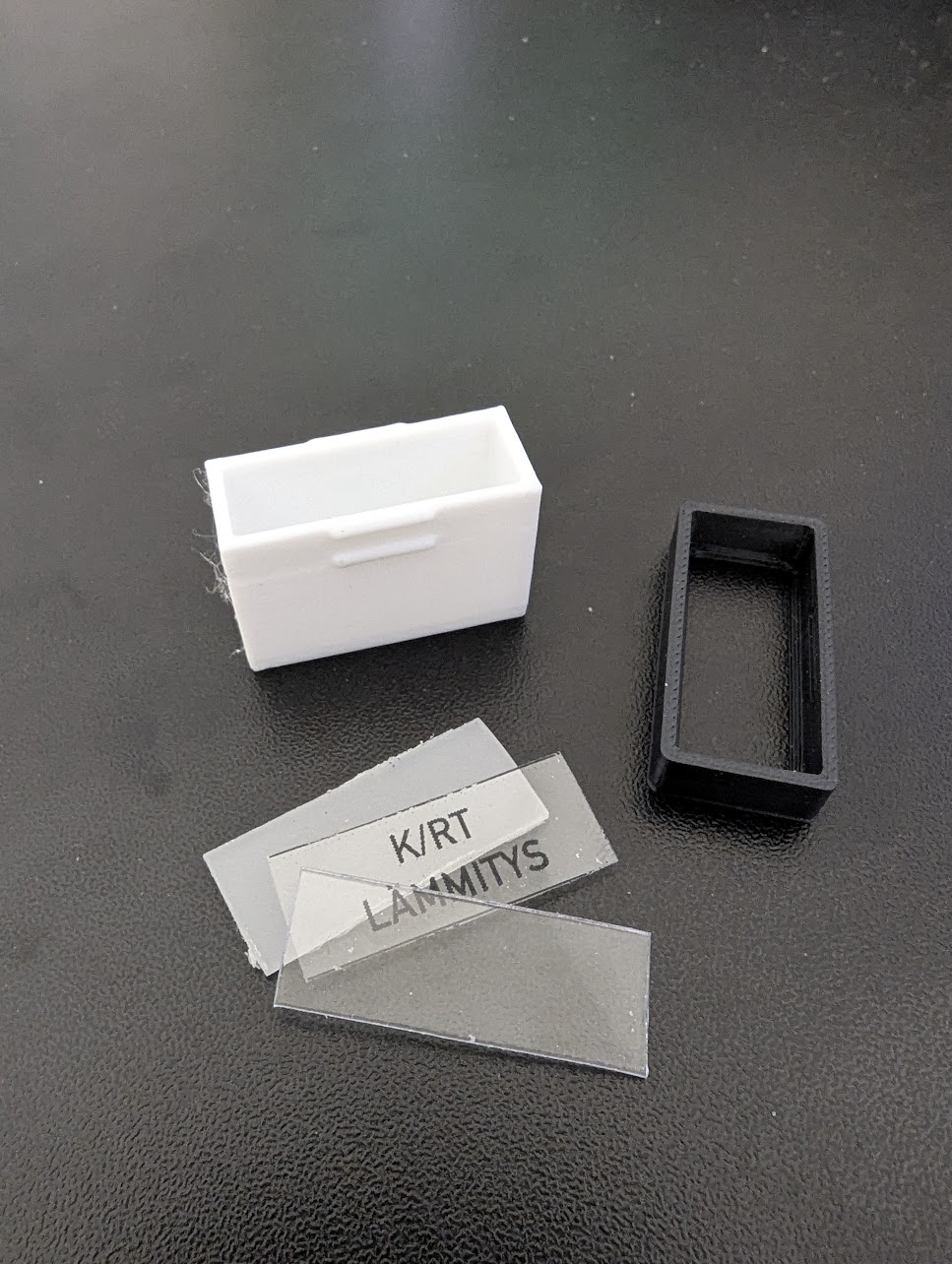
    The construction is straightforward. Each light module consists of a 20mm light well that snap-fits into the front panel. At the bottom, there’s a snug fit for the 5mm LED. The front face is a "sandwich" of a diffuser plate (reclaimed from an old LCD monitor), a label printed on transparent overhead film, and a 1mm acrylic plate. These are held together by a black frame/cap that snap-fits into the light well for toolless removal.

    The enclosure is roughly 200x200x26 mm - near the maximum size for the K1C build plate. The LEDs are daisy-chained and connected to the RPi via a 74AHCT125N level shifter.

    P.S. You probably won't make sense of the labels since they are all in Finnish, but I hope the photos clarify the mechanical structure and how the "light wells" are built.
    BTW: Did you ever finish the DSKY?
    f478285c-1ed0-4491-b9aa-411e502b8e02-image.png

    242a6732-c7fa-4de5-ba9e-5b29777beaa0-image.png

    7e8b1516-8015-430f-9a4c-9ec15ce9c3f7-image.png

    b2c768bf-5588-4c3d-8bee-3bd5e47429a4-image.png

    toggledbitsT 1 Reply Last reply
    👍
    0
    • therealdbT Online
      therealdbT Online
      therealdb
      wrote on last edited by
      #2

      Very cool. And I thought my wall panel was cool 🙂

      if I were you, I'll just build a custom capability and have just one device doing the work per panel. 45 properties/actions per device are totally acceptable imho.

      Unfortunately, AFAIK, at the moment the only dynamic part accepted in topics is substitutions from config. I think @toggledbits will need to specifically support this new option in order to work.

      --
      On a mission to automate everything.

      My MS Reactor contrib
      My Luup Plug-ins

      M 1 Reply Last reply
      0
      • therealdbT therealdb

        Very cool. And I thought my wall panel was cool 🙂

        if I were you, I'll just build a custom capability and have just one device doing the work per panel. 45 properties/actions per device are totally acceptable imho.

        Unfortunately, AFAIK, at the moment the only dynamic part accepted in topics is substitutions from config. I think @toggledbits will need to specifically support this new option in order to work.

        M Offline
        M Offline
        mgvra
        wrote on last edited by
        #3

        @therealdb said in Dynamic MQTT topics and parameters:

        Very cool. And I thought my wall panel was cool 🙂

        Thanks! I'm not sure if I've seen yours, but I'm sure it's much more presentable. Mine is going straight into the technical room - it’s a bit too 'hardcore retro' for the hallway!

        Actually, I'm a bit surprised myself how nicely and evenly those indicators light up. I guess it's all down to the sufficiently deep (white PLA) light wells and the LCD panel diffuser, which is really paying off here.

        The project is still a work in progress (WIP), and I'm currently tinkering with the light colors to resemble actual incandescent bulbs as closely as possible. Unfortunately, the attached pictures don't really do justice to how it looks in real life.

        if I were you, I'll just build a custom capability and have just one device doing the work per panel. 45 properties/actions per device are totally acceptable imho.

        Good call. I'll check that out and see if it makes the maintenance any easier.

        Unfortunately, AFAIK, at the moment the only dynamic part accepted in topics is substitutions from config. I think @toggledbits will need to specifically support this new option in order to work.

        Fair point. Let’s wait and see if he decides to add support for it in the future.

        1 Reply Last reply
        0
        • M mgvra

          Hi,
          I'm building a retro annunciator panel for my home automation’s "mission-critical" (and not so critical) statuses. Each 3D-printed panel consists of 45 RGB WS2812D 5mm LEDs. The plan is to introduce at least two panels, maybe even four if I totally lose it.

          Control is handled by a spare Raspberry Pi 3, which communicates with the MSR via MQTT. Each panel/LED follows this topic format:

          annunciator/panel/<panel-number>/led/<led-number>/set
          

          (e.g., annunciator/panel/1/led/1/set)

          The payload is a simple JSON object:

          {
            "color": "red", // or #FF0000
            "effect": "blink", // static, blink, breath
            "speed": 1000 // in ms
          }
          

          This setup is currently working fine in MSR. One might argue that the device name should be annunciator-panel-led instead, as that’s what it actually represents.

          local_mqtt_capabilities.yaml

          capabilities:
            x_mqtt_annunciator_panel:
              actions:
                on:
                  arguments:
                    color:
                      type: string
                    effect:
                      type: string
                      default: "static"
                      values:
                       - static
                       - blink
                       - breath
                    speed:
                      type: int
                      default: 500
                off: {}
                blink:
                   arguments:
                     color:
                       type: string
                     speed:
                       type: int
                       default: 500
                breath:
                  arguments:
                    color:
                      type: string
                    speed:
                      type: int
                      default: 500
          

          local_mqtt_devices.yaml

          templates:
            annunciator-panel:
              capabilities:
               - x_mqtt_annunciator_panel
              actions:
                x_mqtt_annunciator_panel:
                  on:
                    topic: "annunciator/panel/%panel%/led/%led%/set"
                    retain: true
                    payload:
                      expr: >
                        { "color": parameters.color, "effect": parameters.effect, "speed": parameters.speed }
                      type: json
                  off:
                    topic: "annunciator/panel/%panel%/led/%led%/set"
                    retain: true
                    payload:
                      expr: >
                        { "color": "off", "effect": "static" }
                      type: json
                  blink:
                    topic: "annunciator/panel/%panel%/led/%led%/set"
                    retain: true
                    payload:
                      expr: >
                        { "color": parameters.color, "effect": "blink", "speed": parameters.speed }
                      type: json
                  breath:
                    topic: "annunciator/panel/%panel%/led/%led%/set"
                    retain: true
                    payload:
                      expr: >
                        { "color": parameters.color, "effect": "breath", "speed": parameters.speed }
                      type: json
          

          reactor.yaml

                # Annunciator panel 1
                  annunciator-panel-p01-l01:
                    name: 'Annunciator P1 L01'
                    panel: 1
                    led: 1
                    include: annunciator-panel
                  annunciator-panel-p01-l02:
                    name: 'Annunciator P1 L02'
                    panel: 1
                    led: 2
                    include: annunciator-panel
                  annunciator-panel-p01-l03:
                    name: 'Annunciator P1 L03'
                    panel: 1
                    led: 3
                    include: annunciator-panel
                 
                 and so on, totaling 45 for now
          

          The Question:
          Is there a more efficient way to handle dynamic topics? I tried passing the panel and led IDs as parameters from the UI, but I soon realized that this syntax does not work:
          topic: "annunciator/panel/%parameters.panelId%/led/%parameters.ledId%/set"

          While my current setup works, introducing four panels would generate 180 entities in total. The reason I pass the IDs in the topic (rather than the payload) is to take advantage of MQTT's retain functionality. Since retention works on a per-topic basis, putting IDs inside the payload would only retain the latest update for the entire panel, not for each individual LED.

          Using: Reactor (Multi-hub) latest-25323-d340b7d9 / MQTTController [0.2.25304] (latest-arm64 Docker image running on RPI5)

          Off-topic:
          One might ask: "Who on earth needs dozens of indicator lights in a modern HA system?" Well, probably nobody, unless you get carried away with 1960s NASA ground control panels. I stumbled upon @toggledbits DSKY project and thought that since you’re clearly a fan of similar hardware, you might be interested in this "crazy" project of mine.

          This project was dormant for years but escalated quickly after I picked up a Creality K1C 3D printer. After the obligatory "calibration benchies," I remembered the annunciator panel, fired up Blender, and things got serious. Unlike the DSKY project, I’m not trying to replicate a specific device but rather capturing the era's aesthetic. The design is heavily inspired by the Master Specialties Company’s Roto-Tellite Series 1000 - those classic multicolor indicators found in the Titan II ICBM and NASA consoles.

          The Design:
          The construction is straightforward. Each light module consists of a 20mm light well that snap-fits into the front panel. At the bottom, there’s a snug fit for the 5mm LED. The front face is a "sandwich" of a diffuser plate (reclaimed from an old LCD monitor), a label printed on transparent overhead film, and a 1mm acrylic plate. These are held together by a black frame/cap that snap-fits into the light well for toolless removal.

          The enclosure is roughly 200x200x26 mm - near the maximum size for the K1C build plate. The LEDs are daisy-chained and connected to the RPi via a 74AHCT125N level shifter.

          P.S. You probably won't make sense of the labels since they are all in Finnish, but I hope the photos clarify the mechanical structure and how the "light wells" are built.
          BTW: Did you ever finish the DSKY?
          f478285c-1ed0-4491-b9aa-411e502b8e02-image.png

          242a6732-c7fa-4de5-ba9e-5b29777beaa0-image.png

          7e8b1516-8015-430f-9a4c-9ec15ce9c3f7-image.png

          b2c768bf-5588-4c3d-8bee-3bd5e47429a4-image.png

          toggledbitsT Offline
          toggledbitsT Offline
          toggledbits
          wrote on last edited by
          #4

          @mgvra said in Dynamic MQTT topics and parameters:

          Is there a more efficient way to handle dynamic topics? I tried passing the panel and led IDs as parameters from the UI, but I soon realized that this syntax does not work:
          topic: "annunciator/panel/%parameters.panelId%/led/%parameters.ledId%/set"

          This makes a lot of sense, and I don't know why it hasn't come up before. I need to run out for an errand with mi esposa, but when I get back, I'll work on this and post an updated MQTTController for you to try.

          It's funny that you mention the DSKY project, because I kind of set it aside years ago, but recently got motivated to start building again, so I've spent a little time refamiliarizing myself with where I left it...

          Your annunciator panel... chef's kiss!

          Author of Multi-system Reactor and Reactor, DelayLight, Switchboard, and about a dozen other plugins that run on Vera and openLuup.

          M 1 Reply Last reply
          0
          • toggledbitsT toggledbits

            @mgvra said in Dynamic MQTT topics and parameters:

            Is there a more efficient way to handle dynamic topics? I tried passing the panel and led IDs as parameters from the UI, but I soon realized that this syntax does not work:
            topic: "annunciator/panel/%parameters.panelId%/led/%parameters.ledId%/set"

            This makes a lot of sense, and I don't know why it hasn't come up before. I need to run out for an errand with mi esposa, but when I get back, I'll work on this and post an updated MQTTController for you to try.

            It's funny that you mention the DSKY project, because I kind of set it aside years ago, but recently got motivated to start building again, so I've spent a little time refamiliarizing myself with where I left it...

            Your annunciator panel... chef's kiss!

            M Offline
            M Offline
            mgvra
            wrote on last edited by
            #5

            @toggledbits said in Dynamic MQTT topics and parameters:

            @mgvra said in Dynamic MQTT topics and parameters:

            Is there a more efficient way to handle dynamic topics? I tried passing the panel and led IDs as parameters from the UI, but I soon realized that this syntax does not work:
            topic: "annunciator/panel/%parameters.panelId%/led/%parameters.ledId%/set"

            This makes a lot of sense, and I don't know why it hasn't come up before. I need to run out for an errand with mi esposa, but when I get back, I'll work on this and post an updated MQTTController for you to try.

            That sounds great, thanks! I'm really looking forward to testing the updated MQTTController. It’s also a funny coincidence about the DSKY project - it’s such an iconic piece of hardware, so it's cool to hear you're getting back into it!

            It's funny that you mention the DSKY project, because I kind of set it aside years ago, but recently got motivated to start building again, so I've spent a little time refamiliarizing myself with where I left it...

            Your annunciator panel... chef's kiss!

            I really appreciate the 'chef's kiss' - coming from someone with your eye for detail and history with hardware like the DSKY, that really means a lot!

            br,
            mgvra

            1 Reply Last reply
            0
            • M Offline
              M Offline
              mgvra
              wrote on last edited by mgvra
              #6

              Hi,
              I've installed the latest version 26059 and can confirm that the parameter substitution works perfectly!
              Thanks a lot for the quick fix and the feature update @toggledbits

              Here's my setup

              local_mqtt_capabilities.yaml

              x_mqtt_annunciator_panel:
                  actions:
                    on:
                      arguments:
                        led:
                          type: int
                          min: 1
                          max: 45
                        color:
                          type: string
                        effect:
                          type: string
                          default: "static"
                          values:
                           - static
                           - blink
                           - breath
                        speed:
                          type: int
                          default: 500
                    off:
                      arguments:
                        led:
                          type: int
                          min: 1
                          max: 45
                    static:
                      arguments:
                        led:
                          type: int
                          min: 1
                          max: 45
                        color:
                          type: string
                    blink:
                      arguments:
                        led:
                          type: int
                          min: 1
                          max: 45
                        color:
                          type: string
                        speed:
                          type: int
                          default: 500
                    breath:
                      arguments:
                        led:
                          type: int
                          min: 1
                          max: 45
                        color:
                          type: string
                        speed:
                          type: int
                          default: 500
                    brightness:
                      arguments:
                        value:
                          type: int
                          min: 0
                          max: 255
              

              local_mqtt_devices.yaml

                annunciator-panel:
                  capabilities:
                   - x_mqtt_annunciator_panel
                  requires: [panel]
                  actions:
                    x_mqtt_annunciator_panel:
                      on:
                        topic: "annunciator/panel/%panel%/led/%parameters.led%/set"
                        retain: true
                        payload:
                          expr: >
                            { "color": parameters.color, "effect": parameters.effect, "speed": parameters.speed }
                          type: json
                      off:
                        topic: "annunciator/panel/%panel%/led/%parameters.led%/set"
                        retain: true
                        payload:
                          expr: >
                            { "color": "off", "effect": "static" }
                          type: json
                      static:
                        topic: "annunciator/panel/%panel%/led/%parameters.led%/set"
                        retain: true
                        payload:
                          expr: >
                            { "color": parameters.color, "effect": "static" }
                          type: json
                      blink:
                        topic: "annunciator/panel/%panel%/led/%parameters.led%/set"
                        retain: true
                        payload:
                          expr: >
                            { "color": parameters.color, "effect": "blink", "speed": parameters.speed }
                          type: json
                      breath:
                        topic: "annunciator/panel/%panel%/led/%parameters.led%/set"
                        retain: true
                        payload:
                          expr: >
                            { "color": parameters.color, "effect": "breath", "speed": parameters.speed }
                          type: json
                      brightness:
                        topic: "annunciator/panel/brightness"
                        retain: true
                        payload:
                          expr: >
                            { "value": parameters.value }
                          type: json
              

              reactor.yaml

                    # Annunciator panels
                      annunciator-panel-1:
                        name: 'Annunciator panel 1'
                        panel: 1
                        include: annunciator-panel
              
                      annunciator-panel-2:
                        name: 'Annunciator panel 2'
                        panel: 2
                        include: annunciator-panel
              

              Note that the brightness control is not panel-dependent, as it uses the rpi-ws281x-native library's global brightness attribute. This works well for my setup, as I want all panels to share the same brightness level anyway. Speaking of brightness, it will be controlled by the technical room's PIR and MSR rules that dim or turn off the panels when nobody is present.

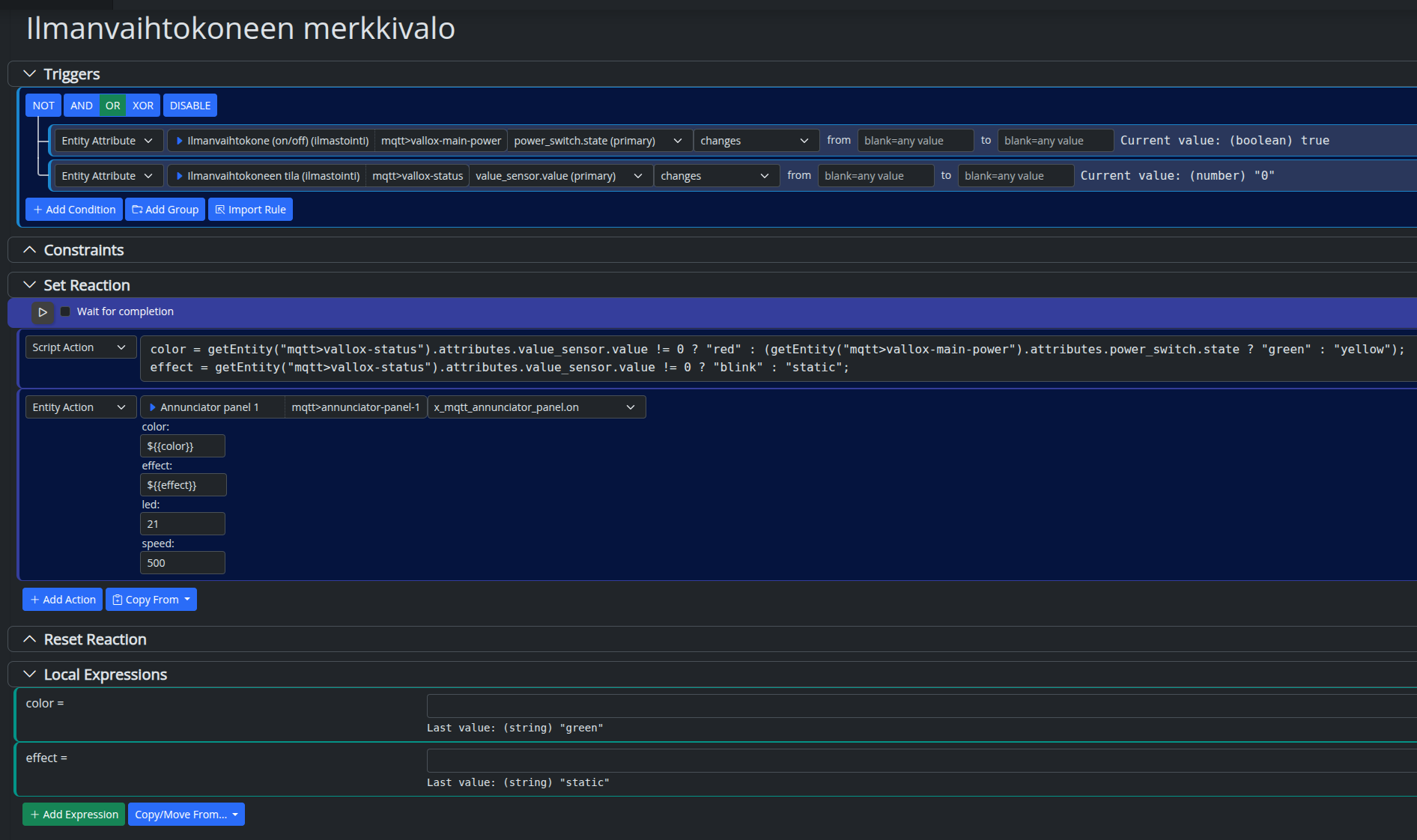
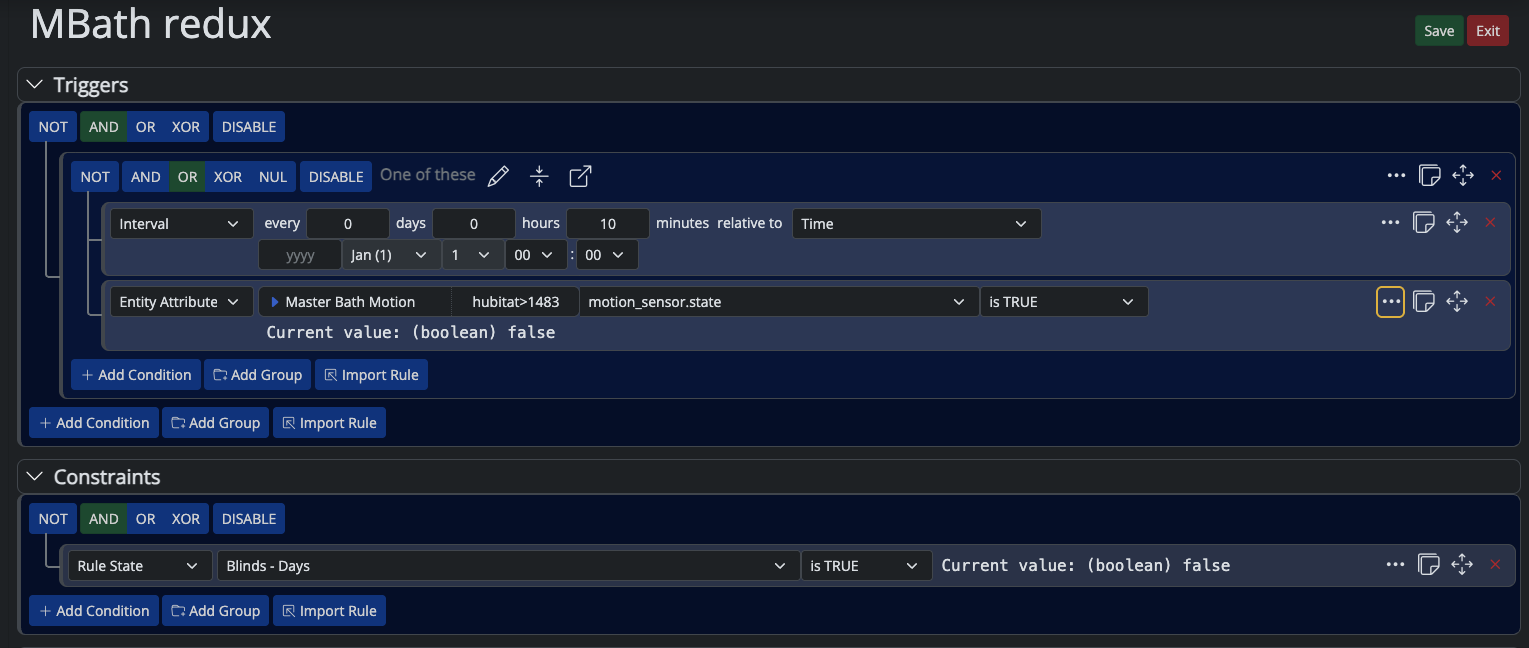
              Below is the setup for the ventilation unit (AHU) indicator light:

              • Green: Running OK
              • Yellow: Switched off
              • Blinking Red: Error

              ba29ea20-cc5f-4998-abd7-c14456600fce-Screenshot from 2026-03-02 18-25-07.png

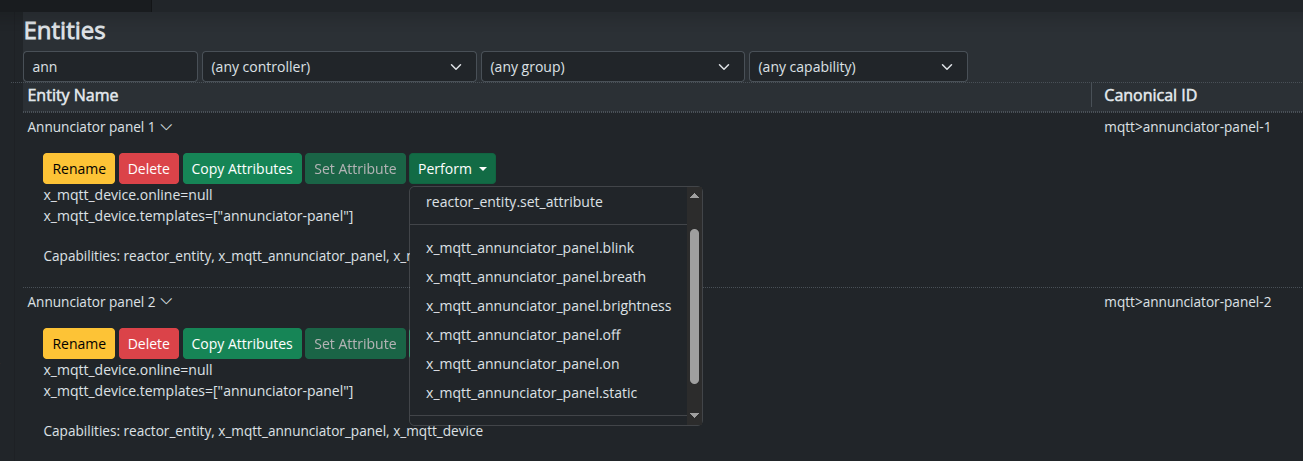
              And here are the panel operations:

              b8995409-8929-4c71-bba4-5ac7f8eae3f4-Screenshot from 2026-03-02 18-23-40.png

              br,
              mgvra

              1 Reply Last reply
              2
              Reply
              • Reply as topic
              Log in to reply
              • Oldest to Newest
              • Newest to Oldest
              • Most Votes


              Recent Topics

              • DynamicGroupController updating members issue
                toggledbitsT
                toggledbits
                0
                4
                9

              • DynamicGroupController and attributes
                therealdbT
                therealdb
                1
                5
                52

              • Arming Envisalink panel from MSR
                toggledbitsT
                toggledbits
                0
                5
                73

              • Upgrade Issues
                T
                tbully
                0
                9
                188

              • [SOLVED] Conflicting Set Reaction Groups Appear to Fire Simultaneously in Single Rule Evaluation
                toggledbitsT
                toggledbits
                0
                10
                181

              • [SOLVED] Question regarding "in" vs "contains" vs contents of the string
                G
                gwp1
                0
                5
                88

              • Reactor (Multi-System/Multi-Hub) Announcements
                toggledbitsT
                toggledbits
                5
                147
                128.2k

              • openLuup console disappeared - 500 - Internal Server Error
                A
                a-lurker
                0
                2
                156

              • Logon screen timeout
                G
                gwp1
                0
                5
                182

              • [MSR] Copy&past of actions and/or drag&drop between set/reset
                toggledbitsT
                toggledbits
                0
                9
                330

              • Upgrade advice - upgrade from aarch64 to ARM64 image
                toggledbitsT
                toggledbits
                0
                4
                194
              Powered by NodeBB | Contributors
              Hosted freely by 10RUPTiV - Solutions Technologiques | Contact us
              • Login

              • Don't have an account? Register

              • Login or register to search.
              • First post
                Last post
              0
              • Categories
              • Recent
              • Tags
              • Popular
              • Unsolved