













Skip to content
  • Categories
  • Recent
  • Tags
  • Popular
  • Unsolved
Collapse
Discussion Forum to share and further the development of home control and automation, independent of platforms.
  1. Home
  2. Software
  3. Multi-System Reactor
  4. Updated to latest MSR 21243 and no entities are being executed I Hubitat
Set reaction triggering wrong z-wave device
T
Topic thumbnail image
Multi-System Reactor
Can you run MSR on Home Assistant OS ?
cw-kidC
Looking at using Home Assistant for the first time, either on a Home Assistant Green, their own hardware or buying a cheap second hand mini PC. Sounds like Home Assistant OS is linux based using Docker for HA etc. Would I also be able to install things like MSR as well on their OS ? On the same box? Thanks.
Multi-System Reactor
How to upgrade from an old version of MSR?
cw-kidC
Hello I haven't updated my installation of MSR in a very long time. Its a bare metal Linux install currently on version 24366-3de60836 I see the latest version is now latest-26011-c621bbc7 I assume I cannot just jump from a very old version to the latest version? Or can I? Thanks
Multi-System Reactor
This trigger no longer working - complaining about the operator needing changing
cw-kidC
Topic thumbnail image
Multi-System Reactor
Self test
CatmanV2C
Having been messing around with some stuff I worked a way to self trigger some tests that I wanted to do on the HA <> MSR integration This got me wondering if there's an entity that changes state / is exposed when a configured controller goes off line? I can't see one but thought it might be hidden or something? Cheers C
Multi-System Reactor
Access control - allowing anonymous user to dashboard
tunnusT
Using build 25328 and having the following users.yaml configuration: users: # This section defines your valid users. admin: ******* groups: # This section defines your user groups. Optionally, it defines application # and API access restrictions (ACLs) for the group. Users may belong to # more than one group. Again, no required or special groups here. admin_group: users: - admin applications: true # special form allows access to ALL applications guests: users: "*" applications: - dashboard api_acls: # This ACL allows users in the "admin" group to access the API - url: "/api" group: admin_group allow: true log: true # This ACL allows anyone/thing to access the /api/v1/alive API endpoint - url: "/api/v1/alive" allow: true session: timeout: 7200 # (seconds) rolling: true # activity extends timeout when true # If log_acls is true, the selected ACL for every API access is logged. log_acls: true # If debug_acls is true, even more information about ACL selection is logged. debug_acls: true My goal is to allow anonymous user to dashboard, but MSR is still asking for a password when trying to access that. Nothing in the logs related to dashboard access. Probably an error in the configuration, but help needed to find that. Tried to put url: "/dashboard" under api_acls, but that was a long shot and didn't work.
Multi-System Reactor
VEC Virtual Switch Auto Off
S
I use Virtual Entity Controller virtual switches which I turn on via webhooks from other applications. Once a switch triggers and turns on, I can then activate associated rules. I would like each virtual switch to automatically turn off after a configurable time (e.g., 5 seconds, 10 seconds). Is there a better way to achieve this auto-off behavior instead of creating a separate rule for each switch that uses the 'Condition must be sustained for' option to turn it off? With a large number of these switches (and the associated turn-off rules), I'm checking to see if there is a simpler approach.If not, could this be a feature request to add an auto-off timer directly to the virtual switches. Thanks Reactor (Multi-hub) latest-26011-c621bbc7 VirtualEntityController v25356 Synology Docker
Multi-System Reactor
Upcoming Storage Change -- Got Back-ups?
toggledbitsT
TL;DR: Format of data in storage directory will soon change. Make sure you are backing up the contents of that directory in its entirety, and you preserve your backups for an extended period, particularly the backup you take right before upgrading to the build containing this change (date of that is still to be determined, but soon). The old data format will remain readable (so you'll be able to read your pre-change backups) for the foreseeable future. In support of a number of other changes in the works, I have found it necessary to change the storage format for Reactor objects in storage at the physical level. Until now, plain, standard JSON has been used to store the data (everything under the storage directory). This has served well, but has a few limitations, including no real support for native JavaScript objects like Date, Map, Set, and others. It also is unable to store data that contains "loops" — objects that reference themselves in some way. I'm not sure exactly when, but in the not-too-distant future I will publish a build using the new data format. It will automatically convert existing JSON data to the new format. For the moment, it will save data in both the new format and the old JSON format, preferring the former when loading data from storage. I have been running my own home with this new format for several months, and have no issues with data loss or corruption. A few other things to know: If you are not already backing up your storage directory, you should be. At a minimum, back this directory up every time you make big changes to your Rules, Reactions, etc. Your existing JSON-format backups will continue to be readable for the long-term (years). The code that loads data from these files looks for the new file format first (which will have a .dval suffix), and if not found, will happily read (and convert) a same-basenamed .json file (i.e. it looks for ruleid.dval first, and if it doesn't find it, it tries to load ruleid.json). I'll publish detailed instructions for restoring from old backups when the build is posted (it's easy). The new .dval files are not directly human-readable or editable as easily as the old .json files. A new utility will be provided in the tools directory to convert .dval data to .json format, which you can then read or edit if you find that necessary. However, that may not work for all future data, as my intent is to make more native JavaScript objects directly storable, and many of those objects cannot be stored in JSON. You may need to modify your backup tools/scripts to pick up the new files: if you explicitly name .json files (rather than just specifying the entire storage directory) in your backup configuration, you will need to add .dval files to get a complete, accurate backup. I don't think this will be an issue for any of you; I imagine that you're all just backing up the entire contents of storage regardless of format/name, that is the safest (and IMO most correct) way to go (if that's not what you're doing, consider changing your approach). The current code stores the data in both the .dval form and the .json form to hedge against any real-world problems I don't encounter in my own use. Some future build will drop this redundancy (i.e. save only to .dval form). However, the read code for the .json form will remain in any case. This applies only to persistent storage that Reactor creates and controls under the storage tree. All other JSON data files (e.g. device data for Controllers) are unaffected by this change and will remain in that form. YAML files are also unaffected by this change. This thread is open for any questions or concerns.
Multi-System Reactor
Oddness in Copy/Move of Reactions
G
Topic thumbnail image
Multi-System Reactor
[Solved] function isRuleEnabled() issue
CrilleC
Topic thumbnail image
Multi-System Reactor
[Reactor] Problem with Global Reactions and groups
therealdbT
Topic thumbnail image
Multi-System Reactor
Possible feature request 2?
CatmanV2C
Just another thought. Adding devices from my Home Assistant / Zigbee2MQTT integration. Works perfectly but they always add as their IEEE address. Some of these devices have up to 10 entities associated, and the moment they are renamed to something sensible, each of those entities 'ceases to exist' in MSR. I like things tidy, and deleting each defunct entity needs 3 clicks. Any chance of a 'bulk delete' option? No biggy as I've pretty much finished my Z-wave migration and I don't expect to be adding more than 2 new Zigbee devices Cheers C
Multi-System Reactor
Reactor (Multi-System/Multi-Hub) Announcements
toggledbitsT
Build 21228 has been released. Docker images available from DockerHub as usual, and bare-metal packages here. Home Assistant up to version 2021.8.6 supported; the online version of the manual will now state the current supported versions; Fix an error in OWMWeatherController that could cause it to stop updating; Unify the approach to entity filtering on all hub interface classes (controllers); this works for device entities only; it may be extended to other entities later; Improve error detail in messages for EzloController during auth phase; Add isRuleSet() and isRuleEnabled() functions to expressions extensions; Implement set action for lock and passage capabilities (makes them more easily scriptable in some cases); Fix a place in the UI where 24-hour time was not being displayed.
Multi-System Reactor
Copying a global reaction
tunnusT
With build 25328, if you copy a global reaction, a new reaction does not appear in the UI unless you do a refresh. I recall this used to work without needing this page refresh? Anyway, only a minor nuisance.
Multi-System Reactor
[Reactor] Bug when sending MQTT boolean payloads
therealdbT
Topic thumbnail image
Multi-System Reactor
Difficulty defining repeating annual period
R
I have tried numerous ways to define a recurring annual period, for example from December 15 to January 15. No matter which method I try - after and before, between, after and/not after, Reactor reports "waiting for invalid date, invalid date. Some constructs also seem to cause Reactor to hang, timeout and restart. For example "before January 15 is evaluated as true, but reports "waiting for invalid date, invalid date". Does anyone have a tried and true method to define a recurring annual period? I think the "between" that I used successfully in the past may have broken with one of the updates.
Multi-System Reactor
Need help with sequence
T
Good evening all, For about the past week or so, I've been having problems with a specific rule in my home automation that controls when my home goes from an Away mode to Home mode. One of the conditions it checked for was my alarm panel, when it changed from Armed Away to Disarmed. There seems to have been a firmware update on the panel that added an intermittent step of "pending", and I can't say for certain it happens 100% of the time. Is there a way to write a condition that so it changes from one condition, to the next, and then another condition? As in, Home alarm changes from armed_away to pending to disarmed. Thanks.
Multi-System Reactor
Possible feature request?
CatmanV2C
No idea how easy this would be. During my migration away from Z-wave I've been replacing the Z-wave devices with Sonoff which has broken some of my automations. Any chance of a 'Test Reaction' function to call out which ones are broken because an entity no longer exists? Without actually running the reaction? Or does this exist already and I'm just not aware of how to do it? Obviously I can see entities that are no longer available, but not quite what I'm looking for. I guess it's something of an edge case so no huge issue. TIA! C
Multi-System Reactor
Logic Assistance: Exterior Lights on when Illuminance Below Threshold
PablaP
Topic thumbnail image
Multi-System Reactor
Time series documentation
tunnusT
Is the current manual (incl. examples) up to date with how retention value is handled in time series configuration? Referring to this post
Multi-System Reactor

Updated to latest MSR 21243 and no entities are being executed I Hubitat

Scheduled Pinned Locked Moved Multi-System Reactor
47 Posts 6 Posters 9.9k Views 6 Watching
  • Oldest to Newest
  • Newest to Oldest
  • Most Votes
Reply
  • Reply as topic
Log in to reply
This topic has been deleted. Only users with topic management privileges can see it.
  • M Matteburk

    @toggledbits I run it with Node app.js

    toggledbitsT Offline
    toggledbitsT Offline
    toggledbits
    wrote on last edited by
    #9

    @matteburk OK. So the direct solution to your problem is to run it this way: NODE_PATH=$(pwd) node app.js

    You really should be running it from systemd on the RPi, though. The command line startup is only for initial validation and setup, it's not meant to be the way to run MSR long term.

    In the tools subdirectory, you'll find a file called reactor.service-example. To install MSR under systemd, do the following:

    1. Copy the above-named file into your /etc/systemd/system directory and rename it to drop the -example part. For example:

       sudo cp tools/reactor.service-example /etc/systemd/system/reactor.service
      
    2. Edit the new file and change the pathnames to match your install directory. Remember that the file is installed in a restricted directory, so you need to use sudo with your editor:

       sudo nano /etc/systemd/system/reactor.service
      
    3. Once you have the file edited with correct names/parameters, stop your existing Reactor process.

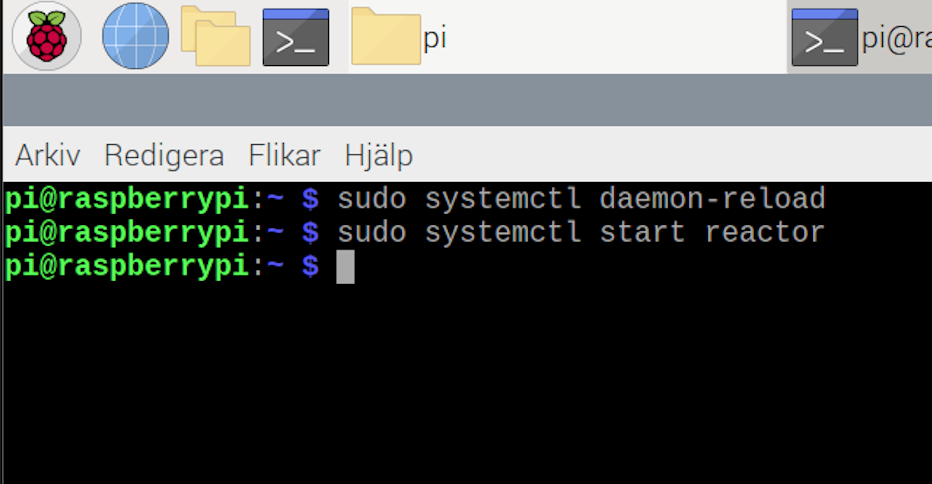
    4. Make systemd aware of the changed configuration file:

       sudo systemctl daemon-reload
      
    5. Start Reactor under systemd:

       sudo systemctl start reactor
      

    If you need to stop Reactor later, that's systemctl stop reactor. You can also restart a running Reactor with systemctl restart reactor.

    Running Reactor under systemd will automatically restart it if it crashes, and start it up automatically when your RPi boots up.

    Author of Multi-system Reactor and Reactor, DelayLight, Switchboard, and about a dozen other plugins that run on Vera and openLuup.

    M 1 Reply Last reply
    0
    • toggledbitsT toggledbits

      @matteburk OK. So the direct solution to your problem is to run it this way: NODE_PATH=$(pwd) node app.js

      You really should be running it from systemd on the RPi, though. The command line startup is only for initial validation and setup, it's not meant to be the way to run MSR long term.

      In the tools subdirectory, you'll find a file called reactor.service-example. To install MSR under systemd, do the following:

      1. Copy the above-named file into your /etc/systemd/system directory and rename it to drop the -example part. For example:

         sudo cp tools/reactor.service-example /etc/systemd/system/reactor.service
        
      2. Edit the new file and change the pathnames to match your install directory. Remember that the file is installed in a restricted directory, so you need to use sudo with your editor:

         sudo nano /etc/systemd/system/reactor.service
        
      3. Once you have the file edited with correct names/parameters, stop your existing Reactor process.

      4. Make systemd aware of the changed configuration file:

         sudo systemctl daemon-reload
        
      5. Start Reactor under systemd:

         sudo systemctl start reactor
        

      If you need to stop Reactor later, that's systemctl stop reactor. You can also restart a running Reactor with systemctl restart reactor.

      Running Reactor under systemd will automatically restart it if it crashes, and start it up automatically when your RPi boots up.

      M Offline
      M Offline
      Matteburk
      wrote on last edited by
      #10

      @toggledbits@
      Followed your instructions to run it under systemd but when i do nr 4 and 5 reactor won't start...
      Should I write sudo systemctl start reactor under pi@raspberrypi as in picture?

      /Mattias

      Skärmavbild 2021-09-04 kl. 10.39.40.png

      1 Reply Last reply
      0
      • toggledbitsT Offline
        toggledbitsT Offline
        toggledbits
        wrote on last edited by
        #11

        This is correct. Check /var/log/syslog for startup errors.

        Author of Multi-system Reactor and Reactor, DelayLight, Switchboard, and about a dozen other plugins that run on Vera and openLuup.

        1 Reply Last reply
        0
        • M Offline
          M Offline
          Matteburk
          wrote on last edited by
          #12

          This is what the log says:
          Sep 5 00:00:00 raspberrypi rsyslogd: [origin software="rsyslogd" swVersion="8.1901.0" x-pid="383" x-info="https://www.rsyslog.com"] rsyslogd was HUPed
          Sep 5 00:00:00 raspberrypi rsyslogd: [origin software="rsyslogd" swVersion="8.1901.0" x-pid="383" x-info="https://www.rsyslog.com"] rsyslogd was HUPed
          Sep 5 00:00:00 raspberrypi systemd[1]: logrotate.service: Succeeded.
          Sep 5 00:00:00 raspberrypi systemd[1]: Started Rotate log files.
          Sep 5 00:00:00 raspberrypi systemd[1]: man-db.service: Succeeded.
          Sep 5 00:00:00 raspberrypi systemd[1]: Started Daily man-db regeneration.
          Sep 5 00:00:02 raspberrypi colord[955]: failed to get session [pid 17774]: Inga data tillg\u00e4ngliga
          Sep 5 00:00:05 raspberrypi systemd[1]: reactor.service: Service RestartSec=5s expired, scheduling restart.
          Sep 5 00:00:05 raspberrypi systemd[1]: reactor.service: Scheduled restart job, restart counter is at 9474.
          Sep 5 00:00:05 raspberrypi systemd[1]: Stopped Multi System Reactor.
          Sep 5 00:00:05 raspberrypi systemd[1]: Started Multi System Reactor.
          Sep 5 00:00:05 raspberrypi systemd[17799]: reactor.service: Failed to determine user credentials: No such process
          Sep 5 00:00:05 raspberrypi systemd[17799]: reactor.service: Failed at step USER spawning /usr/local/lib/nodejs/bin/node: No such process
          Sep 5 00:00:05 raspberrypi systemd[1]: reactor.service: Main process exited, code=exited, status=217/USER
          Sep 5 00:00:05 raspberrypi systemd[1]: reactor.service: Failed with result 'exit-code'.
          Sep 5 00:00:10 raspberrypi systemd[1]: reactor.service: Service RestartSec=5s expired, scheduling restart.
          Sep 5 00:00:10 raspberrypi systemd[1]: reactor.service: Scheduled restart job, restart counter is at 9475.
          Sep 5 00:00:10 raspberrypi systemd[1]: Stopped Multi System Reactor.
          Sep 5 00:00:10 raspberrypi systemd[1]: Started Multi System Reactor.
          Sep 5 00:00:10 raspberrypi systemd[17800]: reactor.service: Failed to determine user credentials: No such process
          Sep 5 00:00:10 raspberrypi systemd[17800]: reactor.service: Failed at step USER spawning /usr/local/lib/nodejs/bin/node: No such process
          Sep 5 00:00:10 raspberrypi systemd[1]: reactor.service: Main process exited, code=exited, status=217/USER
          Sep 5 00:00:10 raspberrypi systemd[1]: reactor.service: Failed with result 'exit-code'.
          Sep 5 00:00:15 raspberrypi systemd[1]: reactor.service: Service RestartSec=5s expired, scheduling restart.
          Sep 5 00:00:15 raspberrypi systemd[1]: reactor.service: Scheduled restart job, restart counter is at 9476.
          Sep 5 00:00:15 raspberrypi systemd[1]: Stopped Multi System Reactor.
          Sep 5 00:00:15 raspberrypi systemd[1]: Started Multi System Reactor.
          Sep 5 00:00:15 raspberrypi systemd[17801]: reactor.service: Failed to determine user credentials: No such process
          Sep 5 00:00:15 raspberrypi systemd[17801]: reactor.service: Failed at step USER spawning /usr/local/lib/nodejs/bin/node: No such process
          Sep 5 00:00:15 raspberrypi systemd[1]: reactor.service: Main process exited, code=exited, status=217/USER
          Sep 5 00:00:15 raspberrypi systemd[1]: reactor.service: Failed with result 'exit-code'.
          Sep 5 00:00:21 raspberrypi systemd[1]: reactor.service: Service RestartSec=5s expired, scheduling restart.
          Sep 5 00:00:21 raspberrypi systemd[1]: reactor.service: Scheduled restart job, restart counter is at 9477.
          Sep 5 00:00:21 raspberrypi systemd[1]: Stopped Multi System Reactor.
          Sep 5 00:00:21 raspberrypi systemd[1]: Started Multi System Reactor.
          Sep 5 00:00:21 raspberrypi systemd[17802]: reactor.service: Failed to determine user credentials: No such process
          Sep 5 00:00:21 raspberrypi systemd[17802]: reactor.service: Failed at step USER spawning /usr/local/lib/nodejs/bin/node: No such process
          Sep 5 00:00:21 raspberrypi systemd[1]: reactor.service: Main process exited, code=exited, status=217/USER
          Sep 5 00:00:21 raspberrypi systemd[1]: reactor.service: Failed with result 'exit-code'.
          Sep 5 00:00:26 raspberrypi systemd[1]: reactor.service: Service RestartSec=5s expired, scheduling restart.
          Sep 5 00:00:26 raspberrypi systemd[1]: reactor.service: Scheduled restart job, restart counter is at 9478.

          1 Reply Last reply
          0
          • toggledbitsT Offline
            toggledbitsT Offline
            toggledbits
            wrote on last edited by
            #13

            Looks like you haven't set the User= line correctly in the reactor.service file. It should be the name of the user that owns the directory in which Reactor is installed. While you are at it, check the pathname to the Reactor install (in the WorkingDirectory and Environment keys), and the pathname to the node executable used in the ExecStart key. If you're not sure where your node lives, just type which node on the command line and it will tell you.

            Author of Multi-system Reactor and Reactor, DelayLight, Switchboard, and about a dozen other plugins that run on Vera and openLuup.

            1 Reply Last reply
            0
            • M Offline
              M Offline
              Matteburk
              wrote on last edited by
              #14

              I checked and changed the lines to this ( I guess something is wrong there)
              [Unit]
              Description=Multi System Reactor
              After=network.target

              [Service]
              Type=simple
              User=pi
              WorkingDirectory=/home/pi/reactor
              Environment=NODE_PATH=/home/pi/reactor
              ExecStart=/home/pi/.local/lib/nodejs/node-v14.15.4-linux-armv7l/bin/node

              Restart=on-failure
              RestartSec=5s

              [Install]
              WantedBy=multi-user.target

              and restarted reactor....... then I see this in log.....

              Sep 5 15:26:16 raspberrypi systemd[9870]: reactor.service: Failed to determine user credentials: No such process
              Sep 5 15:26:16 raspberrypi systemd[9870]: reactor.service: Failed at step USER spawning /usr/local/lib/nodejs/bin/node: No such process
              Sep 5 15:26:16 raspberrypi systemd[1]: reactor.service: Main process exited, code=exited, status=217/USER
              Sep 5 15:26:16 raspberrypi systemd[1]: reactor.service: Failed with result 'exit-code'.
              Sep 5 15:26:21 raspberrypi systemd[1]: reactor.service: Service RestartSec=5s expired, scheduling restart.
              Sep 5 15:26:21 raspberrypi systemd[1]: reactor.service: Scheduled restart job, restart counter is at 20060.
              Sep 5 15:26:21 raspberrypi systemd[1]: Stopped Multi System Reactor.
              Sep 5 15:26:21 raspberrypi systemd[1]: Started Multi System Reactor.
              Sep 5 15:26:21 raspberrypi systemd[9871]: reactor.service: Failed to determine user credentials: No such process
              Sep 5 15:26:21 raspberrypi systemd[9871]: reactor.service: Failed at step USER spawning /usr/local/lib/nodejs/bin/node: No such process
              Sep 5 15:26:21 raspberrypi systemd[1]: reactor.service: Main process exited, code=exited, status=217/USER
              Sep 5 15:26:21 raspberrypi systemd[1]: reactor.service: Failed with result 'exit-code'.
              Sep 5 15:26:22 raspberrypi systemd[1]: Reloading.
              Sep 5 15:26:22 raspberrypi systemd[1]: /etc/systemd/system/teamviewerd.service:8: PIDFile= references path below legacy directory /var/run/, updating /var/run/teamviewerd.pid \u2192 /run/teamviewerd.pid; please update the unit file accordingly.
              Sep 5 15:26:26 raspberrypi systemd[1]: reactor.service: Service RestartSec=5s expired, scheduling restart.
              Sep 5 15:26:26 raspberrypi systemd[1]: reactor.service: Scheduled restart job, restart counter is at 20061.
              Sep 5 15:26:26 raspberrypi systemd[1]: Stopped Multi System Reactor.
              Sep 5 15:26:26 raspberrypi systemd[1]: Started Multi System Reactor.
              Sep 5 15:26:27 raspberrypi systemd[1]: reactor.service: Succeeded.
              Sep 5 15:26:42 raspberrypi systemd[1]: Started Multi System Reactor.
              Sep 5 15:26:43 raspberrypi systemd[1]: reactor.service: Succeeded.
              Sep 5 15:34:06 raspberrypi systemd[1]: Started Multi System Reactor.
              Sep 5 15:34:06 raspberrypi systemd[1]: reactor.service: Succeeded.

              1 Reply Last reply
              0
              • toggledbitsT Offline
                toggledbitsT Offline
                toggledbits
                wrote on last edited by
                #15

                It looks like it's referring to a different pathname for nodejs than you have configured in the service file. Did you make a change to that value somewhere along the way? If you make any changes to the config file, you need to do sudo systemctl daemon-reload to get systemd to read the updated config file. So the first step is to try sudo systemctl daemon-reload followed by sudo systemctl restart reactor.

                If that doesn't work, it is reported elsewhere that sudo systemctl daemon-reexec may resolve this (or perhaps simply rebooting the whole system).

                Then step three, if you're still not successful, is to see if Reactor is logging anything in its own log files.

                Author of Multi-system Reactor and Reactor, DelayLight, Switchboard, and about a dozen other plugins that run on Vera and openLuup.

                M 1 Reply Last reply
                0
                • toggledbitsT toggledbits

                  It looks like it's referring to a different pathname for nodejs than you have configured in the service file. Did you make a change to that value somewhere along the way? If you make any changes to the config file, you need to do sudo systemctl daemon-reload to get systemd to read the updated config file. So the first step is to try sudo systemctl daemon-reload followed by sudo systemctl restart reactor.

                  If that doesn't work, it is reported elsewhere that sudo systemctl daemon-reexec may resolve this (or perhaps simply rebooting the whole system).

                  Then step three, if you're still not successful, is to see if Reactor is logging anything in its own log files.

                  M Offline
                  M Offline
                  Matteburk
                  wrote on last edited by
                  #16

                  @toggledbits

                  I have followed your instructions but no success.

                  Dont no what to do..... Here is the log from msr
                  /Mattias

                  Require stack:

                  • /home/pi/reactor/server/lib/Engine.js
                  • /home/pi/reactor/server/lib/httpapi.js
                  • /home/pi/reactor/app.js
                    Error: Cannot find module 'common/util'
                    Require stack:
                  • /home/pi/reactor/server/lib/Engine.js
                  • /home/pi/reactor/server/lib/httpapi.js
                  • /home/pi/reactor/app.js
                    at Function.Module._resolveFilename (internal/modules/cjs/loader.js:880:15)
                    at Function.Module._load (internal/modules/cjs/loader.js:725:27)
                    at Module.require (internal/modules/cjs/loader.js:952:19)
                    at require (internal/modules/cjs/helpers.js:88:18)
                    at Engine._get_lexp_extensions (/home/pi/reactor/server/lib/Engine.js:862:25)
                    at Rule.evaluateExpressions (/home/pi/reactor/server/lib/Rule.js:904:330)
                    at Rule._evaluate (/home/pi/reactor/server/lib/Rule.js:994:344)
                    at runMicrotasks (<anonymous>)
                    at processTicksAndRejections (internal/process/task_queues.js:93:5)
                    at async /home/pi/reactor/server/lib/Rule.js:963:17
                    2021-09-06T16:19:30.352Z Rule:5:980:Rule.js Rule#rule-ksn5u2pn._evaluate() mutex acquired, evaluating
                    2021-09-06T16:19:30.352Z Rule:5:984:Rule.js Rule#rule-ksn5u2pn update rate is 0/min limit 60/min
                    2021-09-06T16:19:30.353Z Rule:5:904:Rule.js Rule#rule-ksn5u2pn evaluateExpressions() with 0 expressions
                    2021-09-06T16:19:30.354Z Rule:CRIT Error: Cannot find module 'common/util'
                    Require stack:
                  • /home/pi/reactor/server/lib/Engine.js
                  • /home/pi/reactor/server/lib/httpapi.js
                  • /home/pi/reactor/app.js
                    Error: Cannot find module 'common/util'
                    Require stack:
                  • /home/pi/reactor/server/lib/Engine.js
                  • /home/pi/reactor/server/lib/httpapi.js
                  • /home/pi/reactor/app.js
                    at Function.Module._resolveFilename (internal/modules/cjs/loader.js:880:15)
                    at Function.Module._load (internal/modules/cjs/loader.js:725:27)
                    at Module.require (internal/modules/cjs/loader.js:952:19)
                    at require (internal/modules/cjs/helpers.js:88:18)
                    at Engine._get_lexp_extensions (/home/pi/reactor/server/lib/Engine.js:862:25)
                    at Rule.evaluateExpressions (/home/pi/reactor/server/lib/Rule.js:904:330)
                    at Rule._evaluate (/home/pi/reactor/server/lib/Rule.js:994:344)
                    at runMicrotasks (<anonymous>)
                    at processTicksAndRejections (internal/process/task_queues.js:93:5)
                    at async /home/pi/reactor/server/lib/Rule.js:963:17
                    2021-09-06T16:19:30.356Z Rule:5:980:Rule.js Rule#rule-ksm11ihr._evaluate() mutex acquired, evaluating
                    2021-09-06T16:19:30.356Z Rule:5:984:Rule.js Rule#rule-ksm11ihr update rate is 0/min limit 60/min
                    2021-09-06T16:19:30.357Z Rule:5:904:Rule.js Rule#rule-ksm11ihr evaluateExpressions() with 0 expressions
                    2021-09-06T16:19:30.358Z Rule:CRIT Error: Cannot find module 'common/util'
                    Require stack:
                  • /home/pi/reactor/server/lib/Engine.js
                  • /home/pi/reactor/server/lib/httpapi.js
                  • /home/pi/reactor/app.js
                    Error: Cannot find module 'common/util'
                    Require stack:
                  • /home/pi/reactor/server/lib/Engine.js
                  • /home/pi/reactor/server/lib/httpapi.js
                  • /home/pi/reactor/app.js
                    at Function.Module._resolveFilename (internal/modules/cjs/loader.js:880:15)
                    at Function.Module._load (internal/modules/cjs/loader.js:725:27)
                    at Module.require (internal/modules/cjs/loader.js:952:19)
                    at require (internal/modules/cjs/helpers.js:88:18)
                    at Engine._get_lexp_extensions (/home/pi/reactor/server/lib/Engine.js:862:25)
                    at Rule.evaluateExpressions (/home/pi/reactor/server/lib/Rule.js:904:330)
                    at Rule._evaluate (/home/pi/reactor/server/lib/Rule.js:994:344)
                    at runMicrotasks (<anonymous>)
                    at processTicksAndRejections (internal/process/task_queues.js:93:5)
                    at async /home/pi/reactor/server/lib/Rule.js:963:17
                  CrilleC 1 Reply Last reply
                  0
                  • M Matteburk

                    @toggledbits

                    I have followed your instructions but no success.

                    Dont no what to do..... Here is the log from msr
                    /Mattias

                    Require stack:

                    • /home/pi/reactor/server/lib/Engine.js
                    • /home/pi/reactor/server/lib/httpapi.js
                    • /home/pi/reactor/app.js
                      Error: Cannot find module 'common/util'
                      Require stack:
                    • /home/pi/reactor/server/lib/Engine.js
                    • /home/pi/reactor/server/lib/httpapi.js
                    • /home/pi/reactor/app.js
                      at Function.Module._resolveFilename (internal/modules/cjs/loader.js:880:15)
                      at Function.Module._load (internal/modules/cjs/loader.js:725:27)
                      at Module.require (internal/modules/cjs/loader.js:952:19)
                      at require (internal/modules/cjs/helpers.js:88:18)
                      at Engine._get_lexp_extensions (/home/pi/reactor/server/lib/Engine.js:862:25)
                      at Rule.evaluateExpressions (/home/pi/reactor/server/lib/Rule.js:904:330)
                      at Rule._evaluate (/home/pi/reactor/server/lib/Rule.js:994:344)
                      at runMicrotasks (<anonymous>)
                      at processTicksAndRejections (internal/process/task_queues.js:93:5)
                      at async /home/pi/reactor/server/lib/Rule.js:963:17
                      2021-09-06T16:19:30.352Z Rule:5:980:Rule.js Rule#rule-ksn5u2pn._evaluate() mutex acquired, evaluating
                      2021-09-06T16:19:30.352Z Rule:5:984:Rule.js Rule#rule-ksn5u2pn update rate is 0/min limit 60/min
                      2021-09-06T16:19:30.353Z Rule:5:904:Rule.js Rule#rule-ksn5u2pn evaluateExpressions() with 0 expressions
                      2021-09-06T16:19:30.354Z Rule:CRIT Error: Cannot find module 'common/util'
                      Require stack:
                    • /home/pi/reactor/server/lib/Engine.js
                    • /home/pi/reactor/server/lib/httpapi.js
                    • /home/pi/reactor/app.js
                      Error: Cannot find module 'common/util'
                      Require stack:
                    • /home/pi/reactor/server/lib/Engine.js
                    • /home/pi/reactor/server/lib/httpapi.js
                    • /home/pi/reactor/app.js
                      at Function.Module._resolveFilename (internal/modules/cjs/loader.js:880:15)
                      at Function.Module._load (internal/modules/cjs/loader.js:725:27)
                      at Module.require (internal/modules/cjs/loader.js:952:19)
                      at require (internal/modules/cjs/helpers.js:88:18)
                      at Engine._get_lexp_extensions (/home/pi/reactor/server/lib/Engine.js:862:25)
                      at Rule.evaluateExpressions (/home/pi/reactor/server/lib/Rule.js:904:330)
                      at Rule._evaluate (/home/pi/reactor/server/lib/Rule.js:994:344)
                      at runMicrotasks (<anonymous>)
                      at processTicksAndRejections (internal/process/task_queues.js:93:5)
                      at async /home/pi/reactor/server/lib/Rule.js:963:17
                      2021-09-06T16:19:30.356Z Rule:5:980:Rule.js Rule#rule-ksm11ihr._evaluate() mutex acquired, evaluating
                      2021-09-06T16:19:30.356Z Rule:5:984:Rule.js Rule#rule-ksm11ihr update rate is 0/min limit 60/min
                      2021-09-06T16:19:30.357Z Rule:5:904:Rule.js Rule#rule-ksm11ihr evaluateExpressions() with 0 expressions
                      2021-09-06T16:19:30.358Z Rule:CRIT Error: Cannot find module 'common/util'
                      Require stack:
                    • /home/pi/reactor/server/lib/Engine.js
                    • /home/pi/reactor/server/lib/httpapi.js
                    • /home/pi/reactor/app.js
                      Error: Cannot find module 'common/util'
                      Require stack:
                    • /home/pi/reactor/server/lib/Engine.js
                    • /home/pi/reactor/server/lib/httpapi.js
                    • /home/pi/reactor/app.js
                      at Function.Module._resolveFilename (internal/modules/cjs/loader.js:880:15)
                      at Function.Module._load (internal/modules/cjs/loader.js:725:27)
                      at Module.require (internal/modules/cjs/loader.js:952:19)
                      at require (internal/modules/cjs/helpers.js:88:18)
                      at Engine._get_lexp_extensions (/home/pi/reactor/server/lib/Engine.js:862:25)
                      at Rule.evaluateExpressions (/home/pi/reactor/server/lib/Rule.js:904:330)
                      at Rule._evaluate (/home/pi/reactor/server/lib/Rule.js:994:344)
                      at runMicrotasks (<anonymous>)
                      at processTicksAndRejections (internal/process/task_queues.js:93:5)
                      at async /home/pi/reactor/server/lib/Rule.js:963:17
                    CrilleC Offline
                    CrilleC Offline
                    Crille
                    wrote on last edited by
                    #17

                    @matteburk Try installing 21200 just to see if you get MSR running again.

                    M 1 Reply Last reply
                    0
                    • toggledbitsT Offline
                      toggledbitsT Offline
                      toggledbits
                      wrote on last edited by toggledbits
                      #18

                      The messages in the log you posted indicate that NODE_PATH is incorrectly set, so I now cannot be sure if we're back at your original problem because you have tried to run it from the command line and this log is from that, or if this log is from an attempted systemd startup, which makes no sense because the service file you published earlier sets the environment variable correctly.

                      I've given you everything you need to get going again. I'm not sure what else to do. You need to figure it out, though, because this is how this and all future builds will be working, and right now, you're the only person I know of that isn't running, so I'm assuming its a local configuration issue and not a package/software issue.

                      Can you stop any local startup, start again with systemd, and post the startup portion of the log file? I don't want to see the error message again, I need to see all the messages from a Reactor startup under systemd. That will start with the string Reactor <version> starting on <nodejs version> and give me everything up to Startup complete.

                      Author of Multi-system Reactor and Reactor, DelayLight, Switchboard, and about a dozen other plugins that run on Vera and openLuup.

                      M 2 Replies Last reply
                      0
                      • toggledbitsT toggledbits

                        The messages in the log you posted indicate that NODE_PATH is incorrectly set, so I now cannot be sure if we're back at your original problem because you have tried to run it from the command line and this log is from that, or if this log is from an attempted systemd startup, which makes no sense because the service file you published earlier sets the environment variable correctly.

                        I've given you everything you need to get going again. I'm not sure what else to do. You need to figure it out, though, because this is how this and all future builds will be working, and right now, you're the only person I know of that isn't running, so I'm assuming its a local configuration issue and not a package/software issue.

                        Can you stop any local startup, start again with systemd, and post the startup portion of the log file? I don't want to see the error message again, I need to see all the messages from a Reactor startup under systemd. That will start with the string Reactor <version> starting on <nodejs version> and give me everything up to Startup complete.

                        M Offline
                        M Offline
                        Matteburk
                        wrote on last edited by
                        #19

                        @toggledbits ok... yes for sure it is me setting something up wrong... will struggle some more... 🙂

                        1 Reply Last reply
                        0
                        • CrilleC Crille

                          @matteburk Try installing 21200 just to see if you get MSR running again.

                          M Offline
                          M Offline
                          Matteburk
                          wrote on last edited by
                          #20

                          @crille tried .....

                          1 Reply Last reply
                          0
                          • toggledbitsT toggledbits

                            The messages in the log you posted indicate that NODE_PATH is incorrectly set, so I now cannot be sure if we're back at your original problem because you have tried to run it from the command line and this log is from that, or if this log is from an attempted systemd startup, which makes no sense because the service file you published earlier sets the environment variable correctly.

                            I've given you everything you need to get going again. I'm not sure what else to do. You need to figure it out, though, because this is how this and all future builds will be working, and right now, you're the only person I know of that isn't running, so I'm assuming its a local configuration issue and not a package/software issue.

                            Can you stop any local startup, start again with systemd, and post the startup portion of the log file? I don't want to see the error message again, I need to see all the messages from a Reactor startup under systemd. That will start with the string Reactor <version> starting on <nodejs version> and give me everything up to Startup complete.

                            M Offline
                            M Offline
                            Matteburk
                            wrote on last edited by Matteburk
                            #21

                            @toggledbits
                            I dont see the string reactor version starting on XXXX as you wrote.

                            From the var/log syslog I get this after stopped and started reactor via systemctl restart reactor

                            Sep 6 20:58:49 raspberrypi systemd[1]: Started Multi System Reactor.
                            Sep 6 20:58:50 raspberrypi systemd[1]: reactor.service: Succeeded.
                            Sep 6 21:00:41 raspberrypi dbus-daemon[402]: [system] Activating via systemd: service name='org.freedesktop.hostname1' unit='dbus-org.freedesktop.hostname1.service' requested by ':1.57' (uid=1000 pid=1071 comm="/usr/lib/chromium-browser/chromium-browser-v7 --fo")
                            Sep 6 21:00:41 raspberrypi systemd[1]: Starting Hostname Service...
                            Sep 6 21:00:41 raspberrypi dbus-daemon[402]: [system] Successfully activated service 'org.freedesktop.hostname1'
                            Sep 6 21:00:41 raspberrypi systemd[1]: Started Hostname Service.

                            1 Reply Last reply
                            0
                            • toggledbitsT Offline
                              toggledbitsT Offline
                              toggledbits
                              wrote on last edited by
                              #22

                              In reactor.log

                              Author of Multi-system Reactor and Reactor, DelayLight, Switchboard, and about a dozen other plugins that run on Vera and openLuup.

                              M 1 Reply Last reply
                              0
                              • toggledbitsT toggledbits

                                In reactor.log

                                M Offline
                                M Offline
                                Matteburk
                                wrote on last edited by
                                #23

                                @toggledbits
                                hmmm nothing is being logged there after stop ,start. the log file has not been updated since I tried node app.js for a couple of hours ago

                                1 Reply Last reply
                                0
                                • toggledbitsT Offline
                                  toggledbitsT Offline
                                  toggledbits
                                  wrote on last edited by
                                  #24

                                  OK. Post that startup, then. It will tell me a few things as well.

                                  Author of Multi-system Reactor and Reactor, DelayLight, Switchboard, and about a dozen other plugins that run on Vera and openLuup.

                                  1 Reply Last reply
                                  0
                                  • toggledbitsT Offline
                                    toggledbitsT Offline
                                    toggledbits
                                    wrote on last edited by toggledbits
                                    #25

                                    Wait, I'm really confused, you said "nothing is being logged there after stop ,start". Then where did the stuff you posted here come from?

                                    Author of Multi-system Reactor and Reactor, DelayLight, Switchboard, and about a dozen other plugins that run on Vera and openLuup.

                                    M 2 Replies Last reply
                                    0
                                    • toggledbitsT toggledbits

                                      Wait, I'm really confused, you said "nothing is being logged there after stop ,start". Then where did the stuff you posted here come from?

                                      M Offline
                                      M Offline
                                      Matteburk
                                      wrote on last edited by
                                      #26

                                      @toggledbits they that you refer to are there but nothing after I now stopped and started

                                      1 Reply Last reply
                                      0
                                      • toggledbitsT toggledbits

                                        Wait, I'm really confused, you said "nothing is being logged there after stop ,start". Then where did the stuff you posted here come from?

                                        M Offline
                                        M Offline
                                        Matteburk
                                        wrote on last edited by
                                        #27

                                        @toggledbits But if I no try to start via node app.js
                                        I get in terminal window

                                        pi@raspberrypi:~ $ node app.js
                                        internal/modules/cjs/loader.js:883
                                        throw err;
                                        ^

                                        Error: Cannot find module '/home/pi/app.js'
                                        at Function.Module._resolveFilename (internal/modules/cjs/loader.js:880:15)
                                        at Function.Module._load (internal/modules/cjs/loader.js:725:27)
                                        at Function.executeUserEntryPoint [as runMain] (internal/modules/run_main.js:72:12)
                                        at internal/main/run_main_module.js:17:47 {
                                        code: 'MODULE_NOT_FOUND',
                                        requireStack: []
                                        }
                                        pi@raspberrypi:~ $

                                        1 Reply Last reply
                                        0
                                        • toggledbitsT Offline
                                          toggledbitsT Offline
                                          toggledbits
                                          wrote on last edited by
                                          #28

                                          Well that's because you're not in the Reactor directory.
                                          Author of Multi-system Reactor and Reactor, DelayLight, Switchboard, and about a dozen other plugins that run on Vera and openLuup.

                                          M 1 Reply Last reply
                                          0
                                          Reply
                                          • Reply as topic
                                          Log in to reply
                                          • Oldest to Newest
                                          • Newest to Oldest
                                          • Most Votes


                                          Recent Topics

                                          • Set reaction triggering wrong z-wave device
                                            T
                                            tamorgen
                                            0
                                            4
                                            21

                                          • Can you run MSR on Home Assistant OS ?
                                            toggledbitsT
                                            toggledbits
                                            0
                                            11
                                            94

                                          • RPi Alternative: Orange Pi 4 LTS (3GB RAM/16GB eMMC)
                                            toggledbitsT
                                            toggledbits
                                            0
                                            2
                                            1.7k

                                          • RPi Alternative: Orange Pi Zero 2 (1GB)
                                            toggledbitsT
                                            toggledbits
                                            2
                                            3
                                            3.5k

                                          • RPi Alternative: Libre Computer AML-S905X-CC "Le Potato" (2GB RAM)
                                            toggledbitsT
                                            toggledbits
                                            5
                                            6
                                            3.1k

                                          • HA and AI
                                            therealdbT
                                            therealdb
                                            0
                                            4
                                            139

                                          • How to upgrade from an old version of MSR?
                                            CatmanV2C
                                            CatmanV2
                                            0
                                            26
                                            372

                                          • This trigger no longer working - complaining about the operator needing changing
                                            toggledbitsT
                                            toggledbits
                                            0
                                            18
                                            119

                                          • Self test
                                            CatmanV2C
                                            CatmanV2
                                            0
                                            3
                                            112

                                          • Access control - allowing anonymous user to dashboard
                                            toggledbitsT
                                            toggledbits
                                            0
                                            2
                                            124

                                          • VEC Virtual Switch Auto Off
                                            S
                                            SweetGenius
                                            1
                                            1
                                            85

                                          • Upcoming Storage Change -- Got Back-ups?
                                            toggledbitsT
                                            toggledbits
                                            3
                                            1
                                            82
                                          Powered by NodeBB | Contributors
                                          Hosted freely by 10RUPTiV - Solutions Technologiques | Contact us
                                          • Login

                                          • Don't have an account? Register

                                          • Login or register to search.
                                          • First post
                                            Last post
                                          0
                                          • Categories
                                          • Recent
                                          • Tags
                                          • Popular
                                          • Unsolved