




Skip to content
  • Categories
  • Recent
  • Tags
  • Popular
  • Unsolved
Collapse
Discussion Forum to share and further the development of home control and automation, independent of platforms.
  1. Home
  2. Software
  3. Multi-System Reactor
  4. Help. Installing Reactor on Home Assistant.
Arming Envisalink panel from MSR
T
Topic thumbnail image
Multi-System Reactor
[Solved] DynamicGroupController updating members issue
CrilleC
Edit: Solved in latest-26221. Bare-metal latest-26193 I have this group: "OKforLarm": name: OK för Larm select: - include_controller: vera - include_capability: door_sensor filter_expression: entity.attributes.door_sensor.state It contains the entities I expect but behaves a bit odd. When I open vera>device_10097 the entity attribute door_sensor.state changes to true but it won't show up as member in the group, when I also open vera>device_10095 they both shows as members and when I close vera>device_10095 it disappear from the group but when I close vera>device_10097 it lingers in the group until I restart Reactor.
Multi-System Reactor
Reactor (Multi-System/Multi-Hub) Announcements
toggledbitsT
Build 21228 has been released. Docker images available from DockerHub as usual, and bare-metal packages here. Home Assistant up to version 2021.8.6 supported; the online version of the manual will now state the current supported versions; Fix an error in OWMWeatherController that could cause it to stop updating; Unify the approach to entity filtering on all hub interface classes (controllers); this works for device entities only; it may be extended to other entities later; Improve error detail in messages for EzloController during auth phase; Add isRuleSet() and isRuleEnabled() functions to expressions extensions; Implement set action for lock and passage capabilities (makes them more easily scriptable in some cases); Fix a place in the UI where 24-hour time was not being displayed.
Multi-System Reactor
DynamicGroupController and attributes
therealdbT
Hey @toggledbits I'm back to trying to optimize a couple of things based on dynamic group. First of all, I think I found a typo in the doc: primary_attribute: "binary_sensor.state" primary_attribute_value: | d = false; each id in members: d = getEntity(id)?.attributes?.power_switch?.state or d, d I think the correct code snippet is d = false, All that said, my use case for dynamic groups is to group 3 different climate devices, so I could easily command them at the same time. Commands are good, but sometimes I want to check if any of the devices are on, and that's easily done with a similar snippet as the one you have in the docs. But this is limited to the primary attribute, while I want to have any of the attributes in the group to be driven by a similar logic (while all are null in the group). ie, access hvac_control.mode and see if any of the unit is set to cool, or heat. Is that possible, without re-defining an expression in each of my rules? Thanks!
Multi-System Reactor
Upgrade Issues
T
Topic thumbnail image
Multi-System Reactor
[SOLVED] Conflicting Set Reaction Groups Appear to Fire Simultaneously in Single Rule Evaluation
G
Topic thumbnail image
Multi-System Reactor
[SOLVED] Question regarding "in" vs "contains" vs contents of the string
G
Topic thumbnail image
Multi-System Reactor
Logon screen timeout
G
Noticing since 170 that the lock screen doesn't switch to the logon prompt but, rather, stays on the active UI until such time as you go to click something within it. Then it jumps to the login screen. Brave browser Brave 1.92.139 (Official Build) (arm64) Chromium: 150.0.7871.114
Multi-System Reactor
[MSR] Copy&past of actions and/or drag&drop between set/reset
therealdbT
Hey @toggledbits One thing that bothers me while doing work on new systems/new features, is that I cannot copy&paste actions, and I cannot drag&drop between set and resets. #1 is for when I want to copy an action between different rules opened in two separate browser windows, while #2 is when I just need to flip a bunch of actions in the reset, or move some logic back and forth. Both will be appreciated, but I understand the technical challenges. Thanks!
Multi-System Reactor
Upgrade advice - upgrade from aarch64 to ARM64 image
T
I'm currently on version 26011. I understand that the aarch64 image is no longer supported. So, I therefore need to update to the ARM64 image. Can anyone possibly suggest how I update my docker compose.yaml file (see below). Ideally I'd like to keep my existing reactions etc. rather than start from scratch. # Multi-System Reactor template docker-compose.yml (version 22160) # # Change the lines indicated by "DO"... # services: reactor: container_name: reactor environment: # DO change the TZ: line to set your local time zone. # See valid TZ list: https://en.wikipedia.org/wiki/List_of_tz_database_time_zones TZ: GB # # DO NOT change this path. Your directory location is in "source" below. REACTOR_DATA_PREFIX: /var/reactor # DO change the image below to the one you are using (e.g. armv7l or aarch64 for RPi 4) image: toggledbits/reactor:latest-aarch64 restart: "always" expose: - 8111 ports: - 8111:8111 volumes: # DO change the /home/username/reactor below to the directory you created for # your local data; DO NOT change the /var/reactor part - /home/pi/docker/reactor:/var/reactor - /etc/localtime:/etc/localtime:ro tmpfs: /tmp
Multi-System Reactor
Alexa for MSR, any interest?
MikeReadingtonM
Topic thumbnail image
Multi-System Reactor
[RESOLVED] Telegram notification broke with latest update
3
Topic thumbnail image
Multi-System Reactor
[RESOLVED] Phantom device, “INFO” appears
wmarcolinW
Topic thumbnail image
Multi-System Reactor
[RESOLVED] Mode Status NULL
wmarcolinW
Topic thumbnail image
Multi-System Reactor
[RESOLVED] HTTP query failing after version 26177
wmarcolinW
Topic thumbnail image
Multi-System Reactor
Question about the find function
wmarcolinW
Topic thumbnail image
Multi-System Reactor
[Answered] OK to remove old json files?
3
Topic thumbnail image
Multi-System Reactor
Deprecation Announcement: 32-bit ARM *docker* images
toggledbitsT
If you are using the armv7l docker image, the OpenJS Foundation that publishes node is no longer producing 32-bit builds as of v24. That means the last supported LTS version of node for armv7l is v22, which will go End-of-Life in May 2027. Therefore, the Reactor armv7l image is now deprecated and will only be produced until node v22 goes EOL, and I will not publish armv7l images beyond that date. If you are running an RPi 3 or earlier with Reactor, you are on this image, and will need to upgrade hardware to a 64-bit model and use the arm64 image. If you need help getting it done, ask in this category.
Multi-System Reactor
[Solved] build 26150 - engine not starting
G
@toggledbits I pulled the image (well, Watchtower did) and within minutes the whole system went offline. The log looks like it ends with 26143. [latest-26143]2026-05-31T15:23:44.547Z <default:INFO> Closing container Container#Predicate#rule-mkahsmgf/26qq82mw-cons [latest-26143]2026-05-31T15:23:44.547Z <default:INFO> Closing container Container#Predicate#rule-lqyfljfi/22f8on0t-cons [latest-26143]2026-05-31T15:23:44.547Z <default:INFO> Closing container Container#Predicate#rule-lsb61rw8/24oenqi2-cons [latest-26143]2026-05-31T15:23:44.547Z <default:INFO> Closing container Container#Predicate#rule-lrh58he0/rule-lrh58he0:S-1c00gfib-cons [latest-26143]2026-05-31T15:23:44.547Z <default:INFO> Closing container Container#Predicate#rule-lrh58he0/1c00dylr-cons [latest-26143]2026-05-31T15:23:44.547Z <default:INFO> Closing container Container#Predicate#rule-lrh58he0/1nam9w5u-cons [latest-26143]2026-05-31T15:23:44.547Z <default:INFO> Closing container Container#Predicate#rule-miuh2qqi/22ls4lql-cons [latest-26143]2026-05-31T15:23:44.547Z <default:INFO> Closing container Container#Predicate#rule-kwc6rmci/rule-kwc6rmci:S-1vj8sdfc-cons [latest-26143]2026-05-31T15:23:44.547Z <default:INFO> Closing container Container#Predicate#rule-kwc6rmci/rule-kwc6rmci:S-1qanz01x-cons [latest-26143]2026-05-31T15:23:44.547Z <default:INFO> Closing container Container#Predicate#rule-ladyja6a/24lq19p6-cons [latest-26143]2026-05-31T15:23:44.547Z <default:INFO> Closing container Container#Predicate#rule-mk0o8iox/23oy468y-cons [latest-26143]2026-05-31T15:23:44.547Z <default:INFO> Closing container Container#Predicate#rule-miscg2h3/rule-miscg2h3:S-22gmbq1c-cons [latest-26143]2026-05-31T15:23:44.547Z <default:INFO> Closing container Container#Predicate#re-kxgrfjke/238p0old-cons [latest-26143]2026-05-31T15:23:44.547Z <default:INFO> Closing container Container#Predicate#re-m7ccsso5/re-m7ccsso5-1r0myjxa-cons [latest-26143]2026-05-31T15:23:44.547Z <default:INFO> Closing container Container#Predicate#rule-ladyja6a/19nl9wq2-cons [latest-26143]2026-05-31T15:23:44.547Z <default:INFO> Closing container Container#Predicate#rule-ladyja6a/rule-ladyja6a:S-yl3xk9t-cons [latest-26143]2026-05-31T15:23:44.547Z <default:INFO> Closing container Container#Predicate#rule-ladyja6a/rule-ladyja6a:S-yl3vv5m-cons [latest-26143]2026-05-31T15:23:44.547Z <default:INFO> Closing container Container#Predicate#re-ln7j2nqp/re-ln7j2nqp-22mx9lzd-cons [latest-26143]2026-05-31T15:23:44.547Z <default:INFO> Closing container Container#Predicate#re-ln7j2nqp/22mx87c8-cons [latest-26143]2026-05-31T15:23:44.547Z <default:INFO> Closing container Container#Predicate#rule-licneppy/1mzwe7ht-cons [latest-26143]2026-05-31T15:23:44.547Z <default:INFO> Closing container Container#Predicate#rule-ml3194ih/25jqt1j4-cons [latest-26143]2026-05-31T15:23:44.547Z <default:INFO> Closing container Container#Predicate#re-kxgrg7kf/227hshak-cons [latest-26143]2026-05-31T15:23:44.547Z <default:INFO> Closing container Container#Predicate#rule-reactorexmachina/13ua1p95-cons [latest-26143]2026-05-31T15:23:44.547Z <default:INFO> Closing container Container#Predicate#rule-reactorexmachina/13uagam7-cons [latest-26143]2026-05-31T15:23:44.547Z <default:INFO> Closing container Container#Predicate#rule-grpvl9oypg/rule-grpvl9oypg:R-134x4cbv-cons [latest-26143]2026-05-31T15:23:44.547Z <default:INFO> Closing container Container#Predicate#rule-grpvl9oypg/rule-grpvl9oypg:R-134x2fyl-cons [latest-26143]2026-05-31T15:23:44.547Z <default:INFO> Closing container Container#Predicate#re-lscjrws1/238p5c22-cons [latest-26143]2026-05-31T15:23:44.547Z <default:INFO> Closing container Container#Predicate#rule-lbwr0jvq/1xkczf03-cons [latest-26143]2026-05-31T15:23:44.547Z <Structure:NOTICE> Structure Structure#1 stopped [latest-26143]2026-05-31T15:23:44.547Z <app:NOTICE> Closing APIs... [latest-26143]2026-05-31T15:23:44.547Z <wsapi:NOTICE> wsapi: closing... [latest-26143]2026-05-31T15:23:44.547Z <wsapi:NOTICE> wsapi: disconnecting from "192.168.1.23#82" (1001 service closing) [latest-26143]2026-05-31T15:23:44.548Z <httpapi:NOTICE> HTTP API closing... [latest-26143]2026-05-31T15:23:44.549Z <wsapi:NOTICE> wsapi: server closed [latest-26143]2026-05-31T15:23:44.549Z <httpapi:INFO> HTTP server closed. [latest-26143]2026-05-31T15:23:44.549Z <app:NOTICE> Stopping timers... [latest-26143]2026-05-31T15:23:44.551Z <app:null> Shutdown complete, process ID 1 [latest-26143]2026-05-31T15:23:44.551Z <app:null> Closing logs... [latest-26143]2026-05-31T15:23:44.551Z <default:null> Closing log I can SSH to the VM. Alas, I do not have the previous image for 26143 as I'm a little too quick sometimes on housekeeping.
Multi-System Reactor
http request action & digest auth
tunnusT
I’m using the HTTP Request action in MSR and need to authenticate against an endpoint that uses HTTP Digest authentication. Now that endpoint was changed to use SHA-256 in digest auth, so I would like to know if MSR supports it, or is it limited to MD5-based digest auth?
Multi-System Reactor

Help. Installing Reactor on Home Assistant.

Scheduled Pinned Locked Moved Multi-System Reactor
33 Posts 6 Posters 10.8k Views 6 Watching
  • Oldest to Newest
  • Newest to Oldest
  • Most Votes
Reply
  • Reply as topic
Log in to reply
This topic has been deleted. Only users with topic management privileges can see it.
  • A Offline
    A Offline
    alminsk
    wrote on last edited by
    #16

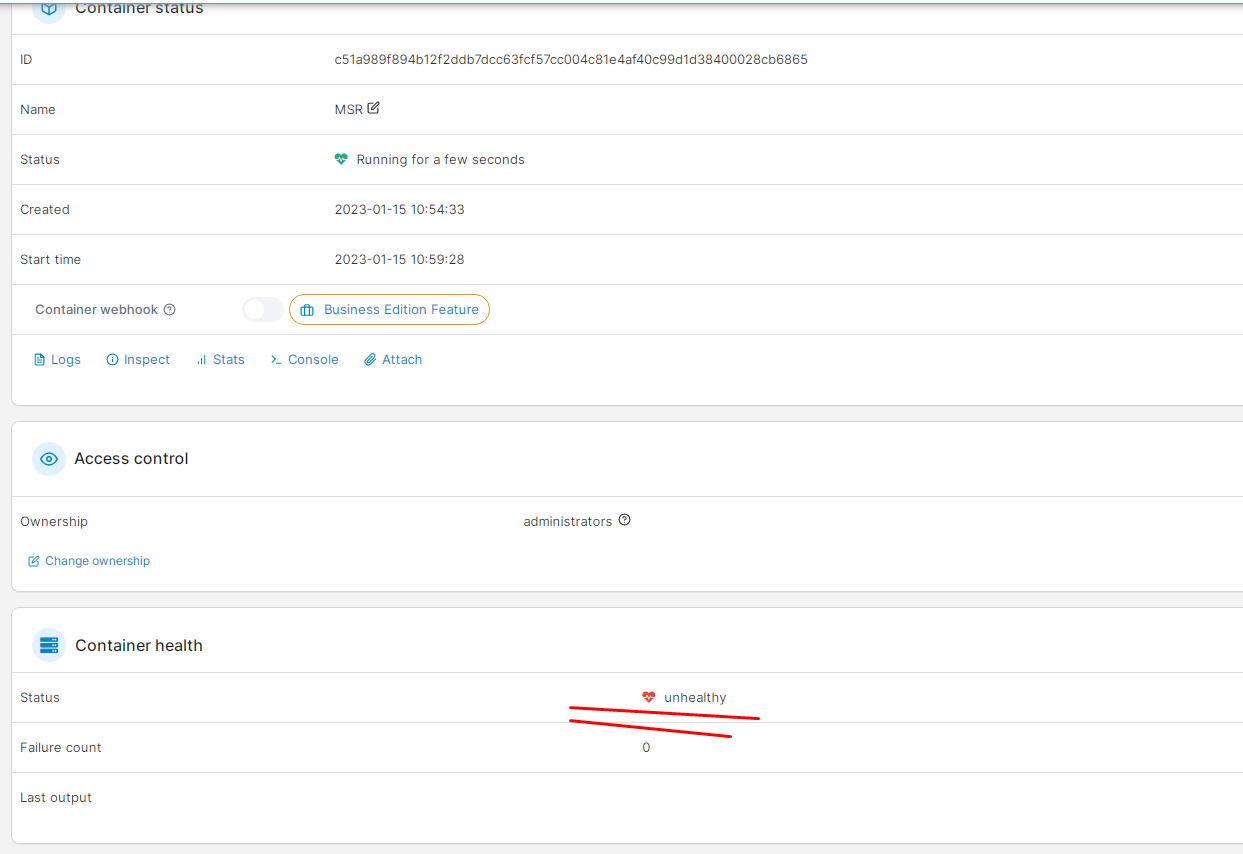
    And for some reason the status is "unhealthy"

    image.png

    1 Reply Last reply
    0
    • toggledbitsT Offline
      toggledbitsT Offline
      toggledbits
      wrote on last edited by
      #17

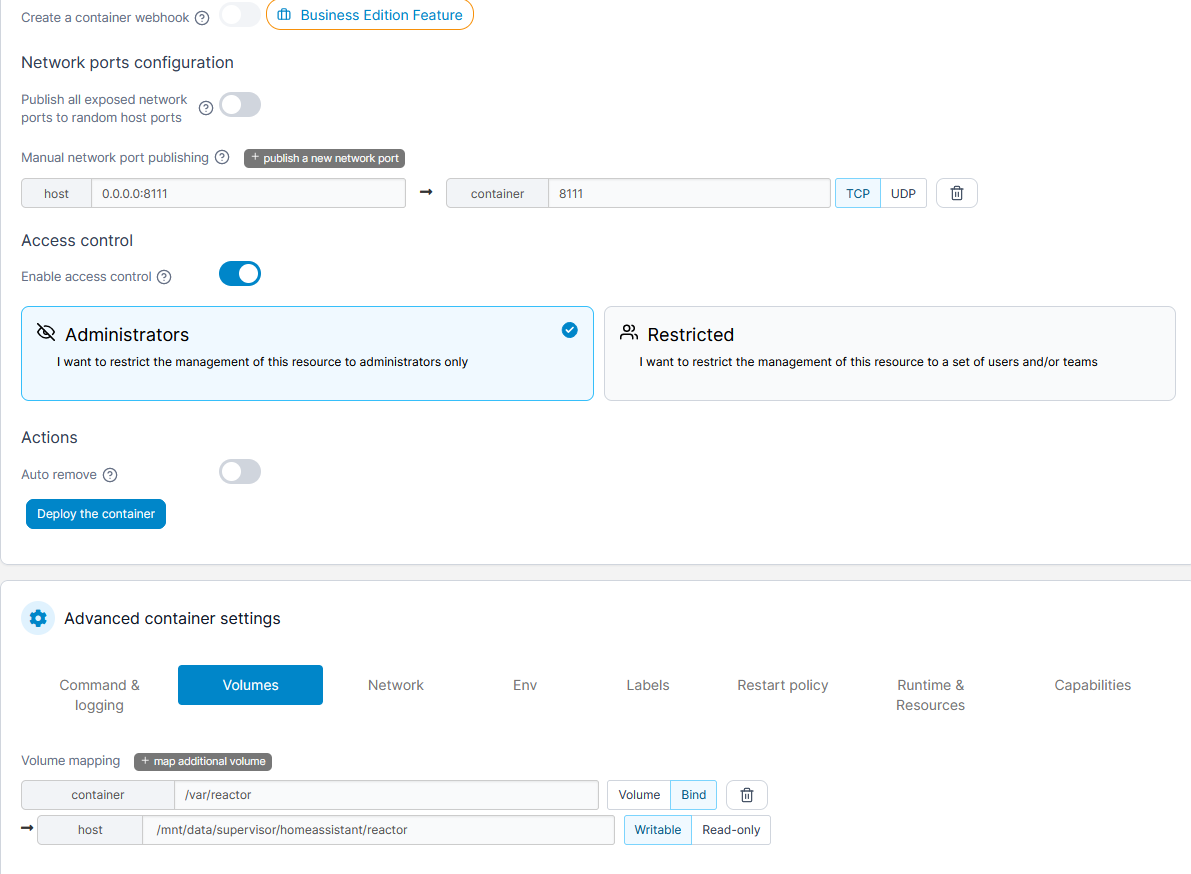
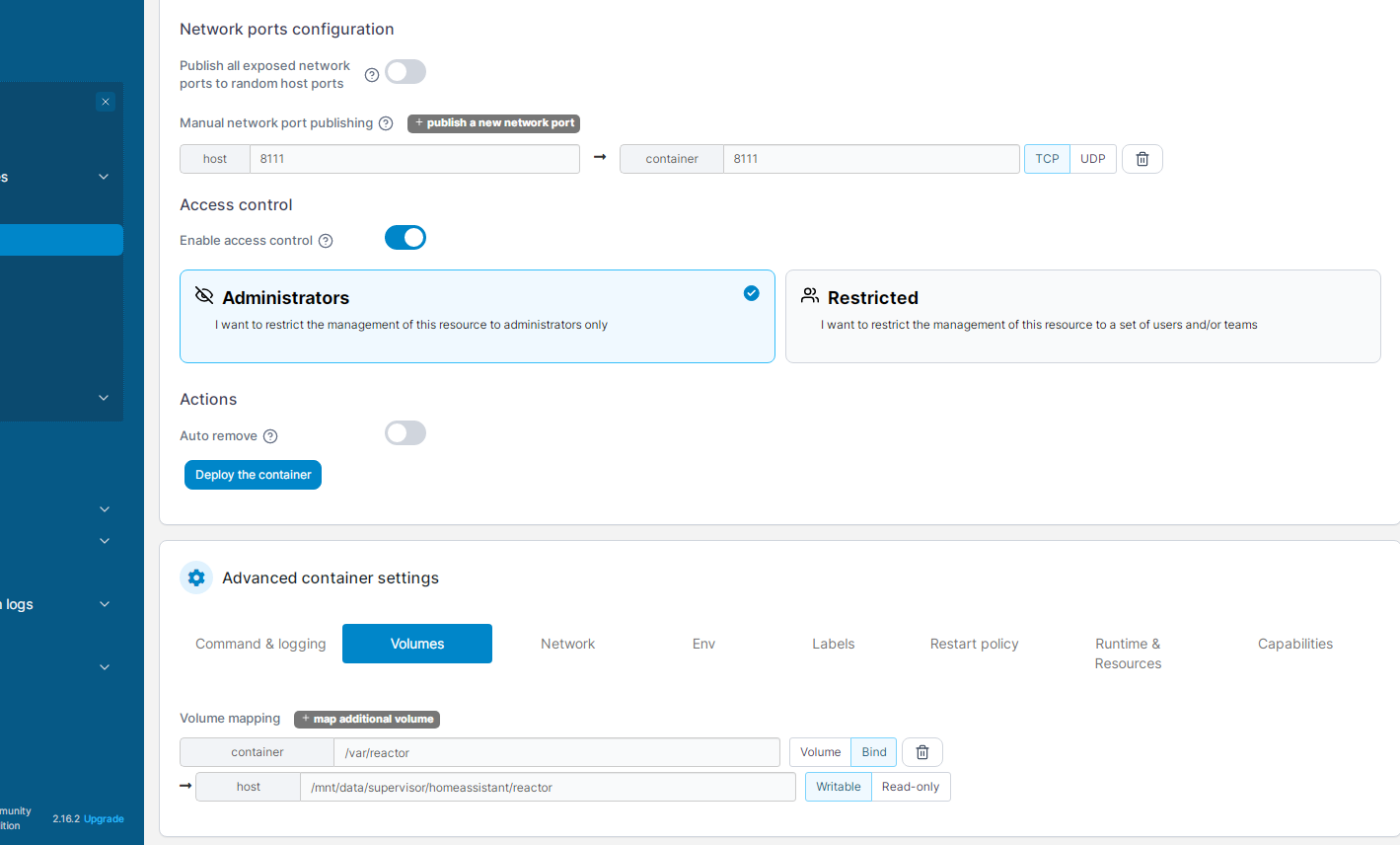
      I don't know/use Portainer, but you didn't show your Volumes tab. Did you create a directory for your config and data and bind it, per the installation instructions?

      Author of Multi-system Reactor and Reactor, DelayLight, Switchboard, and about a dozen other plugins that run on Vera and openLuup.

      1 Reply Last reply
      0
      • A Offline
        A Offline
        alminsk
        wrote on last edited by
        #18

        image.png

        1 Reply Last reply
        0
        • A Offline
          A Offline
          alminsk
          wrote on last edited by
          #19

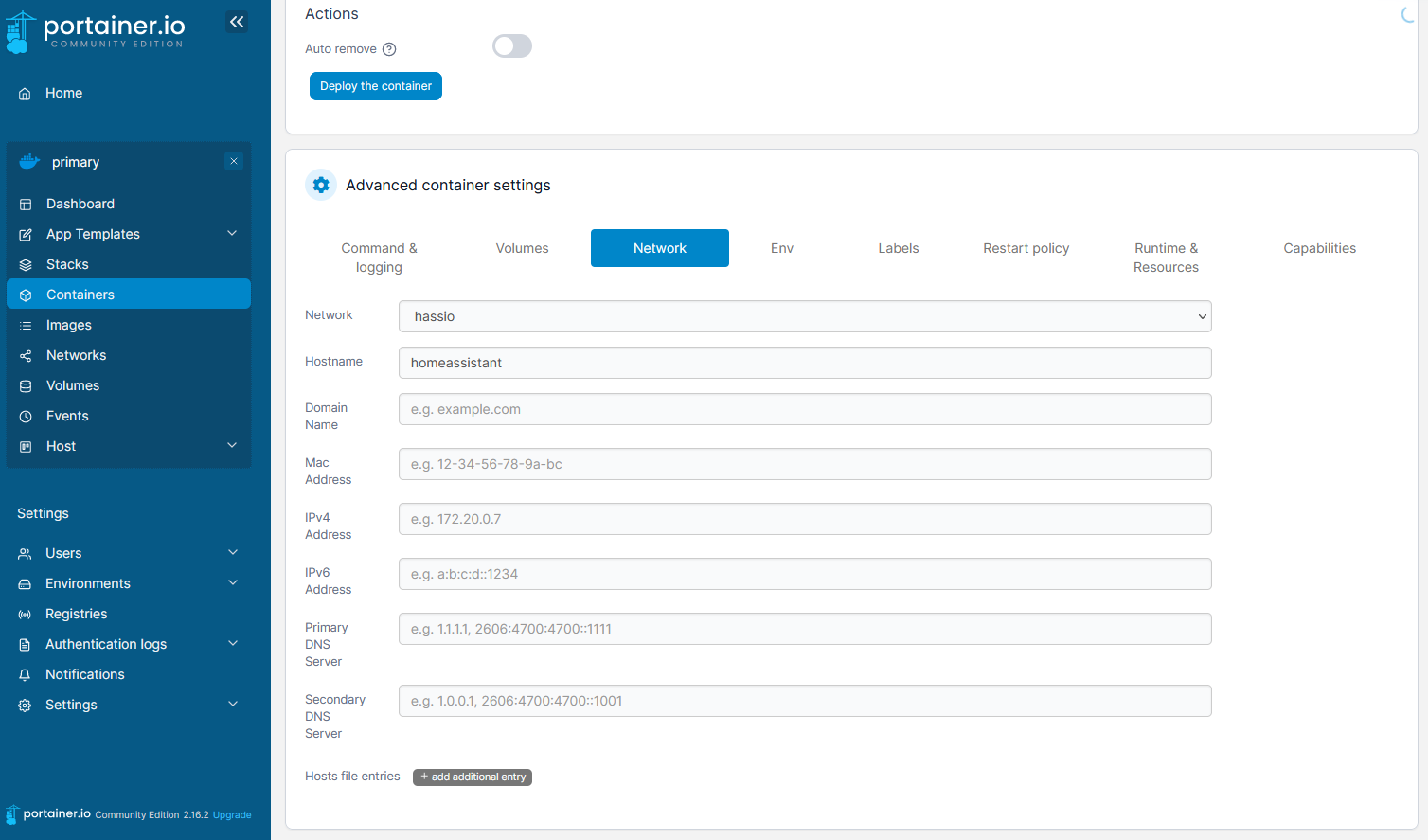
          Maybe I'm not choosing the right network?
          I have it like this now:

          image.png

          1 Reply Last reply
          0
          • toggledbitsT Offline
            toggledbitsT Offline
            toggledbits
            wrote on last edited by toggledbits
            #20

            That volume binding doesn't look right to me. Again, I'm not a Portainer user, but I would think that the path /var/reactor would be mentioned as related to the binding, since this is what Reactor is using internally within the container. It looks like you may have copied something from the Home Assistant configuration, but that's not right. I bet the /mnt/data/supervisor/homeassistant directory does not even exist in your new VM, because Home Assistant is not installed in that VM. You can't copy-paste/borrow from the Home Assistant configuration and get a successful Reactor configuration; different products, different configuration requirements. The Reactor installation instructions for docker show in the examples a Reactor data directory simply created in a regular user home directory. This is what you want. That directory (e.g. /home/username/reactor) should be bound to /var/reactor in the container.

            Your network configuration is also suspect/incorrect. Again, it looks like you copied from Home Assistant's instructions, rather than using the Reactor instructions. The network mode is typically "host". If that doesn't work, you can try "bridge".

            Can any of the Portainer+Reactor users please chime in here with some help for this user? Screen shots would be helpful. @black-cat @Fanan @vezinpi ...

            Author of Multi-system Reactor and Reactor, DelayLight, Switchboard, and about a dozen other plugins that run on Vera and openLuup.

            1 Reply Last reply
            1
            • A Offline
              A Offline
              alminsk
              wrote on last edited by
              #21

              I have created such a catologist. /mnt/data/supervisor/homeassistant

              I tried to install different networks

              "Can any of the Portainer+Reactor users please chime in here with some help for this user? Screen shots would be helpful. @black-cat @Fanan @vezinpi ..." - I would be very grateful to you.

              F 1 Reply Last reply
              0
              • A alminsk

                I have created such a catologist. /mnt/data/supervisor/homeassistant

                I tried to install different networks

                "Can any of the Portainer+Reactor users please chime in here with some help for this user? Screen shots would be helpful. @black-cat @Fanan @vezinpi ..." - I would be very grateful to you.

                F Offline
                F Offline
                Fanan
                wrote on last edited by Fanan
                #22

                @alminsk I use portainer succesfully and have the same volumes setting as you. I followed a guide from someone long time ago, and it's been a "do and forget" thing. I'm not a programmer, so I can't tell why somethings are as they are.

                My network setting are different:
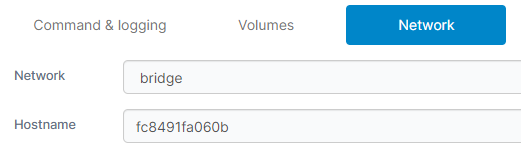
                5fa9129a-9744-4731-8b50-3a8f50b2f6a7-image.png

                My setup is on a HA Blue (odroid n2+) and these values are also different:
                9fb11882-3563-4c17-9c16-fe6f563658e7-image.png

                Under Command & logging everything is the same except for the last line:

                8d6512e0-fc90-435e-a776-1257edd06599-image.png

                I hope this helps... As I wrote, I'm not the expert here, or know what every parameter means. Best of luck!
                /Fanan

                toggledbitsT 1 Reply Last reply
                1
                • F Fanan

                  @alminsk I use portainer succesfully and have the same volumes setting as you. I followed a guide from someone long time ago, and it's been a "do and forget" thing. I'm not a programmer, so I can't tell why somethings are as they are.

                  My network setting are different:
                  5fa9129a-9744-4731-8b50-3a8f50b2f6a7-image.png

                  My setup is on a HA Blue (odroid n2+) and these values are also different:
                  9fb11882-3563-4c17-9c16-fe6f563658e7-image.png

                  Under Command & logging everything is the same except for the last line:
                  8d6512e0-fc90-435e-a776-1257edd06599-image.png

                  I hope this helps... As I wrote, I'm not the expert here, or know what every parameter means. Best of luck!
                  /Fanan

                  toggledbitsT Offline
                  toggledbitsT Offline
                  toggledbits
                  wrote on last edited by toggledbits
                  #23

                  @Fanan Unfortunately, at least one of those differences is incorrect for you. The NODE_PATH would be correct as @alminsk showed in his screen shots; it should be /opt/reactor:/opt/reactor/node_modules. If it is not this exact value, some features of Reactor will not function.

                  The value of tag is not relevant.

                  @alminsk In the face of all of this, I decided yesterday to make Portainer a supported environment, so I got it installed on a spare Pi, did a couple of Reactor installs, and wrote down the steps, here: https://reactor.toggledbits.com/docs/Installation-docker-portainer/

                  Author of Multi-system Reactor and Reactor, DelayLight, Switchboard, and about a dozen other plugins that run on Vera and openLuup.

                  F 1 Reply Last reply
                  3
                  • R Offline
                    R Offline
                    RogerO
                    wrote on last edited by RogerO
                    #24

                    @toggledbits Hi Patrick,
                    Looking at your Portainer doc, found a minor error I think. In second paragraph in first section you have "For most Linux most systems," . Doesn't make sense.

                    Also, should "The stable branch builds have seen action for a while and are more... well... stable." Actually be "The stable branch builds have not seen action for a while and are more... well... stable.

                    1 Reply Last reply
                    1
                    • toggledbitsT toggledbits

                      @Fanan Unfortunately, at least one of those differences is incorrect for you. The NODE_PATH would be correct as @alminsk showed in his screen shots; it should be /opt/reactor:/opt/reactor/node_modules. If it is not this exact value, some features of Reactor will not function.

                      The value of tag is not relevant.

                      @alminsk In the face of all of this, I decided yesterday to make Portainer a supported environment, so I got it installed on a spare Pi, did a couple of Reactor installs, and wrote down the steps, here: https://reactor.toggledbits.com/docs/Installation-docker-portainer/

                      F Offline
                      F Offline
                      Fanan
                      wrote on last edited by
                      #25

                      @toggledbits Thanks! As I mentioned before; these things are like greek to me, so I'm very thankful for all assistance. I changed the NODE_PATH. Strange that it has worked as a charm so far!

                      1 Reply Last reply
                      0
                      • A Offline
                        A Offline
                        alminsk
                        wrote on last edited by
                        #26

                        Excellent. Everything worked. Thank you so much for the excellent REACTOR. Thank you so much for your support.

                        1 Reply Last reply
                        1
                        • A Offline
                          A Offline
                          alminsk
                          wrote on last edited by
                          #27

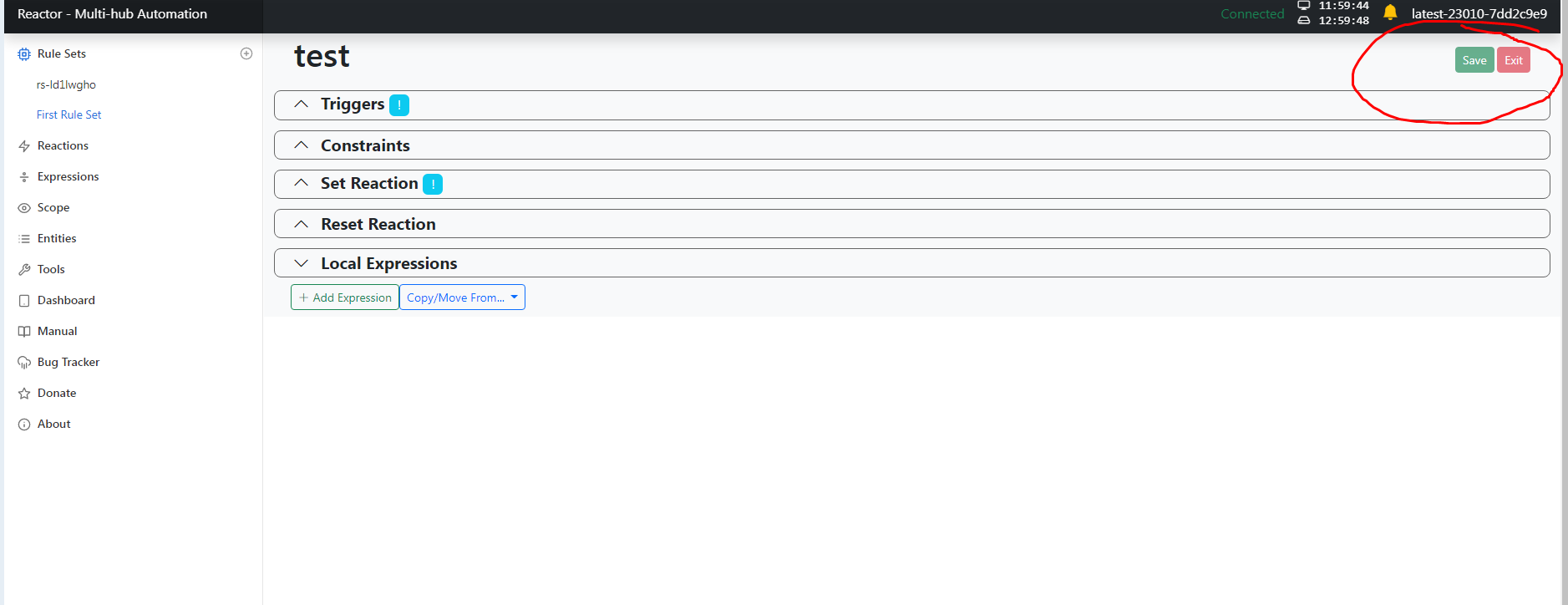
                          Hello everyone. I ran into a problem: I can't save the rules.
                          Screenshot_1.png Screenshot_2.png

                          I assume that the problem is in the path of the user file. Created a directory along this path.

                          Screenshot_3.png

                          The Portainer starts the reactor container . But the rules are not saved.

                          1 Reply Last reply
                          0
                          • A Offline
                            A Offline
                            alminsk
                            wrote on last edited by
                            #28

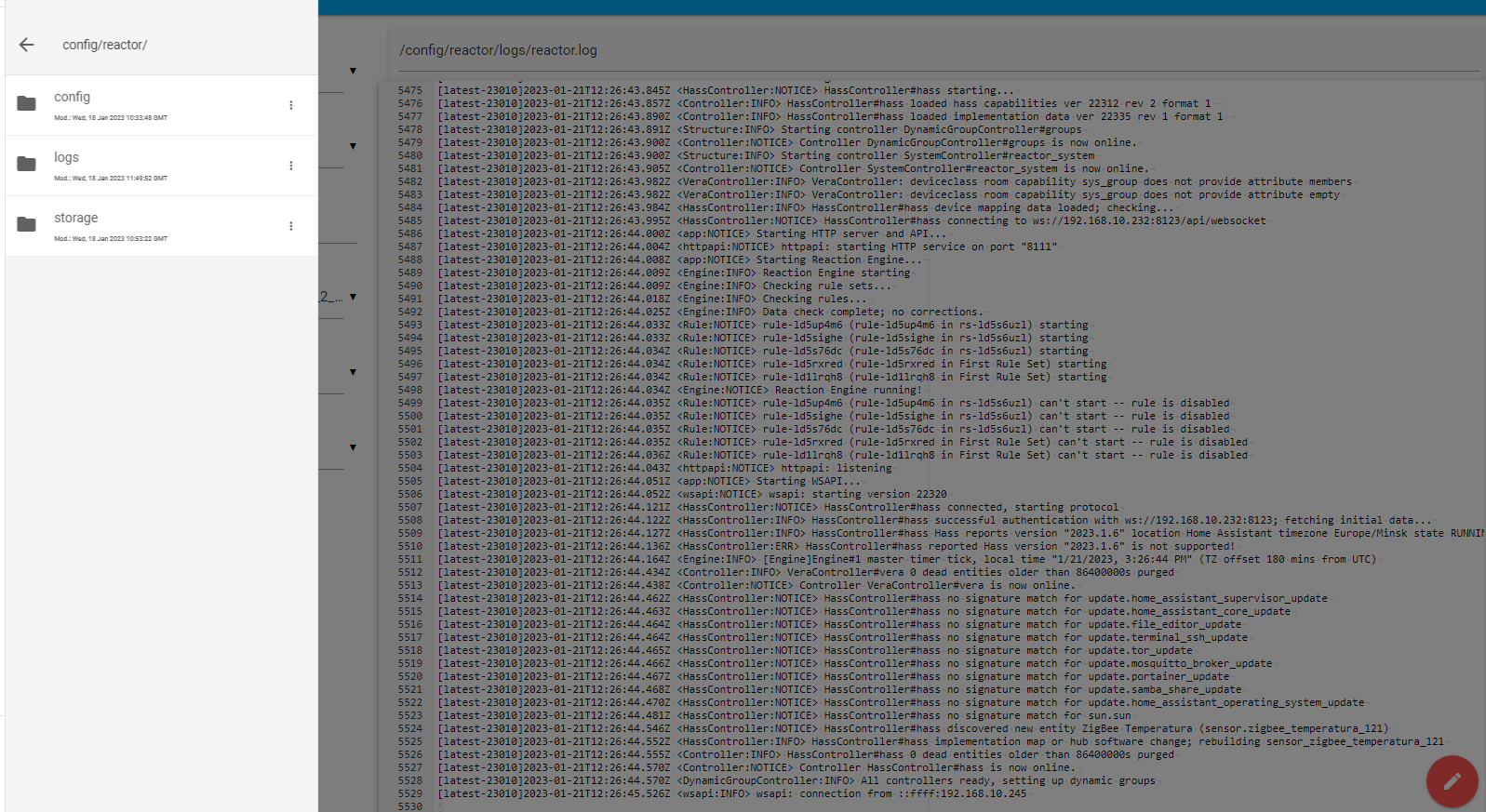
                            I looked at the logs, everything is recorded well. The directory is specified correctly.

                            image.png

                            1 Reply Last reply
                            0
                            • A Offline
                              A Offline
                              alminsk
                              wrote on last edited by
                              #29

                              Everything worked. I don't understand what the reason is. The rules are saved.

                              1 Reply Last reply
                              0
                              • A Offline
                                A Offline
                                alminsk
                                wrote on last edited by
                                #30

                                Maybe I haven't figured out how to work with MSR yet. I used to work with Reactor in VeraPlus, but it works a little differently.

                                1 Reply Last reply
                                0
                                • toggledbitsT Offline
                                  toggledbitsT Offline
                                  toggledbits
                                  wrote on last edited by
                                  #31

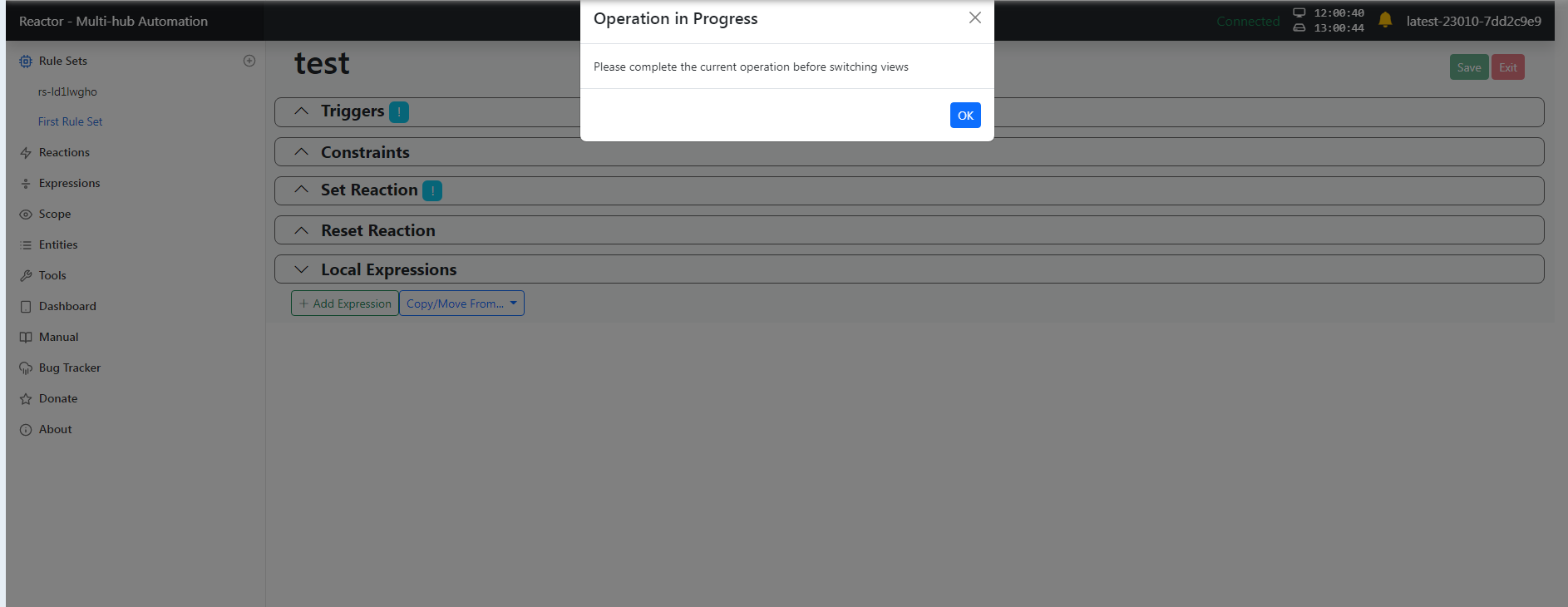
                                  If the save button is faded green as shown in your screen shot, that means you have an error in your rule that you have to fix before saving. Your rule screen shot has everything collapsed/hidden; this is not helpful.

                                  Author of Multi-system Reactor and Reactor, DelayLight, Switchboard, and about a dozen other plugins that run on Vera and openLuup.

                                  1 Reply Last reply
                                  1
                                  • A Offline
                                    A Offline
                                    alminsk
                                    wrote on last edited by
                                    #32

                                    Thanks. I'm figuring it out a little bit. Yes, there really were mistakes.

                                    G 1 Reply Last reply
                                    0
                                    • A alminsk

                                      Thanks. I'm figuring it out a little bit. Yes, there really were mistakes.

                                      G Offline
                                      G Offline
                                      gwp1
                                      wrote on last edited by
                                      #33

                                      @alminsk Now that you've been working in MSR for a short while it's time to revisit the manual. You'll find things that may not have made sense or that you didn't see a use for now make much more sense.

                                      Focus on how to understand the signs MSR is giving you to help you troubleshoot.

                                      I, too, came from the Vera Reactor plugin. "Same but different" applies here - but in all good ways.

                                      *Hubitat C-7 2.5.1.142
                                      *Proxmox VE v8, Beelink MiniPC 12GBs, SSD

                                      *HAOS
                                      Core 2026.7.4
                                      w/ HA Connect ZWA-2
                                      FW: v1.1
                                      SDK: v7.23.1

                                      *Prod MSR in docker/portainer
                                      MSR: latest-26193-8dd8f854
                                      MQTTController: 25139
                                      ZWave Controller: 25139

                                      1 Reply Last reply
                                      4
                                      • toggledbitsT toggledbits locked this topic on
                                      Reply
                                      • Reply as topic
                                      Log in to reply
                                      • Oldest to Newest
                                      • Newest to Oldest
                                      • Most Votes


                                      Recent Topics

                                      • Arming Envisalink panel from MSR
                                        T
                                        tamorgen
                                        0
                                        7
                                        169

                                      • [Solved] DynamicGroupController updating members issue
                                        CrilleC
                                        Crille
                                        0
                                        5
                                        104

                                      • Reactor (Multi-System/Multi-Hub) Announcements
                                        toggledbitsT
                                        toggledbits
                                        5
                                        148
                                        129.6k

                                      • DynamicGroupController and attributes
                                        therealdbT
                                        therealdb
                                        1
                                        5
                                        114

                                      • Upgrade Issues
                                        T
                                        tbully
                                        0
                                        9
                                        226

                                      • [SOLVED] Conflicting Set Reaction Groups Appear to Fire Simultaneously in Single Rule Evaluation
                                        toggledbitsT
                                        toggledbits
                                        0
                                        10
                                        257

                                      • [SOLVED] Question regarding "in" vs "contains" vs contents of the string
                                        G
                                        gwp1
                                        0
                                        5
                                        136

                                      • openLuup console disappeared - 500 - Internal Server Error
                                        A
                                        a-lurker
                                        0
                                        2
                                        173

                                      • Logon screen timeout
                                        G
                                        gwp1
                                        0
                                        5
                                        193

                                      • [MSR] Copy&past of actions and/or drag&drop between set/reset
                                        toggledbitsT
                                        toggledbits
                                        0
                                        9
                                        363

                                      • Upgrade advice - upgrade from aarch64 to ARM64 image
                                        toggledbitsT
                                        toggledbits
                                        0
                                        4
                                        215
                                      Powered by NodeBB | Contributors
                                      Hosted freely by 10RUPTiV - Solutions Technologiques | Contact us
                                      • Login

                                      • Don't have an account? Register

                                      • Login or register to search.
                                      • First post
                                        Last post
                                      0
                                      • Categories
                                      • Recent
                                      • Tags
                                      • Popular
                                      • Unsolved