





MFA
-
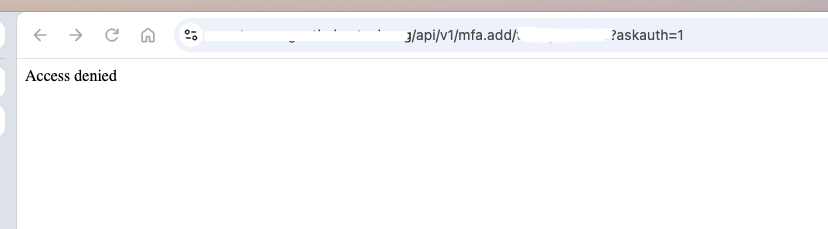
Still no joy. I'm still getting Access Denied after entering my username and password
[latest-26298]2026-10-30T11:39:27.726Z <wsapi:5:wsapi.js:169> (event handler): sending data
[latest-26298]2026-10-30T11:39:27.735Z <wsapi:5:wsapi.js:152> (event handler) sending update for 5 entities
[latest-26298]2026-10-30T11:39:27.982Z <httpapi:5:httpapi.js:1122> httpapi#1 starting request from "192.168.1.127" via ::ffff:192.168.1.127 for GET /api/v1/mfa.add/tmorgenthaler?askauth=1 lang en-US,en;q=0.9 (TLSv1.3)
[latest-26298]2026-10-30T11:39:27.982Z <httpapi:5:httpapi.js:1154> httpapi#1 auth header Basic dG1vcmdlbnRoYWxlcjohUjNicjNhdGgzciE=
[latest-26298]2026-10-30T11:39:27.990Z <httpapi:5:httpapi.js:1161> httpapi#1 auth accepted via HTTP Basic user tmorgenthaler
[latest-26298]2026-10-30T11:39:27.991Z <httpapi:INFO> httpapi#1 API request from ::ffff:192.168.1.127 (TLSv1.3): GET /api/v1/mfa.add/tmorgenthaler
[latest-26298]2026-10-30T11:39:27.991Z <httpapi:INFO> httpapi#1 request for /api/v1/mfa.add/tmorgenthaler from ::ffff:192.168.1.127 user tmorgenthaler auth basic matches / ACL (#6): { "url": "/", "allow": false, "index": 6 }
[latest-26298]2026-10-30T11:39:28.264Z <wsapi:5:wsapi.js:169> (event handler): sending data
[latest-26298]2026-10-30T11:39:28.265Z <wsapi:5:wsapi.js:169> (event handler): sending data
[latest-26298]2026-10-30T11:39:28.265Z <wsapi:5:wsapi.js:169> (event handler): sending data
groups: api_allowed: users: - admin - tmorgenthaler api_acls: - url: "/api/" group: api_allowed source_ip: 192.168.1.1/24 allow: true -
Still no joy. I'm still getting Access Denied after entering my username and password
[latest-26298]2026-10-30T11:39:27.726Z <wsapi:5:wsapi.js:169> (event handler): sending data
[latest-26298]2026-10-30T11:39:27.735Z <wsapi:5:wsapi.js:152> (event handler) sending update for 5 entities
[latest-26298]2026-10-30T11:39:27.982Z <httpapi:5:httpapi.js:1122> httpapi#1 starting request from "192.168.1.127" via ::ffff:192.168.1.127 for GET /api/v1/mfa.add/tmorgenthaler?askauth=1 lang en-US,en;q=0.9 (TLSv1.3)
[latest-26298]2026-10-30T11:39:27.982Z <httpapi:5:httpapi.js:1154> httpapi#1 auth header Basic dG1vcmdlbnRoYWxlcjohUjNicjNhdGgzciE=
[latest-26298]2026-10-30T11:39:27.990Z <httpapi:5:httpapi.js:1161> httpapi#1 auth accepted via HTTP Basic user tmorgenthaler
[latest-26298]2026-10-30T11:39:27.991Z <httpapi:INFO> httpapi#1 API request from ::ffff:192.168.1.127 (TLSv1.3): GET /api/v1/mfa.add/tmorgenthaler
[latest-26298]2026-10-30T11:39:27.991Z <httpapi:INFO> httpapi#1 request for /api/v1/mfa.add/tmorgenthaler from ::ffff:192.168.1.127 user tmorgenthaler auth basic matches / ACL (#6): { "url": "/", "allow": false, "index": 6 }
[latest-26298]2026-10-30T11:39:28.264Z <wsapi:5:wsapi.js:169> (event handler): sending data
[latest-26298]2026-10-30T11:39:28.265Z <wsapi:5:wsapi.js:169> (event handler): sending data
[latest-26298]2026-10-30T11:39:28.265Z <wsapi:5:wsapi.js:169> (event handler): sending data
groups: api_allowed: users: - admin - tmorgenthaler api_acls: - url: "/api/" group: api_allowed source_ip: 192.168.1.1/24 allow: true -
@toggledbits said in MFA:
- url: "/api/"
Remove the trailing slash.
Just getting back to this.
I removed the trailing slash, and I'm still getting the same result. I get prompted for my user name and password (same as before), but as soon as I put it in, I get Access Denied. I'm using Chrome incognito mode.

[latest-26298]2026-11-02T16:22:39.572Z <wsapi:5:wsapi.js:169> (event handler): sending data
[latest-26298]2026-11-02T16:22:39.596Z <wsapi:5:wsapi.js:152> (event handler) sending update for 1 entities
[latest-26298]2026-11-02T16:22:39.983Z <httpapi:5:httpapi.js:1122> httpapi#1 starting request from "192.168.1.123" via ::ffff:192.168.1.123 for GET /api/v1/mfa.add/tmorgenthaler?askauth=1 lang en-US,en;q=0.9 (TLSv1.3)
[latest-26298]2026-11-02T16:22:39.984Z <httpapi:5:httpapi.js:1154> httpapi#1 auth header Basic dG1vcmdlbnRoYWxlcjohUjNicjNhdGgzciE=
[latest-26298]2026-11-02T16:22:39.995Z <httpapi:5:httpapi.js:1161> httpapi#1 auth accepted via HTTP Basic user tmorgenthaler
[latest-26298]2026-11-02T16:22:39.995Z <httpapi:INFO> httpapi#1 API request from ::ffff:192.168.1.123 (TLSv1.3): GET /api/v1/mfa.add/tmorgenthaler
[latest-26298]2026-11-02T16:22:39.995Z <httpapi:INFO> httpapi#1 request for /api/v1/mfa.add/tmorgenthaler from ::ffff:192.168.1.123 user tmorgenthaler auth basic matches / ACL (#6): { "url": "/", "allow": false, "index": 6 }
[latest-26298]2026-11-02T16:22:41.549Z <wsapi:5:wsapi.js:169> (event handler): sending data
[latest-26298]2026-11-02T16:22:41.550Z <wsapi:5:wsapi.js:169> (event handler): sending data
groups: api_allowed: users: - admin - tmorgenthaler api_acls: - url: "/api" group: api_allowed source_ip: 192.168.1.1/24 allow: true -
Turn on ACL debug. The log will then show why your ACL isn't matched.
Also look in your startup messages for any errors (specifically, search for "ignoring config").
-
Turn on ACL debug. The log will then show why your ACL isn't matched.
Also look in your startup messages for any errors (specifically, search for "ignoring config").
@toggledbits
I changed the debug to true, this is what I'm seeing in the logs now:[latest-26298]2026-11-03T16:31:21.448Z <wsapi:5:wsapi.js:169> (event handler): sending data [latest-26298]2026-11-03T16:31:21.448Z <wsapi:5:wsapi.js:169> (event handler): sending data [latest-26298]2026-11-03T16:31:21.449Z <wsapi:5:wsapi.js:169> (event handler): sending data [latest-26298]2026-11-03T16:31:21.472Z <wsapi:5:wsapi.js:152> (event handler) sending update for 5 entities [latest-26298]2026-11-03T16:31:21.820Z <httpapi:5:httpapi.js:1122> httpapi#1 starting request from "69.255.234.254" via ::ffff:192.168.1.73 for GET /api/v1/mfa.add/tmorgenthaler?askauth=1 lang en-US,en;q=0.9 (TLSv1.3) [latest-26298]2026-11-03T16:31:21.820Z <httpapi:5:httpapi.js:1135> httpapi#1 pass_all_proxy is set, passing proxy req from "69.255.234.254" via ::ffff:192.168.1.73 [latest-26298]2026-11-03T16:31:21.820Z <httpapi:5:httpapi.js:1154> httpapi#1 auth header Basic dG1vcmdlbnRoYWxlcjohUjNicjNhdGgzciE= [latest-26298]2026-11-03T16:31:21.829Z <httpapi:5:httpapi.js:1161> httpapi#1 auth accepted via HTTP Basic user tmorgenthaler [latest-26298]2026-11-03T16:31:21.830Z <httpapi:INFO> httpapi#1 API request from "69.255.234.254" (TLSv1.3): GET /api/v1/mfa.add/tmorgenthaler [latest-26298]2026-11-03T16:31:21.830Z <httpapi:INFO> httpapi#1 request for /api/v1/mfa.add/tmorgenthaler from "69.255.234.254" user tmorgenthaler auth basic matches / ACL (#6): { "url": "/", "allow": false, "index": 6 } [latest-26298]2026-11-03T16:31:21.834Z <wsapi:5:wsapi.js:169> (event handler): sending data [latest-26298]2026-11-03T16:31:21.834Z <wsapi:5:wsapi.js:169> (event handler): sending data [latest-26298]2026-11-03T16:31:21.835Z <wsapi:5:wsapi.js:169> (event handler): sending data [latest-26298]2026-11-03T16:31:21.835Z <wsapi:5:wsapi.js:169> (event handler): sending data [latest-26298]2026-11-03T16:31:21.836Z <wsapi:5:wsapi.js:169> (event handler): sending data [latest-26298]2026-11-03T16:31:21.836Z <wsapi:5:wsapi.js:169> (event handler): sending dataI tried again using my local IP, and not using the Cloudflared tunnel
[latest-26298]2026-11-03T16:34:36.924Z <wsapi:5:wsapi.js:169> (event handler): sending data [latest-26298]2026-11-03T16:34:36.924Z <wsapi:5:wsapi.js:169> (event handler): sending data [latest-26298]2026-11-03T16:34:36.949Z <wsapi:5:wsapi.js:152> (event handler) sending update for 5 entities [latest-26298]2026-11-03T16:34:36.987Z <httpapi:5:httpapi.js:1122> httpapi#1 starting request from "192.168.1.127" via ::ffff:192.168.1.127 for GET /api/v1/mfa.add/tmorgenthaler?askauth=1 lang en-US,en;q=0.9 (TLSv1.3) [latest-26298]2026-11-03T16:34:36.987Z <httpapi:5:httpapi.js:1154> httpapi#1 auth header Basic dG1vcmdlbnRoYWxlcjohUjNicjNhdGgzciE= [latest-26298]2026-11-03T16:34:36.996Z <httpapi:5:httpapi.js:1161> httpapi#1 auth accepted via HTTP Basic user tmorgenthaler [latest-26298]2026-11-03T16:34:36.996Z <httpapi:INFO> httpapi#1 API request from ::ffff:192.168.1.127 (TLSv1.3): GET /api/v1/mfa.add/tmorgenthaler [latest-26298]2026-11-03T16:34:36.996Z <httpapi:INFO> httpapi#1 request for /api/v1/mfa.add/tmorgenthaler from ::ffff:192.168.1.127 user tmorgenthaler auth basic matches / ACL (#6): { "url": "/", "allow": false, "index": 6 } [latest-26298]2026-11-03T16:34:36.997Z <wsapi:5:wsapi.js:169> (event handler): sending data [latest-26298]2026-11-03T16:34:36.998Z <wsapi:5:wsapi.js:169> (event handler): sending data [latest-26298]2026-11-03T16:34:36.998Z <wsapi:5:wsapi.js:169> (event handler): sending data [latest-26298]2026-11-03T16:34:36.999Z <wsapi:5:wsapi.js:169> (event handler): sending data [latest-26298]2026-11-03T16:34:37.023Z <wsapi:5:wsapi.js:152> (event handler) sending update for 2 entities [latest-26298]2026-11-03T16:34:37.099Z <httpapi:5:httpapi.js:1122> httpapi#1 starting request from "192.168.1.127" via ::ffff:192.168.1.127 for GET /favicon.ico lang en-US,en;q=0.9 (TLSv1.3) [latest-26298]2026-11-03T16:34:37.237Z <wsapi:5:wsapi.js:169> (event handler): sending data [latest-26298]2026-11-03T16:34:37.237Z <wsapi:5:wsapi.js:169> (event handler): sending data [latest-26298]2026-11-03T16:34:37.238Z <wsapi:5:wsapi.js:169> (event handler): sending data [latest-26298]2026-11-03T16:34:37.238Z <wsapi:5:wsapi.js:169> (event handler): sending data [latest-26298]2026-11-03T16:34:37.238Z <wsapi:5:wsapi.js:169> (event handler): sending data [latest-26298]2026-11-03T16:34:37.239Z <wsapi:5:wsapi.js:169> (event handler): sending data -
As part of startup, you have two log messages:
httpapi#1 ACLsandhttpapi#1 ACL index, one after the other, both with additional data on the same line. Please post those. It looks like your custom ACL is not even being loaded. I would check yourusers.yamlfile against yamllint.com or similar tool... I'm betting you have another error in the file and it's preventing the file from being loaded at all, so the last-known-good version of the configuration (without your ACL change) is being loaded. -
As part of startup, you have two log messages:
httpapi#1 ACLsandhttpapi#1 ACL index, one after the other, both with additional data on the same line. Please post those. It looks like your custom ACL is not even being loaded. I would check yourusers.yamlfile against yamllint.com or similar tool... I'm betting you have another error in the file and it's preventing the file from being loaded at all, so the last-known-good version of the configuration (without your ACL change) is being loaded.@toggledbits
Okay, that was helpful. There was an error, and now I'm getting more information. I'm still getting Access Denied, for two separate reasons I think.[latest-26298]2026-11-03T16:50:01.487Z <wsapi:5:wsapi.js:169> (event handler): sending data [latest-26298]2026-11-03T16:50:01.488Z <wsapi:5:wsapi.js:169> (event handler): sending data [latest-26298]2026-11-03T16:50:01.510Z <wsapi:5:wsapi.js:152> (event handler) sending update for 5 entities [latest-26298]2026-11-03T16:50:01.669Z <httpapi:5:httpapi.js:1122> httpapi#1 starting request from "69.255.234.254" via ::ffff:192.168.1.73 for GET /api/v1/mfa.add/tmorgenthaler?askauth=1 lang en-US,en;q=0.9 (TLSv1.3) [latest-26298]2026-11-03T16:50:01.669Z <httpapi:5:httpapi.js:1135> httpapi#1 pass_all_proxy is set, passing proxy req from "69.255.234.254" via ::ffff:192.168.1.73 [latest-26298]2026-11-03T16:50:01.669Z <httpapi:5:httpapi.js:1154> httpapi#1 auth header Basic dG1vcmdlbnRoYWxlcjohUjNicjNhdGgzciE= [latest-26298]2026-11-03T16:50:01.684Z <httpapi:5:httpapi.js:1161> httpapi#1 auth accepted via HTTP Basic user tmorgenthaler [latest-26298]2026-11-03T16:50:01.685Z <httpapi:INFO> httpapi#1 API request from "69.255.234.254" (TLSv1.3): GET /api/v1/mfa.add/tmorgenthaler [latest-26298]2026-11-03T16:50:01.685Z <httpapi:null> httpapi#1 checking ACLs for /api/v1/mfa.add/tmorgenthaler user tmorgenthaler authorization basic [latest-26298]2026-11-03T16:50:01.685Z <httpapi:null> httpapi#1 no ACLs matched for /api/v1/mfa.add/tmorgenthaler; reducing path [latest-26298]2026-11-03T16:50:01.685Z <httpapi:null> httpapi#1 no ACLs matched for /api/v1/mfa.add; reducing path [latest-26298]2026-11-03T16:50:01.685Z <httpapi:null> httpapi#1 no ACLs matched for /api/v1; reducing path [latest-26298]2026-11-03T16:50:01.685Z <httpapi:null> httpapi#1 checking /api/v1/mfa.add/tmorgenthaler against /api ACL { "url": "/api", "group": "api_allowed", "source_ip": "192.168.1.1/24", "allow": true, "index": 0 } [latest-26298]2026-11-03T16:50:01.685Z <httpapi:null> httpapi#1 ACL no match: user tmorgenthaler to group:api_allowed [latest-26298]2026-11-03T16:50:01.685Z <httpapi:null> httpapi#1 checking /api/v1/mfa.add/tmorgenthaler against /api ACL { "url": "/api", "source_ip": "127/8", "allow": true, "index": 6 } [latest-26298]2026-11-03T16:50:01.686Z <httpapi:null> httpapi#1 ACL no match: IP "69.255.234.254" to source_ip:"127/8" [latest-26298]2026-11-03T16:50:01.686Z <httpapi:null> httpapi#1 no ACLs matched for /api; reducing path [latest-26298]2026-11-03T16:50:01.686Z <httpapi:null> httpapi#1 checking /api/v1/mfa.add/tmorgenthaler against / ACL { "url": "/", "allow": false, "index": 7 } [latest-26298]2026-11-03T16:50:01.686Z <httpapi:INFO> httpapi#1 request for /api/v1/mfa.add/tmorgenthaler from "69.255.234.254" user tmorgenthaler auth basic matches / ACL (#7): { "url": "/", "allow": false, "index": 7 } [latest-26298]2026-11-03T16:50:01.841Z <wsapi:5:wsapi.js:169> (event handler): sending data [latest-26298]2026-11-03T16:50:01.842Z <wsapi:5:wsapi.js:169> (event handler): sending dataOne, it looks like it's seeing my proxy address. I know I set up proxy access in the lastest version of the reactor.yaml file, but it looks like I may need to do the same here.
From reactor.yaml
# baseurl - The base URL to access the Reactor system. If you want to use
#           HTTPS, please see the How-To section of the docs.
baseurl: "https://192.168.1.70:8554"
trusted_proxy: "192.168.1.73"
proxy_baseurl: "https://reactor.notmydomain.com:443"
pass_all_proxy: true
Do I need to put a proxy_baseurl and pass all proxy tag in the users.yaml as well?
The users.yaml file contains the user, so I'm guessing it's hitting the trusted IP filter first?
groups: # This section defines your user groups. Optionally, it defines application # and API access restrictions (ACLs) for the group. Users may belong to # more than one group. Again, no required or special groups here. admin: users: - admin - tmorgenthaler applications: true # special form allows access to ALL applications api: default: allow api_allowed: users: - admin - tmorgenthaler api_acls: - url: "/api" group: api_allowed source_ip: 192.168.1.1/24 allow: true -
Okay, this is not making any sense. I'm trying directly from my local workstation, going to the local IP, and I'm still seeing no match on IP.
This is the command I'm using in a browser, in incognito mode, after restarting my docker instance of reactor.
https://192.168.1.70:8554/api/v1/mfa.add/tmorgenthaler?askauth=1
[latest-26298]2026-11-04T12:43:45.818Z <httpapi:null> httpapi#1 ACL no match: IP ::ffff:192.168.1.127 to source_ip:"127/8"
[latest-26298]2026-11-04T12:43:45.818Z <httpapi:null> httpapi#1 no ACLs matched for /api; reducing path
The api_acl list has the whole /24 as allowed.
api_acls:
  - url: "/api"
    group: api_allowed
    source_ip: 192.168.1.1/24
    allow: true
[latest-26298]2026-11-04T12:43:45.776Z <wsapi:5:wsapi.js:169> (event handler): sending data [latest-26298]2026-11-04T12:43:45.777Z <wsapi:5:wsapi.js:169> (event handler): sending data [latest-26298]2026-11-04T12:43:45.801Z <wsapi:5:wsapi.js:152> (event handler) sending update for 4 entities [latest-26298]2026-11-04T12:43:45.804Z <httpapi:5:httpapi.js:1122> httpapi#1 starting request from "192.168.1.127" via ::ffff:192.168.1.127 for GET /api/v1/mfa.add/tmorgenthaler?askauth=1 lang en-US,en;q=0.9 (TLSv1.3) [latest-26298]2026-11-04T12:43:45.805Z <httpapi:5:httpapi.js:1154> httpapi#1 auth header Basic dG1vcmdlbnRoYWxlcjohUjNicjNhdGgzciE= [latest-26298]2026-11-04T12:43:45.817Z <httpapi:5:httpapi.js:1161> httpapi#1 auth accepted via HTTP Basic user tmorgenthaler [latest-26298]2026-11-04T12:43:45.817Z <httpapi:INFO> httpapi#1 API request from ::ffff:192.168.1.127 (TLSv1.3): GET /api/v1/mfa.add/tmorgenthaler [latest-26298]2026-11-04T12:43:45.818Z <httpapi:null> httpapi#1 checking ACLs for /api/v1/mfa.add/tmorgenthaler user tmorgenthaler authorization basic [latest-26298]2026-11-04T12:43:45.818Z <httpapi:null> httpapi#1 no ACLs matched for /api/v1/mfa.add/tmorgenthaler; reducing path [latest-26298]2026-11-04T12:43:45.818Z <httpapi:null> httpapi#1 no ACLs matched for /api/v1/mfa.add; reducing path [latest-26298]2026-11-04T12:43:45.818Z <httpapi:null> httpapi#1 no ACLs matched for /api/v1; reducing path [latest-26298]2026-11-04T12:43:45.818Z <httpapi:null> httpapi#1 checking /api/v1/mfa.add/tmorgenthaler against /api ACL { "url": "/api", "group": "api_allowed", "source_ip": "192.168.1.1/24", "allow": true, "index": 0 } [latest-26298]2026-11-04T12:43:45.818Z <httpapi:null> httpapi#1 ACL no match: user tmorgenthaler to group:api_allowed [latest-26298]2026-11-04T12:43:45.818Z <httpapi:null> httpapi#1 checking /api/v1/mfa.add/tmorgenthaler against /api ACL { "url": "/api", "source_ip": "127/8", "allow": true, "index": 6 } [latest-26298]2026-11-04T12:43:45.818Z <httpapi:null> httpapi#1 ACL no match: IP ::ffff:192.168.1.127 to source_ip:"127/8" [latest-26298]2026-11-04T12:43:45.818Z <httpapi:null> httpapi#1 no ACLs matched for /api; reducing path [latest-26298]2026-11-04T12:43:45.818Z <httpapi:null> httpapi#1 checking /api/v1/mfa.add/tmorgenthaler against / ACL { "url": "/", "allow": false, "index": 7 } [latest-26298]2026-11-04T12:43:45.818Z <httpapi:INFO> httpapi#1 request for /api/v1/mfa.add/tmorgenthaler from ::ffff:192.168.1.127 user tmorgenthaler auth basic matches / ACL (#7): { "url": "/", "allow": false, "index": 7 } [latest-26298]2026-11-04T12:43:46.137Z <wsapi:5:wsapi.js:169> (event handler): sending data [latest-26298]2026-11-04T12:43:46.138Z <wsapi:5:wsapi.js:169> (event handler): sending dataMy username is in the admin users group, and in the api_allowed users group. My workstation IP of 192.168.1.127 is in the 192.168.1.1/24 network range.
What am I missing that the debug logs are telling me?
-
Okay, this is not making any sense. I'm trying directly from my local workstation, going to the local IP, and I'm still seeing no match on IP.
This is the command I'm using in a browser, in incognito mode, after restarting my docker instance of reactor.
https://192.168.1.70:8554/api/v1/mfa.add/tmorgenthaler?askauth=1
[latest-26298]2026-11-04T12:43:45.818Z <httpapi:null> httpapi#1 ACL no match: IP ::ffff:192.168.1.127 to source_ip:"127/8"
[latest-26298]2026-11-04T12:43:45.818Z <httpapi:null> httpapi#1 no ACLs matched for /api; reducing path
The api_acl list has the whole /24 as allowed.
api_acls:
  - url: "/api"
    group: api_allowed
    source_ip: 192.168.1.1/24
    allow: true
[latest-26298]2026-11-04T12:43:45.776Z <wsapi:5:wsapi.js:169> (event handler): sending data [latest-26298]2026-11-04T12:43:45.777Z <wsapi:5:wsapi.js:169> (event handler): sending data [latest-26298]2026-11-04T12:43:45.801Z <wsapi:5:wsapi.js:152> (event handler) sending update for 4 entities [latest-26298]2026-11-04T12:43:45.804Z <httpapi:5:httpapi.js:1122> httpapi#1 starting request from "192.168.1.127" via ::ffff:192.168.1.127 for GET /api/v1/mfa.add/tmorgenthaler?askauth=1 lang en-US,en;q=0.9 (TLSv1.3) [latest-26298]2026-11-04T12:43:45.805Z <httpapi:5:httpapi.js:1154> httpapi#1 auth header Basic dG1vcmdlbnRoYWxlcjohUjNicjNhdGgzciE= [latest-26298]2026-11-04T12:43:45.817Z <httpapi:5:httpapi.js:1161> httpapi#1 auth accepted via HTTP Basic user tmorgenthaler [latest-26298]2026-11-04T12:43:45.817Z <httpapi:INFO> httpapi#1 API request from ::ffff:192.168.1.127 (TLSv1.3): GET /api/v1/mfa.add/tmorgenthaler [latest-26298]2026-11-04T12:43:45.818Z <httpapi:null> httpapi#1 checking ACLs for /api/v1/mfa.add/tmorgenthaler user tmorgenthaler authorization basic [latest-26298]2026-11-04T12:43:45.818Z <httpapi:null> httpapi#1 no ACLs matched for /api/v1/mfa.add/tmorgenthaler; reducing path [latest-26298]2026-11-04T12:43:45.818Z <httpapi:null> httpapi#1 no ACLs matched for /api/v1/mfa.add; reducing path [latest-26298]2026-11-04T12:43:45.818Z <httpapi:null> httpapi#1 no ACLs matched for /api/v1; reducing path [latest-26298]2026-11-04T12:43:45.818Z <httpapi:null> httpapi#1 checking /api/v1/mfa.add/tmorgenthaler against /api ACL { "url": "/api", "group": "api_allowed", "source_ip": "192.168.1.1/24", "allow": true, "index": 0 } [latest-26298]2026-11-04T12:43:45.818Z <httpapi:null> httpapi#1 ACL no match: user tmorgenthaler to group:api_allowed [latest-26298]2026-11-04T12:43:45.818Z <httpapi:null> httpapi#1 checking /api/v1/mfa.add/tmorgenthaler against /api ACL { "url": "/api", "source_ip": "127/8", "allow": true, "index": 6 } [latest-26298]2026-11-04T12:43:45.818Z <httpapi:null> httpapi#1 ACL no match: IP ::ffff:192.168.1.127 to source_ip:"127/8" [latest-26298]2026-11-04T12:43:45.818Z <httpapi:null> httpapi#1 no ACLs matched for /api; reducing path [latest-26298]2026-11-04T12:43:45.818Z <httpapi:null> httpapi#1 checking /api/v1/mfa.add/tmorgenthaler against / ACL { "url": "/", "allow": false, "index": 7 } [latest-26298]2026-11-04T12:43:45.818Z <httpapi:INFO> httpapi#1 request for /api/v1/mfa.add/tmorgenthaler from ::ffff:192.168.1.127 user tmorgenthaler auth basic matches / ACL (#7): { "url": "/", "allow": false, "index": 7 } [latest-26298]2026-11-04T12:43:46.137Z <wsapi:5:wsapi.js:169> (event handler): sending data [latest-26298]2026-11-04T12:43:46.138Z <wsapi:5:wsapi.js:169> (event handler): sending dataMy username is in the admin users group, and in the api_allowed users group. My workstation IP of 192.168.1.127 is in the 192.168.1.1/24 network range.
What am I missing that the debug logs are telling me?
-
The indenting of your
groupssection is very goofed up.api_allowedand everything below it should be outdented two spaces... same alignment asadmin, not underneath it as you've shown. Also the two lines showing afterapplicationsunderadmin... no idea where that comes from or what it's supposed to do. Not sure what the intent was, but that's not anything Reactor will see or care about.proxy_baseurlandpass_all_proxydo not go inusers.yaml. -
The indenting of your
groupssection is very goofed up.api_allowedand everything below it should be outdented two spaces... same alignment asadmin, not underneath it as you've shown. Also the two lines showing afterapplicationsunderadmin... no idea where that comes from or what it's supposed to do. Not sure what the intent was, but that's not anything Reactor will see or care about.proxy_baseurlandpass_all_proxydo not go inusers.yaml.@toggledbits said in MFA:
The indenting of your
groupssection is very goofed up.api_allowedand everything below it should be outdented two spaces... same alignment asadmin, not underneath it as you've shown. Also the two lines showing afterapplicationsunderadmin... no idea where that comes from or what it's supposed to do. Not sure what the intent was, but that's not anything Reactor will see or care about.proxy_baseurlandpass_all_proxydo not go inusers.yaml.The indenting was the issue. Worked without any changes to the network source ( .1 vs .0). I must have looked at it 20 times and never caught it. Thanks.
And I was also wondering where those two lines came from. I had commented them out, because I couldn't find them in the documentation. I must have copied it from somewhere, but not sure where right now.
Thanks!
-
I'll take some responsibility here for not asking to see the entire file and just relying on snippets (hard to tell indent and relation to other data).
BTW, the give-away was this:
[latest-26298]2026-11-03T16:50:01.685Z <httpapi:null> httpapi#1 ACL no match: user tmorgenthaler to group:api_allowedIt's saying that the user isn't in the group. But the group was in your config file... so this says it can't see your group... and the indenting explained why.
-
I'll take some responsibility here for not asking to see the entire file and just relying on snippets (hard to tell indent and relation to other data).
BTW, the give-away was this:
[latest-26298]2026-11-03T16:50:01.685Z <httpapi:null> httpapi#1 ACL no match: user tmorgenthaler to group:api_allowedIt's saying that the user isn't in the group. But the group was in your config file... so this says it can't see your group... and the indenting explained why.
@toggledbits said in MFA:
I'll take some responsibility here for not asking to see the entire file and just relying on snippets (hard to tell indent and relation to other data).
No worries. At least it got solved.
Funny thing is, I was looking for a sample user config file, like you have when you are setting up the reactor.yaml. If I had found that, it might have clued me in.
And the whole MFA thing was just an extra layer of security. I keep Reactor accessible through my Cloudlfared tunnel, but I already have that security through another layer of MFA from Cloudflare. Anyone trying to hit my URL would have to get through that MFA layer first. This is just in case Cloudflare get's compromised somehow, then I still have an extra layer in place to keep my network secure.