

TL;DR: Format of data in storage directory will soon change. Make sure you are backing up the contents of that directory in its entirety, and you preserve your backups for an extended period, particularly the backup you take right before upgrading to the build containing this change (date of that is still to be determined, but soon). The old data format will remain readable (so you'll be able to read your pre-change backups) for the foreseeable future.
In support of a number of other changes in the works, I have found it necessary to change the storage format for Reactor objects in storage at the physical level.
Until now, plain, standard JSON has been used to store the data (everything under the storage directory). This has served well, but has a few limitations, including no real support for native JavaScript objects like Date, Map, Set, and others. It also is unable to store data that contains "loops" — objects that reference themselves in some way.
I'm not sure exactly when, but in the not-too-distant future I will publish a build using the new data format. It will automatically convert existing JSON data to the new format. For the moment, it will save data in both the new format and the old JSON format, preferring the former when loading data from storage. I have been running my own home with this new format for several months, and have no issues with data loss or corruption.
A few other things to know:
If you are not already backing up your storage directory, you should be. At a minimum, back this directory up every time you make big changes to your Rules, Reactions, etc.
Your existing JSON-format backups will continue to be readable for the long-term (years). The code that loads data from these files looks for the new file format first (which will have a .dval suffix), and if not found, will happily read (and convert) a same-basenamed .json file (i.e. it looks for ruleid.dval first, and if it doesn't find it, it tries to load ruleid.json). I'll publish detailed instructions for restoring from old backups when the build is posted (it's easy).
The new .dval files are not directly human-readable or editable as easily as the old .json files. A new utility will be provided in the tools directory to convert .dval data to .json format, which you can then read or edit if you find that necessary. However, that may not work for all future data, as my intent is to make more native JavaScript objects directly storable, and many of those objects cannot be stored in JSON.
You may need to modify your backup tools/scripts to pick up the new files: if you explicitly name .json files (rather than just specifying the entire storage directory) in your backup configuration, you will need to add .dval files to get a complete, accurate backup. I don't think this will be an issue for any of you; I imagine that you're all just backing up the entire contents of storage regardless of format/name, that is the safest (and IMO most correct) way to go (if that's not what you're doing, consider changing your approach).
The current code stores the data in both the .dval form and the .json form to hedge against any real-world problems I don't encounter in my own use. Some future build will drop this redundancy (i.e. save only to .dval form). However, the read code for the .json form will remain in any case.
This applies only to persistent storage that Reactor creates and controls under the storage tree. All other JSON data files (e.g. device data for Controllers) are unaffected by this change and will remain in that form. YAML files are also unaffected by this change.
This thread is open for any questions or concerns.
Just another thought. Adding devices from my Home Assistant / Zigbee2MQTT integration. Works perfectly but they always add as their IEEE address. Some of these devices have up to 10 entities associated, and the moment they are renamed to something sensible, each of those entities 'ceases to exist' in MSR. I like things tidy, and deleting each defunct entity needs 3 clicks.
Any chance of a 'bulk delete' option?
No biggy as I've pretty much finished my Z-wave migration and I don't expect to be adding more than 2 new Zigbee devices
Cheers
C
Build 21228 has been released. Docker images available from DockerHub as usual, and bare-metal packages here.
Home Assistant up to version 2021.8.6 supported; the online version of the manual will now state the current supported versions;
Fix an error in OWMWeatherController that could cause it to stop updating;
Unify the approach to entity filtering on all hub interface classes (controllers); this works for device entities only; it may be extended to other entities later;
Improve error detail in messages for EzloController during auth phase;
Add isRuleSet() and isRuleEnabled() functions to expressions extensions;
Implement set action for lock and passage capabilities (makes them more easily scriptable in some cases);
Fix a place in the UI where 24-hour time was not being displayed.
I have tried numerous ways to define a recurring annual period, for example from December 15 to January 15. No matter which method I try - after and before, between, after and/not after, Reactor reports "waiting for invalid date, invalid date. Some constructs also seem to cause Reactor to hang, timeout and restart. For example "before January 15 is evaluated as true, but reports "waiting for invalid date, invalid date". Does anyone have a tried and true method to define a recurring annual period? I think the "between" that I used successfully in the past may have broken with one of the updates.
Good evening all,
For about the past week or so, I've been having problems with a specific rule in my home automation that controls when my home goes from an Away mode to Home mode. One of the conditions it checked for was my alarm panel, when it changed from Armed Away to Disarmed. There seems to have been a firmware update on the panel that added an intermittent step of "pending", and I can't say for certain it happens 100% of the time.
Is there a way to write a condition that so it changes from one condition, to the next, and then another condition? As in, Home alarm changes from armed_away to pending to disarmed.
Thanks.
No idea how easy this would be. During my migration away from Z-wave I've been replacing the Z-wave devices with Sonoff which has broken some of my automations.
Any chance of a 'Test Reaction' function to call out which ones are broken because an entity no longer exists? Without actually running the reaction?
Or does this exist already and I'm just not aware of how to do it? Obviously I can see entities that are no longer available, but not quite what I'm looking for.
I guess it's something of an edge case so no huge issue.
TIA!
C
I'm sure this has been asked, and answered, but damned if I can figure it out
Use case: I have a rear garden with lights. A door from the kitchen into the garden and a door from the garage.
Currently if I open the kitchen door the lights come on (yay) and a 3 minute delay starts.
After 3 minutes, no matter what else happens, the lights go off (Boo! But also yay!)
What I would like is for the 3 minute delay until the lights go off to start from the latest door open event.
That is, if I'm going from kitchen to garage, and back again, the lights stay on until there's three minutes of no activity.
I've tried 'hacking' with a virtual switch, but can't seem to stop the delay.
Any pointers?
TIA
C
at _ClientAPI._commandTimeout (http://192.168.1.100:8111/client/ClientAPI.js:807:179
Seeing this randomly when returning to open browser tab after being away awhile. Once, maybe twice a day.
"What did you do to trigger it?" Literally nothing, just walked away and returned and there it was.
Actions taken in reasonably close proximity to this particular instance of it popping up: I'd restarted the MSR container in Portainer.
I'll try to grab some logs here shortly.
I'm having an issue with MSR's UI being very unresponsive. It started happening a couple days ago and I didn't make any changes that would have caused this except adding some meross lan devices in HA. When I go into an entity action and use the search functionality, it usually will start filtering and then get to a place after a few letters are entered where it will take 30 seconds or more (sometimes minutes) for the UI to show what I am typing. During this time MSR ui is completely unresponsive. I've tried multiple browsers and multiple computers. HA and MSR are both deployed in docker. I have run HTOP on the host and when the problem happens there are no CPU/Memory spikes at all.
From a functionality standpoint MSR is working perfectly. This seems to be an UI issue only.
Do i need to ditch Docker and run MSR on a Proxmox VM? I have both stand alone Docker and Proxmox environments. I dont mind doing that I just want to be able to use the UI again...
Installation method
Home Assistant Container
Core
2025.7.3
Frontend
20250702.3
nothing crazy in the logs except some openweather map stuff that doesn't make any sense as it is working fine in MSR
Any help would be greatly appreciated
Reactor latest-25328-b2ed1365 app 25328 configuration from /var/reactor/config
NODE_PATH /opt/reactor:/opt/reactor/node_modules
[latest-25328]2025-11-30T20:01:53.843Z <app:null> Reactor build latest-25328-b2ed1365 starting on v24.11.1 /usr/local/bin/node
[latest-25328]2025-11-30T20:01:53.844Z <app:null> Process ID 1 user/group 0/0; docker; platform linux/x64 #161-Ubuntu SMP Tue Jul 22 14:25:40 UTC 2025; locale (undefined)
[latest-25328]2025-11-30T20:01:53.844Z <app:null> Basedir /opt/reactor; data in /var/reactor/storage
[latest-25328]2025-11-30T20:01:53.844Z <app:null> NODE_PATH=/opt/reactor:/opt/reactor/node_modules
[latest-25328]2025-11-30T20:01:53.865Z <app:null> Resolved timezone=America/New_York, environment TZ=America/New_York; offset minutes from UTC=-300
[latest-25328]2025-11-30T20:01:53.867Z <default:null> Module i18n v25141
[latest-25328]2025-11-30T20:01:53.867Z <app:null> Configured locale (undefined); selected locale(s) en-US.UTF-8
[latest-25328]2025-11-30T20:01:53.879Z <app:null> Loaded locale en-US for en-US
[latest-25328]2025-11-30T20:01:53.879Z <app:null> Local date/time using configured timezone and locale formatting is "11/30/2025, 3:01:53 PM"
[latest-25328]2025-11-30T20:01:53.889Z <Structure:null> Module Structure v25326
[latest-25328]2025-11-30T20:01:53.890Z <Capabilities:null> Module Capabilities v24312
[latest-25328]2025-11-30T20:01:53.904Z <Plugin:null> Module Plugin v25141
[latest-25328]2025-11-30T20:01:53.923Z <Timer:null> Module Timer v25279
[latest-25328]2025-11-30T20:01:53.924Z <TimerBroker:null> Module TimerBroker v25314
[latest-25328]2025-11-30T20:01:53.927Z <Entity:null> Module Entity v25251
[latest-25328]2025-11-30T20:01:53.929Z <Controller:null> Module Controller v25253
[latest-25328]2025-11-30T20:01:53.930Z <AlertManager:null> Module AlertManager v25318
[latest-25328]2025-11-30T20:01:53.937Z <default:null> Module Ruleset v25283
[latest-25328]2025-11-30T20:01:53.937Z <default:null> Module Rulesets v25141
[latest-25328]2025-11-30T20:01:53.942Z <GlobalExpression:null> Module GlobalExpression v25258
[latest-25328]2025-11-30T20:01:53.953Z <Predicate:null> Module Predicate v25328
[latest-25328]2025-11-30T20:01:53.956Z <Rule:null> Module Rule v25323
[latest-25328]2025-11-30T20:01:53.958Z <GlobalReaction:null> Module GlobalReaction v25292
[latest-25328]2025-11-30T20:01:53.959Z <Engine:null> Module Engine v25325
[latest-25328]2025-11-30T20:01:53.964Z <httpapi:null> Module httpapi v25328
[latest-25328]2025-11-30T20:01:53.972Z <wsapi:null> Module wsapi v25328
[latest-25328]2025-11-30T20:01:53.994Z <TaskQueue:null> Module TaskQueue 24138
[latest-25328]2025-11-30T20:01:53.994Z <VeraController:null> Module VeraController v25141
[latest-25328]2025-11-30T20:01:54.179Z <HassController:null> Module HassController v25325
[latest-25328]2025-11-30T20:02:13.797Z <OWMWeatherController:null> Module OWMWeatherController v25268
[latest-25328]2025-11-30T20:02:13.800Z <SystemController:null> Module SystemController v25323
[latest-25328]2025-11-30T20:02:13.807Z <MQTTController:null> Module MQTTController v22092
[latest-25328]2025-11-30T20:02:20.630Z <OWMWeatherController:CRIT> FetchError: request to https://api.openweathermap.org/data/2.5/weather?lat=xxxxxxxxxx&lon=-xxxxxxxxx&appid=xxxxxxxxxxxxxxxxxxxxxxxxxx&units=standard&_r=1xxxxxxxxxxxxxxfailed, reason: [-]
FetchError: request to https://api.openweathermap.org/data/2.5/weather?lat=xxxxxxxxxxx&lon=-xxxxxxxxxxxxxxxxxx&appid=xxxxxxxxxxxxxxxxxxx&units=standard&_r=xxxxxxxxxxxxxxxfailed, reason:
at ClientRequest.<anonymous> (/opt/reactor/node_modules/node-fetch/lib/index.js:1501:11)
at ClientRequest.emit (node:events:508:28)
at ClientRequest.emit (node:domain:489:12)
at emitErrorEvent (node:_http_client:108:11)
at TLSSocket.socketErrorListener (node:_http_client:575:5)
at TLSSocket.emit (node:events:508:28)
at TLSSocket.emit (node:domain:489:12)
at emitErrorNT (node:internal/streams/destroy:170:8)
at emitErrorCloseNT (node:internal/streams/destroy:129:3)
at processTicksAndRejections (node:internal/process/task_queues:89:21
Bug: Unavailable Entities no Longer Showing as Unavailable in "Choose Entity"
-
Hey Patrick, noticed a bug running latest-22328-bb674d9c on my Rpi. When I go to the entities tab I can see the entity that is no longer available has a line through the text and a question mark, but say if I try adding the entity to a rule set it no longer shows as unavailable. See the screenshots for more clarity.
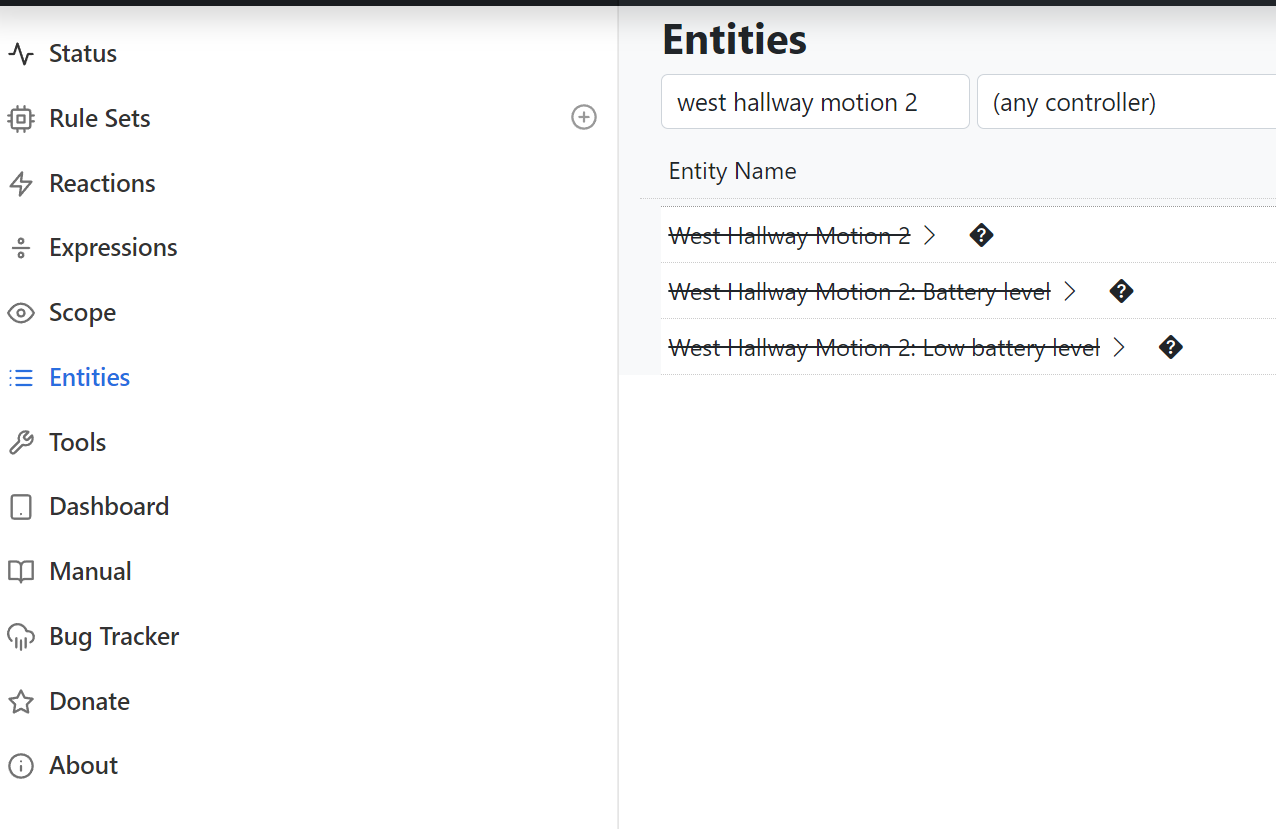
Entity is correctly shown that is unavailable in the entities tab.
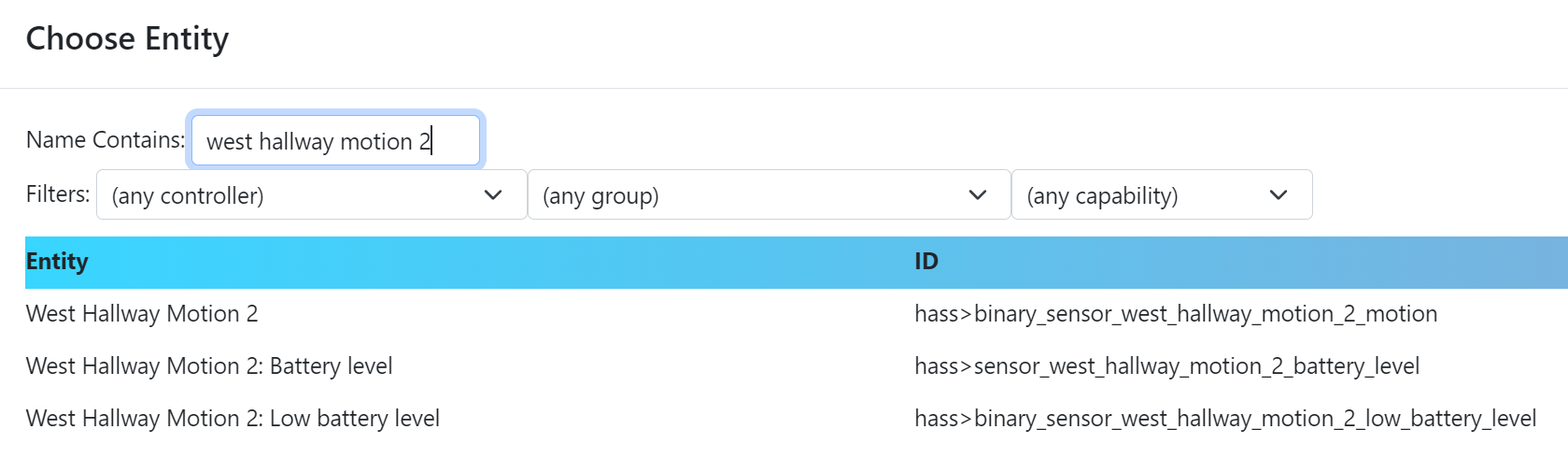
When I go to choose an entity in a rule set it no longer has a line through and a question mark showing that it is unavailable.
PS: I am using the word unavailable in the context that it was deleted from my HA controller
-
I don't think it ever did.
-
I don't think it ever did.
@toggledbits That may be true. If so then lets change this to a feature request!
-

T toggledbits locked this topic on