





MFA
-
@toggledbits ,
I didn't want to pile on to the Login protection thread, but it reminded me about the MFA authentication. I tried to set it up once, and I could never get it to work. I got the pop up to login, and it returns an Access Denied page.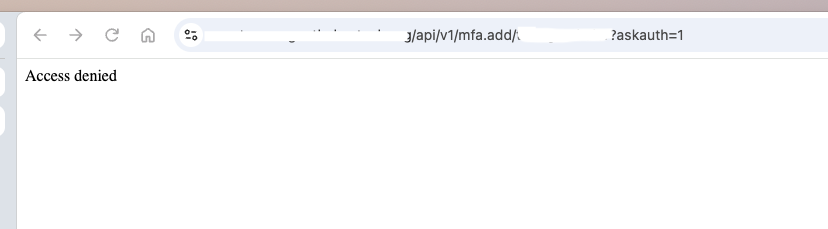
I'm starting with a clean, newly opened browser window, and my credentials are correct.
I'm using these directions, and using my URL and my username in place of UUUU
https://notmyurl.com/api/v1/mfa.add/notmyuserid?askauth=1
I tried it via my private IP as well, and I'm still receiving Access Denied. I'm unsure what the log file is that would provide the why.
I'm running latest-26298-fbb75fb8
-
@tamorgen My experience is the same and I’m sure I’m missing something obvious. I’m at work and haven’t had time to dig in as yet.
-
@tamorgen I beat it. With a lot of AI help, admittedly. But it's up and running. I'm using Portainer inside Proxmox so it had... challenges... with what IP it was "seeing".
I'll see if tomorrow I can pull together the full steps.
I'm using Portainer inside Proxmox so it had... challenges... with what IP it was "seeing".
I have the same setup, and I have my own Cloudflare domain, with a local LXC running Cloudflared for the tunnels, so yeah, I'm sure the authenticator is having issues with the IPs and the virtual networking. Please let me know what you did to get past it.
-
I'm using Portainer inside Proxmox so it had... challenges... with what IP it was "seeing".
I have the same setup, and I have my own Cloudflare domain, with a local LXC running Cloudflared for the tunnels, so yeah, I'm sure the authenticator is having issues with the IPs and the virtual networking. Please let me know what you did to get past it.
@tamorgen I asked Lumo to pull together everything that WORKED to get to the end goal (we had a lot of trial and error at times).
Good luck. YMMV.
Here's the working procedure — tested end-to-end with your Reactor instance.
Setting Up MFA for Multi-System Reactor (MSR)
Problem: Requesting
http://<reactor_host>:8111/api/v1/mfa.add/<username>?askauth=1from a browser or host shell returns ACCESS DENIED, even after entering valid admin credentials.Root Cause: When access control is enabled (
config/users.yamlexists), MSR restricts API access by default to localhost only. Traffic reaching a Dockerised Reactor from the host appears to come from Docker's bridge gateway (172.17.0.1), not127.0.0.1, so it fails the default loopback rule and falls through to the catch-all deny.
Working Setup Procedure
Prerequisites
- MSR installed and running in Docker
- Target user exists in
config/users.yamland is a member of theadmingroup - You have shell access to the host running the container
Step 1: Enter the Reactor Container
docker exec -it <container_name> shReplace
<container_name>with your container name (e.g.,reactor). Find it with:docker ps | grep reactorStep 2: Request the MFA QR Code From Inside the Container
Run the following command inside the container:
curl -s -o /tmp/qrcode.png -u <target_username> \
  http://localhost:8111/api/v1/mfa.add/<target_username>
When prompted, enter the target user's password.
Notes:
-u <target_username>makes curl prompt for the password interactively (safer than typing it in the command line).- The request originates from
127.0.0.1inside the container, which matches the default ACL allowing loopback. - The
?askauth=1parameter is not needed here — it's only for the browser-based flow.
Step 3: Verify the Image Was Generated
ls -la /tmp/qrcode.png
head -c 8 /tmp/qrcode.png | od -An -tx1
You should see
89 50 4e 47 0d 0a 1a 0a— the PNG magic bytes. If you see41 63 63 65 73 73 20 64("Access denied"), the file is stale from an earlier failed attempt. Redo step 2.Step 4: Copy the QR Code to Your Desktop
exit
docker cp <container_name>:/tmp/qrcode.png ~/Desktop/qr-mfa.png
Or from a separate machine:
scp root@<host_ip>:/tmp/qrcode.png .Step 5: Scan the QR Code
Open
qr-mfa.pngin any image viewer and scan it with your authenticator app (Google Authenticator, Authy, Aegis, 1Password, Bitwarden, Ente, etc.).Alternative: Manual Entry
If your viewer can't display the image, install zbar-tools:apt update && apt install -y --no-install-recommends zbar-tools zbarimg --quiet ~/Desktop/qr-mfa.pngThis outputs an
otpauth://totp/...URI. Use thesecret=value in your authenticator app's "Manual Entry" or "Setup Key" option.Step 6: Test the Login
Log into the Reactor UI as the target user. You should be prompted for a six-digit code. Enter the code from your authenticator app.
Step 7: Clean Up the Seed File
Both the host and container copies contain the TOTP secret in plaintext. Delete them after enrollment:
rm -f ~/Desktop/qr-mfa.png
docker exec <container_name> rm -f /tmp/qrcode.png
Anyone who photographs this image can generate valid codes indefinitely.
Recovery (If You Lose the Authenticator)
The same procedure applies for clearing MFA. From inside the container:
docker exec -it <container_name> sh
curl -s -o /dev/null -u <admin_user> -w 'HTTP %{http_code}\n' \
  http://localhost:8111/api/v1/mfa.clear/<username_to_clear>
You'll need admin credentials. The endpoint is subject to the same default ACL rules, so it must be called from inside the container.
What Not to Do (Common Pitfalls)
 Don't
Don't Do
DoRun curlfrom the host shell againstlocalhostor the LAN IPRun the command from inside the container via docker execUse ?askauth=1with curlOnly use it for the browser-based flow Edit users.yamlto add ACL rulesNot required for the initial setup; stick to stock defaults Paste my suggested YAML without validation Use python3 -c "import yaml; yaml.safe_load(open('users.yaml'))"to verify firstRe-run mfa.addafter enrollingIt may rotate the secret and invalidate your existing setup Leave the QR code PNG anywhere accessible Delete it immediately after enrollment
Troubleshooting
Symptom Likely Cause Fix HTTP 403 ForbiddenRequest from host/network interface Use docker execto run curl inside containerHTTP 401 UnauthorizedWrong password Verify credentials, use -u <user>for interactive promptEmpty qrcode.pngor "Access denied" textStale file from failed attempt Delete old copy and re-run step 2 File opens as text instead of image curlwrote error body over PNGCheck magic bytes with odbefore scanning
Optional: Browser-Based MFA Setup (Requires ACL Change)
If you prefer the browser method from a LAN machine (
http://<reactor_host>:8111/api/v1/mfa.add/<user>?askauth=1), you need to add an ACL rule inconfig/users.yaml:api_acls: - url: "/api/v1/mfa.add" group: admin allow: true - url: "/api/v1/mfa.clear" group: admin allow: truePlace these at the top level of the file (same indent as
users:andgroups:). Then restart:docker restart <container_name>Validate the YAML before applying:
python3 -c "import yaml; yaml.safe_load(open('/var/reactor/config/users.yaml')); print('Valid')"Note: This is optional. The
docker execmethod works on stock defaults and requires no configuration changes.
Documented based on real-world testing with Reactor in Docker, October 2026.
-
@tamorgen I asked Lumo to pull together everything that WORKED to get to the end goal (we had a lot of trial and error at times).
Good luck. YMMV.
Here's the working procedure — tested end-to-end with your Reactor instance.
Setting Up MFA for Multi-System Reactor (MSR)
Problem: Requesting
http://<reactor_host>:8111/api/v1/mfa.add/<username>?askauth=1from a browser or host shell returns ACCESS DENIED, even after entering valid admin credentials.Root Cause: When access control is enabled (
config/users.yamlexists), MSR restricts API access by default to localhost only. Traffic reaching a Dockerised Reactor from the host appears to come from Docker's bridge gateway (172.17.0.1), not127.0.0.1, so it fails the default loopback rule and falls through to the catch-all deny.
Working Setup Procedure
Prerequisites
- MSR installed and running in Docker
- Target user exists in
config/users.yamland is a member of theadmingroup - You have shell access to the host running the container
Step 1: Enter the Reactor Container
docker exec -it <container_name> shReplace
<container_name>with your container name (e.g.,reactor). Find it with:docker ps | grep reactorStep 2: Request the MFA QR Code From Inside the Container
Run the following command inside the container:
curl -s -o /tmp/qrcode.png -u <target_username> \
  http://localhost:8111/api/v1/mfa.add/<target_username>
When prompted, enter the target user's password.
Notes:
-u <target_username>makes curl prompt for the password interactively (safer than typing it in the command line).- The request originates from
127.0.0.1inside the container, which matches the default ACL allowing loopback. - The
?askauth=1parameter is not needed here — it's only for the browser-based flow.
Step 3: Verify the Image Was Generated
ls -la /tmp/qrcode.png
head -c 8 /tmp/qrcode.png | od -An -tx1
You should see
89 50 4e 47 0d 0a 1a 0a— the PNG magic bytes. If you see41 63 63 65 73 73 20 64("Access denied"), the file is stale from an earlier failed attempt. Redo step 2.Step 4: Copy the QR Code to Your Desktop
exit
docker cp <container_name>:/tmp/qrcode.png ~/Desktop/qr-mfa.png
Or from a separate machine:
scp root@<host_ip>:/tmp/qrcode.png .Step 5: Scan the QR Code
Open
qr-mfa.pngin any image viewer and scan it with your authenticator app (Google Authenticator, Authy, Aegis, 1Password, Bitwarden, Ente, etc.).Alternative: Manual Entry
If your viewer can't display the image, install zbar-tools:apt update && apt install -y --no-install-recommends zbar-tools zbarimg --quiet ~/Desktop/qr-mfa.pngThis outputs an
otpauth://totp/...URI. Use thesecret=value in your authenticator app's "Manual Entry" or "Setup Key" option.Step 6: Test the Login
Log into the Reactor UI as the target user. You should be prompted for a six-digit code. Enter the code from your authenticator app.
Step 7: Clean Up the Seed File
Both the host and container copies contain the TOTP secret in plaintext. Delete them after enrollment:
rm -f ~/Desktop/qr-mfa.png
docker exec <container_name> rm -f /tmp/qrcode.png
Anyone who photographs this image can generate valid codes indefinitely.
Recovery (If You Lose the Authenticator)
The same procedure applies for clearing MFA. From inside the container:
docker exec -it <container_name> sh
curl -s -o /dev/null -u <admin_user> -w 'HTTP %{http_code}\n' \
  http://localhost:8111/api/v1/mfa.clear/<username_to_clear>
You'll need admin credentials. The endpoint is subject to the same default ACL rules, so it must be called from inside the container.
What Not to Do (Common Pitfalls)
Don't DoRun curlfrom the host shell againstlocalhostor the LAN IPRun the command from inside the container via docker execUse ?askauth=1with curlOnly use it for the browser-based flow Edit users.yamlto add ACL rulesNot required for the initial setup; stick to stock defaults Paste my suggested YAML without validation Use python3 -c "import yaml; yaml.safe_load(open('users.yaml'))"to verify firstRe-run mfa.addafter enrollingIt may rotate the secret and invalidate your existing setup Leave the QR code PNG anywhere accessible Delete it immediately after enrollment
Troubleshooting
Symptom Likely Cause Fix HTTP 403 ForbiddenRequest from host/network interface Use docker execto run curl inside containerHTTP 401 UnauthorizedWrong password Verify credentials, use -u <user>for interactive promptEmpty qrcode.pngor "Access denied" textStale file from failed attempt Delete old copy and re-run step 2 File opens as text instead of image curlwrote error body over PNGCheck magic bytes with odbefore scanning
Optional: Browser-Based MFA Setup (Requires ACL Change)
If you prefer the browser method from a LAN machine (
http://<reactor_host>:8111/api/v1/mfa.add/<user>?askauth=1), you need to add an ACL rule inconfig/users.yaml:api_acls: - url: "/api/v1/mfa.add" group: admin allow: true - url: "/api/v1/mfa.clear" group: admin allow: truePlace these at the top level of the file (same indent as
users:andgroups:). Then restart:docker restart <container_name>Validate the YAML before applying:
python3 -c "import yaml; yaml.safe_load(open('/var/reactor/config/users.yaml')); print('Valid')"Note: This is optional. The
docker execmethod works on stock defaults and requires no configuration changes.
Documented based on real-world testing with Reactor in Docker, October 2026.
-
You don't need to run the commands from inside the container. You can add an ACL allowing the IP address of the host system or your LAN subnet (as
source_ip). But in any case, once you add the user/group ACL entry to permit the endpoint as suggested above, as long as that entry also doesn't restrict IP (i.e. doesn't containsource_ip), any IP that can log in as that user (or a user in that group, if group), will be allowed from anywhere (i.e. authorized queries from outside the container will work). -
You don't need to run the commands from inside the container. You can add an ACL allowing the IP address of the host system or your LAN subnet (as
source_ip). But in any case, once you add the user/group ACL entry to permit the endpoint as suggested above, as long as that entry also doesn't restrict IP (i.e. doesn't containsource_ip), any IP that can log in as that user (or a user in that group, if group), will be allowed from anywhere (i.e. authorized queries from outside the container will work).@toggledbits I honestly did not recall implementing any ACL or Access Control settings outside of adding a user.
That to say, this morning when I went in to start that work, I found entries in place. No recollection of adding them - but it made all of the above suddenly make much more sense.
I can remove the above post if it's way out.
-
You don't need to run the commands from inside the container. You can add an ACL allowing the IP address of the host system or your LAN subnet (as
source_ip). But in any case, once you add the user/group ACL entry to permit the endpoint as suggested above, as long as that entry also doesn't restrict IP (i.e. doesn't containsource_ip), any IP that can log in as that user (or a user in that group, if group), will be allowed from anywhere (i.e. authorized queries from outside the container will work).This is what I see in my reactor.log file:
[latest-26298]2026-10-28T16:27:53.505Z <httpapi:5:httpapi.js:1122> httpapi#1 starting request from "192.168.1.123" via ::ffff:192.168.1.123 for GET /api/v1/mfa.add/tmorgenthaler?askauth=1 lang en-US,en;q=0.9 (TLSv1.3)
[latest-26298]2026-10-28T16:27:53.505Z <httpapi:5:httpapi.js:1154> httpapi#1 auth header Basic dG1vcmdlbnRoYWxlcjohUjNicjNhdGgzciE=
[latest-26298]2026-10-28T16:27:53.517Z <httpapi:5:httpapi.js:1161> httpapi#1 auth accepted via HTTP Basic user tmorgenthaler
[latest-26298]2026-10-28T16:27:53.517Z <httpapi:INFO> httpapi#1 API request from ::ffff:192.168.1.123 (TLSv1.3): GET /api/v1/mfa.add/tmorgenthaler
[latest-26298]2026-10-28T16:27:53.517Z <httpapi:INFO> httpapi#1 request for /api/v1/mfa.add/tmorgenthaler from ::ffff:192.168.1.123 user tmorgenthaler auth basic matches / ACL (#6): { "url": "/", "allow": false, "index": 6 }
I'm assuming the "allow": false is the deny.
The allowed list in my reactor.yaml covers that IP:
allowed_ips: # - "127.0.0.1" # - "192.168.0." # or whatever your local trusted subnet - "192.168.1.0/24" -
The allowed list is separate from ACLs. It's just a first check. The ACLs are next. The former doesn't imply the latter, the latter having much more granularity/detail.
-
The allowed list is separate from ACLs. It's just a first check. The ACLs are next. The former doesn't imply the latter, the latter having much more granularity/detail.
@toggledbits said in MFA:
The allowed list is separate from ACLs. It's just a first check. The ACLs are next.
Okay, I added my /24 to the allowed api in users.yaml
groups:
  api_allowed:
    users:
      - admin
      - tmorgenthaler

api_acls:
  - url: "/api/"
    group: api_allowed
    source_IP: 192.168.1.1/24
    allow: true
but I'm still not getting anywhere:
[latest-26298]2026-10-28T18:22:12.362Z <wsapi:5:wsapi.js:169> (event handler): sending data
[latest-26298]2026-10-28T18:22:12.379Z <wsapi:5:wsapi.js:152> (event handler) sending update for 20 entities
[latest-26298]2026-10-28T18:22:13.139Z <wsapi:5:wsapi.js:169> (event handler): sending data
[latest-26298]2026-10-28T18:22:13.164Z <wsapi:5:wsapi.js:152> (event handler) sending update for 1 entities
root@docker:/home/tmorgenthaler/reactor/logs# cat httpapi.log | grep auth
[latest-26298]2026-10-28T18:18:50.085Z <httpapi:CRIT> httpapi#1 ACLs Array(7) [{ "url": "/api/v1/authorize", "allow": true, "index": 0 }, { "url": "/api/v1/deauthorize", "allow": true, "index": 1 }, { "url": "/api/v1/systime", "allow": true, "index": 2 }, { "url": "/api/v1/alive", "allow": true, "index": 3 }, { "url": "/api/v1/lang", "allow": true, "index": 4 }, { "url": "/api", "source_ip": "127/8", "allow": true, "index": 5 }, { "url": "/", "allow": false, "index": 6 }]
[latest-26298]2026-10-28T18:18:50.086Z <httpapi:CRIT> httpapi#1 ACL index Map(7) {"/api/v1/authorize": Array(1) [0], "/api/v1/deauthorize": Array(1) [1], "/api/v1/systime": Array(1) [2], "/api/v1/alive": Array(1) [3], "/api/v1/lang": Array(1) [4], "/api": Array(1) [5], "/": Array(1) [6] }
[latest-26298]2026-10-28T18:18:52.748Z <httpapi:5:httpapi.js:820> httpapi#1 purging expired authorizations; default delay 7200000
[latest-26298]2026-10-28T18:18:52.748Z <httpapi:5:httpapi.js:848> httpapi#1 setting timer for next authorization purge in 7200000ms
[latest-26298]2026-10-28T18:19:12.395Z <httpapi:5:httpapi.js:1122> httpapi#1 starting request from "192.168.1.123" via ::ffff:192.168.1.123 for GET /api/v1/mfa.add/tmorgenthaler?askauth=1 lang en-US,en;q=0.9 (TLSv1.3)
[latest-26298]2026-10-28T18:19:12.396Z <httpapi:5:httpapi.js:1154> httpapi#1 auth header Basic dG1vcmdlbnRoYWxlcjohUjNicjNhdGgzciE=
[latest-26298]2026-10-28T18:19:12.407Z <httpapi:5:httpapi.js:1161> httpapi#1 auth accepted via HTTP Basic user tmorgenthaler
[latest-26298]2026-10-28T18:19:12.408Z <httpapi:INFO> httpapi#1 request for /api/v1/mfa.add/tmorgenthaler from ::ffff:192.168.1.123 user tmorgenthaler auth basic matches / ACL (#6): { "url": "/", "allow": false, "index": 6 }
[latest-26298]2026-10-28T18:19:34.975Z <httpapi:5:httpapi.js:1122> httpapi#1 starting request from "192.168.1.123" via ::ffff:192.168.1.123 for GET /api/v1/mfa.add/tmorgenthaler?askauth=1 lang en-US,en;q=0.9 (TLSv1.3)
[latest-26298]2026-10-28T18:19:34.975Z <httpapi:5:httpapi.js:1221> httpapi#1 askauth!
[latest-26298]2026-10-28T18:19:47.485Z <httpapi:5:httpapi.js:1122> httpapi#1 starting request from "192.168.1.123" via ::ffff:192.168.1.123 for GET /api/v1/mfa.add/tmorgenthaler?askauth=1 lang en-US,en;q=0.9 (TLSv1.3)
[latest-26298]2026-10-28T18:19:47.485Z <httpapi:5:httpapi.js:1154> httpapi#1 auth header Basic dG1vcmdlbnRoYWxlcjohUjNicjNhdGgzciE=
[latest-26298]2026-10-28T18:19:47.495Z <httpapi:5:httpapi.js:1161> httpapi#1 auth accepted via HTTP Basic user tmorgenthaler
[latest-26298]2026-10-28T18:19:47.495Z <httpapi:INFO> httpapi#1 request for /api/v1/mfa.add/tmorgenthaler from ::ffff:192.168.1.123 user tmorgenthaler auth basic matches / ACL (#6): { "url": "/", "allow": false, "index": 6 }
[latest-26298]2026-10-28T18:19:54.970Z <httpapi:5:httpapi.js:1122> httpapi#1 starting request from "192.168.1.123" via ::ffff:192.168.1.123 for GET /api/v1/mfa.add/tmorgenthaler?askauth=1 lang en-US,en;q=0.9 (TLSv1.3)
[latest-26298]2026-10-28T18:19:54.970Z <httpapi:5:httpapi.js:1154> httpapi#1 auth header Basic dG1vcmdlbnRoYWxlcjohUjNicjNhdGgzciE=
[latest-26298]2026-10-28T18:19:54.979Z <httpapi:5:httpapi.js:1161> httpapi#1 auth accepted via HTTP Basic user tmorgenthaler
[latest-26298]2026-10-28T18:19:54.979Z <httpapi:INFO> httpapi#1 request for /api/v1/mfa.add/tmorgenthaler from ::ffff:192.168.1.123 user tmorgenthaler auth basic matches / ACL (#6): { "url": "/", "allow": false, "index": 6 }
[latest-26298]2026-10-28T18:20:01.600Z <httpapi:5:httpapi.js:1122> httpapi#1 starting request from "192.168.1.123" via ::ffff:192.168.1.123 for GET /api/v1/mfa.add/tmorgenthaler?askauth=1 lang en-US,en;q=0.9 (TLSv1.3)
[latest-26298]2026-10-28T18:20:01.600Z <httpapi:5:httpapi.js:1154> httpapi#1 auth header Basic dG1vcmdlbnRoYWxlcjohUjNicjNhdGgzciE=
[latest-26298]2026-10-28T18:20:01.607Z <httpapi:5:httpapi.js:1161> httpapi#1 auth accepted via HTTP Basic user tmorgenthaler
[latest-26298]2026-10-28T18:20:01.607Z <httpapi:INFO> httpapi#1 request for /api/v1/mfa.add/tmorgenthaler from ::ffff:192.168.1.123 user tmorgenthaler auth basic matches / ACL (#6): { "url": "/", "allow": false, "index": 6 }
[latest-26298]2026-10-28T18:20:10.938Z <httpapi:5:httpapi.js:1122> httpapi#1 starting request from "192.168.1.123" via ::ffff:192.168.1.123 for GET /api/v1/mfa.add/tmorgenthaler?askauth=1 lang en-US,en;q=0.9 (TLSv1.3)
[latest-26298]2026-10-28T18:20:10.938Z <httpapi:5:httpapi.js:1221> httpapi#1 askauth!
[latest-26298]2026-10-28T18:20:54.025Z <httpapi:5:httpapi.js:1122> httpapi#1 starting request from "192.168.1.123" via ::ffff:192.168.1.123 for GET /api/v1/mfa.add/tmorgenthaler?askauth=1 lang en-US,en;q=0.9 (TLSv1.3)
[latest-26298]2026-10-28T18:20:54.025Z <httpapi:5:httpapi.js:1154> httpapi#1 auth header Basic dG1vcmdlbnRoYWxlcjohUjNicjNhdGgzciE=
[latest-26298]2026-10-28T18:20:54.040Z <httpapi:5:httpapi.js:1161> httpapi#1 auth accepted via HTTP Basic user tmorgenthaler
[latest-26298]2026-10-28T18:20:54.040Z <httpapi:INFO> httpapi#1 request for /api/v1/mfa.add/tmorgenthaler from ::ffff:192.168.1.123 user tmorgenthaler auth basic matches / ACL (#6): { "url": "/", "allow": false, "index": 6 }
root@docker:/home/tmorgenthaler/reactor/logs# cat httpapi.log | grep 18:20:54
[latest-26298]2026-10-28T18:20:54.025Z <httpapi:5:httpapi.js:1122> httpapi#1 starting request from "192.168.1.123" via ::ffff:192.168.1.123 for GET /api/v1/mfa.add/tmorgenthaler?askauth=1 lang en-US,en;q=0.9 (TLSv1.3)
[latest-26298]2026-10-28T18:20:54.025Z <httpapi:5:httpapi.js:1154> httpapi#1 auth header Basic dG1vcmdlbnRoYWxlcjohUjNicjNhdGgzciE=
[latest-26298]2026-10-28T18:20:54.040Z <httpapi:5:httpapi.js:1161> httpapi#1 auth accepted via HTTP Basic user tmorgenthaler
[latest-26298]2026-10-28T18:20:54.040Z <httpapi:INFO> httpapi#1 API request from ::ffff:192.168.1.123 (TLSv1.3): GET /api/v1/mfa.add/tmorgenthaler
[latest-26298]2026-10-28T18:20:54.040Z <httpapi:INFO> httpapi#1 request for /api/v1/mfa.add/tmorgenthaler from ::ffff:192.168.1.123 user tmorgenthaler auth basic matches / ACL (#6): { "url": "/", "allow": false, "index": 6 }
[latest-26298]2026-10-28T18:20:54.042Z <wsapi:5:wsapi.js:169> (event handler): sending data
[latest-26298]2026-10-28T18:20:54.042Z <wsapi:5:wsapi.js:169> (event handler): sending data
[latest-26298]2026-10-28T18:20:54.067Z <wsapi:5:wsapi.js:152> (event handler) sending update for 2 entities
[latest-26298]2026-10-28T18:20:54.749Z <wsapi:5:wsapi.js:169> (event handler): sending data
[latest-26298]2026-10-28T18:20:54.775Z <wsapi:5:wsapi.js:152> (event handler) sending update for 1 entities
[latest-26298]2026-10-28T18:20:54.836Z <wsapi:5:wsapi.js:169> (event handler): sending data
[latest-26298]2026-10-28T18:20:54.836Z <wsapi:5:wsapi.js:169> (event handler): sending data
[latest-26298]2026-10-28T18:20:54.861Z <wsapi:5:wsapi.js:152> (event handler) sending update for 2 entities