

Single protocol?
-
Another question to the hive mind. Prompted by the fact that I lost yet another z-wave device over the weekend due to a power issue. It looks like z-way server is reporting another device failed (although it's working fine) and message queue is far too long IMHO. Also the failed device has been removed in the expert interface, but still there in the 'normal' one. Sigh.
Currently I have z-wave, Tuya, thinking about Zigbee.... Does anyone use one single protocol for everything? Right now I'm feeling that as the z-wave stuff dies, I'm just gonna replace it with something else....
C
-
Not sure if anyone could possibly use one protocol for everything however, in my case for my switches, plugs, door locks and some door/motion sensors they all are using z wave.
No specific reason why, it's mainly because I started with vera which had built in z wave so It was familiar to me when I switched over from HA.
I am currently using the Z Wave JS UI add-on, with a ZWA-2 antenna and for the most part been happy. The recent change to the ZWA-2 has helped my network A LOT. I live in a ~13,000sf home so range is big time for me, and with the new antenna the vast majority of my devices connect directly the controller. I have 59 nodes so my network isn't huge but not small.
My overall experience with Z Wave is ok though, I do tinker a lot and it's really easy to fudge something up with no apparent reason why. In my experience once you get network set and working well don't touch it. If something randomly happens (rare) it is kind of hard to troubleshoot as logs don't tell a whole lot, and my troubleshooting is usually just based on my experience with Z wave. The devices themselves are a bit more expensive than the Zigbee counterparts and I believe that has something to do with the fact that all z wave devices need to be licensed. No problem for me I do prefer to have devices that are vetted. Generally, I do see more newer devices being released with Zigbee support and not Z wave but aside from mmWave sensors I haven't really seen anything that I wanted.
I have deployed smaller scale <15 node networks at family members home and those work very well. A set it and forget it ordeal. Also could be because I don't mess with those networks after set up much

IMO you can't go wrong between Zigbee or Z wave. I would stay away from any wifi devices though since you limited to what local control they offer, and definitely avoid, at all cost any cloud reliant devices for obvious reasons.
-
Not sure if anyone could possibly use one protocol for everything however, in my case for my switches, plugs, door locks and some door/motion sensors they all are using z wave.
No specific reason why, it's mainly because I started with vera which had built in z wave so It was familiar to me when I switched over from HA.
I am currently using the Z Wave JS UI add-on, with a ZWA-2 antenna and for the most part been happy. The recent change to the ZWA-2 has helped my network A LOT. I live in a ~13,000sf home so range is big time for me, and with the new antenna the vast majority of my devices connect directly the controller. I have 59 nodes so my network isn't huge but not small.
My overall experience with Z Wave is ok though, I do tinker a lot and it's really easy to fudge something up with no apparent reason why. In my experience once you get network set and working well don't touch it. If something randomly happens (rare) it is kind of hard to troubleshoot as logs don't tell a whole lot, and my troubleshooting is usually just based on my experience with Z wave. The devices themselves are a bit more expensive than the Zigbee counterparts and I believe that has something to do with the fact that all z wave devices need to be licensed. No problem for me I do prefer to have devices that are vetted. Generally, I do see more newer devices being released with Zigbee support and not Z wave but aside from mmWave sensors I haven't really seen anything that I wanted.
I have deployed smaller scale <15 node networks at family members home and those work very well. A set it and forget it ordeal. Also could be because I don't mess with those networks after set up much
IMO you can't go wrong between Zigbee or Z wave. I would stay away from any wifi devices though since you limited to what local control they offer, and definitely avoid, at all cost any cloud reliant devices for obvious reasons.
@Pabla said in Single protocol?:
Not sure if anyone could possibly use one protocol for everything however, in my case for my switches, plugs, door locks and some door/motion sensors they all are using z wave.
No specific reason why, it's mainly because I started with vera which had built in z wave so It was familiar to me when I switched over from HA.
The opposite effect for me… when I finally gave up on Vera, I ditched all my Z-wave devices and switched to Shelly using WiFi for all wallbox switching devices. So, I’m at a loss to understand this comment…
IMO you can't go wrong between Zigbee or Z wave. I would stay away from any wifi devices though since you limited to what local control they offer, and definitely avoid, at all cost any cloud reliant devices for obvious reasons.
Wi-Fi seems to give all the control I need, integrates easily with Apple Home, which I use as my main control, now. For some individual lights I use Zigbee, in the form of Philips Hue, which also has a native bridge to Apple Home, which also offers a secure cloud connection for off-site access. I’m slowly upgrading to Shelly Gen 4 devices which offer Matter protocol which will enable me to abandon the Homebridge software running on my NAS for further simplification.
-
I'm also in the Z-Wave camp, with about 100 devices in my mesh. I still have some on Vera, so I actually have two Z-Wave networks active in my home. There's no question that Vera was a big contributor to problems with early Z-Wave experience. Even my oldest devices run well under Z-WaveJS. Multi-sensors that needed battery changes monthly on the Vera run for months without a change on Z-WaveJS (I suspect Vera's frequent restarts and "configuration" of each device each time are to blame). With the rapidly-declining stability of Ezlo's Vera cloud infrastructure, especially Alexa issues of late, I'm planning on being entirely off before March 1.
I've definitely had a few Z-Wave devices give up the ghost (or the radio); mostly older devices from lesser manufacturers of the time. The largest single group of switches and dimmers I have are all Leviton and around 11 years old, and I've only had one fail (radio died, otherwise functional). GE/Jasco seems to have held up second best among the high-age devices. Many of the other brands didn't make it two years, and those brands no longer exist, too. Everything I've bought in the last 4-5 years is holding on well. I think Zooz gets the award for most-improved. I didn't think much of them a few years ago (and told them so), but their more recent offerings have been stable and well-supported.
Part of the recent stability may be due to a campaign I went on several years ago (bored during Covid), where I found and fixed a number of small electrical problems in my house resulting in a variety of neutral issues (that is, issues with excessive current on the neutral wire). One of the most egregious was that our clothes dryer had been installed by the delivery guys to our four-wire connection with the neutral and ground bonded inside the dryer -- the bonding wire should have been removed for the four-wire service. This resulted in some fairly high circulating neutral and ground currents throughout the house, and in combination with other problems found (loose neutral or ground wires at receptacles, for example) was potentially hazardous and may have led to the failure of those less-robust devices. As I said, the last few years, I don't recall replacing any devices, so I've either eliminated a source of induced failure, culled out all of the weak, or both. I also have whole-house surge protection on my main panels. When my Internet was cable-carried (it no longer is), I had surge/lighting protection at the entrance.
I'm not enthusiastic about WiFi as an HA protocol for a few reasons: power demand, crowded bands, and user knowledge/security. While I love the simplicity of the Shelly WiFi-based devices and use them without reservation, they do not compare in battery life to even the oldest of my Z-Wave devices (well, those no longer on the Vera). The powered devices are fine. Powering many WiFi devices also seems to be "unevolved" -- Shelly gives you terminal connections for line voltage when powered; most others are USB micro or C at 5V with a wall wart, which truly sucks, and finding small UL-listed power supplies that can (and must be) safely installed in a US single-gang box or other enclosure is a nuisance and would make an insurance adjuster throw down his clipboard and walk out. WiFi generally is in increasingly crowded bands. In my neighborhood, the list of WiFi networks I see anywhere in my home that are at -60db or higher (i.e. strong) is long. While it used to be that unsophisticated users would simply crowd onto whatever preconfigured channel their router used by default and I could avoid them by changing channels, newer APs and firmware seek out the less-crowded channels automatically and spread out, so now every channel has a dozen competing networks at 2.4Ghz (relatively few I've found can do 5Ghz). Z-Wave's band has actually become less crowded over time (my neighbors finally abandoned their 20-year old cordless phones, I guess). Configuration and security also becomes an issue: rare is the home user that understands that IoT devices should be isolated from the rest of the network. Their eyes glaze over when you talk about VLANs, firewalls, and DMZs. They don't understand IP addressing, and will use the default /24 subnet their router offers and the small dynamic DHCP pool until the day they add that last Shelly device and now the wife's phone can't get an IP address when she comes home, etc. They will run their vendor-supplied AP at 100% with half-a-dozen 4K WiFi camera streams and wonder why their "Internet" is always slow (they don't even understand the difference between their Internet access and their WiFi network). There's a learning curve to building a solid, secure IP network with WiFi that most users have been shielded from forever and (were told) needed to know nothing about, but if you're going to start putting dozens of IP/WiFi devices on your home network, you'd better learn it and know it and do the work it takes to do it right at scale, or it will bite you hard from the inside or worse, the outside, soon and often.
I've got some BLE in my network as well, and it works well for its purpose (mostly presence sensing). I remain curious, even intrigued, but...
The biggest issue I find, and what I would guess-timate is the biggest barrier to finding a "one protocol to rule them all" today, is that there are no manufacturers that cover the full spectrum of required devices on a single protocol. Nobody makes everything you want, regardless of protocol. So we're left to find the best of breed in each category. I don't see that changing any time soon, or really, ever. The manufacturers follow the money. Smaller manufacturers like Zooz will make a good business out of filling holes that the big guys don't want to address (looking at the ZEN-32 for example). The big manufacturers will always make what they can sell the most, like switches and dimmers.
Matter, HomeBridge, and the like... they are effectively controlled by large corporations that are explicitly disinterested in working with small developers. Claiming open source while you maintain a closed, expensive, and opaque certification process doesn't fly for me. Z-Wave, admittedly, shares some of these ills in its proprietary history, but has been evolving to increasingly open over the last five years, with multiple vendors now producing silicon and that competition driving lower cost to implement. Z-Wave is also pretty much a single-interest ecosystem, where Google, Apple, Amazon, Samsung, and others involved in the likes of Matter and HomeBridge have many areas of research and development, and have been shown to quickly and suddenly divest themselves of technology they decide isn't worth continued effort. The players here have been bad actors in the past; I have no reason to believe they will behave differently in future.
Like others have said, beware the cloud. Eschew the cloud. It's sometimes a necessary, unavoidable evil, but you'd best minimize it.
-
As you may already know, I'm heavily invested in Zwave (70+ devices at the main house, 40 in the beach one), curious towards Shelly Wifi (4-5 devices added when using Vera, that I'll eventually ditch for Zwave) and slowly starting interest in ZigBee.
I find Zwave life after Vera to be definitely better and the mesh still more stable than Zigbee or WiFi.
I've started a new journey to learn more about Matter and I've recently started working on a matterbridge plugin to call HTTP endpoints as in the old ha-bridge days. Problem is, while Matter may seems a standard, vendors have their own preferences over implementation, with the result that support is not complete and you'll see ridiculous constraints, such as no more than 20 matter devices supported on your Alexa network.
We'll see, I avoided tuya because of cloud links and the only cloud-only things I have are my Nest thermostats, bought when I was thinking that it will eventually become less important, because they were the only thermostats that were good to show. Today, I'll not buy them.
All that said, my older Zwave devices are 10 years old and apart 2-3 I had to replace because of relay that stops working, all is good and mesh is stable as it has never been, thanks to ZWA-2.
-
@Pabla said in Single protocol?:
Not sure if anyone could possibly use one protocol for everything however, in my case for my switches, plugs, door locks and some door/motion sensors they all are using z wave.
No specific reason why, it's mainly because I started with vera which had built in z wave so It was familiar to me when I switched over from HA.
The opposite effect for me… when I finally gave up on Vera, I ditched all my Z-wave devices and switched to Shelly using WiFi for all wallbox switching devices. So, I’m at a loss to understand this comment…
IMO you can't go wrong between Zigbee or Z wave. I would stay away from any wifi devices though since you limited to what local control they offer, and definitely avoid, at all cost any cloud reliant devices for obvious reasons.
Wi-Fi seems to give all the control I need, integrates easily with Apple Home, which I use as my main control, now. For some individual lights I use Zigbee, in the form of Philips Hue, which also has a native bridge to Apple Home, which also offers a secure cloud connection for off-site access. I’m slowly upgrading to Shelly Gen 4 devices which offer Matter protocol which will enable me to abandon the Homebridge software running on my NAS for further simplification.
@akbooer said in Single protocol?:
The opposite effect for me… when I finally gave up on Vera, I ditched all my Z-wave devices and switched to Shelly using WiFi for all wallbox switching devices. So, I’m at a loss to understand this comment…
Similar to what Patrick said below, I am not a fan of congesting an already congested wireless protocol. If I were to add 59 clients to my Wifi I would definitely see a degradation in performance. Also, these IOT devices don't really benefit much from using Wifi, the extra bandwidth is great but not really needed for day to day use when reporting states and sending commands. Also Wifi battery powered devices will not have the same battery life as Zigbee/Z Wave equivalents.
@akbooer said in Single protocol?:
Wi-Fi seems to give all the control I need, integrates easily with Apple Home, which I use as my main control, now. For some individual lights I use Zigbee, in the form of Philips Hue, which also has a native bridge to Apple Home, which also offers a secure cloud connection for off-site access. I’m slowly upgrading to Shelly Gen 4 devices which offer Matter protocol which will enable me to abandon the Homebridge software running on my NAS for further simplification.
As for Apple Home I have exposed all my Z wave devices and sensors through the Apple Home integration in HA.
-
I'm also in the Z-Wave camp, with about 100 devices in my mesh. I still have some on Vera, so I actually have two Z-Wave networks active in my home. There's no question that Vera was a big contributor to problems with early Z-Wave experience. Even my oldest devices run well under Z-WaveJS. Multi-sensors that needed battery changes monthly on the Vera run for months without a change on Z-WaveJS (I suspect Vera's frequent restarts and "configuration" of each device each time are to blame). With the rapidly-declining stability of Ezlo's Vera cloud infrastructure, especially Alexa issues of late, I'm planning on being entirely off before March 1.
I've definitely had a few Z-Wave devices give up the ghost (or the radio); mostly older devices from lesser manufacturers of the time. The largest single group of switches and dimmers I have are all Leviton and around 11 years old, and I've only had one fail (radio died, otherwise functional). GE/Jasco seems to have held up second best among the high-age devices. Many of the other brands didn't make it two years, and those brands no longer exist, too. Everything I've bought in the last 4-5 years is holding on well. I think Zooz gets the award for most-improved. I didn't think much of them a few years ago (and told them so), but their more recent offerings have been stable and well-supported.
Part of the recent stability may be due to a campaign I went on several years ago (bored during Covid), where I found and fixed a number of small electrical problems in my house resulting in a variety of neutral issues (that is, issues with excessive current on the neutral wire). One of the most egregious was that our clothes dryer had been installed by the delivery guys to our four-wire connection with the neutral and ground bonded inside the dryer -- the bonding wire should have been removed for the four-wire service. This resulted in some fairly high circulating neutral and ground currents throughout the house, and in combination with other problems found (loose neutral or ground wires at receptacles, for example) was potentially hazardous and may have led to the failure of those less-robust devices. As I said, the last few years, I don't recall replacing any devices, so I've either eliminated a source of induced failure, culled out all of the weak, or both. I also have whole-house surge protection on my main panels. When my Internet was cable-carried (it no longer is), I had surge/lighting protection at the entrance.
I'm not enthusiastic about WiFi as an HA protocol for a few reasons: power demand, crowded bands, and user knowledge/security. While I love the simplicity of the Shelly WiFi-based devices and use them without reservation, they do not compare in battery life to even the oldest of my Z-Wave devices (well, those no longer on the Vera). The powered devices are fine. Powering many WiFi devices also seems to be "unevolved" -- Shelly gives you terminal connections for line voltage when powered; most others are USB micro or C at 5V with a wall wart, which truly sucks, and finding small UL-listed power supplies that can (and must be) safely installed in a US single-gang box or other enclosure is a nuisance and would make an insurance adjuster throw down his clipboard and walk out. WiFi generally is in increasingly crowded bands. In my neighborhood, the list of WiFi networks I see anywhere in my home that are at -60db or higher (i.e. strong) is long. While it used to be that unsophisticated users would simply crowd onto whatever preconfigured channel their router used by default and I could avoid them by changing channels, newer APs and firmware seek out the less-crowded channels automatically and spread out, so now every channel has a dozen competing networks at 2.4Ghz (relatively few I've found can do 5Ghz). Z-Wave's band has actually become less crowded over time (my neighbors finally abandoned their 20-year old cordless phones, I guess). Configuration and security also becomes an issue: rare is the home user that understands that IoT devices should be isolated from the rest of the network. Their eyes glaze over when you talk about VLANs, firewalls, and DMZs. They don't understand IP addressing, and will use the default /24 subnet their router offers and the small dynamic DHCP pool until the day they add that last Shelly device and now the wife's phone can't get an IP address when she comes home, etc. They will run their vendor-supplied AP at 100% with half-a-dozen 4K WiFi camera streams and wonder why their "Internet" is always slow (they don't even understand the difference between their Internet access and their WiFi network). There's a learning curve to building a solid, secure IP network with WiFi that most users have been shielded from forever and (were told) needed to know nothing about, but if you're going to start putting dozens of IP/WiFi devices on your home network, you'd better learn it and know it and do the work it takes to do it right at scale, or it will bite you hard from the inside or worse, the outside, soon and often.
I've got some BLE in my network as well, and it works well for its purpose (mostly presence sensing). I remain curious, even intrigued, but...
The biggest issue I find, and what I would guess-timate is the biggest barrier to finding a "one protocol to rule them all" today, is that there are no manufacturers that cover the full spectrum of required devices on a single protocol. Nobody makes everything you want, regardless of protocol. So we're left to find the best of breed in each category. I don't see that changing any time soon, or really, ever. The manufacturers follow the money. Smaller manufacturers like Zooz will make a good business out of filling holes that the big guys don't want to address (looking at the ZEN-32 for example). The big manufacturers will always make what they can sell the most, like switches and dimmers.
Matter, HomeBridge, and the like... they are effectively controlled by large corporations that are explicitly disinterested in working with small developers. Claiming open source while you maintain a closed, expensive, and opaque certification process doesn't fly for me. Z-Wave, admittedly, shares some of these ills in its proprietary history, but has been evolving to increasingly open over the last five years, with multiple vendors now producing silicon and that competition driving lower cost to implement. Z-Wave is also pretty much a single-interest ecosystem, where Google, Apple, Amazon, Samsung, and others involved in the likes of Matter and HomeBridge have many areas of research and development, and have been shown to quickly and suddenly divest themselves of technology they decide isn't worth continued effort. The players here have been bad actors in the past; I have no reason to believe they will behave differently in future.
Like others have said, beware the cloud. Eschew the cloud. It's sometimes a necessary, unavoidable evil, but you'd best minimize it.
-
@toggledbits Very well said! When you make the switch give the new ZWA-2 Z wave antenna a try, it will fix a lot of any lingering problems.
@Pabla said in Single protocol?:
When you make the switch give the new ZWA-2 Z wave antenna a try, it will fix a lot of any lingering problems.
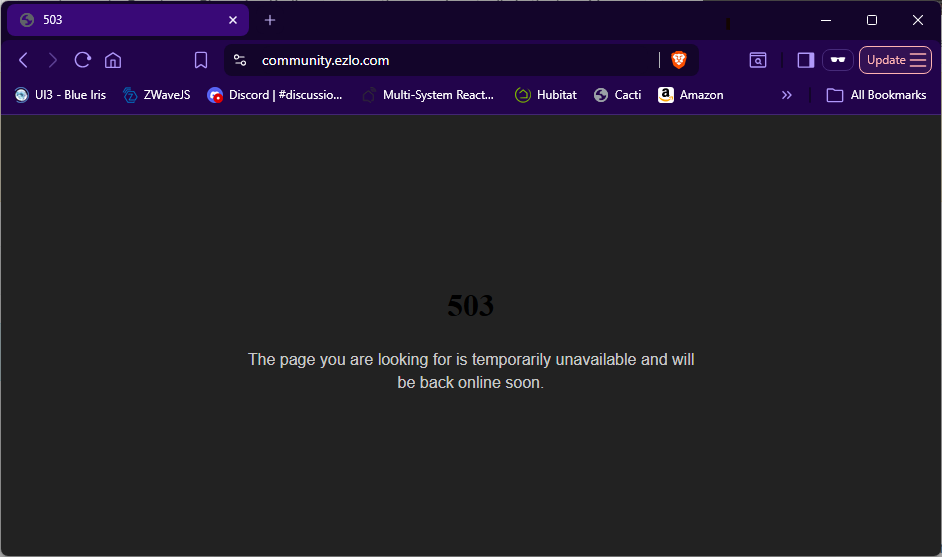
That is exactly where I am headed. Most of the "complicated" devices in my mesh that were on Vera (scene controllers, notably, but also multi-sensors and some devices that were causing issues there) have been moved to a 500-series Z-stick controlled by Z-WaveJS, and I will migrate everything to the ZWA-2 when I get it (on my Christmas wish list, so if it's not under the tree, I'll just gift it to myself after). I have to confess, despite its issues and the horrible ending that Ezlo has given the product (and the tremendous face-in the-dirt failure that their supposed replacement products have been), I remain sentimental. So much wasted potential. Alas, we move on.
Edit: just now, to illustrate:
Author of Multi-system Reactor and Reactor, DelayLight, Switchboard, and about a dozen other plugins that run on Vera and openLuup.