Skip to content
  • Categories
  • Recent
  • Tags
  • Popular
  • Unsolved
Collapse
Discussion Forum to share and further the development of home control and automation, independent of platforms.
S

sidmsmith

@sidmsmith
Raspberry Pi 4 dual RAM variant introduced to mitigate RAM price increases
toggledbitsT
Article here that may be of interest to some: https://www.cnx-software.com/2026/02/05/raspberry-pi-4-dual-ram-variant-introduced-to-mitigate-ram-price-increases-and-supply-challenges/
SBC
Condition for trend
T
Topic thumbnail image
Multi-System Reactor
Set reaction triggering wrong z-wave device
T
Topic thumbnail image
Multi-System Reactor
Can you run MSR on Home Assistant OS ?
cw-kidC
Looking at using Home Assistant for the first time, either on a Home Assistant Green, their own hardware or buying a cheap second hand mini PC. Sounds like Home Assistant OS is linux based using Docker for HA etc. Would I also be able to install things like MSR as well on their OS ? On the same box? Thanks.
Multi-System Reactor
RPi Alternative: Orange Pi 4 LTS (3GB RAM/16GB eMMC)
toggledbitsT
The last of four boards I'm trying in this batch is the Orange Pi 4 LTS. I purchased a 3GB RAM + 16GB eMMC model from Amazon for $83, making it the most costly of the four boards tried, but still well under my US$100 limit. This board is powered by a Rockchip RK3399-T processor, ARM-compatible with dual Cortex-A72 cores and quad Cortex-A53 cores at 1.6Ghz (1.8Ghz for the 4GB model); compare this to the RPi 3B+ with four Cortex-A53 and the RPi 4B with four Cortex-A72, this board is a hybrid that I would expect to stand in the performance middle between the two RPi models. It's available in 3GB and 4GB DDR4 RAM configurations, with and without 16GB eMMC storage. It has a MicroSDHC slot, gigabit Ethernet, WiFi and BT, two USB 2.0 type A ports, one USB 3.0 type C port, a mini PCIe ribbon-cable connector (requires add-on board for standard connector), two each RPi-compatible camera and LCD ports, HDMI type A, and can be powered (5VDC/3A) via USB-C or DC type C (3.8mm OD/1.1mm ID) jack (center-positive), an odd and perhaps unwelcome departure from the more common type A (5.5mm/2.1mm). A serial port for console/debug can be connected by using a (not included) USB-TTL adapter (3.3V) via pin headers like the Orange Pi Zero 2. The included dual-band antenna connects via U.FL connector to the board, so it's easy substituting for another if you prefer. The manufacturer recommends use of a heat sink (which was included in the box). A metal cooling case is also offered by the manufacturer (a bundle with the metal case and a power supply is sold on Amazon for $90 as of this writing). The Orange Pi 4 LTS is somewhat longer than the RPi 4B, and although the boards are the same width, the mounting hole placement is different both in length and (oddly) width. Between this and the differences in connector locations, neither board is a drop-in replacecment for the other and their respective cases are not interchangeable. The 26-pin header is a subset of the RPi 4B's 40-pin header, so some HATs for the RPi may work (although the mounting hole differences will make securing them "interesting"), and some HATs will surely not. Models with eMMC storage have an OS installed and boot immediately with SSH daemon running and ready for login. Mine was running Debian Bullseye, which would probably be fine for most users. It had clearly been on there a while, because it needed a lot of updates, but it's a current distro, so you're running out of the box with something that will last. A different OS can be installed by downloading an image (once again I chose Ubuntu Jammy) and writing it to a MicroSD card, then booting the system from the SD card. You can either leave the system in that state (running the OS from the SD card), or copy the OS from the SD card to the eMMC. The latter is done by a script; documentation for the process is best described in the downloadable PDF User Manual. This took about 10 minutes and went smoothly, and I was able to boot the system without the SD card after the process completed. I have lingering questions around the value of the eMMC storage. It's definitely faster than using MicroSD or USB-based storage (I got 311MB/s average on a 4GB write, compared to MicroSD performance around 15MB/s), but it would take a long-term test of this product to determine if the on-board eMMC option has the stamina to take the write counts typical of Linux systems, and if its wear-leveling and error correction are sufficient to assure a long, error-free life. Given the high premium apparently being paid for including eMMC on the board, it should be fast and durable, but only time and experience (perhaps painful) would tell the latter. A careful configuration with other Flash-friendly filesystems could be used to reduce wear, but this is an advanced configuration/cookbook topic and beyond the scope of this writing. This question is also not unique to eMMC — MicroSD cards are also known to fail with high write cycles, so the use of a "high endurance" product is recommended for any and all systems using MicroSD as primary storage. The board has Mini PCIe capability, and that may be a storage alternative, but read on... Also bear in mind that the eMMC storage is fixed-size forever; it cannot be expanded, and 16GB can run out pretty quickly these days. Users of MicroSD cards for primary storage can upgrade to bigger cards, but when users of eMMC primary storage outgrow it, the only choice is to add a MicroSD card or other "external" storage to the system, move part of the filesystem to it, and then manage both storage devices and deal with the limitations and risks of both. As I mentioned with the Orange Pi Zero 2, if you are going to use this board as a home automation controller/gateway or similar role, it should (IMO) have a battery-backed real time clock (RTC), and Orange Pi offers an add-on module that connects directly to the 26-pin header on the board. An available expansion board provides a standard Mini PCIe interface and SIM card slot (hmm...), but it connects to the main board via a short ribbon cable, and its mounting holes have no complement on the main board, so it seems like it would be a fragile dangly thing that's a nuisance to deal with. I want to like this board more, and it's very capable, but I'm concerned about value. The limited options for eMMC (16GB or none), the question mark of the eMMC's longevity vs cost, the strange DC power connector choice, the lack of 40-pin GPIO on a full-size (plus) board, the inconsistent hole placement, and the fragile Mini PCIe arrangement, are all "cons" that devalue this board in my view. The price point is clearly driven by the additional capabilities of the board (camera support, ports, six core CPU, extra RAM, on-board eMMC storage), but unfortunately, a great many of these features may not be useful for home automation, and therefore potentially a waste of money. In terms of overall value, I still believe the Libre "Le Potato" seems a better choice to me, and the Orange Pi Zero 2 (very) a close second, but I'll admit I'm focused on a particular application and your needs may be better suited to what this board offers than mine. Passmark Results: OrangePi 4 LTS Cortex-A72 (aarch64) 6 cores @ 1200 MHz | 2.9 GiB RAM Number of Processes: 6 | Test Iterations: 1 | Test Duration: Medium -------------------------------------------------------------------------- CPU Mark: 583 Integer Math 12037 Million Operations/s Floating Point Math 2542 Million Operations/s Prime Numbers 4.5 Million Primes/s Sorting 3141 Thousand Strings/s Encryption 153 MB/s Compression 4049 KB/s CPU Single Threaded 154 Million Operations/s Physics 80.5 Frames/s Extended Instructions (NEON) 244 Million Matrices/s Memory Mark: 498 Database Operations 551 Thousand Operations/s Memory Read Cached 2524 MB/s Memory Read Uncached 2602 MB/s Memory Write 3182 MB/s Available RAM 1947 Megabytes Memory Latency 119 Nanoseconds Memory Threaded 6243 MB/s --------------- eMMC storage write 311MB/s average for 4GB; MicroSD (Samsung 32GB class 10) storage write 15MB/s.
SBC
RPi Alternative: Orange Pi Zero 2 (1GB)
toggledbitsT
Topic thumbnail image
SBC
RPi Alternative: Libre Computer AML-S905X-CC "Le Potato" (2GB RAM)
toggledbitsT
With Raspberry Pi boards continuing to be relatively scarce, I've been trying a few alternatives to see what may be usable and good. I had previously written about the Jetson Nano 2GB, which is great, but a little pricey, so I'm trying to find sub-US$100 boards that will run Reactor. I've got four that I'm trying now, but one in particular goes right to work in the most predictable way and seems worth a mention immediately: the Libre Computer Board AML-S905X-CC 2GB (known as "Le Potato"). The form factor is very similar to that of the Raspberry Pi 3 B+, and has comparable CPU (ARM Cortex-A53, quad 64-bit cores at 1.5+GHz -- slightly higher clock speed). It's US$35 on Amazon and LoverPi in the (recommended) 2GB configuration, and easy to get. Startup is like RPi: download one of the available OS images (Ubuntu, Raspbian, Debian, ARMbian, etc.) from their site and write the image to a MicroSD card, insert into slot, power up, and off you go. I tried the Ubuntu 22.04 image first and it comes right up. No problem getting nodejs 18.12.1 installed and running (with Reactor). No WiFi on board, but I don't see that as a minus for use as a controller/hub (which should be hard-wired, IMO). The 40-pin GPIO connector is compatible with typical RPi HATs (PoE, breakouts, etc.). There is an available eMMC (solid state storage) module to use instead of MicroSD, which I would recommend for long-term use. It runs US$25 for 32GB (64GB and 128GB available). The module is scarcely larger than the chip it carries, and has the smallest board-to-board connector I've ever seen. Next up: ESPRESSObin 2GB (spoiler: it's... technical...)
SBC
HA and AI
CatmanV2C
Having hours of (actually quite fun) interaction with AI (Chat GPT) making up dashboards and sensors for HA. It's OK (well it's better than I am!) but it makes soooo many mistakes. Gets there in the end though, if you've half a clue (which I do half the time) C
Home Assistant
How to upgrade from an old version of MSR?
cw-kidC
Hello I haven't updated my installation of MSR in a very long time. Its a bare metal Linux install currently on version 24366-3de60836 I see the latest version is now latest-26011-c621bbc7 I assume I cannot just jump from a very old version to the latest version? Or can I? Thanks
Multi-System Reactor
This trigger no longer working - complaining about the operator needing changing
cw-kidC
Topic thumbnail image
Multi-System Reactor
Self test
CatmanV2C
Having been messing around with some stuff I worked a way to self trigger some tests that I wanted to do on the HA <> MSR integration This got me wondering if there's an entity that changes state / is exposed when a configured controller goes off line? I can't see one but thought it might be hidden or something? Cheers C
Multi-System Reactor
Access control - allowing anonymous user to dashboard
tunnusT
Using build 25328 and having the following users.yaml configuration: users: # This section defines your valid users. admin: ******* groups: # This section defines your user groups. Optionally, it defines application # and API access restrictions (ACLs) for the group. Users may belong to # more than one group. Again, no required or special groups here. admin_group: users: - admin applications: true # special form allows access to ALL applications guests: users: "*" applications: - dashboard api_acls: # This ACL allows users in the "admin" group to access the API - url: "/api" group: admin_group allow: true log: true # This ACL allows anyone/thing to access the /api/v1/alive API endpoint - url: "/api/v1/alive" allow: true session: timeout: 7200 # (seconds) rolling: true # activity extends timeout when true # If log_acls is true, the selected ACL for every API access is logged. log_acls: true # If debug_acls is true, even more information about ACL selection is logged. debug_acls: true My goal is to allow anonymous user to dashboard, but MSR is still asking for a password when trying to access that. Nothing in the logs related to dashboard access. Probably an error in the configuration, but help needed to find that. Tried to put url: "/dashboard" under api_acls, but that was a long shot and didn't work.
Multi-System Reactor
VEC Virtual Switch Auto Off
S
I use Virtual Entity Controller virtual switches which I turn on via webhooks from other applications. Once a switch triggers and turns on, I can then activate associated rules. I would like each virtual switch to automatically turn off after a configurable time (e.g., 5 seconds, 10 seconds). Is there a better way to achieve this auto-off behavior instead of creating a separate rule for each switch that uses the 'Condition must be sustained for' option to turn it off? With a large number of these switches (and the associated turn-off rules), I'm checking to see if there is a simpler approach.If not, could this be a feature request to add an auto-off timer directly to the virtual switches. Thanks Reactor (Multi-hub) latest-26011-c621bbc7 VirtualEntityController v25356 Synology Docker
Multi-System Reactor
Upcoming Storage Change -- Got Back-ups?
toggledbitsT
TL;DR: Format of data in storage directory will soon change. Make sure you are backing up the contents of that directory in its entirety, and you preserve your backups for an extended period, particularly the backup you take right before upgrading to the build containing this change (date of that is still to be determined, but soon). The old data format will remain readable (so you'll be able to read your pre-change backups) for the foreseeable future. In support of a number of other changes in the works, I have found it necessary to change the storage format for Reactor objects in storage at the physical level. Until now, plain, standard JSON has been used to store the data (everything under the storage directory). This has served well, but has a few limitations, including no real support for native JavaScript objects like Date, Map, Set, and others. It also is unable to store data that contains "loops" — objects that reference themselves in some way. I'm not sure exactly when, but in the not-too-distant future I will publish a build using the new data format. It will automatically convert existing JSON data to the new format. For the moment, it will save data in both the new format and the old JSON format, preferring the former when loading data from storage. I have been running my own home with this new format for several months, and have no issues with data loss or corruption. A few other things to know: If you are not already backing up your storage directory, you should be. At a minimum, back this directory up every time you make big changes to your Rules, Reactions, etc. Your existing JSON-format backups will continue to be readable for the long-term (years). The code that loads data from these files looks for the new file format first (which will have a .dval suffix), and if not found, will happily read (and convert) a same-basenamed .json file (i.e. it looks for ruleid.dval first, and if it doesn't find it, it tries to load ruleid.json). I'll publish detailed instructions for restoring from old backups when the build is posted (it's easy). The new .dval files are not directly human-readable or editable as easily as the old .json files. A new utility will be provided in the tools directory to convert .dval data to .json format, which you can then read or edit if you find that necessary. However, that may not work for all future data, as my intent is to make more native JavaScript objects directly storable, and many of those objects cannot be stored in JSON. You may need to modify your backup tools/scripts to pick up the new files: if you explicitly name .json files (rather than just specifying the entire storage directory) in your backup configuration, you will need to add .dval files to get a complete, accurate backup. I don't think this will be an issue for any of you; I imagine that you're all just backing up the entire contents of storage regardless of format/name, that is the safest (and IMO most correct) way to go (if that's not what you're doing, consider changing your approach). The current code stores the data in both the .dval form and the .json form to hedge against any real-world problems I don't encounter in my own use. Some future build will drop this redundancy (i.e. save only to .dval form). However, the read code for the .json form will remain in any case. This applies only to persistent storage that Reactor creates and controls under the storage tree. All other JSON data files (e.g. device data for Controllers) are unaffected by this change and will remain in that form. YAML files are also unaffected by this change. This thread is open for any questions or concerns.
Multi-System Reactor
Oddness in Copy/Move of Reactions
G
Topic thumbnail image
Multi-System Reactor
[Solved] function isRuleEnabled() issue
CrilleC
Topic thumbnail image
Multi-System Reactor
[Reactor] Problem with Global Reactions and groups
therealdbT
Topic thumbnail image
Multi-System Reactor
Possible feature request 2?
CatmanV2C
Just another thought. Adding devices from my Home Assistant / Zigbee2MQTT integration. Works perfectly but they always add as their IEEE address. Some of these devices have up to 10 entities associated, and the moment they are renamed to something sensible, each of those entities 'ceases to exist' in MSR. I like things tidy, and deleting each defunct entity needs 3 clicks. Any chance of a 'bulk delete' option? No biggy as I've pretty much finished my Z-wave migration and I don't expect to be adding more than 2 new Zigbee devices Cheers C
Multi-System Reactor
Reactor (Multi-System/Multi-Hub) Announcements
toggledbitsT
Build 21228 has been released. Docker images available from DockerHub as usual, and bare-metal packages here. Home Assistant up to version 2021.8.6 supported; the online version of the manual will now state the current supported versions; Fix an error in OWMWeatherController that could cause it to stop updating; Unify the approach to entity filtering on all hub interface classes (controllers); this works for device entities only; it may be extended to other entities later; Improve error detail in messages for EzloController during auth phase; Add isRuleSet() and isRuleEnabled() functions to expressions extensions; Implement set action for lock and passage capabilities (makes them more easily scriptable in some cases); Fix a place in the UI where 24-hour time was not being displayed.
Multi-System Reactor
Genuinely impressed with Zigbee and HA / Reactor
CatmanV2C
Just for the record, in case anyone is following, I'm really rather impressed. I have installed one of these: https://www.amazon.co.uk/dp/B0B6P22YJC?ref=ppx_yo2ov_dt_b_fed_asin_title&th=1 That's connected (physically) to the VM running on my Synology, with a 2m USB extension. The same host also runs Openluup, Mosquito, HA Bridge. Yesterday I installed Zigbee2mqtt. That was a bit of a PITA but mostly because of ports and permissions. Once up and running, and the correct boxes ticked, immediately visible in Home Assistant via the MQTT integration, and thence into Reactor I've only got two devices. I bought the cheapest sensor I could find, which is a door sensor. Dead easy to add to ZIgbee2mqtt and again, immediately visible in HA. https://www.amazon.co.uk/dp/B0FPQLWRW1?ref=ppx_yo2ov_dt_b_fed_asin_title The dongle is on the top floor of the house, and I wanted the sensor on the back door (just about as far apart as it's possible to get short of going into the garage) When I moved the sensor downstairs it dropped out pretty instantly (which wasn't a huge surprise) so quick bit of research found out that smart plugs will act as routers so... https://www.amazon.co.uk/dp/B0FDQDPGBB?ref=ppx_yo2ov_dt_b_fed_asin_title Took me about 30 seconds to connect. Updated the name. Instantly visible in Reactor with the new name pushed over from Zigbee2mqtt. And lo, the door sensor now has a signal of 140 and works as far as I can tell perfectly and instantly (unlike my z-wave one). A few more of those will be purchased and used to replace the Tuya wifi cloud devices and the (continually failing) Z-wave plugs (yeah, they were TKB so....) Commended to the house. Thanks for everyone that got me on the right lines. C
Zigbee
About
Posts
6
Topics
3
Shares
0
Groups
0
Followers
0
Following
0

Posts

Recent Best Controversial

  • Expression Evaluation - Last Seen Date/Time
    S sidmsmith

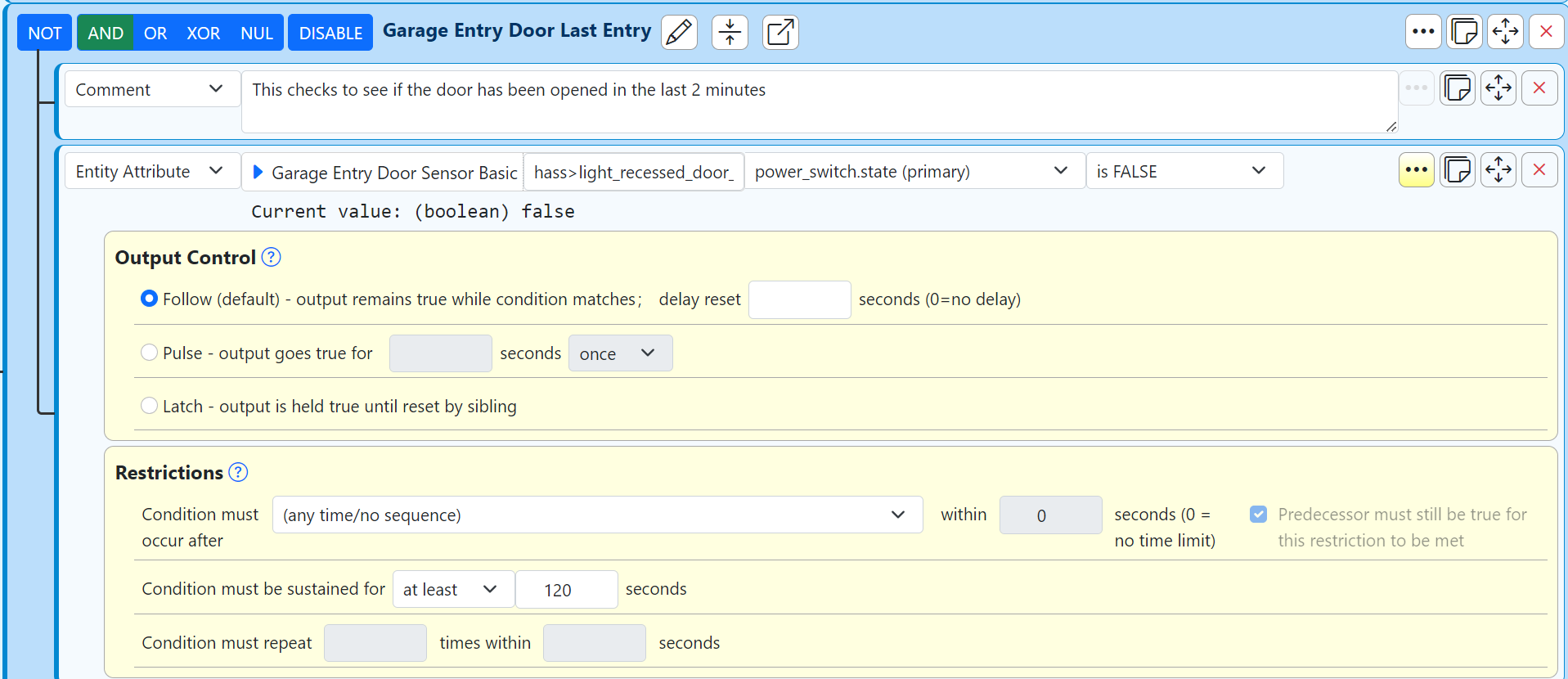
    I think I solved this with a completely different approach. Instead of using variables based on Last Seen, I am just checking the current state of the sensor and used the Restriction that the sensor must be FALSE (ie door closed) for 120 seconds. Not sure why I did not try this the first time.

    Screenshot 2024-09-03 181724.png

    Since my Reaction is now working, I should probably close this out as Solved. However, I am still interested in how to use a variable as described in the original post in case I need to use a similar approach in the future. Hopefully someone can provide some guidance (thanks realdb!) on how to use the variables. If I don't hear back within a few days, I will go ahead and update this as Solved.

    General Discussion

  • Expression Evaluation - Last Seen Date/Time
    S sidmsmith

    @therealdb Thanks for your feedback!

    I have not used a metadata statement like this before so have a follow up. I think I have the proper data elements. But is this statement supposed to be part of the Expression definition or the Reaction Trigger? The screenshot below shows what I tried creating the expression.

    Screenshot 2024-09-03 161415.png

    Sorry for the lack of understanding on my part! Is the goal to have the variable itself be true/false? Or is the goal to have the variable still provide a numeric result that is used in the reaction? I may just need a little more direction.

    Thanks again!

    General Discussion

  • Expression Evaluation - Last Seen Date/Time
    S sidmsmith

    I am trying to run a reaction that turns on lights if a sensor has not been tripped for 2 minutes. Basically, when a garage door is open, turn on inside lights if nothing has been sensed for 2 minutes. My question has to do with the expression/variable for "Last Seen". The variable never gets updated over time since the last seen event never changes.
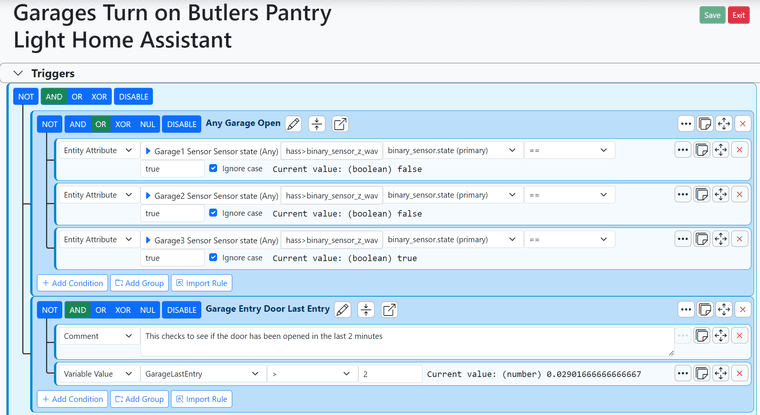
    Screenshot 2024-09-02 191632.png

    In the screenshot above, the reaction checks for any garage door as well as the variable called "GarageLastEntry". The expression for this variable is displayed below:

    Screenshot 2024-09-02 191651.png

    The problem that I am experiencing is that the variable never changes over time. I understand that this is because the "last seen" variable does not change over time when there is no activity. In this screenshot, the value shows 0.029... This can also be seen as the current value in the original reaction screenshot above. After 10 minutes, this value should be 10. However, when a garage door is opened, the variable does not get updated and thus the rule does not become true since .029 is less than 2.

    When I go to the variable and click on the > icon, the variable then gets updated as expected as seen below:

    Screenshot 2024-09-02 191711.png

    So the ultimate question is, how do I use a rule that can use a variable such as "last seen"? Do I need to create another variable or reaction that multiplies this by 1 every minute? From what I read in the manual, a variable is evaluated every time it is included in a reaction. But this is not what I am seeing.

    I also want to ask another question related to this variable. It seems like Reactor continuously deletes this variable and I have to keep recreating it? I have never experienced this with MSR so wanted to ask if this is a common problem or if my definition is causing this.

    Any info is appreciated!!!

    General Discussion

  • MSR Not Actioning
    S sidmsmith

    I updated to the latest build and this solved all of my issues. Thanks for the suggestions! I will try to stay up to date on the latest stable builds from here on.

    Multi-System Reactor

  • MSR Not Actioning
    S sidmsmith

    I am running MSR on a small windows machine. Earlier this week, the machine restarted and Reactor restarted as well. I am now experiencing an issue in which Reactor doesn't seem to be making any updates or calling any scenes. Reactor is communicating with Vera and all entities seem to be accurate (ie lights on or off) and manually clicking on Actions seems to work just fine. The Status page also seems accurate and displays rules automatically being SET and RESET. But when the Reaction changes from SET to RESET or vice versa, none of the actions are actually invoked.

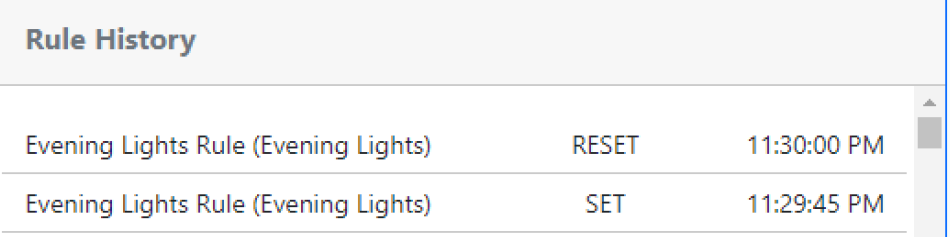
    For example, I manually ran a SET action at 11:29 and my lights turned on. At 11:30, the Status Dashboard shows the rule updating to RESET, but the lights did not turn off.

    I have included a screenshot of the rule history below as well as the log for these times as well.

    Any ideas on what can be going on? I have tried restarting the Windows machine as well as Reactor multiple times to see if this fixes this behavior but have not had any success. Any information is appreciated.

    78f9f75f-d24c-4ff4-a23a-fda0c98cbcbc-image.png

    [stable-22274]2023-04-14T03:29:39.161Z VeraController:null VeraController#vera enqueued task for Entity#vera>scene_3 action script.run: task [Object]{ "SceneNum": "3", "DeviceNum": 0, "id": "action", "serviceId": "urn:micasaverde-com:serviceId:HomeAutomationGateway1", "action": "RunScene" }
    [stable-22274]2023-04-14T03:29:39.587Z VeraController:INFO VeraController#vera 0 dead entities older than 86400000s purged
    [stable-22274]2023-04-14T03:29:45.763Z Rule:NOTICE Evening Lights Rule (Rule#rule-la4gnzmt) configuration changed; reloading
    [stable-22274]2023-04-14T03:29:45.766Z Rule:NOTICE Evening Lights Rule (Rule#rule-la4gnzmt) stopping
    [stable-22274]2023-04-14T03:29:45.772Z Rule:NOTICE Evening Lights Rule (Rule#rule-la4gnzmt) stopped
    [stable-22274]2023-04-14T03:29:45.773Z Rule:NOTICE Rule#rule-la4gnzmt (Evening Lights Rule) starting
    [stable-22274]2023-04-14T03:29:45.777Z Rule:INFO Evening Lights Rule (Rule#rule-la4gnzmt) starting evaluation; because startup
    [stable-22274]2023-04-14T03:29:45.779Z Rule:INFO Evening Lights Rule (Rule#rule-la4gnzmt) evaluated; rule state transition from RESET to SET!
    [stable-22274]2023-04-14T03:29:45.802Z Rule:INFO Evening Lights Rule (Rule#rule-la4gnzmt) evaluation complete
    [stable-22274]2023-04-14T03:29:45.809Z Rule:INFO Evening Lights Rule (Rule#rule-la4gnzmt) started
    [stable-22274]2023-04-14T03:29:45.811Z Engine:INFO Enqueueing "Evening Lights Rule<SET>" (rule-la4gnzmt:S)
    [stable-22274]2023-04-14T03:29:45.840Z Engine:NOTICE Starting reaction Evening Lights Rule<SET> (rule-la4gnzmt:S)
    [stable-22274]2023-04-14T03:29:45.842Z Engine:INFO Evening Lights Rule<SET> all actions completed.
    [stable-22274]2023-04-14T03:30:00.008Z Rule:INFO Evening Lights Rule (Rule#rule-la4gnzmt) starting evaluation; because timer-trigger Timer#rule-la4gnzmt
    [stable-22274]2023-04-14T03:30:00.024Z Rule:INFO Evening Lights Rule (Rule#rule-la4gnzmt) evaluated; rule state transition from SET to RESET!
    [stable-22274]2023-04-14T03:30:00.055Z Rule:INFO Evening Lights Rule (Rule#rule-la4gnzmt) evaluation complete
    [stable-22274]2023-04-14T03:30:00.062Z Engine:INFO Enqueueing "Evening Lights Rule<RESET>" (rule-la4gnzmt:R)
    [stable-22274]2023-04-14T03:30:00.079Z Engine:NOTICE Starting reaction Evening Lights Rule<RESET> (rule-la4gnzmt:R)
    [stable-22274]2023-04-14T03:30:00.080Z Engine:INFO Evening Lights Rule<RESET> all actions completed.
    [stable-22274]2023-04-14T03:30:01.099Z VeraController:INFO VeraController#vera 0 dead entities older than 86400000s purged

    Multi-System Reactor

  • HTTP Request Max Response Limit
    S sidmsmith

    MSR has a parameter called "http_request_action_maxresponse" that can be updated within the properties. There is a good section describing this in the manual. However, the installation config file doesn't include the parameter out of the box. I was able to add the parameter (see below) and eventually got it to work after searching for a while.

    Suggestions:

    1. Include the parameter in the initial config file (or)
    2. Update the manual to state that the parameter should be added to the file

    Additional suggestion:
    I understand that it is potentially unsafe to have a large limit overall. However, some API calls unfortunately return large sizes which aren't necessarily problematic. The additional suggestion is to include a configurable max size within each HTTP Reaction in the UI. If it isn't populated then MSR could default to the config file like it does today. This way, we could have a reasonable default limit while allowing larger limit for certain HTTP calls.

      engine:
        #
        # enabled - Whether or not the rules engine runs. Change only when directed.
        enabled: true
        http_request_action_maxresponse: 10000
    
    Multi-System Reactor
  • Login

  • Don't have an account? Register

  • Login or register to search.
  • First post
    Last post
0
  • Categories
  • Recent
  • Tags
  • Popular
  • Unsolved