











Reset a delay
-
I'm sure this has been asked, and answered, but damned if I can figure it out
Use case: I have a rear garden with lights. A door from the kitchen into the garden and a door from the garage.
Currently if I open the kitchen door the lights come on (yay) and a 3 minute delay starts.
After 3 minutes, no matter what else happens, the lights go off (Boo! But also yay!)
What I would like is for the 3 minute delay until the lights go off to start from the latest door open event.
That is, if I'm going from kitchen to garage, and back again, the lights stay on until there's three minutes of no activity.
I've tried 'hacking' with a virtual switch, but can't seem to stop the delay.
Any pointers?
TIA
C
The Ex-Vera abuser know as CatmanV2.....
-
I'm sure this has been asked, and answered, but damned if I can figure it out
Use case: I have a rear garden with lights. A door from the kitchen into the garden and a door from the garage.
Currently if I open the kitchen door the lights come on (yay) and a 3 minute delay starts.
After 3 minutes, no matter what else happens, the lights go off (Boo! But also yay!)
What I would like is for the 3 minute delay until the lights go off to start from the latest door open event.
That is, if I'm going from kitchen to garage, and back again, the lights stay on until there's three minutes of no activity.
I've tried 'hacking' with a virtual switch, but can't seem to stop the delay.
Any pointers?
TIA
C
@CatmanV2 Off the top of my head, you'd want to set the
Followto 180 (three minutes).
I'd create an
ORGroupthat contains both doors. Set the above at theGrouplevel... in my mind that means " of either/any/both" doors, the last one closed starts the three minute timer. If any are reopened before it runs out, it restarts upon re-closure.
-
I'm sure this has been asked, and answered, but damned if I can figure it out
Use case: I have a rear garden with lights. A door from the kitchen into the garden and a door from the garage.
Currently if I open the kitchen door the lights come on (yay) and a 3 minute delay starts.
After 3 minutes, no matter what else happens, the lights go off (Boo! But also yay!)
What I would like is for the 3 minute delay until the lights go off to start from the latest door open event.
That is, if I'm going from kitchen to garage, and back again, the lights stay on until there's three minutes of no activity.
I've tried 'hacking' with a virtual switch, but can't seem to stop the delay.
Any pointers?
TIA
C
@CatmanV2 foul ball. Not showing your work. Can't guide you properly here. What you are asking is actually default behavior, so either you've done something odd, or there's a bug. Either way, can't tell unless you post your work.
Author of Multi-system Reactor and Reactor, DelayLight, Switchboard, and about a dozen other plugins that run on Vera and openLuup.
-
@CatmanV2 foul ball. Not showing your work. Can't guide you properly here. What you are asking is actually default behavior, so either you've done something odd, or there's a bug. Either way, can't tell unless you post your work.
@toggledbits hell sorry! Not my intention at all!
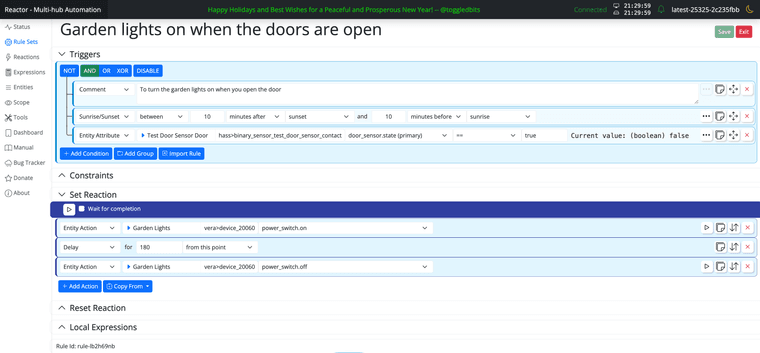
Here's what I have for the one sensor that currently exists (I'm migrating) The theory remains the same, though. I want the lights to turn off three minutes after the last open event, i.e. if I open the back door (the lights come on), the delay starts. If I don't open the back door again, the lights go off after 3 minutes.
But if I open the door again after 2 minutes 30, the lights stay on for another 3 minutes.
Hopefully this will resolve my foul, but I was expecting a pointer as opposed to an answer

C
-
@CatmanV2 Off the top of my head, you'd want to set the
Followto 180 (three minutes).I'd create an
ORGroupthat contains both doors. Set the above at theGrouplevel... in my mind that means " of either/any/both" doors, the last one closed starts the three minute timer. If any are reopened before it runs out, it restarts upon re-closure. -
@gwp1 Thanks. Not sure I understand, but that's on me multi-failing. I shall look probably tomorrow!
C
@CatmanV2 my bad - I should have called you out for not following posting etiquette. I just recognized a scenario similar to one I run.
Here's an example of what I do for my garage overhead light:
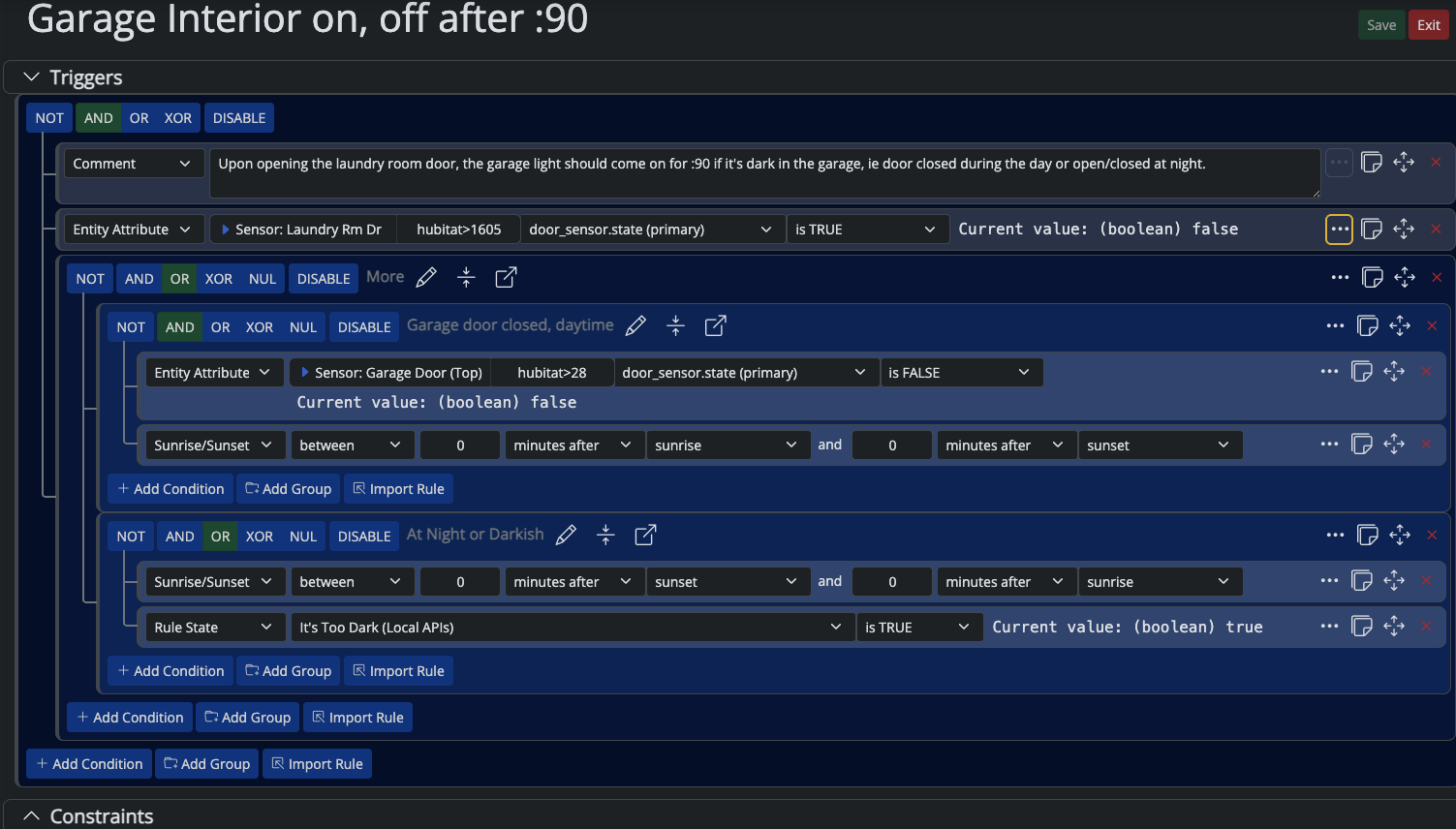
Expanding the yellow outlined three dotted box....

Then my
SET/RESETare
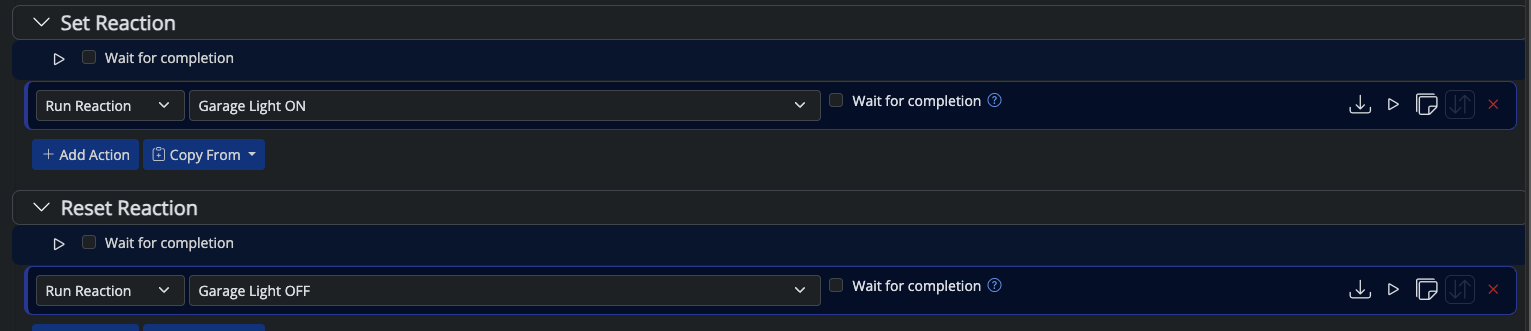
All told, what happens is "If the laundry room door out to the garage is opened, and the garage door is closed during the day OR it's night time/really dark outside turn on the light and leave it on for :90 after the laundry room door closes then turn it back off".
Doing it the way you're doing it, it's gonna turn off after that 180 second delay no matter what happens.
Doing it the way I'm doing it, if the laundry room door is left open... or is reopened... the light stays on. :90 is enough time to close that door and get oneself and doggo into the Jeep if leaving. If returning, :90 isn't too long to have the light on after one goes into the house.
This is where @toggledbits says "wow, that's over-complicated --- try this instead" because he usually does and is usually right LOL. (I tend to overthink/overcomplicate my automations....)
*Hubitat C-7 2.5.2.135
*Proxmox VE v8, Beelink MiniPC 12GBs, SSD*HAOS
Core 2026.10.1
w/ HA Connect ZWA-2
FW: v1.1
SDK: v7.23.1*Prod MSR in docker/portainer
MSR: latest-26287-0a7107d5
MQTTController: 25139
ZWave Controller: 25139 -
@CatmanV2 my bad - I should have called you out for not following posting etiquette. I just recognized a scenario similar to one I run.
Here's an example of what I do for my garage overhead light:
Expanding the yellow outlined three dotted box....
Then my
SET/RESETare
All told, what happens is "If the laundry room door out to the garage is opened, and the garage door is closed during the day OR it's night time/really dark outside turn on the light and leave it on for :90 after the laundry room door closes then turn it back off".
Doing it the way you're doing it, it's gonna turn off after that 180 second delay no matter what happens.
Doing it the way I'm doing it, if the laundry room door is left open... or is reopened... the light stays on. :90 is enough time to close that door and get oneself and doggo into the Jeep if leaving. If returning, :90 isn't too long to have the light on after one goes into the house.
This is where @toggledbits says "wow, that's over-complicated --- try this instead" because he usually does and is usually right LOL. (I tend to overthink/overcomplicate my automations....)
@gwp1 said in Reset a delay:
This is where @toggledbits says "wow, that's over-complicated --- try this instead" because he usually does and is usually right LOL. (I tend to overthink/overcomplicate my automations....)
ROFL! Actually, your response is dead-nuts right for both the consequence of @CatmanV2 's approach and what he needs to do to get what he wants. The only critique I have is that the first image is a bit daunting to look at, with all the extra conditions. But overall, as they say: This is the way...
Author of Multi-system Reactor and Reactor, DelayLight, Switchboard, and about a dozen other plugins that run on Vera and openLuup.