













Dynamic MQTT topics and parameters
-
Hi,
I'm building a retro annunciator panel for my home automation’s "mission-critical" (and not so critical) statuses. Each 3D-printed panel consists of 45 RGB WS2812D 5mm LEDs. The plan is to introduce at least two panels, maybe even four if I totally lose it.Control is handled by a spare Raspberry Pi 3, which communicates with the MSR via MQTT. Each panel/LED follows this topic format:
annunciator/panel/<panel-number>/led/<led-number>/set(e.g., annunciator/panel/1/led/1/set)
The payload is a simple JSON object:
{
  "color": "red", // or #FF0000
  "effect": "blink", // static, blink, breath
  "speed": 1000 // in ms
}
This setup is currently working fine in MSR. One might argue that the device name should be annunciator-panel-led instead, as that’s what it actually represents.
local_mqtt_capabilities.yaml
capabilities:
  x_mqtt_annunciator_panel:
    actions:
      on:
        arguments:
          color:
            type: string
          effect:
            type: string
            default: "static"
            values:
             - static
             - blink
             - breath
          speed:
            type: int
            default: 500
      off: {}
      blink:
         arguments:
           color:
             type: string
           speed:
             type: int
             default: 500
      breath:
        arguments:
          color:
            type: string
          speed:
            type: int
            default: 500
local_mqtt_devices.yaml
templates:
  annunciator-panel:
    capabilities:
     - x_mqtt_annunciator_panel
    actions:
      x_mqtt_annunciator_panel:
        on:
          topic: "annunciator/panel/%panel%/led/%led%/set"
          retain: true
          payload:
            expr: >
              { "color": parameters.color, "effect": parameters.effect, "speed": parameters.speed }
            type: json
        off:
          topic: "annunciator/panel/%panel%/led/%led%/set"
          retain: true
          payload:
            expr: >
              { "color": "off", "effect": "static" }
            type: json
        blink:
          topic: "annunciator/panel/%panel%/led/%led%/set"
          retain: true
          payload:
            expr: >
              { "color": parameters.color, "effect": "blink", "speed": parameters.speed }
            type: json
        breath:
          topic: "annunciator/panel/%panel%/led/%led%/set"
          retain: true
          payload:
            expr: >
              { "color": parameters.color, "effect": "breath", "speed": parameters.speed }
            type: json
reactor.yaml
      # Annunciator panel 1
        annunciator-panel-p01-l01:
          name: 'Annunciator P1 L01'
          panel: 1
          led: 1
          include: annunciator-panel
        annunciator-panel-p01-l02:
          name: 'Annunciator P1 L02'
          panel: 1
          led: 2
          include: annunciator-panel
        annunciator-panel-p01-l03:
          name: 'Annunciator P1 L03'
          panel: 1
          led: 3
          include: annunciator-panel

       and so on, totaling 45 for now
The Question:
Is there a more efficient way to handle dynamic topics? I tried passing the panel and led IDs as parameters from the UI, but I soon realized that this syntax does not work:
topic: "annunciator/panel/%parameters.panelId%/led/%parameters.ledId%/set"While my current setup works, introducing four panels would generate 180 entities in total. The reason I pass the IDs in the topic (rather than the payload) is to take advantage of MQTT's retain functionality. Since retention works on a per-topic basis, putting IDs inside the payload would only retain the latest update for the entire panel, not for each individual LED.
Using: Reactor (Multi-hub) latest-25323-d340b7d9 / MQTTController [0.2.25304] (latest-arm64 Docker image running on RPI5)
Off-topic:
One might ask: "Who on earth needs dozens of indicator lights in a modern HA system?" Well, probably nobody, unless you get carried away with 1960s NASA ground control panels. I stumbled upon @toggledbits DSKY project and thought that since you’re clearly a fan of similar hardware, you might be interested in this "crazy" project of mine.This project was dormant for years but escalated quickly after I picked up a Creality K1C 3D printer. After the obligatory "calibration benchies," I remembered the annunciator panel, fired up Blender, and things got serious. Unlike the DSKY project, I’m not trying to replicate a specific device but rather capturing the era's aesthetic. The design is heavily inspired by the Master Specialties Company’s Roto-Tellite Series 1000 - those classic multicolor indicators found in the Titan II ICBM and NASA consoles.
The Design:
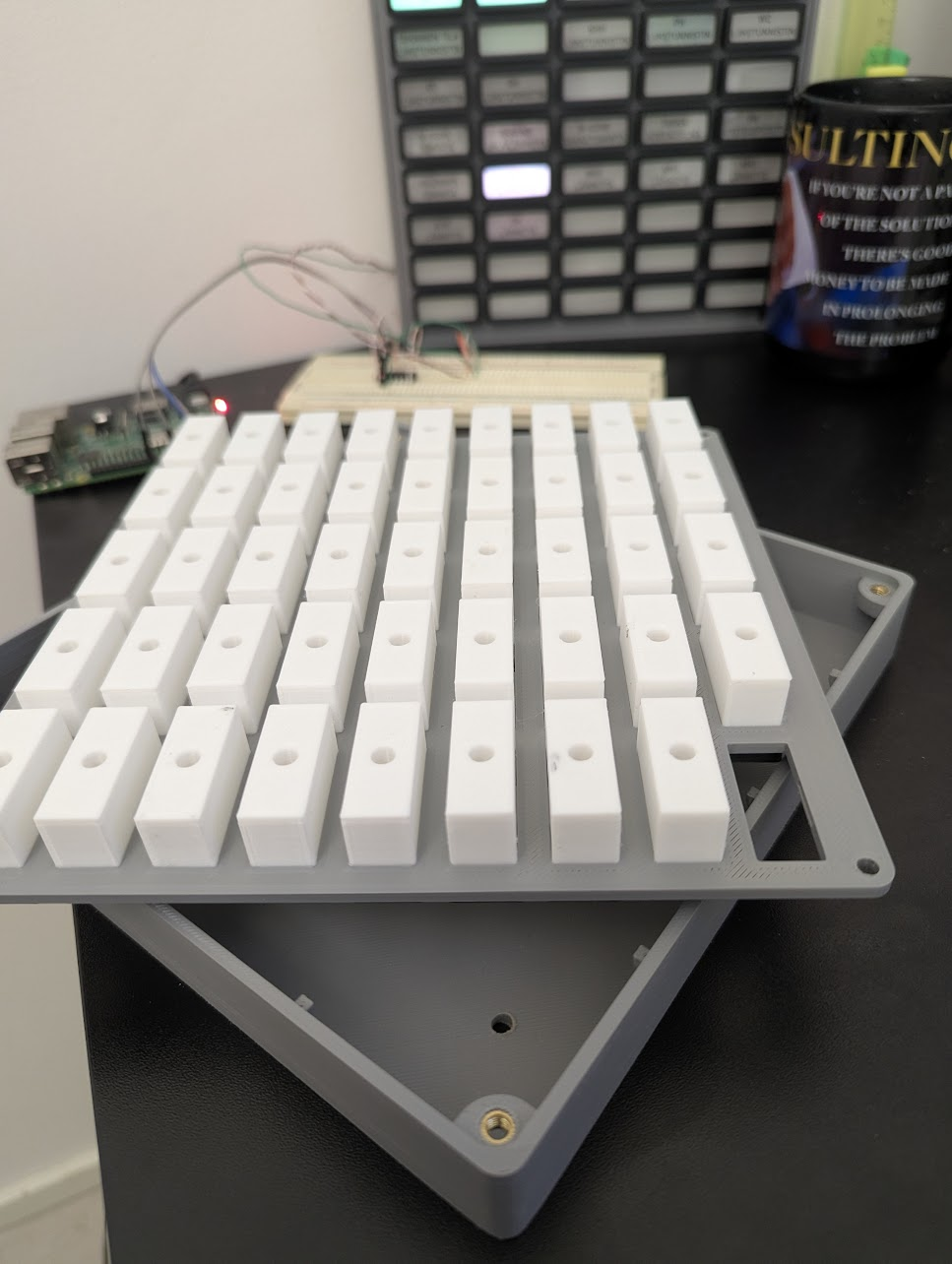
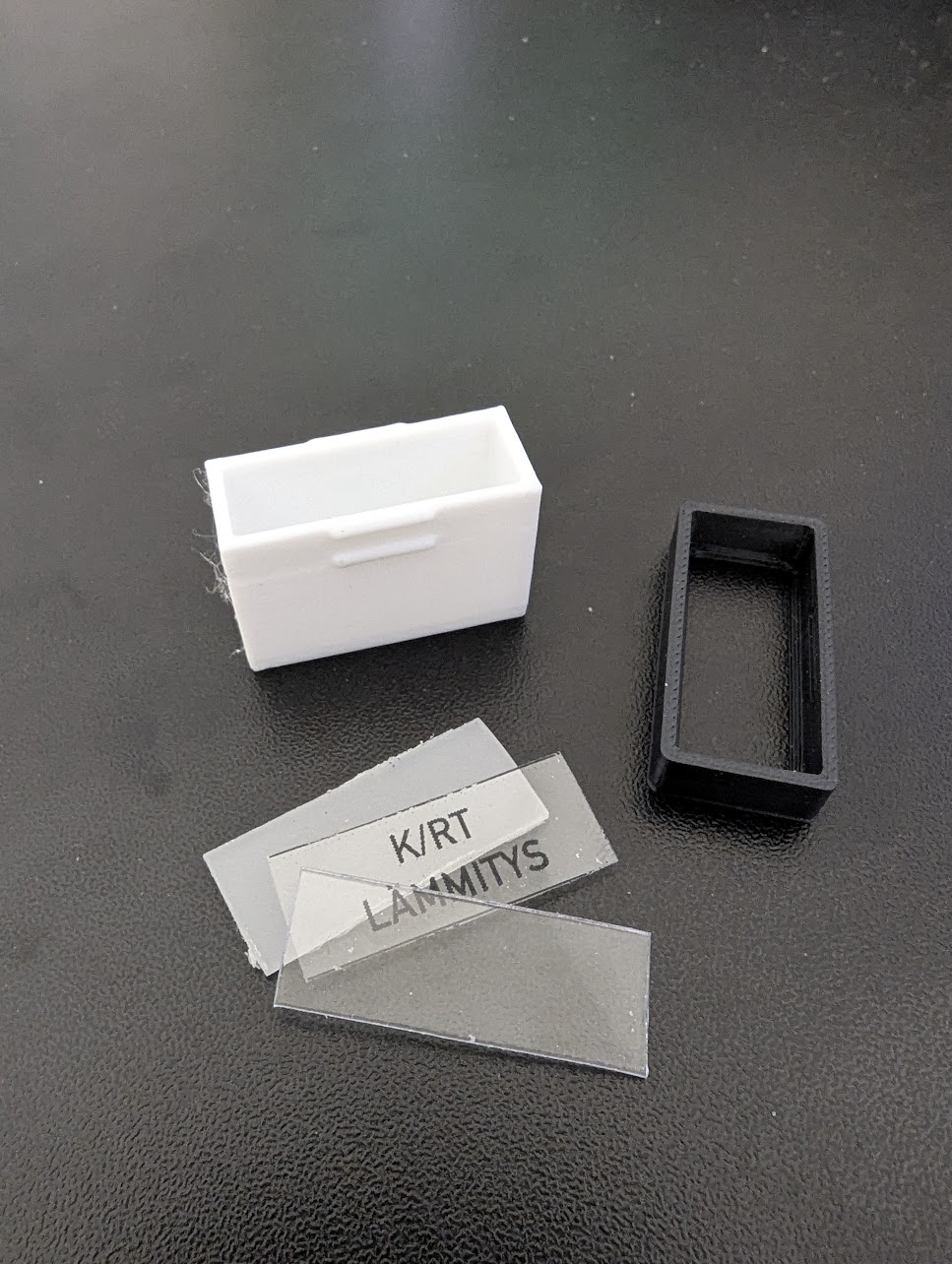
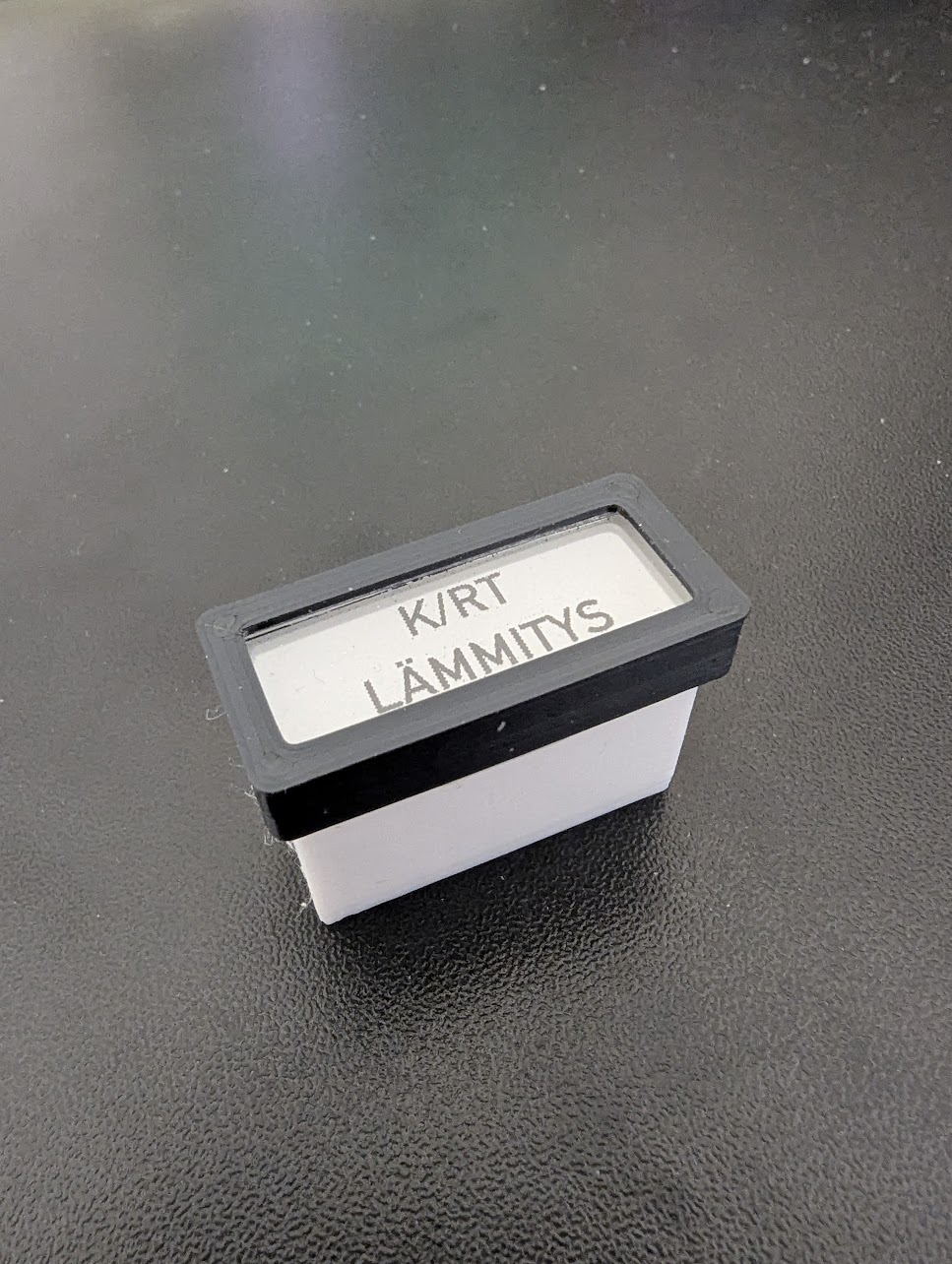
The construction is straightforward. Each light module consists of a 20mm light well that snap-fits into the front panel. At the bottom, there’s a snug fit for the 5mm LED. The front face is a "sandwich" of a diffuser plate (reclaimed from an old LCD monitor), a label printed on transparent overhead film, and a 1mm acrylic plate. These are held together by a black frame/cap that snap-fits into the light well for toolless removal.The enclosure is roughly 200x200x26 mm - near the maximum size for the K1C build plate. The LEDs are daisy-chained and connected to the RPi via a 74AHCT125N level shifter.
P.S. You probably won't make sense of the labels since they are all in Finnish, but I hope the photos clarify the mechanical structure and how the "light wells" are built.
BTW: Did you ever finish the DSKY?
-
Very cool. And I thought my wall panel was cool

if I were you, I'll just build a custom capability and have just one device doing the work per panel. 45 properties/actions per device are totally acceptable imho.
Unfortunately, AFAIK, at the moment the only dynamic part accepted in topics is substitutions from config. I think @toggledbits will need to specifically support this new option in order to work.
-
Very cool. And I thought my wall panel was cool
if I were you, I'll just build a custom capability and have just one device doing the work per panel. 45 properties/actions per device are totally acceptable imho.
Unfortunately, AFAIK, at the moment the only dynamic part accepted in topics is substitutions from config. I think @toggledbits will need to specifically support this new option in order to work.
@therealdb said in Dynamic MQTT topics and parameters:
Very cool. And I thought my wall panel was cool
Thanks! I'm not sure if I've seen yours, but I'm sure it's much more presentable. Mine is going straight into the technical room - it’s a bit too 'hardcore retro' for the hallway!
Actually, I'm a bit surprised myself how nicely and evenly those indicators light up. I guess it's all down to the sufficiently deep (white PLA) light wells and the LCD panel diffuser, which is really paying off here.
The project is still a work in progress (WIP), and I'm currently tinkering with the light colors to resemble actual incandescent bulbs as closely as possible. Unfortunately, the attached pictures don't really do justice to how it looks in real life.
if I were you, I'll just build a custom capability and have just one device doing the work per panel. 45 properties/actions per device are totally acceptable imho.
Good call. I'll check that out and see if it makes the maintenance any easier.
Unfortunately, AFAIK, at the moment the only dynamic part accepted in topics is substitutions from config. I think @toggledbits will need to specifically support this new option in order to work.
Fair point. Let’s wait and see if he decides to add support for it in the future.
-
Hi,
I'm building a retro annunciator panel for my home automation’s "mission-critical" (and not so critical) statuses. Each 3D-printed panel consists of 45 RGB WS2812D 5mm LEDs. The plan is to introduce at least two panels, maybe even four if I totally lose it.Control is handled by a spare Raspberry Pi 3, which communicates with the MSR via MQTT. Each panel/LED follows this topic format:
annunciator/panel/<panel-number>/led/<led-number>/set(e.g., annunciator/panel/1/led/1/set)
The payload is a simple JSON object:
{
  "color": "red", // or #FF0000
  "effect": "blink", // static, blink, breath
  "speed": 1000 // in ms
}
This setup is currently working fine in MSR. One might argue that the device name should be annunciator-panel-led instead, as that’s what it actually represents.
local_mqtt_capabilities.yaml
capabilities:
  x_mqtt_annunciator_panel:
    actions:
      on:
        arguments:
          color:
            type: string
          effect:
            type: string
            default: "static"
            values:
             - static
             - blink
             - breath
          speed:
            type: int
            default: 500
      off: {}
      blink:
         arguments:
           color:
             type: string
           speed:
             type: int
             default: 500
      breath:
        arguments:
          color:
            type: string
          speed:
            type: int
            default: 500
local_mqtt_devices.yaml
templates:
  annunciator-panel:
    capabilities:
     - x_mqtt_annunciator_panel
    actions:
      x_mqtt_annunciator_panel:
        on:
          topic: "annunciator/panel/%panel%/led/%led%/set"
          retain: true
          payload:
            expr: >
              { "color": parameters.color, "effect": parameters.effect, "speed": parameters.speed }
            type: json
        off:
          topic: "annunciator/panel/%panel%/led/%led%/set"
          retain: true
          payload:
            expr: >
              { "color": "off", "effect": "static" }
            type: json
        blink:
          topic: "annunciator/panel/%panel%/led/%led%/set"
          retain: true
          payload:
            expr: >
              { "color": parameters.color, "effect": "blink", "speed": parameters.speed }
            type: json
        breath:
          topic: "annunciator/panel/%panel%/led/%led%/set"
          retain: true
          payload:
            expr: >
              { "color": parameters.color, "effect": "breath", "speed": parameters.speed }
            type: json
reactor.yaml
      # Annunciator panel 1
        annunciator-panel-p01-l01:
          name: 'Annunciator P1 L01'
          panel: 1
          led: 1
          include: annunciator-panel
        annunciator-panel-p01-l02:
          name: 'Annunciator P1 L02'
          panel: 1
          led: 2
          include: annunciator-panel
        annunciator-panel-p01-l03:
          name: 'Annunciator P1 L03'
          panel: 1
          led: 3
          include: annunciator-panel

       and so on, totaling 45 for now
The Question:
Is there a more efficient way to handle dynamic topics? I tried passing the panel and led IDs as parameters from the UI, but I soon realized that this syntax does not work:
topic: "annunciator/panel/%parameters.panelId%/led/%parameters.ledId%/set"While my current setup works, introducing four panels would generate 180 entities in total. The reason I pass the IDs in the topic (rather than the payload) is to take advantage of MQTT's retain functionality. Since retention works on a per-topic basis, putting IDs inside the payload would only retain the latest update for the entire panel, not for each individual LED.
Using: Reactor (Multi-hub) latest-25323-d340b7d9 / MQTTController [0.2.25304] (latest-arm64 Docker image running on RPI5)
Off-topic:
One might ask: "Who on earth needs dozens of indicator lights in a modern HA system?" Well, probably nobody, unless you get carried away with 1960s NASA ground control panels. I stumbled upon @toggledbits DSKY project and thought that since you’re clearly a fan of similar hardware, you might be interested in this "crazy" project of mine.This project was dormant for years but escalated quickly after I picked up a Creality K1C 3D printer. After the obligatory "calibration benchies," I remembered the annunciator panel, fired up Blender, and things got serious. Unlike the DSKY project, I’m not trying to replicate a specific device but rather capturing the era's aesthetic. The design is heavily inspired by the Master Specialties Company’s Roto-Tellite Series 1000 - those classic multicolor indicators found in the Titan II ICBM and NASA consoles.
The Design:
The construction is straightforward. Each light module consists of a 20mm light well that snap-fits into the front panel. At the bottom, there’s a snug fit for the 5mm LED. The front face is a "sandwich" of a diffuser plate (reclaimed from an old LCD monitor), a label printed on transparent overhead film, and a 1mm acrylic plate. These are held together by a black frame/cap that snap-fits into the light well for toolless removal.The enclosure is roughly 200x200x26 mm - near the maximum size for the K1C build plate. The LEDs are daisy-chained and connected to the RPi via a 74AHCT125N level shifter.
P.S. You probably won't make sense of the labels since they are all in Finnish, but I hope the photos clarify the mechanical structure and how the "light wells" are built.
BTW: Did you ever finish the DSKY?@mgvra said in Dynamic MQTT topics and parameters:
Is there a more efficient way to handle dynamic topics? I tried passing the panel and led IDs as parameters from the UI, but I soon realized that this syntax does not work:
topic: "annunciator/panel/%parameters.panelId%/led/%parameters.ledId%/set"This makes a lot of sense, and I don't know why it hasn't come up before. I need to run out for an errand with mi esposa, but when I get back, I'll work on this and post an updated MQTTController for you to try.
It's funny that you mention the DSKY project, because I kind of set it aside years ago, but recently got motivated to start building again, so I've spent a little time refamiliarizing myself with where I left it...
Your annunciator panel... chef's kiss!
-
@mgvra said in Dynamic MQTT topics and parameters:
Is there a more efficient way to handle dynamic topics? I tried passing the panel and led IDs as parameters from the UI, but I soon realized that this syntax does not work:
topic: "annunciator/panel/%parameters.panelId%/led/%parameters.ledId%/set"This makes a lot of sense, and I don't know why it hasn't come up before. I need to run out for an errand with mi esposa, but when I get back, I'll work on this and post an updated MQTTController for you to try.
It's funny that you mention the DSKY project, because I kind of set it aside years ago, but recently got motivated to start building again, so I've spent a little time refamiliarizing myself with where I left it...
Your annunciator panel... chef's kiss!
@toggledbits said in Dynamic MQTT topics and parameters:
@mgvra said in Dynamic MQTT topics and parameters:
Is there a more efficient way to handle dynamic topics? I tried passing the panel and led IDs as parameters from the UI, but I soon realized that this syntax does not work:
topic: "annunciator/panel/%parameters.panelId%/led/%parameters.ledId%/set"This makes a lot of sense, and I don't know why it hasn't come up before. I need to run out for an errand with mi esposa, but when I get back, I'll work on this and post an updated MQTTController for you to try.
That sounds great, thanks! I'm really looking forward to testing the updated MQTTController. It’s also a funny coincidence about the DSKY project - it’s such an iconic piece of hardware, so it's cool to hear you're getting back into it!
It's funny that you mention the DSKY project, because I kind of set it aside years ago, but recently got motivated to start building again, so I've spent a little time refamiliarizing myself with where I left it...
Your annunciator panel... chef's kiss!
I really appreciate the 'chef's kiss' - coming from someone with your eye for detail and history with hardware like the DSKY, that really means a lot!
br,
mgvra -
Hi,
I've installed the latest version 26059 and can confirm that the parameter substitution works perfectly!
Thanks a lot for the quick fix and the feature update @toggledbitsHere's my setup
local_mqtt_capabilities.yaml
x_mqtt_annunciator_panel:
    actions:
      on:
        arguments:
          led:
            type: int
            min: 1
            max: 45
          color:
            type: string
          effect:
            type: string
            default: "static"
            values:
             - static
             - blink
             - breath
          speed:
            type: int
            default: 500
      off:
        arguments:
          led:
            type: int
            min: 1
            max: 45
      static:
        arguments:
          led:
            type: int
            min: 1
            max: 45
          color:
            type: string
      blink:
        arguments:
          led:
            type: int
            min: 1
            max: 45
          color:
            type: string
          speed:
            type: int
            default: 500
      breath:
        arguments:
          led:
            type: int
            min: 1
            max: 45
          color:
            type: string
          speed:
            type: int
            default: 500
      brightness:
        arguments:
          value:
            type: int
            min: 0
            max: 255
local_mqtt_devices.yaml
  annunciator-panel:
    capabilities:
     - x_mqtt_annunciator_panel
    requires: [panel]
    actions:
      x_mqtt_annunciator_panel:
        on:
          topic: "annunciator/panel/%panel%/led/%parameters.led%/set"
          retain: true
          payload:
            expr: >
              { "color": parameters.color, "effect": parameters.effect, "speed": parameters.speed }
            type: json
        off:
          topic: "annunciator/panel/%panel%/led/%parameters.led%/set"
          retain: true
          payload:
            expr: >
              { "color": "off", "effect": "static" }
            type: json
        static:
          topic: "annunciator/panel/%panel%/led/%parameters.led%/set"
          retain: true
          payload:
            expr: >
              { "color": parameters.color, "effect": "static" }
            type: json
        blink:
          topic: "annunciator/panel/%panel%/led/%parameters.led%/set"
          retain: true
          payload:
            expr: >
              { "color": parameters.color, "effect": "blink", "speed": parameters.speed }
            type: json
        breath:
          topic: "annunciator/panel/%panel%/led/%parameters.led%/set"
          retain: true
          payload:
            expr: >
              { "color": parameters.color, "effect": "breath", "speed": parameters.speed }
            type: json
        brightness:
          topic: "annunciator/panel/brightness"
          retain: true
          payload:
            expr: >
              { "value": parameters.value }
            type: json
reactor.yaml
      # Annunciator panels
        annunciator-panel-1:
          name: 'Annunciator panel 1'
          panel: 1
          include: annunciator-panel

        annunciator-panel-2:
          name: 'Annunciator panel 2'
          panel: 2
          include: annunciator-panel
Note that the brightness control is not panel-dependent, as it uses the rpi-ws281x-native library's global brightness attribute. This works well for my setup, as I want all panels to share the same brightness level anyway. Speaking of brightness, it will be controlled by the technical room's PIR and MSR rules that dim or turn off the panels when nobody is present.
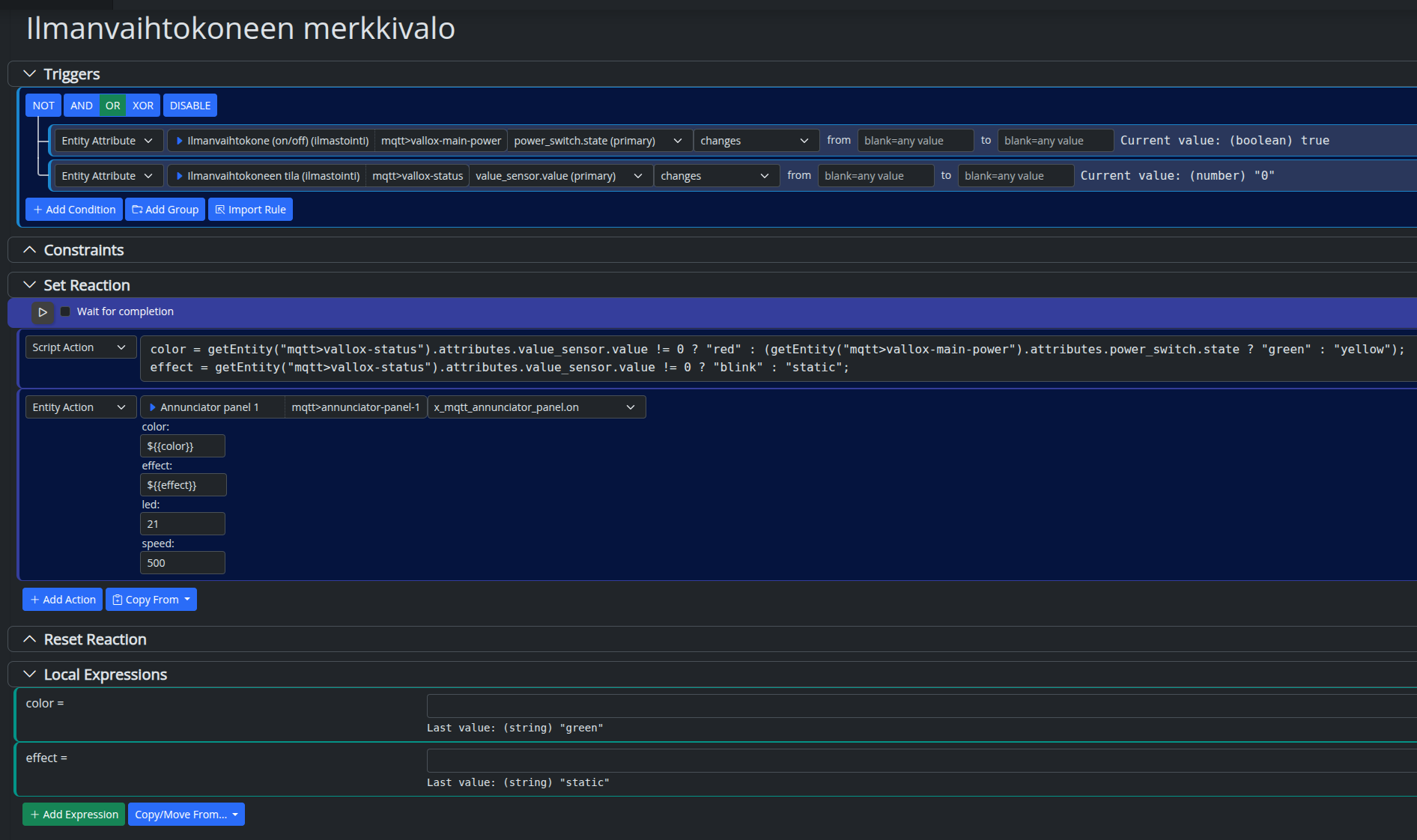
Below is the setup for the ventilation unit (AHU) indicator light:
- Green: Running OK
- Yellow: Switched off
- Blinking Red: Error
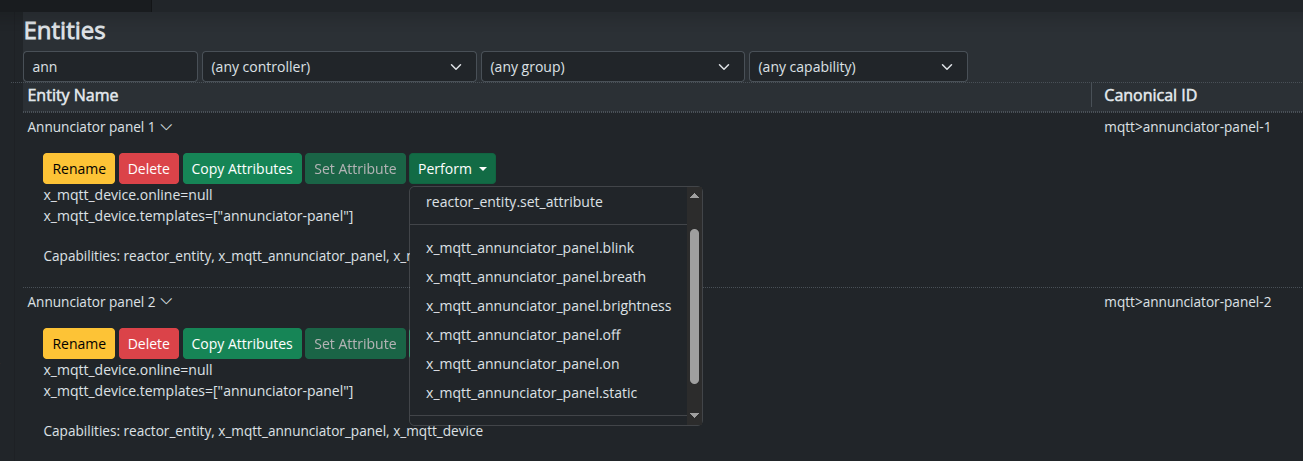
And here are the panel operations:
br,
mgvra
