





Support for Ezlo Atom controllers?
-
How is MSR installed, and how are you running/starting it?
-
How is MSR installed, and how are you running/starting it?
@toggledbits
MSR is installed on Windows 10, bare metall.
I open up Windows Powershell and navigate to the MSR folder, and then type "node app.js".
Everything else is working. I have a Vera and a Home Assistant up and running since months back... It's just the Ezlo that's not working. -
OK. You need to set the shell environment variable NODE_PATH to the install directory where Reactor lives (the directory that contains Reactor's app.js file).
-
OK. You need to set the shell environment variable NODE_PATH to the install directory where Reactor lives (the directory that contains Reactor's app.js file).
@toggledbits . Thanks. Did that. Sadly it still don't work. Got this instead:
PS D:\msr> node app.js basedir D:\msr confdir D:\msr\config datadir D:\msr\storage logsdir D:\msr\logs plugindir D:\msr\ext module.paths [ 'D:\\msr\\node_modules', 'D:\\node_modules' ] NODE_PATH D:\MSR Logging stream path spec may be using pre-21075 form; please remove ./logs/ from the path! 2021-07-30T13:10:38.707Z <app:null> Reactor latest-21203-9503e5d starting on v15.11.0 2021-07-30T13:10:38.708Z <app:INFO> Process ID 16096; platform win32/x64 Windows 10 Pro 2021-07-30T13:10:38.709Z <app:INFO> Basedir D:\msr; data in D:\msr\storage 2021-07-30T13:10:38.709Z <app:INFO> NODE_PATH D:\MSR; module paths [ "D:\\msr\\node_modules", "D:\\node_modules" ] 2021-07-30T13:10:38.751Z <Plugin:null> Module Plugin v21173 2021-07-30T13:10:38.757Z <default:INFO> Module Entity v21177 2021-07-30T13:10:38.760Z <Controller:null> Module Controller v21191 2021-07-30T13:10:38.761Z <default:null> Module Structure v21196 2021-07-30T13:10:38.766Z <default:null> Module Ruleset v21096 2021-07-30T13:10:38.766Z <default:null> Module Rulesets v21096 2021-07-30T13:10:38.781Z <default:null> Module Rule v21168 2021-07-30T13:10:38.786Z <default:null> Module Engine v21197 2021-07-30T13:10:38.787Z <default:null> Module httpapi v21200 2021-07-30T13:10:38.790Z <default:null> Module httpproxy v21054 2021-07-30T13:10:38.806Z <default:null> Module wsapi v21196 2021-07-30T13:10:38.810Z <app:NOTICE> Starting Structure... 2021-07-30T13:10:38.814Z <Structure:INFO> Structure#1 starting controller interface vera (VeraController) 2021-07-30T13:10:38.820Z <Structure:INFO> Structure#1 starting controller interface ezlo (EzloController) 2021-07-30T13:10:38.822Z <Structure:INFO> Structure#1 starting controller interface hass (HassController) 2021-07-30T13:10:38.823Z <Structure:INFO> Structure#1 starting controller interface reactor_system (SystemController) 2021-07-30T13:10:38.860Z <default:null> Module VeraController v21202 2021-07-30T13:10:38.924Z <default:null> Module HassController v21191 2021-07-30T13:10:38.926Z <default:null> Module SystemController v21102 2021-07-30T13:10:38.929Z <VeraController:NOTICE> VeraController#vera starting 2021-07-30T13:10:38.960Z <VeraController:INFO> VeraController#vera loaded mapping ver 21202 rev 1 format 1 notice 2021-07-30T13:10:38.970Z <Controller:CRIT> Controller: failed to load ezlo implementation file:///D:/msr/server/lib/EzloController.js: TypeError: Cannot read property 'getConfig' of undefined 2021-07-30T13:10:38.970Z <Controller:CRIT> TypeError: Cannot read property 'getConfig' of undefined TypeError: Cannot read property 'getConfig' of undefined at Function.getInstance (D:\MSR\server\lib\Configuration.js:128:89) at Object.<anonymous> (D:\MSR\server\lib\Logger.js:154:49) at Module._compile (node:internal/modules/cjs/loader:1092:14) at Object.Module._extensions..js (node:internal/modules/cjs/loader:1121:10) at Module.load (node:internal/modules/cjs/loader:972:32) at Function.Module._load (node:internal/modules/cjs/loader:813:14) at Module.require (node:internal/modules/cjs/loader:996:19) at require (node:internal/modules/cjs/helpers:92:18) at Object.<anonymous> (D:\MSR\server\lib\Capabilities.js:71:99) at Module._compile (node:internal/modules/cjs/loader:1092:14) TypeError: Cannot read property 'getConfig' of undefined at Function.getInstance (D:\MSR\server\lib\Configuration.js:128:89) at Object.<anonymous> (D:\MSR\server\lib\Logger.js:154:49) at Module._compile (node:internal/modules/cjs/loader:1092:14) at Object.Module._extensions..js (node:internal/modules/cjs/loader:1121:10) at Module.load (node:internal/modules/cjs/loader:972:32) at Function.Module._load (node:internal/modules/cjs/loader:813:14) at Module.require (node:internal/modules/cjs/loader:996:19) at require (node:internal/modules/cjs/helpers:92:18) at Object.<anonymous> (D:\MSR\server\lib\Capabilities.js:71:99) at Module._compile (node:internal/modules/cjs/loader:1092:14) -
Fix the case on your NODE_PATH value so it matches the actual case of every element of the directory path and give it a try.
-
Fix the case on your NODE_PATH value so it matches the actual case of every element of the directory path and give it a try.
@toggledbits
I've tried and tried - but I can't get it to work (getting the Ezlo Plus to work in MSR). I've several times tried every step. I use the Windows 10 bare metal install (reactor-latest-21221-4a447cb).
I have repeatedly used:npm install --loglevel error --no-save set NODE_PATH=D:\reactorAll cases are correct.
This is what I get:
2021-08-12T17:45:38.541Z <Controller:CRIT> Controller: failed to load ezlo implementation file:///D:/reactor/server/lib/EzloController.js: Error: Cannot find module 'server/lib/Configuration'
Require stack:
- D:\reactor\server\lib\EzloController.js
2021-08-12T17:45:38.542Z <Controller:CRIT> Error: Cannot find module 'server/lib/Configuration'
Require stack:
- D:\reactor\server\lib\EzloController.js
Error: Cannot find module 'server/lib/Configuration'
Require stack:
- D:\reactor\server\lib\EzloController.js
    at Function.Module._resolveFilename (node:internal/modules/cjs/loader:933:15)
    at Function.Module._load (node:internal/modules/cjs/loader:778:27)
    at Module.require (node:internal/modules/cjs/loader:1005:19)
    at require (node:internal/modules/cjs/helpers:94:18)
    at Object.<anonymous> (D:\reactor\server\lib\EzloController.js:506:144)
    at Module._compile (node:internal/modules/cjs/loader:1101:14)
    at Object.Module._extensions..js (node:internal/modules/cjs/loader:1153:10)
    at Module.load (node:internal/modules/cjs/loader:981:32)
    at Function.Module._load (node:internal/modules/cjs/loader:822:12)
    at ModuleWrap.<anonymous> (node:internal/modules/esm/translators:201:29)
Error: Cannot find module 'server/lib/Configuration'
Require stack:
- D:\reactor\server\lib\EzloController.js
    at Function.Module._resolveFilename (node:internal/modules/cjs/loader:933:15)
    at Function.Module._load (node:internal/modules/cjs/loader:778:27)
    at Module.require (node:internal/modules/cjs/loader:1005:19)
    at require (node:internal/modules/cjs/helpers:94:18)
    at Object.<anonymous> (D:\reactor\server\lib\EzloController.js:506:144)
    at Module._compile (node:internal/modules/cjs/loader:1101:14)
    at Object.Module._extensions..js (node:internal/modules/cjs/loader:1153:10)
    at Module.load (node:internal/modules/cjs/loader:981:32)
    at Function.Module._load (node:internal/modules/cjs/loader:822:12)
    at ModuleWrap.<anonymous> (node:internal/modules/esm/translators:201:29) {
  code: 'MODULE_NOT_FOUND',
  requireStack: [ 'D:\\reactor\\server\\lib\\EzloController.js' ]
}
I do have the files that's MSR is asking for (eg. D:\reactor\server\lib\EzloController.js). So it's so strange! Do you know what could be wrong?
Best regards,
/Fanan -
Working for me:
C:\Users\Patrick\Documents\MSR>set NODE_PATH=C:\Users\Patrick\Documents\MSR

C:\Users\Patrick\Documents\MSR>node app.js
basedir C:\Users\Patrick\Documents\MSR
confdir C:\Users\Patrick\Documents\MSR\config
datadir C:\Users\Patrick\Documents\MSR\storage
logsdir C:\Users\Patrick\Documents\MSR\logs
plugindir C:\Users\Patrick\Documents\MSR\ext
module.paths [
  'C:\\Users\\Patrick\\Documents\\MSR\\node_modules',
  'C:\\Users\\Patrick\\Documents\\node_modules',
  'C:\\Users\\Patrick\\node_modules',
  'C:\\Users\\node_modules',
  'C:\\node_modules'
]
NODE_PATH C:\Users\Patrick\Documents\MSR
2021-08-12T18:39:38.096Z <app:null> Reactor ###BUILDVERSION### starting on v14.15.5
2021-08-12T18:39:38.097Z <app:INFO> Process ID 26416; platform win32/x64 Windows 10 Pro
2021-08-12T18:39:38.099Z <app:INFO> Basedir C:\Users\Patrick\Documents\MSR; data in C:\Users\Patrick\Documents\MSR\storage
2021-08-12T18:39:38.099Z <app:INFO> NODE_PATH C:\Users\Patrick\Documents\MSR; module paths [ "C:\\Users\\Patrick\\Documents\\MSR\\node_modules", "C:\\Users\\Patrick\\Documents\\node_modules", "C:\\Users\\Patrick\\node_modules", "C:\\Users\\node_modules", "C:\\node_modules" ]
2021-08-12T18:39:38.100Z <app:INFO> process.env=[object Object]
2021-08-12T18:39:38.100Z <app:INFO> process.env.TEST=(undefined)
2021-08-12T18:39:38.145Z <Plugin:null> Module Plugin v21173
2021-08-12T18:39:38.152Z <default:INFO> Module Entity v21177
2021-08-12T18:39:38.155Z <Controller:null> Module Controller v21191
2021-08-12T18:39:38.156Z <default:null> Module Structure v21216
2021-08-12T18:39:38.162Z <default:null> Module Ruleset v21096
2021-08-12T18:39:38.162Z <default:null> Module Rulesets v21096
2021-08-12T18:39:38.181Z <default:null> Module Rule v21221
2021-08-12T18:39:38.185Z <default:null> Module Engine v21213
2021-08-12T18:39:38.186Z <default:null> Module httpapi v21215
2021-08-12T18:39:38.189Z <default:null> Module httpproxy v21054
2021-08-12T18:39:38.209Z <default:null> Module wsapi v21196
2021-08-12T18:39:38.212Z <app:NOTICE> Starting Structure...
2021-08-12T18:39:38.214Z <Structure:NOTICE> Structure#1 plugin ID influx disabled; skipping
2021-08-12T18:39:38.216Z <Structure:INFO> Structure#1 starting controller interface ezlo (EzloController)
2021-08-12T18:39:38.220Z <Structure:INFO> Structure#1 starting controller interface reactor_system (SystemController)
2021-08-12T18:39:38.249Z <default:null> Module EzloController v21218
2021-08-12T18:39:38.251Z <default:null> Module SystemController v21102
2021-08-12T18:39:38.254Z <EzloController:null> EzloController#ezlo created, config { "source": "wss://192.168.0.67:17000", "serial": "900xxxxx", "username": "xxxxx", "password": "xxxxx", "auto_rediscover": false }
2021-08-12T18:39:38.255Z <EzloController:null> EzloController#ezlo instance log level (null) (4)
2021-08-12T18:39:38.269Z <Controller:INFO> EzloController#ezlo device mapping data loaded; checking...
2021-08-12T18:39:38.272Z <Controller:INFO> EzloController#ezlo performing cloud auth to get local access token
2021-08-12T18:39:38.324Z <Controller:NOTICE> Controller SystemController#reactor_system is now online.
2021-08-12T18:39:38.395Z <app:INFO> Structure running; pausing for controllers' initial ready
2021-08-12T18:39:39.934Z <Controller:INFO> EzloController#ezlo cloud auth phase complete (local access token acquired)
2021-08-12T18:39:39.936Z <Controller:INFO> EzloController#ezlo opening local hub connection to "900xxxxx" at wss://192.168.0.67:17000
2021-08-12T18:39:39.938Z <Controller:NOTICE> EzloController#ezlo configured to ignore host ("900xxxxx") certificate
2021-08-12T18:39:39.940Z <Controller:NOTICE> EzloController#ezlo connecting via WS to wss://192.168.0.67:17000
2021-08-12T18:39:40.038Z <Controller:NOTICE> EzloController#ezlo successful hub login; performing inventory
2021-08-12T18:39:40.227Z <Controller:INFO> EzloController#ezlo data load complete; 21 devices received, 26 entities registered; 66 items.
2021-08-12T18:39:40.227Z <Controller:INFO> EzloController#ezlo hub inventory complete/successful; 187ms
2021-08-12T18:39:40.229Z <Controller:NOTICE> Controller EzloController#ezlo is now online.
2021-08-12T18:39:40.231Z <app:NOTICE> Starting Reaction Engine...
2021-08-12T18:39:40.233Z <Engine:INFO> Reaction Engine starting
2021-08-12T18:39:40.234Z <Engine:INFO> Checking rule sets...
2021-08-12T18:39:40.237Z <Engine:INFO> Checking rules...
2021-08-12T18:39:40.237Z <Engine:INFO> Data check complete; no corrections.
2021-08-12T18:39:40.240Z <Engine:NOTICE> Reaction Engine running!
2021-08-12T18:39:40.241Z <app:NOTICE> Starting HTTP server and API...
2021-08-12T18:39:40.245Z <app:NOTICE> Startup complete
2021-08-12T18:39:40.249Z <httpapi:NOTICE> HTTP API v1 21215 base URL http://192.168.0.164:8111; listening
2021-08-12T18:39:40.258Z <app:NOTICE> HTTP server running; registering proxy endpoints.
2021-08-12T18:39:40.259Z <app:NOTICE> Starting WSAPI...
2021-08-12T18:39:40.260Z <wsapi:NOTICE> wsapi: starting version 21196
2021-08-12T18:39:40.343Z <Engine:INFO> Engine#1 master timer tick, local time "8/12/2021, 2:39:40 PM" (TZ offset -240 mins from UTC)
Your snippets don't show the current startup information, which would be useful. Make sure that NODE_PATH appears with the correct value in the startup messages, as shown in the log above.
Also works under PowerShell:
PS C:\Users\Patrick\Documents\MSR> $env:NODE_PATH = 'C:\Users\Patrick\Documents\MSR' PS C:\Users\Patrick\Documents\MSR> $env:NODE_PATH C:\Users\Patrick\Documents\MSR PS C:\Users\Patrick\Documents\MSR> node app.js basedir C:\Users\Patrick\Documents\MSR confdir C:\Users\Patrick\Documents\MSR\config datadir C:\Users\Patrick\Documents\MSR\storage logsdir C:\Users\Patrick\Documents\MSR\logs plugindir C:\Users\Patrick\Documents\MSR\ext module.paths [ 'C:\\Users\\Patrick\\Documents\\MSR\\node_modules', 'C:\\Users\\Patrick\\Documents\\node_modules', 'C:\\Users\\Patrick\\node_modules', 'C:\\Users\\node_modules', 'C:\\node_modules' ] NODE_PATH C:\Users\Patrick\Documents\MSR 2021-08-12T18:45:56.225Z <app:null> Reactor ###BUILDVERSION### starting on v14.15.5 2021-08-12T18:45:56.226Z <app:INFO> Process ID 25296; platform win32/x64 Windows 10 Pro 2021-08-12T18:45:56.227Z <app:INFO> Basedir C:\Users\Patrick\Documents\MSR; data in C:\Users\Patrick\Documents\MSR\storage 2021-08-12T18:45:56.227Z <app:INFO> NODE_PATH C:\Users\Patrick\Documents\MSR; module paths [ "C:\\Users\\Patrick\\Documents\\MSR\\node_modules", "C:\\Users\\Patrick\\Documents\\node_modules", "C:\\Users\\Patrick\\node_modules", "C:\\Users\\node_modules", "C:\\node_modules" ] 2021-08-12T18:45:56.228Z <app:INFO> process.env=[object Object] 2021-08-12T18:45:56.228Z <app:INFO> process.env.TEST=(undefined) 2021-08-12T18:45:56.271Z <Plugin:null> Module Plugin v21173 2021-08-12T18:45:56.279Z <default:INFO> Module Entity v21177 2021-08-12T18:45:56.282Z <Controller:null> Module Controller v21191 2021-08-12T18:45:56.283Z <default:null> Module Structure v21216 2021-08-12T18:45:56.287Z <default:null> Module Ruleset v21096 2021-08-12T18:45:56.287Z <default:null> Module Rulesets v21096 2021-08-12T18:45:56.303Z <default:null> Module Rule v21221 2021-08-12T18:45:56.310Z <default:null> Module Engine v21213 2021-08-12T18:45:56.310Z <default:null> Module httpapi v21215 2021-08-12T18:45:56.312Z <default:null> Module httpproxy v21054 2021-08-12T18:45:56.332Z <default:null> Module wsapi v21196 2021-08-12T18:45:56.334Z <app:NOTICE> Starting Structure... 2021-08-12T18:45:56.338Z <Structure:NOTICE> Structure#1 plugin ID influx disabled; skipping 2021-08-12T18:45:56.339Z <Structure:INFO> Structure#1 starting controller interface ezlo (EzloController) 2021-08-12T18:45:56.344Z <Structure:INFO> Structure#1 starting controller interface reactor_system (SystemController) 2021-08-12T18:45:56.370Z <default:null> Module EzloController v21218 2021-08-12T18:45:56.372Z <default:null> Module SystemController v21102 2021-08-12T18:45:56.375Z <EzloController:null> EzloController#ezlo created, config { "source": "wss://192.168.0.67:17000", "serial": "900xxxxx", "username": "xxxxx", "password": "xxxxx", "auto_rediscover": false } 2021-08-12T18:45:56.375Z <EzloController:null> EzloController#ezlo instance log level (null) (4) 2021-08-12T18:45:56.385Z <Controller:INFO> EzloController#ezlo device mapping data loaded; checking... 2021-08-12T18:45:56.386Z <Controller:INFO> EzloController#ezlo performing cloud auth to get local access token 2021-08-12T18:45:56.441Z <Controller:NOTICE> Controller SystemController#reactor_system is now online. 2021-08-12T18:45:56.518Z <app:INFO> Structure running; pausing for controllers' initial ready 2021-08-12T18:45:59.726Z <Controller:INFO> EzloController#ezlo cloud auth phase complete (local access token acquired) 2021-08-12T18:45:59.727Z <Controller:INFO> EzloController#ezlo opening local hub connection to "900xxxxx" at wss://192.168.0.67:17000 2021-08-12T18:45:59.727Z <Controller:NOTICE> EzloController#ezlo configured to ignore host ("900xxxxx") certificate 2021-08-12T18:45:59.729Z <Controller:NOTICE> EzloController#ezlo connecting via WS to wss://192.168.0.67:17000 2021-08-12T18:45:59.823Z <Controller:NOTICE> EzloController#ezlo successful hub login; performing inventory 2021-08-12T18:46:00.006Z <Controller:INFO> EzloController#ezlo data load complete; 21 devices received, 26 entities registered; 66 items. 2021-08-12T18:46:00.006Z <Controller:INFO> EzloController#ezlo hub inventory complete/successful; 182ms 2021-08-12T18:46:00.007Z <Controller:NOTICE> Controller EzloController#ezlo is now online. 2021-08-12T18:46:00.008Z <app:NOTICE> Starting Reaction Engine... 2021-08-12T18:46:00.009Z <Engine:INFO> Reaction Engine starting 2021-08-12T18:46:00.009Z <Engine:INFO> Checking rule sets... 2021-08-12T18:46:00.012Z <Engine:INFO> Checking rules... 2021-08-12T18:46:00.012Z <Engine:INFO> Data check complete; no corrections. 2021-08-12T18:46:00.016Z <Engine:NOTICE> Reaction Engine running! 2021-08-12T18:46:00.017Z <app:NOTICE> Starting HTTP server and API... 2021-08-12T18:46:00.022Z <app:NOTICE> Startup complete 2021-08-12T18:46:00.026Z <httpapi:NOTICE> HTTP API v1 21215 base URL http://192.168.0.164:8111; listening 2021-08-12T18:46:00.039Z <app:NOTICE> HTTP server running; registering proxy endpoints. 2021-08-12T18:46:00.040Z <app:NOTICE> Starting WSAPI... 2021-08-12T18:46:00.042Z <wsapi:NOTICE> wsapi: starting version 21196 2021-08-12T18:46:00.123Z <Engine:INFO> Engine#1 master timer tick, local time "8/12/2021, 2:46:00 PM" (TZ offset -240 mins from UTC) -
Working for me:
C:\Users\Patrick\Documents\MSR>set NODE_PATH=C:\Users\Patrick\Documents\MSR

C:\Users\Patrick\Documents\MSR>node app.js
basedir C:\Users\Patrick\Documents\MSR
confdir C:\Users\Patrick\Documents\MSR\config
datadir C:\Users\Patrick\Documents\MSR\storage
logsdir C:\Users\Patrick\Documents\MSR\logs
plugindir C:\Users\Patrick\Documents\MSR\ext
module.paths [
  'C:\\Users\\Patrick\\Documents\\MSR\\node_modules',
  'C:\\Users\\Patrick\\Documents\\node_modules',
  'C:\\Users\\Patrick\\node_modules',
  'C:\\Users\\node_modules',
  'C:\\node_modules'
]
NODE_PATH C:\Users\Patrick\Documents\MSR
2021-08-12T18:39:38.096Z <app:null> Reactor ###BUILDVERSION### starting on v14.15.5
2021-08-12T18:39:38.097Z <app:INFO> Process ID 26416; platform win32/x64 Windows 10 Pro
2021-08-12T18:39:38.099Z <app:INFO> Basedir C:\Users\Patrick\Documents\MSR; data in C:\Users\Patrick\Documents\MSR\storage
2021-08-12T18:39:38.099Z <app:INFO> NODE_PATH C:\Users\Patrick\Documents\MSR; module paths [ "C:\\Users\\Patrick\\Documents\\MSR\\node_modules", "C:\\Users\\Patrick\\Documents\\node_modules", "C:\\Users\\Patrick\\node_modules", "C:\\Users\\node_modules", "C:\\node_modules" ]
2021-08-12T18:39:38.100Z <app:INFO> process.env=[object Object]
2021-08-12T18:39:38.100Z <app:INFO> process.env.TEST=(undefined)
2021-08-12T18:39:38.145Z <Plugin:null> Module Plugin v21173
2021-08-12T18:39:38.152Z <default:INFO> Module Entity v21177
2021-08-12T18:39:38.155Z <Controller:null> Module Controller v21191
2021-08-12T18:39:38.156Z <default:null> Module Structure v21216
2021-08-12T18:39:38.162Z <default:null> Module Ruleset v21096
2021-08-12T18:39:38.162Z <default:null> Module Rulesets v21096
2021-08-12T18:39:38.181Z <default:null> Module Rule v21221
2021-08-12T18:39:38.185Z <default:null> Module Engine v21213
2021-08-12T18:39:38.186Z <default:null> Module httpapi v21215
2021-08-12T18:39:38.189Z <default:null> Module httpproxy v21054
2021-08-12T18:39:38.209Z <default:null> Module wsapi v21196
2021-08-12T18:39:38.212Z <app:NOTICE> Starting Structure...
2021-08-12T18:39:38.214Z <Structure:NOTICE> Structure#1 plugin ID influx disabled; skipping
2021-08-12T18:39:38.216Z <Structure:INFO> Structure#1 starting controller interface ezlo (EzloController)
2021-08-12T18:39:38.220Z <Structure:INFO> Structure#1 starting controller interface reactor_system (SystemController)
2021-08-12T18:39:38.249Z <default:null> Module EzloController v21218
2021-08-12T18:39:38.251Z <default:null> Module SystemController v21102
2021-08-12T18:39:38.254Z <EzloController:null> EzloController#ezlo created, config { "source": "wss://192.168.0.67:17000", "serial": "900xxxxx", "username": "xxxxx", "password": "xxxxx", "auto_rediscover": false }
2021-08-12T18:39:38.255Z <EzloController:null> EzloController#ezlo instance log level (null) (4)
2021-08-12T18:39:38.269Z <Controller:INFO> EzloController#ezlo device mapping data loaded; checking...
2021-08-12T18:39:38.272Z <Controller:INFO> EzloController#ezlo performing cloud auth to get local access token
2021-08-12T18:39:38.324Z <Controller:NOTICE> Controller SystemController#reactor_system is now online.
2021-08-12T18:39:38.395Z <app:INFO> Structure running; pausing for controllers' initial ready
2021-08-12T18:39:39.934Z <Controller:INFO> EzloController#ezlo cloud auth phase complete (local access token acquired)
2021-08-12T18:39:39.936Z <Controller:INFO> EzloController#ezlo opening local hub connection to "900xxxxx" at wss://192.168.0.67:17000
2021-08-12T18:39:39.938Z <Controller:NOTICE> EzloController#ezlo configured to ignore host ("900xxxxx") certificate
2021-08-12T18:39:39.940Z <Controller:NOTICE> EzloController#ezlo connecting via WS to wss://192.168.0.67:17000
2021-08-12T18:39:40.038Z <Controller:NOTICE> EzloController#ezlo successful hub login; performing inventory
2021-08-12T18:39:40.227Z <Controller:INFO> EzloController#ezlo data load complete; 21 devices received, 26 entities registered; 66 items.
2021-08-12T18:39:40.227Z <Controller:INFO> EzloController#ezlo hub inventory complete/successful; 187ms
2021-08-12T18:39:40.229Z <Controller:NOTICE> Controller EzloController#ezlo is now online.
2021-08-12T18:39:40.231Z <app:NOTICE> Starting Reaction Engine...
2021-08-12T18:39:40.233Z <Engine:INFO> Reaction Engine starting
2021-08-12T18:39:40.234Z <Engine:INFO> Checking rule sets...
2021-08-12T18:39:40.237Z <Engine:INFO> Checking rules...
2021-08-12T18:39:40.237Z <Engine:INFO> Data check complete; no corrections.
2021-08-12T18:39:40.240Z <Engine:NOTICE> Reaction Engine running!
2021-08-12T18:39:40.241Z <app:NOTICE> Starting HTTP server and API...
2021-08-12T18:39:40.245Z <app:NOTICE> Startup complete
2021-08-12T18:39:40.249Z <httpapi:NOTICE> HTTP API v1 21215 base URL http://192.168.0.164:8111; listening
2021-08-12T18:39:40.258Z <app:NOTICE> HTTP server running; registering proxy endpoints.
2021-08-12T18:39:40.259Z <app:NOTICE> Starting WSAPI...
2021-08-12T18:39:40.260Z <wsapi:NOTICE> wsapi: starting version 21196
2021-08-12T18:39:40.343Z <Engine:INFO> Engine#1 master timer tick, local time "8/12/2021, 2:39:40 PM" (TZ offset -240 mins from UTC)
Your snippets don't show the current startup information, which would be useful. Make sure that NODE_PATH appears with the correct value in the startup messages, as shown in the log above.
Also works under PowerShell:
PS C:\Users\Patrick\Documents\MSR> $env:NODE_PATH = 'C:\Users\Patrick\Documents\MSR' PS C:\Users\Patrick\Documents\MSR> $env:NODE_PATH C:\Users\Patrick\Documents\MSR PS C:\Users\Patrick\Documents\MSR> node app.js basedir C:\Users\Patrick\Documents\MSR confdir C:\Users\Patrick\Documents\MSR\config datadir C:\Users\Patrick\Documents\MSR\storage logsdir C:\Users\Patrick\Documents\MSR\logs plugindir C:\Users\Patrick\Documents\MSR\ext module.paths [ 'C:\\Users\\Patrick\\Documents\\MSR\\node_modules', 'C:\\Users\\Patrick\\Documents\\node_modules', 'C:\\Users\\Patrick\\node_modules', 'C:\\Users\\node_modules', 'C:\\node_modules' ] NODE_PATH C:\Users\Patrick\Documents\MSR 2021-08-12T18:45:56.225Z <app:null> Reactor ###BUILDVERSION### starting on v14.15.5 2021-08-12T18:45:56.226Z <app:INFO> Process ID 25296; platform win32/x64 Windows 10 Pro 2021-08-12T18:45:56.227Z <app:INFO> Basedir C:\Users\Patrick\Documents\MSR; data in C:\Users\Patrick\Documents\MSR\storage 2021-08-12T18:45:56.227Z <app:INFO> NODE_PATH C:\Users\Patrick\Documents\MSR; module paths [ "C:\\Users\\Patrick\\Documents\\MSR\\node_modules", "C:\\Users\\Patrick\\Documents\\node_modules", "C:\\Users\\Patrick\\node_modules", "C:\\Users\\node_modules", "C:\\node_modules" ] 2021-08-12T18:45:56.228Z <app:INFO> process.env=[object Object] 2021-08-12T18:45:56.228Z <app:INFO> process.env.TEST=(undefined) 2021-08-12T18:45:56.271Z <Plugin:null> Module Plugin v21173 2021-08-12T18:45:56.279Z <default:INFO> Module Entity v21177 2021-08-12T18:45:56.282Z <Controller:null> Module Controller v21191 2021-08-12T18:45:56.283Z <default:null> Module Structure v21216 2021-08-12T18:45:56.287Z <default:null> Module Ruleset v21096 2021-08-12T18:45:56.287Z <default:null> Module Rulesets v21096 2021-08-12T18:45:56.303Z <default:null> Module Rule v21221 2021-08-12T18:45:56.310Z <default:null> Module Engine v21213 2021-08-12T18:45:56.310Z <default:null> Module httpapi v21215 2021-08-12T18:45:56.312Z <default:null> Module httpproxy v21054 2021-08-12T18:45:56.332Z <default:null> Module wsapi v21196 2021-08-12T18:45:56.334Z <app:NOTICE> Starting Structure... 2021-08-12T18:45:56.338Z <Structure:NOTICE> Structure#1 plugin ID influx disabled; skipping 2021-08-12T18:45:56.339Z <Structure:INFO> Structure#1 starting controller interface ezlo (EzloController) 2021-08-12T18:45:56.344Z <Structure:INFO> Structure#1 starting controller interface reactor_system (SystemController) 2021-08-12T18:45:56.370Z <default:null> Module EzloController v21218 2021-08-12T18:45:56.372Z <default:null> Module SystemController v21102 2021-08-12T18:45:56.375Z <EzloController:null> EzloController#ezlo created, config { "source": "wss://192.168.0.67:17000", "serial": "900xxxxx", "username": "xxxxx", "password": "xxxxx", "auto_rediscover": false } 2021-08-12T18:45:56.375Z <EzloController:null> EzloController#ezlo instance log level (null) (4) 2021-08-12T18:45:56.385Z <Controller:INFO> EzloController#ezlo device mapping data loaded; checking... 2021-08-12T18:45:56.386Z <Controller:INFO> EzloController#ezlo performing cloud auth to get local access token 2021-08-12T18:45:56.441Z <Controller:NOTICE> Controller SystemController#reactor_system is now online. 2021-08-12T18:45:56.518Z <app:INFO> Structure running; pausing for controllers' initial ready 2021-08-12T18:45:59.726Z <Controller:INFO> EzloController#ezlo cloud auth phase complete (local access token acquired) 2021-08-12T18:45:59.727Z <Controller:INFO> EzloController#ezlo opening local hub connection to "900xxxxx" at wss://192.168.0.67:17000 2021-08-12T18:45:59.727Z <Controller:NOTICE> EzloController#ezlo configured to ignore host ("900xxxxx") certificate 2021-08-12T18:45:59.729Z <Controller:NOTICE> EzloController#ezlo connecting via WS to wss://192.168.0.67:17000 2021-08-12T18:45:59.823Z <Controller:NOTICE> EzloController#ezlo successful hub login; performing inventory 2021-08-12T18:46:00.006Z <Controller:INFO> EzloController#ezlo data load complete; 21 devices received, 26 entities registered; 66 items. 2021-08-12T18:46:00.006Z <Controller:INFO> EzloController#ezlo hub inventory complete/successful; 182ms 2021-08-12T18:46:00.007Z <Controller:NOTICE> Controller EzloController#ezlo is now online. 2021-08-12T18:46:00.008Z <app:NOTICE> Starting Reaction Engine... 2021-08-12T18:46:00.009Z <Engine:INFO> Reaction Engine starting 2021-08-12T18:46:00.009Z <Engine:INFO> Checking rule sets... 2021-08-12T18:46:00.012Z <Engine:INFO> Checking rules... 2021-08-12T18:46:00.012Z <Engine:INFO> Data check complete; no corrections. 2021-08-12T18:46:00.016Z <Engine:NOTICE> Reaction Engine running! 2021-08-12T18:46:00.017Z <app:NOTICE> Starting HTTP server and API... 2021-08-12T18:46:00.022Z <app:NOTICE> Startup complete 2021-08-12T18:46:00.026Z <httpapi:NOTICE> HTTP API v1 21215 base URL http://192.168.0.164:8111; listening 2021-08-12T18:46:00.039Z <app:NOTICE> HTTP server running; registering proxy endpoints. 2021-08-12T18:46:00.040Z <app:NOTICE> Starting WSAPI... 2021-08-12T18:46:00.042Z <wsapi:NOTICE> wsapi: starting version 21196 2021-08-12T18:46:00.123Z <Engine:INFO> Engine#1 master timer tick, local time "8/12/2021, 2:46:00 PM" (TZ offset -240 mins from UTC)@toggledbits
Thanks! I now seem to have overcome the NODE_PATH.... So the next problem arise. I now get a message related to the Ezlo plus: "... ezlo failed to authenticate: Error: Request failed: 404 NOT FOUND."I did a screenshot, so that I could easily hide my credentials. I have used my username as I use for both my Vera and Ezlo. I have checked them over and over - and they are correct. Is it something connected to the " "? Or what could it be?
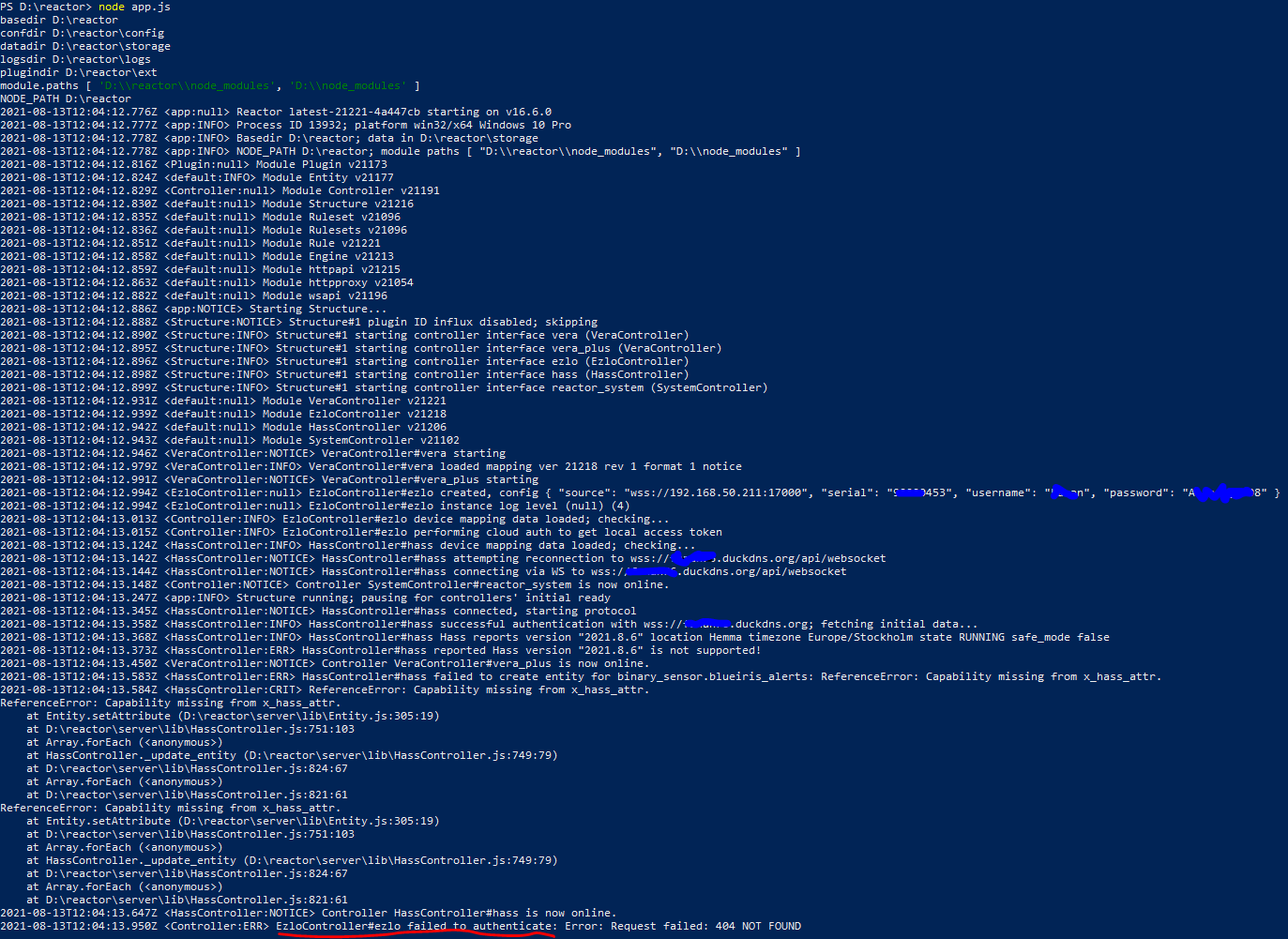
The last lines are:
2021-08-13T12:04:13.950Z <Controller:ERR> EzloController#ezlo failed to authenticate: Error: Request failed: 404 NOT FOUND 2021-08-13T12:04:13.951Z <Controller:ERR> EzloController#ezlo failed to log in: auth failed 2021-08-13T12:04:15.034Z <VeraController:NOTICE> Controller VeraController#vera is now online. 2021-08-13T12:04:18.963Z <Controller:INFO> EzloController#ezlo performing cloud auth to get local access token 2021-08-13T12:04:19.460Z <Controller:ERR> EzloController#ezlo failed to authenticate: Error: Request failed: 404 NOT FOUND 2021-08-13T12:04:19.461Z <Controller:ERR> EzloController#ezlo failed to log in: auth failed 2021-08-13T12:04:24.470Z <Controller:INFO> EzloController#ezlo performing cloud auth to get local access token 2021-08-13T12:04:24.955Z <Controller:ERR> EzloController#ezlo failed to authenticate: Error: Request failed: 404 NOT FOUND 2021-08-13T12:04:24.956Z <Controller:ERR> EzloController#ezlo failed to log in: auth failed -
Username or password is incorrect. The "NOT FOUND" it is referring to is you.
-
Username or password is incorrect. The "NOT FOUND" it is referring to is you.
@toggledbits
I also thought so. But it's not incorrect. I even tried to create another user profile. The profile is able to log in to Vera/Ezlo. But when I use the profiles credentials, I get the same error. I changed between my true profile and the test profile - and always get the same result. So it's more to the story.
This is from my yaml file. I guess it looks alright?
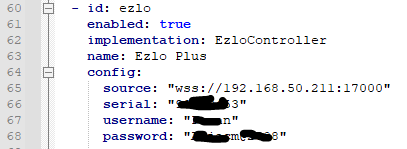
-
Are there any special characters in the password, like international characters? Also what region are you in?
-
Yes, there is a @ in my password. I'm in Europe/Sweden.
Vera/Ezlo has these demands on the passwords:
Password must be at least 8 characters long and include:- at least one lowercase letter;
- at least one special character;
- uppercase letters or numbers.
-
Is your username capitalized?
-
Is your username capitalized?
@toggledbits
Yes. Everywhere. -
OK. That's probably it. Try creating an account with an all lower-case username. Password is fine.
-
Excellent news. That's a bug I can fix, so I'll make sure that's in the next build and you can use your username the way you want it to be.
Author of Multi-system Reactor and Reactor, DelayLight, Switchboard, and about a dozen other plugins that run on Vera and openLuup.
-
Excellent news. That's a bug I can fix, so I'll make sure that's in the next build and you can use your username the way you want it to be.
"Note that Generation 1 Atoms are supported in this version, but only through the remote access API (so it's cloud-dependent). Gen2 and later Atoms/PlugHubs can run with local/LAN access (no cloud dependency)."
Did you hear back from the Ezlo devs with the needed information for this? Or have you just gone ahead and used the learned knowledge from the forum ?
My Atom is now at firmware version 0.8.539. However I am not totally sure if its a gen1 or gen2 Atom? I think its gen2 but not sure.
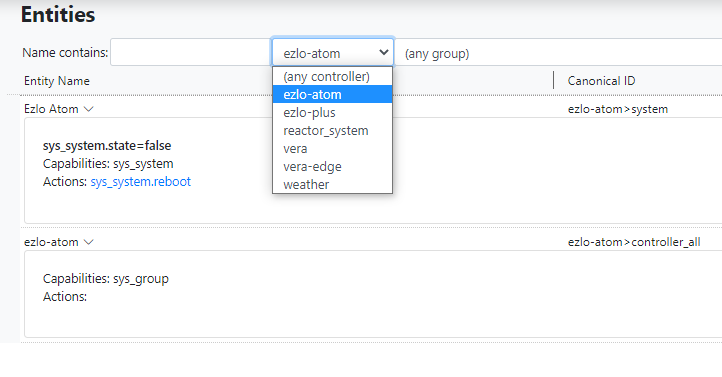
Its still not appearing in the MSR Entities area however.
I have tried with "set_anonymous_access: true" commented out and not commented out in the reactor.yaml file.
I can't see anything in the MSR log to do with the Atom controller only the Ezlo Plus controller.
Thanks
-
I have heard nothing from the eZLO devs on anything. That's business as usual. Everything I've done, everything that everyone has done, in this respect has been done based on hearsay and tribal knowledge, no specifications or documentation from eZLO. May stop working at any time.
Sounds like you have a Gen1 atom. You have to configure for cloud/remote access, it doesn't switch back and forth automatically. That involves just commenting out the
sourcefield. If thesourcefield is not present, then theEzloControlleruses remote access to get to the device. But, there's bug that leaked in the remote access login that I just fixed. Are you on a docker container or bare metal install?The
set_anonymous_accessfield is not available for Atom and PlugHub; it is not supported on these platforms.Author of Multi-system Reactor and Reactor, DelayLight, Switchboard, and about a dozen other plugins that run on Vera and openLuup.
-
I have heard nothing from the eZLO devs on anything. That's business as usual. Everything I've done, everything that everyone has done, in this respect has been done based on hearsay and tribal knowledge, no specifications or documentation from eZLO. May stop working at any time.
Sounds like you have a Gen1 atom. You have to configure for cloud/remote access, it doesn't switch back and forth automatically. That involves just commenting out the
sourcefield. If thesourcefield is not present, then theEzloControlleruses remote access to get to the device. But, there's bug that leaked in the remote access login that I just fixed. Are you on a docker container or bare metal install?The
set_anonymous_accessfield is not available for Atom and PlugHub; it is not supported on these platforms.Bare metal Linux Debian install.
I did try to comment out the source line earlier. I just tried again now. I also have set_anonymous_access commented out.
The serial number of the Atom and the username and password look OK. Restarted MSR but still nothing in entities.
If I login to https://home.getvera.com/ with same username and password I can see that Atom listed in the controllers.
- id: ezlo-atom
  enabled: false
  implementation: EzloController
  name: Ezlo Atom
  config:
    # source: "wss://192.168.0.243:17000"  # change the IP address
    serial: "70060304"    # put your hub's serial here
    username: "myusername"  # put your username here between quotes
    password: "mypassword"  # and password
    # set_anonymous_access: true
In the MSR log I see no mention of the word "atom"
Maybe I need your bug fix first then.
Cheers.
EDIT:
Bugger just spotted it says enabled "false" maybe that's why.
 It was the low-case username that did the trick!