











Skip to content
  • Categories
  • Recent
  • Tags
  • Popular
  • Unsolved
Collapse
Discussion Forum to share and further the development of home control and automation, independent of platforms.
  1. Home
  2. Software
  3. Multi-System Reactor
  4. Added IP camera to Ezlo, what is causing this
[Solved] Error: Command timeout
G
at _ClientAPI._commandTimeout (http://192.168.1.100:8111/client/ClientAPI.js:807:179 Seeing this randomly when returning to open browser tab after being away awhile. Once, maybe twice a day. "What did you do to trigger it?" Literally nothing, just walked away and returned and there it was. Actions taken in reasonably close proximity to this particular instance of it popping up: I'd restarted the MSR container in Portainer. I'll try to grab some logs here shortly.
Multi-System Reactor
[MSR] Feature request: For Each action on arrays/groups
therealdbT
Topic thumbnail image
Multi-System Reactor
Issue with MSR UI becoming unresponsive
S
I'm having an issue with MSR's UI being very unresponsive. It started happening a couple days ago and I didn't make any changes that would have caused this except adding some meross lan devices in HA. When I go into an entity action and use the search functionality, it usually will start filtering and then get to a place after a few letters are entered where it will take 30 seconds or more (sometimes minutes) for the UI to show what I am typing. During this time MSR ui is completely unresponsive. I've tried multiple browsers and multiple computers. HA and MSR are both deployed in docker. I have run HTOP on the host and when the problem happens there are no CPU/Memory spikes at all. From a functionality standpoint MSR is working perfectly. This seems to be an UI issue only. Do i need to ditch Docker and run MSR on a Proxmox VM? I have both stand alone Docker and Proxmox environments. I dont mind doing that I just want to be able to use the UI again... Installation method Home Assistant Container Core 2025.7.3 Frontend 20250702.3 nothing crazy in the logs except some openweather map stuff that doesn't make any sense as it is working fine in MSR Any help would be greatly appreciated Reactor latest-25328-b2ed1365 app 25328 configuration from /var/reactor/config NODE_PATH /opt/reactor:/opt/reactor/node_modules [latest-25328]2025-11-30T20:01:53.843Z <app:null> Reactor build latest-25328-b2ed1365 starting on v24.11.1 /usr/local/bin/node [latest-25328]2025-11-30T20:01:53.844Z <app:null> Process ID 1 user/group 0/0; docker; platform linux/x64 #161-Ubuntu SMP Tue Jul 22 14:25:40 UTC 2025; locale (undefined) [latest-25328]2025-11-30T20:01:53.844Z <app:null> Basedir /opt/reactor; data in /var/reactor/storage [latest-25328]2025-11-30T20:01:53.844Z <app:null> NODE_PATH=/opt/reactor:/opt/reactor/node_modules [latest-25328]2025-11-30T20:01:53.865Z <app:null> Resolved timezone=America/New_York, environment TZ=America/New_York; offset minutes from UTC=-300 [latest-25328]2025-11-30T20:01:53.867Z <default:null> Module i18n v25141 [latest-25328]2025-11-30T20:01:53.867Z <app:null> Configured locale (undefined); selected locale(s) en-US.UTF-8 [latest-25328]2025-11-30T20:01:53.879Z <app:null> Loaded locale en-US for en-US [latest-25328]2025-11-30T20:01:53.879Z <app:null> Local date/time using configured timezone and locale formatting is "11/30/2025, 3:01:53 PM" [latest-25328]2025-11-30T20:01:53.889Z <Structure:null> Module Structure v25326 [latest-25328]2025-11-30T20:01:53.890Z <Capabilities:null> Module Capabilities v24312 [latest-25328]2025-11-30T20:01:53.904Z <Plugin:null> Module Plugin v25141 [latest-25328]2025-11-30T20:01:53.923Z <Timer:null> Module Timer v25279 [latest-25328]2025-11-30T20:01:53.924Z <TimerBroker:null> Module TimerBroker v25314 [latest-25328]2025-11-30T20:01:53.927Z <Entity:null> Module Entity v25251 [latest-25328]2025-11-30T20:01:53.929Z <Controller:null> Module Controller v25253 [latest-25328]2025-11-30T20:01:53.930Z <AlertManager:null> Module AlertManager v25318 [latest-25328]2025-11-30T20:01:53.937Z <default:null> Module Ruleset v25283 [latest-25328]2025-11-30T20:01:53.937Z <default:null> Module Rulesets v25141 [latest-25328]2025-11-30T20:01:53.942Z <GlobalExpression:null> Module GlobalExpression v25258 [latest-25328]2025-11-30T20:01:53.953Z <Predicate:null> Module Predicate v25328 [latest-25328]2025-11-30T20:01:53.956Z <Rule:null> Module Rule v25323 [latest-25328]2025-11-30T20:01:53.958Z <GlobalReaction:null> Module GlobalReaction v25292 [latest-25328]2025-11-30T20:01:53.959Z <Engine:null> Module Engine v25325 [latest-25328]2025-11-30T20:01:53.964Z <httpapi:null> Module httpapi v25328 [latest-25328]2025-11-30T20:01:53.972Z <wsapi:null> Module wsapi v25328 [latest-25328]2025-11-30T20:01:53.994Z <TaskQueue:null> Module TaskQueue 24138 [latest-25328]2025-11-30T20:01:53.994Z <VeraController:null> Module VeraController v25141 [latest-25328]2025-11-30T20:01:54.179Z <HassController:null> Module HassController v25325 [latest-25328]2025-11-30T20:02:13.797Z <OWMWeatherController:null> Module OWMWeatherController v25268 [latest-25328]2025-11-30T20:02:13.800Z <SystemController:null> Module SystemController v25323 [latest-25328]2025-11-30T20:02:13.807Z <MQTTController:null> Module MQTTController v22092 [latest-25328]2025-11-30T20:02:20.630Z <OWMWeatherController:CRIT> FetchError: request to https://api.openweathermap.org/data/2.5/weather?lat=xxxxxxxxxx&lon=-xxxxxxxxx&appid=xxxxxxxxxxxxxxxxxxxxxxxxxx&units=standard&_r=1xxxxxxxxxxxxxxfailed, reason: [-] FetchError: request to https://api.openweathermap.org/data/2.5/weather?lat=xxxxxxxxxxx&lon=-xxxxxxxxxxxxxxxxxx&appid=xxxxxxxxxxxxxxxxxxx&units=standard&_r=xxxxxxxxxxxxxxxfailed, reason: at ClientRequest.<anonymous> (/opt/reactor/node_modules/node-fetch/lib/index.js:1501:11) at ClientRequest.emit (node:events:508:28) at ClientRequest.emit (node:domain:489:12) at emitErrorEvent (node:_http_client:108:11) at TLSSocket.socketErrorListener (node:_http_client:575:5) at TLSSocket.emit (node:events:508:28) at TLSSocket.emit (node:domain:489:12) at emitErrorNT (node:internal/streams/destroy:170:8) at emitErrorCloseNT (node:internal/streams/destroy:129:3) at processTicksAndRejections (node:internal/process/task_queues:89:21
Multi-System Reactor
Date/time condition
tunnusT
Topic thumbnail image
Multi-System Reactor
Device log?
G
@toggledbits is there a log that will show me what rule is turning on a specific device? I've got a switch that has been kicking on at 2200 ET for several nights now and the reactor.log doesn't have a thing in it that I can see on a device level (it being more rules-based).
Multi-System Reactor
Midnight crossing not working in date/time condition (build 25325)
tunnusT
Topic thumbnail image
Multi-System Reactor
Reactor (Multi-System/Multi-Hub) Announcements
toggledbitsT
Build 21228 has been released. Docker images available from DockerHub as usual, and bare-metal packages here. Home Assistant up to version 2021.8.6 supported; the online version of the manual will now state the current supported versions; Fix an error in OWMWeatherController that could cause it to stop updating; Unify the approach to entity filtering on all hub interface classes (controllers); this works for device entities only; it may be extended to other entities later; Improve error detail in messages for EzloController during auth phase; Add isRuleSet() and isRuleEnabled() functions to expressions extensions; Implement set action for lock and passage capabilities (makes them more easily scriptable in some cases); Fix a place in the UI where 24-hour time was not being displayed.
Multi-System Reactor
[Solved] Local expression in Rule does not evaluate as they used to do
CrilleC
Topic thumbnail image
Multi-System Reactor
Home Assistant 2025.11.2 and latest-25315
CrilleC
Topic thumbnail image
Multi-System Reactor
Notice to Docker + ARM Users (RPi 3/4/5 and others)
toggledbitsT
This post does not apply to users of Intel/AMD-based systems. If you are using a Reactor image tagged latest-amd64 or stable-amd64, then this post does not apply to you. It also does not apply to bare-metal installs; it's for users of docker images on ARM-based systems only (principally Raspberry Pi hosts, but could be others). After January 15, 2026, I will no longer produce the aarch64-tagged docker image for Reactor. The ARM images will be arm64 for 64-bit operating systems, and armv7l for 32-bit operating systems. For those of you running a container from the aarch64 image today, this will be a relatively simple change: you just need to switch the image used for your docker container to a differently-tagged image. If you are using docker-compose, then this is a relatively simple matter of changing the image line in your docker-compose.yaml file and then stopping (docker-compose down) and restarting (docker-compose up -d) your Reactor daemon. But there's a catch... not all of you can safely just switch from the aarch64 image to the arm64 image. And, you can't just trust the output of uname -m, for example, because this exposes the CPU architecture, but not the word size of the OS running on that CPU. For Raspberry Pi systems, the transition to 64-bit operating systems was long (starting in 2016) and not always obvious — although there was a first "official" 64-bit OS for RPis in 2020, it did not become a default recommendation in the Raspberry Pi Imager until 2021, and then that was only the default for Pi 3/4 systems with >4GB RAM; it was 2022 before it was universally recommended for all 64-bit CPUs regardless of RAM size. Depending on when you first imaged your RPi system and what default you may have been offered/chosen, you could today easily have a 64-bit CPU Raspberry Pi running a 32-bit version of the operating system. Upgrades along the way would not change this; changing it to fully 64-bit requires a full reimage of the system. To establish if your OS is 64- or 32-bit, log in to your Pi and run: sudo dpkg-architecture -q DEB_HOST_ARCH. If the response is arm64 or aarch64, then you are running a 64-bit OS and you should use the arm64-tagged image. If it's anything else, you are running a 32-bit OS, and you should use the armv7l-tagged image. pi@rpi4-1:~ $ sudo dpkg-architecture -q DEB_HOST_ARCH armhf pi@rpi4-1:~ $ uname -m aarch64 pi@rpi4-1:~ $ In the example above, the uname command reports that the CPU is 64-bit architecture (aarch64), which is true for the host on which I ran these commands, but the DEB_HOST_ARCH value is armhf, indicating a 32-bit operating system. This system has to use the armv7l-tagged image. Other systems will have their own ways of determining the word size of the running OS. Since the majority of Reactor users running ARM systems are on Raspberry Pis, I am able to supply the above instructions, but if you happen to have a different ARM system, you'll need to do some web searching to figure out how to expose that information. Or, you can just try the arm64 image, and if it doesn't start up, try the armv7l image. Remember to always back up your system before making any changes. For everyone, please make this change as soon as possible, and if you have any trouble finding a working image, please (1) go back to the current aarch64 image; and (2) let me know in this thread along with as much detail about your host system as you can offer (including the output of the dpkg-architecture command mentioned above).
Multi-System Reactor
Requesting a proper ARM64/aarch64 Docker image (Pi 5 support)
M
Hi, I'm in the process of migrating from a Raspberry Pi 4 (ARMv7) to a Raspberry Pi 5 (ARMv8/aarch64), but I’ve run into an issue: there is no proper ARMv8/aarch64 image available. None of the existing images run on the Pi 5 - they all exit immediately with code 139 (segmentation fault), which typically indicates that the binaries inside the image are not compatible with the ARM64/aarch64 architecture used by the Pi 5. Would it be possible to publish a correct ARMv8/aarch64 (linux/arm64) image? Building one should be relatively straightforward using docker buildx with multi-arch support. For example, my own Node.js images are built this way: docker buildx build --push \ -t <localrepo>/<project>:<tag> \ --platform=linux/arm64,linux/amd64 \ --file ./apps/<project>/Dockerfile . This produces both the AMD64 and ARM64/v8 variants automatically. Also, as a side note, it may be best to avoid using Alpine as the base image for the ARM64 build, since musl-based builds often cause compatibility issues and unnecessary headaches. A glibc-based base image (e.g., Debian or Ubuntu) tends to work far more reliably on ARM64, especially for Node.js applications. @toggledbits - tagging you in case you missed this. Thanks, mgvra
Multi-System Reactor
Script action and custom timers
therealdbT
Sorry to write here without trying, but I’m flying today. Am I correct if i say that script action with alarm() makes it possible to execute a reaction in a given interval, lets say 15 seconds or 3.5 minutes? That sounds amazing, since I’ve used weird tricks, including a custom controller, just to do this.
Multi-System Reactor
Help resolve change in behaviour post update
CatmanV2C
Topic thumbnail image
Multi-System Reactor
Reactor w/HA 2025.11 error on set_datetime service call setting only time
CrilleC
@toggledbits Do you know if this is related to that PR or is it a change they made in 2025.11.1? [latest-25310]2025-11-11T13:16:24.319Z <HassController:INFO> HassController#hass perform x_hass_input_datetime.set_datetime on Entity#hass>input_datetime_vvb_dag with { "time": "10:45" } [latest-25310]2025-11-11T13:16:24.320Z <HassController:INFO> HassController#hass: sending payload for x_hass_input_datetime.set_datetime on Entity#hass>input_datetime_vvb_dag action: { "type": "call_service", "service_data": { "date": (null), "time": "10:45", "datetime": (null), "timestamp": (null) }, "domain": "input_datetime", "service": "set_datetime", "target": { "entity_id": "input_datetime.vvb_dag" } } [latest-25310]2025-11-11T13:16:24.321Z <HassController:ERR> HassController#hass request 1762866984320<2025-11-11 14:16:24> (call_service) failed: [Error] Not a parseable type for dictionary value @ data['date'] [-] [latest-25310]2025-11-11T13:16:24.321Z <HassController:WARN> HassController#hass action x_hass_input_datetime.set_datetime({ "time": "10:45" }) on Entity#hass>input_datetime_vvb_dag failed! [latest-25310]2025-11-11T13:16:24.321Z <HassController:INFO> Service call payload: {"type":"call_service","service_data":{"date":null,"time":"10:45","datetime":null,"timestamp":null},"domain":"input_datetime","service":"set_datetime","target":{"entity_id":"input_datetime.vvb_dag"},"id":1762866984320} [latest-25310]2025-11-11T13:16:24.322Z <HassController:INFO> Service data: {"fields":{"date":{"example":"\"2019-04-20\"","selector":{"text":{"multiline":false,"multiple":false}}},"time":{"example":"\"05:04:20\"","selector":{"time":{}}},"datetime":{"example":"\"2019-04-20 05:04:20\"","selector":{"text":{"multiline":false,"multiple":false}}},"timestamp":{"selector":{"number":{"min":0,"max":9223372036854776000,"mode":"box","step":1}}}},"target":{"entity":[{"domain":["input_datetime"]}]}} [latest-25310]2025-11-11T13:16:24.322Z <Engine:ERR> Engine#1 reaction rule-mgb8pfhs:S step 0 perform x_hass_input_datetime.set_datetime failed: [Error] Not a parseable type for dictionary value @ data['date'] [-] [latest-25310]2025-11-11T13:16:24.322Z <Engine:INFO> Engine#1 action args: { "time": "10:45" } [latest-25310]2025-11-11T13:16:24.322Z <Engine:INFO> Resuming reaction Sätt Schema VVB i Home Assistant<AKTIV> (rule-mgb8pfhs:S) from step 1 [latest-25310]2025-11-11T13:16:24.323Z <HassController:INFO> HassController#hass perform x_hass_input_datetime.set_datetime on Entity#hass>input_datetime_vvb_natt with { "time": "03:00", "timestamp": 0 } [latest-25310]2025-11-11T13:16:24.323Z <HassController:INFO> HassController#hass: sending payload for x_hass_input_datetime.set_datetime on Entity#hass>input_datetime_vvb_natt action: { "type": "call_service", "service_data": { "date": (null), "time": "03:00", "datetime": (null), "timestamp": 0 }, "domain": "input_datetime", "service": "set_datetime", "target": { "entity_id": "input_datetime.vvb_natt" } } [latest-25310]2025-11-11T13:16:24.324Z <HassController:ERR> HassController#hass request 1762866984323<2025-11-11 14:16:24> (call_service) failed: [Error] Not a parseable type for dictionary value @ data['date'] [-] [latest-25310]2025-11-11T13:16:24.324Z <HassController:WARN> HassController#hass action x_hass_input_datetime.set_datetime({ "time": "03:00", "timestamp": 0 }) on Entity#hass>input_datetime_vvb_natt failed! [latest-25310]2025-11-11T13:16:24.324Z <HassController:INFO> Service call payload: {"type":"call_service","service_data":{"date":null,"time":"03:00","datetime":null,"timestamp":0},"domain":"input_datetime","service":"set_datetime","target":{"entity_id":"input_datetime.vvb_natt"},"id":1762866984323} [latest-25310]2025-11-11T13:16:24.324Z <HassController:INFO> Service data: {"fields":{"date":{"example":"\"2019-04-20\"","selector":{"text":{"multiline":false,"multiple":false}}},"time":{"example":"\"05:04:20\"","selector":{"time":{}}},"datetime":{"example":"\"2019-04-20 05:04:20\"","selector":{"text":{"multiline":false,"multiple":false}}},"timestamp":{"selector":{"number":{"min":0,"max":9223372036854776000,"mode":"box","step":1}}}},"target":{"entity":[{"domain":["input_datetime"]}]}} [latest-25310]2025-11-11T13:16:24.324Z <Engine:ERR> Engine#1 reaction rule-mgb8pfhs:S step 1 perform x_hass_input_datetime.set_datetime failed: [Error] Not a parseable type for dictionary value @ data['date'] [-] [latest-25310]2025-11-11T13:16:24.324Z <Engine:INFO> Engine#1 action args: { "time": "03:00", "timestamp": 0 } [latest-25310]2025-11-11T13:16:24.325Z <Engine:INFO> Resuming reaction Sätt Schema VVB i Home Assistant<AKTIV> (rule-mgb8pfhs:S) from step 2 [latest-25310]2025-11-11T13:16:24.325Z <Engine:INFO> Sätt Schema VVB i Home Assistant<AKTIV> all actions completed.
Multi-System Reactor
Reactor Version 25310 : Office Light control via rule in reactor no longer working since last update.
P
Hello, I currently have an office light (connected via a Leviton Zwave Dimmer switch) controlled from a Gen5 Aeotech Zwave switch installed on my Synology 720+ NAS. I run HA(2025.11.10) in a virtual machine from my NAS and Reactor on the container manager of the same NAS. Prior to updating to 25304 the rule I had set to turn the light on to a specific dimming value worked correctly. Now the rule appears to follow the decision tree, however the reaction does not trigger setting the dimming or turning on the office light? Strangely I can still turn the light on and off as well as dim it directly from HASS..? I have tried using the ''try this action'' button in the rules reaction setting and it will not control the light and does not throw an error flagÉ Please help, P.S Reactor has been rock steady for me over the last few years and I'm a big fan of this solution.
Multi-System Reactor
[Solved] alarm() in global expression throws error in log.
CrilleC
Topic thumbnail image
Multi-System Reactor
[Solved] Define function issue in latest-25304
CrilleC
Topic thumbnail image
Multi-System Reactor
No Upgrade Notification for Build 25308?
CatmanV2C
FWIW I'm no longer getting a notification from MSR that there's an update. Just thought I'd mention it C
Multi-System Reactor
Strange behavior in MSR latest-25304 with disabled groups in Reaction
therealdbT
Topic thumbnail image
Multi-System Reactor
[Reactor] Variables not updating correctly in latest-25201-2aa18550
therealdbT
Topic thumbnail image
Multi-System Reactor

Added IP camera to Ezlo, what is causing this

Scheduled Pinned Locked Moved Multi-System Reactor
5 Posts 2 Posters 433 Views 2 Watching
  • Oldest to Newest
  • Newest to Oldest
  • Most Votes
Reply
  • Reply as topic
Log in to reply
This topic has been deleted. Only users with topic management privileges can see it.
  • CrilleC Offline
    CrilleC Offline
    Crille
    wrote on last edited by
    #1

    @toggledbits I added an IP camera to my Ezlo for testing and my global variable for Ezlo devices that are not responding randomly do a quick toggle from empty to "IP camera" then back to empty.
    Is it the controller interface not supporting IP cameras or something else causing this?
    @2021-10-19T23:24:07.826Z

    [latest-21292]2021-10-19T23:10:00.043Z <Engine:NOTICE> Resuming reaction Schema - Dräneringspump<SET> (rule-ktd8obiy:S) from step 2
    [latest-21292]2021-10-19T23:10:00.043Z <Engine:5:Engine.js:1504> Engine#1 reaction rule-ktd8obiy:S step 2 perform { "entity": "vera>device_53", "action": "power_switch.off" }
    [latest-21292]2021-10-19T23:10:00.043Z <Engine:5:Engine.js:1407> _process_reaction_queue() task returned, new status 3; task 29
    [latest-21292]2021-10-19T23:10:00.044Z <VeraController:null> VeraController#vera enqueue task for Entity#vera>device_53 action power_switch.off: task { "newTargetValue": "0", "DeviceNum": 53, "id": "action", "serviceId": "urn:upnp-org:serviceId:SwitchPower1", "action": "SetTarget" }
    [latest-21292]2021-10-19T23:10:00.044Z <Engine:5:Engine.js:1442> _process_reaction_queue ending with 1 in queue; none delayed/ready; waiting
    [latest-21292]2021-10-19T23:10:00.048Z <Engine:5:Engine.js:1442> _process_reaction_queue() wake-up!
    [latest-21292]2021-10-19T23:10:00.049Z <Engine:5:Engine.js:1403> _process_reaction_queue() running task 29 { "tid": 29, "id": "rule-ktd8obiy:S", "rule": "rule-ktd8obiy", "__reaction": [RuleReaction#rule-ktd8obiy:S], "next_step": 3, "status": 1, "ts": 1634684400015, "parent": --null--, "__resolve": --function--, "__reject": --function--, "__promise": [object Promise], "attempts": 3 }
    [latest-21292]2021-10-19T23:10:00.049Z <Engine:NOTICE> Resuming reaction Schema - Dräneringspump<SET> (rule-ktd8obiy:S) from step 3
    [latest-21292]2021-10-19T23:10:00.049Z <Engine:INFO> Schema - Dräneringspump<SET> all actions completed.
    [latest-21292]2021-10-19T23:10:00.049Z <Engine:5:Engine.js:1407> _process_reaction_queue() task returned, new status -1; task 29
    [latest-21292]2021-10-19T23:10:00.050Z <Engine:5:Engine.js:1442> _process_reaction_queue ending with 0 in queue; none delayed/ready; waiting
    [latest-21292]2021-10-19T23:17:00.724Z <VeraController:ERR> VeraController#vera update request failed: FetchError: network timeout at: http://127.0.0.1:3480/data_request?id=status&DataVersion=574966431&Timeout=15&MinimumDelay=100&output_format=json&_r=1634685402721
    [latest-21292]2021-10-19T23:24:07.826Z <EzloController:WARN> EzloController#ezlo warning: update parameter serviceNotification for Entity#ezlo>device_615e11a7129e071220cb5f8d not previously defined! (value now (boolean)false)
    [latest-21292]2021-10-19T23:24:07.826Z <EzloController:WARN> EzloController#ezlo warning: update parameter syncNotification for Entity#ezlo>device_615e11a7129e071220cb5f8d not previously defined! (value now (boolean)false)
    [latest-21292]2021-10-19T23:24:07.828Z <Rule:INFO> Rule#rule-ku32xyj5 evaluation in progress; waiting for completion
    [latest-21292]2021-10-19T23:24:07.828Z <Rule:INFO> Rule#rule-kue8adhf evaluation in progress; waiting for completion
    [latest-21292]2021-10-19T23:24:07.828Z <Engine:5:Engine.js:981> Engine#1 set global EzloDevicesNotResponding; value=(string)IP Camera
    [latest-21292]2021-10-19T23:24:12.474Z <Rule:INFO> Rule#rule-ku32xyj5 evaluation in progress; waiting for completion
    [latest-21292]2021-10-19T23:24:12.475Z <Rule:INFO> Rule#rule-kue8adhf evaluation in progress; waiting for completion
    [latest-21292]2021-10-19T23:24:12.476Z <Engine:5:Engine.js:981> Engine#1 set global EzloDevicesNotResponding; value=(string)
    [latest-21292]2021-10-19T23:24:12.482Z <Rule:INFO> Notifiering - Ezlo devices OK (Rule#rule-kue8adhf) SET!
    [latest-21292]2021-10-19T23:24:12.483Z <Engine:5:Engine.js:1442> _process_reaction_queue() wake-up!
    [latest-21292]2021-10-19T23:24:12.487Z <Rule:INFO> Notifiering - Ezlo devices OK (Rule#rule-kue8adhf) RESET!
    
    1 Reply Last reply
    0
    • toggledbitsT Offline
      toggledbitsT Offline
      toggledbits
      wrote on last edited by toggledbits
      #2

      I need a more complete picture than this. Show the rule(s) involved and the global variables, please. There is a rule toggling at the end of the log snippet, but since you haven't really given me any context to know what is what, what it's doing or not doing, and why, I have no context for what I'm looking at.

      And actually, now that I look at it, am I even looking at the rules, or are you just asking about the two log entries at the timestamp you gave? Not clear what your question/problem is....?

      Author of Multi-system Reactor and Reactor, DelayLight, Switchboard, and about a dozen other plugins that run on Vera and openLuup.

      CrilleC 1 Reply Last reply
      0
      • toggledbitsT toggledbits

        I need a more complete picture than this. Show the rule(s) involved and the global variables, please. There is a rule toggling at the end of the log snippet, but since you haven't really given me any context to know what is what, what it's doing or not doing, and why, I have no context for what I'm looking at.

        And actually, now that I look at it, am I even looking at the rules, or are you just asking about the two log entries at the timestamp you gave? Not clear what your question/problem is....?

        CrilleC Offline
        CrilleC Offline
        Crille
        wrote on last edited by
        #3

        @toggledbits Sorry for not giving the whole picture. My question is if you know why "IP Camera" is added and removed from the variable within seconds.
        Looking at it further myself though it seems like the Ezlo actually is reporting this device as "not reachable" for a few seconds, I misread the log and thought it was within ms and the WARN of "not previously defined" made me curious.

        The rule is just sending me a notification and triggers if the variable changes from anything to anything AND variable == string"", Pulse for 1 second.
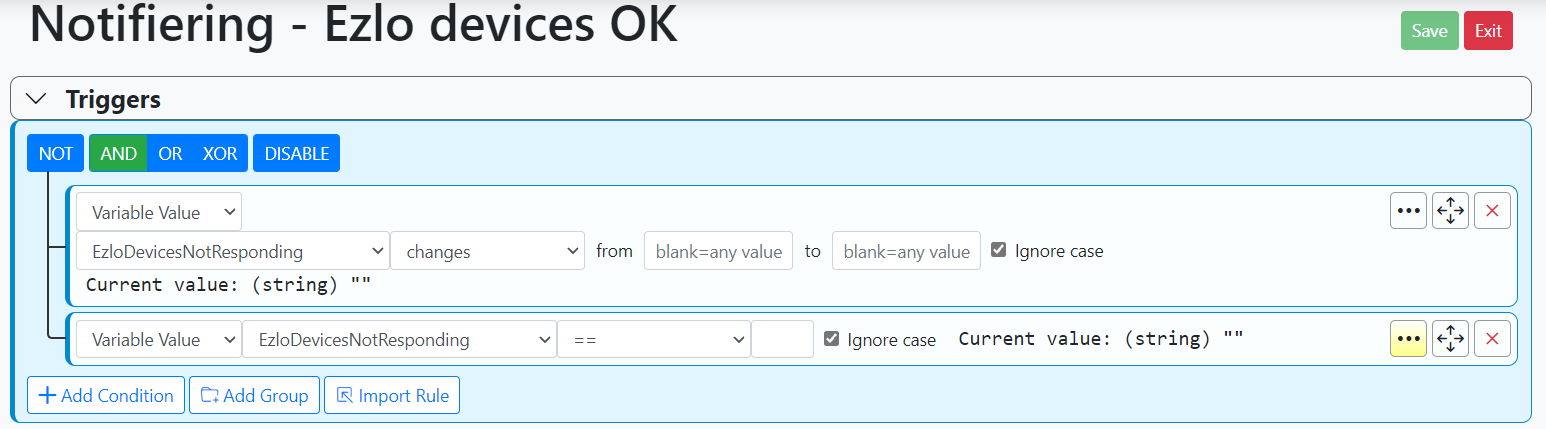
        rule.PNG

        The global expression is
        expression.PNG

        Sorry to bother unnecessary 🙂
        I guess I'll just remove the camera or filter it out in the expression as it's sending me notifications that all devices are responding again when my other rule that notifies me of devices not responding haven't had the chance to pick up the quick toggle.

        1 Reply Last reply
        0
        • toggledbitsT Offline
          toggledbitsT Offline
          toggledbits
          wrote on last edited by toggledbits
          #4

          The logs are showing that the eZLO is sending updates, and apparently that value changed state twice in about 5 seconds: you can see at 24:07 where the global variable changes, so it has gotten one update and handled it, and then at 24:12 it has gotten another and changed it back. It would be an eZLO-side mystery to unravel why it's sending not-reachable followed by reachable so quickly, maybe a bug in their firmware, maybe just the way it works. It seems possible, even likely, that during any restart of the hub, devices would be marked down until they are known up, and some will just be left in the last known state until a new state is established, and given that the Vera engineering team is still present for the eZLO firmware, I'm sure they are still up to their old tricks and there is some inconsistency in which is chosen for which device or device class/type. I would not be at all surprised if IP-driven devices (like cameras) are marked for failure immediately when any request to the device fails, even on the first try, so lapses in network/wifi or the camera itself may lead to spurious marking of the device as failed followed by a quick recovery. These are all very real risks of the problem being solved.

          So, probably something to mention in the other thread on this general (device error) subject: you may need to add a "sustained for" to your rule to dampen response, to allow for such momentary lapses, which are probably more common than we've ever realized, but will be on full display now that people are implementing rules like this.

          The logged warnings... since eZLO is such a great unfinished unknown, and there are many inconsistencies and undocumented behaviors of their system and API, when an update for a device from the API arrives with a value that was not in the first device inventory, the warning is issued. Reactor then just adds the value to the device and carries on as if it was always there. So that's largely debug/notice of a surprise, but nothing harmful. And I'm not sure the values involved are even documented; I'll have to look (serviceNotification is known according to the API docs, and seems to be an internal value; syncNotification is undocumented). But in any case, the warnings are advisory only and harmless and irrelevant to behavior here.

          Thanks for posting the screen shots in English! 🙂

          Author of Multi-system Reactor and Reactor, DelayLight, Switchboard, and about a dozen other plugins that run on Vera and openLuup.

          CrilleC 1 Reply Last reply
          1
          • toggledbitsT toggledbits

            The logs are showing that the eZLO is sending updates, and apparently that value changed state twice in about 5 seconds: you can see at 24:07 where the global variable changes, so it has gotten one update and handled it, and then at 24:12 it has gotten another and changed it back. It would be an eZLO-side mystery to unravel why it's sending not-reachable followed by reachable so quickly, maybe a bug in their firmware, maybe just the way it works. It seems possible, even likely, that during any restart of the hub, devices would be marked down until they are known up, and some will just be left in the last known state until a new state is established, and given that the Vera engineering team is still present for the eZLO firmware, I'm sure they are still up to their old tricks and there is some inconsistency in which is chosen for which device or device class/type. I would not be at all surprised if IP-driven devices (like cameras) are marked for failure immediately when any request to the device fails, even on the first try, so lapses in network/wifi or the camera itself may lead to spurious marking of the device as failed followed by a quick recovery. These are all very real risks of the problem being solved.

            So, probably something to mention in the other thread on this general (device error) subject: you may need to add a "sustained for" to your rule to dampen response, to allow for such momentary lapses, which are probably more common than we've ever realized, but will be on full display now that people are implementing rules like this.

            The logged warnings... since eZLO is such a great unfinished unknown, and there are many inconsistencies and undocumented behaviors of their system and API, when an update for a device from the API arrives with a value that was not in the first device inventory, the warning is issued. Reactor then just adds the value to the device and carries on as if it was always there. So that's largely debug/notice of a surprise, but nothing harmful. And I'm not sure the values involved are even documented; I'll have to look (serviceNotification is known according to the API docs, and seems to be an internal value; syncNotification is undocumented). But in any case, the warnings are advisory only and harmless and irrelevant to behavior here.

            Thanks for posting the screen shots in English! 🙂

            CrilleC Offline
            CrilleC Offline
            Crille
            wrote on last edited by
            #5

            @toggledbits Sustained for is the way to go here, thank you for your advice.

            I can say that for Zigbee devices their firmware is a mess, a reboot of the controller marks all devices unreachable until they are physically toggled or reporting new sensor values, so rebooting means going around the house like a fool toggling lights and blowing on temp/humidity sensors, and if you don't do it fast enough you have to reboot again to give the devices a new chance to phone home in time. 🙂

            1 Reply Last reply
            0
            • toggledbitsT toggledbits locked this topic on
            Reply
            • Reply as topic
            Log in to reply
            • Oldest to Newest
            • Newest to Oldest
            • Most Votes


            Recent Topics

            • Home Assistant Connect ZWA-2 & ZBT-2
              toggledbitsT
              toggledbits
              3
              5
              137

            • [Solved] Error: Command timeout
              toggledbitsT
              toggledbits
              0
              10
              259

            • [MSR] Feature request: For Each action on arrays/groups
              toggledbitsT
              toggledbits
              0
              2
              16

            • Issue with MSR UI becoming unresponsive
              S
              sethlampman
              0
              7
              65

            • Date/time condition
              tunnusT
              tunnus
              0
              3
              89

            • Is there a way to turn this section (image in post) off?
              toggledbitsT
              toggledbits
              0
              1
              64

            • Device log?
              toggledbitsT
              toggledbits
              0
              2
              96

            • Midnight crossing not working in date/time condition (build 25325)
              tunnusT
              tunnus
              0
              3
              113

            • Reactor (Multi-System/Multi-Hub) Announcements
              toggledbitsT
              toggledbits
              5
              131
              75.7k

            • [Solved] Local expression in Rule does not evaluate as they used to do
              CrilleC
              Crille
              0
              5
              324

            • Home Assistant 2025.11.2 and latest-25315
              G
              gwp1
              0
              6
              320
            Powered by NodeBB | Contributors
            Hosted freely by 10RUPTiV - Solutions Technologiques | Contact us
            • Login

            • Don't have an account? Register

            • Login or register to search.
            • First post
              Last post
            0
            • Categories
            • Recent
            • Tags
            • Popular
            • Unsolved

