





Skip to content
  • Categories
  • Recent
  • Tags
  • Popular
  • Unsolved
Collapse
Discussion Forum to share and further the development of home control and automation, independent of platforms.
  1. Home
  2. Software
  3. Multi-System Reactor
  4. Cheapest platform on which to run MSR
Arming Envisalink panel from MSR
T
Topic thumbnail image
Multi-System Reactor
[Solved] DynamicGroupController updating members issue
CrilleC
Edit: Solved in latest-26221. Bare-metal latest-26193 I have this group: "OKforLarm": name: OK för Larm select: - include_controller: vera - include_capability: door_sensor filter_expression: entity.attributes.door_sensor.state It contains the entities I expect but behaves a bit odd. When I open vera>device_10097 the entity attribute door_sensor.state changes to true but it won't show up as member in the group, when I also open vera>device_10095 they both shows as members and when I close vera>device_10095 it disappear from the group but when I close vera>device_10097 it lingers in the group until I restart Reactor.
Multi-System Reactor
Reactor (Multi-System/Multi-Hub) Announcements
toggledbitsT
Build 21228 has been released. Docker images available from DockerHub as usual, and bare-metal packages here. Home Assistant up to version 2021.8.6 supported; the online version of the manual will now state the current supported versions; Fix an error in OWMWeatherController that could cause it to stop updating; Unify the approach to entity filtering on all hub interface classes (controllers); this works for device entities only; it may be extended to other entities later; Improve error detail in messages for EzloController during auth phase; Add isRuleSet() and isRuleEnabled() functions to expressions extensions; Implement set action for lock and passage capabilities (makes them more easily scriptable in some cases); Fix a place in the UI where 24-hour time was not being displayed.
Multi-System Reactor
DynamicGroupController and attributes
therealdbT
Hey @toggledbits I'm back to trying to optimize a couple of things based on dynamic group. First of all, I think I found a typo in the doc: primary_attribute: "binary_sensor.state" primary_attribute_value: | d = false; each id in members: d = getEntity(id)?.attributes?.power_switch?.state or d, d I think the correct code snippet is d = false, All that said, my use case for dynamic groups is to group 3 different climate devices, so I could easily command them at the same time. Commands are good, but sometimes I want to check if any of the devices are on, and that's easily done with a similar snippet as the one you have in the docs. But this is limited to the primary attribute, while I want to have any of the attributes in the group to be driven by a similar logic (while all are null in the group). ie, access hvac_control.mode and see if any of the unit is set to cool, or heat. Is that possible, without re-defining an expression in each of my rules? Thanks!
Multi-System Reactor
Upgrade Issues
T
Topic thumbnail image
Multi-System Reactor
[SOLVED] Conflicting Set Reaction Groups Appear to Fire Simultaneously in Single Rule Evaluation
G
Topic thumbnail image
Multi-System Reactor
[SOLVED] Question regarding "in" vs "contains" vs contents of the string
G
Topic thumbnail image
Multi-System Reactor
Logon screen timeout
G
Noticing since 170 that the lock screen doesn't switch to the logon prompt but, rather, stays on the active UI until such time as you go to click something within it. Then it jumps to the login screen. Brave browser Brave 1.92.139 (Official Build) (arm64) Chromium: 150.0.7871.114
Multi-System Reactor
[MSR] Copy&past of actions and/or drag&drop between set/reset
therealdbT
Hey @toggledbits One thing that bothers me while doing work on new systems/new features, is that I cannot copy&paste actions, and I cannot drag&drop between set and resets. #1 is for when I want to copy an action between different rules opened in two separate browser windows, while #2 is when I just need to flip a bunch of actions in the reset, or move some logic back and forth. Both will be appreciated, but I understand the technical challenges. Thanks!
Multi-System Reactor
Upgrade advice - upgrade from aarch64 to ARM64 image
T
I'm currently on version 26011. I understand that the aarch64 image is no longer supported. So, I therefore need to update to the ARM64 image. Can anyone possibly suggest how I update my docker compose.yaml file (see below). Ideally I'd like to keep my existing reactions etc. rather than start from scratch. # Multi-System Reactor template docker-compose.yml (version 22160) # # Change the lines indicated by "DO"... # services: reactor: container_name: reactor environment: # DO change the TZ: line to set your local time zone. # See valid TZ list: https://en.wikipedia.org/wiki/List_of_tz_database_time_zones TZ: GB # # DO NOT change this path. Your directory location is in "source" below. REACTOR_DATA_PREFIX: /var/reactor # DO change the image below to the one you are using (e.g. armv7l or aarch64 for RPi 4) image: toggledbits/reactor:latest-aarch64 restart: "always" expose: - 8111 ports: - 8111:8111 volumes: # DO change the /home/username/reactor below to the directory you created for # your local data; DO NOT change the /var/reactor part - /home/pi/docker/reactor:/var/reactor - /etc/localtime:/etc/localtime:ro tmpfs: /tmp
Multi-System Reactor
Alexa for MSR, any interest?
MikeReadingtonM
Topic thumbnail image
Multi-System Reactor
[RESOLVED] Telegram notification broke with latest update
3
Topic thumbnail image
Multi-System Reactor
[RESOLVED] Phantom device, “INFO” appears
wmarcolinW
Topic thumbnail image
Multi-System Reactor
[RESOLVED] Mode Status NULL
wmarcolinW
Topic thumbnail image
Multi-System Reactor
[RESOLVED] HTTP query failing after version 26177
wmarcolinW
Topic thumbnail image
Multi-System Reactor
Question about the find function
wmarcolinW
Topic thumbnail image
Multi-System Reactor
[Answered] OK to remove old json files?
3
Topic thumbnail image
Multi-System Reactor
Deprecation Announcement: 32-bit ARM *docker* images
toggledbitsT
If you are using the armv7l docker image, the OpenJS Foundation that publishes node is no longer producing 32-bit builds as of v24. That means the last supported LTS version of node for armv7l is v22, which will go End-of-Life in May 2027. Therefore, the Reactor armv7l image is now deprecated and will only be produced until node v22 goes EOL, and I will not publish armv7l images beyond that date. If you are running an RPi 3 or earlier with Reactor, you are on this image, and will need to upgrade hardware to a 64-bit model and use the arm64 image. If you need help getting it done, ask in this category.
Multi-System Reactor
[Solved] build 26150 - engine not starting
G
@toggledbits I pulled the image (well, Watchtower did) and within minutes the whole system went offline. The log looks like it ends with 26143. [latest-26143]2026-05-31T15:23:44.547Z <default:INFO> Closing container Container#Predicate#rule-mkahsmgf/26qq82mw-cons [latest-26143]2026-05-31T15:23:44.547Z <default:INFO> Closing container Container#Predicate#rule-lqyfljfi/22f8on0t-cons [latest-26143]2026-05-31T15:23:44.547Z <default:INFO> Closing container Container#Predicate#rule-lsb61rw8/24oenqi2-cons [latest-26143]2026-05-31T15:23:44.547Z <default:INFO> Closing container Container#Predicate#rule-lrh58he0/rule-lrh58he0:S-1c00gfib-cons [latest-26143]2026-05-31T15:23:44.547Z <default:INFO> Closing container Container#Predicate#rule-lrh58he0/1c00dylr-cons [latest-26143]2026-05-31T15:23:44.547Z <default:INFO> Closing container Container#Predicate#rule-lrh58he0/1nam9w5u-cons [latest-26143]2026-05-31T15:23:44.547Z <default:INFO> Closing container Container#Predicate#rule-miuh2qqi/22ls4lql-cons [latest-26143]2026-05-31T15:23:44.547Z <default:INFO> Closing container Container#Predicate#rule-kwc6rmci/rule-kwc6rmci:S-1vj8sdfc-cons [latest-26143]2026-05-31T15:23:44.547Z <default:INFO> Closing container Container#Predicate#rule-kwc6rmci/rule-kwc6rmci:S-1qanz01x-cons [latest-26143]2026-05-31T15:23:44.547Z <default:INFO> Closing container Container#Predicate#rule-ladyja6a/24lq19p6-cons [latest-26143]2026-05-31T15:23:44.547Z <default:INFO> Closing container Container#Predicate#rule-mk0o8iox/23oy468y-cons [latest-26143]2026-05-31T15:23:44.547Z <default:INFO> Closing container Container#Predicate#rule-miscg2h3/rule-miscg2h3:S-22gmbq1c-cons [latest-26143]2026-05-31T15:23:44.547Z <default:INFO> Closing container Container#Predicate#re-kxgrfjke/238p0old-cons [latest-26143]2026-05-31T15:23:44.547Z <default:INFO> Closing container Container#Predicate#re-m7ccsso5/re-m7ccsso5-1r0myjxa-cons [latest-26143]2026-05-31T15:23:44.547Z <default:INFO> Closing container Container#Predicate#rule-ladyja6a/19nl9wq2-cons [latest-26143]2026-05-31T15:23:44.547Z <default:INFO> Closing container Container#Predicate#rule-ladyja6a/rule-ladyja6a:S-yl3xk9t-cons [latest-26143]2026-05-31T15:23:44.547Z <default:INFO> Closing container Container#Predicate#rule-ladyja6a/rule-ladyja6a:S-yl3vv5m-cons [latest-26143]2026-05-31T15:23:44.547Z <default:INFO> Closing container Container#Predicate#re-ln7j2nqp/re-ln7j2nqp-22mx9lzd-cons [latest-26143]2026-05-31T15:23:44.547Z <default:INFO> Closing container Container#Predicate#re-ln7j2nqp/22mx87c8-cons [latest-26143]2026-05-31T15:23:44.547Z <default:INFO> Closing container Container#Predicate#rule-licneppy/1mzwe7ht-cons [latest-26143]2026-05-31T15:23:44.547Z <default:INFO> Closing container Container#Predicate#rule-ml3194ih/25jqt1j4-cons [latest-26143]2026-05-31T15:23:44.547Z <default:INFO> Closing container Container#Predicate#re-kxgrg7kf/227hshak-cons [latest-26143]2026-05-31T15:23:44.547Z <default:INFO> Closing container Container#Predicate#rule-reactorexmachina/13ua1p95-cons [latest-26143]2026-05-31T15:23:44.547Z <default:INFO> Closing container Container#Predicate#rule-reactorexmachina/13uagam7-cons [latest-26143]2026-05-31T15:23:44.547Z <default:INFO> Closing container Container#Predicate#rule-grpvl9oypg/rule-grpvl9oypg:R-134x4cbv-cons [latest-26143]2026-05-31T15:23:44.547Z <default:INFO> Closing container Container#Predicate#rule-grpvl9oypg/rule-grpvl9oypg:R-134x2fyl-cons [latest-26143]2026-05-31T15:23:44.547Z <default:INFO> Closing container Container#Predicate#re-lscjrws1/238p5c22-cons [latest-26143]2026-05-31T15:23:44.547Z <default:INFO> Closing container Container#Predicate#rule-lbwr0jvq/1xkczf03-cons [latest-26143]2026-05-31T15:23:44.547Z <Structure:NOTICE> Structure Structure#1 stopped [latest-26143]2026-05-31T15:23:44.547Z <app:NOTICE> Closing APIs... [latest-26143]2026-05-31T15:23:44.547Z <wsapi:NOTICE> wsapi: closing... [latest-26143]2026-05-31T15:23:44.547Z <wsapi:NOTICE> wsapi: disconnecting from "192.168.1.23#82" (1001 service closing) [latest-26143]2026-05-31T15:23:44.548Z <httpapi:NOTICE> HTTP API closing... [latest-26143]2026-05-31T15:23:44.549Z <wsapi:NOTICE> wsapi: server closed [latest-26143]2026-05-31T15:23:44.549Z <httpapi:INFO> HTTP server closed. [latest-26143]2026-05-31T15:23:44.549Z <app:NOTICE> Stopping timers... [latest-26143]2026-05-31T15:23:44.551Z <app:null> Shutdown complete, process ID 1 [latest-26143]2026-05-31T15:23:44.551Z <app:null> Closing logs... [latest-26143]2026-05-31T15:23:44.551Z <default:null> Closing log I can SSH to the VM. Alas, I do not have the previous image for 26143 as I'm a little too quick sometimes on housekeeping.
Multi-System Reactor
http request action & digest auth
tunnusT
I’m using the HTTP Request action in MSR and need to authenticate against an endpoint that uses HTTP Digest authentication. Now that endpoint was changed to use SHA-256 in digest auth, so I would like to know if MSR supports it, or is it limited to MD5-based digest auth?
Multi-System Reactor

Cheapest platform on which to run MSR

Scheduled Pinned Locked Moved Multi-System Reactor
27 Posts 7 Posters 10.0k Views 7 Watching
  • Oldest to Newest
  • Newest to Oldest
  • Most Votes
Reply
  • Reply as topic
Log in to reply
This topic has been deleted. Only users with topic management privileges can see it.
  • CatmanV2C Offline
    CatmanV2C Offline
    CatmanV2
    wrote on last edited by
    #9

    I'd go for Raspian
    https://www.raspberrypi.com/software/

    It's a dead simple set up with the imager (no reason you shouldn't be able to use the SSD with that) The server version should give you everything you need but being based on Debian it should be trivial to get any missing bits (like curl and NodeJS 16). I also am running Debian 10 and have just set up MSR on a Debian 11 VM so more than happy to help until a proper expert comes along 😉

    C

    The Ex-Vera abuser know as CatmanV2.....

    1 Reply Last reply
    1
    • toggledbitsT Offline
      toggledbitsT Offline
      toggledbits
      wrote on last edited by toggledbits
      #10

      Agree, best at this point would be Raspbian Bullseye, which is available as a 64-bit distribution that will maximize the performance of the host. If you choose to run Reactor under docker rather than bare-metal install, there are now 64-bit (aarch64) images available of Reactor.

      IIRC, you have to bring the system up on a MicroSD card as usual, and then you can use raspi-config to reconfigure it to boot from the SSD. That basically means you will need to install the OS twice, in advance before your first boot... once on the MicroSD, and once on the SSD. Once it's booting from the SSD, you can (and should) remove the MicroSD card. There are several different instructions for this available by search; some will give you steps to simply copy the OS from the MicroSD to the SSD, which is fine, too.

      Also, I believe that starting with Bullseye builds in March 2022, the default pi user is no longer included in the distribution — a user had to be created during the first boot. That means you will have to have a monitor (HDMI) and keyboard (USB) connected (and mouse if using the GUI). Also note that most instructions for Pi things tend to assume that the pi user exists and is the first user on the system, so you may want to go with that when asked.

      Author of Multi-system Reactor and Reactor, DelayLight, Switchboard, and about a dozen other plugins that run on Vera and openLuup.

      1 Reply Last reply
      1
      • Black CatB Offline
        Black CatB Offline
        Black Cat
        wrote on last edited by
        #11

        With the new Raspberry Pi Imager you can configure the boot sequence and user when you download (format) the card or SSD.
        Click on the settings Icon (lower righthand side) that will give you access to setting User Names, SSH and more..
        Make sure you use the Rasp Pi downloader for this and its a breeze.

        I suggest you just throw caution to the wind and buy a SSD, they aren't that much more expensive than a SD Card.
        The Pi4 makes it all worth while

        aka Zedrally

        G 1 Reply Last reply
        2
        • Black CatB Black Cat

          With the new Raspberry Pi Imager you can configure the boot sequence and user when you download (format) the card or SSD.
          Click on the settings Icon (lower righthand side) that will give you access to setting User Names, SSH and more..
          Make sure you use the Rasp Pi downloader for this and its a breeze.

          I suggest you just throw caution to the wind and buy a SSD, they aren't that much more expensive than a SD Card.
          The Pi4 makes it all worth while

          G Offline
          G Offline
          gwp1
          wrote on last edited by
          #12

          @black-cat TOTALLY agree on the SSD. I found a three-pack on AMZ for a very reasonable cost and haven't looked back. Everything runs much smoother/faster than on the SD card (for obvious reasons) and the knowledge that I'm not facing a SD card failure is reassuring.

          *Hubitat C-7 2.5.1.142
          *Proxmox VE v8, Beelink MiniPC 12GBs, SSD

          *HAOS
          Core 2026.7.4
          w/ HA Connect ZWA-2
          FW: v1.1
          SDK: v7.23.1

          *Prod MSR in docker/portainer
          MSR: latest-26193-8dd8f854
          MQTTController: 25139
          ZWave Controller: 25139

          1 Reply Last reply
          0
          • T Offline
            T Offline
            Talisker
            wrote on last edited by
            #13

            Thanks for all the suggestions and support. I have a 16 GB SSD coming (based on advice given). I was hoping to install the OS directly as I don't have a SD Card. Still, it's a small problem if that all that is stopping me. I was thinking of using (installing?) a Docker so that I can install other applications too, but would this be too much to bite off for a beginner?

            MSR user on Raspberry PI 4. Running MSR version 26011 in Docker

            toggledbitsT 1 Reply Last reply
            0
            • T Talisker

              Thanks for all the suggestions and support. I have a 16 GB SSD coming (based on advice given). I was hoping to install the OS directly as I don't have a SD Card. Still, it's a small problem if that all that is stopping me. I was thinking of using (installing?) a Docker so that I can install other applications too, but would this be too much to bite off for a beginner?

              toggledbitsT Offline
              toggledbitsT Offline
              toggledbits
              wrote on last edited by toggledbits
              #14

              @talisker said in Cheapest platform on which to run MSR:

              I was thinking of using (installing?) a Docker so that I can install other applications too, but would this be too much to bite off for a beginner?

              I recommend it. It takes away a lot of details. Install docker and docker-compose on the RPi like this:

              sudo apt-get install docker docker-compose
              

              I recommend using docker-compose to manage the container from the command line. The installation instructions (for Reactor on docker) give you a template docker-compose configuration file you can just copy-paste. It makes starting the Reactor container much less verbose, and it basically manages itself once started (including restarting at boot). Upgrades are this easy:

              docker-compose down     # stop Reactor
              docker-compose pull     # pull updated Reactor image
              docker-compose up -d    # restart Reactor on new image
              

              I guess you could also install Portainer for a GUI to manage docker, but I think that's more complicated. Put the three lines above in a script file and run it whenever you need to.

              I would also recommend installing Geany if you plan on using the desktop GUI. It's a very easy programmer's text editor that does syntax highlighting, so it will help you make correct changes to Reactor's YAML configuration files, shell scripts, etc.

              Author of Multi-system Reactor and Reactor, DelayLight, Switchboard, and about a dozen other plugins that run on Vera and openLuup.

              Black CatB 1 Reply Last reply
              0
              • toggledbitsT toggledbits

                No, a Pi 2 won't do it. Well, you probably could, but I don't recommend it and I haven't tried it. A 3B+ is workable. I've tested that, so that's the safest minimum I can recommend.

                I've had trouble getting Pis as well for multiple projects, but I recently found rpilocator.com and I can highly recommend it. If you follow them on Twitter you can basically get alerts from them and it helps. You need to be quick. Yesterday they reported over 100 units available from a popular US seller, and today that seller is reported out of stock.

                I recently managed to get a Compute Module 4 with 8GB EMMC (built-in Flash storage like an SSD). That ran me US$45 for the CM4, and another $40 for the I/O board on which you mount it. I am testing that right now, and will likely use it as my build system for 64-bit Raspbian Bullseye releases (coming soon). It's much tidier than fussing with the USB-SATA adapter. That is all equivalent to a 4B+ in power, and may be equivalent or even a little lower in price -- by the time you've purchased a Pi 4B+ with 2GB RAM, an 8GB or larger SSD, and the USB 3.1 to SATA interface, you're in the same price range. Either way you go, the investment is a computing platform you can use for a long time; they've got good power, are well-built little boards (all), etc.

                Also, for any configuration with less than 2GB RAM, I recommend using the "Lite" version of the OS install (no desktop/GUI, command line only). That would include the 3B+.

                toggledbitsT Offline
                toggledbitsT Offline
                toggledbits
                wrote on last edited by
                #15

                I want to add that I've been using a (Raspberry Pi) Compute Module 4 with 8GB EMMC on board (and no Wi-Fi), mounted on the RPi CM4 I/O Board, and it's a great combination and alternative. I mentioned that earlier in this thread when I first got it, and now it's been about six weeks and I've got some experience with it. The overall cost was comparable to the RPi 4B+ maker/consumer board with an added SSD and USB3.1 interface (around $45 for the CM4 and $40 for the I/O board, so US$85). The CM4's are more available right now (still hard to get, but much easier than the maker board) because RPi is giving manufacturing priority to CM4 to support industry. The I/O boards are easy to get and always have been. The I/O board offers two on-board HDMI interfaces, a PCIe (x1) ssocket (for many things, like another way to get storage), a gigabit Ethernet port, two USB 2.0 connectors (hmmmph, rather see 3.x), microSD socket (for non-EMMC models), two camera connectors, two display connectors, 28 x GPIO, and a battery-backed real time clock. You can power it with a 12VDC power supply (2.1mm positive tip barrel connector), so it's easy to get the power in that the board really needs, and on a connector I regard as more stable and durable for that purpose than USB micro. It also offers a Berg-style power connector for use with, for example, a small (MeanWell) switching PSU. It has a USB micro connector for connecting to a PC, where the system then looks like a Flash drive so you can do updates or make filesystem changes on a cold system.

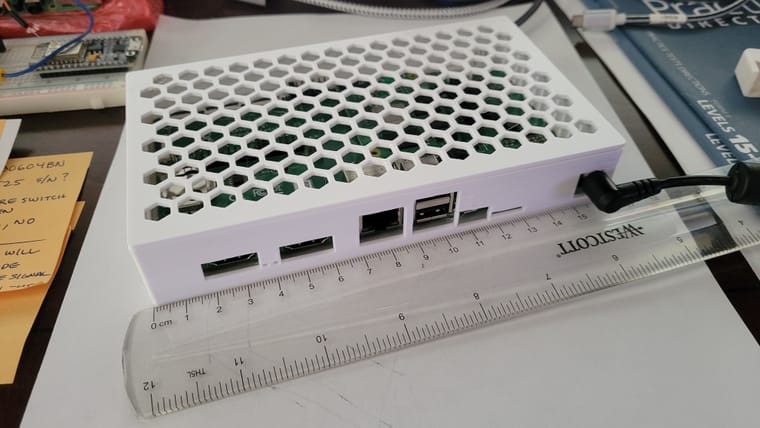
                Below are a couple of photos of my rig in a case I designed in Fusion 360 and 3D printed.
                20220609_130143.jpg 20220609_130155.jpg

                It's a bit (1-2cm) smaller than a Vera Plus in every dimension; for non-Vera readers, that's about the size of many 4-port Ethernet switches and small routers. It's fanless, and so far, I haven't seen the need for anything other than passive/convective cooling. But I will be adding heat sinks to the CM4, just for more headroom. The I/O board has a standard four-pin fan connector that works from the 12VDC supply.

                What I especially like is that the eMMC storage is bus-connected to the CPU on the same card, so it's much faster than either MicroSD or SSD-over-USB. I haven't tested PCIe storage yet. The CM4 configuration is also much less fragile. I find the USB interface cable necessary for the SSD on the maker board setup to be unwieldy to cable manage, and I've learned not to move it at all when running or I'll cause disk faults and a kernel crash (i.e. it looks and acts like cobbled together bits, where the CM4+I/O looks purpose-built). The real time clock is also great to have; many of you may remember from Those Other Forums that I am firmly of the opinion that no serious IoT platform can be built without one (so that the time is very close to correct when the system cold boots after a power loss and network time is not yet available, and thus time-bsed automations don't go crazy due to a reset/default clock).

                I highly recommend this approach to anyone. For CM4 configuration, I think the 2GB RAM/8GB eMMC (MSRP US$40 without Wi-Fi, US$45 with) is good for just a basic Reactor host, but the filesystem may end up a little tight if you also want to run Hass, InfluxDB, etc. (the OS itself takes almost half of my 8GB with the desktop GUI installed). I would go up to 16GB or 32GB eMMC for those, and 4GB RAM. The maximum manufactured configuration is 8GB RAM and 32GB eMMC, with an MSRP of US$90/95 without/with Wi-Fi. Run it on the 64-bit version of Raspbian Bullseye. Unless you have some reason to want Wi-Fi, I'd save the US$5 — running your IoT automations on Wi-Fi as primary network interface is not a good idea (IMO); the I/O board's gigabit Ethernet port is The Way. Full specs for the CM4 are here, and for the I/O board here.

                Just so I've said it, I don't think the maker board configuration is bad at all, it's just in a close second place for me right now (because of the form factor issues and the real time clock). Six weeks ago I didn't have enough experience with the CM4 to declare it my favorite, but as of right now, that's where it is. But I would in no way shy away from the maker board or recommend against it. I've seen some tidy rigs put together with easily-printed cases for the maker board with an SSD, and some clever right-angle USB connectors to ease the USB cabling issue. But if you're comparing cost and convenience of the two configurations, I now think the CM4+I/O configuration edges out the maker board. The best configuration for you is the one you find most agreeable, always.

                Author of Multi-system Reactor and Reactor, DelayLight, Switchboard, and about a dozen other plugins that run on Vera and openLuup.

                Black CatB 1 Reply Last reply
                2
                • toggledbitsT toggledbits

                  @talisker said in Cheapest platform on which to run MSR:

                  I was thinking of using (installing?) a Docker so that I can install other applications too, but would this be too much to bite off for a beginner?

                  I recommend it. It takes away a lot of details. Install docker and docker-compose on the RPi like this:

                  sudo apt-get install docker docker-compose
                  

                  I recommend using docker-compose to manage the container from the command line. The installation instructions (for Reactor on docker) give you a template docker-compose configuration file you can just copy-paste. It makes starting the Reactor container much less verbose, and it basically manages itself once started (including restarting at boot). Upgrades are this easy:

                  docker-compose down     # stop Reactor
                  docker-compose pull     # pull updated Reactor image
                  docker-compose up -d    # restart Reactor on new image
                  

                  I guess you could also install Portainer for a GUI to manage docker, but I think that's more complicated. Put the three lines above in a script file and run it whenever you need to.

                  I would also recommend installing Geany if you plan on using the desktop GUI. It's a very easy programmer's text editor that does syntax highlighting, so it will help you make correct changes to Reactor's YAML configuration files, shell scripts, etc.

                  Black CatB Offline
                  Black CatB Offline
                  Black Cat
                  wrote on last edited by Black Cat
                  #16

                  @toggledbits said in Cheapest platform on which to run MSR:

                  I guess you could also install Portainer for a GUI to manage docker, but I think that's more complicated

                  @toggledbits, more complicated is an understatement.
                  I'd like to hear from anyone who has done this and not experienced difficulties, I've been able to run either (Reactor or Portainer) but not both in Portainer Container. Over to the experts.....

                  aka Zedrally

                  1 Reply Last reply
                  0
                  • toggledbitsT toggledbits

                    I want to add that I've been using a (Raspberry Pi) Compute Module 4 with 8GB EMMC on board (and no Wi-Fi), mounted on the RPi CM4 I/O Board, and it's a great combination and alternative. I mentioned that earlier in this thread when I first got it, and now it's been about six weeks and I've got some experience with it. The overall cost was comparable to the RPi 4B+ maker/consumer board with an added SSD and USB3.1 interface (around $45 for the CM4 and $40 for the I/O board, so US$85). The CM4's are more available right now (still hard to get, but much easier than the maker board) because RPi is giving manufacturing priority to CM4 to support industry. The I/O boards are easy to get and always have been. The I/O board offers two on-board HDMI interfaces, a PCIe (x1) ssocket (for many things, like another way to get storage), a gigabit Ethernet port, two USB 2.0 connectors (hmmmph, rather see 3.x), microSD socket (for non-EMMC models), two camera connectors, two display connectors, 28 x GPIO, and a battery-backed real time clock. You can power it with a 12VDC power supply (2.1mm positive tip barrel connector), so it's easy to get the power in that the board really needs, and on a connector I regard as more stable and durable for that purpose than USB micro. It also offers a Berg-style power connector for use with, for example, a small (MeanWell) switching PSU. It has a USB micro connector for connecting to a PC, where the system then looks like a Flash drive so you can do updates or make filesystem changes on a cold system.

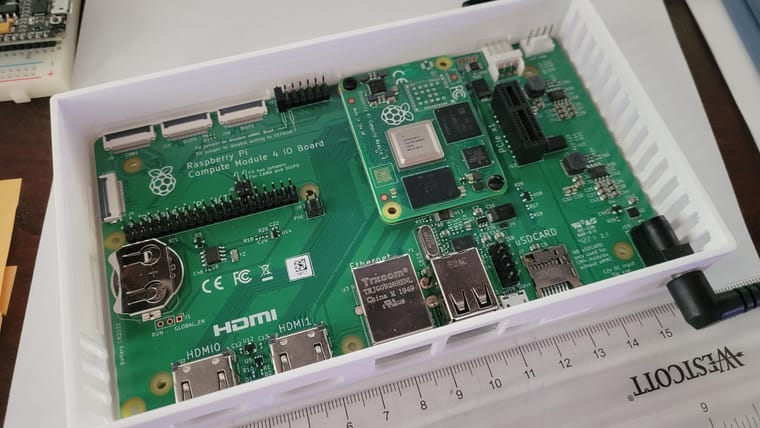
                    Below are a couple of photos of my rig in a case I designed in Fusion 360 and 3D printed.
                    20220609_130143.jpg 20220609_130155.jpg

                    It's a bit (1-2cm) smaller than a Vera Plus in every dimension; for non-Vera readers, that's about the size of many 4-port Ethernet switches and small routers. It's fanless, and so far, I haven't seen the need for anything other than passive/convective cooling. But I will be adding heat sinks to the CM4, just for more headroom. The I/O board has a standard four-pin fan connector that works from the 12VDC supply.

                    What I especially like is that the eMMC storage is bus-connected to the CPU on the same card, so it's much faster than either MicroSD or SSD-over-USB. I haven't tested PCIe storage yet. The CM4 configuration is also much less fragile. I find the USB interface cable necessary for the SSD on the maker board setup to be unwieldy to cable manage, and I've learned not to move it at all when running or I'll cause disk faults and a kernel crash (i.e. it looks and acts like cobbled together bits, where the CM4+I/O looks purpose-built). The real time clock is also great to have; many of you may remember from Those Other Forums that I am firmly of the opinion that no serious IoT platform can be built without one (so that the time is very close to correct when the system cold boots after a power loss and network time is not yet available, and thus time-bsed automations don't go crazy due to a reset/default clock).

                    I highly recommend this approach to anyone. For CM4 configuration, I think the 2GB RAM/8GB eMMC (MSRP US$40 without Wi-Fi, US$45 with) is good for just a basic Reactor host, but the filesystem may end up a little tight if you also want to run Hass, InfluxDB, etc. (the OS itself takes almost half of my 8GB with the desktop GUI installed). I would go up to 16GB or 32GB eMMC for those, and 4GB RAM. The maximum manufactured configuration is 8GB RAM and 32GB eMMC, with an MSRP of US$90/95 without/with Wi-Fi. Run it on the 64-bit version of Raspbian Bullseye. Unless you have some reason to want Wi-Fi, I'd save the US$5 — running your IoT automations on Wi-Fi as primary network interface is not a good idea (IMO); the I/O board's gigabit Ethernet port is The Way. Full specs for the CM4 are here, and for the I/O board here.

                    Just so I've said it, I don't think the maker board configuration is bad at all, it's just in a close second place for me right now (because of the form factor issues and the real time clock). Six weeks ago I didn't have enough experience with the CM4 to declare it my favorite, but as of right now, that's where it is. But I would in no way shy away from the maker board or recommend against it. I've seen some tidy rigs put together with easily-printed cases for the maker board with an SSD, and some clever right-angle USB connectors to ease the USB cabling issue. But if you're comparing cost and convenience of the two configurations, I now think the CM4+I/O configuration edges out the maker board. The best configuration for you is the one you find most agreeable, always.

                    Black CatB Offline
                    Black CatB Offline
                    Black Cat
                    wrote on last edited by
                    #17

                    @toggledbits said in Cheapest platform on which to run MSR:

                    I want to add that I've been using a (Raspberry Pi) Compute Module 4 with 8GB EMMC on board

                    Way to go, unfortunately for me, the CM4 I/O board is the only part available. The Compute Module 4 is OOS (all versions), sigh.....
                    BTW, I love the case.....makes it all look very professional.

                    aka Zedrally

                    toggledbitsT 1 Reply Last reply
                    1
                    • Black CatB Black Cat

                      @toggledbits said in Cheapest platform on which to run MSR:

                      I want to add that I've been using a (Raspberry Pi) Compute Module 4 with 8GB EMMC on board

                      Way to go, unfortunately for me, the CM4 I/O board is the only part available. The Compute Module 4 is OOS (all versions), sigh.....
                      BTW, I love the case.....makes it all look very professional.

                      toggledbitsT Offline
                      toggledbitsT Offline
                      toggledbits
                      wrote on last edited by toggledbits
                      #18

                      @black-cat said in Cheapest platform on which to run MSR:

                      The Compute Module 4 is OOS

                      It's terrible right now, for sure. Just a reminder, rpilocator.com may be helpful. I'm asking him if he can add AU/NZ vendors, but I see PiAustralia has starter kits available (not just board, but a kit with a board). Pricey, but if you must have, maybe worth the premium.

                      For anyone it helps, it appears Semaf in Austria has stock of RPI 4B 2GB at the moment, and has since last night.

                      Update: Core Electronics (AU) also has the starter kit and the desktop kit in stock, and both come with a Pi 4 board.

                      Author of Multi-system Reactor and Reactor, DelayLight, Switchboard, and about a dozen other plugins that run on Vera and openLuup.

                      1 Reply Last reply
                      0
                      • toggledbitsT Offline
                        toggledbitsT Offline
                        toggledbits
                        wrote on last edited by toggledbits
                        #19

                        If anyone is interested, I've published my model for the Compute Module 4 case on printables.com.

                        Author of Multi-system Reactor and Reactor, DelayLight, Switchboard, and about a dozen other plugins that run on Vera and openLuup.

                        1 Reply Last reply
                        0
                        • A Offline
                          A Offline
                          Alan_F
                          wrote on last edited by
                          #20

                          @black-cat I run Reactor and Portainer on a Pi4 without any issues.

                          The Pi is running Node-Red (bare metal), and in Docker: Teslamate (includes Teslamate, Grafana, Traefik, PostgreSQL, MQTT), Reactor (includes InfluxDB for Reactor, Chronograf, Telegraf), Gotify (a self-hosted notification platform), and a Tesla Powerwall integration (includes 2nd instances of Telegraf and InfluxDB, Grafana, and pypowerwall). Fifteen containers when you add Portainer itself. The Portainer GUI makes this all much easier to manage.

                          1 Reply Last reply
                          0
                          • Black CatB Offline
                            Black CatB Offline
                            Black Cat
                            wrote on last edited by
                            #21

                            @Alan_F , thanks for the reply.
                            The difficulty I have is not running it but setting MSR configuration.
                            I haven't been able to locate where the config files reside. @toggledbits, could MSR have a goto button for setting the configs in the Tools page?
                            That would make setting configs extremely easy.

                            aka Zedrally

                            toggledbitsT 1 Reply Last reply
                            0
                            • Black CatB Black Cat

                              @Alan_F , thanks for the reply.
                              The difficulty I have is not running it but setting MSR configuration.
                              I haven't been able to locate where the config files reside. @toggledbits, could MSR have a goto button for setting the configs in the Tools page?
                              That would make setting configs extremely easy.

                              toggledbitsT Offline
                              toggledbitsT Offline
                              toggledbits
                              wrote on last edited by
                              #22

                              @black-cat said in Cheapest platform on which to run MSR:

                              I haven't been able to locate where the config files reside.

                              They live in the config subdirectory of the directory you created. You're using Portainer? Should be in the configuration of the existing container (it's a binding to /var/reactor inside the container).

                              Author of Multi-system Reactor and Reactor, DelayLight, Switchboard, and about a dozen other plugins that run on Vera and openLuup.

                              R 1 Reply Last reply
                              0
                              • R Offline
                                R Offline
                                retireditguy
                                wrote on last edited by
                                #23

                                Love your printed case, but it is not tall or deep enough to add the PCIE adapter for an m2 SSD. Have you come across any oversized cases for the CM4 IO boards that would accommodate use of the PCI slot.

                                1 Reply Last reply
                                0
                                • toggledbitsT Offline
                                  toggledbitsT Offline
                                  toggledbits
                                  wrote on last edited by
                                  #24

                                  If you tell me how much more clearance you need, I'd be happy to model a roomier version.

                                  Author of Multi-system Reactor and Reactor, DelayLight, Switchboard, and about a dozen other plugins that run on Vera and openLuup.

                                  R 1 Reply Last reply
                                  0
                                  • toggledbitsT toggledbits

                                    If you tell me how much more clearance you need, I'd be happy to model a roomier version.

                                    R Offline
                                    R Offline
                                    retireditguy
                                    wrote on last edited by
                                    #25

                                    @toggledbits I have the CM4IO currently installed in a Waveshare CM4-IO-Board- Case-A metal case. The board is mounted to standoffs inside the case. I was able to remove enough of the front rim of the case to be able to mount the board without the cover, so depth is no longer an issue (There was already a small cutout area in the rim.) Overall the case is 6 7/8" wide x 4 1/8" deep x 1 1/8" high. It needs about another 1 1/2" in height, making the total height 2 1/2". I appreciate your offer to model a roomier case, but I don't have a 3D printer so it would be of little use to me. I guess that I will have to run it without a cover until the market catches up, assuming that the CM4 on CM4 IO is selling well.

                                    1 Reply Last reply
                                    0
                                    • toggledbitsT toggledbits

                                      @black-cat said in Cheapest platform on which to run MSR:

                                      I haven't been able to locate where the config files reside.

                                      They live in the config subdirectory of the directory you created. You're using Portainer? Should be in the configuration of the existing container (it's a binding to /var/reactor inside the container).

                                      R Offline
                                      R Offline
                                      retireditguy
                                      wrote on last edited by
                                      #26
                                      This post is deleted!
                                      toggledbitsT 1 Reply Last reply
                                      0
                                      • R retireditguy

                                        This post is deleted!

                                        toggledbitsT Offline
                                        toggledbitsT Offline
                                        toggledbits
                                        wrote on last edited by
                                        #27

                                        @retireditguy your question is OT for this thread and belongs in its own topic. Please start a new topic for your question. Also, please refer to the posting guidelines before (re)asking your question.

                                        Author of Multi-system Reactor and Reactor, DelayLight, Switchboard, and about a dozen other plugins that run on Vera and openLuup.

                                        1 Reply Last reply
                                        0
                                        • toggledbitsT toggledbits locked this topic on
                                        Reply
                                        • Reply as topic
                                        Log in to reply
                                        • Oldest to Newest
                                        • Newest to Oldest
                                        • Most Votes


                                        Recent Topics

                                        • Arming Envisalink panel from MSR
                                          T
                                          tamorgen
                                          0
                                          7
                                          200

                                        • [Solved] DynamicGroupController updating members issue
                                          CrilleC
                                          Crille
                                          0
                                          5
                                          142

                                        • Reactor (Multi-System/Multi-Hub) Announcements
                                          toggledbitsT
                                          toggledbits
                                          5
                                          148
                                          130.6k

                                        • DynamicGroupController and attributes
                                          therealdbT
                                          therealdb
                                          1
                                          5
                                          132

                                        • Upgrade Issues
                                          T
                                          tbully
                                          0
                                          9
                                          247

                                        • [SOLVED] Conflicting Set Reaction Groups Appear to Fire Simultaneously in Single Rule Evaluation
                                          toggledbitsT
                                          toggledbits
                                          0
                                          10
                                          273

                                        • [SOLVED] Question regarding "in" vs "contains" vs contents of the string
                                          G
                                          gwp1
                                          0
                                          5
                                          149

                                        • openLuup console disappeared - 500 - Internal Server Error
                                          A
                                          a-lurker
                                          0
                                          2
                                          178

                                        • Logon screen timeout
                                          G
                                          gwp1
                                          0
                                          5
                                          200

                                        • [MSR] Copy&past of actions and/or drag&drop between set/reset
                                          toggledbitsT
                                          toggledbits
                                          0
                                          9
                                          386

                                        • Upgrade advice - upgrade from aarch64 to ARM64 image
                                          toggledbitsT
                                          toggledbits
                                          0
                                          4
                                          224
                                        Powered by NodeBB | Contributors
                                        Hosted freely by 10RUPTiV - Solutions Technologiques | Contact us
                                        • Login

                                        • Don't have an account? Register

                                        • Login or register to search.
                                        • First post
                                          Last post
                                        0
                                        • Categories
                                        • Recent
                                        • Tags
                                        • Popular
                                        • Unsolved