












Condition for trend
-
Is there a way to set a condition for a trending number? I just installed a Zooz ZSE44 Temp/Humidity sensor in one of my bathrooms. I wanted to set a condition based upon how quickly the Humidity sensor reports the humidity level trending down (say after a shower).
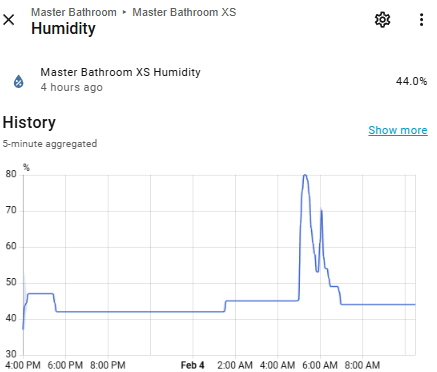
If you look at the graph below from the device, you can see the humidity spiking at 5 am, then dropping, then spiking again, then dropping. I'm trying to set up a condition when the level trends up or down quickly.
-
I think I may have figured out a way...
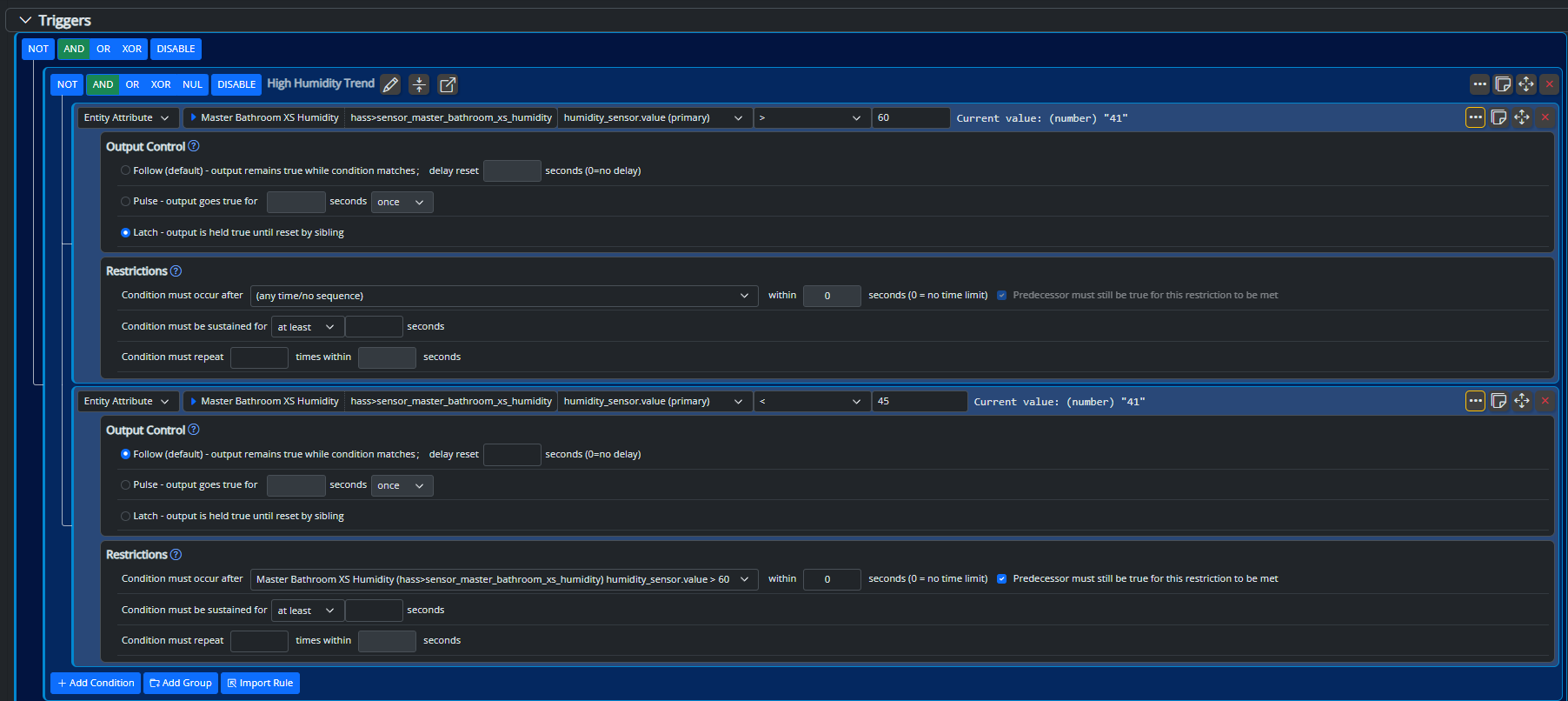
If I use a Latch condition when the Humidity goes above 60, and then another condition when it goes below 45 (dependent on the first condition being true first), that should give me the result I'm looking for; that being the shower isn't being used anymore, and the shower light can be turned off. Am I correct in my understanding of how Latch works, in that that condition will stay true until the Set Reaction triggers?
-
VirtualEntityController can sample another entity's data and do time-series aggregation (moving average, rate of change, etc.).
Refer to the documentation for VirtualEntityController
-
VirtualEntityController can sample another entity's data and do time-series aggregation (moving average, rate of change, etc.).
Refer to the documentation for VirtualEntityController
@toggledbits said in Condition for trend:
VirtualEntityController can sample another entity's data and do time-series aggregation (moving average, rate of change, etc.).
Thanks for that. I wasn't familiar with that, and it sounds like what I was initially looking for.
-
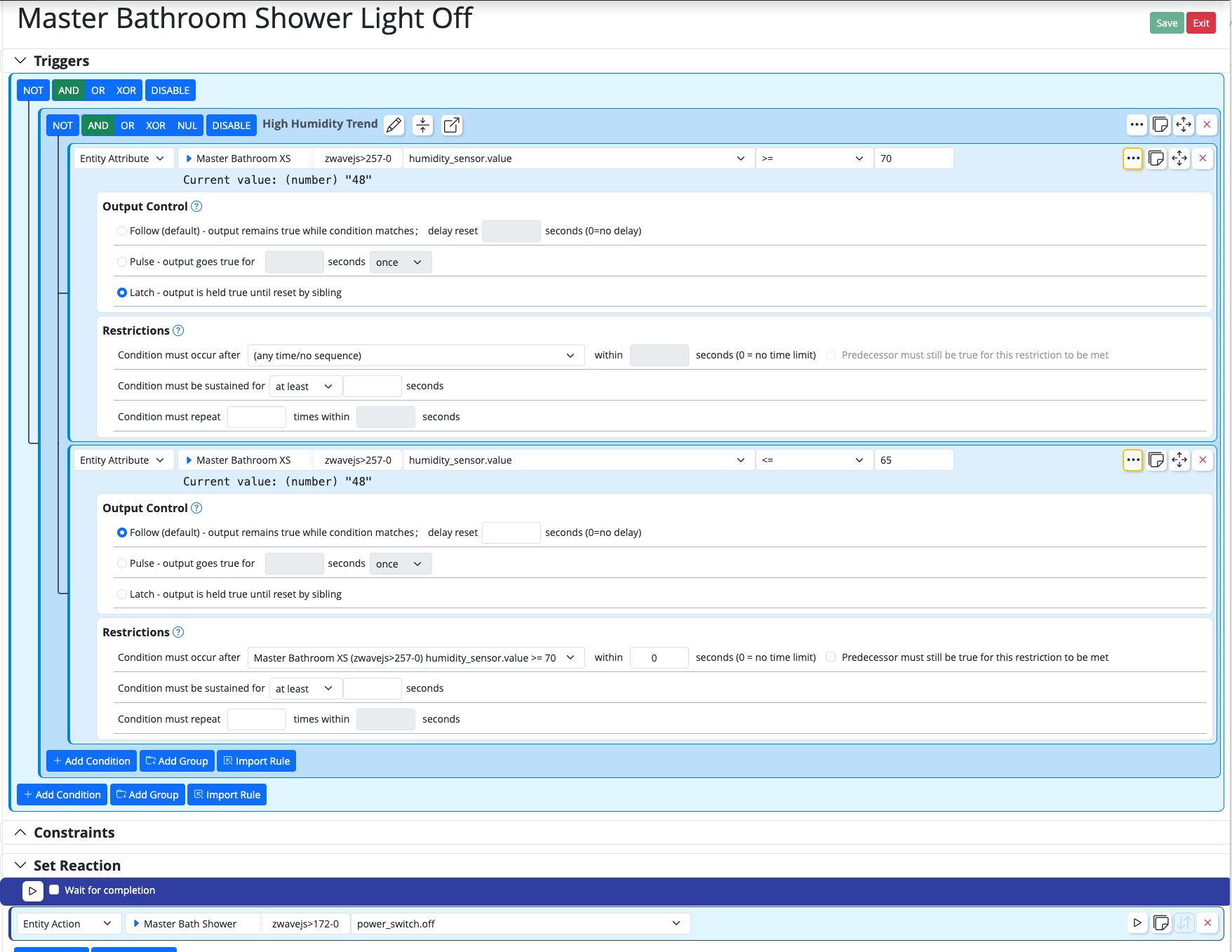
So, for some reason, my Latch method isn't working. I see the humidity go above 70, and I see the first condition go true. When I'm done showering, and fan evacuates the excess humidity, it drops back down and goes below 65, and that condition becomes true.
The second condition has the restriction that it must occur after the first condition is met.
I guess the second condition resets the Latched condition, so both conditions aren't true at the same time?
Is there another way to do a first condition, then the second condition that I'm missing?
-
So, for some reason, my Latch method isn't working. I see the humidity go above 70, and I see the first condition go true. When I'm done showering, and fan evacuates the excess humidity, it drops back down and goes below 65, and that condition becomes true.
The second condition has the restriction that it must occur after the first condition is met.
I guess the second condition resets the Latched condition, so both conditions aren't true at the same time?
Is there another way to do a first condition, then the second condition that I'm missing?
@tamorgen said in Condition for trend:
I guess the second condition resets the Latched condition, so both conditions aren't true at the same time?
Correct. Both conditions cannot be true at the same time.
Your relatively simple logic here doesn't need a latch. Just use two rules, one to turn the fan on at humidity >= 70, and the other to turn it off when humidity <= 65.
If you insist on a latch in one rule, then you need to pair the latching condition with a condition that stays true until it's time to reset it. Really, all you need to do is reverse the operand in your second condition: it should be humidity >= 65 (and this second condition not latching). When humidity rises, the second condition will go true before the first (latching) condition, but won't Set the rule because both must be true. When the humidity gets to 70, the first will go true, so both will then be true, and the Set Reaction then runs to turn the fan on. As humidity comes down below 70, the first condition will become logically false, but remain in true state because it is latched while the second condition also remains true (i.e. humidity hasn't yet reached the low cutoff). When the humidity drops below 65, the second condition will go false, causing the reset of the latch on the first condition. The Reset Reaction then runs (it turns the fan off).
That said, seasonally and with local changes in weather, your indoor humidity varies, and using fixed values like this may not work out very well over the course of a year. I've tried. That's why I added aggregates/trending to VirtualEntityController. You can have VEC create a
rateaggregate over 5 minutes. You'd need to "tune" the condition's rate value test, but as a starting point for the conditions, let's say if the rate of change exceeds 2.0 (which is % humidity per minute, the unit VEC will report forrate, equating to about 10% (positive) change in the five minute sampling period), your rule turns the fan on. It may be a little trickier figuring out when to turn the fan off. As a practical matter, I've found that having the fan run on a timed basis for 30 minutes once triggered is a simplifying assumption that works out perfectly in my bathroom, but you could also look at rate (e.g. rate of change is <0.0167 sustained for 15 minutes, for example). I would always add a time component to the run of exhaust fans in any case, because these simple fans aren't built for long runtimes (bathroom exhaust fans have started fires from running too long).controllers: - id: virtual enabled: true implementation: VirtualEntityController name: Virtual Entity Controller config: entities: - id: "master_bath_rh_rate" name: "Master Bath Humidity Change Rate" type: ValueSensor capabilities: value_sensor: attributes: value: model: time series aggregate: rate entity: "mqtt>shelly_handt3" attribute: "humidity_sensor.value" interval: 150 retention: 300 precision: 3 primary_attribute: "value_sensor.value" -
Okay, so maybe I'm missing something or not explaining my train of though here....
First, I'm not trying to control an exhaust fan, I'm trying to control the shower light. The exhaust fan has it's own built in sensor and . I'm using the humidity to determine that someone is taking a shower, so the light should remain on. When someone stops taking a shower, the humidity will drop (due to the automatic exhaust fan), and then the light can be turned off. I can't easily put a motion sensor in the shower, so the humidity sensor is the logical sensor. I've observed the values before, during, and after taking a shower, and generally, the humidity in that room is 30's or 40's, and when a shower is in play, it jumps up to the 70's or 80's.
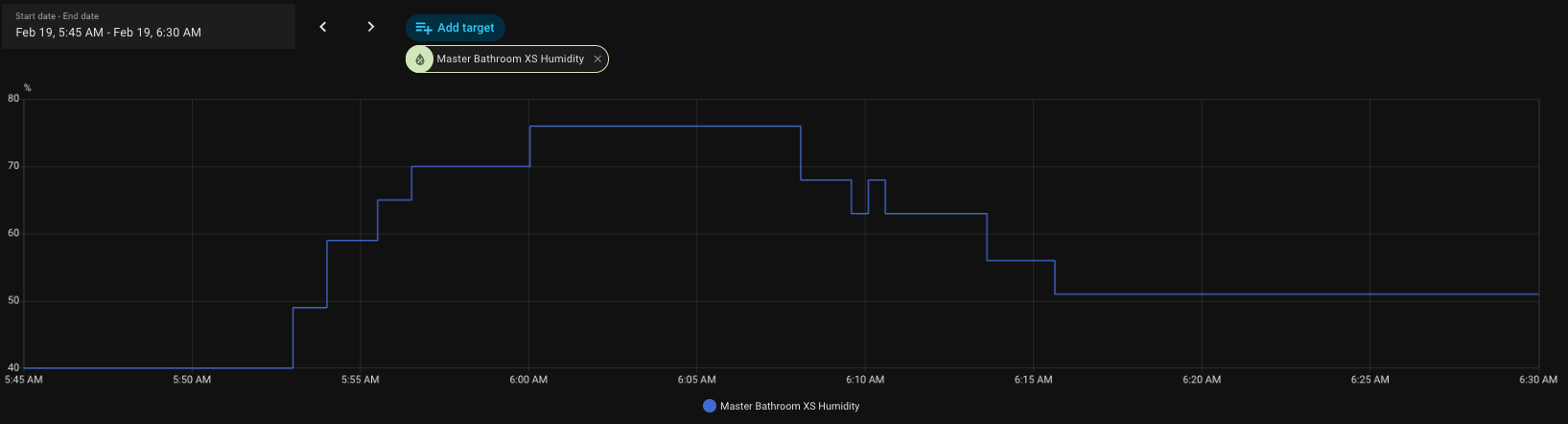
I tried doing it with just one rule, but there really isn't a operand to change below a number. There is Changes from x to y, and then < or <=. If I just have a simple rule to say below 65%, then the light will go off before the humidity level rises. This is why I was trying to latch aspect, because generally when I step into the bathroom, I manually turn on the shower light, turn on the shower, finish, and inevitably the shower light get's left on, whether it's me or my wife.
I initially thought about the trend/time aspect, but I thought that for this purpose, that is actually over complicating things. All I really need to know is a) did the humidity level rise above point A, and b) did it drop below point B, in that sequence.
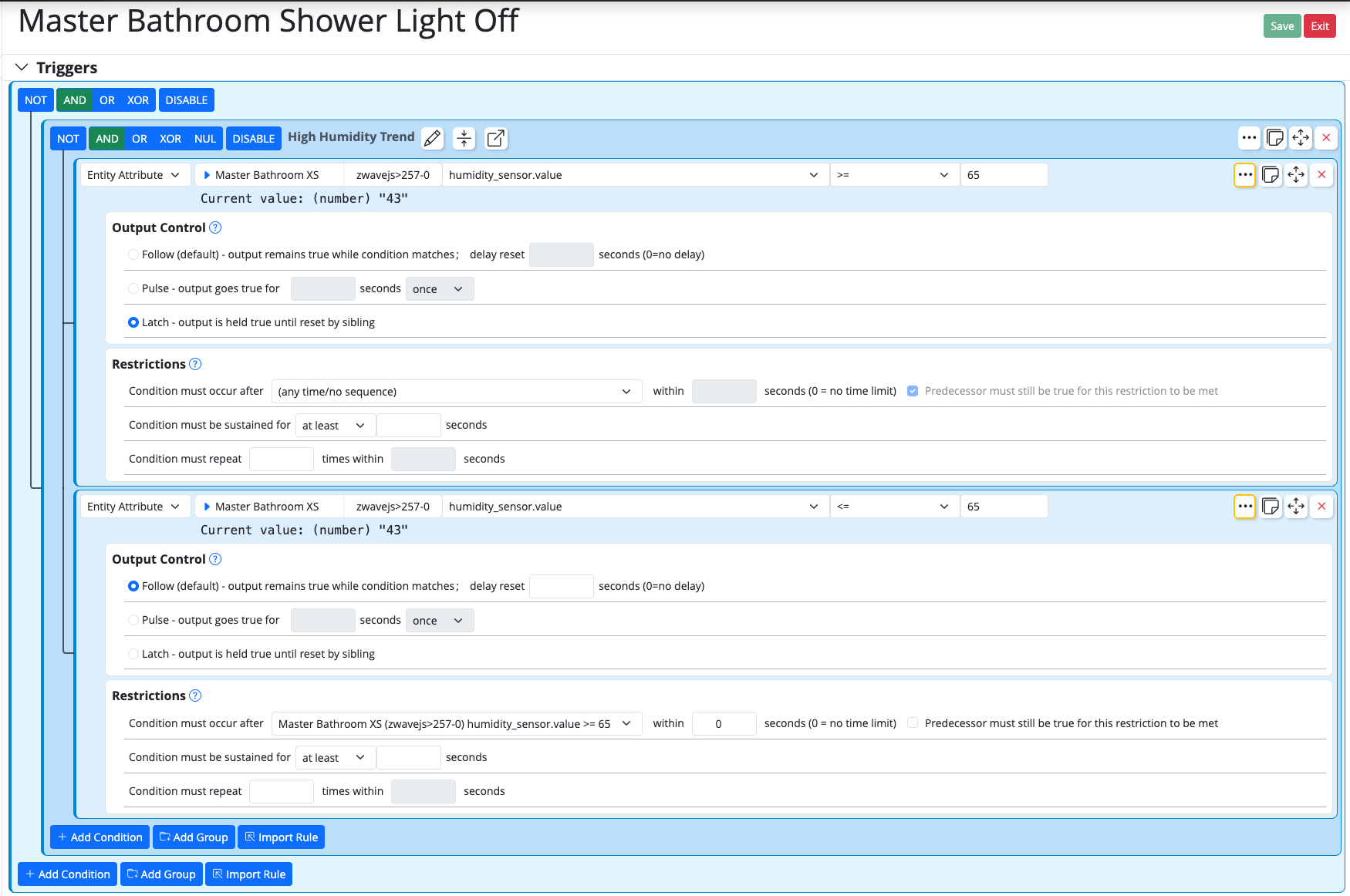
So, from my understanding, you are saying I just need to change the value fo the first condition to >= 65, and the second condition can stay at <= 65?
-
Okay, so maybe I'm missing something or not explaining my train of though here....
First, I'm not trying to control an exhaust fan, I'm trying to control the shower light. The exhaust fan has it's own built in sensor and . I'm using the humidity to determine that someone is taking a shower, so the light should remain on. When someone stops taking a shower, the humidity will drop (due to the automatic exhaust fan), and then the light can be turned off. I can't easily put a motion sensor in the shower, so the humidity sensor is the logical sensor. I've observed the values before, during, and after taking a shower, and generally, the humidity in that room is 30's or 40's, and when a shower is in play, it jumps up to the 70's or 80's.
I tried doing it with just one rule, but there really isn't a operand to change below a number. There is Changes from x to y, and then < or <=. If I just have a simple rule to say below 65%, then the light will go off before the humidity level rises. This is why I was trying to latch aspect, because generally when I step into the bathroom, I manually turn on the shower light, turn on the shower, finish, and inevitably the shower light get's left on, whether it's me or my wife.
I initially thought about the trend/time aspect, but I thought that for this purpose, that is actually over complicating things. All I really need to know is a) did the humidity level rise above point A, and b) did it drop below point B, in that sequence.
So, from my understanding, you are saying I just need to change the value fo the first condition to >= 65, and the second condition can stay at <= 65?
@tamorgen said in Condition for trend:
generally when I step into the bathroom, I manually turn on the shower light, turn on the shower, finish, and inevitably the shower light get's left on, whether it's me or my wife.
Important detail.
@tamorgen said in Condition for trend:
So, from my understanding, you are saying I just need to change the value fo the first condition to >= 65, and the second condition can stay at <= 65?
No. Both conditions >=, and you should have a deadband between them. And since you turn the light on manually, the Set Reaction in that rule can do nothing, and the Reset Reaction turns the light off.
Your image is now mixing concepts and adding condition options not discussed, not needed. Based on your graph and descriptions, I would go with exactly this (do not add any other features) and see how it goes:
- Condition #1: humidity >= 65, latching output
- Condition #2: humidity >= 50, default (follow) output
- Set Reaction: empty
- Reset Reaction: turn light off.
Note that both conditions are >=. This is the way.
-
Deadband... a range of the measurement where nothing happens; but there is usually action at the extremes of the deadband (the low and high values).
With the configuration I gave you, it's the range of humidity between 50% and 65%... if the humidity goes only from 40% to 55%, that 55% is in the "deadband" and the rule won't turn the light off if the humidity then falls below 50% (the low end of the deadband) because the humidity never exceeded the high end (65%) of the deadband. But the way the rule is set up, if the humidity does reach 65%, then the rule becomes "sensitive" and watches for the humidity to drop below 50%, and then it will turn the light off.
Deadband is also commonly used to refer to thermostats, for example, where it's commonly the small differential enforced between a heating setpoint and a cooling setpoint so that the thermostat won't try to do both at the same time, or bang back and forth between the two rapidly when the temperature is in a small range between those setpoints.
-
Okay, I understand. For a minute I thought it there was a setting I needed to enable. I've set it up and I'll know if it works in the morning. Thanks for all the help.