




-
So... I have been using this for 10 months now and yeah it is better than a zigbee stick because you bypass the usb interface. It is a direct serial uart so I got to fool around with the firmware without ever bricking it due incorrect bootloader etc which usb requires.
You know there are only a handful of zigbee chipsets so... this is the silabs one and is the most generically compatible. The conbee would be the only zigbee stick I would consider with the TI one being last though it is cheap.
@parkerc... yup I am using it with two connections. I have a uzb plugged into my vera at the center of my house sending both the zigbee and the uzb serial ports down to my z-way/openluup/homeassistant VMs in my server down in my garage. You can practically make it send any number of serial port you want. -
Hey @rafale77
I’m going to have a play with this later, as a comprehensive usb/serial server (https://smarthome.community/topic/209/home-automation-serial-server-raspberry-pi ) is something I’ve been tinkering with for years ! (https://community.getvera.com/t/building-a-ser2net-serial-to-ip-server/173673) - wow has it really been that long .. 2012 !!!
Once announced and eventually added to Vera, Zigbee has been a capability that I’ve been keen to explore, but due to it’s lack of consistency (compared to z-wave) I’ve not invested much time.
Although; it is on my HA to-do list, - out of my league, but by opening up the zigbee on Vera, is there the potential to extend its usage with (https://github.com/koenkk/zigbee-herdsman ) and (https://github.com/koenkk/zigbee2mqtt) ?
-
Hey @rafale77
I’m going to have a play with this later, as a comprehensive usb/serial server (https://smarthome.community/topic/209/home-automation-serial-server-raspberry-pi ) is something I’ve been tinkering with for years ! (https://community.getvera.com/t/building-a-ser2net-serial-to-ip-server/173673) - wow has it really been that long .. 2012 !!!
Once announced and eventually added to Vera, Zigbee has been a capability that I’ve been keen to explore, but due to it’s lack of consistency (compared to z-wave) I’ve not invested much time.
Although; it is on my HA to-do list, - out of my league, but by opening up the zigbee on Vera, is there the potential to extend its usage with (https://github.com/koenkk/zigbee-herdsman ) and (https://github.com/koenkk/zigbee2mqtt) ?
Have not looked at these project in quite some time but if my memory serves me well, they support only the TI chipset stacks so no they are not compatible with the chip on the vera. The stack on the vera works with the bellows-zigpy project: https://github.com/zigpy/bellows, EZSP stack, which was the base of the initial Home assistant zigbee support.
-
@rafale77. I want to neuter my Vera Plus and socat the zwave, but keep the client wifi connectivity so I can place the Vera more centrally. I modified the nuke vera script to not do "wifi down". This seemed to work for a while, my ra0 interface had an IP, and I was able to reboot the Vera and it still worked. After a couple days the Vera dropped off the wifi, even the wired interface wouldn't link up. I did a factory reset and that got the wired interface working again.
I'm not sure how to configure the wireless interface. Using iwconfig to try and configure ra0 w/ the wifi ssid gave me "SET failed on device ra0 ; Operation not supported." Any ideas on what I might need to do to get the client wifi working?
-
Interesting. Not sure why none of the interface would work after a few days. You may want to look for system logs. This should not happen unless something on your network kicked the vera out. I am thinking of a DHCP lease renewal failing for example.
I would suggest to set everything with a static IP for a start if you have not done so. Note also that if you are using 2.4GHz wifi and don't have the channels setup right you may have your wifi interfere with zigbee. -
Hmm it won't work on z-way... this is more for other platforms for example homeseer or home assistant. z-way unfortunately requires a key which requires the hardware to be specific (uzb or razberry).
The compatibility is only one way. You can use any usb zwave stick, including the uzb on homeseer, domotcz, homeassistant, vera etc... because they all use the same zwave serial API but z-way only works with their hardware.
With this nuking process, you basically turned the vera into a usb zwave and zigbee stick over IP. -
Aha, OK.
Anyway, i found the way to install socat at least (for anyone wondering about this later):
 Using a Vera Edge as a network-attached zwave device (skipping the vera software)
I have a few Vera’s lying around and I wanted to migrate one to home assistant, and instead of going the tedious way of adding again all my zwave devices to a zwave stick, I decided to try and make a zwave-to-tcp device out of the controller, and connect home assistant to it. Data path: zwave...
So, this is not a way to get zigbee to Openluup instead of the vera bridge?
-
Throwing out a thought; could it be possible to reinstall a VeraPlus with HASSio?
I'm really sick of the zigbee handling of the vera, so if HA can use the zigbee chip in the vera, that could be even more elegant than HASS on the main unit and Socat..
Found this thread: https://community.home-assistant.io/t/ha-on-openwrt/118125/16
It may be possible to do that on a nuked vera?
-
..which links to this: https://community.home-assistant.io/t/how-to-install-ha-on-your-router/126937
I may have a go at this..

-
I've been looking a bit more at this, taking in zigbee and rfxtrx from a vera to HASS.
Zigbee is in, and runs well, but the second connection is rough, wether its z-wave or RFXTRX (I added a line for it in ser2net.conf).
I noticed that the Vera seems to have a timeout on the connections, is there a way to disable this or to change it?
-
Can't see that my router does anything here, but I do see that the RFXTRX integration in HASS has some issues, so it may just be that implementation. Zigbee to ZHA in hass is completely stable..
I just noticed that my SSH connection dropped out if i wasn't active on it, so I thought that this may be the case for the RFX connection as well..
-
Hello, I would like to use Home Assistant (HA) instead of the Vera Lite or Edge, which are becoming obsolete. The only thing is that Alexa works quite well with the Vera, but I believe that sooner or later, Ezlo will remove that functionality. There haven’t been any firmware updates for a while, so I’m wondering if it’s still possible to use a Vera with HA, as discussed in a previous post. Is it easily reversible in case it doesn’t work for me and I need to go back to the Vera? I’m thinking of using the “rafale77 nukevera.sh” script, but I suspect that despite a reboot, it may still leave some traces. So, to return to the original state, can we still access the interface to create a backup of the Vera? Thank you for the information. Also, for HA, how can I use socat because things might have changed over time?
-

After the veralert service was shut down and Richard confirmed that it will not be available again, I searched for a new notification service to use in my vere secure. I signed up for the PushOver service.
I want to take a snapshot from a camera with camera snapshot address “192.168.4.37/img/snapshot.cgi?size=4&quality=1” and video address “192.168.4.37/img/video.mjpeg” according to a trigger.
Actually, someone (Tlex) did a work about this years ago on the vera forum, but I couldn't understand that script. I also wrote to him to be more descriptive, but I didn't get an answer. Can you help me with this?
Let's assume you have done the following:
Downloaded and installed Z-Way following these instructions. No Zway license is required to do the following.
The software is now all up and running with your UZB stick (whole other post).
Dial up this Zway web page: http://<Zway_server_IP_address>:8083/expert/#/network/controller
Under the heading "Firmware" take note of the "SDK version" and the "Serial API Version". Say they equal 6.71.01 & 05.23 respectively like it shows here.
Now on to Vera:
Go to the Vera UI --> Z-Wave Settings and taken note of the "Version" shown for Vera's internal Zwave IC. For example purposes, say it equals "6.01".
You plug your UZB stick into Vera.
In the Z-Wave Settings you set the port to "/dev/ttyACM0"
You've rebooted Vera, so that it starts using the UZB stick.
OK, so what "Version" will Vera now display and the version of what? The version shown by Vera is the "Z-Wave protocol" version or the "Serial API" version - it's unclear which but I suspect the former. However on most occasions the numbers are the same. It's not the Software Developers Kit (SDK) version number.
Knowing the UZB firmware version you can identify what Vera will show with the following table.
From the example above: Zway stated the version as 5.23. It will show in Vera as version 4.61 - see table. However the Vera internals showed up as 6.01. So using this method to copy the Zwave configuration to the stick will not work, as the stick represents a downgrade and you can only do same to same or upgrades. So in this case you need to update the stick firmware from 5.23 to 5.32 as a minimum. Then the stick will show up in Vera with version of 6.01.
Which is great. So you then use the Zway software to upgrade the stick firmware. And that's the last you hear from it because this happens:
"Sorry to inform you, but there is a known issue in some UZB manufactured by our partners on license base that after upgrade they become bricked."
And you have to do this to unbrick it. So time to try someone else's stick. Sigh.
ZWay UZB version
Vera version
SDK version
5.39
6.09
6.82.01
6.08
6.82.00
6.07
6.81.06
6.06
6.81.05
6.05
6.81.04
6.04
6.81.03
6.03
6.81.02
5.37
6.02
6.81.01
5.36
6.02???
6.81.00 ????
5.33
6.02???
6.81.00 ????
5.32
6.01
6.81.00
5.03
6.71.03
5.02
6.71.02
5.27 BL 48059
4.61
6.71.0?
5.26
4.61
6.71.0?
5.23
4.61
6.71.01
4.6
6.71.00
5.2
4.6?
6.7?.00
5.16
4.6?
6.70.00
4.62
6.61.01
4.33
6.61.00
4.54
6.51.10
5.07
4.38
6.51.09
4.34
6.51.08
4.24
6.51.07
4.05
6.51.06
5.06
4.01
6.51.04
3.99
6.51.03
3.95
6.51.02
3.92
6.51.01
3.83
6.51.00
3.79
6.50.01
3.71
6.50.00
3.67
3.35
6.10.00
3.41
6.02.00
3.37
6.01.03
2.78
The table is based on page 434 of silabs app INS13954 and the UZB firmware revision information found here. The table may have errors!
The vera can run both its zwave and zigbee network off of external USB radios instead of the onboard ones. This could have advantages in terms of portability, facilitating migrations or recoveries in case the vera craps out. It could also enable testing of newer radio firmwares.
Zwave is pretty straightforward as its serial API is standardized and the protocol is the same regardless of what brand of USB stick you use. I have run my vera off of USB sticks of various brands for years going from Aeotec, Zooz, Homeseer and even the most generic silabs/Sigma Design. You just insert the stick in the usb port, find out which serial port it created (under the /dev/ folder) and use that port (ie. /dev/ttyACM0, /dev/ttyUSB0 etc) in the zwave advance menu.
Zigbee is a little trickier as the protocol and chipset was not quite as standardized as zwave. The vera only works with ember Znet protocol and you will need to find a usb stick with an EM35x chip in it which already has an ember zigbee firmware loaded. One example of such a stick is the Go Control HUSBZB1 (dual zwave-zigbee stick). The port is not readily accessible on the vera UI but can be accessed either through editing of the /etc/cmh/user-data.json or through ALTUI by going into the hidden zigbee radio device through the "table devices " menu and changing modifying the port variable there.
You can also upgrade the onboard zwave and zigbee radio firmwares from the command line SSH...
Good morning all,
I've got a stable Home Assistant running on a RPI 4 with a Aeotec Z-Stick 7 Plus, and of course the Z-wave JS integration. I've manually moved a handful of devices, and I'm overall much happier with the HA z-wave capability than I am with Vera. There are still some things I'm trying to figure out that I have in Vera that I'm not sure how they'll work in HA, but no deal breakers.
I've got all of my automation on MSR and off of luup Reactor, so really the only thing left for me is to migrate my Z-wave network. I saw @rafale77's post about using a Zwave.me UZB1 to Zway, but of course that's not what I'm using.
Is there a similar method that I can use my Aeotec Z-Stick 7 plus to Home Assistant? I have around 70 Z-wave devices (give or take devices that generate multiple instances in Vera), so manual unpairing, including, etc, would be quite a chore.
So ... I am trying to do the following:
Current setup:
Vera Plus (1.7.4955) Zwave only -> HASSIO VM (full control via Vera Integration)
Future Target:
HASSIO VM (leveraging zwave.me UZB1 dongle via USB)
I have done the following so far:
Updated UZB1 dongle (via RPi SmartHome) to latest 5.39 Firmware
I followed the following steps to try and migrate my existing Z-Wave NW (currently on Vera) onto the UZB1 dongle following the steps listed here:
Migrate from Vera to Z-way
Problem:
Steps 1-3: went fine (although the dumps are labeled as dongle.6.1.dump.x)
Step 4: went fine and the UZB1 was recognized as it should be (per dmesg)
Step 5: updating the port to /dev/ttyACM0 went fine, although I didn't see any indication of luup reload (or a save button for that matter when updating the port mapping)
Step 6: I did the touch for dongle.restore, but wasn't sure where to trigger a luup reload (I assumed it was Z-Wave Settings > Advanced > Reload Engine). I believe I got an error message when trying to do that step
Step 7: verify dongle.restore.go I don't recall being in the directions when I was going the test, but I rebooted
Post Reboot: None of my previous z-wave devices were listed. I also checked dmesg via ssh and noticed the following items:
[ 4.328000] Unsupported Device!
[ 4.328000] Vendor=658 ProdID=200
[ 4.328000] Manufacturer= Product=
I saw that item a couple times which almost seems like Vera is blocking the UZB1 or at least complaining about it.
I ended up switching the Z-Wave back to the embedded controller, and restoring configuration from backup.
Any suggestions what I did wrong??
Having trouble getting a Vera 3 to recognise a Z-Wave.Me UZB stick.
WinSCP indicates it's mounted at /dev/ttyACM0, so the Vera Z-Wave settings were adjusted to match. On a Luup engine reload Vera UI states: "ZWave : Failed To Start". Ditto for a complete Vera reboot.
Has anyone successfully used a UZB stick with a Vera 3?
Hello Everyone,
I am using iPhone locator on Vera, and yesterday it stopped working. Looking at the logs, I can see the connection is refused, but nothing on my end changed. iPhone locator is really important in my particular setup, so I guess I have two questions.
Is it broken, or is it me?
I don't see anyone else saying there is an issue, but I am not sure how many people are still using it (or Vera for location) at this point. I installed it on a blank Vera test controller, same issue. It might be something with the iCloud account, but it works everywhere else.
Is there something similar on another platform?
Mainly what I would like is the ability to force a poll of iCloud location on demand. I have a bunch of triggers setup, including magnetic sensors in my driveway to sense vehicles and determine if the motion is egress or ingress. These triggers in conjunction with MSR have been a great way to double check phone location, and I would hate to lose this functionality. It looks like HA might have something with "iCloud3". Is anyone using it?
Thanks,
Mike
@akbooer said in
The only thing left on Vera is now electricity meter readers, and I simply can't find any suitable WiFi replacement.
My hem stopped reporting this august and I’ve replaced it with a Shelly EM. I’m using another one on my solar and they’re amazing fast to report and quite precise. They’re WiFi, and mqtt based. Recommended!
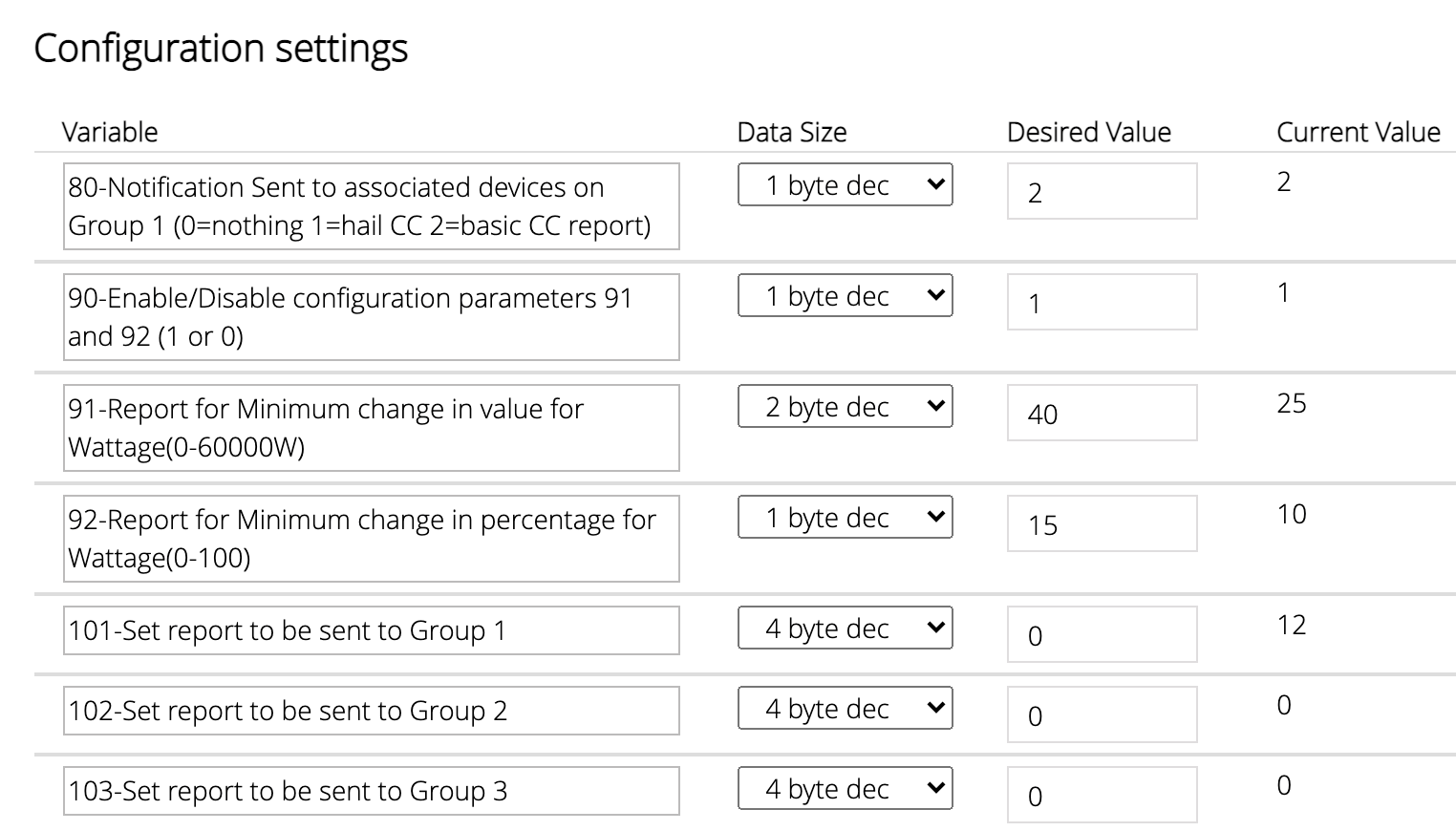
Long story short: I need to tweak some parameters for Fibaro Plugs, to remove frequent notifications about watts (I just need a very good approximation, in order to detect the cycle of washer/dryer), but the parameters depend on the firmware version, and I have:
271,1554,21554
and the other one has:
271,4102,0
Any help is apprreciated.
So, I recently added Pi-Hole (pi-hole.net) to my networked clients for its open-sourced Ad and Tracker Blocking. Essentially, it’s a DNS Blacklisting solution and it can display the Domains being accessed.
To my dismay I’m seeing the VERA+ attempting calls to facebook.com on a regular basis between 20 – 70 minutes each.
The Active apps on VERA are Sercomm IP Camera, Amazon Alexa Helper, Garage Door, Foscam HD, Reator, SiteSensor and Ezlo Cameras. I just recently removed AltUI before disconnecting from the cloud services.
Any ideas on how I could track down the culprit caller?
Thanks for your consideration.
I've got a Nokia/Withings bathroom scale on which I weigh myself daily. I used to use IFTTT to push every weighing result into a Google Spreadsheet in the cloud, but now that I use MSR, I'm more interested in integrating this data into that workflow.
Has anyone figured out a way to move data from a WiFi-connected scale into the Vera environment? I don't mind trying something indirect, as for instance I've already linked the weights over to my Google Fit app.
Open to suggestions!


 (Just the bakup vera though)