











Adding remotes, scene controllers as entities to MSR
-
I am reading about MSR abilities, and wonder which one is best in my scenario.
I am thinking about "button" as it should be only one entity for each button on the remote, if I have got it right?
Any thoughts?
button
Used when the device implements the behavior of a pressable button.
Attributes:
state — (string) last button state: single (pressed once), double (double-press), triple (triple-press), 4 (four-press), 5 (five-press), hold, release, long, unknown. Not all Controller instances will (or are required to) implement all values; this is dependent on the capabilities of the underlying hub and the device itself. -
I am reading about MSR abilities, and wonder which one is best in my scenario.
I am thinking about "button" as it should be only one entity for each button on the remote, if I have got it right?
Any thoughts?
button
Used when the device implements the behavior of a pressable button.
Attributes:
state — (string) last button state: single (pressed once), double (double-press), triple (triple-press), 4 (four-press), 5 (five-press), hold, release, long, unknown. Not all Controller instances will (or are required to) implement all values; this is dependent on the capabilities of the underlying hub and the device itself.@andr great choice!
-
===group
===So, a little report of a night of testing what does not work.
Read @toggledbits tips above together with the manual about Capabilites and put this in my reactor.yaml:
    config:
      source: ':-D'
      access_token: ':-)'
      log_events: false
          # Additions to config section for Lukas Fibaro Keyfob:
      event_targets:    # this section starts the event-receiving entities
        "Keyfob_fyrkant":      # Assign an ID to your entity; each entity must have a unique ID
          name: Lukas Keyfob Fyrkant   # This is optional but recommended, so you have a friendly name
          capabilities: ['button'] # define an array of capabilities to be modified by the event
           attributes:
             state:
               type: string
               values:
                 - 'single'
                 - 'double'
                 - 'triple'
                 - 'hold'
                 - 'release'
             since:
               type: int, timestamp
          events:  # define an array of events that modify capability attributes on the entity
          - event:  # start of an event; each element of the events array begins this way
              event_type: zwave_js_value_notification
              data:  # optional section, if further matching to the event data is required
                property: "Scene 001" # Square button
                value: "KeyPressed"   # Square button event
            response:  # begin the (required) response section for handling the event
              "button.state":  # an attribute that the event modifies.
                expr: "single"   # expression to get attribute value from event data
                from: "event.data.property.value"  # dot-reference expression to pull value from event message
                map:                    # optional, map to modify value
                  string: 'single'   # if value is value_in, it is mapped to new_value
              # repeat "capability.attribute" section for all attributes modified by the event
      #    - event:  # start of next event for this entity, same form as above
This did not work at all, Reactor would not even start

Tinkered with a bit, but no luck.
Anyone see if it is something simple to fix or is this beyond saving?Testing something simpler, just to see that I can create some kind of Hass Entity, I copied @toggledbits motion_sensor example above and made some adjustments.
      event_targets:
        "knapp_fyrkant":
          capabilities: ['binary_sensor']
          primary_attribute: binary_sensor.state
          events:
            - event:
                event_type: zwave_js_value_notification
                data:
                  property: "Scene 001"
                  value: "KeyPressed"
              response:
                "binary_sensor.state":
                  from: "event.data.property.value"
                  map:
                    KeyPressed: true
A tiny, little bit, closer... Reactor starts again and I got myself a fresh new binary sensor "knapp_fyrkant"
But I am guessing something is wrong in data and/or response section because the "sensor" doesn't changes to true.I dont think I really follow how event data and response from relate. I need to sleep on this
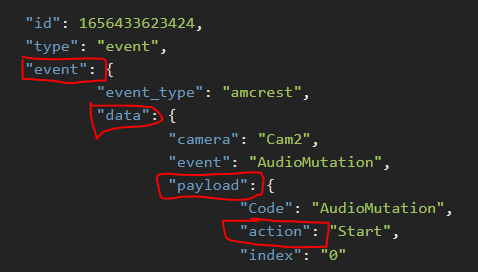
from: "event.data.payload.action"Here is info from hass event log, for pressing the Square button 1x and 2x.
2022 - 06 - 29 T21: 15: 44.500 Z zwave_js_value_notification {
	"id": 1656536987817,
	"type": "event",
	"event": {
		"event_type": "zwave_js_value_notification",
		"data": {
			"domain": "zwave_js",
			"node_id": 15,
			"home_id": 3523230191,
			"endpoint": 0,
			"device_id": "4cfedde34f701262785f27ac571a7f80",
			"command_class": 91,
			"command_class_name": "Central Scene",
			"label": "Scene 001",
			"property": "scene",
			"property_name": "scene",
			"property_key": "001",
			"property_key_name": "001",
			"value": "KeyPressed",
			"value_raw": 0
		},
		"origin": "LOCAL",
		"time_fired": "2022-06-29T21:15:43.082064+00:00",
		"context": {
			"id": "01G6RN3S3ASSBZ33RYPHND6QG8",
			"parent_id": null,
			"user_id": null
		}
	}
}
2022 - 06 - 29 T21: 15: 50.890 Z zwave_js_value_notification {
	"id": 1656536987817,
	"type": "event",
	"event": {
		"event_type": "zwave_js_value_notification",
		"data": {
			"domain": "zwave_js",
			"node_id": 15,
			"home_id": 3523230191,
			"endpoint": 0,
			"device_id": "4cfedde34f701262785f27ac571a7f80",
			"command_class": 91,
			"command_class_name": "Central Scene",
			"label": "Scene 001",
			"property": "scene",
			"property_name": "scene",
			"property_key": "001",
			"property_key_name": "001",
			"value": "KeyPressed2x",
			"value_raw": 3
		},
		"origin": "LOCAL",
		"time_fired": "2022-06-29T21:15:49.475286+00:00",
		"context": {
			"id": "01G6RN3ZB3BYRPDZMM9S6CMRZB",
			"parent_id": null,
			"user_id": null
		}
	}
}
Just noticed that I have mixed up "property" with "label" so I think I start there tomorrow.
Good night! -
This did not work at all, Reactor would not even start
Not surprised it wouldn't start... it's not properly formatted. Two errors: the
attributesline is incorrectly indented (and therefore so is everything underneath it). Second issue, it shouldn't even be there. If it was properly indented, it would be ignored, because the code isn't looking for it. The definition of thebuttoncapability is already determined by system files; you don't need to repeat it here.As for the rest of it, the
- eventis also not properly indented, although this may not make it choke.Your
propertyvalue in theeventsection won't match anything. That value doesn't appear in the example data you posted. It does matchlabel, however, but I don't recommend using that. Change thepropertyvalue tosceneand addproperty_keywith value001. You probably also want to match the specific device, so that if you have more than one of these, these rules apply only to this one; do this by matchingnode_id.Your
responsehas a few issues. Traversing your sample data, the action field isevent.data.valuenotevent.data.property.value. Theexprline shouldn't be there, since you're usingmapto remap the string values grabbed byfrom. The wordstringin the map data should be the wordKeyPressed(an actual string you are looking for) with the valuesingle(the string you want it to be, which matches the definition of thebutton.stateattribute). If there are other possible strings that map todouble,triple,holdandrelease, those should be added to the map; since you show in your sample data a 2x press, I added that (see below).Then, to make sure
button.sinceis correctly updated (modified for each event), you need to specify it as an attribute to be updated as part of the event response, and in this case we will use anexpression to set it to the current time.Correcting all that, I give you this:
      event_targets:    # this section starts the event-receiving entities
        "Keyfob_fyrkant":      # Assign an ID to your entity; each entity must have a unique ID
          name: Lukas Keyfob Fyrkant   # This is optional but recommended, so you have a friendly name
          capabilities: ['button']  # define an array of capabilities to be modified by the event
          events:  # define an array of events that modify capability attributes on the entity
            - event:  # start of an event; each element of the events array begins this way
                event_type: zwave_js_value_notification
                data:  # optional section, if further matching to the event data is required
                  node_id: 15
                  property: "scene" # Square button
                  property_key: "001"
              response:  # begin the (required) response section for handling the event
                "button.state":  # an attribute that the event modifies.
                  from: "event.data.value"  # dot-reference expression to pull value from event message
                  map:                    # optional, map to modify value
                    KeyPressed: 'single'   # if value is value_in, it is mapped to new_value
                    KeyPressed2x: 'double'
                  map_unmatched: 'unknown'
                "button.since":
                  expr: "time()"
I highly recommend using a syntax-highlighting YAML editor. Check out https://onlineyamltools.com/edit-yaml
-
This did not work at all, Reactor would not even start
Not surprised it wouldn't start... it's not properly formatted. Two errors: the
attributesline is incorrectly indented (and therefore so is everything underneath it). Second issue, it shouldn't even be there. If it was properly indented, it would be ignored, because the code isn't looking for it. The definition of thebuttoncapability is already determined by system files; you don't need to repeat it here.As for the rest of it, the
- eventis also not properly indented, although this may not make it choke.Your
propertyvalue in theeventsection won't match anything. That value doesn't appear in the example data you posted. It does matchlabel, however, but I don't recommend using that. Change thepropertyvalue tosceneand addproperty_keywith value001. You probably also want to match the specific device, so that if you have more than one of these, these rules apply only to this one; do this by matchingnode_id.Your
responsehas a few issues. Traversing your sample data, the action field isevent.data.valuenotevent.data.property.value. Theexprline shouldn't be there, since you're usingmapto remap the string values grabbed byfrom. The wordstringin the map data should be the wordKeyPressed(an actual string you are looking for) with the valuesingle(the string you want it to be, which matches the definition of thebutton.stateattribute). If there are other possible strings that map todouble,triple,holdandrelease, those should be added to the map; since you show in your sample data a 2x press, I added that (see below).Then, to make sure
button.sinceis correctly updated (modified for each event), you need to specify it as an attribute to be updated as part of the event response, and in this case we will use anexpression to set it to the current time.Correcting all that, I give you this:
      event_targets:    # this section starts the event-receiving entities
        "Keyfob_fyrkant":      # Assign an ID to your entity; each entity must have a unique ID
          name: Lukas Keyfob Fyrkant   # This is optional but recommended, so you have a friendly name
          capabilities: ['button']  # define an array of capabilities to be modified by the event
          events:  # define an array of events that modify capability attributes on the entity
            - event:  # start of an event; each element of the events array begins this way
                event_type: zwave_js_value_notification
                data:  # optional section, if further matching to the event data is required
                  node_id: 15
                  property: "scene" # Square button
                  property_key: "001"
              response:  # begin the (required) response section for handling the event
                "button.state":  # an attribute that the event modifies.
                  from: "event.data.value"  # dot-reference expression to pull value from event message
                  map:                    # optional, map to modify value
                    KeyPressed: 'single'   # if value is value_in, it is mapped to new_value
                    KeyPressed2x: 'double'
                  map_unmatched: 'unknown'
                "button.since":
                  expr: "time()"
I highly recommend using a syntax-highlighting YAML editor. Check out https://onlineyamltools.com/edit-yaml
Many thanks!
will be digging in to this later tonight again.A few follow up questions to check that I understand things correctly.
capabilities: ['button']In frase above, somewhere in MSR code, the word 'button' is equal to what I tried to specify with this section and that why that was unnecessary?
```
attributes:state: type: string values: - 'single' - 'double' - 'triple' - 'hold' - 'release' since: type: int, timestampAbout how to fill the 'form' row, in your example you usefrom: "event.data.payload.action"
And I assume that this comes from this marked words? 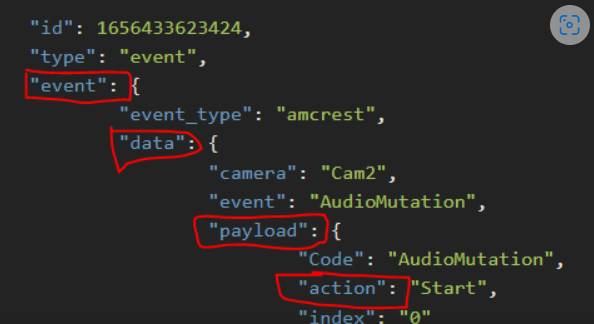 I starting to think that yaml file should be read somewhat like a folder tree, would that make sense? So, in your example, if the 'start action' was like a .bat-file the way to think about the Form row the adress would be **event\data\payload\action** Please say I am on the right track 😂🙏 -
Yeah, you need to fix it. It should not be left like this, as the discussion may be read by others in future, and I can't follow it (also on my phone), and likely nobody would bother
From what I can see, I don't know why you're stuck on using
payloadin yourfromvalue, that word/key does not appear in your event data. -
Ok, for some reason i can't make the mess go away in earlier post, so double post...
Many thanks!
will be digging in to this later tonight again.A few follow up questions to check that I understand things correctly.
capabilities: ['button']In frase above, somewhere in MSR code, the word 'button' is equal to what I tried to specify with this section and that why that was unnecessary?
attributes:

            state:

              type: string

              values:

                - 'single'

                - 'double'

                - 'triple'

                - 'hold'

                - 'release'

            since:

              type: int, timestamp
About how to fill the 'form' row, in your example you use
from: "event.data.payload.action"And I assume that this comes from this marked words?
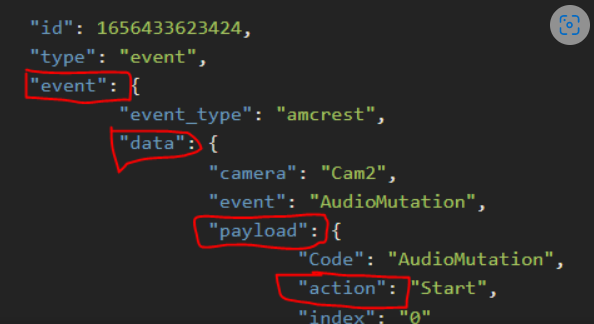
I starting to think that yaml file should be read somewhat like a folder tree, would that make sense?
So, in your example, if the 'start action' was like a .bat-file the way to think about the Form row the adress would be event\data\payload\action
Please say I am on the right track

-
Ok, some progress thanks to @toggledbits of course.
Copied in his code in reactor.yaml and that worked fine of course. Also added a line for 3x click and that worked also.
event_targets:    # this section starts the event-receiving entities
        "Keyfob_fyrkant":      # Assign an ID to your entity; each entity must have a unique ID
          name: Lukas Keyfob Fyrkant   # This is optional but recommended, so you have a friendly name
          capabilities: ['button']  # define an array of capabilities to be modified by the event
          events:  # define an array of events that modify capability attributes on the entity
            - event:  # start of an event; each element of the events array begins this way
                event_type: zwave_js_value_notification
                data:  # optional section, if further matching to the event data is required
                  node_id: 15
                  property: "scene" # Square button
                  property_key: "001"
              response:  # begin the (required) response section for handling the event
                "button.state":  # an attribute that the event modifies.
                  from: "event.data.value"  # dot-reference expression to pull value from event message
                  map:                    # optional, map to modify value
                    KeyPressed: 'single'   # if value is value_in, it is mapped to new_value
                    KeyPressed2x: 'double'
                    KeyPressed3x: 'tripple'
But, still, I can't for some reason really understand the code and how different parts relate to each other.

In 'event data' I was expecting to fill out in the 'label' field from hass_event log because that is an uniq value for each one of the six buttons, and then the 'value' field that identifies the number of keypresses on this specific button.
In my mind that would give a uniq combination for MSR to identify.
I did (with very low hopes) tried it alsoevent_targets: # this section starts the event-receiving entities "Keyfob_fyrkant": # Assign an ID to your entity; each entity must have a unique ID name: Lukas Keyfob Fyrkant # This is optional but recommended, so you have a friendly name capabilities: ['button'] # define an array of capabilities to be modified by the event events: # define an array of events that modify capability attributes on the entity - event: # start of an event; each element of the events array begins this way event_type: zwave_js_value_notification data: # optional section, if further matching to the event data is required node_id: 15 label: "Scene 001" # Square button value: "KeyPressed" value: "KeyPressed2x" value: "KeyPressed3x" response: # begin the (required) response section for handling the event "button.state": # an attribute that the event modifies. from: "event.data.value" # dot-reference expression to pull value from event message map: # optional, map to modify value KeyPressed: 'single' # if value is value_in, it is mapped to new_value KeyPressed2x: 'double' KeyPressed3x: 'tripple'and of course:

Reactor did not start.I would really like to get a grip why this is what is needed in event data
                  property: "scene" # Square button
                  property_key: "001"
Meanwhile, as @toggledbits code of course worked I did the simplest rule with an action, toggle a lamp on off.
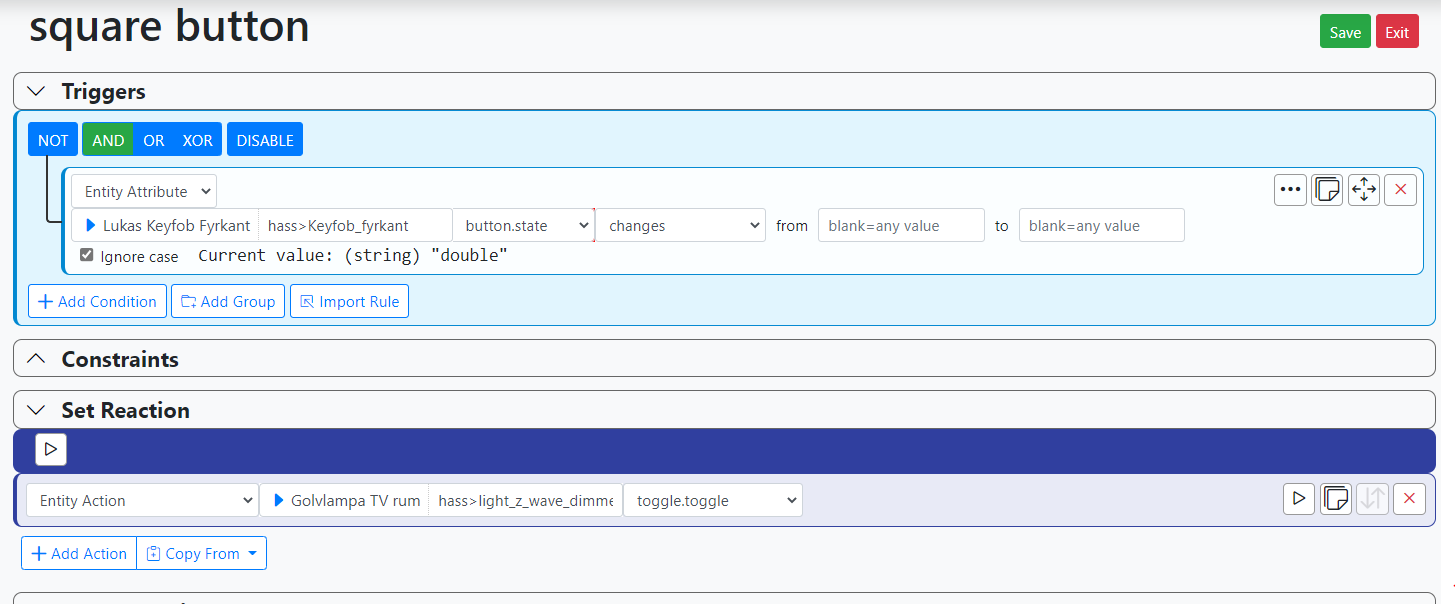
Here I expected (or hoped) to find triggers for every combination of button presses.
For now Square: 1x, 2x, 3x
But I guess I need to set the 'button.state' to 'contains' 'single' 'double' etc.
But whatever event state MSR caught, it doesn't resest.
When MSR start the value is NULL, but after a click it holds that value, for example 'single', and I expect it to reset immediately after the 'single' event have passed by.So, this is it for today. It is friday night and I am happy to say that I think my wife misses me

Have a great weekend everyone. -
But, still, I can't for some reason really understand the code and how different parts relate to each other.
The
eventsection is a filter to look for a specific event. In your version, you have multiplevaluekeys, which is not allowed. Also, you don't want to filter by value, just accept them all and let theresponsesection deal with them. I recommended against usinglabelbecause it's changeable in ZWave, whereas thepropertyandproperty_keyvalues are defined by the device and will not change.So again, the
eventsection is the filter that determines what incoming event will match, and what will not.Once an event matches, the
responsesection determines what to do with it. Each component of theresponsesection is an attribute of an assigned capability and the instructions to set it. In the case ofbutton.state, my version says grab the valuefrom event.data.value, and then,mapthat value from the device's string to one of Reactor's accepted capability/attribute value. Settingbutton.sincecompletes the "contract" of thebuttoncapability (i.e. makes it work like similar uses ofbuttonin other devices and related to other controllers). I'm not sure I can explain it more simply than that.It's really just a "if you find this... do this" configuration. The effect is that if a matching button event is detected by the
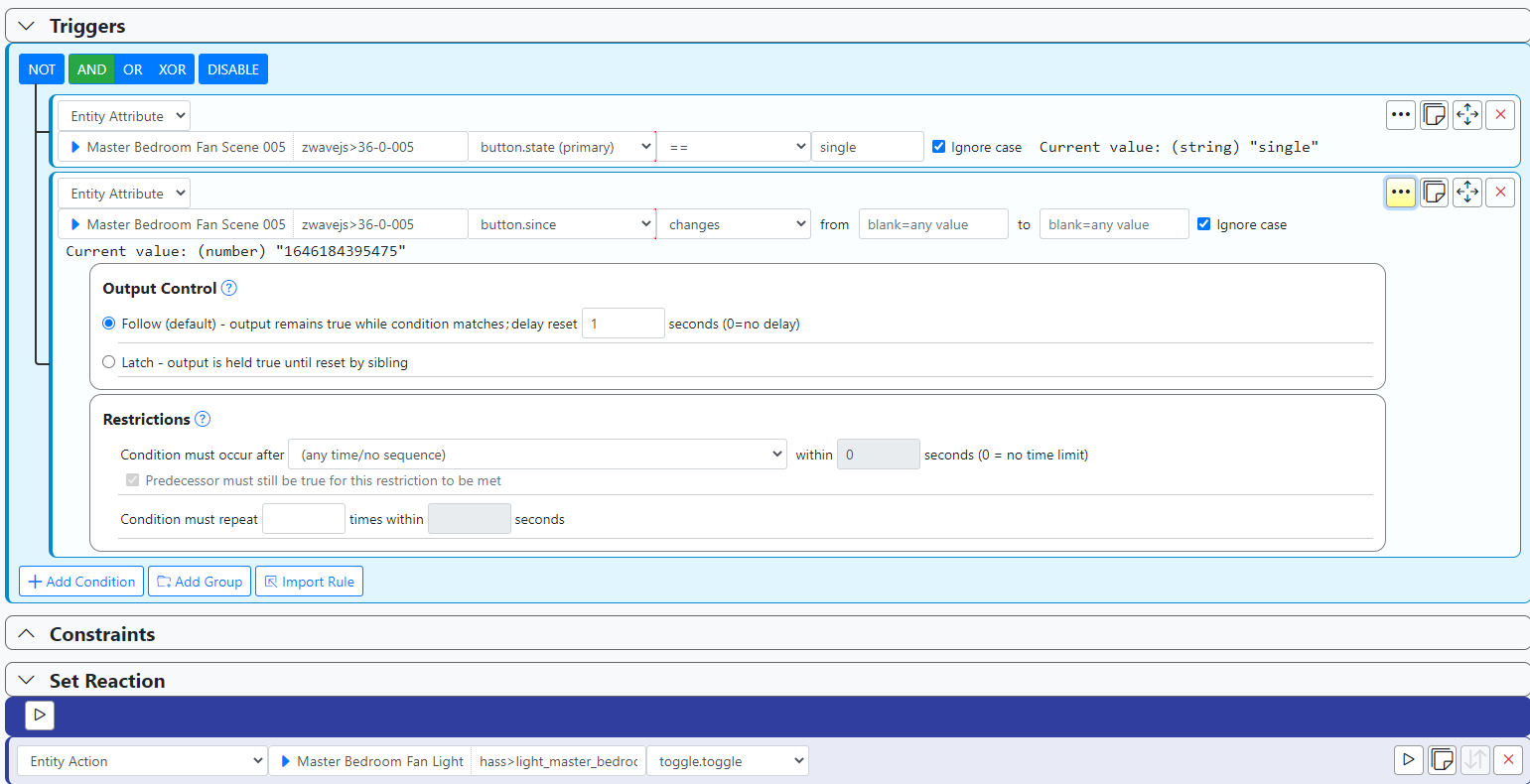
eventsection, theresponsesection will interpet the value and map it to a Reactor-compatible value to place on the entity attributebutton.state, and also update thebutton.sincetimestamp. Thus thesincetimestamp changes every time a button press event is received, butstatemay not change, because it's possible to press a button once, wait 15 seconds, and press the same button again, which will result in the valuesinglebeing persistent on thestateattribute and not changing. So to detect an event, you have to check bothstateandsince(and this is consistent with allbuttonbehavior in Reactor).To test button state in a rule, you test
button.statefor what you want in that rule (equalssingle,double,triple), and you AND that test with abutton.sincechanges (from any to any). That will send a very short pulse when a matching button press occurs. While testing, to make sure you can see it, add a "sustained for" delay on the changes condition of a few seconds (keep it short), and you'll more easily see what's going on in the status view. Make sure to remove the delay when you're done playing (keeping it will dampen response to buttons when, for example, a single press is done repeatedly within the delay period).Example here: https://smarthome.community/assets/uploads/files/1646184651741-cbff18f3-ce2d-4ecd-ae65-2554f77a4a80-image.png
-
But, still, I can't for some reason really understand the code and how different parts relate to each other.
The
eventsection is a filter to look for a specific event. In your version, you have multiplevaluekeys, which is not allowed. Also, you don't want to filter by value, just accept them all and let theresponsesection deal with them. I recommended against usinglabelbecause it's changeable in ZWave, whereas thepropertyandproperty_keyvalues are defined by the device and will not change.So again, the
eventsection is the filter that determines what incoming event will match, and what will not.Once an event matches, the
responsesection determines what to do with it. Each component of theresponsesection is an attribute of an assigned capability and the instructions to set it. In the case ofbutton.state, my version says grab the valuefrom event.data.value, and then,mapthat value from the device's string to one of Reactor's accepted capability/attribute value. Settingbutton.sincecompletes the "contract" of thebuttoncapability (i.e. makes it work like similar uses ofbuttonin other devices and related to other controllers). I'm not sure I can explain it more simply than that.It's really just a "if you find this... do this" configuration. The effect is that if a matching button event is detected by the
eventsection, theresponsesection will interpet the value and map it to a Reactor-compatible value to place on the entity attributebutton.state, and also update thebutton.sincetimestamp. Thus thesincetimestamp changes every time a button press event is received, butstatemay not change, because it's possible to press a button once, wait 15 seconds, and press the same button again, which will result in the valuesinglebeing persistent on thestateattribute and not changing. So to detect an event, you have to check bothstateandsince(and this is consistent with allbuttonbehavior in Reactor).To test button state in a rule, you test
button.statefor what you want in that rule (equalssingle,double,triple), and you AND that test with abutton.sincechanges (from any to any). That will send a very short pulse when a matching button press occurs. While testing, to make sure you can see it, add a "sustained for" delay on the changes condition of a few seconds (keep it short), and you'll more easily see what's going on in the status view. Make sure to remove the delay when you're done playing (keeping it will dampen response to buttons when, for example, a single press is done repeatedly within the delay period).Example here: https://smarthome.community/assets/uploads/files/1646184651741-cbff18f3-ce2d-4ecd-ae65-2554f77a4a80-image.png
Ok, I understood it at first that I needed to specify more stuff in the event section, like 'value' so it then could be mapped to right command, otherwise it would not be known.
But nodeid, property and property key is just to filter out right device, all the other data is still there?
And in that case, I guess that it would work to skip event data and just mapping commands to MSR functions? (Of course nothing else can send 'Keypressed' command because that would be messy) -
Ok, I understood it at first that I needed to specify more stuff in the event section, like 'value' so it then could be mapped to right command, otherwise it would not be known.
But nodeid, property and property key is just to filter out right device, all the other data is still there?
And in that case, I guess that it would work to skip event data and just mapping commands to MSR functions? (Of course nothing else can send 'Keypressed' command because that would be messy)@andr said in Adding remotes, scene controllers as entities to MSR:
But nodeid, property and property key is just to filter out right device, all the other data is still there?
That's right. The
eventsection only filters using the data; it does not modify the data or transform it in any way. Whatever is received in the event structure stays as received.@andr said in Adding remotes, scene controllers as entities to MSR:
And in that case, I guess that it would work to skip event data and just mapping commands to MSR functions?
I'm not sure what you mean by this. I don't think you want to skip anything. You should filter the incoming events, to make sure that you are handling the right events from the right device. So you need to be specific in the
eventfilter to both the event type and the sending device. -
@andr said in Adding remotes, scene controllers as entities to MSR:
But nodeid, property and property key is just to filter out right device, all the other data is still there?
That's right. The
eventsection only filters using the data; it does not modify the data or transform it in any way. Whatever is received in the event structure stays as received.@andr said in Adding remotes, scene controllers as entities to MSR:
And in that case, I guess that it would work to skip event data and just mapping commands to MSR functions?
I'm not sure what you mean by this. I don't think you want to skip anything. You should filter the incoming events, to make sure that you are handling the right events from the right device. So you need to be specific in the
eventfilter to both the event type and the sending device.@toggledbits said in Adding remotes, scene controllers as entities to MSR:
||@andr said in Adding remotes, scene controllers as entities to MSR:
And in that case, I guess that it would work to skip event data and just mapping commands to MSR functions?||
I'm not sure what you mean by this. I don't think you want to skip anything. You should filter the incoming events, to make sure that you are handling the right events from the right device. So you need to be specific in the event filter to both the event type and the sending device.
That was just me trying to understand how stuff is related, not something I would try out.
For example, in my system there is only one device that are sending "Keypressed3x" and that can not be mixed up with anything else. In that case if I had such uniq string to map to MSR command 'triple' I could skip the filtering in event section?Again, this is just for my own curiosa trying to learn something new.
-
Anyway, some kinds of sucess the last nights

All buttons are configured and seems to work so far.
The final reactor.yaml looks like this (just showing the first two buttons as it is just the entity name and 'property key' that differ )
event_targets:    # this section starts the event-receiving entities
        "Keyfob_Fyrkant":      # Assign an ID to your entity; each entity must have a unique ID
          name: Lukas Keyfob Fyrkant   # This is optional but recommended, so you have a friendly name
          capabilities: ['button']  # define an array of capabilities to be modified by the event
          events:  # define an array of events that modify capability attributes on the entity
            - event:  # start of an event; each element of the events array begins this way
                event_type: zwave_js_value_notification
                data:  # optional section, if further matching to the event data is required
                  node_id: 15
                  property: "scene" # Square button
                  property_key: "001"
              response:  # begin the (required) response section for handling the event
                "button.state":  # an attribute that the event modifies.
                  from: "event.data.value"  # dot-reference expression to pull value from event message
                  map:                    # optional, map to modify value
                    KeyPressed: 'single'   # if value is value_in, it is mapped to new_value
                    KeyPressed2x: 'double'
                    KeyPressed3x: 'tripple'
                    KeyHeldDown: 'hold'
                    KeyReleased: 'release'
                "button.since":  # an attribute that the event modifies.
                  from: "event.context.id"  # dot-reference expression to pull value from event message
        "Keyfob_Ring":      # Assign an ID to your entity; each entity must have a unique ID
          name: Lukas Keyfob Ring   # This is optional but recommended, so you have a friendly name
          capabilities: ['button']  # define an array of capabilities to be modified by the event
          events:  # define an array of events that modify capability attributes on the entity
            - event:  # start of an event; each element of the events array begins this way
                event_type: zwave_js_value_notification
                data:  # optional section, if further matching to the event data is required
                  node_id: 15
                  property: "scene" # Circle button
                  property_key: "002"
              response:  # begin the (required) response section for handling the event
                "button.state":  # an attribute that the event modifies.
                  from: "event.data.value"  # dot-reference expression to pull value from event message
                  map:                    # optional, map to modify value
                    KeyPressed: 'single'   # if value is value_in, it is mapped to new_value
                    KeyPressed2x: 'double'
                    KeyPressed3x: 'triple'
                    KeyHeldDown: 'hold'
                    KeyReleased: 'release'
                "button.since":  # an attribute that the event modifies.
                  from: "event.context.id"  # dot-reference expression to pull value from event message
A thought that crossed my mind recently, to maybe expand the functions of this little remote in the future.
Fibaro have built in a possibilty for 6 extra scenes that activates after a sequence of button presses I specify. I have not activated this yet as I don't think I really need it, but what I realised is that it probably quite easy to add a lot of differnt button sequences in MSR as long or short that I want?Next part is to get some rules and actions set-up that can use the remote.
-
Thanks ...
I followed this post and managed to successfully use my HANK SCN04 remote with Reactor and Home Assistant. -
Thanks ...
I followed this post and managed to successfully use my HANK SCN04 remote with Reactor and Home Assistant.@christian_fabre
Happy to hear that it come to use (and that myself learned a few things on the way)

-
@toggledbits said in Adding remotes, scene controllers as entities to MSR:
||@andr said in Adding remotes, scene controllers as entities to MSR:
And in that case, I guess that it would work to skip event data and just mapping commands to MSR functions?||
I'm not sure what you mean by this. I don't think you want to skip anything. You should filter the incoming events, to make sure that you are handling the right events from the right device. So you need to be specific in the event filter to both the event type and the sending device.
That was just me trying to understand how stuff is related, not something I would try out.
For example, in my system there is only one device that are sending "Keypressed3x" and that can not be mixed up with anything else. In that case if I had such uniq string to map to MSR command 'triple' I could skip the filtering in event section?Again, this is just for my own curiosa trying to learn something new.
@andr said in Adding remotes, scene controllers as entities to MSR:
In that case if I had such uniq string to map to MSR command 'triple' I could skip the filtering in event section?
No. You must filter. If you don't, every incoming event then causes the
responsesection to act and will likely cause spurious changes of the entity data. -
Thanks ...
I followed this post and managed to successfully use my HANK SCN04 remote with Reactor and Home Assistant.@christian_fabre said in Adding remotes, scene controllers as entities to MSR:
Thanks ...
I followed this post and managed to successfully use my HANK SCN04 remote with Reactor and Home Assistant.@christian_fabre Do you mind sharing the code you used? I have two of the HANK SCN04 as well, and am trying to do the same thing
-
I believe that the following is a cleaned-up version of the final code (that which @Andr posted above is not indented properly as shown in these forums and won't work directly, so please use this instead):
controllers:
  - id: hass
    implementation: HassController
    enabled: true
    name: Home Assistant
    config:
      source: 'ws://192.168.0.nnn:8123'
      # The lines above are a guide for indenting only, DO NOT COPY.
      # --- Start copy/paste from below this line ---
      event_targets:
        "hank_XXX_btn_1":
          name: "Hank XXX Button 1"
          capabilities:
            - button
          events:
            - event:
                event_type: zwave_js_value_notification
                data:
                  node_id: XXX  # Put your ZWaveJS node ID here
                  property: scene
                  property_key: "001"  #  001=button 1, 002=button 2, etc.
              response:
                button.since:
                  from: event.context.id
                button.state:
                  from: event.data.value
                  map:
                    KeyHeldDown: hold
                    KeyPressed: single
                    KeyPressed2x: double
                    KeyPressed3x: triple
                    KeyReleased: release
        "hank_XXX_btn_2":
          name: "Hank XXX Button 2"
          capabilities:
            - button
          events:
            - event:
                event_type: zwave_js_value_notification
                data:
                  node_id: XXX  # Put your ZWaveJS node ID here
                  property: scene
                  property_key: "002"  #  001=button 1, 002=button 2, etc.
              response:
                button.since:
                  from: event.context.id
                button.state:
                  from: event.data.value
                  map:
                    KeyHeldDown: hold
                    KeyPressed: single
                    KeyPressed2x: double
                    KeyPressed3x: triple
                    KeyReleased: release
You need to copy the lines beginning with
event_targets:to the end, and paste them into theconfigsection of thecontrollersentry for your HassController instance. You should change all instances ofXXXto the ZWave node ID of your Hank controller. This will give you buttons 1 and 2. To add buttons 3 and 4, just copy-paste either button 1 or button 2 and modify the button number (property_key), entity name, and entity ID. One Reactor entity is created for each button you configure.If you are not well-versed in editing YAML, I suggest you make a backup copy of your
configdirectory before making any changes.
 Standard Capabilities - Reactor - Multi-Hub Automation