










Need advice building templates for MQTTController
-
Two thoughts I'm struggling with:
- Regarding the
lwtkey "If this implementation isn't appropriate for your device, don't use the lwt key and handle the device's LWT topic and the x_mqtt_device.online attribute explicitly in your configuration."
Could you elaborate on how I would do this?
I've tried
my_shelly_uni:
  capabilities: ['power_switch', 'toggle', "binary_sensor", "x_mqtt_device"]
  primary_attribute: power_switch.state
  requires: [topic, channel]
  events:
    "shellies/%topic%/relay/%channel%":
      "power_switch.state":
        expr: 'bool(payload)'
    "shellies/%topic%/adc/0":
      "binary_sensor.state":
        expr: 'int(payload) < "1"'
    "shellies/%topic%/online":
      "x_mqtt_device.online":
         expr: 'bool(payload)'
for Shelly UNI which sends
true/falsein theonlinetopic.- Is there a way to group templates in one "brand" file in the
mqtt_templatesfolder? For example aìkea_tradfri.yamlthat hold templates forcontrol_outlet,light_bulb_e14,light_bulb_e27etc.?
Bare-metal install Reactor latest-22343, MQTTController-22340.
- Regarding the
-
Two thoughts I'm struggling with:
- Regarding the
lwtkey "If this implementation isn't appropriate for your device, don't use the lwt key and handle the device's LWT topic and the x_mqtt_device.online attribute explicitly in your configuration."
Could you elaborate on how I would do this?
I've tried
my_shelly_uni:
  capabilities: ['power_switch', 'toggle', "binary_sensor", "x_mqtt_device"]
  primary_attribute: power_switch.state
  requires: [topic, channel]
  events:
    "shellies/%topic%/relay/%channel%":
      "power_switch.state":
        expr: 'bool(payload)'
    "shellies/%topic%/adc/0":
      "binary_sensor.state":
        expr: 'int(payload) < "1"'
    "shellies/%topic%/online":
      "x_mqtt_device.online":
         expr: 'bool(payload)'
for Shelly UNI which sends
true/falsein theonlinetopic.- Is there a way to group templates in one "brand" file in the
mqtt_templatesfolder? For example aìkea_tradfri.yamlthat hold templates forcontrol_outlet,light_bulb_e14,light_bulb_e27etc.?
Bare-metal install Reactor latest-22343, MQTTController-22340.
@Crille said in Need advice building templates for MQTTController:
I've tried
Sigh. "I tried X"... and...? Config looks right. Not doing what you expect? What have you done to confirm that the topic is being sent by the device (e.g. visible in MQTTExplorer), and received by MQTTController (e.g. turn on topic logging for
shellies/)? If it's being received by MQTTController (can be seen in the topic logs), what else is in the reactor.log file? If there's nothing standing out in the log, have you upped the log level for MQTTController to 5 to see in detail how the topic is being received and handled?@Crille said in Need advice building templates for MQTTController:
Is there a way to group templates in one "brand" file in the mqtt_templates folder? For example a ìkea_tradfri.yaml that hold templates for control_outlet,light_bulb_e14,light_bulb_e27 etc.?
Any file in
mqtt_templatescan have multiple templates defined in it. It simply uses thetemplates:top-level key and has the template IDs and specifications indented below that. The templates can also be packaged in a ZIP file for easy distribution as a set, if there are multiple files.But... your template names must include some kind of namespace identifier. Don't name your template
control_outputorlight_bulb_e14, but rather (for example)tradfri_control_outputandtradfri_light_bulb_e14to prevent collisions with other (perhaps future) templates in the community.Documentation: https://reactor.toggledbits.com/docs/MQTTController/#publishing-templates-for-the-community
@Crille said in Need advice building templates for MQTTController:
expr: 'int(payload) < "1"'Comparing numbers to strings is at least bad style, and definitely a bad habit that will bite you some day.
- Regarding the
-
@crille I have a wip for templates for Shelly uni, i3 and i4, among others. Great to hear you’re working on a template for the uni.
--
On a mission to automate everything. -
@Crille said in Need advice building templates for MQTTController:
I've tried
Sigh. "I tried X"... and...? Config looks right. Not doing what you expect? What have you done to confirm that the topic is being sent by the device (e.g. visible in MQTTExplorer), and received by MQTTController (e.g. turn on topic logging for
shellies/)? If it's being received by MQTTController (can be seen in the topic logs), what else is in the reactor.log file? If there's nothing standing out in the log, have you upped the log level for MQTTController to 5 to see in detail how the topic is being received and handled?@Crille said in Need advice building templates for MQTTController:
Is there a way to group templates in one "brand" file in the mqtt_templates folder? For example a ìkea_tradfri.yaml that hold templates for control_outlet,light_bulb_e14,light_bulb_e27 etc.?
Any file in
mqtt_templatescan have multiple templates defined in it. It simply uses thetemplates:top-level key and has the template IDs and specifications indented below that. The templates can also be packaged in a ZIP file for easy distribution as a set, if there are multiple files.But... your template names must include some kind of namespace identifier. Don't name your template
control_outputorlight_bulb_e14, but rather (for example)tradfri_control_outputandtradfri_light_bulb_e14to prevent collisions with other (perhaps future) templates in the community.Documentation: https://reactor.toggledbits.com/docs/MQTTController/#publishing-templates-for-the-community
@Crille said in Need advice building templates for MQTTController:
expr: 'int(payload) < "1"'Comparing numbers to strings is at least bad style, and definitely a bad habit that will bite you some day.
@toggledbits said in Need advice building templates for MQTTController:
Config looks right
Thank you, wasn't sure about that.
Sorry for posting in a hurry, here's the rest of "show your work":
This is the entity in reactor config:
entities:
  "poolvarmepump":
    name: "Poolvärmepump"
    topic: "shellyuni-C45BBE6C6DE8"
    channel: "1"
    uses_template: my_shelly_uni
The actual device is disconnected from power so I used MQTT Explorer to manually publish in that topic
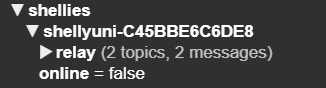
This is logged in the topic log
2022-12-16T18:57:49.593Z "shellies/shellyuni-C45BBE6C6DE8/online" 0 false falseThis is log level 5
[latest-22343]2022-12-16T19:09:47.346Z <MQTTController:5:MQTTController.js:834> MQTTController#mosquitto-mqtt handling shellies/shellyuni-C45BBE6C6DE8/online for poolvarmepump: false
[latest-22343]2022-12-16T19:09:47.346Z <MQTTController:5:MQTTController.js:934> MQTTController#mosquitto-mqtt setting Entity#mosquitto-mqtt>poolvarmepump x_mqtt_device.online=false
This is log level 7
[latest-22343]2022-12-16T18:11:20.082Z <MQTTController:6:MQTTController.js:389> MQTTController#mqtt message packet=[Object]{ "cmd": "publish", "retain": false, "qos": 0, "dup": false, "length": 47, "topic": "smartreader/sensor/voltage_phase_3/state", "payload": 232.7 } [latest-22343]2022-12-16T18:11:20.098Z <MQTTController:6:MQTTController.js:389> MQTTController#mqtt message packet=[Object]{ "cmd": "publish", "retain": false, "qos": 0, "dup": false, "length": 45, "topic": "smartreader/sensor/current_phase_1/state", "payload": 6.8 } [latest-22343]2022-12-16T18:11:20.103Z <MQTTController:6:MQTTController.js:389> MQTTController#mqtt message packet=[Object]{ "cmd": "publish", "retain": false, "qos": 0, "dup": false, "length": 45, "topic": "smartreader/sensor/current_phase_2/state", "payload": 0.9 } [latest-22343]2022-12-16T18:11:20.109Z <MQTTController:6:MQTTController.js:389> MQTTController#mqtt message packet=[Object]{ "cmd": "publish", "retain": false, "qos": 0, "dup": false, "length": 45, "topic": "smartreader/sensor/current_phase_3/state", "payload": 4.0 } [latest-22343]2022-12-16T18:11:23.377Z <MQTTController:6:MQTTController.js:389> MQTTController#mosquitto-mqtt message packet=[Object]{ "cmd": "publish", "retain": false, "qos": 0, "dup": false, "length": 45, "topic": "shellies/shellyuni-C45BBE6C6DE8/online", "payload": false } [latest-22343]2022-12-16T18:11:23.377Z <MQTTController:6:MQTTController.js:422> MQTTController#mosquitto-mqtt dispatching shellies/shellyuni-C45BBE6C6DE8/online to poolvarmepump [latest-22343]2022-12-16T18:11:23.377Z <MQTTController:5:MQTTController.js:834> MQTTController#mosquitto-mqtt handling shellies/shellyuni-C45BBE6C6DE8/online for poolvarmepump: false [latest-22343]2022-12-16T18:11:23.377Z <MQTTController:6:MQTTController.js:854> MQTTController#mosquitto-mqtt template in context is [Object]{ "capabilities": [ "power_switch", "toggle", "binary_sensor", "x_mqtt_device" ], "primary_attribute": "power_switch.state", "requires": [ "topic" ], "events": { "shellies/%topic%/relay/%channel%": { "power_switch.state": { "expr": "bool(payload)", "attribute": "power_switch.state" } }, "shellies/%topic%/adc/0": { "binary_sensor.state": { "expr": "int(payload) < \"1\"", "attribute": "binary_sensor.state" } }, "shellies/%topic%/online": { "x_mqtt_device.online": { "expr": "bool(payload)", "attribute": "x_mqtt_device.online" } } }, "actions": { "power_switch": { "on": { "topic": "shellies/%topic%/relay/%channel%/command", "payload": "on" }, "off": { "topic": "shellies/%topic%/relay/%channel%/command", "payload": "off" }, "set": { "topic": "shellies/%topic%/relay/%channel%/command", "payload": { "expr": "parameters.state ? 'on' : 'off'", "type": "raw" } } } }, "__source": "/home/homebridge/reactor/config/mqtt_templates/my_shelly_uni.yaml", "name": "Poolvärmepump", "topic": "shellyuni-C45BBE6C6DE8", "channel": "1", "uses_template": "my_shelly_uni", "entity": { "id": "poolvarmepump", "canonical_id": "mosquitto-mqtt>poolvarmepump", "controller": "mosquitto-mqtt", "type": "Entity", "name": "Poolvärmepump", "lastchange": 1671214268458, "lastupdate": 1671214268458, "can_delete": true, "can_rename": true, "capabilities": { "x_mqtt_device": { "attributes": { "online": { "type": "boolean" } }, "actions": { "poll": { } } }, "power_switch": { "attributes": { "state": { "type": "bool", "values": { "true": "on", "false": "off" } } }, "actions": { "on": { }, "off": { }, "set": { "arguments": { "state": { "type": …, "values": … } } } } }, "toggle": { "actions": { "toggle": { } } }, "binary_sensor": { "attributes": { "state": { "type": "bool" } } } }, "attribute_meta": { "x_mqtt_device": { "online": { "type": "boolean", "last_modified": 1671214268458, "previous_value": false, "previous_last_modified": 1671214268458 } }, "power_switch": { "state": { "type": "bool", "values": { "true": "on", "false": "off" }, "last_modified": 1667398843973, "previous_value": --null--, "previous_last_modified": 1667398843486 } }, "toggle": { }, "binary_sensor": { "state": { "type": "bool", "last_modified": 1667398843973, "previous_value": --null--, "previous_last_modified": 1667398843486 } } }, "attributes": { "x_mqtt_device": { "online": true }, "power_switch": { "state": false }, "toggle": { }, "binary_sensor": { "state": false } }, "actions": [ "x_mqtt_device.poll", "power_switch.on", "power_switch.off", "power_switch.set", "toggle.toggle" ], "primary_attribute": "power_switch.state", "primary_value": false }, "system": { "id": "system", "canonical_id": "mosquitto-mqtt>system", "controller": "mosquitto-mqtt", "type": "System", "name": "Mosquitto MQTT", "lastchange": 1671214263406, "lastupdate": 1671214263406, "can_delete": false, "can_rename": true, "capabilities": { "sys_system": { "attributes": { "state": { "type": "bool" } }, "actions": { "restart": { }, "purge_dead_entities": { "arguments": { "age": { "type": …, "min": …, "default": … } } }, "delete_entity": { "arguments": { "entity_id": { "type": … } } }, "rename_entity": { "arguments": { "entity_id": { "type": …, "sort": … }, "new_name": { "type": …, "sort": … } } } } }, "x_mqtt": { "attributes": { }, "actions": { "publish": { "arguments": { "topic": { "type": …, "sort": … }, "payload": { "type": …, "bigtext": …, "uiclass": …, "optional": …, "sort": … }, "qos": { "type": …, "values": …, "default": …, "required": …, "sort": … }, "retain": { "type": …, "default": …, "required": …, "sort": … } } } } } }, "attribute_meta": { "sys_system": { "state": { "type": "bool", "last_modified": 1671214263406, "previous_value": false, "previous_last_modified": 1671214255282 } }, "x_mqtt": { } }, "attributes": { "sys_system": { "state": true }, "x_mqtt": { } }, "actions": [ "sys_system.restart", "sys_system.purge_dead_entities", "sys_system.delete_entity", "sys_system.rename_entity", "x_mqtt.publish" ], "primary_attribute": "sys_system.state", "primary_value": true }, "payload_raw": "false", "packet": [object Object], "payload": "false", "value": "4.12" } [latest-22343]2022-12-16T18:11:23.378Z <MQTTController:6:MQTTController.js:857> MQTTController#mosquitto-mqtt events for Entity#mosquitto-mqtt>poolvarmepump: [Array][ { "expr": "bool(payload)", "attribute": "x_mqtt_device.online" } ] [latest-22343]2022-12-16T18:11:23.378Z <MQTTController:7:MQTTController.js:861> MQTTController#mosquitto-mqtt entity poolvarmepump attribute x_mqtt_device.online source [Object]{ "expr": "bool(payload)", "attribute": "x_mqtt_device.online" } [latest-22343]2022-12-16T18:11:23.378Z <MQTTController:5:MQTTController.js:934> MQTTController#mosquitto-mqtt setting Entity#mosquitto-mqtt>poolvarmepump x_mqtt_device.online=false [latest-22343]2022-12-16T18:11:23.460Z <MQTTController:6:MQTTController.js:389> MQTTController#mosquitto-mqtt message packet=[Object]{ "cmd": "publish", "retain": false, "qos": 0, "dup": false, "length": 42, "topic": "shellies/shellyix3-98CDAC2F5883/input/0", "payload": 1 } [latest-22343]2022-12-16T18:11:23.460Z <MQTTController:6:MQTTController.js:422> MQTTController#mosquitto-mqtt dispatching shellies/shellyix3-98CDAC2F5883/input/0 to ljussensor [latest-22343]2022-12-16T18:11:23.460Z <MQTTController:5:MQTTController.js:834> MQTTController#mosquitto-mqtt handling shellies/shellyix3-98CDAC2F5883/input/0 for ljussensor: "1" [latest-22343]2022-12-16T18:11:23.460Z <MQTTController:6:MQTTController.js:854> MQTTController#mosquitto-mqtt template in context is [Object]{ "capabilities": [ "binary_sensor" ], "primary_attribute": "binary_sensor.state", "events": { "shellies/%topic%/input/%channel%": { "binary_sensor.state": { "expr": "bool(payload)", "attribute": "binary_sensor.state" } } }, "name": "Skymningsrelä", "topic": "shellyix3-98CDAC2F5883", "channel": "0", "uses_template": "my_shelly_sensor", "entity": { "id": "ljussensor", "canonical_id": "mosquitto-mqtt>ljussensor", "controller": "mosquitto-mqtt", "type": "Entity", "name": "Skymningsrelä", "lastchange": 1671214263452, "lastupdate": 1671214263452, "can_delete": true, "can_rename": true, "capabilities": { "x_mqtt_device": { "attributes": { "online": { "type": "boolean" } }, "actions": { "poll": { } } }, "binary_sensor": { "attributes": { "state": { "type": "bool" } } } }, "attribute_meta": { "x_mqtt_device": { "online": { "type": "boolean", "last_modified": 1671214263452, "previous_value": false, "previous_last_modified": 1671214263009 } }, "binary_sensor": { "state": { "type": "bool", "last_modified": 1671201570383, "previous_value": false, "previous_last_modified": 1671176239276 } } }, "attributes": { "x_mqtt_device": { "online": true }, "binary_sensor": { "state": true } }, "actions": [ "x_mqtt_device.poll" ], "primary_attribute": "binary_sensor.state", "primary_value": true }, "system": { "id": "system", "canonical_id": "mosquitto-mqtt>system", "controller": "mosquitto-mqtt", "type": "System", "name": "Mosquitto MQTT", "lastchange": 1671214263406, "lastupdate": 1671214263406, "can_delete": false, "can_rename": true, "capabilities": { "sys_system": { "attributes": { "state": { "type": "bool" } }, "actions": { "restart": { }, "purge_dead_entities": { "arguments": { "age": { "type": …, "min": …, "default": … } } }, "delete_entity": { "arguments": { "entity_id": { "type": … } } }, "rename_entity": { "arguments": { "entity_id": { "type": …, "sort": … }, "new_name": { "type": …, "sort": … } } } } }, "x_mqtt": { "attributes": { }, "actions": { "publish": { "arguments": { "topic": { "type": …, "sort": … }, "payload": { "type": …, "bigtext": …, "uiclass": …, "optional": …, "sort": … }, "qos": { "type": …, "values": …, "default": …, "required": …, "sort": … }, "retain": { "type": …, "default": …, "required": …, "sort": … } } } } } }, "attribute_meta": { "sys_system": { "state": { "type": "bool", "last_modified": 1671214263406, "previous_value": false, "previous_last_modified": 1671214255282 } }, "x_mqtt": { } }, "attributes": { "sys_system": { "state": true }, "x_mqtt": { } }, "actions": [ "sys_system.restart", "sys_system.purge_dead_entities", "sys_system.delete_entity", "sys_system.rename_entity", "x_mqtt.publish" ], "primary_attribute": "sys_system.state", "primary_value": true }, "payload_raw": "1", "packet": [object Object], "payload": "1" }and this is a hard refreshed view of the entity

Totally missed the docs for publishing templates, my bad!
Thank you for spotting my mistake, I've corrected the expr for the binary_sensor.
-
OK. I just posted MQTTController 22350 that has a fix to keep from overriding your custom value (it will still try, but yours will prevail).
-
@crille I have a wip for templates for Shelly uni, i3 and i4, among others. Great to hear you’re working on a template for the uni.
@therealdb My use case for the Shelly uni template is not very generic so I won't publish that to the community but I'm working on some other templates for IKEA Tradfri, Tuya smart plugs and Xioami sensors that might be published later on.
But this fix would be a great addition to your existing templates for Shelly devices.
-
@therealdb My use case for the Shelly uni template is not very generic so I won't publish that to the community but I'm working on some other templates for IKEA Tradfri, Tuya smart plugs and Xioami sensors that might be published later on.
But this fix would be a great addition to your existing templates for Shelly devices.
@Crille yeah, I'm just writing some guidance for Shelly Uni, since it's just a dual input/output device and we have template for that. I have template for Shelly Button 1 already in my test environment, and I'll write something for i3 as well, probably using a scene controller as the base (it could be already mapped today as 3 separate devices).
Thanks for the contribution!
-
@toggledbits A few more thoughts:
-
I would like to parameterize
primary_attribute:andtemperature_sensor.unitsto give the user the oppurtunity to choose between for example temperature or humidity and C or F. Before I show you all my failures, is it supposed to be doable in current release? (I'm now doing it by having the same templates in one file but with differentprimary_attribute:and id's) -
I'd like to suggest more aliases for
value_sensorfor exampleatmospheric_pressureandsignal_strengthboth with.units. Is that something you would consider or is there another way to accomplish twovalue_sensorin one entity? -
Before I show you all my failures, is it possible somehow to predefine values for
light_effect?
Thank you for your patience and let me know if you need me to provide more info if the answer isn't just yes or no

-
-
 T toggledbits locked this topic on