





Skip to content
  • Categories
  • Recent
  • Tags
  • Popular
  • Unsolved
Collapse
Discussion Forum to share and further the development of home control and automation, independent of platforms.
  1. Home
  2. Software
  3. Multi-System Reactor
  4. Replacing SiteSensor Plugin (Vera) with MSR
[Solved] DynamicGroupController updating members issue
CrilleC
Edit: Solved in latest-26221. Bare-metal latest-26193 I have this group: "OKforLarm": name: OK för Larm select: - include_controller: vera - include_capability: door_sensor filter_expression: entity.attributes.door_sensor.state It contains the entities I expect but behaves a bit odd. When I open vera>device_10097 the entity attribute door_sensor.state changes to true but it won't show up as member in the group, when I also open vera>device_10095 they both shows as members and when I close vera>device_10095 it disappear from the group but when I close vera>device_10097 it lingers in the group until I restart Reactor.
Multi-System Reactor
Reactor (Multi-System/Multi-Hub) Announcements
toggledbitsT
Build 21228 has been released. Docker images available from DockerHub as usual, and bare-metal packages here. Home Assistant up to version 2021.8.6 supported; the online version of the manual will now state the current supported versions; Fix an error in OWMWeatherController that could cause it to stop updating; Unify the approach to entity filtering on all hub interface classes (controllers); this works for device entities only; it may be extended to other entities later; Improve error detail in messages for EzloController during auth phase; Add isRuleSet() and isRuleEnabled() functions to expressions extensions; Implement set action for lock and passage capabilities (makes them more easily scriptable in some cases); Fix a place in the UI where 24-hour time was not being displayed.
Multi-System Reactor
DynamicGroupController and attributes
therealdbT
Hey @toggledbits I'm back to trying to optimize a couple of things based on dynamic group. First of all, I think I found a typo in the doc: primary_attribute: "binary_sensor.state" primary_attribute_value: | d = false; each id in members: d = getEntity(id)?.attributes?.power_switch?.state or d, d I think the correct code snippet is d = false, All that said, my use case for dynamic groups is to group 3 different climate devices, so I could easily command them at the same time. Commands are good, but sometimes I want to check if any of the devices are on, and that's easily done with a similar snippet as the one you have in the docs. But this is limited to the primary attribute, while I want to have any of the attributes in the group to be driven by a similar logic (while all are null in the group). ie, access hvac_control.mode and see if any of the unit is set to cool, or heat. Is that possible, without re-defining an expression in each of my rules? Thanks!
Multi-System Reactor
Arming Envisalink panel from MSR
T
Topic thumbnail image
Multi-System Reactor
Upgrade Issues
T
Topic thumbnail image
Multi-System Reactor
[SOLVED] Conflicting Set Reaction Groups Appear to Fire Simultaneously in Single Rule Evaluation
G
Topic thumbnail image
Multi-System Reactor
[SOLVED] Question regarding "in" vs "contains" vs contents of the string
G
Topic thumbnail image
Multi-System Reactor
Logon screen timeout
G
Noticing since 170 that the lock screen doesn't switch to the logon prompt but, rather, stays on the active UI until such time as you go to click something within it. Then it jumps to the login screen. Brave browser Brave 1.92.139 (Official Build) (arm64) Chromium: 150.0.7871.114
Multi-System Reactor
[MSR] Copy&past of actions and/or drag&drop between set/reset
therealdbT
Hey @toggledbits One thing that bothers me while doing work on new systems/new features, is that I cannot copy&paste actions, and I cannot drag&drop between set and resets. #1 is for when I want to copy an action between different rules opened in two separate browser windows, while #2 is when I just need to flip a bunch of actions in the reset, or move some logic back and forth. Both will be appreciated, but I understand the technical challenges. Thanks!
Multi-System Reactor
Upgrade advice - upgrade from aarch64 to ARM64 image
T
I'm currently on version 26011. I understand that the aarch64 image is no longer supported. So, I therefore need to update to the ARM64 image. Can anyone possibly suggest how I update my docker compose.yaml file (see below). Ideally I'd like to keep my existing reactions etc. rather than start from scratch. # Multi-System Reactor template docker-compose.yml (version 22160) # # Change the lines indicated by "DO"... # services: reactor: container_name: reactor environment: # DO change the TZ: line to set your local time zone. # See valid TZ list: https://en.wikipedia.org/wiki/List_of_tz_database_time_zones TZ: GB # # DO NOT change this path. Your directory location is in "source" below. REACTOR_DATA_PREFIX: /var/reactor # DO change the image below to the one you are using (e.g. armv7l or aarch64 for RPi 4) image: toggledbits/reactor:latest-aarch64 restart: "always" expose: - 8111 ports: - 8111:8111 volumes: # DO change the /home/username/reactor below to the directory you created for # your local data; DO NOT change the /var/reactor part - /home/pi/docker/reactor:/var/reactor - /etc/localtime:/etc/localtime:ro tmpfs: /tmp
Multi-System Reactor
Alexa for MSR, any interest?
MikeReadingtonM
Topic thumbnail image
Multi-System Reactor
[RESOLVED] Telegram notification broke with latest update
3
Topic thumbnail image
Multi-System Reactor
[RESOLVED] Phantom device, “INFO” appears
wmarcolinW
Topic thumbnail image
Multi-System Reactor
[RESOLVED] Mode Status NULL
wmarcolinW
Topic thumbnail image
Multi-System Reactor
[RESOLVED] HTTP query failing after version 26177
wmarcolinW
Topic thumbnail image
Multi-System Reactor
Question about the find function
wmarcolinW
Topic thumbnail image
Multi-System Reactor
[Answered] OK to remove old json files?
3
Topic thumbnail image
Multi-System Reactor
Deprecation Announcement: 32-bit ARM *docker* images
toggledbitsT
If you are using the armv7l docker image, the OpenJS Foundation that publishes node is no longer producing 32-bit builds as of v24. That means the last supported LTS version of node for armv7l is v22, which will go End-of-Life in May 2027. Therefore, the Reactor armv7l image is now deprecated and will only be produced until node v22 goes EOL, and I will not publish armv7l images beyond that date. If you are running an RPi 3 or earlier with Reactor, you are on this image, and will need to upgrade hardware to a 64-bit model and use the arm64 image. If you need help getting it done, ask in this category.
Multi-System Reactor
[Solved] build 26150 - engine not starting
G
@toggledbits I pulled the image (well, Watchtower did) and within minutes the whole system went offline. The log looks like it ends with 26143. [latest-26143]2026-05-31T15:23:44.547Z <default:INFO> Closing container Container#Predicate#rule-mkahsmgf/26qq82mw-cons [latest-26143]2026-05-31T15:23:44.547Z <default:INFO> Closing container Container#Predicate#rule-lqyfljfi/22f8on0t-cons [latest-26143]2026-05-31T15:23:44.547Z <default:INFO> Closing container Container#Predicate#rule-lsb61rw8/24oenqi2-cons [latest-26143]2026-05-31T15:23:44.547Z <default:INFO> Closing container Container#Predicate#rule-lrh58he0/rule-lrh58he0:S-1c00gfib-cons [latest-26143]2026-05-31T15:23:44.547Z <default:INFO> Closing container Container#Predicate#rule-lrh58he0/1c00dylr-cons [latest-26143]2026-05-31T15:23:44.547Z <default:INFO> Closing container Container#Predicate#rule-lrh58he0/1nam9w5u-cons [latest-26143]2026-05-31T15:23:44.547Z <default:INFO> Closing container Container#Predicate#rule-miuh2qqi/22ls4lql-cons [latest-26143]2026-05-31T15:23:44.547Z <default:INFO> Closing container Container#Predicate#rule-kwc6rmci/rule-kwc6rmci:S-1vj8sdfc-cons [latest-26143]2026-05-31T15:23:44.547Z <default:INFO> Closing container Container#Predicate#rule-kwc6rmci/rule-kwc6rmci:S-1qanz01x-cons [latest-26143]2026-05-31T15:23:44.547Z <default:INFO> Closing container Container#Predicate#rule-ladyja6a/24lq19p6-cons [latest-26143]2026-05-31T15:23:44.547Z <default:INFO> Closing container Container#Predicate#rule-mk0o8iox/23oy468y-cons [latest-26143]2026-05-31T15:23:44.547Z <default:INFO> Closing container Container#Predicate#rule-miscg2h3/rule-miscg2h3:S-22gmbq1c-cons [latest-26143]2026-05-31T15:23:44.547Z <default:INFO> Closing container Container#Predicate#re-kxgrfjke/238p0old-cons [latest-26143]2026-05-31T15:23:44.547Z <default:INFO> Closing container Container#Predicate#re-m7ccsso5/re-m7ccsso5-1r0myjxa-cons [latest-26143]2026-05-31T15:23:44.547Z <default:INFO> Closing container Container#Predicate#rule-ladyja6a/19nl9wq2-cons [latest-26143]2026-05-31T15:23:44.547Z <default:INFO> Closing container Container#Predicate#rule-ladyja6a/rule-ladyja6a:S-yl3xk9t-cons [latest-26143]2026-05-31T15:23:44.547Z <default:INFO> Closing container Container#Predicate#rule-ladyja6a/rule-ladyja6a:S-yl3vv5m-cons [latest-26143]2026-05-31T15:23:44.547Z <default:INFO> Closing container Container#Predicate#re-ln7j2nqp/re-ln7j2nqp-22mx9lzd-cons [latest-26143]2026-05-31T15:23:44.547Z <default:INFO> Closing container Container#Predicate#re-ln7j2nqp/22mx87c8-cons [latest-26143]2026-05-31T15:23:44.547Z <default:INFO> Closing container Container#Predicate#rule-licneppy/1mzwe7ht-cons [latest-26143]2026-05-31T15:23:44.547Z <default:INFO> Closing container Container#Predicate#rule-ml3194ih/25jqt1j4-cons [latest-26143]2026-05-31T15:23:44.547Z <default:INFO> Closing container Container#Predicate#re-kxgrg7kf/227hshak-cons [latest-26143]2026-05-31T15:23:44.547Z <default:INFO> Closing container Container#Predicate#rule-reactorexmachina/13ua1p95-cons [latest-26143]2026-05-31T15:23:44.547Z <default:INFO> Closing container Container#Predicate#rule-reactorexmachina/13uagam7-cons [latest-26143]2026-05-31T15:23:44.547Z <default:INFO> Closing container Container#Predicate#rule-grpvl9oypg/rule-grpvl9oypg:R-134x4cbv-cons [latest-26143]2026-05-31T15:23:44.547Z <default:INFO> Closing container Container#Predicate#rule-grpvl9oypg/rule-grpvl9oypg:R-134x2fyl-cons [latest-26143]2026-05-31T15:23:44.547Z <default:INFO> Closing container Container#Predicate#re-lscjrws1/238p5c22-cons [latest-26143]2026-05-31T15:23:44.547Z <default:INFO> Closing container Container#Predicate#rule-lbwr0jvq/1xkczf03-cons [latest-26143]2026-05-31T15:23:44.547Z <Structure:NOTICE> Structure Structure#1 stopped [latest-26143]2026-05-31T15:23:44.547Z <app:NOTICE> Closing APIs... [latest-26143]2026-05-31T15:23:44.547Z <wsapi:NOTICE> wsapi: closing... [latest-26143]2026-05-31T15:23:44.547Z <wsapi:NOTICE> wsapi: disconnecting from "192.168.1.23#82" (1001 service closing) [latest-26143]2026-05-31T15:23:44.548Z <httpapi:NOTICE> HTTP API closing... [latest-26143]2026-05-31T15:23:44.549Z <wsapi:NOTICE> wsapi: server closed [latest-26143]2026-05-31T15:23:44.549Z <httpapi:INFO> HTTP server closed. [latest-26143]2026-05-31T15:23:44.549Z <app:NOTICE> Stopping timers... [latest-26143]2026-05-31T15:23:44.551Z <app:null> Shutdown complete, process ID 1 [latest-26143]2026-05-31T15:23:44.551Z <app:null> Closing logs... [latest-26143]2026-05-31T15:23:44.551Z <default:null> Closing log I can SSH to the VM. Alas, I do not have the previous image for 26143 as I'm a little too quick sometimes on housekeeping.
Multi-System Reactor
http request action & digest auth
tunnusT
I’m using the HTTP Request action in MSR and need to authenticate against an endpoint that uses HTTP Digest authentication. Now that endpoint was changed to use SHA-256 in digest auth, so I would like to know if MSR supports it, or is it limited to MD5-based digest auth?
Multi-System Reactor

Replacing SiteSensor Plugin (Vera) with MSR

Scheduled Pinned Locked Moved Multi-System Reactor
91 Posts 7 Posters 49.0k Views 6 Watching
  • Oldest to Newest
  • Newest to Oldest
  • Most Votes
Reply
  • Reply as topic
Log in to reply
This topic has been deleted. Only users with topic management privileges can see it.
  • LibraSunL Offline
    LibraSunL Offline
    LibraSun
    wrote on last edited by LibraSun
    #9

    OPENWEATHER PRO TIP

    Users of MSR's built-in weather object ('weather>default') may wish to know how to convert the value in wx.icon to an actual thumbnail image.

    Here's how:
    Suppose the value stored in that variable is '01d'
    Simply prepend 'http://openweathermap.org/img/wn/' to the beginning, and append '.png' to the end. (You can enlarge the image by including '@2x', '@4x', etc. before the '.png'!)

    Better still, gather all of the icons files from https://openweathermap.org/weather-conditions and host them on your own local server/repo, to spare OWx from excess bandwidth. You can also grab their table of "Weather Condition Codes" containing a description of each possible value in wx.condition_code.

    These tirbits would be helpful in designing a dynamic "Weather" tile for the MSR Dashboard feature!!

    EXAMPLES:

    clear sky Condition: 01d = "Clear Sky (day)"
    clouds Condition: 04n = "Clouds (night)"

    1 Reply Last reply
    0
    • LibraSunL Offline
      LibraSunL Offline
      LibraSun
      wrote on last edited by LibraSun
      #10

      FEATURE REQUEST

      Add "Solar Noon" to Sunrise/Sunset trigger in MSR, even if it's just derived as "halfway point between Sunrise and Sunset"
      (No need for "Civil Noon" since that's automatically 12:00pm)

      Could be useful for farms, solar installations, etc.

      1 Reply Last reply
      0
      • toggledbitsT Offline
        toggledbitsT Offline
        toggledbits
        wrote on last edited by
        #11

        That's easy, it has it, so all I need to do is add the menu item to the UI.

        Author of Multi-system Reactor and Reactor, DelayLight, Switchboard, and about a dozen other plugins that run on Vera and openLuup.

        1 Reply Last reply
        1
        • toggledbitsT toggledbits

          Great. If you filter the "Entities" list (left nav) for the "wx" capability, you should find the entity that contains your local weather data.

          G Offline
          G Offline
          gwp1
          wrote on last edited by
          #12

          @toggledbits I found this:
          a66f3768-e8e4-4280-b215-ebc45ae3d696-image.png

          Oddly, the historical is returning Melgrove lol I left the config so that it would pull from the default location which is using lat/long.

          *Hubitat C-7 2.5.1.142
          *Proxmox VE v8, Beelink MiniPC 12GBs, SSD

          *HAOS
          Core 2026.7.4
          w/ HA Connect ZWA-2
          FW: v1.1
          SDK: v7.23.1

          *Prod MSR in docker/portainer
          MSR: latest-26193-8dd8f854
          MQTTController: 25139
          ZWave Controller: 25139

          1 Reply Last reply
          0
          • toggledbitsT Offline
            toggledbitsT Offline
            toggledbits
            wrote on last edited by
            #13

            I'm not sure where you're going with this post? Are you reporting a problem?

            Author of Multi-system Reactor and Reactor, DelayLight, Switchboard, and about a dozen other plugins that run on Vera and openLuup.

            G 1 Reply Last reply
            0
            • toggledbitsT toggledbits

              I'm not sure where you're going with this post? Are you reporting a problem?

              G Offline
              G Offline
              gwp1
              wrote on last edited by
              #14

              @toggledbits I guess I am - unless I'm misreading the docs. I believe to have OWM set to use the default location of MSR which is Hanahan SC, not Melgrove Someplace.

              I don't want to file a bug until I'm sure it's MSR and not me.

              *Hubitat C-7 2.5.1.142
              *Proxmox VE v8, Beelink MiniPC 12GBs, SSD

              *HAOS
              Core 2026.7.4
              w/ HA Connect ZWA-2
              FW: v1.1
              SDK: v7.23.1

              *Prod MSR in docker/portainer
              MSR: latest-26193-8dd8f854
              MQTTController: 25139
              ZWave Controller: 25139

              1 Reply Last reply
              0
              • toggledbitsT Offline
                toggledbitsT Offline
                toggledbits
                wrote on last edited by
                #15

                OK. In order to sort that out, I need to see your configuration for both the default system location and OWM. Post here or PM is fine.

                Author of Multi-system Reactor and Reactor, DelayLight, Switchboard, and about a dozen other plugins that run on Vera and openLuup.

                G 1 Reply Last reply
                0
                • toggledbitsT toggledbits

                  OK. In order to sort that out, I need to see your configuration for both the default system location and OWM. Post here or PM is fine.

                  G Offline
                  G Offline
                  gwp1
                  wrote on last edited by
                  #16

                  @toggledbits Posted via PM.

                  *Hubitat C-7 2.5.1.142
                  *Proxmox VE v8, Beelink MiniPC 12GBs, SSD

                  *HAOS
                  Core 2026.7.4
                  w/ HA Connect ZWA-2
                  FW: v1.1
                  SDK: v7.23.1

                  *Prod MSR in docker/portainer
                  MSR: latest-26193-8dd8f854
                  MQTTController: 25139
                  ZWave Controller: 25139

                  1 Reply Last reply
                  0
                  • toggledbitsT Offline
                    toggledbitsT Offline
                    toggledbits
                    wrote on last edited by
                    #17

                    OK. Looks like all is good, OWM is just returning an odd place name (who knows what data they sourced that from), and since you are using "default" configuration (home location from Reactor main config), it's using OWM's returned name for the entity name. If you do a custom location in the OWM config, you can set the name by adding the "name" to the custom config. I'm going to extend that behavior to the default location config as well, and that will be in today's build. If you want to get it fixed before that, just add a location to your OWMController config section:

                      - id: weather
                        enabled: true
                        implementation: OWMWeatherController
                        name: OWM Weather
                        config:
                          appid: "yourappidhere"
                          locations:
                            - id: home
                              name: "My Custom Place Name"
                              latitude: nn.nnnnnn
                              longitude: nn.nnnnnn
                    

                    Author of Multi-system Reactor and Reactor, DelayLight, Switchboard, and about a dozen other plugins that run on Vera and openLuup.

                    G 1 Reply Last reply
                    2
                    • toggledbitsT toggledbits

                      OK. Looks like all is good, OWM is just returning an odd place name (who knows what data they sourced that from), and since you are using "default" configuration (home location from Reactor main config), it's using OWM's returned name for the entity name. If you do a custom location in the OWM config, you can set the name by adding the "name" to the custom config. I'm going to extend that behavior to the default location config as well, and that will be in today's build. If you want to get it fixed before that, just add a location to your OWMController config section:

                        - id: weather
                          enabled: true
                          implementation: OWMWeatherController
                          name: OWM Weather
                          config:
                            appid: "yourappidhere"
                            locations:
                              - id: home
                                name: "My Custom Place Name"
                                latitude: nn.nnnnnn
                                longitude: nn.nnnnnn
                      
                      G Offline
                      G Offline
                      gwp1
                      wrote on last edited by
                      #18

                      @toggledbits I'm a few nightly builds behind so I'll wait until you have tonight's out. Thanks!

                      *Hubitat C-7 2.5.1.142
                      *Proxmox VE v8, Beelink MiniPC 12GBs, SSD

                      *HAOS
                      Core 2026.7.4
                      w/ HA Connect ZWA-2
                      FW: v1.1
                      SDK: v7.23.1

                      *Prod MSR in docker/portainer
                      MSR: latest-26193-8dd8f854
                      MQTTController: 25139
                      ZWave Controller: 25139

                      1 Reply Last reply
                      0
                      • LibraSunL LibraSun

                        For MSR users with SiteSensor still installed back on Vera, you might want to consider letting MSR take over those duties. Here's a quick run-down of how I imported one of my SiteSensor recipes into a Rule on MSR, using OpenWeather API* as an example.

                        STEP 1: Copy the Basics from Vera
                        (a) Go to your Vera > Devices, locate SiteSensor (the main instance, not one of its children devices) and click ► for details then click SETTINGS.
                        (b) Copy and paste (into Notepad or other text editor) the Request URL along with each of the defined expressions.

                        STEP 2: Create a Rule on MSR
                        (c) Jump into Rule Sets and click "Create Rule". Click its title to rename the rule 'OpenWeather (API)" and click 'Rename'.
                        (d) Decide on appropriate Triggers (in my case, it's an OR group that includes an [INTERVAL] set to "Every 3 hours" plus a few [ENTITY ATTRIBUTE] entries reacting to things like entering/leaving home, waking up, etc.).
                        (e) In Set Reacion, create an [HTTP REQUEST] > [GET] action.
                        (f) Paste your old "Request URL" into the "Request URL" box.

                        FYI GET calls to OpenWeather API* take the form:

                        http://api.openweathermap.org/data/2.5/weather?zip=<your_ZIP_code>&id=<your_Wx_ID>&appid=<app-id>&units=imperial
                        

                        (g) Create four new blank Expressions (name them openWx, Tx, Hx and Rx).
                        (h) Click SAVE & EXIT

                        STEP 3: Process the Response
                        (i) Re-open rule "OpenWeather (API)" by clicking the 'Edit' icon.
                        (j) Within the [HTTP REQUEST] action, assign "Capture response to:" ► openWx
                        (k) Down in Expressions, click "[+]Add Expresssion" then enter the following:
                        Tx := round(openWx.main.temp,1)
                        // yields current outdoor temperature
                        Hx := round(openWx.main.humidity)
                        // yields current humidity conditions
                        Rx := openWx.rain ? ( openWx.rain['3h'] ? openWx.rain['3h'] : 0) : 0
                        // yields predicted rainfall, if present; otherwise 0
                        (l) Click SAVE & EXIT. Enjoy!

                        Naturally, your specific needs and workflow will differ from the one I've outlined here. For instance, you may wish to explore the contents of the JSON object in openWx for additional data of interest to you, and define variables to match.

                        My goal here has been to illustrate some key concepts needed for moving from SiteSensor over to MSR:

                        • Some syntax is the same, such as dot notation for object.item.access;
                        • Other syntax has changed, such as the use of ternary A ? B : C in place of IF (A, B, C);
                        • Manually setting an [INTERVAL] in lieu of SiteSensor's timed schedule;

                        Pro tip: If your workflow demands that other Rules react to the output of the "OpenWeather (API)" rule, then be sure to create all of the aforementioned Expressions under "Global Expressions" instead, so they become accessible across all Rule Sets.

                        Once the transition is complete, you can either DISARM SiteSensor on Vera or remove it entirely with "Remove Device" (which will automatically remove all of its child devices).

                        *Additional reading:
                        OpenWeather API : https://openweathermap.org/api
                        FREE SUBSCRIPTION REQUIRED TO USE THIS SERVICE

                        PRO TIP: See below for optimal way to incorporate OpenWeatherMap into your MSR workflow(s), by enabling the service directly in the reactor.yaml config file.

                        cw-kidC Offline
                        cw-kidC Offline
                        cw-kid
                        wrote on last edited by
                        #19

                        @librasun said in Replacing SiteSensor Plugin (Vera) with MSR:

                        My goal here has been to illustrate some key concepts needed for moving from SiteSensor over to MSR

                        I never used SiteSensor plugin for Vera before.

                        Thanks for the MSR example you wrote.

                        I wanted to try this out and found this Covid-19 API here.

                        However the http command they give doesn't seem to return any results data, either just in the web browser or in my MSR rule.

                        https://covid19-api.com/country?name=UK&format=json
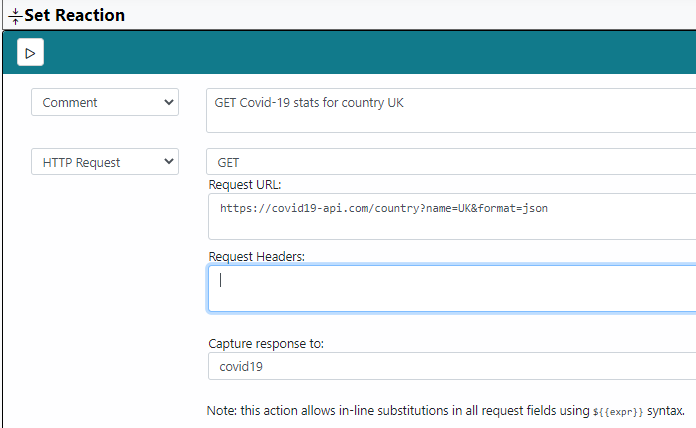
                        

                        52885b5e-6ae2-4454-8650-a2fb4b55eb4c-image.png

                        The curl command does work OK however

                        curl -X GET "https://covid19-api.com/country?name=UK&format=json" -H "accept: application/json"
                        

                        How do I specify the application/json in the MSR rule? Assuming the problem is related to that.

                        1 Reply Last reply
                        0
                        • toggledbitsT Offline
                          toggledbitsT Offline
                          toggledbits
                          wrote on last edited by
                          #20

                          Same way. One header per line in that field.

                          Author of Multi-system Reactor and Reactor, DelayLight, Switchboard, and about a dozen other plugins that run on Vera and openLuup.

                          cw-kidC 1 Reply Last reply
                          0
                          • toggledbitsT toggledbits

                            Same way. One header per line in that field.

                            cw-kidC Offline
                            cw-kidC Offline
                            cw-kid
                            wrote on last edited by cw-kid
                            #21

                            @toggledbits

                            In the "Request Headers" field in the "Set Reaction" I have tried the following:

                            Accept: application/json

                            and tried:

                            Content-Type: application/json

                            It allows me to save the rule but when I go back in to the rule that field is empty again and its not collecting the response data in to my empty expression / variable.

                            1 Reply Last reply
                            0
                            • toggledbitsT Offline
                              toggledbitsT Offline
                              toggledbits
                              wrote on last edited by
                              #22

                              So there are two separate issues here:

                              1. First, we need to figure out if the UI is correctly storing the headers or not, and if the problem is merely that it is not restoring/displaying them correctly when you go back into the editor. The check for that is to go into the reaction, add the headers, and save. Then, open the rule status view and it will show you the rule ID underneath the rule condition status and expressions. Go to your reactor/storage/rules directory, and grab the same-named file (with .json suffix) and post it here. Let's see what's being stored.

                              2. Look at the logs to see where the reaction is running and what the request is doing. There may be errors logged.

                              It's entirely possible that the problem is 1, 2, or even both.

                              Author of Multi-system Reactor and Reactor, DelayLight, Switchboard, and about a dozen other plugins that run on Vera and openLuup.

                              1 Reply Last reply
                              0
                              • cw-kidC Offline
                                cw-kidC Offline
                                cw-kid
                                wrote on last edited by cw-kid
                                #23

                                @toggledbits

                                I cannot upload files to this forum it seems.

                                I have uploaded the rule to my One Drive here

                                1 Reply Last reply
                                0
                                • toggledbitsT Offline
                                  toggledbitsT Offline
                                  toggledbits
                                  wrote on last edited by
                                  #24

                                  OK. There's definitely two broken things in the handling of headers, so go ahead and open a PR for this. No need to post the rule there (again); I've got it and have the issue in hand, but unfortunately, it's not just a UI issue.

                                  Author of Multi-system Reactor and Reactor, DelayLight, Switchboard, and about a dozen other plugins that run on Vera and openLuup.

                                  1 Reply Last reply
                                  1
                                  • cw-kidC Offline
                                    cw-kidC Offline
                                    cw-kid
                                    wrote on last edited by
                                    #25

                                    OK done

                                    https://reactor.toggledbits.com/mantisbt/view.php?id=147

                                    Thanks

                                    1 Reply Last reply
                                    2
                                    • cw-kidC Offline
                                      cw-kidC Offline
                                      cw-kid
                                      wrote on last edited by cw-kid
                                      #26

                                      OK so lets say I now have a variable in MSR that contains some data pulled down from a HTTP Request to some online API somewhere.

                                      How can I send that value / information to a Generic IO Sensor in Vera ?

                                      I know how to create a GenericIO device in Vera and I know how to send data to it from a simple HTTP command, for example this command will send the text "Hello World"

                                      http://Vera-IP/port_3480/data_request?id=lu_variableset&DeviceNum=128&serviceId=urn:micasaverde-com:serviceId:GenericSensor1&Variable=CurrentLevel&Value=Hello World
                                      

                                      And here is the device in Vera:

                                      51473251-7dd4-436a-b70a-02add45a940f-image.png

                                      But how to create a rule to send the contents of an MSR variable (expression) ?

                                      LibraSunL 1 Reply Last reply
                                      0
                                      • LibraSunL Offline
                                        LibraSunL Offline
                                        LibraSun
                                        wrote on last edited by LibraSun
                                        #27

                                        I'm going to assume the data was returned in JSON format? In which case MSR treats that like an object {}, whose keys can be referenced with dot notation.
                                        For example, if your variable respData stored the response {animal:"cat", clothing:"suit", food:"chow"} and you want to send the current value of the "chow" key therein, simply reference that value with respData.chow.

                                        One hurdle you may have to overcome, since the data is being fetched and stored in Rule A, but you want to reference the results in Rule B, is that you'd then have to either (a) store respData as a Global Expression, or (b) create a blank Expression in Rule B, and tell Rule A to [Set Variable] on it.

                                        1 Reply Last reply
                                        0
                                        • cw-kidC cw-kid

                                          OK so lets say I now have a variable in MSR that contains some data pulled down from a HTTP Request to some online API somewhere.

                                          How can I send that value / information to a Generic IO Sensor in Vera ?

                                          I know how to create a GenericIO device in Vera and I know how to send data to it from a simple HTTP command, for example this command will send the text "Hello World"

                                          http://Vera-IP/port_3480/data_request?id=lu_variableset&DeviceNum=128&serviceId=urn:micasaverde-com:serviceId:GenericSensor1&Variable=CurrentLevel&Value=Hello World
                                          

                                          And here is the device in Vera:

                                          51473251-7dd4-436a-b70a-02add45a940f-image.png

                                          But how to create a rule to send the contents of an MSR variable (expression) ?

                                          LibraSunL Offline
                                          LibraSunL Offline
                                          LibraSun
                                          wrote on last edited by
                                          #28

                                          @cw-kid said in Replacing SiteSensor Plugin (Vera) with MSR:

                                          But how to create a rule to send the contents of an MSR variable (expression) ?

                                          In case you revised your question, or I misinterpreted it earlier, here goes:

                                          It sounds like you want to send data from MSR to a plug-in / virtual device / sensor over on Vera. Before you begin, go to that "device" > Advanced > Variables and determine which of its variables is intended to receive the data.

                                          Click "EDIT" next to that variable, and look for its complete "service" name in the window; copy that string for use back in MSR.

                                          Close that window on Vera, then head back over to MSR.

                                          In MSR, you will want an [ENTITY ACTION] in the Set Reaction. Choose the target device as the 'Entity' and choose "x_vera_device.set_variable" as the action.

                                          Fill out the three fields, where "service:" and "variable:" come from the string you copied earlier. For "value:" either type a constant (numeric or "text"), or a variable name properly clad in curly brackets ( e.g. ${{respData}} ) so the value gets substituted next time the Rule triggers.

                                          Hope this helps!!

                                          1 Reply Last reply
                                          1
                                          Reply
                                          • Reply as topic
                                          Log in to reply
                                          • Oldest to Newest
                                          • Newest to Oldest
                                          • Most Votes


                                          Recent Topics

                                          • [Solved] DynamicGroupController updating members issue
                                            CrilleC
                                            Crille
                                            0
                                            5
                                            25

                                          • Reactor (Multi-System/Multi-Hub) Announcements
                                            toggledbitsT
                                            toggledbits
                                            5
                                            148
                                            128.5k

                                          • DynamicGroupController and attributes
                                            therealdbT
                                            therealdb
                                            1
                                            5
                                            74

                                          • Arming Envisalink panel from MSR
                                            toggledbitsT
                                            toggledbits
                                            0
                                            5
                                            96

                                          • Upgrade Issues
                                            T
                                            tbully
                                            0
                                            9
                                            212

                                          • [SOLVED] Conflicting Set Reaction Groups Appear to Fire Simultaneously in Single Rule Evaluation
                                            toggledbitsT
                                            toggledbits
                                            0
                                            10
                                            222

                                          • [SOLVED] Question regarding "in" vs "contains" vs contents of the string
                                            G
                                            gwp1
                                            0
                                            5
                                            108

                                          • openLuup console disappeared - 500 - Internal Server Error
                                            A
                                            a-lurker
                                            0
                                            2
                                            162

                                          • Logon screen timeout
                                            G
                                            gwp1
                                            0
                                            5
                                            190

                                          • [MSR] Copy&past of actions and/or drag&drop between set/reset
                                            toggledbitsT
                                            toggledbits
                                            0
                                            9
                                            339

                                          • Upgrade advice - upgrade from aarch64 to ARM64 image
                                            toggledbitsT
                                            toggledbits
                                            0
                                            4
                                            199
                                          Powered by NodeBB | Contributors
                                          Hosted freely by 10RUPTiV - Solutions Technologiques | Contact us
                                          • Login

                                          • Don't have an account? Register

                                          • Login or register to search.
                                          • First post
                                            Last post
                                          0
                                          • Categories
                                          • Recent
                                          • Tags
                                          • Popular
                                          • Unsolved