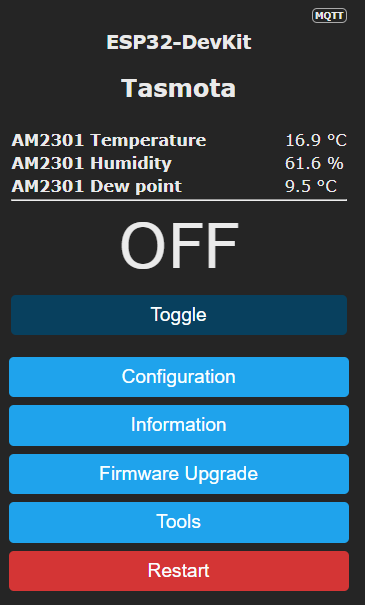
Struggling to setup my first Tasmota device and MQTT
-
Hi
Trying to create my first Tasmota device on an ESP board. I flashed it OK setup the GPIO pins and pointed it to an new MQTT broker running on the same Linux Debian box as MSR. I followed these instructions here to install a MQTT Controller in MSR, which I can now see under Entities. My topic on the Tasmota setup I called "fan_controller" I don't see any new device coming into MSR however.
My ESP has an DHT22 Temp sensor attached and a Single Channel Relay to control a Fan and I also have a local touch button connected to the ESP board.
If I run this command in terminal on the Debian box I do see some data from the ESP / Tasmota device.
mosquitto_sub -h localhost -t "#" -vtele/fan_controller/LWT Online tasmota/discovery/7C87CE2F4CE0/config {"ip":"192.168.0.46","dn":"Tasmota","fn":["Tasmota",null,null,null,null,null,null,null],"hn":"fan-controller-3296","mac":"7C87CE2F4CE0","md":"ESP32-DevKit","ty":0,"if":0,"cam":0,"ofln":"Offline","onln":"Online","state":["OFF","ON","TOGGLE","HOLD"],"sw":"15.2.0","t":"fan_controller","ft":"%prefix%/%topic%/","tp":["cmnd","stat","tele"],"rl":[1,0,0,0,0,0,0,0,0,0,0,0,0,0,0,0,0,0,0,0,0,0,0,0,0,0,0,0,0,0,0,0],"swc":[-1,-1,-1,-1,-1,-1,-1,-1,-1,-1,-1,-1,-1,-1,-1,-1,-1,-1,-1,-1,-1,-1,-1,-1,-1,-1,-1,-1,-1,-1,-1,-1],"swn":[null,null,null,null,null,null,null,null,null,null,null,null,null,null,null,null,null,null,null,null,null,null,null,null,null,null,null,null,null,null,null,null],"btn":[0,0,0,0,0,0,0,0,0,0,0,0,0,0,0,0,0,0,0,0,0,0,0,0,0,0,0,0,0,0,0,0],"so":{"4":0,"11":0,"13":0,"17":0,"20":0,"30":0,"68":0,"73":0,"82":0,"114":0,"117":0},"lk":0,"lt_st":0,"bat":0,"dslp":0,"sho":[],"sht":[],"ver":1} tasmota/discovery/7C87CE2F4CE0/sensors {"sn":{"Time":"2026-02-14T17:25:50","AM2301":{"Temperature":14.2,"Humidity":56.7,"DewPoint":5.7},"TempUnit":"C"},"ver":1} reactor/mqtt/LWT onlineIn my Reactor.yaml file I added this:
- id: mqtt
  name: MQTT
  enabled: true
  implementation: MQTTController
  config:
    source: "mqtt://127.0.0.1:1883"
    tasmota_discovery: true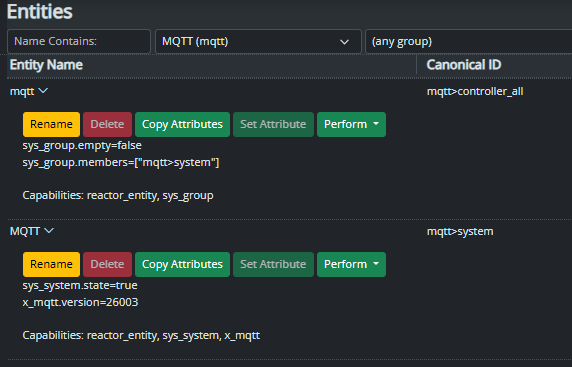
192.168.0.4 is the MSR / MQTT Broker Debian box.
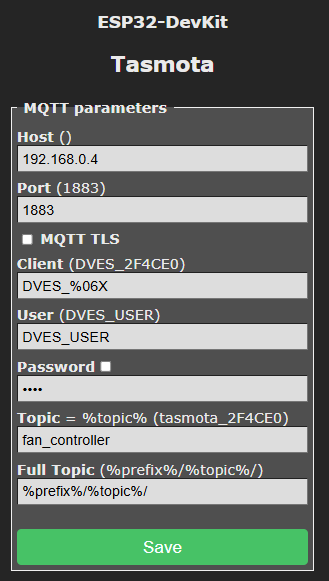
Probably a bad idea but I then asked A.I. what the problem might be and it was telling me I needed to change my reactor.yaml file and change
implementation: MQTTControllertoclass: MQTTControllerand it also told me to add these two lines at the top of the reactor.yaml filesystem: extension_path: /home/stuart/reactor/extI don't know if it made that up or read it somewhere, I could not see any reference to it. Anyway MSR didn't want to load the MQTT Controller into Entities when I changed it to "class" instead of "implementation".
In my file system it looks like this:
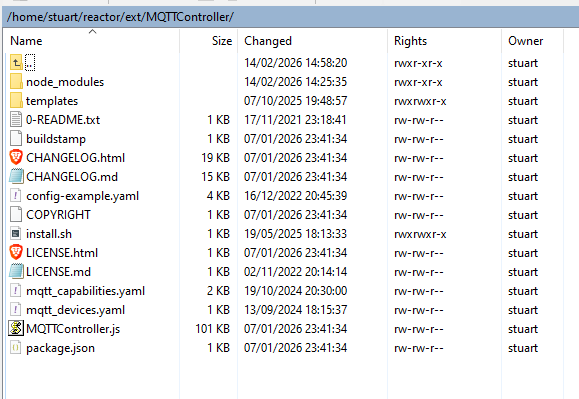
I am not sure what I am missing?
Thanks.
EDIT: The A.I. also told me to run a command to change the IP from 127.0.0.1 to 0.0.0.0 perhaps that was a mistake.
Here is what IP and port it seems to be listening on:
 sudo ss -tlnp | grep mosquitto
LISTEN 0      100          0.0.0.0:1883      0.0.0.0:*    users:(("mosquitto",pid=23713,fd=5))
Here is what the A.I. said when I asked it why we changed it from 127.0.0.1 to 0.0.0.0
"1. The Broker (Mosquitto) at 0.0.0.0
Think of 0.0.0.0 as "Listen to everyone."Because Mosquitto is set to 0.0.0.0, it is listening for messages from both the internal system (the HP Thin Client itself) and external devices (your ESP32 fan controller).
If it were set to 127.0.0.1, it would be "deaf" to your ESP32.
- Reactor at 127.0.0.1
Think of 127.0.0.1 as "Talking to myself."
Since Multi-System Reactor and Mosquitto are both living on the same HP Thin Client, Reactor doesn't need to go out onto the Wi-Fi to find the broker. It just looks internally.
Using 127.0.0.1 (localhost) is faster and more secure because that traffic never even leaves the computer's CPU.
So, no, it is not a problem! Reactor talks to the broker internally (127.0.0.1), and the ESP32 talks to the broker externally (192.168.0.4). They meet in the middle inside the Mosquitto database.""
- Reactor at 127.0.0.1
-
Hi
Trying to create my first Tasmota device on an ESP board. I flashed it OK setup the GPIO pins and pointed it to an new MQTT broker running on the same Linux Debian box as MSR. I followed these instructions here to install a MQTT Controller in MSR, which I can now see under Entities. My topic on the Tasmota setup I called "fan_controller" I don't see any new device coming into MSR however.
My ESP has an DHT22 Temp sensor attached and a Single Channel Relay to control a Fan and I also have a local touch button connected to the ESP board.
If I run this command in terminal on the Debian box I do see some data from the ESP / Tasmota device.
mosquitto_sub -h localhost -t "#" -vtele/fan_controller/LWT Online tasmota/discovery/7C87CE2F4CE0/config {"ip":"192.168.0.46","dn":"Tasmota","fn":["Tasmota",null,null,null,null,null,null,null],"hn":"fan-controller-3296","mac":"7C87CE2F4CE0","md":"ESP32-DevKit","ty":0,"if":0,"cam":0,"ofln":"Offline","onln":"Online","state":["OFF","ON","TOGGLE","HOLD"],"sw":"15.2.0","t":"fan_controller","ft":"%prefix%/%topic%/","tp":["cmnd","stat","tele"],"rl":[1,0,0,0,0,0,0,0,0,0,0,0,0,0,0,0,0,0,0,0,0,0,0,0,0,0,0,0,0,0,0,0],"swc":[-1,-1,-1,-1,-1,-1,-1,-1,-1,-1,-1,-1,-1,-1,-1,-1,-1,-1,-1,-1,-1,-1,-1,-1,-1,-1,-1,-1,-1,-1,-1,-1],"swn":[null,null,null,null,null,null,null,null,null,null,null,null,null,null,null,null,null,null,null,null,null,null,null,null,null,null,null,null,null,null,null,null],"btn":[0,0,0,0,0,0,0,0,0,0,0,0,0,0,0,0,0,0,0,0,0,0,0,0,0,0,0,0,0,0,0,0],"so":{"4":0,"11":0,"13":0,"17":0,"20":0,"30":0,"68":0,"73":0,"82":0,"114":0,"117":0},"lk":0,"lt_st":0,"bat":0,"dslp":0,"sho":[],"sht":[],"ver":1} tasmota/discovery/7C87CE2F4CE0/sensors {"sn":{"Time":"2026-02-14T17:25:50","AM2301":{"Temperature":14.2,"Humidity":56.7,"DewPoint":5.7},"TempUnit":"C"},"ver":1} reactor/mqtt/LWT onlineIn my Reactor.yaml file I added this:
- id: mqtt
  name: MQTT
  enabled: true
  implementation: MQTTController
  config:
    source: "mqtt://127.0.0.1:1883"
    tasmota_discovery: true
192.168.0.4 is the MSR / MQTT Broker Debian box.
Probably a bad idea but I then asked A.I. what the problem might be and it was telling me I needed to change my reactor.yaml file and change
implementation: MQTTControllertoclass: MQTTControllerand it also told me to add these two lines at the top of the reactor.yaml filesystem: extension_path: /home/stuart/reactor/extI don't know if it made that up or read it somewhere, I could not see any reference to it. Anyway MSR didn't want to load the MQTT Controller into Entities when I changed it to "class" instead of "implementation".
In my file system it looks like this:
I am not sure what I am missing?
Thanks.
EDIT: The A.I. also told me to run a command to change the IP from 127.0.0.1 to 0.0.0.0 perhaps that was a mistake.
Here is what IP and port it seems to be listening on:
 sudo ss -tlnp | grep mosquitto
LISTEN 0      100          0.0.0.0:1883      0.0.0.0:*    users:(("mosquitto",pid=23713,fd=5))
Here is what the A.I. said when I asked it why we changed it from 127.0.0.1 to 0.0.0.0
"1. The Broker (Mosquitto) at 0.0.0.0
Think of 0.0.0.0 as "Listen to everyone."Because Mosquitto is set to 0.0.0.0, it is listening for messages from both the internal system (the HP Thin Client itself) and external devices (your ESP32 fan controller).
If it were set to 127.0.0.1, it would be "deaf" to your ESP32.
- Reactor at 127.0.0.1
Think of 127.0.0.1 as "Talking to myself."
Since Multi-System Reactor and Mosquitto are both living on the same HP Thin Client, Reactor doesn't need to go out onto the Wi-Fi to find the broker. It just looks internally.
Using 127.0.0.1 (localhost) is faster and more secure because that traffic never even leaves the computer's CPU.
So, no, it is not a problem! Reactor talks to the broker internally (127.0.0.1), and the ESP32 talks to the broker externally (192.168.0.4). They meet in the middle inside the Mosquitto database.""
@cw-kid By the numbers:
tasmota_discoveryis not a thing in Reactor, so that won't work.- The AI-recommended use of 0.0.0.0 for the host IP address of your MQTT broker (mosquitto) is correct and recommended.
implementation: MQTTControlleris the correct usage (classis deprecated).- You should use the 127.0.0.1 (aka loopback) address for the MQTTController's
sourceconfiguration inreactor.yamlwhenever the MQTT broker (i.e. mosquitto) is running on the same host as Reactor; otherwise, use the LAN interface address (192.168.0.4 in your case). system:andextension_pathare also not a thing in Reactor configuration (another AI fantasy fact).- All ESP32s and other MQTT clients should use the LAN address for the MQTT host (192.168.0.4 as shown in your image; that's correct).
You need to use one of the available templates for Tasmota described in the MQTTController documentation or create a configuration of your own. The latter may be necessary for your configuration, but we need more info. Please show more of the Tasmota device configuration (screen shots), so we can help you with that.
Until then, just choose the simple included switch/relay configuration template to get things working (i.e. so you can see that Reactor sees the device and may be able to control it).
  # In the controllers section of reactor.yaml:
  - id: mqtt
    enabled: true
    implementation: MQTTController
    name: Mosquitto
    config:
      source: mqtt://127.0.0.1:1883/
      log_topics: ['tele','stat','tasmota']  # only for testing, disable when not in use (makes big log file)
      entities:
        tasmota_fan_controller:
          name: "Tasmota Fan Controller"
          topic: fan_controller  # matches topic configured in Tasmota
          unit: 0  # relay number on the device
          include:
            - tasmota_generic_relay
            - tasmota_sensor_temperature_humidity
This may be all you need. Try it and see what happens. Don't forget to look at the logs when things aren't working as expected. And look at the
mqtt-topics.logfile to see what data you are getting (post a nice snippet of it here, along with everything else requested, if the device isn't working in Reactor). - Reactor at 127.0.0.1
-
Knew A.I. just dreams some things up out of thin air! I have removed the stuff it suggested to add to the reactor.yaml file.
I have this now as my MQTT Controller section:
- id: mqtt
  enabled: true
  interface: MQTTController
  name: Mosquitto
  config:
    source: 'mqtt://127.0.0.1:1883'
    log_topics: ['tele','stat','tasmota']  # only for testing, disable when not in use (makes big log file)
    entities:
      tasmota_fan_controller:
        name: "Tasmota Fan Controller"
        topic: fan_controller  # matches topic configured in Tasmota
        unit: 0  # relay number on the device
        include: tasmota_generic_relay
        include: tasmota_sensor_temperature_humidity
However MSR is not loading it now, it says "The Reactor configuration in "/home/stuart/reactor/config/reactor.yaml" could not be read; the system has started with an empty configuration." I guess there is something wrong with the formatting somewhere. Seems very picky if it loads the config file or not after I have edited it etc.
I have used "interface: MQTTController" and not "implementation: MQTTController" correct ?
@toggledbits said in Struggling to setup my first Tasmota device and MQTT:
Please show more of the Tasmota device configuration (screen shots), so we can help you with that.
Some more details:
Hardware:
ESP32-WROOM-32
Chip Information -
XX5R69
Silabs CP2102
DCL00X
2108+Computer Fan is 12V with external DC power supply
Relay (SRD-05VDC-SL-C) (Single Channel)
TTP223B Touch Sensor
DHT22 Temperature Humidity SensorI used one of these expansion boards what the ESP32 board sits into, as it gives you more pins to connect multiple sensor etc. Like it gives you more pins for the 3.3V and 5V for example.
Pinout:
TTP223B Touch Sensor (Signal Wire) -> GPIO_IN:4 (Input)
Relay (SRD-05VDC-SL-C) (Signal Wire) -> GPIO_OUT:27 (Output)
DHT22 Temperature Humidity Sensor (Signal Wire) -> GPIO:5There is an "Information" button in the Tasmota device webpage that also shows a lot of device info if you want that also?
Thanks.
-
The formatting in the reator.yaml file looks OK ? I am using notepad ++
But anytime I try to add the new MQTT Controller section and restart MSR it doesn't load the config. if I remove that new section. save and restart MSR then it does load the config as I see my other Vera controllers then in Entities.
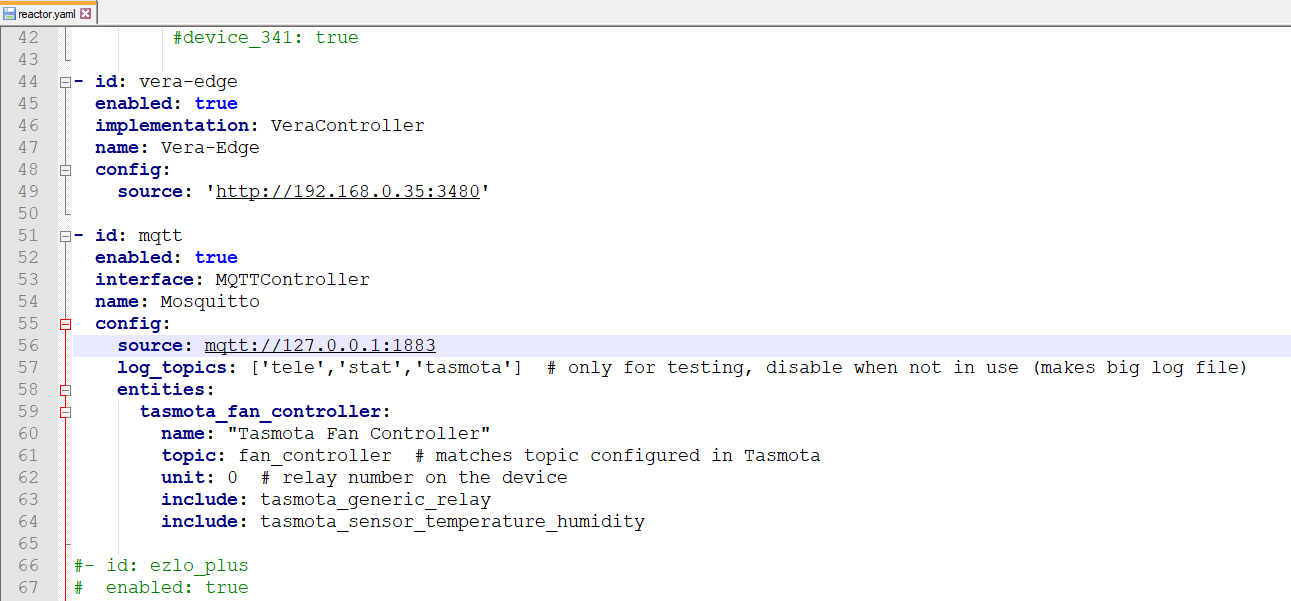
-
Sorry, my bad, change the
includesection to look like this (I'll fix the example above as well):include: - tasmota_generic_relay - tasmota_sensor_temperature_humidityAlso, you can use yamllint.com to sanity-check your entire config file.
-
Sorry, my bad, change the
includesection to look like this (I'll fix the example above as well):include: - tasmota_generic_relay - tasmota_sensor_temperature_humidityAlso, you can use yamllint.com to sanity-check your entire config file.
@toggledbits said in Struggling to setup my first Tasmota device and MQTT:
        include:
          - tasmota_generic_relay
- tasmota_sensor_temperature_humidityThanks, now MSR reads the reactor.yaml file as it shows me the Vera controllers etc. But I am seeing this alert now:
"controller "Mosquitto" (undefined mqtt) could not be loaded at startup due to error. See the log."
I looked in the reactor.log and all its rotations but could not see any mention of MQTT.
I also checked the reactor.yaml file on that website and it says its valid.
i then changed this "interface: MQTTController" to this "implementation: MQTTController" and restarted and now I can see the MQTT Controller again under Entities.
I then waited like 10 minutes to see if any new "fan_controller" devices would appear ? And nothing does. Searching the logs again for "mqtt" there are no search matches. Also cannot see a mqtt-topics.log file in the logs folder.
If I run this command on the MSR / MQTT Broker box.
mosquitto_sub -v -t 'tele/fan_controller/#' -t 'stat/fan_controller/#'Eventually some data from the ESP / Tasmota comes in:
tele/fan_controller/LWT Online
tele/fan_controller/STATE {"Time":"2026-02-15T11:59:06","Uptime":"0T14:12:43","UptimeSec":51163,"Heap":120,"SleepMode":"Dynamic","Sleep":50,"LoadAvg":19,"MqttCount":3,"Berry":{"HeapUsed":4,"Objects":50},"POWER":"OFF","Wifi":{"AP":1,"SSId":"ASUS_86_2G","BSSId":"04:D9:F5:74:C5:E0","Channel":10,"Mode":"HT40","RSSI":98,"Signal":-51,"LinkCount":2,"Downtime":"0T00:00:04"},"Hostname":"fan-controller-7192","IPAddress":"192.168.0.49"}
tele/fan_controller/SENSOR {"Time":"2026-02-15T11:59:06","AM2301":{"Temperature":15.6,"Humidity":62.1,"DewPoint":8.4},"TempUnit":"C"}
I see data for the temp sensor and I assume "POWER":"OFF" is the Relay / Switch state, as it is currently off.
-
MQTT Explorer is good for troubleshooting to make sure your data is actually getting to the broker IME
C
-
Reading the help page it shows this example config. I don't know what this channel number does? I didn't see a setting for setting a channel number in the Tasmota web UI. However I see there is a "channel" I saw in the data stream in the terminal mine mentioned channel 10. So I tried adding that also into my config.
EDIT: Current Control Channel: 10 appears to be the current 2.4GHZ WIFI channel of my router, its set to AUTO so that channel will change or "channel" in the reactor.yaml something different?
config:
    source: "mqtt://127.0.0.1:1883/"
    entities:
      shelly1_stairway:
        name: "Stairway Light"
        topic: shelly1_43DFD2
        include: shelly_relay
        channel: 0
- id: mqtt enabled: true implementation: MQTTController name: Mosquitto config: source: mqtt://127.0.0.1:1883 log_topics: ['tele','stat','tasmota'] # only for testing, disable when not in use (makes big log file) entities: tasmota_fan_controller: name: "Tasmota Fan Controller" topic: fan_controller # matches topic configured in Tasmota unit: 1 # relay number on the device include: - tasmota_generic_relay - tasmota_sensor_temperature_humidity channel: 10Didn't help however adding Channel still no new entities appearing.
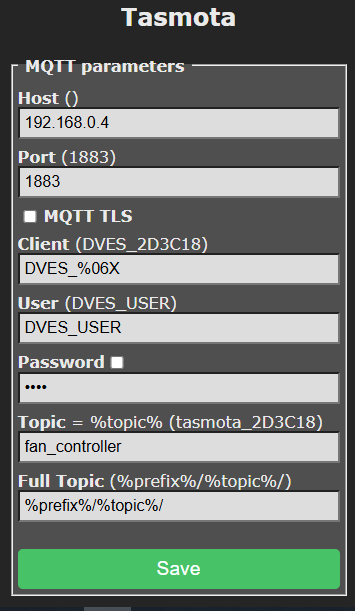
Just seen this also:
"notably Tasmota, do not have MQTT retain on by default (a poor choice for IoT devices, IMO). On Tasmota devices, you can turn it on by using the PowerRetain on, SwitchRetain on, SensorRetain on and StateRetain on commands in the Tasmota console."
I will run those commands now.
-
A.I. just been telling me how to control the Tasmota with HTTP commands can turn on / off the relay now via HTTP if need be. This commands shows everything about the Tasmota device.
http://192.168.0.49/cm?cmnd=Status%200{"Status":{"Module":1,"DeviceName":"Tasmota","FriendlyName":["Tasmota"],"Topic":"fan_controller","ButtonTopic":"0","Power":"0","PowerLock":"0","PowerOnState":3,"LedState":1,"LedMask":"FFFF","SaveData":1,"SaveState":1,"SwitchTopic":"0","SwitchMode":[1,0,0,0,0,0,0,0,0,0,0,0,0,0,0,0,0,0,0,0,0,0,0,0,0,0,0,0,0,0,0,0],"ButtonRetain":0,"SwitchRetain":1,"SensorRetain":1,"PowerRetain":1,"InfoRetain":0,"StateRetain":1,"StatusRetain":0},"StatusPRM":{"Baudrate":115200,"SerialConfig":"8N1","GroupTopic":"tasmotas","OtaUrl":"http://ota.tasmota.com/tasmota32/release/tasmota32.bin","RestartReason":"Software reset CPU","Uptime":"0T15:23:32","StartupUTC":"2026-02-14T20:46:23","Sleep":50,"CfgHolder":4617,"BootCount":8,"BCResetTime":"2026-02-14T20:26:13","SaveCount":48},"StatusFWR":{"Version":"15.2.0(release-tasmota32)","BuildDateTime":"2025-12-12T10:58:29","Core":"3.3.4","SDK":"5.3.4.251205","CpuFrequency":160,"Hardware":"ESP32-D0WD-V3 v3.0","CR":"430/699"},"StatusLOG":{"SerialLog":2,"WebLog":2,"MqttLog":0,"FileLog":0,"SysLog":0,"LogHost":"","LogPort":514,"SSId":["ASUS_86_2G",""],"TelePeriod":60,"Resolution":"558180C0","SetOption":["000082AB","2805C80000000600003C5A0A192800000000","00000080","00006000","00004080","00000000"]},"StatusMEM":{"ProgramSize":2086,"Free":793,"Heap":112,"StackLowMark":3,"PsrMax":0,"PsrFree":0,"ProgramFlashSize":4096,"FlashSize":4096,"FlashChipId":"16405E","FlashFrequency":80,"FlashMode":"DIO","Features":["0809","9F9AD7DF","0015A001","B7F7BFCF","05DA9BC4","E0360DC7","480840D2","20200000","D4BC482D","810A80F1","00000814"],"Drivers":"1,2,!3,!4,!5,7,!8,9,10,11,12,!14,!16,!17,!20,!21,!24,26,!27,29,!34,!35,38,50,52,!59,!60,62,!63,!66,!67,!68,!73,!75,82,!86,!87,!88,!91,!121","Sensors":"1,2,3,5,6,7,8,9,10,11,12,13,14,15,17,18,19,20,21,22,26,31,34,37,39,40,42,43,45,51,52,55,56,58,59,64,66,67,74,85,92,95,98,103,105,109,127","I2CDriver":"7,8,9,10,11,12,13,14,15,17,18,20,24,29,31,36,41,42,44,46,48,58,62,65,69,76,77,82,89"},"StatusNET":{"Hostname":"fan-controller-7192","IPAddress":"192.168.0.49","Gateway":"192.168.0.1","Subnetmask":"255.255.255.0","DNSServer1":"192.168.0.1","DNSServer2":"0.0.0.0","Mac":"7C:87:CE:2D:3C:18","IP6Global":"","IP6Local":"fe80::7e87:ceff:fe2d:3c18%st1","Ethernet":{"Hostname":"","IPAddress":"0.0.0.0","Gateway":"0.0.0.0","Subnetmask":"0.0.0.0","DNSServer1":"192.168.0.1","DNSServer2":"0.0.0.0","Mac":"00:00:00:00:00:00","IP6Global":"","IP6Local":""},"Webserver":2,"HTTP_API":1,"WifiConfig":4,"WifiPower":16.0},"StatusMQT":{"MqttHost":"192.168.0.4","MqttPort":1883,"MqttClientMask":"DVES_%06X","MqttClient":"DVES_2D3C18","MqttUser":"DVES_USER","MqttCount":3,"MqttTLS":0,"MAX_PACKET_SIZE":1200,"KEEPALIVE":30,"SOCKET_TIMEOUT":4},"StatusTIM":{"UTC":"2026-02-15T12:09:55Z","Local":"2026-02-15T13:09:55","StartDST":"2026-03-29T02:00:00","EndDST":"2026-10-25T03:00:00","Timezone":"+01:00","Sunrise":"07:58","Sunset":"18:10"},"StatusSNS":{"Time":"2026-02-15T13:09:55","AM2301":{"Temperature":15.0,"Humidity":62.2,"DewPoint":7.8},"TempUnit":"C"},"StatusSTS":{"Time":"2026-02-15T13:09:55","Uptime":"0T15:23:32","UptimeSec":55412,"Heap":112,"SleepMode":"Dynamic","Sleep":50,"LoadAvg":19,"MqttCount":3,"Berry":{"HeapUsed":4,"Objects":50},"POWER":"OFF","Wifi":{"AP":1,"SSId":"ASUS_86_2G","BSSId":"04:D9:F5:74:C5:E0","Channel":10,"Mode":"HT40","RSSI":100,"Signal":-48,"LinkCount":2,"Downtime":"0T00:00:04"},"Hostname":"fan-controller-7192","IPAddress":"192.168.0.49"}} -
When asking AI, be sure to send the docs, the exact page. It will be more precise. All that said, here's my config
controllers:
  - id: mqtt
    name: MQTT
    enabled: true
    implementation: MQTTController
    config:
      # omitted...
      entities:
        # dehum
        tasmota_dehumidifier:
          name: "Dehum - sensors"
          include: tasmota_sensor_temperature_humidity
          topic: "tasmota-dehum"
          source: SI7021
        tasmota_dehumidifier_switch:
          name: "Dehum - switch"
          include: tasmota_generic_relay
          topic: "tasmota-dehum"
          unit: ""
You could probably consolidate them, but I prefer to have the switch and the sensors separated: it's easier to start and to manage them.
In you case, as per the post,
topic: "tasmota-dehum" should betopic: "fan_controller", whilesourceshould beAM2301`. -
@cw_kid in your post here the configuration you posted is incorrect -- the indenting is invalid, and that will prevent anything from working for that entity.
Honestly, I can't at this stage really get a read on where you are. Between you jumping in with random AI changes and others commenting, your config is a moving target and I can't follow it. If you want my help, I will send you a link so you can upload your config and I can look at it and potentially fix it. Otherwise, I'll let you continue to learn on your own and seek help from others.
-
Clearly the problem is I don't know how to structure or write the required yaml code. Following @therealdb example above, I changed mine to this:
- id: mqtt
  name: Mosquitto
  enabled: true
  implementation: MQTTController
  config:
    entities:
      tasmota_fan_controller_temp:
        name: "Stairs Cupboard Temp"
        include: tasmota_sensor_temperature_humidity
        topic: "fan_controller"
        source: AM2301
I could then finally see an Entity for it in MSR for the Temp sensor. But with no data values as yet its null.
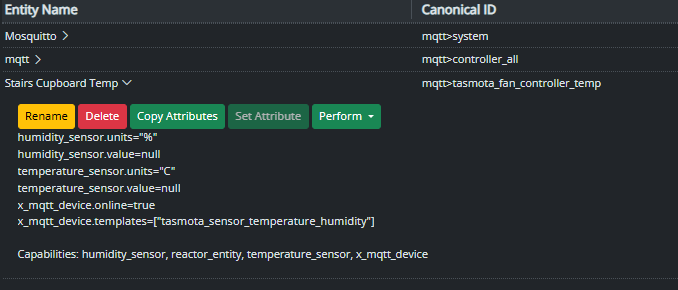
That obviously only imported the DHT22 (AM230) Temp sensor part.
I then tried to add this to also include the 1 channel Relay part.
- id: mqtt
  name: Mosquitto
  enabled: true
  implementation: MQTTController
  config:
    entities:
      tasmota_fan_controller_temp:
        name: "Stairs Cupboard Temp"
        include: tasmota_sensor_temperature_humidity
        topic: "fan_controller"
        source: AM2301
      tasmota_fan_controller_relay:
        name: "Stairs Cupboard Fan"
        include: tasmota_generic_relay
        topic: "fan_controller"
        source:
        unit: "1"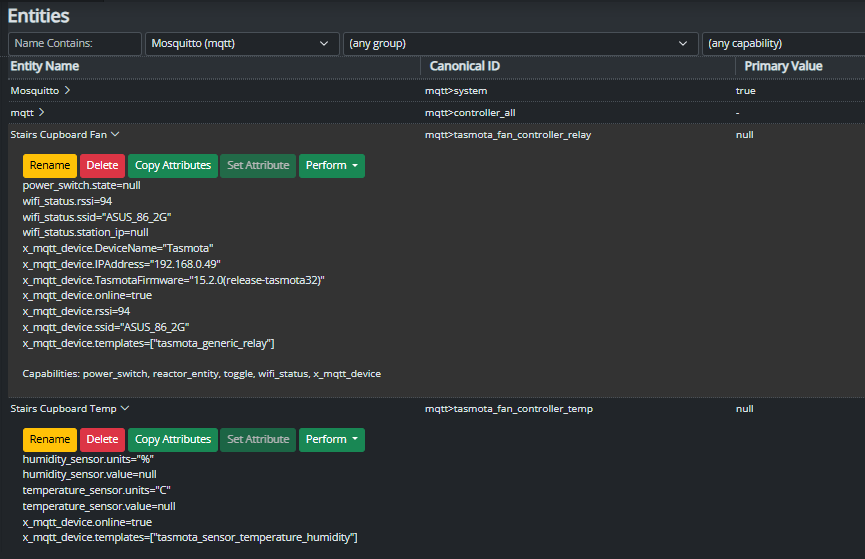
The relay part seems to be working! I pressed the "Perform" button and was able to turn on and off the relay / fan OK.
Seems I didn't need a "Source:" for the relay portion, I left that blank as I didn't know what to put in there anyway.
So just not sure why I have no data from the Temp sensor currently.
-
Its working now, a wire came off the ESP board for the DHT22 which is why it was null. I connected the wire again and now I see data in MSR.
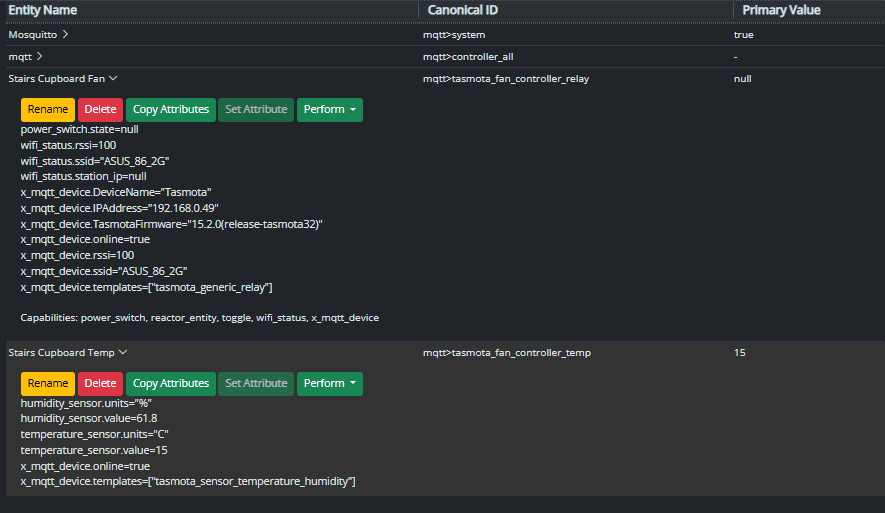
So this seems to be the now working yaml code:
- id: mqtt
  name: Mosquitto
  enabled: true
  implementation: MQTTController
  config:
    entities:
      tasmota_fan_controller_temp:
        name: "Stairs Cupboard Temp"
        include: tasmota_sensor_temperature_humidity
        topic: "fan_controller"
        source: AM2301
      tasmota_fan_controller_relay:
        name: "Stairs Cupboard Fan"
        include: tasmota_generic_relay
        topic: "fan_controller"
        unit: "1"
And I did just install MQTT Explorer so a screen shot of that:
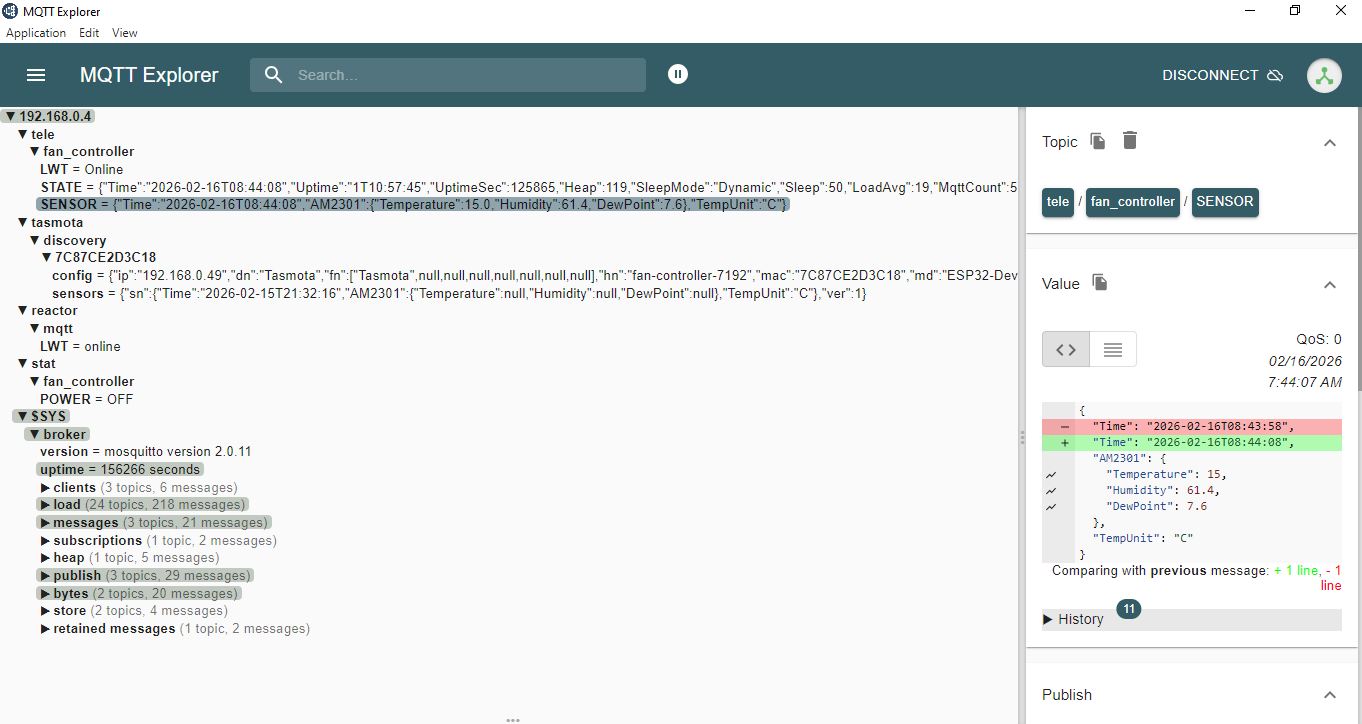
Thanks for everyone help, I just needed a nudge in the right direction with the MSR yaml code.
-
What else can I build! I have loads of spare ESP boards and sensors laying around the place, what I was using when trying out "EzloPi" but I am gonna switch to Tasmota / MSR and eventually Home Assistant when I retire my Vera Plus for Z-Wave duties.
-
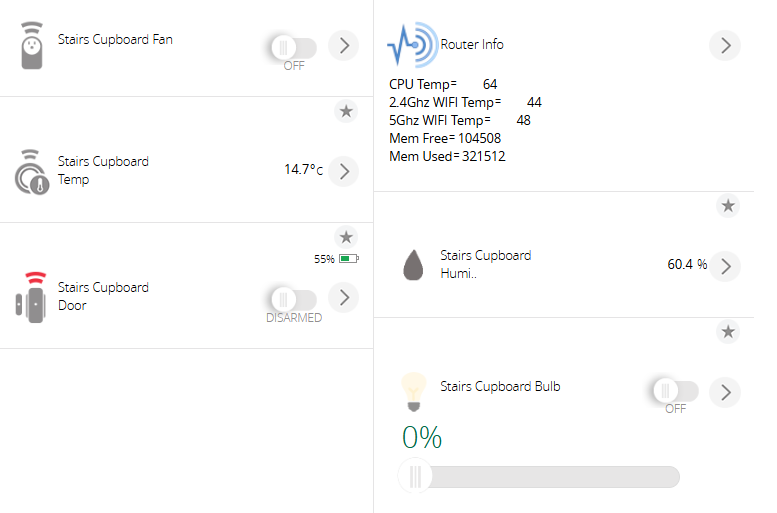
Sweet everything appears to be working now, I created some virtual devices in Vera for the Temp and Humidity and some new MSR rules to push those values to them in Vera if they change.
Updated my Home Remote dashboard and I can see them on my phone now and also have a switch to turn the Fan on and off..
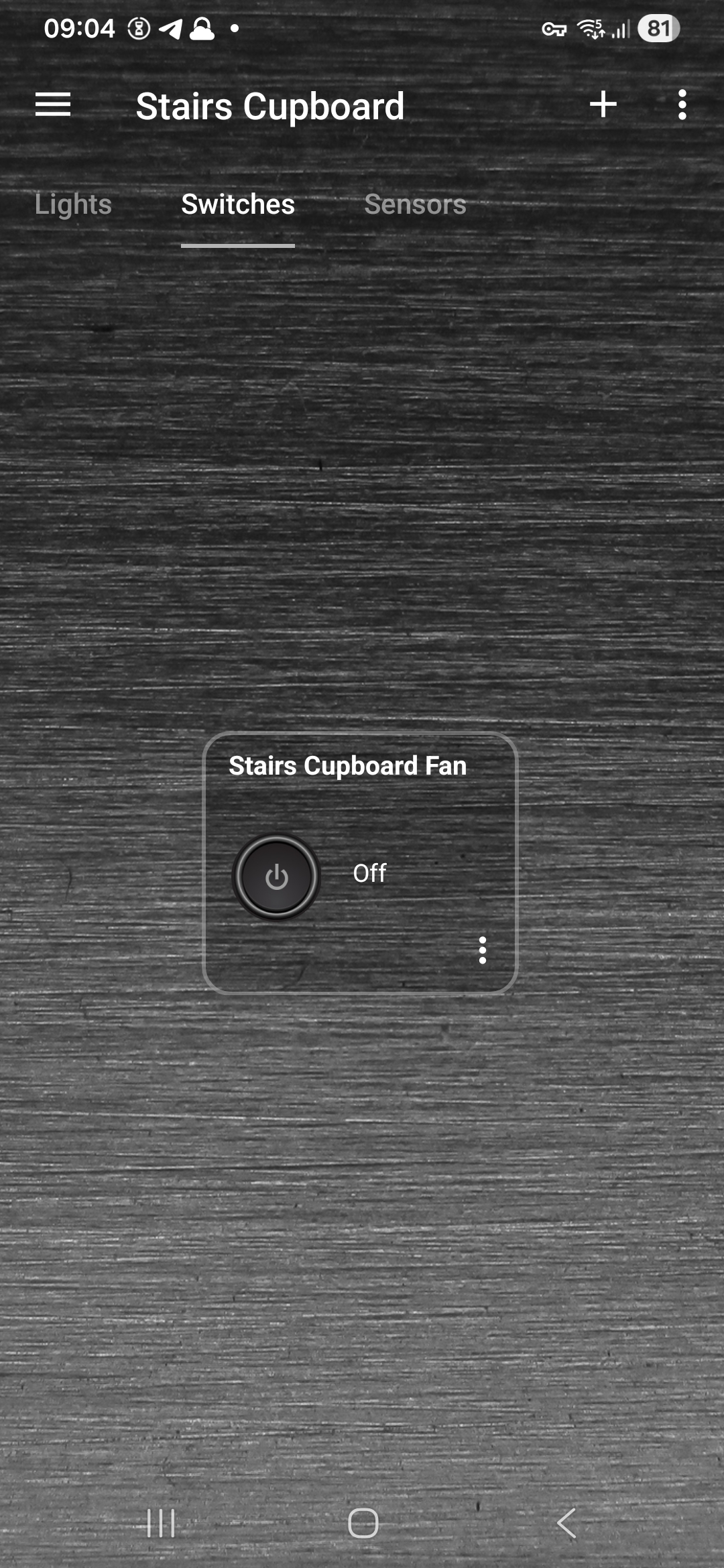 !
!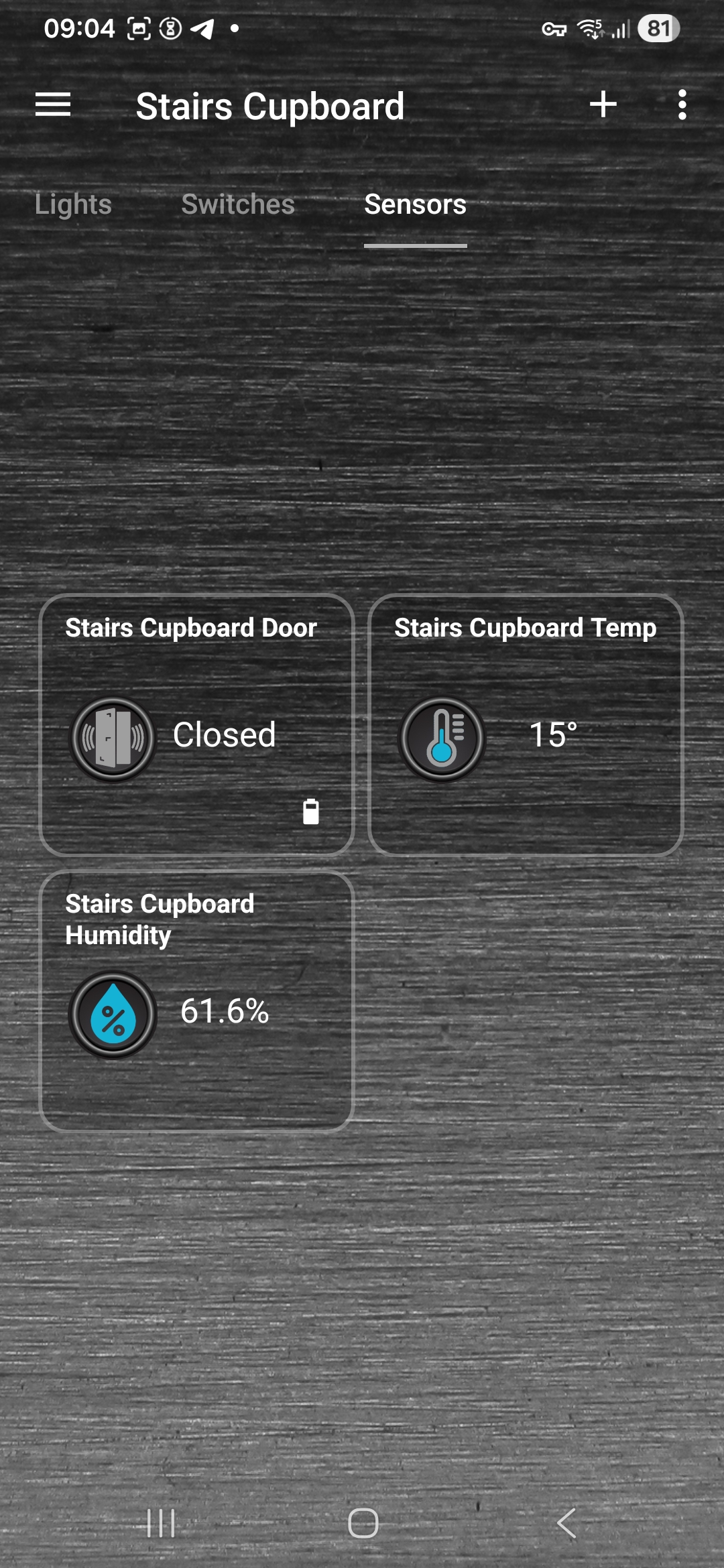 !
! -
What else can I build! I have loads of spare ESP boards and sensors laying around the place, what I was using when trying out "EzloPi" but I am gonna switch to Tasmota / MSR and eventually Home Assistant when I retire my Vera Plus for Z-Wave duties.
@cw-kid I have them with lux, barometric, distance, and temp/humidity sensors, while also using a couple as Bluetooth bridges. in this regard, your fantasy is the real limit.
I've recently moved everything I could to ZWave, because it is better in terms of stability, but ATM there's no equivalent for fancy sensors, even if ZigBee has a denter offer.
-
Actually I do have one issue: power_switch.state=null
It seems MSR is not seeing what the state of the relay currently is? Which is causing me an issue now in a rule I am trying to create.
If I run this command in terminal on the MSR / MQTT broker box
:~mosquitto_sub -v -t 'tele/fan_controller/#' -t 'stat/fan_controller/#'I see this:
tele/fan_controller/LWT Online
tele/fan_controller/STATE {"Time":"2026-02-16T18:38:48","Uptime":"0T03:13:09","UptimeSec":11589,"Heap":113,"SleepMode":"Dynamic","Sleep":50,"LoadAvg":19,"MqttCount":1,"Berry":{"HeapUsed":4,"Objects":50},"POWER":"OFF","Wifi":{"AP":1,"SSId":"ASUS_86_2G","BSSId":"04:D9:F5:74:C5:E0","Channel":3,"Mode":"HT40","RSSI":100,"Signal":-20,"LinkCount":1,"Downtime":"0T00:00:04"},"Hostname":"Stairs-Cupboard-Fan-ESP32","IPAddress":"192.168.0.49"}
tele/fan_controller/SENSOR {"Time":"2026-02-16T18:38:48","AM2301":{"Temperature":21.2,"Humidity":47.9,"DewPoint":9.7},"TempUnit":"C"}
stat/fan_controller/POWER OFF
stat/fan_controller/POWER OFFWhich is correct, the fan is currently off.
So maybe the yaml code is not quite right if its not seeing the state of the relay.
I can turn on / off the relay however via MSR so it is talking to it somewhat.
This is what is in the reactor.yaml file currently.
- id: mqtt
  name: Mosquitto
  enabled: true
  implementation: MQTTController
  config:
    entities:
      tasmota_fan_controller_temp:
        name: "Stairs Cupboard Temp"
        include: tasmota_sensor_temperature_humidity
        topic: "fan_controller"
        source: AM2301
      tasmota_fan_controller_relay:
        name: "Stairs Cupboard Fan"
        include: tasmota_generic_relay
        topic: "fan_controller"
        unit: "1"