Skip to content
  • Categories
  • Recent
  • Tags
  • Popular
  • Unsolved
Collapse
Discussion Forum to share and further the development of home control and automation, independent of platforms.
akbooerA

akbooer

@akbooer
Any thoughts on which is better
CatmanV2C
Obviously a quiet forum, but perhaps it's time I'm looking at rolling Zigbee into my system, in large part for the Aqara FP300 presence sensors which seem to finally provide a solution to if the wasp is actually in the box. My current set up is as follows: One Debian VM on Synology NAS running: Z-wave Server Open Luup Multi system reactor HA bridge Mosquito MQQT broker This machine has a UZB Z-wave stick connected via the USB port on the NAS Another HAOS VM on the same NAS running HAOS I've got some older Z-wave stuff that I keep around until it fails. I have some Tuya stuff integrated in HA My thought was to get either a SMLIGHT SLZB-06M or an Aqara Hub M2 Integrate them via Zigbee2MQQT (running on the Debian machine) and then expose them in HA so I can continue to automate in MSR. Thoughts on which of those devices wold be preferable long term. Both are POE capable which is good. It also appears I could add a USB dongle to the NAS and expose it to the HAOS machine. Any thoughts from the assembled experts here? TIA C
Zigbee
Reactor Loading Screen Safari
S
Topic thumbnail image
Multi-System Reactor
Constraints states visually do not match actual
S
Topic thumbnail image
Multi-System Reactor
Oh the joy of pairing
CatmanV2C
When I remember the old days Just added a new Tuya plug (OK so it's cloud) Start to finish, visible in HA and MSR < 30 seconds... C
Vera
HDMI oddness
CatmanV2C
Not really Smart Home stuff, but going to ask as we have smart people... Bear with me on this one. Asking here because of the font of knowledge! For many eek years I have had a Virgin V6 box and a Raspberry Pi running Kodi connected to my TV through a cheap *** HDMI switch. It all worked beautifully but the absolutely critical thing was that the TV remote passed the signals back to the Pi to allow remote control of Kodi. Couple of changes of late: Installed a soundbar on the TV using the ARC (audio return channel). That then turns the soundbar on and off when the TV turns on and off and the TV volume control controls the soundbar volume direct. Everything continues to work Upgraded the software of the Tivo box to Virgin 360. This is literally software only. You get sent a snacky new Bluetooth remote hit 'upgrade' on the screen and off it goes. Now, things are not playing well. Typically when I turn on to watch Kodi the soundbar comes on (as it should) but the TV either puts out sound through its own speakers and the soundbar, or just the soundbar. It's not possible to control the volume of the soundbar through the TV. Also it's not longer possible to control Kodi using the TV remote. If I turn the TV360 box off, i.e. power it down, before turning on to watch Kodi, everything is fine. This makes little to no sense to me. My assumption is that the cheap *** HDMI switch is getting something from the TV360 connection that it didn't used to get when the software was Tivo and that's screwing up the HDMI communications. I'm upgrading the switch to something a little less chap, but wondered if anyone could validate my theory at all? TIA C
General Discussion
Home Assistant Connect ZWA-2 & ZBT-2
therealdbT
Topic thumbnail image
Hardware
[MSR] Feature request: For Each action on arrays/groups
therealdbT
Topic thumbnail image
Multi-System Reactor
[Solved] Error: Command timeout
G
at _ClientAPI._commandTimeout (http://192.168.1.100:8111/client/ClientAPI.js:807:179 Seeing this randomly when returning to open browser tab after being away awhile. Once, maybe twice a day. "What did you do to trigger it?" Literally nothing, just walked away and returned and there it was. Actions taken in reasonably close proximity to this particular instance of it popping up: I'd restarted the MSR container in Portainer. I'll try to grab some logs here shortly.
Multi-System Reactor
Issue with MSR UI becoming unresponsive
S
I'm having an issue with MSR's UI being very unresponsive. It started happening a couple days ago and I didn't make any changes that would have caused this except adding some meross lan devices in HA. When I go into an entity action and use the search functionality, it usually will start filtering and then get to a place after a few letters are entered where it will take 30 seconds or more (sometimes minutes) for the UI to show what I am typing. During this time MSR ui is completely unresponsive. I've tried multiple browsers and multiple computers. HA and MSR are both deployed in docker. I have run HTOP on the host and when the problem happens there are no CPU/Memory spikes at all. From a functionality standpoint MSR is working perfectly. This seems to be an UI issue only. Do i need to ditch Docker and run MSR on a Proxmox VM? I have both stand alone Docker and Proxmox environments. I dont mind doing that I just want to be able to use the UI again... Installation method Home Assistant Container Core 2025.7.3 Frontend 20250702.3 nothing crazy in the logs except some openweather map stuff that doesn't make any sense as it is working fine in MSR Any help would be greatly appreciated Reactor latest-25328-b2ed1365 app 25328 configuration from /var/reactor/config NODE_PATH /opt/reactor:/opt/reactor/node_modules [latest-25328]2025-11-30T20:01:53.843Z <app:null> Reactor build latest-25328-b2ed1365 starting on v24.11.1 /usr/local/bin/node [latest-25328]2025-11-30T20:01:53.844Z <app:null> Process ID 1 user/group 0/0; docker; platform linux/x64 #161-Ubuntu SMP Tue Jul 22 14:25:40 UTC 2025; locale (undefined) [latest-25328]2025-11-30T20:01:53.844Z <app:null> Basedir /opt/reactor; data in /var/reactor/storage [latest-25328]2025-11-30T20:01:53.844Z <app:null> NODE_PATH=/opt/reactor:/opt/reactor/node_modules [latest-25328]2025-11-30T20:01:53.865Z <app:null> Resolved timezone=America/New_York, environment TZ=America/New_York; offset minutes from UTC=-300 [latest-25328]2025-11-30T20:01:53.867Z <default:null> Module i18n v25141 [latest-25328]2025-11-30T20:01:53.867Z <app:null> Configured locale (undefined); selected locale(s) en-US.UTF-8 [latest-25328]2025-11-30T20:01:53.879Z <app:null> Loaded locale en-US for en-US [latest-25328]2025-11-30T20:01:53.879Z <app:null> Local date/time using configured timezone and locale formatting is "11/30/2025, 3:01:53 PM" [latest-25328]2025-11-30T20:01:53.889Z <Structure:null> Module Structure v25326 [latest-25328]2025-11-30T20:01:53.890Z <Capabilities:null> Module Capabilities v24312 [latest-25328]2025-11-30T20:01:53.904Z <Plugin:null> Module Plugin v25141 [latest-25328]2025-11-30T20:01:53.923Z <Timer:null> Module Timer v25279 [latest-25328]2025-11-30T20:01:53.924Z <TimerBroker:null> Module TimerBroker v25314 [latest-25328]2025-11-30T20:01:53.927Z <Entity:null> Module Entity v25251 [latest-25328]2025-11-30T20:01:53.929Z <Controller:null> Module Controller v25253 [latest-25328]2025-11-30T20:01:53.930Z <AlertManager:null> Module AlertManager v25318 [latest-25328]2025-11-30T20:01:53.937Z <default:null> Module Ruleset v25283 [latest-25328]2025-11-30T20:01:53.937Z <default:null> Module Rulesets v25141 [latest-25328]2025-11-30T20:01:53.942Z <GlobalExpression:null> Module GlobalExpression v25258 [latest-25328]2025-11-30T20:01:53.953Z <Predicate:null> Module Predicate v25328 [latest-25328]2025-11-30T20:01:53.956Z <Rule:null> Module Rule v25323 [latest-25328]2025-11-30T20:01:53.958Z <GlobalReaction:null> Module GlobalReaction v25292 [latest-25328]2025-11-30T20:01:53.959Z <Engine:null> Module Engine v25325 [latest-25328]2025-11-30T20:01:53.964Z <httpapi:null> Module httpapi v25328 [latest-25328]2025-11-30T20:01:53.972Z <wsapi:null> Module wsapi v25328 [latest-25328]2025-11-30T20:01:53.994Z <TaskQueue:null> Module TaskQueue 24138 [latest-25328]2025-11-30T20:01:53.994Z <VeraController:null> Module VeraController v25141 [latest-25328]2025-11-30T20:01:54.179Z <HassController:null> Module HassController v25325 [latest-25328]2025-11-30T20:02:13.797Z <OWMWeatherController:null> Module OWMWeatherController v25268 [latest-25328]2025-11-30T20:02:13.800Z <SystemController:null> Module SystemController v25323 [latest-25328]2025-11-30T20:02:13.807Z <MQTTController:null> Module MQTTController v22092 [latest-25328]2025-11-30T20:02:20.630Z <OWMWeatherController:CRIT> FetchError: request to https://api.openweathermap.org/data/2.5/weather?lat=xxxxxxxxxx&lon=-xxxxxxxxx&appid=xxxxxxxxxxxxxxxxxxxxxxxxxx&units=standard&_r=1xxxxxxxxxxxxxxfailed, reason: [-] FetchError: request to https://api.openweathermap.org/data/2.5/weather?lat=xxxxxxxxxxx&lon=-xxxxxxxxxxxxxxxxxx&appid=xxxxxxxxxxxxxxxxxxx&units=standard&_r=xxxxxxxxxxxxxxxfailed, reason: at ClientRequest.<anonymous> (/opt/reactor/node_modules/node-fetch/lib/index.js:1501:11) at ClientRequest.emit (node:events:508:28) at ClientRequest.emit (node:domain:489:12) at emitErrorEvent (node:_http_client:108:11) at TLSSocket.socketErrorListener (node:_http_client:575:5) at TLSSocket.emit (node:events:508:28) at TLSSocket.emit (node:domain:489:12) at emitErrorNT (node:internal/streams/destroy:170:8) at emitErrorCloseNT (node:internal/streams/destroy:129:3) at processTicksAndRejections (node:internal/process/task_queues:89:21
Multi-System Reactor
Date/time condition
tunnusT
Topic thumbnail image
Multi-System Reactor
Is there a way to turn this section (image in post) off?
toggledbitsT
Topic thumbnail image
Comments & Feedback
Device log?
G
@toggledbits is there a log that will show me what rule is turning on a specific device? I've got a switch that has been kicking on at 2200 ET for several nights now and the reactor.log doesn't have a thing in it that I can see on a device level (it being more rules-based).
Multi-System Reactor
Midnight crossing not working in date/time condition (build 25325)
tunnusT
Topic thumbnail image
Multi-System Reactor
Reactor (Multi-System/Multi-Hub) Announcements
toggledbitsT
Build 21228 has been released. Docker images available from DockerHub as usual, and bare-metal packages here. Home Assistant up to version 2021.8.6 supported; the online version of the manual will now state the current supported versions; Fix an error in OWMWeatherController that could cause it to stop updating; Unify the approach to entity filtering on all hub interface classes (controllers); this works for device entities only; it may be extended to other entities later; Improve error detail in messages for EzloController during auth phase; Add isRuleSet() and isRuleEnabled() functions to expressions extensions; Implement set action for lock and passage capabilities (makes them more easily scriptable in some cases); Fix a place in the UI where 24-hour time was not being displayed.
Multi-System Reactor
[Solved] Local expression in Rule does not evaluate as they used to do
CrilleC
Topic thumbnail image
Multi-System Reactor
Home Assistant 2025.11.2 and latest-25315
CrilleC
Topic thumbnail image
Multi-System Reactor
Notice to Docker + ARM Users (RPi 3/4/5 and others)
toggledbitsT
This post does not apply to users of Intel/AMD-based systems. If you are using a Reactor image tagged latest-amd64 or stable-amd64, then this post does not apply to you. It also does not apply to bare-metal installs; it's for users of docker images on ARM-based systems only (principally Raspberry Pi hosts, but could be others). After January 15, 2026, I will no longer produce the aarch64-tagged docker image for Reactor. The ARM images will be arm64 for 64-bit operating systems, and armv7l for 32-bit operating systems. For those of you running a container from the aarch64 image today, this will be a relatively simple change: you just need to switch the image used for your docker container to a differently-tagged image. If you are using docker-compose, then this is a relatively simple matter of changing the image line in your docker-compose.yaml file and then stopping (docker-compose down) and restarting (docker-compose up -d) your Reactor daemon. But there's a catch... not all of you can safely just switch from the aarch64 image to the arm64 image. And, you can't just trust the output of uname -m, for example, because this exposes the CPU architecture, but not the word size of the OS running on that CPU. For Raspberry Pi systems, the transition to 64-bit operating systems was long (starting in 2016) and not always obvious — although there was a first "official" 64-bit OS for RPis in 2020, it did not become a default recommendation in the Raspberry Pi Imager until 2021, and then that was only the default for Pi 3/4 systems with >4GB RAM; it was 2022 before it was universally recommended for all 64-bit CPUs regardless of RAM size. Depending on when you first imaged your RPi system and what default you may have been offered/chosen, you could today easily have a 64-bit CPU Raspberry Pi running a 32-bit version of the operating system. Upgrades along the way would not change this; changing it to fully 64-bit requires a full reimage of the system. To establish if your OS is 64- or 32-bit, log in to your Pi and run: sudo dpkg-architecture -q DEB_HOST_ARCH. If the response is arm64 or aarch64, then you are running a 64-bit OS and you should use the arm64-tagged image. If it's anything else, you are running a 32-bit OS, and you should use the armv7l-tagged image. pi@rpi4-1:~ $ sudo dpkg-architecture -q DEB_HOST_ARCH armhf pi@rpi4-1:~ $ uname -m aarch64 pi@rpi4-1:~ $ In the example above, the uname command reports that the CPU is 64-bit architecture (aarch64), which is true for the host on which I ran these commands, but the DEB_HOST_ARCH value is armhf, indicating a 32-bit operating system. This system has to use the armv7l-tagged image. Other systems will have their own ways of determining the word size of the running OS. Since the majority of Reactor users running ARM systems are on Raspberry Pis, I am able to supply the above instructions, but if you happen to have a different ARM system, you'll need to do some web searching to figure out how to expose that information. Or, you can just try the arm64 image, and if it doesn't start up, try the armv7l image. Remember to always back up your system before making any changes. For everyone, please make this change as soon as possible, and if you have any trouble finding a working image, please (1) go back to the current aarch64 image; and (2) let me know in this thread along with as much detail about your host system as you can offer (including the output of the dpkg-architecture command mentioned above).
Multi-System Reactor
Requesting a proper ARM64/aarch64 Docker image (Pi 5 support)
M
Hi, I'm in the process of migrating from a Raspberry Pi 4 (ARMv7) to a Raspberry Pi 5 (ARMv8/aarch64), but I’ve run into an issue: there is no proper ARMv8/aarch64 image available. None of the existing images run on the Pi 5 - they all exit immediately with code 139 (segmentation fault), which typically indicates that the binaries inside the image are not compatible with the ARM64/aarch64 architecture used by the Pi 5. Would it be possible to publish a correct ARMv8/aarch64 (linux/arm64) image? Building one should be relatively straightforward using docker buildx with multi-arch support. For example, my own Node.js images are built this way: docker buildx build --push \ -t <localrepo>/<project>:<tag> \ --platform=linux/arm64,linux/amd64 \ --file ./apps/<project>/Dockerfile . This produces both the AMD64 and ARM64/v8 variants automatically. Also, as a side note, it may be best to avoid using Alpine as the base image for the ARM64 build, since musl-based builds often cause compatibility issues and unnecessary headaches. A glibc-based base image (e.g., Debian or Ubuntu) tends to work far more reliably on ARM64, especially for Node.js applications. @toggledbits - tagging you in case you missed this. Thanks, mgvra
Multi-System Reactor
Script action and custom timers
therealdbT
Sorry to write here without trying, but I’m flying today. Am I correct if i say that script action with alarm() makes it possible to execute a reaction in a given interval, lets say 15 seconds or 3.5 minutes? That sounds amazing, since I’ve used weird tricks, including a custom controller, just to do this.
Multi-System Reactor
Help resolve change in behaviour post update
CatmanV2C
Topic thumbnail image
Multi-System Reactor
About
Posts
1.5k
Topics
23
Shares
0
Groups
1
Followers
3
Following
0

Posts

Recent Best Controversial

  • Vera account suspended for a 1000 years
    akbooerA akbooer

    Well, this probably won't be the last time that someone from there joins us here, but, for the time being, I think it's time to move on.

    We have a critical mass of really constructive contributors here, and we should certainly be doing what @toggledbits suggests:

    • "a place where technical discussion can lead over corporate policy "
    • "take a wide view of the HA market, and not be beholden to one product"
    • "We get work done. We get work done for each other."

    "Make it so!"

    Vera

  • Vera account suspended for a 1000 years
    akbooerA akbooer

    Clearly deranged. All I ever wanted to do was support openLuup users, and point out that, under the new regime, that was best done here rather than there!

    Vera

  • Vera account suspended for a 1000 years
    akbooerA akbooer

    @pabla said in Vera account suspended for a 1000 years:

    you just don't know what you could say that will get you banned.

    ...I just mentioned bicycle wheels!

    Anyway, welcome. Glad you're here.

    Vera

  • openLuup: MQTT server
    akbooerA akbooer

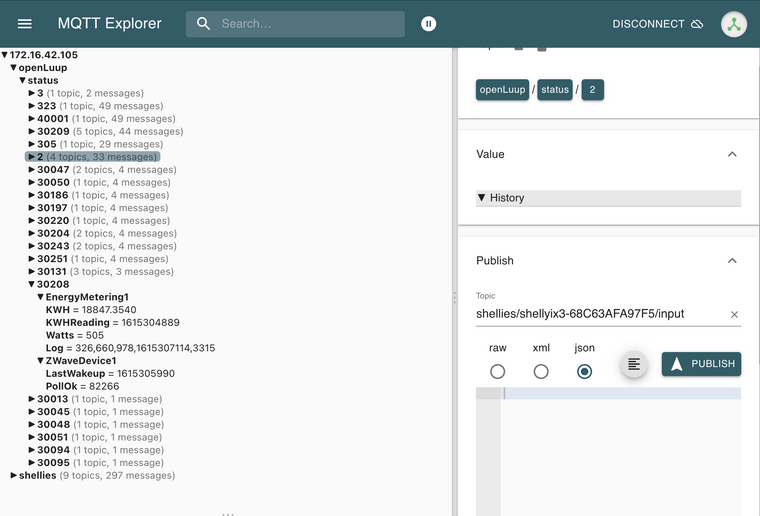
    I now have an alpha version of openLuup using MQTT to send ALL device variable status updates in real time. This beats the heck out of almost any other approach in terms of latency.

    It publishes to topics named openLuup/device_no/short_service_id/var_name (where short_service_name is the useful part of the serviceId – ie. the last alphanumeric bit.) Here's a screen shot of MQTT Explorer watching this test system which is linked to a Vera.

    Screenshot 2021-03-09 at 16.34.10.png

    openLuup

  • [Solved] latest-22328 restart fails
    akbooerA akbooer

    It’s what a community is for!

    Multi-System Reactor

  • Vera account suspended for a 1000 years
    akbooerA akbooer

    Liking @LibraSun ’s statistical analysis of the situation there!

    Also amused at the publication of my PM, which, in fact, was obviously personalised, and you can easily work out who it was sent to because of the specific mention of HomeWave. I may have sent other similar ones, but they would most probably have been directed specifically at openLuup users.

    Vera

  • Generic support for external plug-ins in different languages
    akbooerA akbooer

    @perh said in Generic support for external plug-ins in different languages:

    MQTT server, is that the same as a broker?

    @rafale77 said in Generic support for external plug-ins in different languages:

    A server is not a broker.

    To be sure 'server' is an overloaded term. However, within the scope of MQTT, a server is a broker. The OASIS MQTT specification (version 3.1.1, which is what I'm implementing) uses the term exclusively, and defines it (on lines 31-32) thus:

    "A program or device that acts as an intermediary between Clients which publish Application Messages and Clients which have made Subscriptions."

    I have, indeed, written a server, so you will not need Mosquitto, or any other server, installed anywhere, although, as @therealdb points out, you can have multiple servers (on different ports.)

    openLuup

  • openLuup: Version Log
    akbooerA akbooer

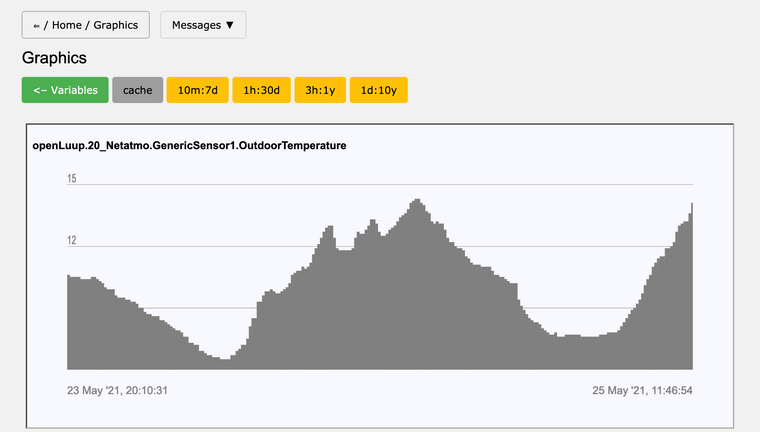
    Development Branch: 2021 Release 5.23

    Significant changes and additions to the Data Historian:

    • Variable graphing pages enables plotting of any of the archives or the in-memory cache
    • Database editor to view variable values and commit changes to the database
    • Support for multiple Graphite Carbon databases (complete replacement for DataYours)
    • New console page to show rules for which variables are cached and/or archived
    • Historian archive rules now independent (decoupled from old Whisper database .conf files)

    In addition, the openLuup plugin device now has variables for solar Right Ascension (RA), Declination (DEC), Altitude (ALT), and Azimuth (AZ), which are updated every two minutes. Also a GetSolarCoords action which gives these values for any given time (defaults to now) and latitude/longitude (defaults to current location.) These calculations have always been done by openLuup to support scene times of sunrise/sunset, but are now available for use (negating the need for a separate plugin, eg. Heliotrope.)

    Screenshot_2021-05-25 openLuup(2).png

    openLuup

  • openLuup: Version Log
    akbooerA akbooer

    Master Branch: 2021 Release 7.25

    Long-overdue roll-up of the last year's development updates!

    including...

    • MQTT QoS 0 server
    • UDP -> MQTT bridge
    • Shelly device support
    • Tasmota device support
    • Highlighting of errors on log pages
    • Simplified Shelly-like HTTP commands for device control
    • Automatic substitution of JSON module with RapidJson, if available
    • Data Historian improvements including better archive data plotting
    • Solar coordinates available (for shades / lighting / etc...)

    As ever, enormous thanks to those who provide ideas and feedback, or even criticism!

    AK

    openLuup

  • Starlink Available in Some Areas
    akbooerA akbooer

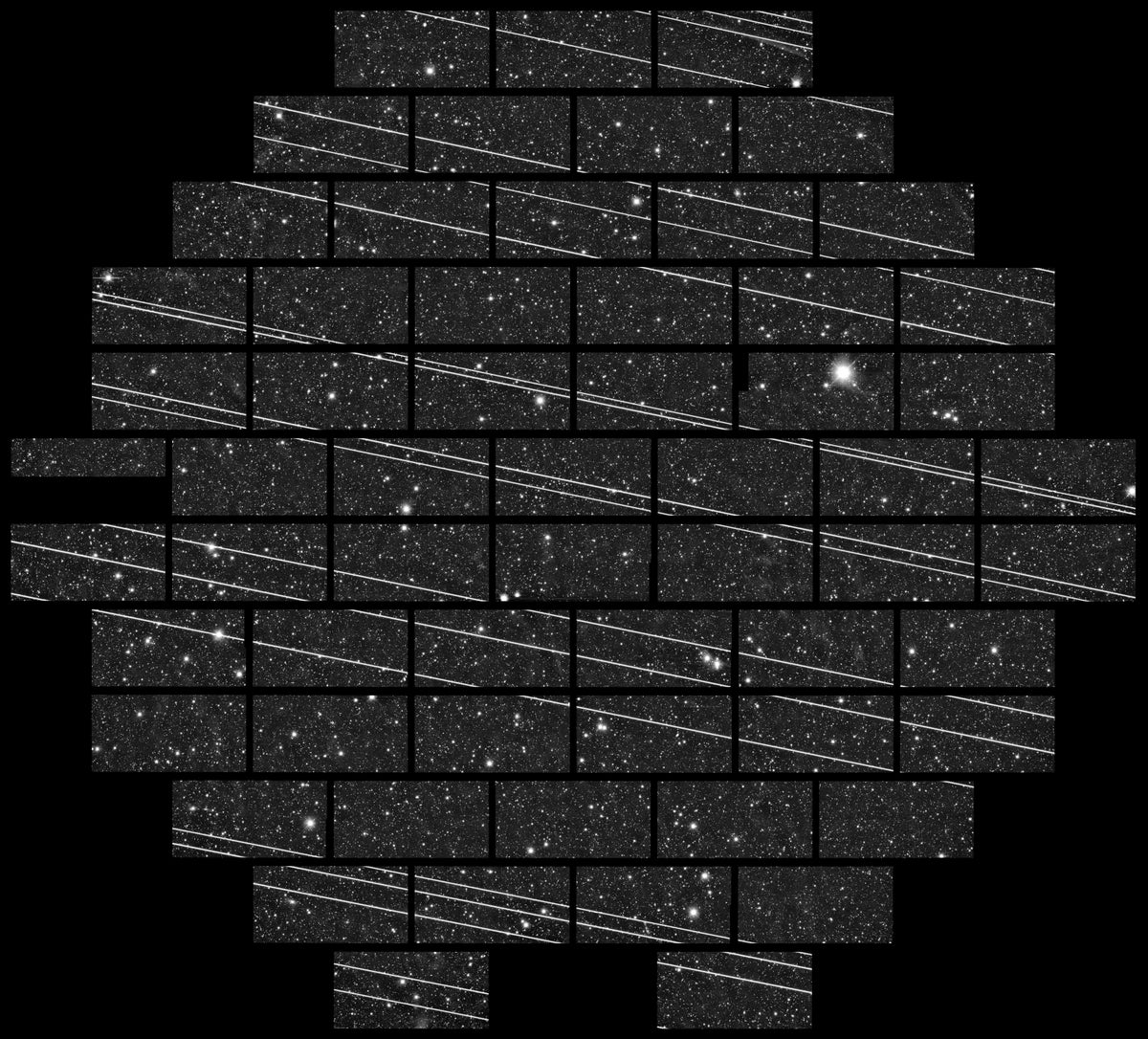
    Not so happy with Starlink, myself, as I am an astro-photographer...

    Emily Zhang

    SpaceX's Dark Satellites Are Still Too Bright for Astronomers

    SpaceX's Dark Satellites Are Still Too Bright for Astronomers

    The company’s attempts to dim the spacecraft in its megaconstellation fall short of eliminating disruptions to the world’s ground-based observatories

    Although we live in a rural area, we have fibre optic to the house with 1 Gb, since the CEO of a company who installs fibres lives in the village!

    General Discussion

  • Shelly 1 as doorbell sensor/opener
    akbooerA akbooer

    Just bought a Shelly Button 1. These things are tiny, and absolutely beautiful. Trying this out as a remote switch stuck to the wall in a place where I simply can't get any power line and use a regular Shelly ix3.

    Hardware

  • Deconz
    akbooerA akbooer

    @rafale77 said in Deconz:

    Not giving up on the idea of a bridge for openLuup

    Currently I’m working on new concepts for plugin implementations, taking Shelly as an exemplar. If successful, this could be a framework for other protocols.

    Unlike the other place, I’m looking for a seamless evolution of API and capability. The BIG IDEA is to implement ‘plugins’ as CGI files which could be run under almost any web server. A significant part of openLuup’s extended functionality is already implemented in this way (Historian, Console, ...) For a complete transition, I would need to wrap some existing parts (Luup requests, bridges, ...) as CGIs. This would, eventually allow me to lose the weakest part of openLuup, which is its own web server...

    Zigbee

  • List of plugins available at the Alternative App Store
    akbooerA akbooer

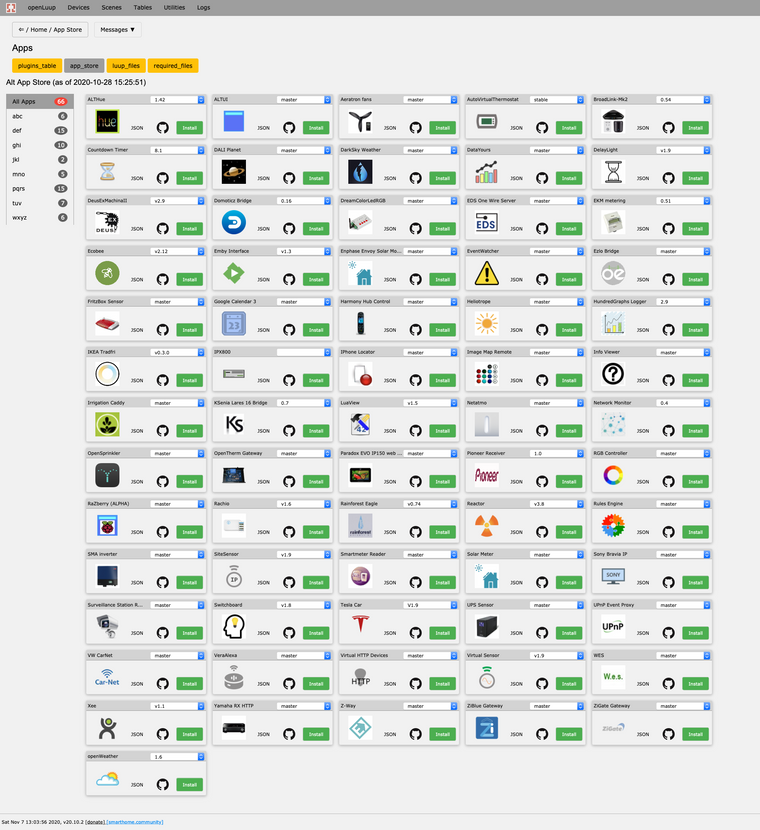
    Under openLuup, you can use the native App Store page...

    http://openLuupIP:3480/openLuup?page=app_store
    

    ...which, of course, shows only openLuup compatible plugins. It's also very responsive.

    Hovering over the plugin icon shows the description, and there are links to the App Store JSON and GitHub repository if you're a developer wanting to browse those.

    Screenshot_2020-11-07 openLuup.png

    Code/Snippet library

  • openLuup: Version Log
    akbooerA akbooer

    A list of openLuup releases including the latest developments…

    • master – stable, and infrequently updated,
    • development – latest updates and bug fixes,
    • testing – use only when advised!

    A long while ago (May, 2015) I wrote my 2000-th post on another forum: openLuup - running unmodified plugins on any machine.

    Now rehosted at https://community.ezlo.com/t/openluup-running-unmodified-plugins-on-any-machine/187412

    Here’s the gist of it:


    ...I want to work in a more open and stable [Vera] environment...

    ...All would be solved if Luup was open source and could be run on the plethora of cheap and reliable hardware available today. But it’s not. But we could get something like that effect if we engineered a sufficient subset of Luup to run on such a platform. Could it be done? What would we need?

    1. UI
    2. scheduler
    3. web server
    4. Luup compatible API
    5. Device and Implementation xml file reader
    6. Zwave bridge to Vera
    7. runs most plugins without modification

    What we wouldn’t need is UPnP.

    What have we (nearly) got already?

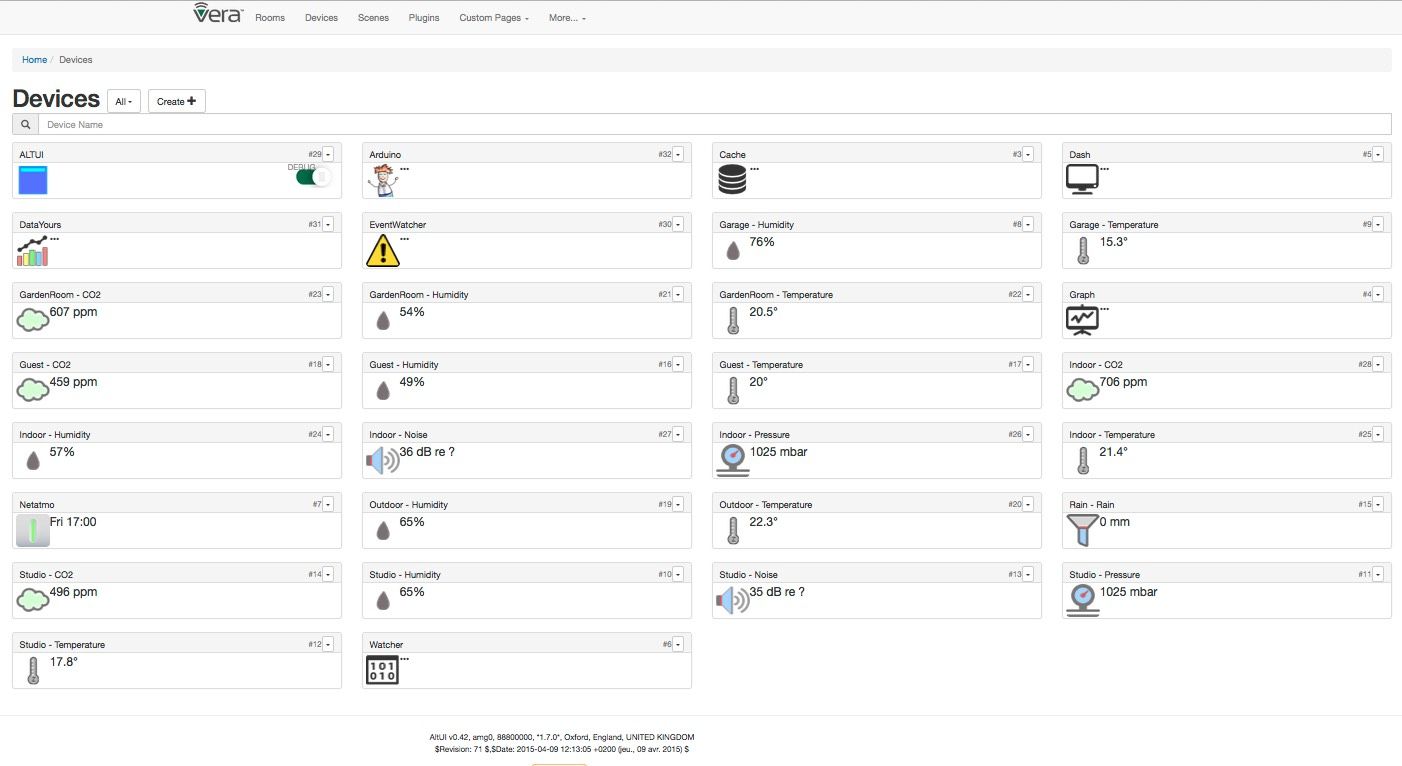
    • We have, courtesy of @amg0, the most excellent AltUI: Alternate UI to UI7, and that, I think, is probably the hardest one to do in the above list.
    • Items 2 - 5, and 7, I’ve prototyped, in pure Lua, and posted elsewhere: DataYours on Raspberry Pi, running selected plugins unmodified, including: DataYours, EventWatcher, Netatmo, RBLuaTest, altUI. See screenshot attached.

    Is it worth the effort? Probably not. Will I pursue this quest? Yes.


    openLuup was the result.

    DE2056BF-E548-4611-972B-40276F00BFEB.jpeg

    openLuup

  • Apple Homepod mini
    akbooerA akbooer

    My Homepod mini arrived today. Very slick setup using an iPad. Happily discovered the Homebridge running in my Synology Docker, and all the configured devices (including my new Shelly Button 1!)

    The revelation here is that the Homepod solves the remote access issue for openLuup, in that all the devices exposed (via MQTT) to the Homebridge are fully functional.

    Love it! Thanks for the initial recommendation @rafale77 .

    General Discussion

  • Hue dimmer as replacement for MiniMote remote
    akbooerA akbooer

    Finally, I’ve found an adequate replacement for my beloved MiniMote four-button remotes (I’ve had nine of them for the last 10 years or so!). I should have realised this earlier, but with four buttons and approximately the same form factor, the Philips Hue remotes are viable replacements…

    …however, they are, of course, Zigbee and not Zwave, but this doesn’t matter in my HA environment, which has now completely ditched Zwave and Vera for all lighting and control functions, and replaced them with Hue and Shelly devices. These are all brought together with a Homebridge installation running under Docker on Synology NAS with the Apple Home app as the UI. This gives, of course, both secure remote access and voice control.

    The MiniMote buttons I had configured as scene triggers to do whatever I needed, most usually toggling lights. The same functionality is easily achieved within the Home app by appropriate shortcuts.

    I’m still using openLuup as a secondary hub which mimics all the various devices using MQTT and the ALTHUE plug-in and logs all device and sensor data using the built-in Historian and viewed through Grafana.

    Works for me!

    AK

    Hardware

  • openLuup: Version Log
    akbooerA akbooer

    Development Branch: 2020 Release 5.1

    • Startup log shows JSON module version information (thanks @a-lurker)

    If you have installed Cjson then the startup log should include:

    2020-05-01 13:00:56.780 openLuup.json:: version 2020.04.16 @akbooer
    2020-05-01 13:00:56.780 openLuup.init:: using Cjson 2.1.0 for fast decoding

    If not, then:

    2020-05-01 12:54:47.675 openLuup.json:: version 2020.04.16 @akbooer
    2020-05-01 12:54:47.675 openLuup.init:: Cjson not installed - using openLuup.json.Lua.decode() instead

    openLuup

  • SmartThings Moving to....Lua
    akbooerA akbooer

    Wise choice. 😉

    General Discussion

  • openLuup: Version Log
    akbooerA akbooer

    Development Branch: 2020 Release 5.10

    • native image panel for openLuupCamera1 device
    • category 6 for ditto
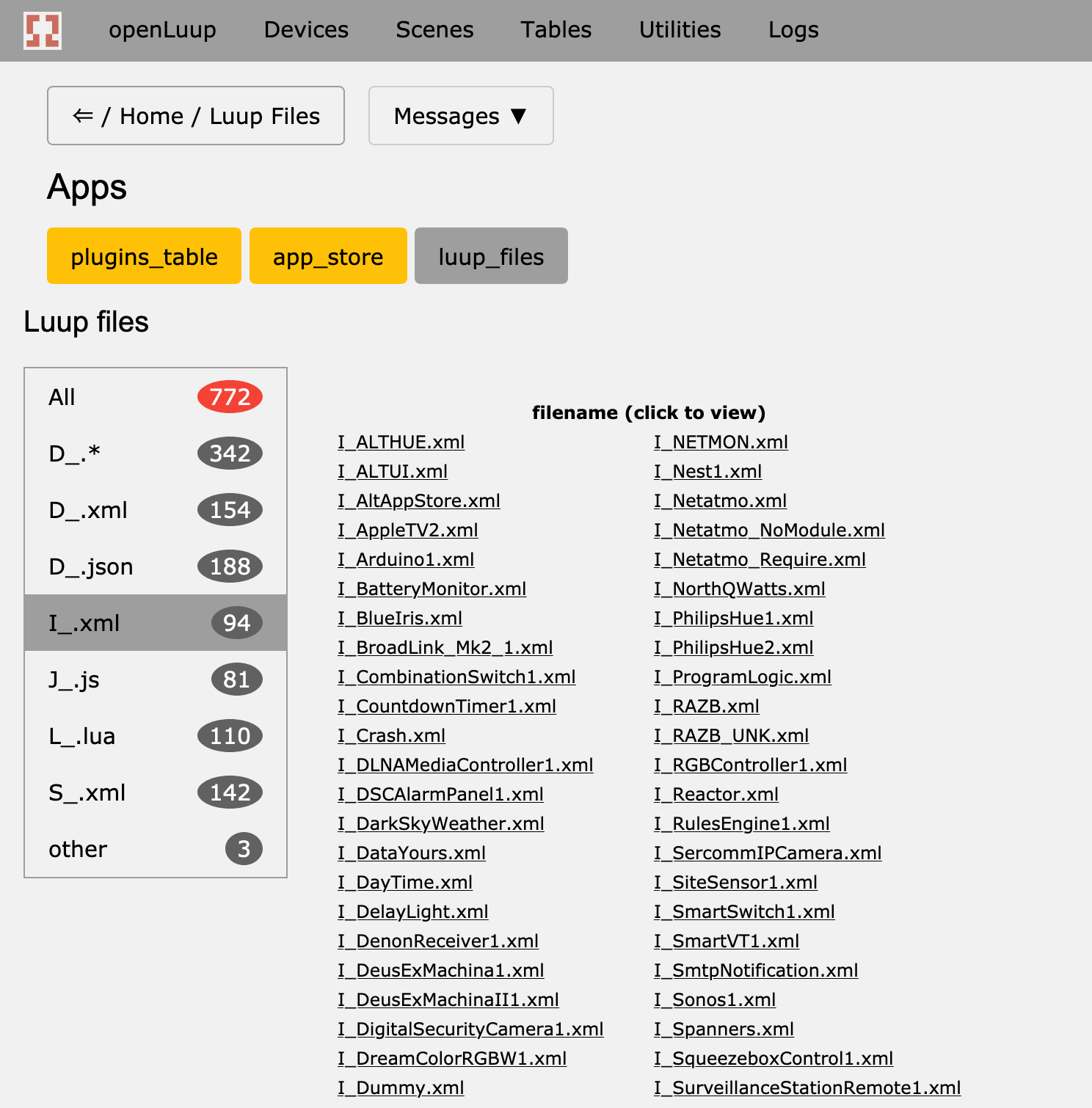
    • file counts in Luup files page menu

    The openLuup console Luup Files page offers a very fast way to browse and view all the Luup device files that the system knows about. A click on the file name opens a Viewer on the file itself. The file filter menu now shows a count of each file type. I seem to have a total of 772 such files on my development system...

    Screenshot_2020-05-10 openLuup.png

    openLuup

  • openLuup: Version Log
    akbooerA akbooer

    Development Branch: 2020 Release 7.4

    INDEPENDENCE DAY Edition

    ...nothing to do with the USA, but the day in the UK when Covid-19 restrictions are reduced, and more shops and businesses can open!

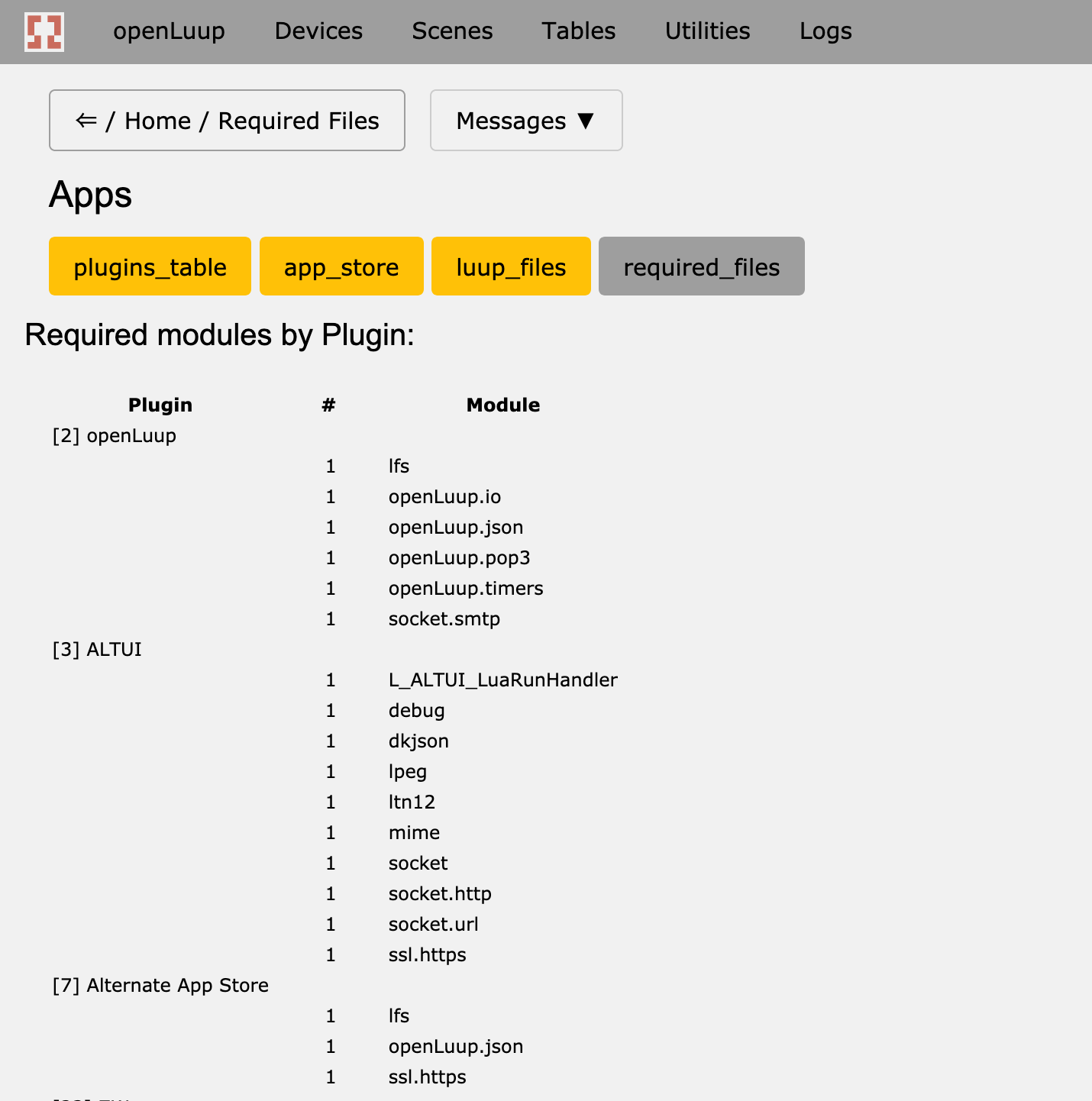
    • added Required Files sub-page to the Plugins page group, showing which files/modules are required by plugins (and how many times.)

    This is in preparation for being able to specify replacement modules without altering the plugin code itself. Applications include replacing dkjson with RapidJSON, and the like.

    Not fixed:

    • the log file customisation in Lua Startup (sorry @CatmanV2, next time.)

    Screenshot_2020-07-04 openLuup(1).png

    openLuup
  • Login

  • Don't have an account? Register

  • Login or register to search.
  • First post
    Last post
0
  • Categories
  • Recent
  • Tags
  • Popular
  • Unsolved