












Multidimensional Array
-
${{[["Window 1","Status On"],["Window 2","Status On"],["Window 3","Status Off"],["Window 4","Status On"]]}}should work
and to find all Status on'seach val in testarray : if val[1] === "Status On" then val[0] endifand to find the value of Window 1
(each val in testarray : if val[0] === "Window 1" then val[1] endif)[0] -
${{[["Window 1","Status On"],["Window 2","Status On"],["Window 3","Status Off"],["Window 4","Status On"]]}}should work
and to find all Status on'seach val in testarray : if val[1] === "Status On" then val[0] endifand to find the value of Window 1
(each val in testarray : if val[0] === "Window 1" then val[1] endif)[0] -
Expanding the question, suppose the first part of the array is the device ID, like "vera>device1234".
Is it possible to use the function below to use this same bidirectional array to search for the name, i.e. using val[0] for the search?
sort( each id in testarray: do e=getEntity( id ), ( e?.attributes?.binary_sensor?.state == true or e?.attributes?.motion_sensor?.state == true ) ? e.name : null done )
What would the function look like?
Thanks.
-
Hi @toggledbits it is possible to have an array in the following way
["Window 1"]["Status On"]
["Window 2"]["Status On"]
["Window 3"]["Status Off"]
["Window 4"]["Status On"]That is, bidirectional.
How would this array be loaded? Normally we use Variable = ${{ ["Window 1", "Window 2", "Window 3", "Window 4"] }}, how would the array pair be loaded?.
Then the use, how would be a looping where I want to ask who has "Status On" and it returns me a new array with the part 1, that is the list of "Window"?
Or another search, I provide the information of the content of part 1, as "Window 2" and it would return me an array with the part 2 "Satus On".
Is it possible to have something like this?
Could you give the examples?
Thanks.
@wmarcolin I smell an X-Y problem, but I'll go on...
I don't know what "bidirectionally" means in this context. Do you mean "two dimensional?" Bidirectional refers to movement, for example, forwards and backwards, or up and down, which is a different thing.
A couple of minor comments to @Elcid 's response:
${{[["Window 1","Status On"],["Window 2","Status On"],["Window 3","Status Off"],["Window 4","Status On"]]}}Note that this is substitution syntax, not expression syntax when defining a variable. Adjust accordingly.
each val in testarray : if val[1] === "Status On" then val[0] endifThere is no
===operator in the expression language, it's just==(each val in testarray : if val[0] === "Window 1" then val[1] endif)[0]This is better written as
first ... of ..., since you only want the one element (which by implication here the key "Window 1" must be unique in the array), and there's no need to keep searching through the array once you've found it (wastes CPU cycles).But about that uniqueness for "Window 1"... this is the real meat of my response:
If the first element of each subarray (row) is unique, then using a two-dimensional array is inefficient (i.e. doable, but not the best choice). Where unique values are present, an object containing key/value pairs gives immediate random access to any "element", without iteration:
devices = {
    "lamp1": "on",
    "lamp2": "off",
    "lamp3": "on"
}
In this example, we can quickly determine the status of any lamp without iteration:
devices.lamp2will give usoff.This can be further broken down with additional data: each value in the key/value pairs of the object can be any data type, so they can be an array or object themselves:
devices = {
    "lamp1": {
        "status": "on",
        "room": 0
    }
    "lamp2": { "status": "off", "room": 0 }
    "lamp3": { "status": "on", "room": 2 }
}
We can again quickly get to the state of lamp2 using
devices.lamp2.status(resultoffagain). Usingdevices.lamp3.roomtells us that lamp3 is in room 2. Note that in the example code above, I have shown lamp1 with a typical (JSON-style) fully indented with line breaks for readability, but lamp2 and lamp3 are in a more compact form. Whitespace (including newlines) are not significant to the syntax. Use them for readability if you wish, or leave them out for compactness if that's acceptable.When you must search within the values, you can still use iteration. Find the devices in room 0:
each dev,id in devices: dev.room==0 ? id : nullBy using
each dev,id, the iterator will provide both the value and the key for each pair in the object. That is, on the first iteration, dev will contain our subobject (itself with keys status and room) for lamp1, and id will containlamp1; on the second iteration, the subobject for lamp2 is given in dev, and id islamp2, and so on. The result of the iteration in this case is an array of IDs of objects in room 0:["lamp1","lamp2"]; you could also modify the iteration to return the data objects (using dev), if that was more efficient for your later use of this expression's result.Find the first device that is "off":
first dev,id of devices: dev.status=="off" ? id : nullAdding new devices after the initialization is also easy:
devices.lamp4 = { "status": "on", "room": 2 }But this is all data storage theory, and details of an implementation for a problem that apparently hasn't been stated. We need to know what you are really trying to do, if you are asking for help getting it done. As I said, where we stand right now, this seems very X-Y-ish. The post title is also poor quality, and the head post itself breaks a couple of the posting guidelines.
Author of Multi-system Reactor and Reactor, DelayLight, Switchboard, and about a dozen other plugins that run on Vera and openLuup.
-
@wmarcolin I smell an X-Y problem, but I'll go on...
I don't know what "bidirectionally" means in this context. Do you mean "two dimensional?" Bidirectional refers to movement, for example, forwards and backwards, or up and down, which is a different thing.
A couple of minor comments to @Elcid 's response:
${{[["Window 1","Status On"],["Window 2","Status On"],["Window 3","Status Off"],["Window 4","Status On"]]}}Note that this is substitution syntax, not expression syntax when defining a variable. Adjust accordingly.
each val in testarray : if val[1] === "Status On" then val[0] endifThere is no
===operator in the expression language, it's just==(each val in testarray : if val[0] === "Window 1" then val[1] endif)[0]This is better written as
first ... of ..., since you only want the one element (which by implication here the key "Window 1" must be unique in the array), and there's no need to keep searching through the array once you've found it (wastes CPU cycles).But about that uniqueness for "Window 1"... this is the real meat of my response:
If the first element of each subarray (row) is unique, then using a two-dimensional array is inefficient (i.e. doable, but not the best choice). Where unique values are present, an object containing key/value pairs gives immediate random access to any "element", without iteration:
devices = {
    "lamp1": "on",
    "lamp2": "off",
    "lamp3": "on"
}
In this example, we can quickly determine the status of any lamp without iteration:
devices.lamp2will give usoff.This can be further broken down with additional data: each value in the key/value pairs of the object can be any data type, so they can be an array or object themselves:
devices = {
    "lamp1": {
        "status": "on",
        "room": 0
    }
    "lamp2": { "status": "off", "room": 0 }
    "lamp3": { "status": "on", "room": 2 }
}
We can again quickly get to the state of lamp2 using
devices.lamp2.status(resultoffagain). Usingdevices.lamp3.roomtells us that lamp3 is in room 2. Note that in the example code above, I have shown lamp1 with a typical (JSON-style) fully indented with line breaks for readability, but lamp2 and lamp3 are in a more compact form. Whitespace (including newlines) are not significant to the syntax. Use them for readability if you wish, or leave them out for compactness if that's acceptable.When you must search within the values, you can still use iteration. Find the devices in room 0:
each dev,id in devices: dev.room==0 ? id : nullBy using
each dev,id, the iterator will provide both the value and the key for each pair in the object. That is, on the first iteration, dev will contain our subobject (itself with keys status and room) for lamp1, and id will containlamp1; on the second iteration, the subobject for lamp2 is given in dev, and id islamp2, and so on. The result of the iteration in this case is an array of IDs of objects in room 0:["lamp1","lamp2"]; you could also modify the iteration to return the data objects (using dev), if that was more efficient for your later use of this expression's result.Find the first device that is "off":
first dev,id of devices: dev.status=="off" ? id : nullAdding new devices after the initialization is also easy:
devices.lamp4 = { "status": "on", "room": 2 }But this is all data storage theory, and details of an implementation for a problem that apparently hasn't been stated. We need to know what you are really trying to do, if you are asking for help getting it done. As I said, where we stand right now, this seems very X-Y-ish. The post title is also poor quality, and the head post itself breaks a couple of the posting guidelines.
Hi Patrick!
%(#ff0000)[Again a Master Class on how to do the right things.]
My use case is that I want to associate each device in my installation with an identification of which group it belongs to (door, window, security, light...).
The group I will have to make the manual list (I think), so the first step of var1, I understand is the list I have to assemble, and whenever I have a new device, I update this list manually.

Just a note master, at the beginning of your example, I had to put the comma at each element of the array
I reproduced your examples to test, and I just can't find the error in the example of the first (var4).
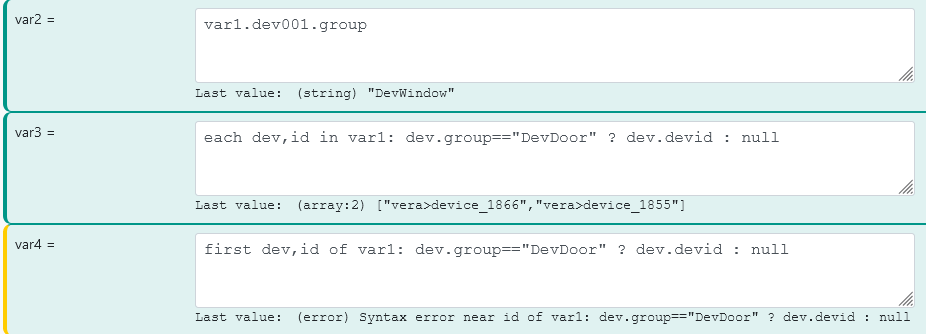
Now comes the use, to see device names and which group they are in, or even to search the groups. My next step, is to manage when a device has the true state of its sensor, to take actions such as triggering an action/alarm/siren/message according to the group the device is part of.
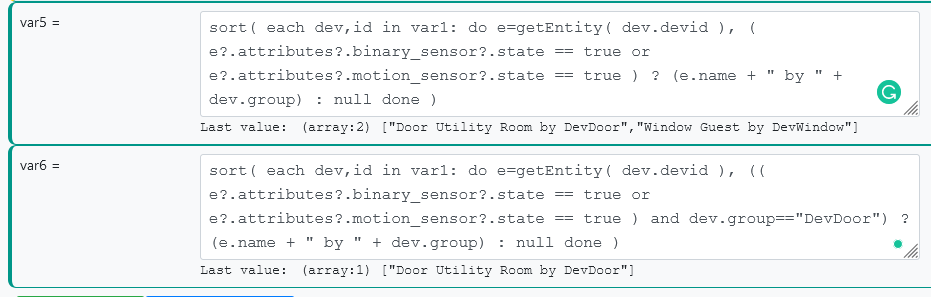
If you can see, I am looking to work around not using (yet) a database, which we have had in other trackers to empower the information from the devices.
Now exploring the Master, sorry

In your last example, you explain how to add one more row to the array, one more element, perfect. Now, is it possible to add another column to the existing array? For example, with the array I created, add a column that already stores the device name? A loop that looks at the devid and then looks at the device name attribute?
I was forgetting, how do I change the contents of the array, is it possible with Set Variable? I want to change for example the group from DevWindow to DevDoor for one element.
Thanks.
-
Hi Patrick!
%(#ff0000)[Again a Master Class on how to do the right things.]
My use case is that I want to associate each device in my installation with an identification of which group it belongs to (door, window, security, light...).
The group I will have to make the manual list (I think), so the first step of var1, I understand is the list I have to assemble, and whenever I have a new device, I update this list manually.
Just a note master, at the beginning of your example, I had to put the comma at each element of the array
I reproduced your examples to test, and I just can't find the error in the example of the first (var4).
Now comes the use, to see device names and which group they are in, or even to search the groups. My next step, is to manage when a device has the true state of its sensor, to take actions such as triggering an action/alarm/siren/message according to the group the device is part of.
If you can see, I am looking to work around not using (yet) a database, which we have had in other trackers to empower the information from the devices.
Now exploring the Master, sorry
In your last example, you explain how to add one more row to the array, one more element, perfect. Now, is it possible to add another column to the existing array? For example, with the array I created, add a column that already stores the device name? A loop that looks at the devid and then looks at the device name attribute?
I was forgetting, how do I change the contents of the array, is it possible with Set Variable? I want to change for example the group from DevWindow to DevDoor for one element.
Thanks.
@wmarcolin Well, I'm almost ready to release my first version of dynamic groups... still hashing out a few details. If you urgently need to do all this work, it's certainly a good opportunity to break your forehead on some sticky problems (I'm always in favor of experimentation and pushing limits).
First, having
var1be an expression that does an assignment todevicesisn't necessary. Just call your variable devices and put in the rest of the expression after the=in your screen shot and be done with it. You can also set up yourdevicesstructure more simply. I'm not sure what the extradev001anddev002identifiers are doing for you, but you can (and probably should) just use the entity canonical IDs directly. It will make everything much simpler. Here's is the expression for thedevicesvariable:{ "hubitat>15": { group: "DevWindow" }, "vera>device_1866": { group: "DevDoor" }, ...etc... }Also, if
groupis the only data you are keeping, there is no value to creating a subobject to keep it, just make the group name be the value of the device's key/ID. But I'll continue with the structure you're trying to use...Anyway, by simplifying the structure of
devices, here's what it looks like and how it changes your first three expressions: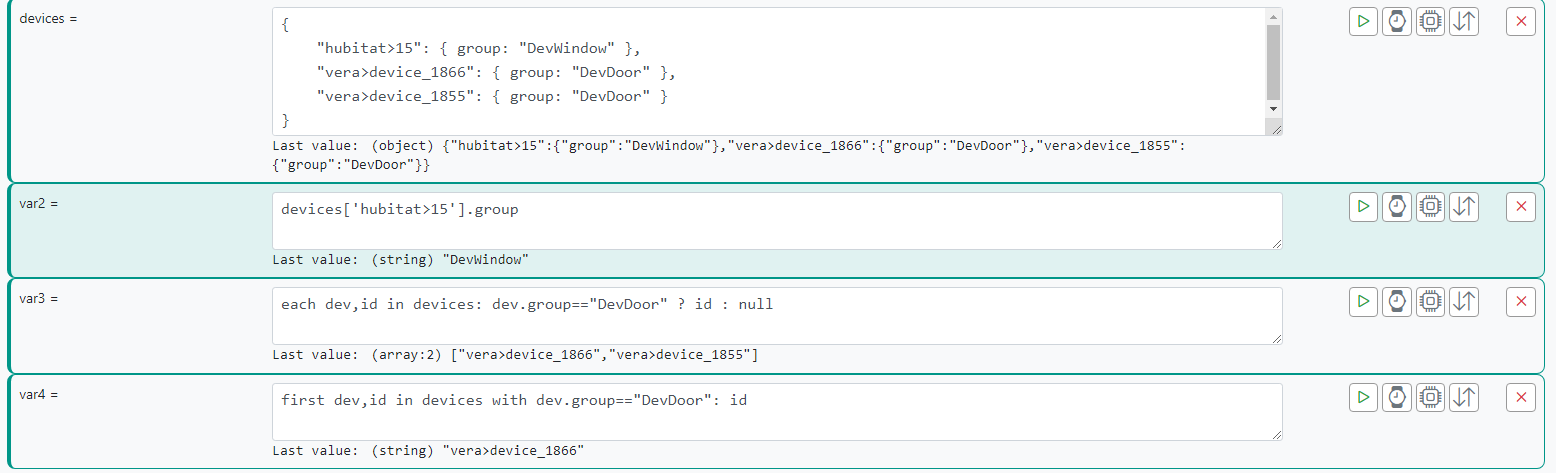
Looking at var2, we need to use quoted identifiers because a canonical ID contains a character (
>) that cannot be used in an identifier, so thisdevices.hubitat>15.groupis not valid. The quoted identifier syntax iscontext["complexKey"]as shown.The var3 expression is simpler, because we're not looking through the extra layer of indirection your structure had introduced, we're looking directly as our descriptive subobjects.
The var4 expression is an error in the syntax on my part. The correct syntax is shown, but I've had to embellish a bit here (next release of Reactor for you, so it won't work until I publish and you update).
But here's the important part...
As for the rest of it, you're making it unnecessarily hard, I think, because
entity.primary_valuewill give you the value of the primary attribute, so you don't really need to care what capability that comes from and go to the work of classifying devices in expressions to try to make that work. There's an easier way.Based on what I see here, now that we understand you are actually trying to accomplish, what you really need to do is set those primary attributes in
local_hubitat_devices.yaml, and skip all of thedevicescomplexity you are creating here, and just use theprimary_valuefrom the entity in your sort/search expressions.To do the overrides in
local_hubitat_devices.yaml:entities: # Entry shows how an entity can have a service added and its name forced "hubitat>76": # Name override name: "Attic Environmental Sensor" # # List of capabilities to add to this device (array) capabilities: - SomeAdditionalCapability - AnotherAdditionalCapability # # Assign primary attribute for this device primary_attribute: "temperature_sensor.value" "hubitat>178": primary_attribute: "x_hubitat_extra_attributes.batteryLastReplaced"Author of Multi-system Reactor and Reactor, DelayLight, Switchboard, and about a dozen other plugins that run on Vera and openLuup.
-
@wmarcolin Well, I'm almost ready to release my first version of dynamic groups... still hashing out a few details. If you urgently need to do all this work, it's certainly a good opportunity to break your forehead on some sticky problems (I'm always in favor of experimentation and pushing limits).
First, having
var1be an expression that does an assignment todevicesisn't necessary. Just call your variable devices and put in the rest of the expression after the=in your screen shot and be done with it. You can also set up yourdevicesstructure more simply. I'm not sure what the extradev001anddev002identifiers are doing for you, but you can (and probably should) just use the entity canonical IDs directly. It will make everything much simpler. Here's is the expression for thedevicesvariable:{ "hubitat>15": { group: "DevWindow" }, "vera>device_1866": { group: "DevDoor" }, ...etc... }Also, if
groupis the only data you are keeping, there is no value to creating a subobject to keep it, just make the group name be the value of the device's key/ID. But I'll continue with the structure you're trying to use...Anyway, by simplifying the structure of
devices, here's what it looks like and how it changes your first three expressions:Looking at var2, we need to use quoted identifiers because a canonical ID contains a character (
>) that cannot be used in an identifier, so thisdevices.hubitat>15.groupis not valid. The quoted identifier syntax iscontext["complexKey"]as shown.The var3 expression is simpler, because we're not looking through the extra layer of indirection your structure had introduced, we're looking directly as our descriptive subobjects.
The var4 expression is an error in the syntax on my part. The correct syntax is shown, but I've had to embellish a bit here (next release of Reactor for you, so it won't work until I publish and you update).
But here's the important part...
As for the rest of it, you're making it unnecessarily hard, I think, because
entity.primary_valuewill give you the value of the primary attribute, so you don't really need to care what capability that comes from and go to the work of classifying devices in expressions to try to make that work. There's an easier way.Based on what I see here, now that we understand you are actually trying to accomplish, what you really need to do is set those primary attributes in
local_hubitat_devices.yaml, and skip all of thedevicescomplexity you are creating here, and just use theprimary_valuefrom the entity in your sort/search expressions.To do the overrides in
local_hubitat_devices.yaml:entities: # Entry shows how an entity can have a service added and its name forced "hubitat>76": # Name override name: "Attic Environmental Sensor" # # List of capabilities to add to this device (array) capabilities: - SomeAdditionalCapability - AnotherAdditionalCapability # # Assign primary attribute for this device primary_attribute: "temperature_sensor.value" "hubitat>178": primary_attribute: "x_hubitat_extra_attributes.batteryLastReplaced"Hi Master!
Wow, good news that we will have in the MSR capacity, I am your test guy if you need a tester. And I'm aligned with you, I like to explore, learn, go to the limit, even with knowledge limitations, I seek to explore.
I will keep the array structure that can put more dimensions, surely I will explore.
Aligned from var4, I repeated your instruction and it really follows the syntax error, no problem for now, as I said we are learning and testing.
Master I am trying, to follow the correct path, instead of going all the way around creating the array. I edited the file local_hubitat_devices.yaml to test with these 4 devices, and I see that in the capabilities now appears the DeviceGroup, but I don't see in the attributes, or way to add the value.
# This file has local definitions/overrides for Hubitat devices.
---
entities:
  # Entry shows how an entity can have a capability added and its name forced
  "hubitat>NNN":
    # Name override
    #name: "Attic Environmental Sensor"
    #
    # List of capabilities to add to this device (array)
    #capabilities:
    #  - Tone
    #
    # Assign primary attribute for this device
    #primary_attribute: "temperature_sensor.value"
  "hubitat>15":
    capabilities:
      - DeviceGroup
    group: "Window"
  "hubitat>67":
    capabilities:
      - DeviceGroup
    group: "Window"
  "hubitat>98":
    capabilities:
      - DeviceGroup
    group: "Door"
  "hubitat>99":
    capabilities:
      - DeviceGroup
    group: "Door"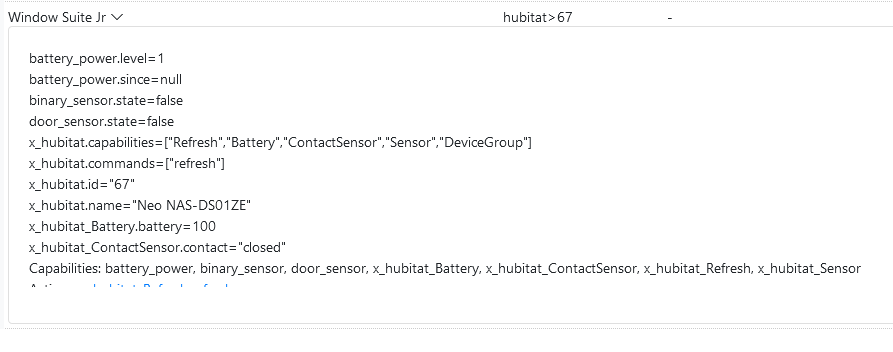
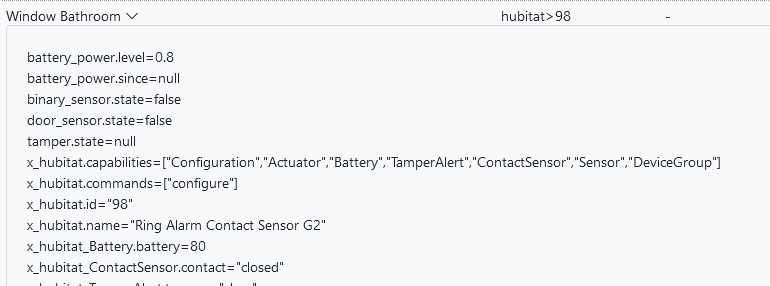
Now I have a question, can I use this same file for the Vera devices? Following the same path?
Thanks.
-
You can't make up data. Just because you assign the capability DeviceGroup to the device, that doesn't mean you get to assign the attributes (group) that may be associated with that capability. Hubitat would have to provide the group data from its side -- the values for that attribute still have to come from Hubitat. And that probably won't be happening, because DeviceGroup does not appear to be a valid Hubitat capability.
Author of Multi-system Reactor and Reactor, DelayLight, Switchboard, and about a dozen other plugins that run on Vera and openLuup.
-
You can't make up data. Just because you assign the capability DeviceGroup to the device, that doesn't mean you get to assign the attributes (group) that may be associated with that capability. Hubitat would have to provide the group data from its side -- the values for that attribute still have to come from Hubitat. And that probably won't be happening, because DeviceGroup does not appear to be a valid Hubitat capability.
@toggledbits I understand, so in this case for now is to use the array resource that we discussed before, until you publish the news.

Anyway thanks for one more class of knowledge.

-
@wmarcolin I smell an X-Y problem, but I'll go on...
I don't know what "bidirectionally" means in this context. Do you mean "two dimensional?" Bidirectional refers to movement, for example, forwards and backwards, or up and down, which is a different thing.
A couple of minor comments to @Elcid 's response:
${{[["Window 1","Status On"],["Window 2","Status On"],["Window 3","Status Off"],["Window 4","Status On"]]}}Note that this is substitution syntax, not expression syntax when defining a variable. Adjust accordingly.
each val in testarray : if val[1] === "Status On" then val[0] endifThere is no
===operator in the expression language, it's just==(each val in testarray : if val[0] === "Window 1" then val[1] endif)[0]This is better written as
first ... of ..., since you only want the one element (which by implication here the key "Window 1" must be unique in the array), and there's no need to keep searching through the array once you've found it (wastes CPU cycles).But about that uniqueness for "Window 1"... this is the real meat of my response:
If the first element of each subarray (row) is unique, then using a two-dimensional array is inefficient (i.e. doable, but not the best choice). Where unique values are present, an object containing key/value pairs gives immediate random access to any "element", without iteration:
devices = {
    "lamp1": "on",
    "lamp2": "off",
    "lamp3": "on"
}
In this example, we can quickly determine the status of any lamp without iteration:
devices.lamp2will give usoff.This can be further broken down with additional data: each value in the key/value pairs of the object can be any data type, so they can be an array or object themselves:
devices = {
    "lamp1": {
        "status": "on",
        "room": 0
    }
    "lamp2": { "status": "off", "room": 0 }
    "lamp3": { "status": "on", "room": 2 }
}
We can again quickly get to the state of lamp2 using
devices.lamp2.status(resultoffagain). Usingdevices.lamp3.roomtells us that lamp3 is in room 2. Note that in the example code above, I have shown lamp1 with a typical (JSON-style) fully indented with line breaks for readability, but lamp2 and lamp3 are in a more compact form. Whitespace (including newlines) are not significant to the syntax. Use them for readability if you wish, or leave them out for compactness if that's acceptable.When you must search within the values, you can still use iteration. Find the devices in room 0:
each dev,id in devices: dev.room==0 ? id : nullBy using
each dev,id, the iterator will provide both the value and the key for each pair in the object. That is, on the first iteration, dev will contain our subobject (itself with keys status and room) for lamp1, and id will containlamp1; on the second iteration, the subobject for lamp2 is given in dev, and id islamp2, and so on. The result of the iteration in this case is an array of IDs of objects in room 0:["lamp1","lamp2"]; you could also modify the iteration to return the data objects (using dev), if that was more efficient for your later use of this expression's result.Find the first device that is "off":
first dev,id of devices: dev.status=="off" ? id : nullAdding new devices after the initialization is also easy:
devices.lamp4 = { "status": "on", "room": 2 }But this is all data storage theory, and details of an implementation for a problem that apparently hasn't been stated. We need to know what you are really trying to do, if you are asking for help getting it done. As I said, where we stand right now, this seems very X-Y-ish. The post title is also poor quality, and the head post itself breaks a couple of the posting guidelines.
@toggledbits said in Multidimensional Array:
There is no === operator in the expression language, it's just ==
Not according to your doc's.
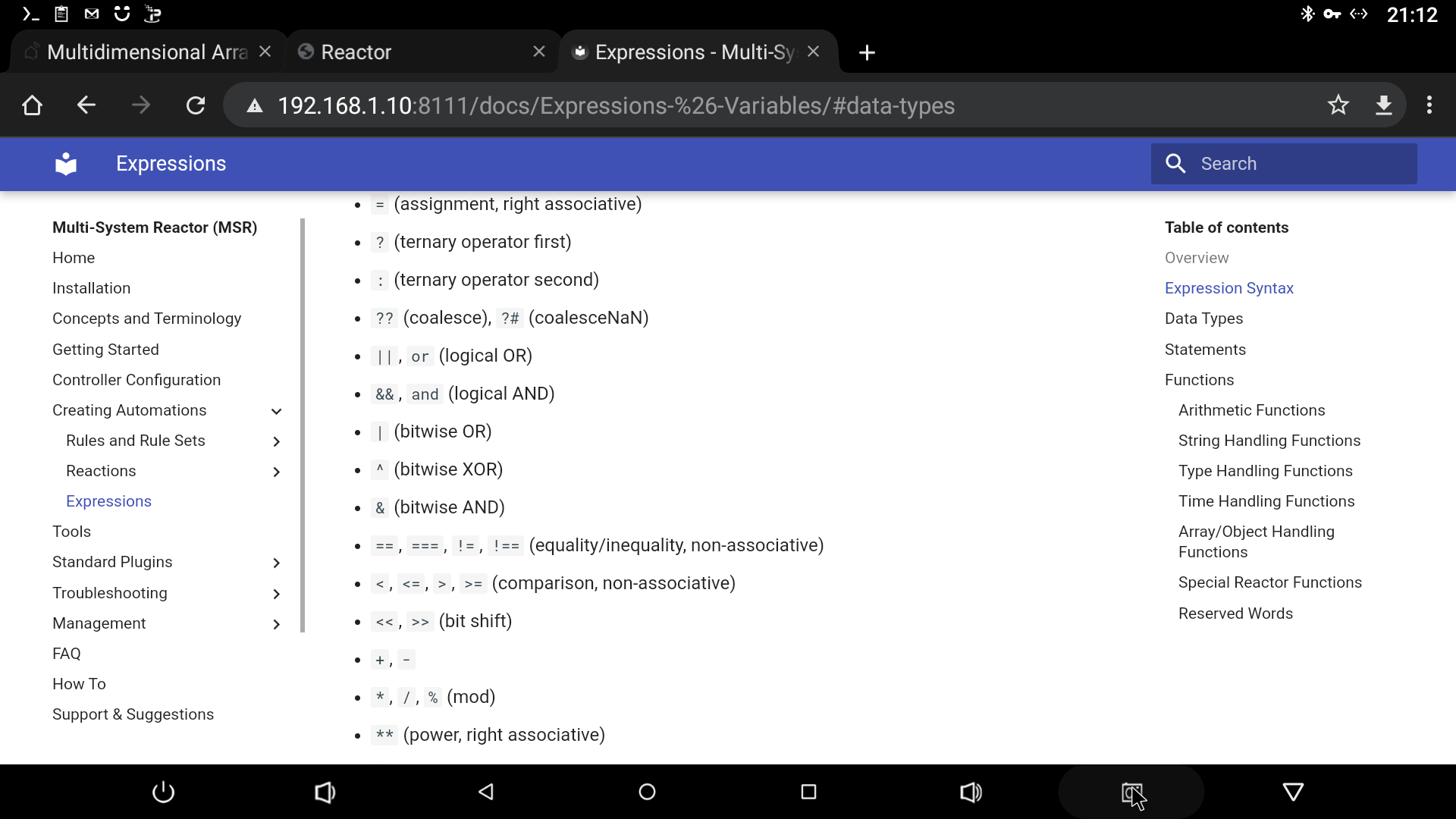
Also used in a test expression and working.
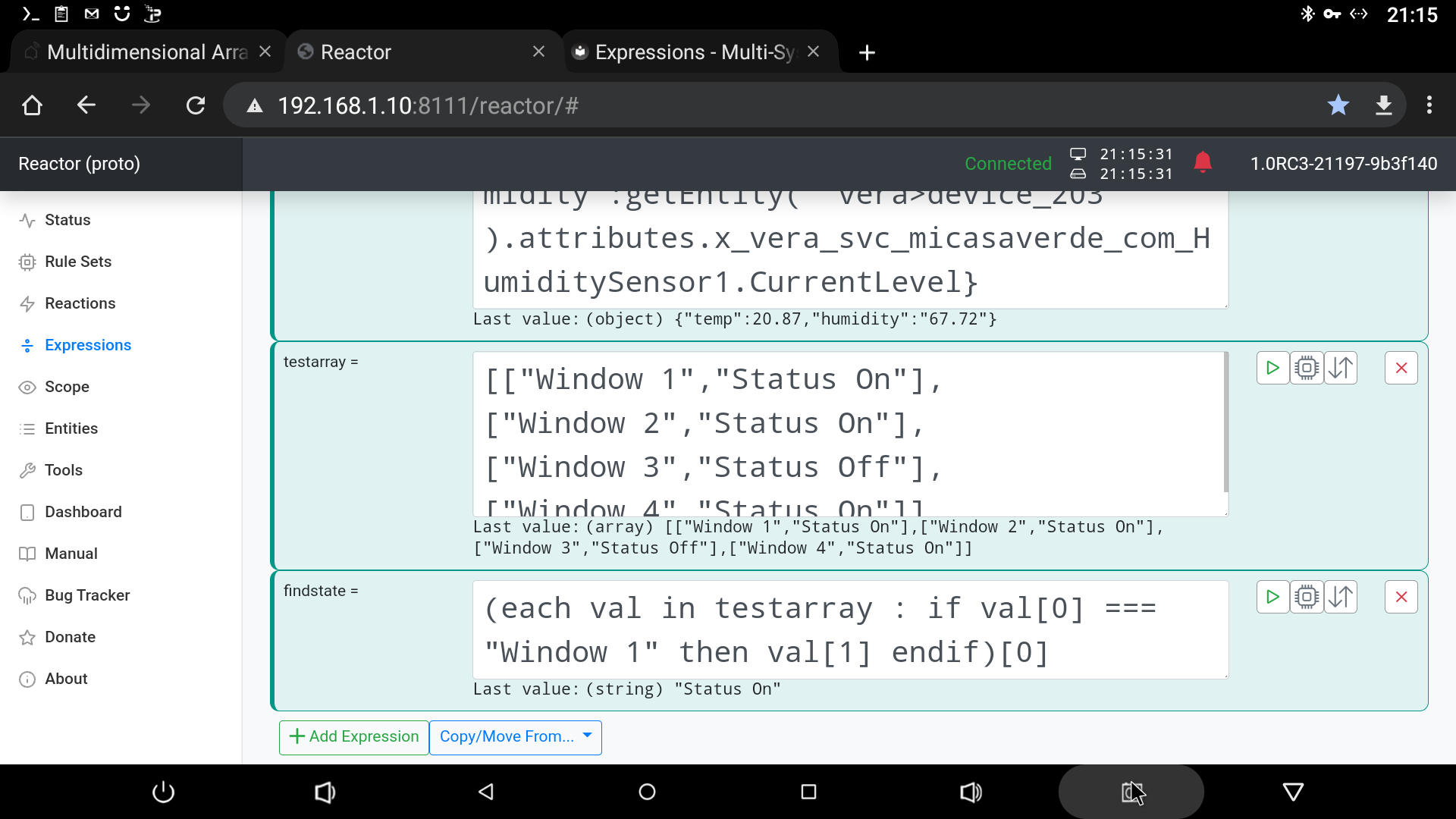
Noted used "in" rather than "of" as I thought he wanted a 2D array not a object/dictionary.
-
@toggledbits said in Multidimensional Array:
There is no === operator in the expression language, it's just ==
Not according to your doc's.
Also used in a test expression and working.
Noted used "in" rather than "of" as I thought he wanted a 2D array not a object/dictionary.
-
@toggledbits said in Multidimensional Array:
There is no === operator in the expression language, it's just ==
Not according to your doc's.
Also used in a test expression and working.
Noted used "in" rather than "of" as I thought he wanted a 2D array not a object/dictionary.
@elcid said in Multidimensional Array:
Not according to your doc's.
You are correct, I'm suffering from holiday brain-fade.
@wmarcolin Version 21331 just released has the first release of dynamic groups. It also includes a syntax enhancement to the expression
first...instatement to allow a result expression, so it can return something other than what it finds (i.e. it can perform operations on what it finds and return that as a result). This is useful for yourvar4of this post, which should befirst dev,id of devices: dev.group=="DevDoor": idto give you the ID of the first matching device. But again, I think the combination of primary attribute assignment and dynamic groups is going to be the best way to solve this.Author of Multi-system Reactor and Reactor, DelayLight, Switchboard, and about a dozen other plugins that run on Vera and openLuup.
-
@elcid said in Multidimensional Array:
Not according to your doc's.
You are correct, I'm suffering from holiday brain-fade.
@wmarcolin Version 21331 just released has the first release of dynamic groups. It also includes a syntax enhancement to the expression
first...instatement to allow a result expression, so it can return something other than what it finds (i.e. it can perform operations on what it finds and return that as a result). This is useful for yourvar4of this post, which should befirst dev,id of devices: dev.group=="DevDoor": idto give you the ID of the first matching device. But again, I think the combination of primary attribute assignment and dynamic groups is going to be the best way to solve this.@toggledbits Hi!
Perfect, you have totally changed the command.
first dev,id in var1 with dev.group=="DevDoor": dev.devid
I'm going to study the dynamic group, because even though I can compare object or array contents, the usage is horrible. It's very difficult to validate an array inside another one, or to make combined selections.
Well, I don't really know the language, so I'm having a hard time. Let's see if the dynamic groups can make something that should be simple easier.
I'll return tomorrow with my experiences

-
@elcid said in Multidimensional Array:
Not according to your doc's.
You are correct, I'm suffering from holiday brain-fade.
@wmarcolin Version 21331 just released has the first release of dynamic groups. It also includes a syntax enhancement to the expression
first...instatement to allow a result expression, so it can return something other than what it finds (i.e. it can perform operations on what it finds and return that as a result). This is useful for yourvar4of this post, which should befirst dev,id of devices: dev.group=="DevDoor": idto give you the ID of the first matching device. But again, I think the combination of primary attribute assignment and dynamic groups is going to be the best way to solve this.Hi Patrick!
I don't know if I'm doing something wrong, but I followed the following steps to use DynamicGroupController.- Stopped the MSR
- Compared the reactor configuration file
- Added the new Groups instruction, the one in the file is almost the same as the manual, and below is the one I set up.
- id: groups enable: true implementation: DynamicGroupController name: Dynamic Group Controller config: groups: "low_battery": name: Low Battery Devices select: - include_capability: - battery_power filter_expression: > entity.attributes.battery_power.level < 0.35 "tripped": name: Tripped Devices select: - include_capability: - binary_sensor - motion_sensor filter_expression: > entity.attributes.binary_sensor.state == true or entity.attributes.motion_sensor.state == true- I restarted MSR + Tools Restart + Crtl+F5
- Search in Entities and I see that they are created, but without content


- Check if they are available for action, yes but also without content.
- As the master instructed, let's go to the log file.
[latest-21331]2021-11-27T21:13:45.136Z <default:INFO> OWMWeatherController#weather done; 1 locations, 0 failed
[latest-21331]2021-11-27T21:13:45.137Z <default:NOTICE> Controller OWMWeatherController#weather is now online.
[latest-21331]2021-11-27T21:13:46.538Z <VeraController:NOTICE> Controller VeraController#vera is now online.
[latest-21331]2021-11-27T21:13:46.540Z <default:ERR> error updating dynamic group low_battery_entries: Error: Invalid selector key
[latest-21331]2021-11-27T21:13:46.541Z <default:CRIT> Error: Invalid selector key
Error: Invalid selector key
    at DynamicGroupController._select (C:\MSR\reactor\server\lib\DynamicGroupController.js:260:23)
    at DynamicGroupController._update_group (C:\MSR\reactor\server\lib\DynamicGroupController.js:193:45)
    at C:\MSR\reactor\server\lib\DynamicGroupController.js:243:38
    at Array.forEach (<anonymous>)
    at DynamicGroupController._update (C:\MSR\reactor\server\lib\DynamicGroupController.js:240:95)
    at C:\MSR\reactor\server\lib\DynamicGroupController.js:150:42
    at processTicksAndRejections (node:internal/process/task_queues:96:5)
[latest-21331]2021-11-27T21:13:46.543Z <default:ERR> error updating dynamic group tripped_entries: Error: Invalid selector key
[latest-21331]2021-11-27T21:13:46.544Z <default:CRIT> Error: Invalid selector key
Error: Invalid selector key
    at DynamicGroupController._select (C:\MSR\reactor\server\lib\DynamicGroupController.js:260:23)
    at DynamicGroupController._update_group (C:\MSR\reactor\server\lib\DynamicGroupController.js:193:45)
    at C:\MSR\reactor\server\lib\DynamicGroupController.js:243:38
    at Array.forEach (<anonymous>)
    at DynamicGroupController._update (C:\MSR\reactor\server\lib\DynamicGroupController.js:240:95)
    at C:\MSR\reactor\server\lib\DynamicGroupController.js:150:42
    at processTicksAndRejections (node:internal/process/task_queues:96:5)
[latest-21331]2021-11-27T21:13:46.544Z <app:NOTICE> Starting HTTP server and API...
[latest-21331]2021-11-27T21:13:46.552Z <app:NOTICE> Starting Reaction Engine...
Well, I found this error, and obviously, I don't know how to solve it. What I did? I reinstalled the MSR, using only the config and storage directory, and the result is the same.
-
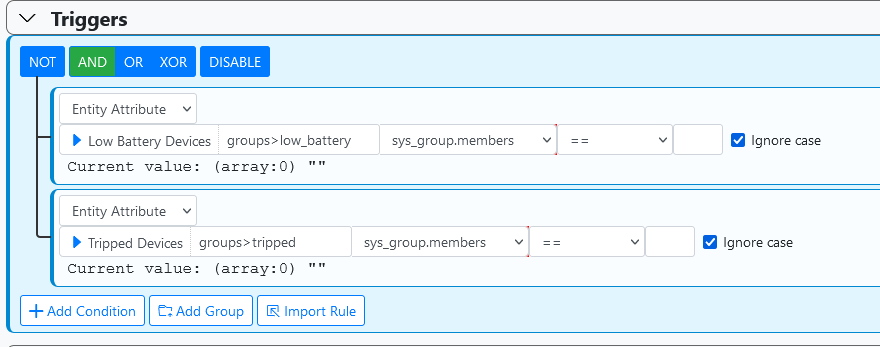
The groups would be empty if there were no tripped or low battery devices in their respective groups, so that's not all conclusive; it may be perfectly correct. The groups at least appear to be correct, for empty groups (no entities matched).
The time stamps in your log snippet are unrelated to the time stamp on the entities, so I can't really draw any conclusions from that either. If you post logs, make sure you are posting logs where the time stamps align to the problem you're reporting.
On your conditions, you can't compare an array to an empty string; that's not a valid test.
Author of Multi-system Reactor and Reactor, DelayLight, Switchboard, and about a dozen other plugins that run on Vera and openLuup.
-
The groups would be empty if there were no tripped or low battery devices in their respective groups, so that's not all conclusive; it may be perfectly correct. The groups at least appear to be correct, for empty groups (no entities matched).
The time stamps in your log snippet are unrelated to the time stamp on the entities, so I can't really draw any conclusions from that either. If you post logs, make sure you are posting logs where the time stamps align to the problem you're reporting.
On your conditions, you can't compare an array to an empty string; that's not a valid test.
Ok let's go in parts, what I created in Group is the same thing I do in the traditional way and get the result, see the battery case.
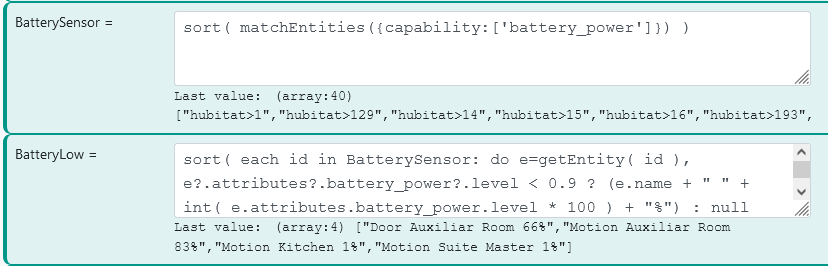
I'm not seeing an error anymore, after a reboot of the MSR host.
[latest-21331]2021-11-28T02:45:18.584Z <default:null> Module httpapi v21308
[latest-21331]2021-11-28T02:45:18.661Z <VeraController:null> Module VeraController v21324
[latest-21331]2021-11-28T02:45:18.668Z <default:INFO> Structure#1 loading controller interface hubitat (HubitatController)
[latest-21331]2021-11-28T02:45:18.676Z <HubitatController:null> Module HubitatController v21324
[latest-21331]2021-11-28T02:45:18.679Z <default:INFO> Structure#1 loading controller interface groups (DynamicGroupController)
[latest-21331]2021-11-28T02:45:18.686Z <DynamicGroupController:null> Module DynamicGroupController v21331
[latest-21331]2021-11-28T02:45:18.688Z <default:INFO> Structure#1 loading controller interface weather (OWMWeatherController)
[latest-21331]2021-11-28T02:45:18.693Z <OWMWeatherController:null> Module OWMWeatherController v21313
[latest-21331]2021-11-28T02:45:18.761Z <default:INFO> Starting controller HubitatController#hubitat [latest-21331]2021-11-28T02:45:18.782Z <default:INFO> Starting controller DynamicGroupController#groups [latest-21331]2021-11-28T02:45:18.784Z <default:NOTICE> Controller DynamicGroupController#groups is now online. [latest-21331]2021-11-28T02:45:18.785Z <default:INFO> Starting controller OWMWeatherController#weatherI see that the times are synchronized
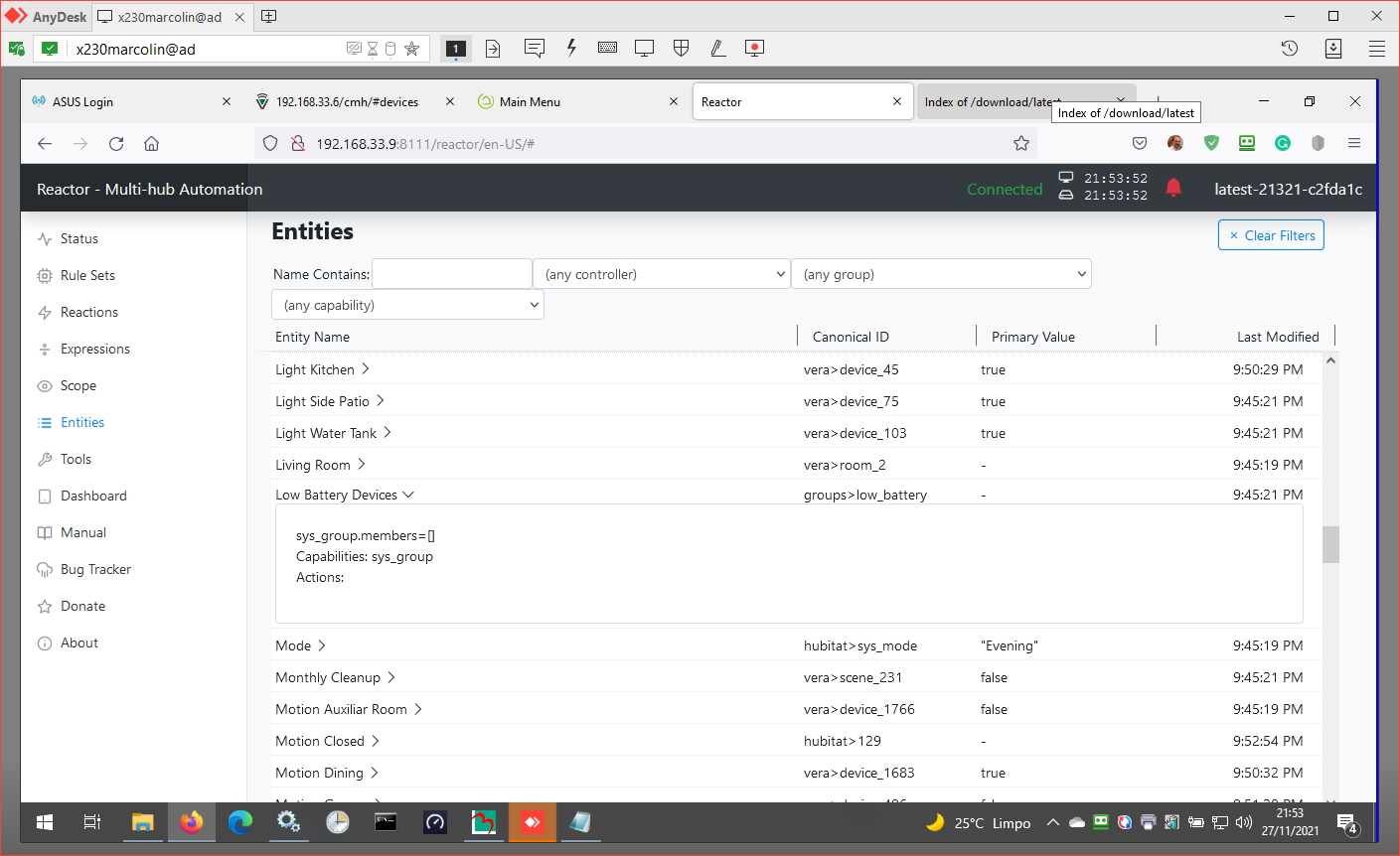
But the array is still empty
Any instructions where I can look for something?
-
The recommended debugging for this would be to start unraveling your criteria and see what it produces. As a first step (don't do this, just read), I would remove the
filter_expressionand make sure that your selectors are producing the expected set of eligible devices. An easy way to do that is to simply put an "X" in front offilter_expression(i.e. to make itXfilter_expression), which changes the name of the key and hides it from the code that's looking for it. You could also comment it out, but that would require that you comment each subordinate line as well, which is more work and can be error-prone. Restart MSR after config changes, of course, and refreshes are also recommended (don't need to be hard refreshes).But, I found an error, and it's pretty subtle. For me, it logged one short line, so it would be easy to miss; I imagine you have it as well. But it's going to require a code change to fix, so I'll release another build later today. I'll also fix the doc issue you PM'd me about.
Also, don't forget that filtering by controller or capability is a good way to quickly remove "noise" from your Entities list.
Author of Multi-system Reactor and Reactor, DelayLight, Switchboard, and about a dozen other plugins that run on Vera and openLuup.
-
The recommended debugging for this would be to start unraveling your criteria and see what it produces. As a first step (don't do this, just read), I would remove the
filter_expressionand make sure that your selectors are producing the expected set of eligible devices. An easy way to do that is to simply put an "X" in front offilter_expression(i.e. to make itXfilter_expression), which changes the name of the key and hides it from the code that's looking for it. You could also comment it out, but that would require that you comment each subordinate line as well, which is more work and can be error-prone. Restart MSR after config changes, of course, and refreshes are also recommended (don't need to be hard refreshes).But, I found an error, and it's pretty subtle. For me, it logged one short line, so it would be easy to miss; I imagine you have it as well. But it's going to require a code change to fix, so I'll release another build later today. I'll also fix the doc issue you PM'd me about.
Also, don't forget that filtering by controller or capability is a good way to quickly remove "noise" from your Entities list.
I debugged removing filter_axpression entirely, and the variables are still empty. I'll wait for your version update and test again.
-
The recommended debugging for this would be to start unraveling your criteria and see what it produces. As a first step (don't do this, just read), I would remove the
filter_expressionand make sure that your selectors are producing the expected set of eligible devices. An easy way to do that is to simply put an "X" in front offilter_expression(i.e. to make itXfilter_expression), which changes the name of the key and hides it from the code that's looking for it. You could also comment it out, but that would require that you comment each subordinate line as well, which is more work and can be error-prone. Restart MSR after config changes, of course, and refreshes are also recommended (don't need to be hard refreshes).But, I found an error, and it's pretty subtle. For me, it logged one short line, so it would be easy to miss; I imagine you have it as well. But it's going to require a code change to fix, so I'll release another build later today. I'll also fix the doc issue you PM'd me about.
Also, don't forget that filtering by controller or capability is a good way to quickly remove "noise" from your Entities list.
@toggledbits well done
Low Battery Devices charging perfect!
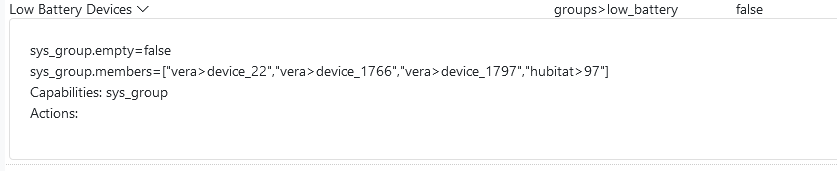
But there is a problem for "tripped", which repeated the same setting as "low_battery".
  - id: groups
    enable: true
    implementation: DynamicGroupController
    name: Dynamic Group Controller
    config:
      groups:
        "low_battery":
          name: Low Battery Devices
          select:
            - include_capability:
              - battery_power
          filter_expression: >
            entity.attributes.battery_power.level < 0.3
        "tripped":
          name: Tripped Devices
          select:
            - include_capability:
              - binary_sensor
              - motion_sensor
          filter_expression: >
            entity.attributes.binary_sensor.state == true or
            entity.attributes.motion_sensor.state == true
This is what is showing up in the log.
[latest-21332]2021-11-29T01:49:33.599Z <default:ERR> error updating dynamic group tripped: ReferenceError: Invalid reference to member state of null
[latest-21332]2021-11-29T01:49:33.600Z <default:CRIT> ReferenceError: Invalid reference to member state of null
ReferenceError: Invalid reference to member state of null
    at _run (C:\MSR\reactor\common\lexp.js:1369:31)
    at _run (C:\MSR\reactor\common\lexp.js:1233:34)
    at _run (C:\MSR\reactor\common\lexp.js:1290:44)
    at C:\MSR\reactor\common\lexp.js:1223:29
    at Array.forEach (<anonymous>)
    at _run (C:\MSR\reactor\common\lexp.js:1222:28)
    at Object.run (C:\MSR\reactor\common\lexp.js:1564:22)
    at DynamicGroupController._update_group (C:\MSR\reactor\server\lib\DynamicGroupController.js:229:141)
    at C:\MSR\reactor\server\lib\DynamicGroupController.js:267:39
    at Array.forEach (<anonymous>)
Would I have to include any additional information in the configuration to not have this problem with null?
-
In your expression, you are not guarding for entities that have
binary_sensorbut do not havemotion_sensor, and vice versa. Use the coalescing member access operator?.in the two sub-expressions.Author of Multi-system Reactor and Reactor, DelayLight, Switchboard, and about a dozen other plugins that run on Vera and openLuup.